Square

A magical payment system.

Remember the old days?

You would be browsing art at a street fair, decide there was something you simply had to have and would then go through agonies while the merchant struggled with one of those massive imprint machines with a slider to record your credit card information. This was not only likely to jam, you were also giving out your credit card number, thus making a massive and unwarranted assumption of trust. Not good.

Well, all of that just changed.

For the photographer setting up at a street fair to sell his prints all that is now needed is one of these and a 3G or later iPhone or a 3G iPad:
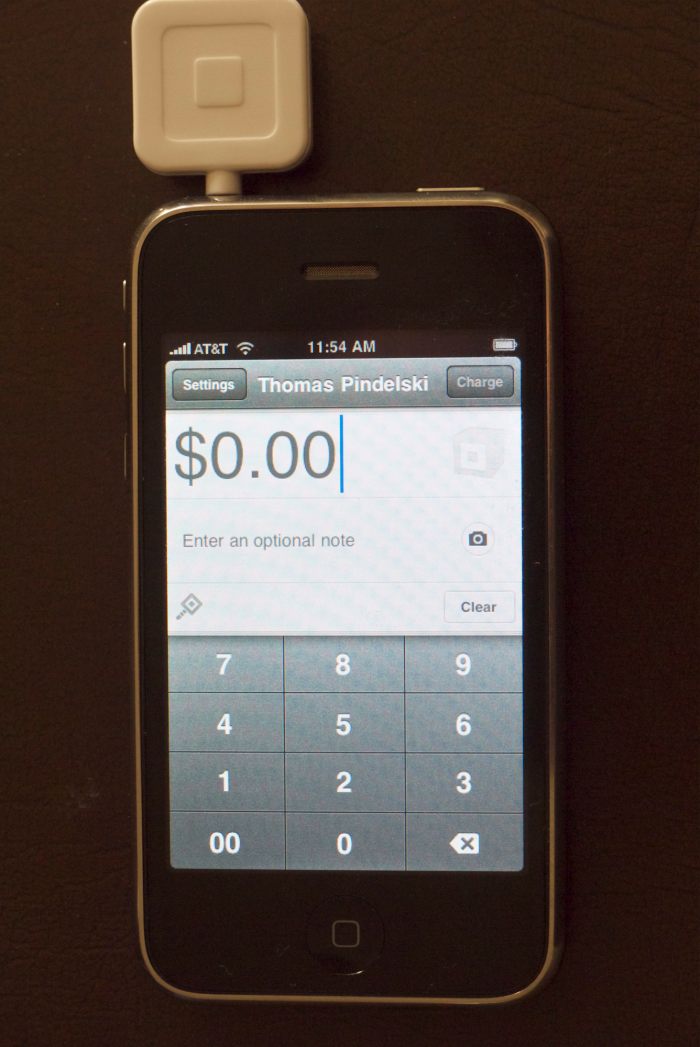
The Square card reader attached to my 3G iPhone.

The card reader is free when you sign up with Square, which I did immediately the service was announced a month ago. They finally shipped the device, which plugs into the headphone socket and has a slot for swiping the credit card.

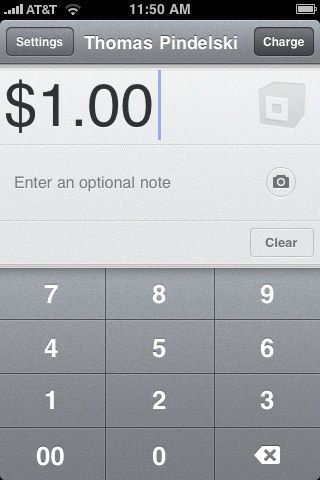
Now I would love to relate that I had just sold a dozen big prints for thousands of dollars, but until that happy day comes around, I decided to do the manly thing and charge myself $1.00 to see how things worked.

After setting up my Square account and downloading the iPhone app, I keyed in the charge amount thus:
Next, I signed using my finger as a pen:
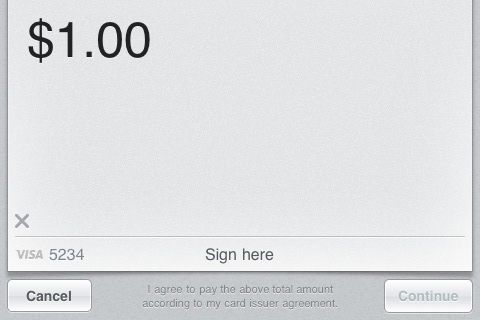
Hitting ‘Continue’ I saw:

Now my client (me!) wants a receipt:
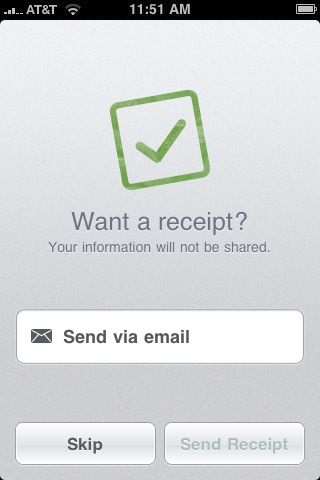
After entering the client’s email (mine!) I saw:
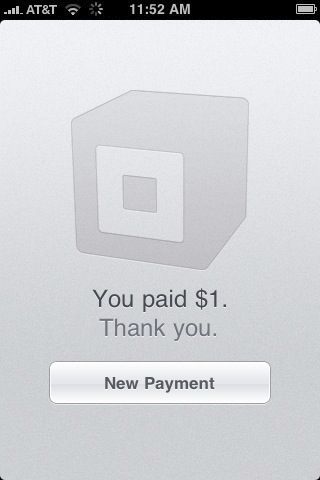
I was done.

Now going to my desktop HackPro, there were two emails waiting for me.

The first was to me as vendor:
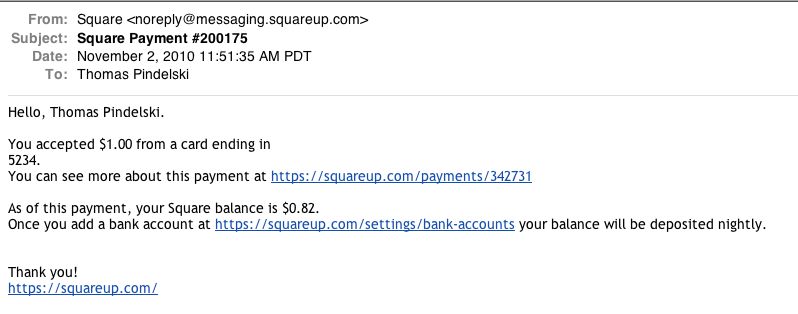
I went to the link and set up my bank account information to receive the payment.

The other was to my buyer:
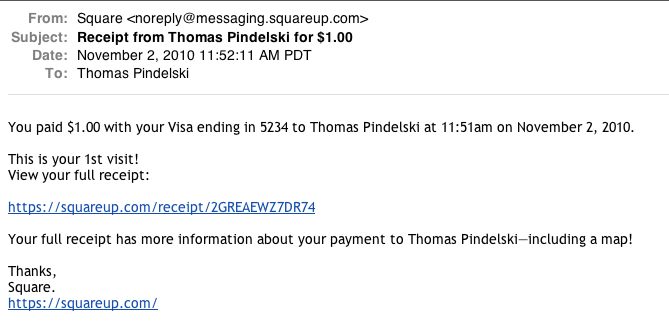
By clicking the link the buyer can see the full receipt – by the way the map location is about a mile out!
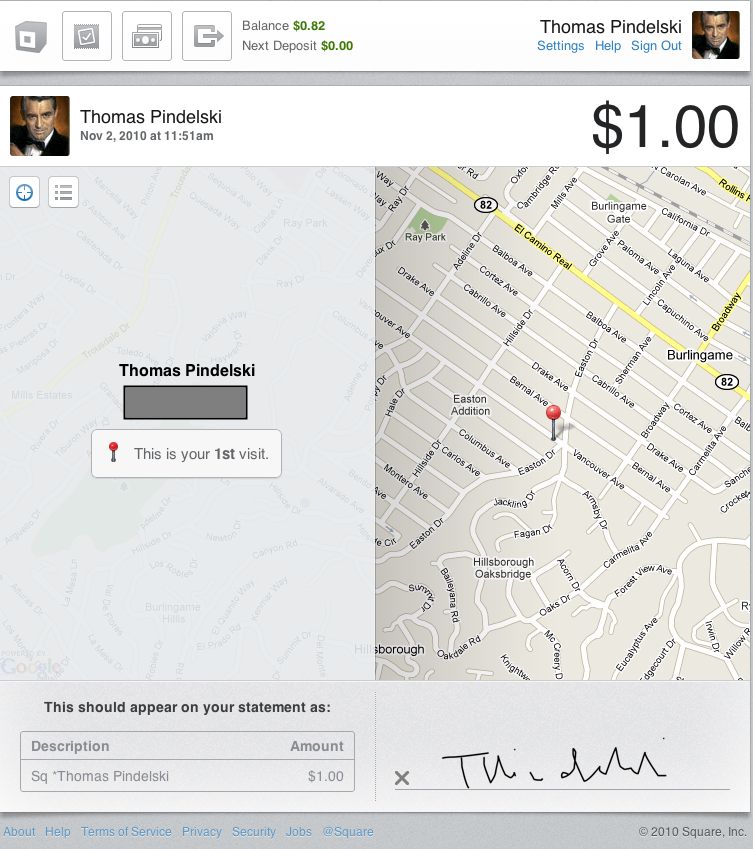
Buyer’s receipt.

Many have remarked on the remarkable resemblance I bear to Cary Grant and I confess it’s true. It’s all I can do to keep the women away.

Is that mind blowing or what? You can learn more by clicking here.

You don’t have to restrict the use of this device to photo sales; any Craigslist sale can now be advertised “Will accept credit cards” and the beauty is that if you swipe the card rather than keying in the number, your buyer has the immense comfort of knowing that the credit card number is never known to you. The fees charged for a swiped card are also lower than for one whose number has been keyed in manually. See below.

Charges?
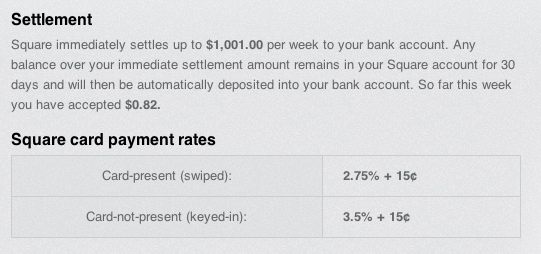
I have read that the amount limitations will be phased out as your use grows but do not yet have details. This elegant solution mimics the dedicated iPod Touch devices used by sales clerks in the Apple Store. Given that the little attachment can be removed and stashed in a coin pocket it’s a perfect working solution for anyone seeking to accept credit card payments as long as wifi or 3G cell phone service is available at the payment location.

Ansel Adams, photographer?

Please ….

It’s no great secret to long time visitors here that I detest the landscape work of Ansel Adams. His picture postcard subjects, rendered in grossly over processed pretentious monochrome, leave me feeling physically ill. One of his most adulated snaps, ‘Moonrise Hernandez’ is a perfect example. Clearly taken in broad daylight (look at the shadows on the tombstones) it has been grotesquely processed to imitate moonlight. For all I know even the moon was pasted in from another image. As for his image of Half Dome, Yosemite …. well, better not to get me going.

Yet critically deprived Americans – eager for a claim to an ‘artist’ of their own – drool over his pictures and some even cough up serious coin to stick one of his monstrosities on the wall. The older and more yellowed, the more they pay. I know of what I speak, having had a close brush with death viewing the great man’s work myself. Yes, dear reader, I have held an original Adams print in my (cotton gloved) hands, which is more than 99.9% of his uncritical fans can say.

Well, if you thought his landscape work was pure garbage, be assured that his street photography makes it look good by comparison.

NPR has had the courage to reproduce twelve of his street snaps and it’s hard not to laugh once you have supressed the urge to cry at the thought that someone actually paid him for these. Just click the picture below, but maybe first get something cold, liquid and strong. You will need it.

Drink before you click.

The new AppleTV – Part III

Adding a DAC.

Part II appears here.

The new AppleTV lacks traditional coaxial analog connectors for sound output; it comes with an optical Toslink sound output socket only. So if you want to route the AppleTV’s sound output to external speakers via an analog external amplifier/receiver lacking a digital optical sound input, you need a Digital Analog Converter (DAC). Speakers (and amplifiers, for that matter) built into TV sets are generally poor quality so bypassing them and using external loudspeaker boxes connected to a receiver ensures better sound.

There are two versions of the DAC, depending whether your sound system is 2 speakers and an optional subwoofer (2.1) or four corner speakers, a center and a subwoofer (5.1).

My Sony receiver is not that old yet it lacks a Toslink connector for optical digital sound, meaning I had to interpose a DAC between the AppleTV and the Sony. Adding a new digital receiver makes no economic sense, so I bought a Gefen DAC. There are two models.

  • For 2.1 sound – use this one. $58 at the time of writing. This is the one I use.
  • For 5.1 sound – this one. $91.

I went with the Gefen – cheaper units are available – as research disclosed it was known to work with the AppleTV.

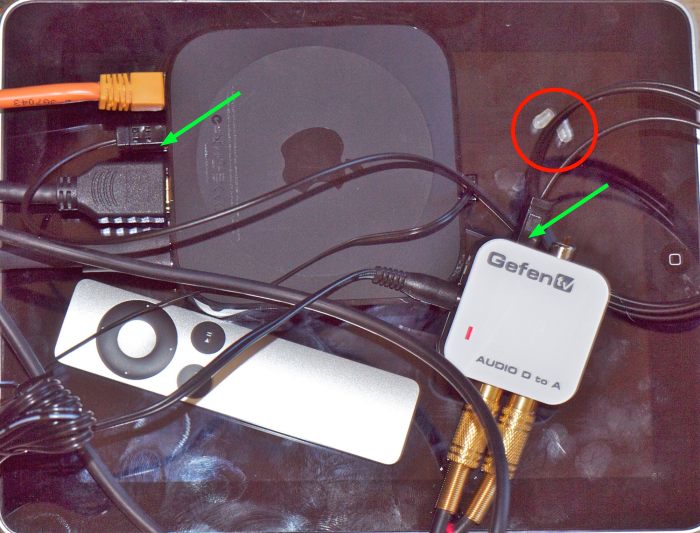
Red circle denotes removed rubber Toslink covers. Green arrows show Toslink cable connections.
Apple Remote included for scale. Gold connectors route two channel analog sound to the receiver. iPad backdrop.

As the specifications are silent I also purchased a short Toslink optical fiber cable only to find that Gefen includes one in the box with the DAC! So save $6 and don’t buy a separate cable. Then I ran into a serious snag. I had never so much as seen a Toslink cable before and, no matter how I tried, I could not get the flimsy connector to stay in either the Gefen or AppleTV sockets. After a spot of head scratching and Googling, it transpired that the optical ends of the connector are covered with translucent rubber caps, circled in the above picture. Removing these allowed the connectors to fit at both ends. Duh! I knew that engineering degree would come in handy one day ….

After that it was plain sailing. I switched off the TV’s speakers, connected the AppleTV to the Gefen and routed my two RCA coaxial cables from the Gefen DAC to the Sony receiver. The DAC comes with a small power supply so you will have to search out yet another adapter to make it fit your already overburdened power strip. The red LED on the DAC confirms it’s getting power but in practice you will hide it out of the way.

The sound is excellent, the Sony receiver’s volume control is set at half way through the scale so clearly the amplifier is being adequately driven by the DAC and, equally importantly, not overdriven. The TV remains connected using an HDMI cable (for video) and the orange cable you can see connected to the AppleTV is for wired internet. I use wired in preference to wireless as the AppleTV sits right next to my broadband modem and I always prefer wired to wireless, having grown up in a world where men were men, cars had carburettors and the word ‘digital’ was not in common use. The small cable routed to the front bezel of the AppleTV is the optical sender from my IR blaster.

Check the Comments to this article to learn how the HDMI and Toslink sound outputs interact.

I have to add that until now I have always thought the USB connector to be one of the worst designed on the planet, and just slightly better than the Firewire800 one. Well, it must now take the runner’s up place to the Toslink one which, though keyed, is so small that you have to look awfully hard for the keyways, for some reason only fits one way (nonsensical for an optical signal) and will leave you scratching your head because of those little rubber covers about which the instructions are silent.

We now enjoy premium quality video and sound from the new AppleTV and greatly enjoy watching our photo slideshows with the help of this handy little device, as well as listening to our music and watching Netflix and iTunes movies.

A bigger hard drive for the MacBook Air

Any day now!

At the conclusion of Part V of my MBA review I wrote:

“The ingenuity of man will ensure that higher capacity flash hard drives become available in no time for far less than Apple will charge you and ifixit already has a supply of five pointed Torx screwdrivers available, for all of $4.95, which will allow you to replace the fan yourself.”

For ‘fan’ you can also read ‘flash drive’, the same tool being required.

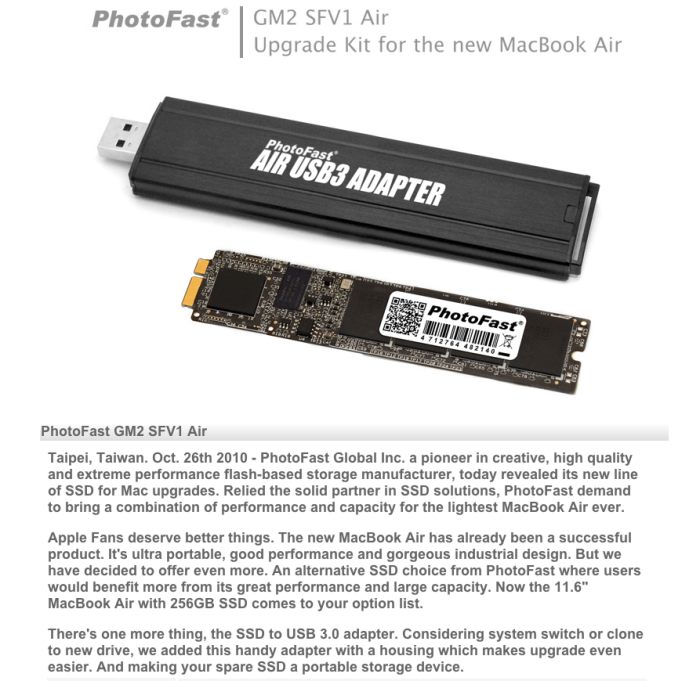
Well, that was yesterday. Today a larger, faster flash drive was announced, claimed to be 30% faster and, at 256gB twice as large as the largest base spec sold by Apple. (You can get 256gB but on the 13″ MBA only and that at a $300 premium to the 128gB base spec for the 13″ model; the maximum you can get on the 11.6″ MBA is 128gB, at a $200 premium to the 64gB base spec.)

Click the picture for more. The vendor makes the excellent point that the flash drive removed from the MBA can be used as back-up storage using the provided USB casing; the latter is required to plug in the new drive externally to first clone everything to it from the stock MBA drive installed by Apple. The installation, based on the ifixit pictures, should be a piece of cake. 10 Torxscrews using the special screwdriver are removed to free the base and an eleventh like screw, once removed, allows replacement of the plug-and-play flash drive.

While the largest flash drive sold by PhotoFast is currently 256gB, we will be seeing terabyte drives before you can say “Well, Mr. Jobs, that ploy with those silly five headed ‘unique’ screws didn’t last long now, did it?” Duh!

There’s something very appealing about this process. Apple is trying to screw its customers by charging egregious premia for additional flash storage and is, in turn, being screwed by its own suppliers with cheaper and better aftermarket alternatives. US pricing is unknown but I would hazard a guess of $200, which gets you four times the 64gB base spec on the 11.6″ where the maximum of 128gB commands a $200 premium. If I’m right that means twice the maximum Apple offers for the same price. Prices will only fall as solid state storage gradually obsoletes spinning disks.

Update Feb 2011: Apple threatened litigation/contract cancellation of other parts if PhotoFast did not cease and desist from marketing this SSD. Jerks. Anyway, MacSales offers a like upgrade, although without the external enclosure, and you can read about it here.

A matte screen MacBook Air

Yea!

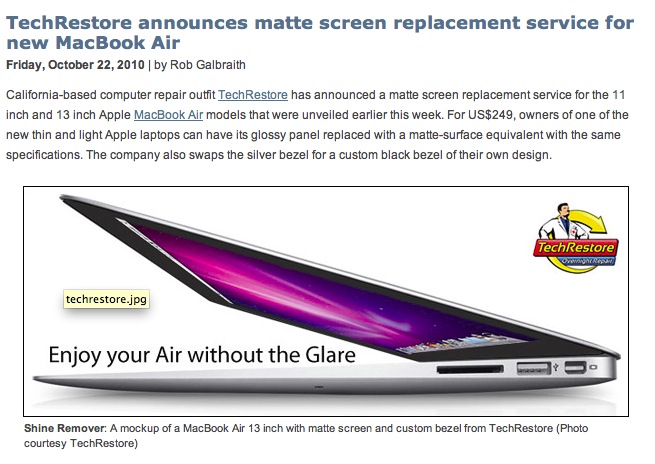
I have refrained from yet more grumbling about the glossy screen on the MBA. I reckon readers have had enough of that. But when friend of the blog Gregg L. sent me this piece the only decent thing to do with it was to share.

Click the picture for details. If only they could do this for the iPad ….

Now I just need a friendly Market God to allow me to buy another MBA while mine is out for surgery ….