A cheap, huge monitor

All of 32″!

When I asked ace computer builder and Hackmeister FU Steve to put together an economy Hackintosh for me some 18 months ago, the uses and design dictates were simple. The prime use for the machine would be to provide streaming stock quotes and related data feeds on two 21.5″ displays as well as acting as a backup in the event something went wrong with my main desktop machine, the nuclear powered, state-of-the-art HP100+. Accordingly the economy HP10 sports a Sandy Bridge i3 CPU, a second-hand nVidia 9800GTX+ GPU and a couple of regular spinning disk hard drives, each a modest 500GB.

The machine has proved excellent and is running OS Mountain Lion 10.8.3, the current version of the best OS on the planet.

The other day, when upgrading the living room TV from 42″ to 55″, I remarked how inexpensive large CD displays were becoming, and that triggered the idea to swap the HP10′s two smallish monitors for one big one. The cheapest 32″ LCD (actually 31.5″) I could find at Amazon was the Seiki LC-32G82 for $220, delivered from Adorama in NYC. Since then I have discovered that Kmart in the Bay Area peninsula stocks the same set for the same price, and I would counsel buying locally as QC with these cheap Chinese sets seems iffy. A local purchase makes exchange easier.

The screen area of a 31.5″ set is 215% that of one 21.5″ display, so the total screen space is largely unchanged, but in a much more elegant setup. Proceeds of sale of the old displays will pay for the new.

I wall mounted the set – it only weighs 29 lbs, using one of the original 100mm VESA mounts bolted to a $10 adaptor plate, the mount attached to the wall via a batten which is bolted with lug bolts to the studs in the wall. The distance from screen to wall is a total of 7 inches, and the surface is semi-matt, posing no issues with reflections.


Adapter plate for original VESA mount installed. Pillar for supporting plate has been removed, top.


On the wall. Pillar for supporting plate visible underneath, not yet removed.

While the display will be used exclusively for my day job, I took a moment to test it with Lightroom to determine whether it could be used for photo processing. First I tried a Mini DisplayPort to HDMI connector then a DVI-A to VGA one. Surprisingly, the VGA connector rendered considerably higher resolution so that’s what I am using. VGA, an analog feed, is not supported by EyeOne’s Display One software and colorimeter, so I profiled the display using Apple’s excellent utility (in Expert mode) found in Sys Prefs->Displays->Color, with final fine tuning done by eye against one of my calibrated Dell 2209WA monitors attached to the HP100+.

The results are really excellent and I illustrate this below, first with a JPG exported from LR on the HP100+:

Next is a screenshot of the same image on the calibrated Seiki:

Judge for yourself.

So the Seiki is more than usable as a very cost-effective large display for processing images. 32″ for photo processing is really large so your workspace really needs a decent setback so that your nose is not in the display, but after a few minutes use there’s no going back.

What are the drawbacks?

Well, it’s not as elegant as a big Dell Ultrasharp, sporting a relatively broad, glossy bezel. Though it’s only 60HZ that is fine for watching fast moving sports like Formula One through BBC’s iPlayer. By contrast, the same sport viewed on any of my three Dell 2209WA displays is poorly rendered, with much smearing/doubling in full screen mode. At this point I’m beginning to wonder why I spent $1,000 on the three Dell monitors …. The Seiki is 1920 x 1080 (16:9 widescreen), not the higher resolution 2560 x 1600 (16:10 – much nicer) sported by the Dell. And the warranty is one year compared to three. Wake from sleep is some 20 seconds, compared to 1 second for my Dells if that’s of concern.

On the other hand, the current Dell 3014 runs $1,300, so you could get almost six of the Seikis for one Dell. And you can dispense with separate computer speakers or a sound bar as if you are using VGA with a green motherboard socket, a separate 3.5mm coax cable delivers sound through the Seiki’s built in speakers which are quite decent sounding.

It’s an enticing proposition for photographers on a budget. If you decide on one, be sure not to get the $20 cheaper 720p version. That’s false economy. The correct model designation is LC32G82. While you can pay many times the amount asked for slimmer, more chic-looking sets, the finish of the Seiki is first class with tight seams and no blemishes on my example. The stand is very sturdy and the massive support pillar easily removed (six screws), replaced by a supplied blanking plate for wall mounting.


Easily read on a 32″ display. Click the image for a larger version of this Seiki screenshot.

Oh! and one other thing. You can always watch the TV on this display!

The Hackintosh and Blu-Ray

Another step forward.

It’s no great secret that Apple has never included a Blu-Ray reader/burner in its computers. Maybe they are right. With the increasing availability of HD streaming video they have concluded that BR makes no sense. Maybe their greedy profit margins on their mostly mediocre hardware couldn’t survive the markup? Who knows?

A related problem is the dishonesty of the movie studios. Ever interested in hosing the consumer down for something claimed to be newer and better, a lot of classic movies have been cynically copied to BR discs with no effort made to go back to the original film stock, no enhancing of signal-to-noise ratios, no scanning of the original images and no great sound. That’s a lot of no. So you often get a poor transfer whose major distinguishing feature from the SD DVD is the price.

My choice for my inaugural Blu-Ray movie is Lawrence of Arabia. Robert Harris is recognized as one of the most adept restorers of old movies, and every frame of the original 65mm film has been scanned, retouched, color corrected and so on. A true labor of love. So I started with a Blu-Ray disc created from his restoration.


El Orance at the Red Sea, Aqaba.

But first the technical details.

The HackMini, my TV Hackster, uses a modest Gigabyte H67M-D2-B3 motherboard and an equally modest EVGA GT430 graphics card, the last sporting VGA, HDI and DVI outputs. It runs OS X Lion 10.7.4 because there’s no earthly reason to upgrade. I have long used it with VGA connected to the TV set with a separate 3.5mm coaxial cable for sound. It has worked really well. An expert Hackintosh friend (thank you, PB!) had alerted me that getting the HDMI port (it conveys digital video and audio) working is quite a challenge. For those into Hack matters, the DSDT.aml file has to be edited extensively and depending on your hardware, additional drivers (‘kexts’) may have to be installed. It all looked a bit forbidding, and my ace hacker and Hackintosh guru FU Steve was out of town, so I got down to the hardware part first.


The inexpensive nVidia GT430 – this is the VGA/HDMI/DVI version in the HackMini.

The cheapest Blu-Ray reader/burner I could find was an LG for all of $44 – prices seem to fluctuate daily:

As you can see, the size is the same as that of its predecessor, and replacing the original Sony drive was a matter of a few minutes, helped by the ample space in the HackMini’s enclosure. MacMini owners need not apply ….

Next I connected the drive to the TV using an HDMI cable and rebooted. Naïvely thinking that I could use the latest version of the VLC video payer with Blu-Ray enhancements added, I fired up the app and got an error message. The Lawrence of Arabia BR DVD is encrypted and will not play through VLC.

So I hunted around a bit and came up with BluRayDVDPlayer and had a perfect picture first time but …. no sound over HDMI. You can try this app free, the $40 price registration removing the obtrusive watermark. Sure enough, looking in OS X’s System Preferences->Sound disclosed no HDMI output. I checked out the hacking instruction at Tonymacx86 and was less than enthralled, so I reconnected the drive to the TV using a VGA cable and separate sound cable. Ha! BluRayDVDPlayer takes the digital sound feed and makes it available to the analog VGA feed. Wonderful. Video and audio was now working. So the all in cost was $44 for the hardware and $40 for the application. But nothing is every clean in Hackintosh land. For once, those unfortunates who do not get it, AKA Windows users, can click right through.

But try and buy the Mac app from the BluRayDVDPlayer site and nothing happens when you click the ‘Buy Now’ icon.


Click the image.

However, right click or ‘control-click’ on ‘Buy Now’ and ‘Open in a new tab’ and you are up and running. A code is immediately emailed to you, easily input, and the watermark is gone. The interface is exquisite, the tuning Preferences engineered by users – lean and mean, fast, unobtrusive – and the app appears to be regularly updated for the latest nefarious copy protection schemes of the fools in Hollywood who earnestly believe that buyers will make 35GB copies for distribution to their friends. Right.

So what about the experience?

Lawrence of Arabia in Blu-Ray is truly starting at the top. A photographer’s dream. As I wrote in the introduction of this piece, it is overwhelming, one of the greatest movies made, its great length but a flash as you sit, enthralled. I once saw it at the Carnegie Theater on 7th Avenue in NYC in 1985 on a large screen and really that is the way it should be seen. But a decent sized home TV and this splendidly remastered Blu-Ray DVD come pretty close. I’ll leave you with two images, a mere 1000 pixels wide – no prizes for guessing which is which.


Subjectively? Blue-Ray leaves HD streaming content in the dust. Regular DVDs? Not a chance. Netflix will happily rent you Blu-Ray DVDs for a monthly premium of $4. Their catalog now numbers some 3,300. Just make sure the ones you rent have really been remastered (Amazon reviews are good for this) not some slimy hack copy of a low quality DVD file.


The home screen on the HackMini.

The Hackintosh for 2013

More attractive than ever.

Apple’s MacPro is now seriously obsolete. Memory is a slow 1333Mhz, USB 3 is not supported, Thunderbolt is not supported and the best video card option is the ATI Radeon 5870, now a generation behind and sporting but 1GB of memory. With 32GB of CPU memory and the 5870 GPU, along with one 1TB HDD, the rig will run you just shy of $4,000. Displays are extra.

Here’s the current Hackintosh build, not bleeding edge, just leading edge, which uses Intel’s i7 IvyBridge CPU, easily overclocked under warranty from stock:

That’s some $1,060 with no HDDs and no displays, keyboard, speakers or mouse. A keyboard, speakers and mouse of choice will add $100 and the rule here is anything but an Apple keyboard (foul chiclet keys) or mouse (the carpal tunnel special). Add $20 for OS X and $70 for a 1TB HDD to make things comparable and the all in cost becomes $1,250. Unless heavy video editing is contemplated, the $200 GPU can be omitted with the Hack using the excellent Intel HD4000 onboard GPU which comes with the CPU. Perfectly capable for LR and PS use. Further, 16GB of RAM is more than adequate, bringing the price down to $940. The power supply used is massively over-spec’d at 850 watts, but the marginal cost over a smaller power supply is so modest that there is no reason to compromise. You can spend as much or as little on storage and displays as you like, whether Mac or Hack. An exceptional value.

Apple has hinted that a new MacPro is in the works for 2013 and if this is true I expect that it will be far costlier than the current MacPro, Apple knowing that these are mostly used by design and video professionals spending someone else’s money. I also expect the new MacPro to be much smaller thus compromising cooling and it will, of course, use many proprietary parts meaning that when something breaks chances are the whole box will be out for repair. Meanwhile, the hospitalized Hack needs but a trip to Amazon or your local electronics store to fix what ails it at very low-cost in very short time indeed. It is a great comfort knowing that Fry’s Electronics is a 30 minute drive from my home though, like the umbrella never seeing rain, nothing ever breaks in my Hack.

Best of all, while there is still a need for a tinkerer’s mindset as Hacks can have quirks at the software – if not hardware – stage, the free tools available for today’s builder have never been better. It’s still not a plug-and-play experience, but it’s getting close.

The Hack build above sports a very quiet case (recommended by a reader – thank you PB) with superior cable management, adds two Thunderbolt sockets, front panel USB3 support, 32GB of memory which is more than anyone needs, an outstanding GPU ideal for still photographers and the best wifi in the business.

My slightly earlier SandyBridge i7 CPU Hack uses many of these parts and the only time it is restarted is when an OS X upgrade dictates that. Otherwise it’s on 7-by-24 and runs as cool as the proverbial cucumber no matter what it is tasked with. Used very hard, it is, in a word, as reliable as a brick.


Massive, silent cooling fans inside Corsair’s Obsidian case.

For the first time builder, the support community is so broad and so helpful that the risks of DIY are negated. Your sweat equity will total 1-3 hours of fun assembly time and another 2-5 hours installing OS X. What’s not to like?

Intel’s CPU for 2013 will be the yet to be released Haswell which will have lower power consumption (irrelevant for a desktop machine) and maybe the usual 7% or so speed increase. Integrated graphics will again be improved and a new motherboard will be required to accommodate the new CPU. I do not see any of these enhancements as a valid reason for delaying a Hack build.

Mac OS 10.8.3

One nice enhancement.

The best thing about Apple’s troubles – a CEO with the charisma of a sponge, a stock down over 30% from its peak, more cash than it knows what to do with, a tired cell phone offering, a lack of innovation and failure in the TV market – is that these many distractions mean fewer updates of OS X, the OS powering Macs and Hackintoshes. Because, let’s face it, every ‘enhancement’ since OS Snow Leopard (10.6) has been so much fluff and noise. SL (Intel machines only) can still be bought from Amazon for some $40 but will almost certainly not run on the latest Macs. It’s fine with Hacks and offers one huge feature missing from Lion and Mountain Lion – Rosetta, the PPC G3/4/5 emulator which allows it to run any old apps from your PPC days on an Intel Mac or Hack. You know, apps like HP’s DJ30/90/130 color management utility which will not run on anything later and is essential for debugging whatever ails your HP DesignJet dye ink printer.

As I still have a ten year old PPC iMac G4 for DesignJet maintenance, the loss of Rosetta is not such a big deal, so it was with trepidation that I approached the latest minor upgrade of Mountain Lion 10.8.3. What else would now be broken by Cupertino’s policy of planned obsolescence?

When performing the upgrade I did so by downloading the complete (Combo) update from Apple here rather than the incremental upgrade which is what is applied if you upgrade through the App Store. Hackintosh community chat has it that a Combo upgrade is more reliable than an incremental one. I have no idea if that is true, but this approach avoids being forced to upgrade to the latest version of iTunes, an app which Apple has never got right.

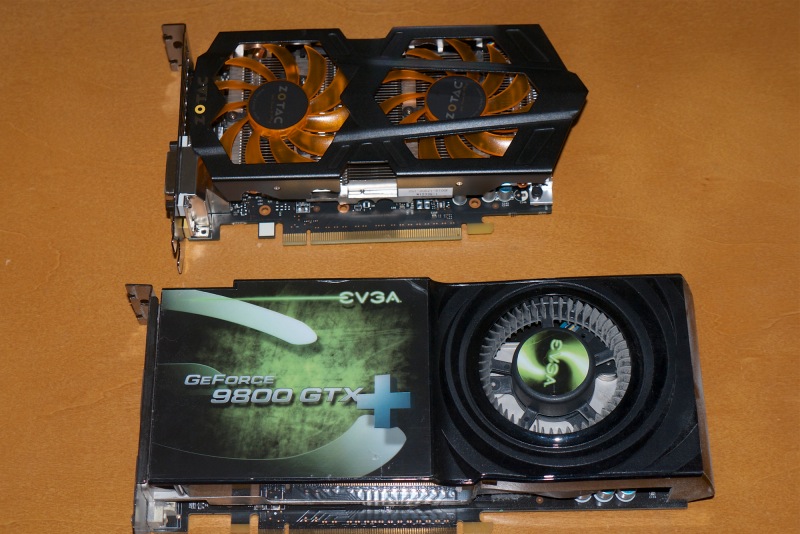
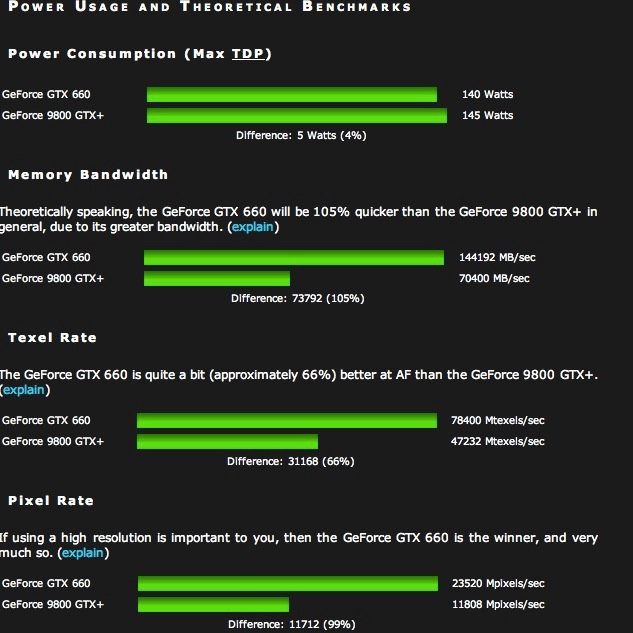
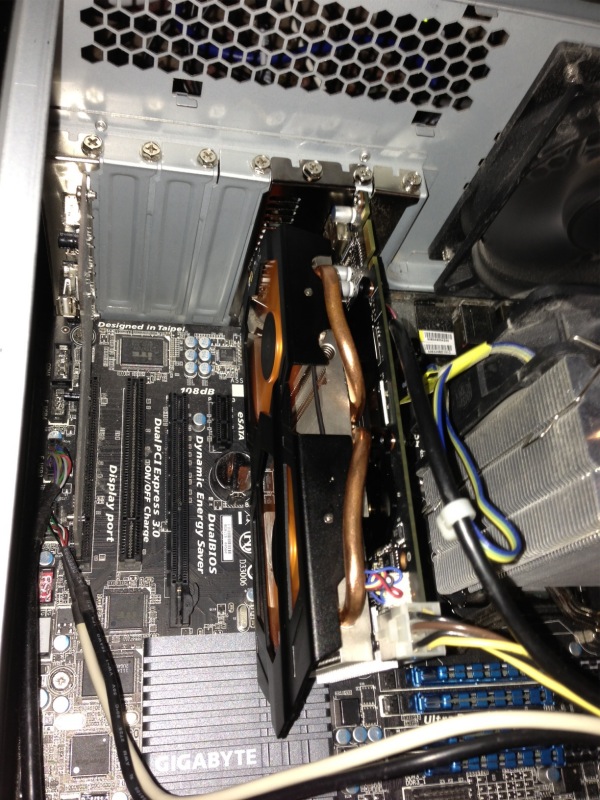
After a week of running I can say it seems fine and there is one significant enhancement. Because one of the new 2012 iMacs uses the nVidia 660M GPU, Apple has had to provide native support in OS X for the nVidia 660 GPU family to run OS X on that machine. The GTX 660 is one of nVidia’s finest bang-for-the-buck mid-range GPUs, with the 660M in the iMac being – yup, you guessed it – a crippled version. The iMac 660M version has but 0.5GB of memory, compared with 2GB (3GB on some EVGA cards in the US for $30 more) for the aftermarket cards. I would bet the clock speed is lower too, heat being any iMac’s bugbear, but cannot confirm this. The Zotac GTX 660 I am using (not the 660 TI) retails for $215, which includes two powerful variable speed integrated fans which are exceptionally quiet. These aftermarket cards all support up to two 2560 x 1600 pixel displays and include HDMI and DisplayPort in addition to DVI sockets. The Zotac board is recommended over the competitors’ if you have limited space in your box. It is considerably shorter, making a major difference to the accessibility of the motherboard’s SATA sockets in my Antec Sonata III enclosure. Non-trivial.

To put the sophistication of these latest GPUs into context, the Intel i7 Ivy Bridge CPU has some 800,000 transistors. The nVidia GTX660 CPU has 2.54bn – three times as many! Little wonder nVidia is making serious progress in the world of supercomputers, where its graphics chips are delivering cost effective performance at state-of-the-art throughputs.

My three monitors remain the estimable Dell 1650 x 1080 21.5″ 2209WA IPS ones, now some 4 years old, because they are easily calibrated and the dot pitch is fine for my purposes. Plus I like the bigger default fonts these deliver. If you use newer 1920 x 1200, 1920 x 1080, 2560 x 1600 or 2560 x 1440 displays, a card like the GTX 660 will easily crunch through graphics which might leave earlier nVidia GT2xx, GT4xx, 98xx or 88xx cards running out of steam.

I wrote about updating my HP100 Hack to nVidia’s latest card here and that hardware and OS needed nVidia’s separate drivers to make the card work. Now, with 10.8.3, the drivers come with the OS, so no external drivers are necessary. The benefits are twofold. My Hack is now more stable – looking to be as good as in the Snow Leopard days of yore – and the CPU’s idle temperature has fallen from 104F to 94F. Nice. The start-up problem where 10.8.2 frequently refused to recognize my third display, driven through a DisplayLink USB dongle, is gone. And the i1 DisplayOne Lion colorimeter display profiling software continues to work fine.

The Zotac GTX 660 in the HP100. Lots of room.

The native GTX660 support works for all nVidia cards, whether Asus, EVGA, MSI, Gigabyte (all per chat boards), Zotac (mine), PNY (tested and owned by reader PB) or any other brand. The chips are the same. Once you upgrade your Hack to 10.8.3 you can delete these two lines from your Boot Drive/Extra/org.chameleon.Boot.plist file on your Hackintosh as the presence of native drivers no longer requires the Hack to be informed that a 660 Kepler card is installed (thanks to reader PB for the tip):


The above lines can be deleted.

nVidia also released an update to its CUDA driver, which you can download through the related System Preferences pane, after which you will see this:


Latest CUDA driver.

The System Information->Displays data is also updated to reflect the use of native nVidia 660 drivers:

Let us all hope that Apple remains seriously distracted with its other woes and leaves OS X alone for good and all, instead of adding dumb gesture support, hidden Library directories and poorly implemented voice recognition. They might like to start by fixing the joke that is Siri on the iPhone. I use Google search on my iPhone – it’s everything Siri is not. Fast, accurate, a joy to use for voice search with excellent speech recognition. Even if you speak English, like me, not American!

Hitting the wall

Technologically unchallenged.


HP100+

One of the best indicators that the desktop PC has peaked is the falling sales of PC hardware and the poor upgrade rates to Windows 8, the latter as much a function of a mediocre product as it is of ‘free’ competition from the scummy people at Google in terms of their Cloud apps.

And while I have been diligent in seeking out the services of ace Hackintosh builder FU Steve in keeping my Hackintosh at 90% of the state of the art (90%, as Ferrari pricing takes over at anything higher and you get performance you cannot use) the state of play right now suggests that future enhancements will be few and far between.

Sure, while I could add a couple of silly priced EIZO monitors, which I would never do, there is nothing I can currently do to my Hackintosh, the HP100+, to improve it for my purposes, which leaves me without a tech challenge. Disappointing.

Desktops have peaked.

I could add a wild and crazy $$$$ GPU, but I do not game. I can scarcely tell the difference with the latest nVidia GTX 660 card installed on what I do, which is mostly LR and a bit of PS.

I use a SandyBridge i7 CPU and IvyBridge, the latest iteration, adds nothing in a desktop. Nor, I suspect, will Haswell in 2013 where the stated goal is lower power consumption. I’m green, but not so green that I’m about to rip out the guts of HP100+ to save a few watts in power consumption, installing a new motherboard and CPU.

I could have FU install a Xeon CPU and motherboard, at Rolls Royce prices, but the only plus of that is in massively multi-threaded math operations, and I have no need of that. LR and PS use four threads poorly, never mind sixteen.

I could ask El Supremo to add BluRay but the reason I passed on my BluRay player to a friend is that on the 42″ 720p Vizio TV (5 yrs old and it continues to delight daily) I could not tell the difference from regular DVDs, so BluRay is not something I could make use of.

The other thing which is currently useless is Thunderbolt, as so few peripherals support it. Those that do are overpriced, and I already have USB3, which is half as fast, running fine (not a pretty story, but I got there. As Churchill said of American democracy, we will try everything else before settling on the right answer, which is how FU got USB3 to work!). The only thing I use USB3 for where the speed is actually exploited, is to import images from SDHC and CF camera cards into Lightroom.

This sort of reminds me of film camera days. I was happy with my Leicas for 35 years because there was nothing else out there that was better for what I mostly do, meaning street snaps. And technology was only improving for film emulsions, not for hardware. Then digital came along and I have been chopping and changing, but seem to have stabilized on the two big Nikon DSLRs, both obsolete, and the two small Panny MFTs, the latter increasingly my son’s province. Then of course I got into converting old classic-era Nikkors with chips and that effort was super successful, the lenses are to die for and there’s nothing more I need optically. Forget believing that today’s optics are better. They are not.

Yours, technologically unchallenged ….