Category Archives: Photographers

The new AppleTV – Part I

Some preliminary thoughts.

I wrote of the original AppleTV in these pages a few years back. After my first one blew, I ended up selling the second for this was a deeply flawed device. Its various purposes were to store data, relay data from other devices and allow purchase or rental of movies from the iTunes store. It did none of these well.

Data storage on the internal hard drive was very limited. Absent extensive hacking, external storage could not be added. I hacked mine and would lose the hacks with every OS upgrade.

The relaying of data was not great either. Even with 802.11n wireless, jittering of the movie sourced from your remote Mac was common owing to the pokey Intel CPU used.

And, finally, the iTunes movie library available for purchase or rent was not only very limited in scope, the format for purchased movies was the so-so ‘.mkv’ one, rather than something higher quality.

But the single worst feature, by far, of the original AppleTV was that it ran criminally hot. In his manic pursuit of a clean exterior, Steve Jobs had dispensed with fan cooling for the hot running CPU and hard drive, opting for conduction of heat through the device’s metal skirt. That would get so hot (on both the ones I owned) that you would not want your child close to the gadget. It also dramatically shortened life expectancy and reports of failure in well under two years were a dime a dozen. Design had truly ruled function.

So once I got rid of mine I gave the device no more thought. Movies are routed to our TV from a MacMini to which my file servers are attached, using VLC to play the movie. DVDs from Netflix are played through the MacMini. And pictures residing in iTunes on my Hackintosh are relayed to the TV via the MacMini and simple wireless networking. The movie files are uncompressed VOB format (4-5gB a movie) and there is no stuttering thanks to the competent Core2Duo CPU in the Mini, whose fan is cranked up to avoid the usual Mac overheating problems. I run it at 3,000 rpm minimum, compared to maybe 1,000 stock. A new fan is cheaper than a new MacMini. When I want to watch a streaming Netflix movie the MacMini is pointed to Netflix using Safari and off we go.

It all makes for a very reliable setup yet, when the new AppleTV was announced a few weeks ago, I took notice for one reason. It runs the same A4 CPU used in the iPad and that CPU is cooler than Steve McQueen.
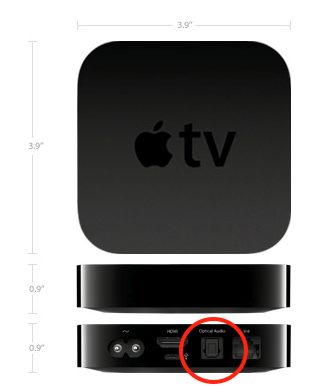
The new AppleTV. TOSlink optical digital sound output socket circled.

The thinking underlying the new AppleTV has changed. There is no more internal storage (hooray for that) and there is still no fan. With the A4 CPU none is needed. The device is now solely a streaming connector for your data, whether stored on other home Macs or in the cloud, be the latter Netflix, iTunes, internet radio stations, etc. And the interface from the original AppleTV is retained and it is outstanding. Just point and click with a simple and elegant remote control.

I wrote about the elegant Apple Remote when reviewing Plex and it is a gorgeous design, even if the buttons could use greater spacing. The new AppleTV includes one and the now much smaller AppleTV (the size of a hockey puck) and Remote sell for just $99. Not much downside if you decide it’s not for you.

Some of the original limitations remain. Your movie files must be in a format AppleTV likes (.m4V, .mp4 and .mov) so you still cannot play your ripped VOB uncompressed DVD files unless you go through the time consuming (if easy) conversion process using an app like Handbrake (free download). Your rental movie choices are still limited to those in the iTunes library and you can no longer buy movies using the AppleTV, as it has no storage. And you cannot access the Internet to rent from Amazon’s Video on Demand service – I use the MacMini for that, with Safari.

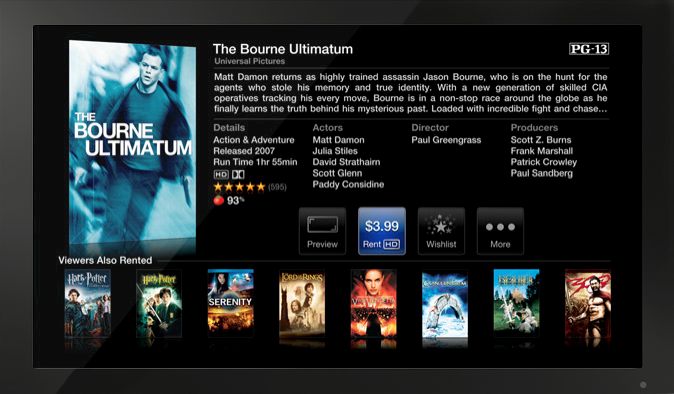
But the added functionality makes it worthwhile for me. First, it runs super cool, even when taxed with streaming an HD movie. Setup is easy and you can use the built-in wireless internet connection or an ethernet cable. I prefer the latter as it’s simply more robust. And now you can get dozens of internet radio stations and, most importantly, Netflix, delivered in the usual Apple TV interface. Anyone who has used Netflix streaming through a browser on their TV knows just how poor that UI is, with very small text. I cannot make it out sitting 10 feet away from our 42″ TV. And while you can get the nice AppleTV interface on your MacMini using Frontrow, you cannot get Netflix or Internet radio that way. So just for Netflix alone, the AppleTV makes sense. I can easily read the clear text on the screen of our 720p LCD TV, a somewhat dated bottom-of-the-line Vizio from WalMart.

The Apple Remote:

Typifying Apple’s attention to ergonomic design, the Apple Remote supplied with the AppleTV is not the same as the one you can buy separately for $19, though either will work.
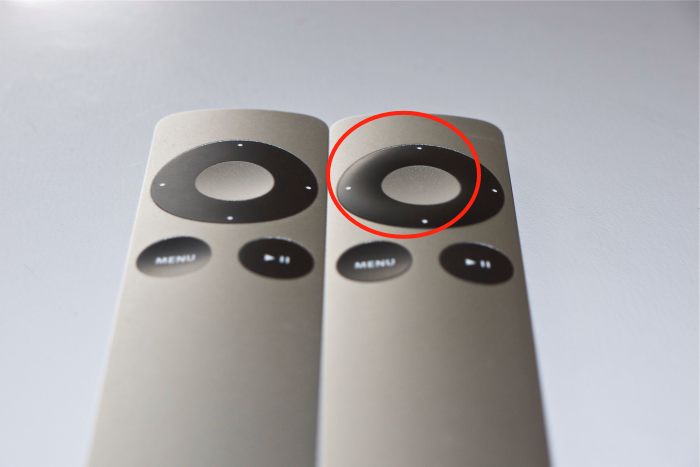
Regular and AppleTV Apple Remote – note the raised directional buttons on the latter – circled.

The raised directional buttons on the AppleTV version have a purpose. They permit instant tactile recognition of which is which if you have both, like I do. I use the regular one to control my MacMini. To preclude one remote speaking to both the AppleTV and the MacMini you have to pair each to its respective device. In the AppleTV that’s a simple menu option. For the MacMini you point the other remote at the Mini and hold the Menu and Right arrow buttons for a few seconds until you see the paired logo on the screen. Henceforth each remote will ‘speak’ to the related device only, so when you switch inputs between your AppleTV and the MacMini, you do not enter a chaotic screen resulting from all the instructions you sent to one device being ‘seen’ by the other.

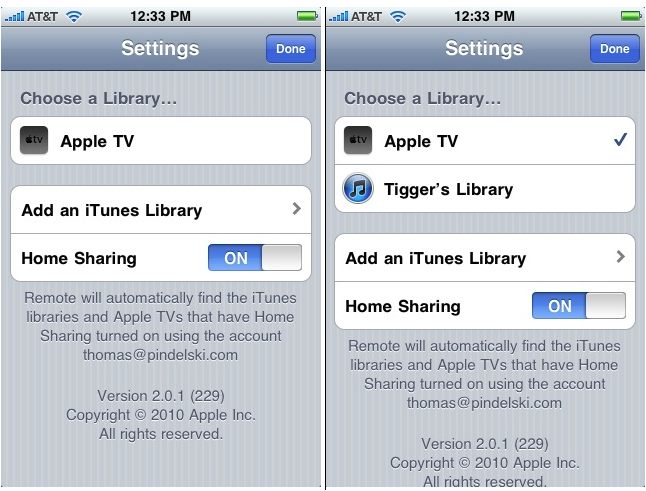
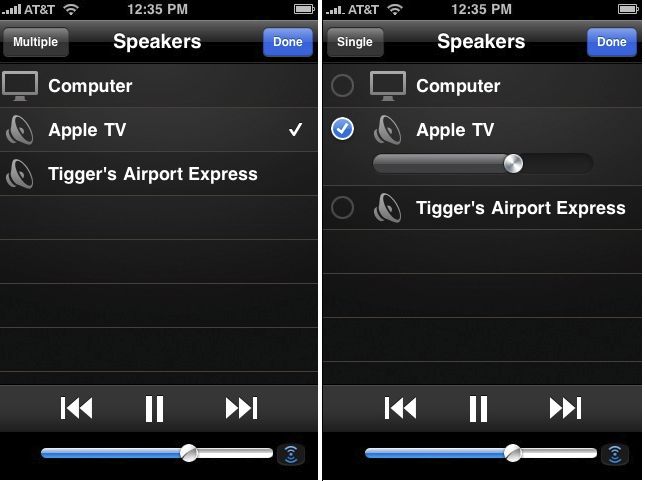
These remotes are infra red, meaning line of sight is needed to your AppleTV if they are to work. You can greatly enhance their range and reduce their directionality by adding an IR blaster or, if you have an iPhone or an iPhone Touch, download the free Remote app which will make your handheld device into a wifi remote, no line of sight being involved.

Connectivity:

The changes here will likely affect how you connect the new AppleTV to your peripherals. Out of the box all you need do is add an HDMI cable, plug it into your modern TV and you have video and sound flawlessly relayed. Anything more than 720p on the TV is wasted as that’s the maximum definition supported by the AppleTV or, indeed, by iTunes or Netflix movies.

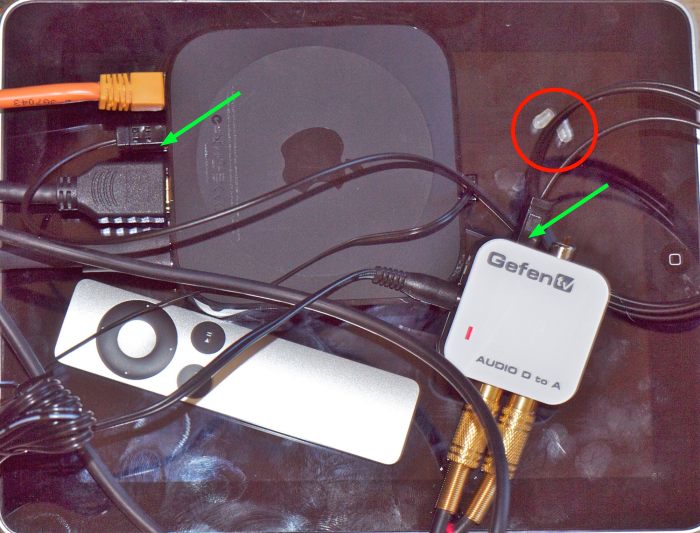
However, if like me you prefer better quality sound from your TV, you will want to use a separate amplifier/receiver and external speakers to get the best from the source material. With the old AppleTV you simply switched off the speakers in your TV and used RCA coaxial cables to route sound from the AppleTV to your amplifier to which you connected external speakers. The new AppleTV has no RCA connectors for analog sound, supporting digital sound output only through the single TOSlink optical digital connector – circled in the first picture above. If, as is my case, your external amplifier is older and does not have an optical digital input, you need to convert the optical digital sound output from the new AppleTV to analog, using a Digital to Analog Converter (DAC). It’s cheaper than buying a new amplifier/receiver.

There are two approaches. If you use 2.1 sound (2 speakers and maybe a subwoofer) you need one of these, and a short TOSlink optical cable. The latter goes between the DAC and your AppleTV and the output of the DAC goes to your amplifier using standard analog RCA coaxial cables. If you use 5.1 surround sound, you need one of these. There are cheaper versions than these Gefen DACs but they have been extensively tested with the AppleTV are are known to work. In either case, your total investment is less than one old AppleTV.

At this time I’m using the (poor) internal speakers in our TV to test the new AppleTV while I await delivery of the Gefen DAC.

First impressions: Compared with its predecessor, the new AppleTV runs cool, is far more responsive to the remote, is overall faster, renders iTunes Store movies at a higher quality level and delivers Netflix streaming and a large selection of internet radio stations, neither available on the old version. Why, there’s even classical music for old goats like me. It is very easy to setup as a host for your pictures stored on your remote Mac and does a superb job of rendering slideshows on your TV screen.

More in Part II when I have the DAC installed for higher quality sound, and have stressed the device. Initial impressions, suffice it to say, are positive.

Disclosure: I have been using Apple hardware and software for a decade. All of it has been paid for with a very small fraction of capital gains on my Apple stock holdings. In that sense, I have never actually ‘paid’ for anything from Apple and truly have no axe to grind for the products. Just for the stock! At the time of writing I am long AAPL common stock and call options. This is not investment advice. Take your own advice, not mine.

Jason Hawkes

An aerial photographer.

Consulting my rational side, I can only conclude that nearly all air flight is a waste of time and resources. One third involves visiting Aunt Minnie in Florida when she could be simply dialed up on a webcam. Another third involves boondoggles passing as conferences where we try to create team spririt or some such nonsense when we should be focusing on teaching individuality. And the remainder is spent on business meetings which would be better conducted at the local video center, saving vast amounts of time and money. But for a world which largely values motion over action, flying is just the ticket.

But there is a very special niche which I exempt from criticism, and that’s aerial photography. Which of us has not pointed his camera at the window when coming in to land for the occasional snap? Though, as with most things, to do this well you have to devote yourself to it and that’s Jason Hawkes’s avocation.


The Empire State Building at night.

While much of this Englishman’s work is done in Europe, he has a new book named New York at Night which amply illustrates the difference between the amateur snapper and the dedicated specialist.

For more, check out his web site. Hawkes uses just two lenses on his full frame Nikons, 14-24mm and 70-200mm zooms, with a gyroscopic stabilizer. While the Kenyon range of stabilizers is expensive, they can also be rented for a reasonable sum.

And while you are perusing his superb images, think also how much better a world without flight would be. No Holiday Inns or Hiltons, no Las Vegas, no 9/11, cheaper gas, less noise, less pollution, fewer traffic jams, more productivity, more time spent with the family instead of being busy being busy, more trains, and on and on.

George Tice

A photographer from New Jersey.

One of the more treasured books in my photography library is this small monograph on New Jersey photographer George Tice (b. 1938). Tice is perhaps best explained in his saying “If I were given the choice of traveling to China or Missouri, I’d probably pick Missouri. I want to be known as an American photographer.”

It shows in his work which is calm, restrained and clearly imbued with a love for his country. There is none of that denigration of the worst that can be America so often seen in Cartier-Bresson’s pictures taken on this side of the pond. Rather, there’s a gentle, insightful approach of one who clearly loves where he is.

One of my favorites is of the interior of a seemingly deserted barber’s shop in Paterson, New Jersey, whose window sign proudly proclaiming ‘Joe’s Barber Shop’ is missing several letters (p.53). There’s no need to replace them, you can hear the proprietor thinking. Every one knows where the local barber shop is. It’s been there for ever, after all. A lovely memory of the best that small towns bring.

The book remains available from Amazon and you can go there by clicking the picture above.

National Geographic Traveler

A source of inspiration.

I was leafing through (OK, flicking through, on the iPad) the current issue of National Geographic Traveler, much inspired by some of the great photography, when I came upon this truly stunning image.

A face of rare warmth and beauty. No surprise that it was taken by master French photographer, Eric Lafforgue, profiled earlier in these pages.

You can read electronic versions of the magazine on your desktop, laptop or iPad for the princely sum of $11.50 for one year’s worth, and have an endless source of inspiration. They are accessible through Zinio , a well supported site and iPad app. Forget the poky iPhone’s screen, for it cannot begin to do the work justice.

Five years old today

This blog, that is.

Daniel Boorstin, Librarian of Congress, said “I write to find out what I think.” I find I am like minded. Setting down ideas each day is a helpful process which, I suppose, is why I write this blog.

So it comes as a signal pleasure to relate that this journal is five years old today.

First post date …. for UK readers, at least.

Those five years have seen a revolution in the technology of photography, exemplified by my own experience. This photographer was a Leica devotee of some 35 years’ happy use back on June 15, 2005, with some serious Rollei medium format gear on the side. Today the hardware consists of a Canon 5D when the very highest quality ‘medium format’ quality is called for and a Panasonic G1 for street happy snapping, with the diminutive Panasonic LX1 in the glove compartment. Not a film camera in sight, these all having moved to collectors’ closets over the past five years, neatly paying for most of the digital gear in the process. Now while digital gear has all the charisma and charm of a cold war era Soviet politician, unlike that bear of old it does produce consistently, at a quality level superior in every way to film and getting better daily. What’s not to like? OK, so you no longer regard it as an heirloom to pass down to your nearest and dearest, as it will be unrepairable electronic detritus five years hence, but it is so cheap and so competent that the result is a win for the user and the maker. Confirming what I wrote, to much opprobium, on July 5, 2005, Film is dead. And so is Kodak.

The software front here has enjoyed a rock stable combination of OS X on various Macs accompanied by Lightroom which is now in its third iteration, though the changes at the margin are becoming …. marginal. A robust pair that never lock up and continue to make me wonder, as I have for the past decade, why anyone valuing his time would use the fraud that is Windows.

Processing hardware has been less of a joy, not helped by a litany of failures from Apple’s awful hardware, with only the iPhone being distinguished by its reliability, likely accompanied by the too-new-to-say iPad. Mercifully, I saw the light a while back and built my own HackPro from inexpensive PC parts and it has been running totally glitch-free 24 by 7 since put into service. It’s as fast as just about any overpriced MacPro on the planet and a fraction of the cost, not to mention infinitely upgradeable for low outlay. The advent of OS X for Intel CPUs made this possible so it was not a practical proposition until fairly recently. Every self-respecting photographer who demands the very best in performance from his processing hardware should consider building one of these, avoiding Apple’s overpriced, short lived desktop and laptop jewelry like the plague.

Mention of the iPad does not require much of a stretch to pronounce that the PC is Dead. The form factor and user interface of this device will come to dominate content consumption and creation over the next five years in much the same way digital imaging has come to dominate photography over the past five. Our children will ask why anyone in their right mind ever used a keyboard, one of the few remnants of antiquity in modern societies. Get ready to say goodbye first to your clunky, overheating laptop and, eventually, to your desktop gear.

No mention of hardware can be complete without lauding HP’s now discontinued DesignJet 90 wide format printer, which makes fade free prints in sizes up to 18″ x 24″ without complaining and does so at very modest cost. It made possible my one man show a while back and I bless it daily. A tool which does exactly what the maker claims – makes superb prints. It remains a great value on the used market though I suppose that, with the advent of cheap large screen TVs, I ought to add the the Print is Dead and the ecosystem of the world can only benefit.

On the personal fulfillment front, or whatever the current psychobabble calls it, photographic life has been eminently satisfying, seeing the production of two books of photographs and a one man show in April 2007. Lots of hard work and lots of fun.

This journal has also been lucky in featuring the work of many outstanding current and past photographers, and you need only click the drop-down menus above (‘Photographers’) to see their work. If I were forced to name five who have most affected me and my work they would be Cartier-Bresson, Doisneau, Penn, Porter and Horst. All are profiled on this site.

And finally, there’s the list of stinkers which you can see by clicking here. These range from jerks like ‘Anonymous’ who posts idiotic comments here, to unscrupulous photographers who think nothing of turning tragedy to profit by false means, conflicted ‘journalists’ who laud gear after first making sure future free loaners are guaranteed, and modern day crooks like Google who are robbing us of our privacy while jealously safeguarding their own. This will not change, for there are fortunes to be made, as these miscreants have learned, from human gullibility. This blog remains totally revenue free (meaning I make nothing, zilch, nada from it – even my modest book sale profits go to charity) with no click-through earnings of any sort, so you can expect it will remain outspoken, skeptical and fearless over the next five years.

Celebrating five great years.

Thanks for stopping by this last half-decade and I hope we are both around five years’ hence.