Category Archives: Hardware

Stuff

Bluetooth ruminations

No such thing as a standard.

One of the challenges of controlling the Hack Mini from ten feet away is finding a wireless mouse which actually works. The challenge was identical with the MacMini predecessor, and while there are many variations on the theme, I’ll share my experiences below in the hope that they prove useful to others using a Mac or Hack as a home theater computer. I would guess this applies equally to PCs.

I’m not going to focus on Apple wireless mice here, because Apple seems genetically incapable of making a proper mouse. The original BT mouse had but two buttons, the next had that ridiculous little scroll ball which would eventually cause the device’s demise owing to ingress of dirt and grease, and the current Magic Mouse belongs in the MOMA design section, not causing you carpal tunnel at your workstation. I have used all three extensively. If the tech world offered gaol sentences for bad ergonomic design, the designer of the Magic Mouse would be a lifer. I got rid of both mine after a few months of desperately trying to get them to work properly, with all sorts of aftermarket drivers to enable broader functionality, but there’s simply no way to improve the frightful low profile design or handgrip, both inspired by Torquemada’s torture chambers. Other than design fetishists, the only people who like this mouse are surgeons in the carpal tunnel business. The only thing the MagicMouse does well is super smooth scrolling, making them much like many beautful women I have known. Strictly one purpose devices.

There are three kinds of wireless mice.

Bluetooth:

Probably the oldest technology, Bluetooth receivers are built in to many desktops, laptops, and nearly all modern cell phones and tablets. They use a 2.4gHz frequency and claims for reliable operation over ranges up to 30 feet are pure rot, in my experience. With several bluetooth adapters tested, I have found that unless the mouse is no more than 2-3 feet from the bluetooth receiver, or ‘dongle’, erratic operation results. Place metal between mouse and receiver and things get worse quickly. It’s not predictable nor is it clear to me why erratic operation comes and goes, but once I moved my bluetooth dongles from the rear of computer cases to the front or to the keyboard (if equipped with a USB socket) the erratic behavior ceased. This has been the case with any number of computers I have used. I doubt it’s interference from other 2.4gHz devices (like cordless phones) as we have none in the house and the neighbors are too far away.

‘Pairing’ of the mouse with a computer using BT is notoriously unreliable and generational differences abound. Try pairing an early white Apple bluetooth keyboard with current computers. I could never get it to work, and Apple even admits that the older keyboards will not work. That’s a shame because the early white keyboards were head and shoulders superior ergonomically to the atrocious current ‘chiclet’ key offerings from Apple.

Battery life of BT mice is poor. You will see claims of up to 3 months but that is also pure rot. Reckon on 1-2 months with alkaline AA batteries, 30% less with rechargeables. The AAA variants are worse still. Most also suffer from very poor vertical scrolling, owing to the coarsely stepped design of the teeth driven by the scroll wheel.

On my two HackPros I use ancient Logitech MX900 BT mice, recommended by a reader. Long discontinued, these use two AA rechargeable batteries which last 4-5 days at most. There is no on-off switch. But the superior ergonomics (right handed only) make that minor inconvenience worthwhile. So much so that I prefer these for outlining tasks in Photoshop to a Wacom tablet. Junk the charger and use rechargeable AA cells, which take seconds to swap. This mouse is large, heavy and has a plethora of programmable buttons which, once you get used to them, you will miss in other designs. They crop up on eBay regulary. Don’t pay more than $20.

RF:

Increasingly the thing in wireless mice. Indeed, I have read that Windows 7 no longer includes BT drivers so BT mice may not work with Win 7 unless you download and install these. Microsoft actually makes an outstanding range of mice, most ergonomically solid, and uses this technology in its wireless offerings. I have a couple of their Wireless Mobile Mouse 6000 models, one black, the other white, and each comes with a paired, minuscule dongle, unique to the mouse in question, so interference is not an issue if you use more than one in proximity. They have additional programmable side buttons, very useful, and include a sideways tilt function on the scroll wheel for lateral scrolling. The BlueTrack technology does what it claims and this mouse will track on just about anything, most importantly on the sofa whence the HackMini is controlled. This design also uses the 2.4gHz frequency but, unlike a BT mouse, is ‘instant on’, with no pairing required. I have never known either of mine not to be instantly recognized with any number of Macs or Hacks.

Battery life is stellar, even though only a single AA battery is used. Not the 8 months claimed but easily 3-4 if left on, and if you use the on-off switch it’s far greater.

But the mouse suffers from the same defect found in the BT designs I have used. Unless the mouse and receiver are no more than 2-3 feet apart, response becomes erratic and random, with sufficient cursor jerkiness guaranteed to have you check in to the local looney bin. As with BT mice I have used, scrolling is coarse for the reason stated above.

Wifi:

This seems like the ideal solution. Pretty much all computers have wifi receivers. These offer huge range, with low power consumption, but the wifi mice I know of work only with special drivers and current Windows operating systems. There are alternatives such as the MobileMouse app for iPhones and iPads, which make these into wireless touchpads, but it’s far easier to select things on a TV screen using a mouse than a touch pad. Cost of entry is very low if you already own an iDevice.

Receivers:

Both BT and RF mice require a receiver in the computer. Macs have BT receivers built-in but Hacks need to add them. You can either use remaindered parts from a Mac and install internally (use a 3.3 volts power supply. 5 volts will fry the receiver), or use any one of the many dongles on the market, ranging in price from $2-60. The dongles have the advantage that the receiver is external, and is not shielded by the computer’s case. I have traditionally used the IOGear one. It’s small, cheap and works well at short distances though mouse movement will not wake a sleeping Hack; a touch on the keyboard is needed for that. With the HackMini I simply had no luck, getting erratic behavior using this BT dongle or the RF one for the MSFT wireless mouse at my 10 foot range.
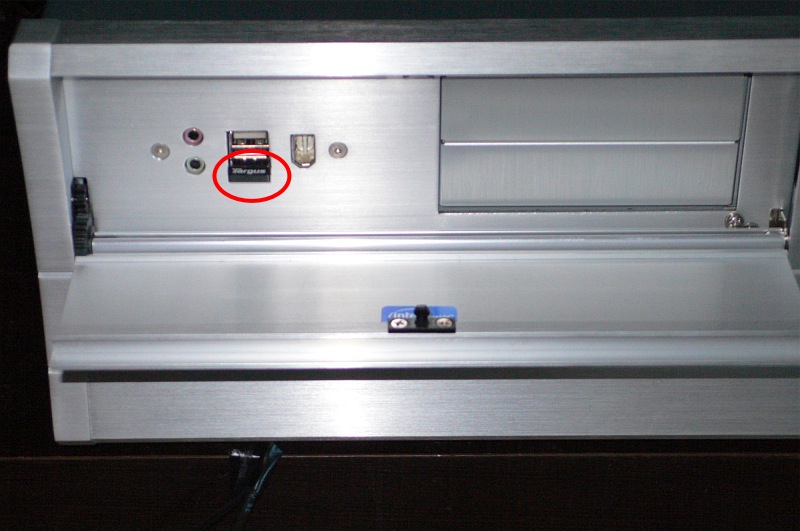
Targus ACB10US BT dongle in the Hack Mini. The Mini is usually used with this aluminum flap closed, which does not help with BT reception.

A spot of checking on chat boards disclosed that many were having better luck with the Targus ACB10US dongle. I procured one and still had occasional cursor jerkiness at a 10 foot range using the Logitech MX900. Then I thought I would try a different BT mouse and opted for the Verbatim BT wireless notebook mouse. This has looks only a mother could love, but has several offsetting advantages. The ergonomics are good, it’s symmetrical so my left-handed son can use it easily, it uses two AA batteries, the top rear switch chooses between three cursor speeds, it tracks on just about anything and it has an on-off switch. Now the latter fills me with dread as you would think regaining pairing would be fraught with problems, yet I have found pairing is reliably restored when switching on in just 3 seconds. That’s not the instantaneous ‘on’ you get with RF mice, but it’s pretty solid and, with a mouse on the sofa, you really want an on-off switch as movement on the sofa will bring the cursor to life and interfere with the movie watching experience. My 9 year old, who is the main operator of the HackMini, has made this abundantly clear to me! Movement of the mouse when used with the Targus dongle will wake a sleeping screen, which is just as well as the Hack Mini has no keyboard!

But, best of all, the connectivity and stability are superb. I have the Targus BT dongle behind the closed aluminum flap on the front of the Silverlake enclosure used for the Hack Mini, and the mouse has no issues communicating with the dongle over ten feet and an intervening cocktail table. The batteries are AA (avoid short lived AAA at all costs) and add nice heft. There is a paucity of buttons – just left and right click, scroll, lateral scroll, scroll press and the sequential three speed one mentioned before. The latter glows red when the batteries are dying. This lack of buttons is not an issue for use with a TV screen. Unlike other non-Apple BT mice, the scroll wheel moves the screen in small increments, not as smoothly as the Apple designs, but it will do. The color is a ghastly metallic powder blue. Mine cost $27.
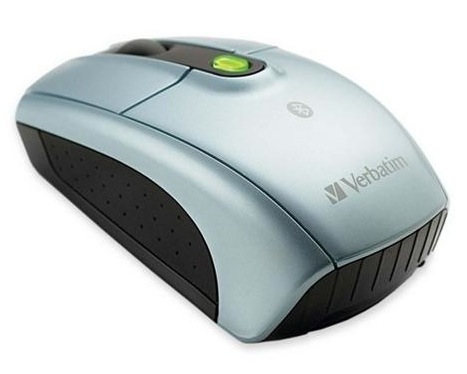
Verbatim Bluetooth mouse. Function trumps looks and finish.

Driver software:

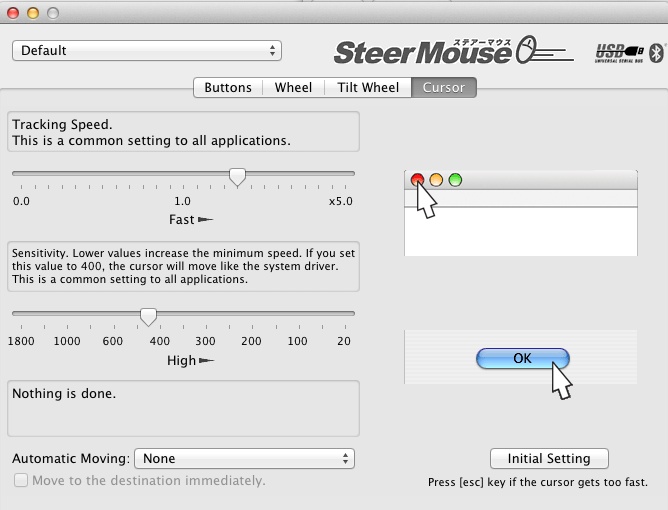
With all my mice, whether RF, BT or wired, I use the SteerMouse app which installs as a preference pane and permits saving of multiple profiles. I make sure all mouse drivers in the preference pane, other than the stock Apple one, are disabled, and find that tuning the cursor ‘speed’ and ‘sensitivity’ settings is a vital part of the goal, which is to deliver smooth cursor movement. One key advantage of SteerMouse is that you can use it to enable all the buttons on older mice whose makers never provided Apple drivers, like the excellent Logitech MX900. Those on my two MX900s are all enabled, and most useful. One payment covers all the Macs in your home, so it’s not like it costs a lot.

These are my cursor settings for the old Logitech MX900. For the Verbatim BT mouse I use 0.7/600. If the sensitivity is too high (and the speed too low), jerkiness results.
In closing, the Verbatim mouse is the polar opposite of Apple’s MagicMouse. It’s ugly and comfortable, where the MagicMouse is beautiful but useless. And one final note on the Targus ACB10US BT dongle. It does not support the Advanced Audio Distribution Profile (A2DP), meaning that BT headphones like the excellent Arctic Sound P311 ‘phones will not work. By contrast the IOGear dongle does support A2DP. So much for standards.


Hardware of the Year

A cornucopia of choices.

On the camera front this year choices, with one exception, have been modestly incremental. The flapping mirror DSLR is at the end of its life, obsoleted by electronic viewfinders, and will struggle on for a few more years in the hands of a few professional users who have yet to fully amortize their capital investment. Meanwhile, EVFs move to strength in the likes of the Sony NEX-7 and, of course, in the Panasonic G3 and GH1. All that’s needed to speed the demise of the clunky, bulky DSLR is a professional grade APS-C or MFT body and maybe a few faster lenses. Responsiveness will only improve, and the G3 has shown that autofocus is now as fast or faster with modern technologies than that offered in traditional bodies.

After an interminable wait, I finally got my G3 body, and while it compromises handling in the interest of an even smaller size, the sensor is two stops better than the one in the G1, and once the improved and more compact PZ kit lens arrives – back ordered for months now – the G1 and its excellent kit lens will move on. The sensor is now so good that I need nothing better. As I can reliably make perfect 18″ x 24″ prints from the G3’s files, I have no need for more pixels. Focusing speed is outstanding and while there are a few ergonomic quibbles, the overall package is a street snapper’s dream. Those needing more sophisticated movie functions will opt for the costlier GH2 body, with a similar sensor and better handling. The G3 + kit lens at $600 make a compelling case for junking all that bulky old gear. You know, that kit you increasingly leave behind because photography is meant to be fun, not a sore shoulder and bad back. 2012 may well see a pro-grade GH3 added to the mix. The MFT lens range is already vast with something for most tastes from several makers.

Hair replacement. Market Street, SF. G3, kit lens @16mm, 1/2500, f/5.6, ISO320.

The day when we will see a true modern version of the rangefinder Leica is now very close. Panny offers the operational speed, Sony the best EVF in the business, Fuji in its X100 and X10 has the form factor right, and lenses are getting smaller and lighter daily. With all this gear offering full automation the street snapper has never been better served.

The other incremental improvement in camera gear this year has been the addition of the splendid Sony lens to the latest iPhone, the 4S, along with much improved response times. While any cell phone is a handling disaster, owing to its form factor, the 4S really makes decent print sizes possible, and has a simple and practical UI. If only Apple would make a real camera the world would open its wallet. It’s a $20bn revenue opportunity waiting to capitalize on the sloth of Canon and Nikon, neither with any credible innovation or thinking to entice the more demanding user. I have 13″ x 19″ prints on the wall here made from the 4S and while the snaps were made in ideal lighting conditions, the very fact that a decent sized print can be made is a revelation, given how compact the camera is. And it even makes phone calls!

But by a considerable margin, my award for Hardware of the Year goes to Intel and its superb line of Sandy Bridge CPUs.

These come in many flavors at various prices, from the bottom of the line i3 2100 at $115, to the top of the line i7 2600K at $320. In 2012 the enhanced Ivy Bridge range will bring higher speeds yet still using the same socket, dictating but a BIOS update to work on your existing motherboard. All come with built in graphics, with select i3 and all i5 and i7 models including the better quality Intel Graphics 3000 GPU, so that the computer builder does not even have to use a separate graphics card. Power consumption is way down from the predecessor Core2Duo/Extreme/Quad lines, the prices continue to drop and the performance is significantly improved in all respects. For the novice computer builder, be it Windows or OS X or Linux, the only thing to fear is fear itself, with an abundance of excellent help sites on the web to speed your construction. Even hacking PC hardware to run OS X is now at the point where it’s almost trivial, and the alternatives simply do not solve. You can buy a pre-assembled piece of garbage from Dell or HP, or a piece of short-lived poorly designed but beautifully executed jewelry from Apple in the guise of an iMac, but given that any photographer today spends more time in front of a computer display than behind a camera, why not enjoy the best and build your own? Intel has never made it simpler, with their ‘K’ CPU models warranted for overclocking, so with a couple of key strokes the builder can increase CPU speed by 20-40%. Incremental cost? $zero.

I upgraded my three display HackPro stalwart from a Core2Quad to a Core i5-2500K, overclocked a modest 21%, and am enjoying response and video framing rates nothing short of astounding. Memory speed with the latest RAM sticks is twice that of the predecessor, with some 16gB running a mere $70. You can view the results by clicking Links->Videos on this site. So enthused was I by the price:performance equation, that I junked my old Intel Atom-powered stock quotes Hack and replaced it with an inexpensive i3 2100 machine, with a speedy Nvidia GT430 GPU, and two inexpensive 1920×1080 displays. Why, and the US taxpayer subsidized me for half the cost, the lot being a deductible business expense.

And finally, I replaced one of the worst pieces of hardware I have ever used, the late-2009 MacMini, with a HackMini, also using the i3 and the same GPU as a movie server and home theater PC. I have never been happier. Movies are ripped/compressed with no stress, there is a total absence of all those start up errors the Mini came with as stock, it does not overheat, and the DVD player is a real machine with an extending tray, not the terminally doomed slot-loading excrescence in the Mini. Yes, Virginia, consumers still watch DVDs, much as Apple would tell you otherwise. My gift-to-self this Christmas is a 35 DVD box of Clint Eastwood’s Warner Brothers movies, for the grand sum of $77 from Amazon. These will be ripped and stored to my server boxes in no time and watching them will come without all those offensive commercials modern DVDs include. Go ahead, make my day. And “I’m paying for this microphone, Mr. Chairman”, as a one time presidential candidate remarked. Don’t ask me to pay to watch your advertising. Finally, the Hack Mini has USB sockets and a card reader where you can actually access them – on the front – nor hidden away among the mess of cables and spider webs in the MacMini.

Reliability of these machines? All are on 7/24 and the only time I restart is when an application upgrade dictates that be done. All run OS X Lion.

Do yourself a big favor. Junk your desktop and replace it with something bespoke which you have built yourself. If you get really stuck, ask your 9 year old to do the assembly.

Sony NEX-7

An interesting development.

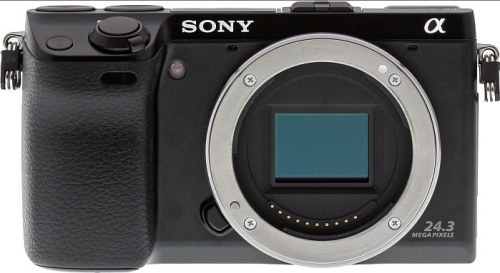
When a reader pointed the new Sony NEX-7 out to me I brushed it off with the rebuff that cameras without proper viewfinders hold no interest for me. Yes, I use an iPhone 4S which lacks one, but that’s hardly for ‘serious’ snapping. It’s all I can do to hold that gadget when taking a snap without dropping it.

Well, I was wrong. Not only does the flood-delayed NEX-7, when it emerges from Thailand, have a viewfinder, it’s a high pixel density EVF, on paper an improvement over the one in the Panny G3 and GH2. And Sony has dropped the ridiculous prism ‘bump’ which Panny insists on including in its DSLRs.

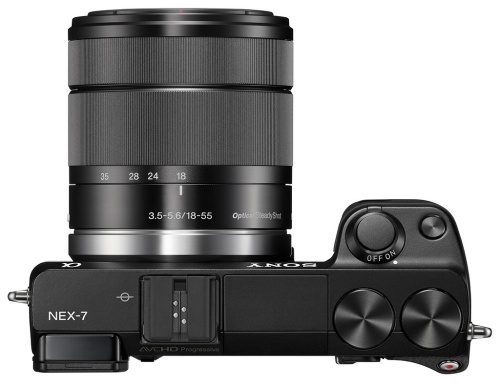
From pictures it’s a little hard to reconcile the seemingly gargantuan lenses, mostly in garish, shiny chrome, with the small body, and the alternative of using adapted Leica M optics is simply not an alternative. No auto focus and silly prices make it so.

But it’s an interesting entry from Sony and one which boasts a high megapixel sensor. If responsiveness and the UI are half decent, it will be a meaningful entry into the APS-C marketplace. However, at $1200 for the body + kit lens, I doubt Panasonic is losing any sleep over it.

Seemingly gargantuan kit lens in place.

Saving Sammy’s best

A quick fix for a dead HDD.

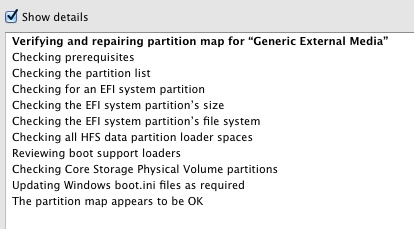
A new Samsung HE103UJ 1tB disk drive runs some $240, a great deal more than the $120 I paid for mine, the immediately previous generation HD103UH with the same specs – 32mB cache, 7200 rpm, 3mb/s SATAII data transfer rate. At that replacement cost I reckoned there was no downside to taking it apart and seeing if something obvious was the cause. The drive would not be recognized by OS X’s Finder but would pop up in Disk Utility. However, Disk Utility could neither repair or erase the drive, those options remaining greyed out.

Yes, there are cheaper drives out there, but as a reader commented on yesterday’s column, recent drive failure rates seem to be skyrocketing. The Sammy is a known, high quality drive, mine being 3.5 years old. I own a dozen of these 1tB drives and this is the first to fail. Most have over 3 years’ use, often 7/24.

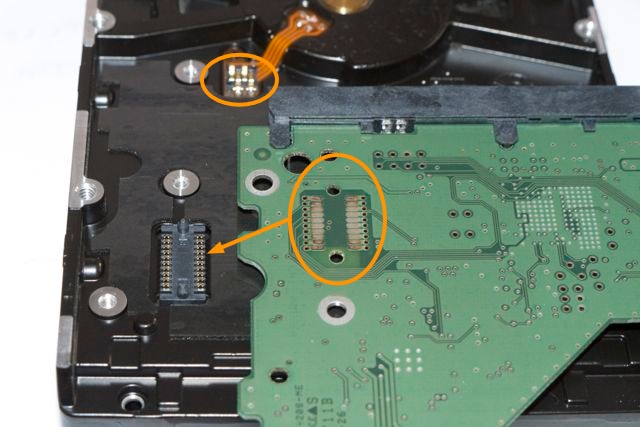
The controller board on the back of these is retained with five T8 Torx screws and I had it off in a couple of minutes. It makes contact with the drive’s innards in two areas – a multi-contact connector and a two point one – both circled below:

Even to the naked eye it was obvious that the multi-contact connector was heavily oxidized, though there were no signs of heat damage anywhere on the board and the drive neither overheated or made strange noises which would suggest mechanical issues. A couple of seconds cleaning the contacts with my son’s school eraser, the board was replaced and guess what?

Yup, Disk Utility erased and formatted the drive immediately and the Repair function found no errors. The drive also now appeared in Finder.

Sammy must have sold millions of these and they have a deservedly great reputation, so before applying a sledgehammer to your blown one, as long as the heads are not clicking like mad, the bearing is not screaming and it can still be seen in Disk Utility, try this quick fix. I checked a couple of other 3.5″ SATA drives from other makers and the mechanics seem much the same, with the controller board attached with a few screws.

Big Storage

Spinning discs rule – if only just.

First, a few words about large traditional spinning disk (HDD) external drive enclosures. These are still the cheapest way to store large amounts of data. The recent floods in Thailand, which accounts for one third of global drive manufacturing, have increased prices from as low as 9 cents/gB to maybe 11 cents/gB for the slower drives, but that still puts SSDs to shame, with prices around $3/gB, or 25x as much. And SSD capacities are atill low. A 1tB Western Digital Caviar Green HDD runs some $130 today.

My rule is that if you buy a single traditional HDD for storage you are playing with fire. Drives simply must be duplicated as one or the other will eventually fail. A device whose multiple platters spin at a minimum of 5,400rpm – that’s 2.84 billion revolutions a year if left on – and whose data heads fly back and forth at insane speeds, is a modern miracle which works awfully hard. So matched pairs it is. Further, I don’t buy ‘passive cooling’ arguments, where fins are claimed to conduct heat away. Nope, if it doesn’t have a fan I’m not interested. And finally, I don’t trust RAID. A simple copy works for me, not yet more technology waiting to go wrong. I use Carbon Copy Cloner for automated overnight backups so that there’s nothing to forget.

When one of my OWC/MacSales enclosures recently failed, just out of warranty (naturally), a failure that was the driver for yesterday’s column, I ordered a like replacement from OWC. These are not cheap at $120 each but they are well made, beautifully finished in unpainted aluminum and as only one of the five I have owned for years had failed I didn’t particularly want to explore alternatives. But OWC has changed the design and the latest variant which ships without drives has deleted the internal dip switches which permitted setting the box to recognize the two drives inside as individual devices. The current version permits RAID only. Back it went. OWC told me they only sell these with pre-installed HDDs of their make of choice for individual drive setups, as some makers’ drives are too temperamental to be thus recognized. I had two good drives, so an empty enclosure was what I required.

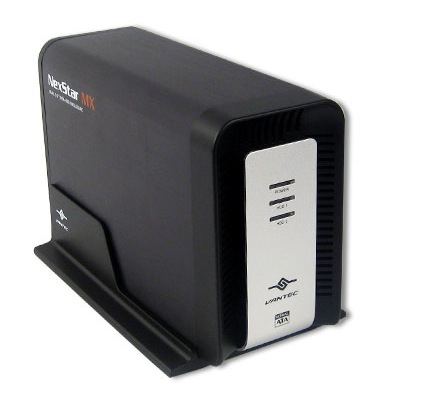
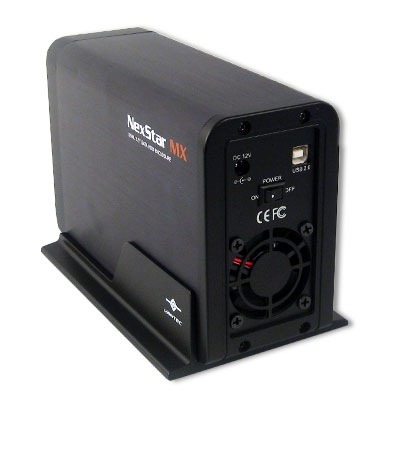
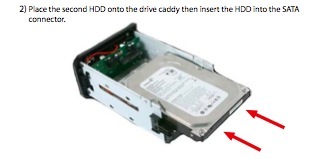
So I shopped around for a dual drive, fan cooled enclosure, which permitted the two drives to be recognized as separate devices, and settled a tad reluctantly on the Vantec NexStar MX. The low price was troubling – just $45 from Amazon USA. Further, the Amazon reviews complained about the fan noise but I reckoned at that price there was little to lose. Well, it turns out this is a fine enclosure. While it comes in black only, the drive mounting scheme is far superior to the fiddly cables used by OWC. The drives simply slide in, there are no cables, and each is retained with the screws provided. Four more small Philips screws hold the enclosure together and you are in business. The enclosure is beautifully made, requiring no excuses. This is USB2 only, so high data transfer rates will not happen here, but for mass storage of photographs or movies, these are just the ticket. The drive enclosure is 12 feet away from where I work so fan noise is not an issue. If it is you could probably hack away the grille to reduce it or reduce the fan speed as one Amazon reviewer did. He soldered a 120 ohm resistor in series with the power supply cable to the fan. The trade off is that the enclosure will run hotter.

There’s a green power light and a blue LED for each HDD to denote activity.

Rear view. The stand need not be used in practice and is removable.

The drives simply slide in. No cables required.

The manual specifically states that the capacity is 2 x 1tB HDDs. Amazon reviewers suggest that 2 x 1.5tB is possible although new drivers may have to be installed. I don’t know if this enclosure will support larger drives. I doubt it. So if you are happy with two 1tB HDDs, this is fine. Anything larger, do your research first. 2tB drives currnetly offer the lowest data storage cost per byte. I rather suspect that if you partition these into two 1tB partitions they will work fine, as I am guessing that the enclosure’s drive controller chip is choking at anything larger than a 1tB partition, but I do not know. Finally, this enclosure will not support the higher data transfer rates offered by the latest SATAIII HDDs. It supports SATAI and II only. If you can live with those limitations it’s a fine and inexpensive solution for large volume data storage needs.