Seen in Little Italy, SF.

G1, kit lens @ 16mm, 1/4000,, f/4.5m ISO320.
Seen in Little Italy, SF.
G1, kit lens @ 16mm, 1/4000,, f/4.5m ISO320.
An interesting development.
When a reader pointed the new Sony NEX-7 out to me I brushed it off with the rebuff that cameras without proper viewfinders hold no interest for me. Yes, I use an iPhone 4S which lacks one, but that’s hardly for ‘serious’ snapping. It’s all I can do to hold that gadget when taking a snap without dropping it.
Well, I was wrong. Not only does the flood-delayed NEX-7, when it emerges from Thailand, have a viewfinder, it’s a high pixel density EVF, on paper an improvement over the one in the Panny G3 and GH2. And Sony has dropped the ridiculous prism ‘bump’ which Panny insists on including in its DSLRs.
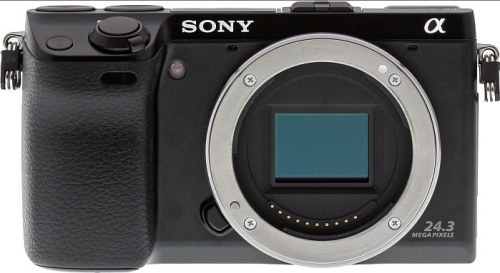
From pictures it’s a little hard to reconcile the seemingly gargantuan lenses, mostly in garish, shiny chrome, with the small body, and the alternative of using adapted Leica M optics is simply not an alternative. No auto focus and silly prices make it so.
But it’s an interesting entry from Sony and one which boasts a high megapixel sensor. If responsiveness and the UI are half decent, it will be a meaningful entry into the APS-C marketplace. However, at $1200 for the body + kit lens, I doubt Panasonic is losing any sleep over it.
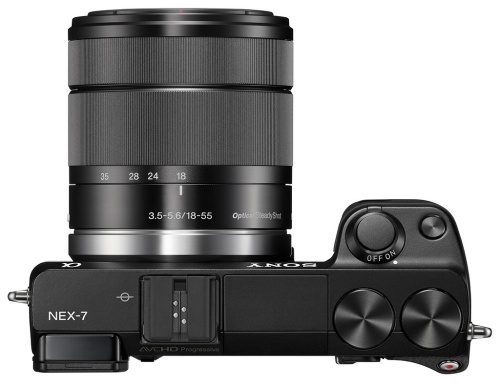
Seemingly gargantuan kit lens in place.
OWS comes to SF.
Remarkable peace prevails at the OWS encampment on the Embarcadero at the Ferry Building in San Francisco.

G3, kit lens @14mm, 1/100. f/9, ISO 320.
Three or four police cars were in evidence but their drivers were too occupied with the donuts and coffee on this chilly morning to bother harassing the peaceful protesters.

G3, kit lens @18mm, 1/50, f/9, ISO320
A quick fix for a dead HDD.
A new Samsung HE103UJ 1tB disk drive runs some $240, a great deal more than the $120 I paid for mine, the immediately previous generation HD103UH with the same specs – 32mB cache, 7200 rpm, 3mb/s SATAII data transfer rate. At that replacement cost I reckoned there was no downside to taking it apart and seeing if something obvious was the cause. The drive would not be recognized by OS X’s Finder but would pop up in Disk Utility. However, Disk Utility could neither repair or erase the drive, those options remaining greyed out.
Yes, there are cheaper drives out there, but as a reader commented on yesterday’s column, recent drive failure rates seem to be skyrocketing. The Sammy is a known, high quality drive, mine being 3.5 years old. I own a dozen of these 1tB drives and this is the first to fail. Most have over 3 years’ use, often 7/24.
The controller board on the back of these is retained with five T8 Torx screws and I had it off in a couple of minutes. It makes contact with the drive’s innards in two areas – a multi-contact connector and a two point one – both circled below:
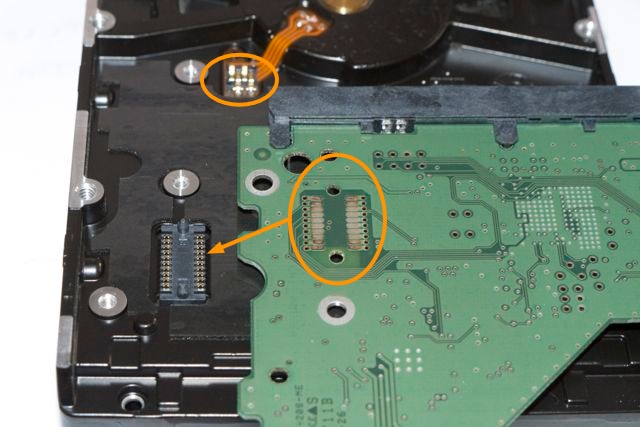
Even to the naked eye it was obvious that the multi-contact connector was heavily oxidized, though there were no signs of heat damage anywhere on the board and the drive neither overheated or made strange noises which would suggest mechanical issues. A couple of seconds cleaning the contacts with my son’s school eraser, the board was replaced and guess what?
Yup, Disk Utility erased and formatted the drive immediately and the Repair function found no errors. The drive also now appeared in Finder.
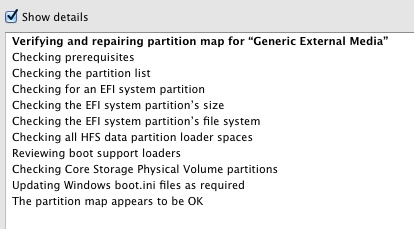
Sammy must have sold millions of these and they have a deservedly great reputation, so before applying a sledgehammer to your blown one, as long as the heads are not clicking like mad, the bearing is not screaming and it can still be seen in Disk Utility, try this quick fix. I checked a couple of other 3.5″ SATA drives from other makers and the mechanics seem much the same, with the controller board attached with a few screws.
Spinning discs rule – if only just.
First, a few words about large traditional spinning disk (HDD) external drive enclosures. These are still the cheapest way to store large amounts of data. The recent floods in Thailand, which accounts for one third of global drive manufacturing, have increased prices from as low as 9 cents/gB to maybe 11 cents/gB for the slower drives, but that still puts SSDs to shame, with prices around $3/gB, or 25x as much. And SSD capacities are atill low. A 1tB Western Digital Caviar Green HDD runs some $130 today.
My rule is that if you buy a single traditional HDD for storage you are playing with fire. Drives simply must be duplicated as one or the other will eventually fail. A device whose multiple platters spin at a minimum of 5,400rpm – that’s 2.84 billion revolutions a year if left on – and whose data heads fly back and forth at insane speeds, is a modern miracle which works awfully hard. So matched pairs it is. Further, I don’t buy ‘passive cooling’ arguments, where fins are claimed to conduct heat away. Nope, if it doesn’t have a fan I’m not interested. And finally, I don’t trust RAID. A simple copy works for me, not yet more technology waiting to go wrong. I use Carbon Copy Cloner for automated overnight backups so that there’s nothing to forget.
When one of my OWC/MacSales enclosures recently failed, just out of warranty (naturally), a failure that was the driver for yesterday’s column, I ordered a like replacement from OWC. These are not cheap at $120 each but they are well made, beautifully finished in unpainted aluminum and as only one of the five I have owned for years had failed I didn’t particularly want to explore alternatives. But OWC has changed the design and the latest variant which ships without drives has deleted the internal dip switches which permitted setting the box to recognize the two drives inside as individual devices. The current version permits RAID only. Back it went. OWC told me they only sell these with pre-installed HDDs of their make of choice for individual drive setups, as some makers’ drives are too temperamental to be thus recognized. I had two good drives, so an empty enclosure was what I required.
So I shopped around for a dual drive, fan cooled enclosure, which permitted the two drives to be recognized as separate devices, and settled a tad reluctantly on the Vantec NexStar MX. The low price was troubling – just $45 from Amazon USA. Further, the Amazon reviews complained about the fan noise but I reckoned at that price there was little to lose. Well, it turns out this is a fine enclosure. While it comes in black only, the drive mounting scheme is far superior to the fiddly cables used by OWC. The drives simply slide in, there are no cables, and each is retained with the screws provided. Four more small Philips screws hold the enclosure together and you are in business. The enclosure is beautifully made, requiring no excuses. This is USB2 only, so high data transfer rates will not happen here, but for mass storage of photographs or movies, these are just the ticket. The drive enclosure is 12 feet away from where I work so fan noise is not an issue. If it is you could probably hack away the grille to reduce it or reduce the fan speed as one Amazon reviewer did. He soldered a 120 ohm resistor in series with the power supply cable to the fan. The trade off is that the enclosure will run hotter.
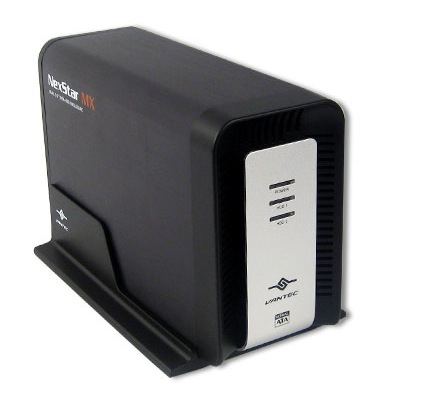
There’s a green power light and a blue LED for each HDD to denote activity.
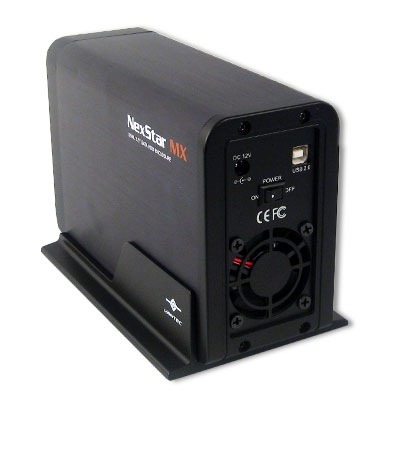
Rear view. The stand need not be used in practice and is removable.
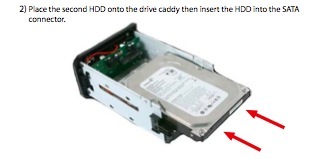
The drives simply slide in. No cables required.
The manual specifically states that the capacity is 2 x 1tB HDDs. Amazon reviewers suggest that 2 x 1.5tB is possible although new drivers may have to be installed. I don’t know if this enclosure will support larger drives. I doubt it. So if you are happy with two 1tB HDDs, this is fine. Anything larger, do your research first. 2tB drives currnetly offer the lowest data storage cost per byte. I rather suspect that if you partition these into two 1tB partitions they will work fine, as I am guessing that the enclosure’s drive controller chip is choking at anything larger than a 1tB partition, but I do not know. Finally, this enclosure will not support the higher data transfer rates offered by the latest SATAIII HDDs. It supports SATAI and II only. If you can live with those limitations it’s a fine and inexpensive solution for large volume data storage needs.