Happy Fourth.
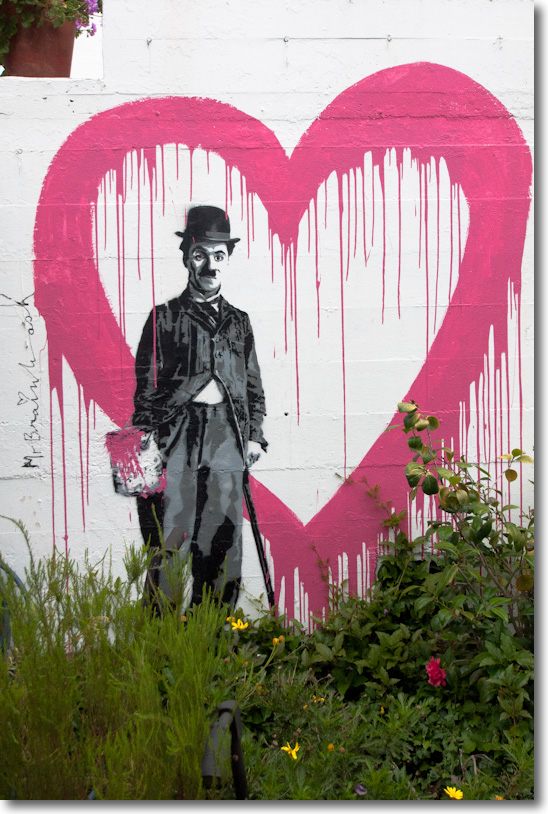
On 24th Street in San Francisco’s Mission District. G1, kit lens @ 19mm, 1/2000, f/5.6, ISO 320.
Happy Fourth.
On 24th Street in San Francisco’s Mission District. G1, kit lens @ 19mm, 1/2000, f/5.6, ISO 320.
Just divine.
One Magic Second.
Date: July 2, 2011
Place: 24th and Folsom Streets, San Francisco
Modus operandi: Loitering about.
Weather: Fabulous morning light.
Time: 10:10:46 and 10:10:46
Gear: Panasonic G1, kit lens at 86mm FFE
Medium: Digital
Me: Creating an indelible memory
My age: 59
Our boy has been taking cartooning lessons at the Sirron Norris studio on Valencia in the Mission District. Sirron is a marvelously talented cartoonist and his work is to be found on murals all over the Mission District. As he relates it, the only thing he recalls wanting to do as a child was to draw, and his vocation has become his profession. While Winston labors away under Sirron’s watchful eye, I traipse around the area hoping to catch a snap or two of the vibrant street life that is everywhere. Truly, few square blocks of San Francisco so abound with possibilities as do these.
Phil’z Coffee at 24th and Folsom is very much at the center of Mission District culture. On any morning you will find the locals gathered for a cup of joe and some gossip. And, if you get lucky, you will see some beautiful people there.
Phil’z Coffee at 24th and Folsom Streets. G1, kit lens @ 23mm, 1/500, f/4.7, ISO 320.
I was meandering along 24th Street yesterday morning and idly turned the corner onto Folsom where my eye was instantly drawn to this serenly beautiful young woman, posed as if for Titian and his oils. She saw me raise the camera deliberately to my face, gazed back at me untroubled and unthreatened, then looked down, lost in thought, the morning sun outlining her swan-like neck. The magic moment was over so quickly I found myself wondering if it had really happened, yet the processed film suggests it did. This is the sort of thing any street snapper absolutely lives for. Literally, One Magic Second.

Swan Neck. G1, kit lens @ 41mm, 1/320, f/5.6, ISO 320.
So fleeting was this moment that a check of the EXIF data for the two snaps shows both were taken within the same magical second of time – 10:10:46 am, July 2, 2011.

This sort of thing used to be the province of the rangefinder Leica but, frankly, that camera’s antiquated, slow manual focusing could scarcely be a worse choice for the modern street snap genre. Quite why anyone buys these anymore leaves me mystified – too slow for street snaps, no zoom lenses, too limited for anything else and silly-priced. Doctors and dentists, I suppose. Or should that be hedge fund managers?
Update: I shared these snaps with a friend who writes eloquently:
“That look…… the right half shows the shyly flattered contentment …(wild inward pleasure)….at being considered actionably photogenic.”
Now that’s a LARGE print!
It’s five years since I confessed to my liking for Really Large Prints, and I have to say that I like them as much today as I ever did.
But when Bottega Veneta, the luxury Italian leather goods store, decided to lease this space on Stockton Street in San Francisco’s ritzy shopping area, they hid their improvements in grand style!
Imagine the size of the printer required to make this ….
Stockton Street. G1, kit lens @18mm, 1/400, f/9, ISO 320.
I had to wait for ages for traffic to clear and for the pedestrians to be arranged just so. Look carefully and you can make out the front door for the construction crew.
Two new lenses.
[column width=50% padding=3%]
I have but three lenses for my Panasonic G1 and that’s pretty much all I need.
Two are from Panasonic, with OIS built in – the stellar 14-45mm kit lens and the wonderfully compact 45-200mm. The third is from Olympus and it’s the ultrawide zoom, the 9-18mm MFT.
While the Olympus zoom suffers from barrel distortion to varying degrees, click this link and you can download my profiles to remove these distortions in LR3 or in Photoshop. Unlike for the Panasonic lenses, the G bodies do not correct distortions from the Olympus lens range, so if it matters you have to do it manually. It takes seconds for the occasional architectural snap which requires such correction. That apart, I have found the 9-18mm to be an outstanding optical performer, indistinguishable in practice from the excellent Panny 14-45mm kit lens as far as definition goes.
[/column]
[column width=45% padding=2%]
The Olympus 9-18mm is an indication that Oly is getting serious about making better lenses for its underwhelming Pen MFT bodies. I write ‘underwhelming’ as any camera whose primary mode of viewfinding requires the user to hold it arm-outsrteched, inches from his face, is not a serious camera for this photographer. First, I like to actually see what I’m viewfinding. Second, adding Oly’s clunky clip on EVF makes the whole thing bulkier than any G-series Panny with a built-in (and outstanding) EVF. Third, I prefer to remain unobtrusive. And last, I would rather not look like a dork. The sole advantage I can see to Oly’s bodies is that OIS is built into the body, meaning it works with any lens, whereas with the Panny lenses, selected lenses have OIS built into the lens. The Oly 9-18mm has no OIS but it is hardly missed at those focal length on my G1.
Now Olympus has announced two very interesting lenses for MFT – the 12mm f/2 (24mm FFE) fast ultrawide and the 45mm f/1.8 (90mm FFE) portrait lens.
[/column]

[column width=50% padding=3%]
Priced at $800 and $400, respectively, and available in July and September 2011, these fill two important niches, but it’s the latter lens which especially interests me. Since selling my 5D outfit, which included Canon’s simply superb 85mm f/1.8 portrait lens I have lacked a wide aperture portrait lens.
Sure, I can emulate shallow depth-of-field by selectively blurring details in Photoshop, when they are rendered too sharp with the Panny kit lens at 45mm. At 45mm the Panny kit lens is a modest f/5.6 and often has too much d-o-f for head-and-shoulders portraits. But using PS in a studio portrait to keep the eyes sharp and the ears blurred is not so easy. The Oly 45mm is a full 3.5 stops faster than the kit lens at 45mm so will afford far greater control over (shallow) depth of field. Thus it interests me greatly.
[/column]
[column width=45% padding=2%]
It remains to be seen whether these new Oly lenses are up to the performance of the 9-18mm, but at the prices asked I would guess that the quality will be fine. Obtrusive chrome finish? Who cares what color it is in the studio? Size? The Panny kit zoom at 45mm protrudes some 3.4″. Best as I can tell, the 45mm f/1.8 is much more compact, protruding maybe 2.5″ or as much as the kit zoom at 14mm, its smallest size. So this promises to be a truly compact portrait lens but with enough barrrel to permit support from underneath the lens. Lack of OIS? I’ll be using it with my Novatron studio flash outfit so camera shake is not an issue.
It will be a long wait to September for my 45mm f/1.8!
Curiously, the machining of the Oly’s focus collar is identical to that on my first portrait lens, bought in 1972, the estimable 90mm Elmar f/4 for my Leica M3:
[/column]

The Oly’s technology is just a tad more sophisticated. The Elmar was f/4, manual focus, manual aperture (the aperture ring rotated with the focus collar!), was twice the length of the Oly and the lens head unscrewed for use on bellows and close-up devices. There were no electronics in sight and construction was serious chrome coated brass. A fine optic which ran me £32 or $492.61 in today’s money. So the Oly is almost 20% cheaper!
Easily added.
Snow Leopard users should be aware of Apple’s latest sleight of hand.
TRIM – garbage management for SSDs which maintains their performance – has been added in Snow Leopard 10.6.8, the last version of Snow Leopard before Lion comes to market in July, 2011.
But that’s not all good news. You see Apple, in its greed for every penny they can squeeze from buyers of its overpriced jewelry passing as computer hardware, has made sure that TRIM support will only be available if you bought your computer with its SSD from Apple. Meaning you were well and truly hosed down at a 100% premium compared to what you could have bought an SSD for yourself. Or, worse luck, maybe that SSD option was simply unavailable when you bought your hardware so now you are forced to use an aftermarket SSD to upgrade. No TRIM for you, my lad. So much for backward compatibility and planned obsolescence.
Apple has made it extremely easy to replace HDDs in MacBook Pros and MacPros (and extremely hard in iMacs and Minis) but if you slot that nice new SSD into your MBP/MacPro/Mini, TRIM will not work. Upgrading your HDD to an SSD in your MBP, a plug-and-play operation which does not invalidate the warranty, is the single best thing for the performance of your laptop. However, when you do so, this is what OS 10.6.8’s System Profiler will report:
No TRIM for you, sucker.
Mercifully, there are many smart people out there who believe in freedom of speech and refuse to be stolen from. Hop over to the good people at Groths and you can download their utility and have TRIM up and running on your aftermarket SSD in no time at all. My SSDs are recent Intel X25-M 120gB models, and this fix works perfectly on both, after a restart.
As usual with these things, I suggest you try this on a bootable backup drive first, to be on the safe side. After you complete the installation, your System Profiler->Serial-ATA->SSD should look like this, and your SSD’s performance will be enhanced for the long term:
TRIM enabled on the HackPro.
As you can see, the fix uses no space, merely modifying existing files, speaking loudly to Apple’s increasingly cynical attitude toward its customers.
If you have been using your SSD without TRIM for a while, as I have, Lifehacker has information on how to clean it up here.