Photography and the CPI

How we spend money.

This may seem a bit dry but bear with me.

The CPI is the US Consumer Price Index which is a US government scam used to fool most of the people most of the time. The stated uses of the CPI appear on the government’s web site as follows:

  • As an economic indicator. As the most widely used measure of inflation, the CPI is an indicator of the effectiveness of government policy. In addition, business executives, labor leaders and other private citizens use the index as a guide in making economic decisions.
  • As a deflator of other economic series. The CPI and its components are used to adjust other economic series for price change and to translate these series into inflation-free dollars.
  • As a means for adjusting income payments. Over 2 million workers are covered by collective bargaining agreements which tie wages to the CPI. The index affects the income of almost 80 million people as a result of statutory action: 47.8 million Social Security beneficiaries, about 4.1 million military and Federal Civil Service retirees and survivors, and about 22.4 million food stamp recipients. Changes in the CPI also affect the cost of lunches for the 26.7 million children who eat lunch at school. Some private firms and individuals use the CPI to keep rents, royalties, alimony payments and child support payments in line with changing prices. Since 1985, the CPI has been used to adjust the Federal income tax structure to prevent inflation-induced increases in taxes.

The reason I refer to the CPI as a scam is that I’m the one who does the grocery shopping chez Pindelski and I have been seeing the grocery bill rise steadily over the past year, despite the government’s lofty pronouncements that the nation is threatened with imminent deflation which is why they are printing ever more money. I’m also an investor, which is what I do to allow me to afford those groceries, and it is not lost on me that global commodity prices for everything from aluminum and palladium to corn, wheat and soy beans have been going through the roof. But if you read the above uses (especially the third bullet) of the CPI and you run the government, it is very much in your interest to misstate the statistic erring on the low side. It suggests you have inflation under control while simultaneously allowing you to deny pay raises to a host of workers and pensioners.

Anyway, these were the thoughts that prompted me to check the components of the US CPI to better understand what’s going on. Well, it’s pretty obvious when I tell you that housing and rent comprise no less than 40% of the index and unless you are blind, deaf and dumb, it will not have escaped your notice that US house prices have been falling 20% annually for the past two years, thanks to the bubble blown by the criminal cabal that is Wall Street. Now 20% of 40% is 8%, so right there you have an 8% drop in the CPI; with the government telling us that CPI is rising at 2% annually, that means that everything else is rising at 16.7% for the math to work ( (8+2)/0.6 = 16.7 ). Aaah!, now I understand what’s going on and why our grocery bill is rising so steeply.

While nosing around the Bureau of Labor Statistics web site I delved into the CPI some more and, lo and behold, ‘photography’ is in the index! It’s in the Recreation section which accounts for a total weight of 6.437% – here’s how that section breaks down:
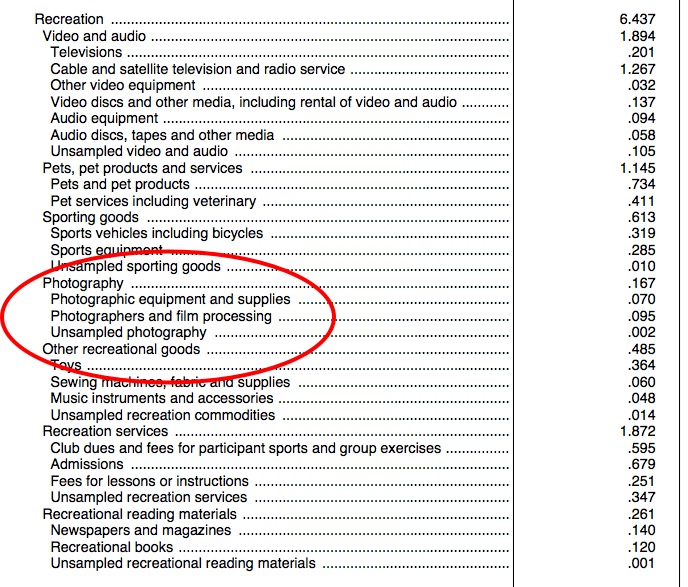
Recreation and photography in the CPI.

So Americans spend about eight times as much on cable TV as they do on photography. They spend in a similar ratio on their pets! It’s also depressing to note how little is spent on books – near the bottom of the table.

Well, the point of this column is not to harangue with tales of government lies; you already know that your government lies to you, no matter where you reside. Rather, it’s to place focus on some interesting data on how much we spend, as a nation, on taking pictures relative to other pastimes, most of which are passive, meaning TV and sports. In one simple table you can learn more of the interests of a nation than any amount of subjective chatter will provide and, yes, we are living in a high inflation economy whose housing stock remains greatly overpriced.


Eisie’s nurse

A wonderful reminiscence.

Here’s a picture of the nurse whom Eisie photographed in Times Square all those years back on V-J day:

Here’s the picture:

Until the word ‘iconic’ was destroyed by overuse, this was one of the great iconic reportage snaps. He took several as the sailor was kissing every woman he passed. This was the best. From the end of the last war America won ….

The CD is dead

Finally.

That miracle storage technology of the 1980s, brought to us by Philips and Sony, died today; not that it hasn’t been dying for the best part of a decade, but this is the final tolling of the bell:

The only thing I rue about the passing of CDs, and to a far greater extent the predecessor LP record, is that electronic downloads no longer provide any scope for the photographer’s art. The LP offered a huge 12 inch-square canvas for photographs, that of the CD’s case was not even 20% of the area but still decent. And now it’s zero. A shame.

Three displays at work

Not a glossy screen in sight.

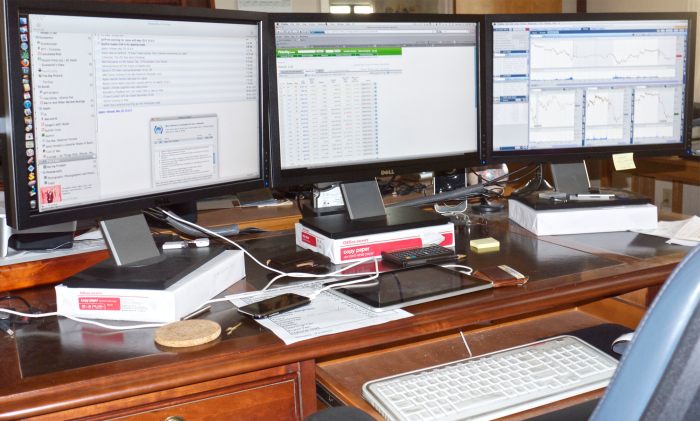
In the previous column I rambled on about using a USB-powered gadget to drive a third display connected to the HackPro, as I did not want to have to install a second video card with all the related complexities that would entail. That worked out well and today I received my third Dell 2209WA display as you can see below:

A nice place to work – three Dell 2209WA displays running under Snow Leopard.

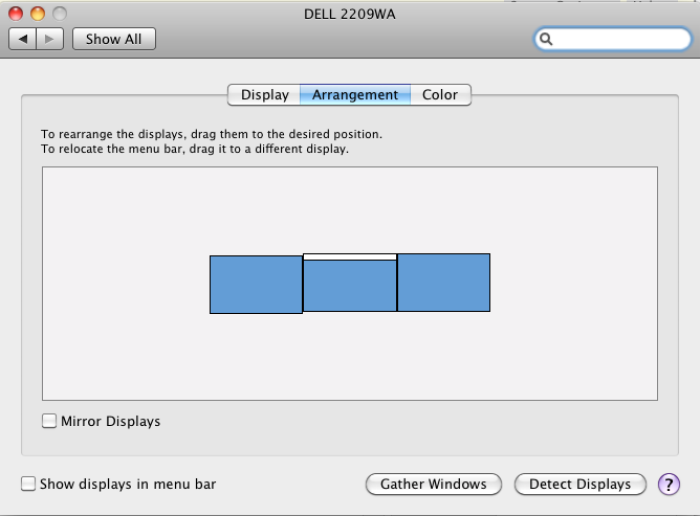
Installation could hardly be simpler. After connecting the third display to the open DVI-D connector on the HackPro I fired up System Preferences->Displays, setting things thus:

Display settings for three displays.

The white bar, draggable at will, denoted the display which will display the menu bar; the display screens’ are simply dragged into place so that cursor movement across them is continuous.

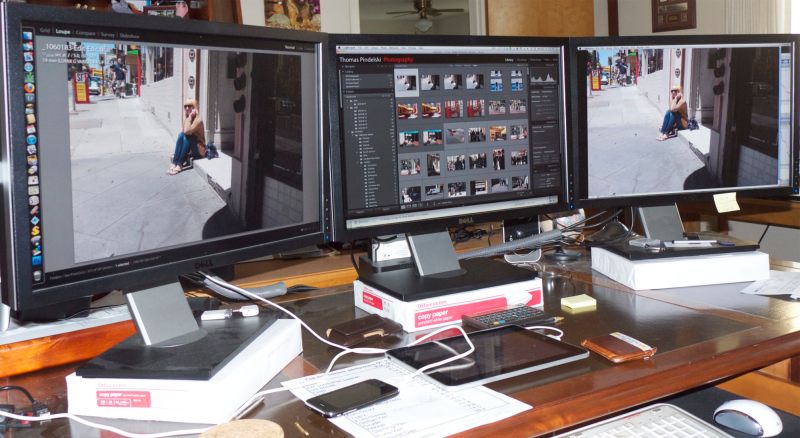
In the next picture I have Lightroom 3 running on the two left hand most displays and Photoshop on the right. Thus you can easily round trip a file from LR to PS, working the PS adjustments on the third screen,

Note the high tech reams of paper raising each display so that my eyes are level with a point a couple of inches below the top; even at maximum height I cannot get them high enough without this kludge.

I’m surprised how easy all this was to do and am now out of desk space for any more – maybe I need to go to two tiers?

Nah! – here’s my next version:

Houston – we have lift off.

Temperature monitor reports no detectible heat rise for any component. The HackPro can take it!

A few words on the latest Dell 22″ display:

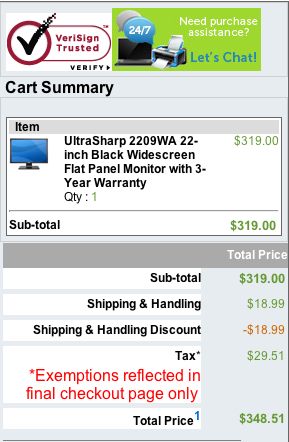
The current 22″ Dell display (it’s 21.5″ just like my 2209WA) is the E2210H and at $200 is significantly cheaper than the 2209WA which remains available at $319. There are, however, three other key differences, over and above rthe price, which are significant:

  • The 2210 is 1920 x 1080 compared to 1680 x 1050 pixels, so more pixels
  • The 2210 does not use an IPS panel
  • The 2210 is the far narrower 16:9 width:height aspect ratio compared to 16:10 for the 2209

Why would I prefer the 2209?

First, because IPS panels have far less color change off axis than regular ones; try it in a store and see for yourself. For photo processing that’s a key difference. Second 1920 x 1080 is too many pixels for text – for my mediocre eyes the default font is too small at this pixel density and while I can increase it using System Preferences, why have it in the first place? Finally, while 16:9 is great for watching widescreen movies on your computer screen (you want to watch movies on a computer?) as the picture fills the screen, for work use it’s simply to narrow, wasting space at the sides.

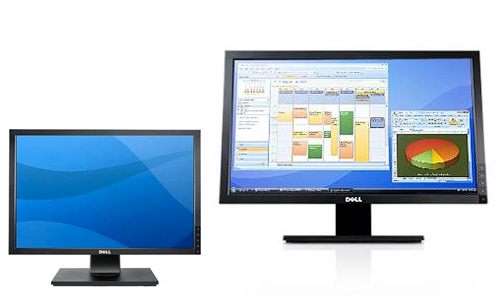
Here’s a comparison of the aspect ratios from the Dell site (not to scale) which clearly shows how much wider the 2210 (on the right) is:

Dell 2209WA and Dell E2210H

Don’t believe me. Check the current iMacs in your local Apple Store. The 21.5″ one is 1920 x 1080 (like the Dell 2210) and the 27″ is 2560 x 1440 pixels. In practice this results in near identical font sizes on both and that font is small.

I thought long and hard about this and checked out the 27″ screens extensively – the choice was two 27″ screens or three 21.5″ones. Well, despite the better apparent specs of the 27″ screen. I came down squarely in the 21.5″ camp, and added a third. You should do like comparisons to see what works best for you. The screen real estate between the two alternatives is roughly similar. By the way, 27″ Dell matte screens, made by LG Electronics just like the ones in the iMacs, are $1,000 each, whereas the three Dells I use cost me under $1,000 in total. Not a trivial difference and one which, intriguingly, highlights what a good value the 27″ iMac is, if you can live with a glossy screen, small fonts and historically execrable reliability for these prone-to-overheat machines, as my personal experiences illustrates.

Adding a third monitor

Are you nuts?

It seems like just the other day that I added a Dell 2209WA 21.5″ IPS monitor to what was then my work computer, the 24″ white iMac. That machine overheated and died so I had a HackPro built and added a second Dell. This works beautifully with Lightroom 3 and is also invaluable in my day job where I manage money for a living.

At the time I questioned who needs two displays, yet now I find I cannot live without them!

The Dell is 1680 x 1050 pixels, a pixel size which works nicely with my mediocre eyesight, delivering larger fonts than the default in most 24″ monitors which is 1920 x 1200. Sure, the font size can be increased with the latter in the Mac’s System Preferences->Displays panel but then why pay up for the higher pixel density in the first place? Or so I tell myself.

I thought long and hard about migrating to two 27″ widescreen monitors, similar to those used in the current 27″ iMac (though I would use matte screens in preference to the iMac’s ghastly glossy displays) but after several trips to the Apple Store I concluded that the even smaller font sizes on those 2560 x 1440 pixel displays were not what my eyes needed.

Meanwhile, my growing data hunger meant that I was getting frustrated with too much moving about of windows on the two Dells in my day job, so I resolved to add a third display. Mercifully Dell still sells the 2209WA and it’s still around $300, compared with nearly $1,000 for one 27″ Ultrasharp model, but the question remained how best to drive that third monitor from the HackPro. The Hackster runs a superb EVGA Nvidia 9800GTX+ 512mB display card which has two outlets. If you use a Dual-link DVI cable with these (the cable is a single one despite the name) you can power two 30″ monsters or two 27″ ones, for that matter.

So I asked HackPro’s builder to sniff around the Hackintosh chat boards and found there’s not much out there regarding three or more monitor use. It seems that the HackPro could be hacked (!) to accept a second display card as the hardware slot is there on the motherboard, but while the software part was not impossible, I couldn’t afford to lose the use of the HackPro for an extended period of time. Man’s gotta eat …. When I built the HackPro the 24″ iMac was still struggling along so downtime was not an issue. As that dog iMac is now in silicon heaven I no longer have a full sized desktop backup.

So I put the idea of adding a second video card aside and continued to grumble about my lack of screen space.

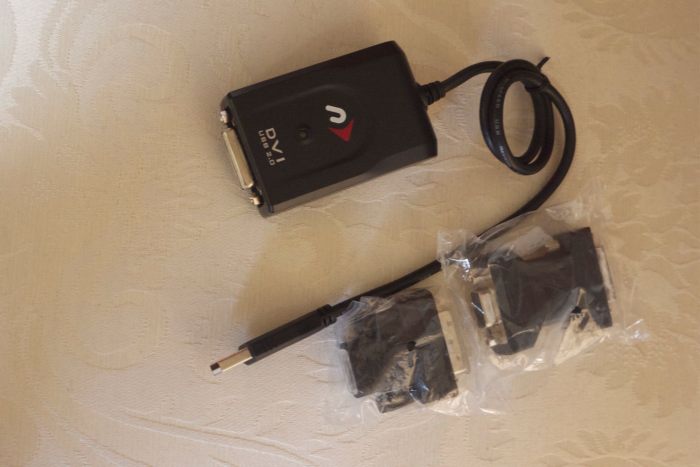
Then, out of the blue, I came across the Newer Technology USB to DVI/HDMI/VGA adapter, marketed by MacSales for under $70. Less than the price of another display card, in other words. For that sum I thought there was little to lose and just received mine. I decided to try it with one of the Dells to evaluate whether it made sense to buy a third monitor.

The Newer Technology USB to DVI adapter, with VGA and mini-DVI adapters.

Installation requires download of a driver from the DVD which comes with the gadget and a reboot. Thereafter, I simply unplugged one of the Dells from the HackPro’s video card, plugged it into the adapter and the adapter into one of the many free USB sockets on the computer.

No problemo!

The USB connected monitor came to life immediately and after a few minutes spent profiling the setup (the colors were way bluer than with the monitor driven from the computer’s video card, requiring Blue to be reduced from 97 to 85 for a perfect color match across the two monitors) I was up and running.

The most critical test I could think of was to run a movie DVD in the HackPro’s DVD player, stretch the picture across the two adjacent Dells and observe. The USB connected monitor displays the slightest jerkiness compared to smooth scrolling on the other monitor which is connected to the Nvidia 9800GTX+ card. Would you want to watch movies on it all day? No. Is it adequate for my purposes, mostly the display of streaming stock quotes, occasional moving charts, You Tube videos and the like? Yes, more than adequate.

I noted no untoward changes in the operating temperature of any component, using Temperature Monitor as always; the Newer Technology adapter gets noticeably warm but as it resides outside the HackPro box I am not concerned. It is USB powered and there is no external power supply to worry about. The adapter comes with Mini-DVI and VGA adapters if that’s what you use. I simply used direct DVI. Drivers for Mac OS X Tiger, Leopard and Snow Leopard are included (I use the latter) and the instructions also say that it will work in third world countries where PCs are still in use.

A three screen setup could be of great use to the Lightroom user who frequently finds he has to round trip images through Photoshop, PS being displayed on the third monitor.

Bottom line? I just placed an order for a third Dell 2209WA display and will report back when I have it up and running.

The manufacturers claims that up to four USB powered monitors can be connected to a Mac in this way, one adapter per monitor. Ovbviously, I hope never to have to check this out.

MacSales markets any number of useful Mac add-ons and I have many of their drive enclosures, hard drives, etc. around the home. Check them out – a lot of useful things to be found on their web site.

Anomalies: In addition to the slight jerkiness noted above, I am aware of one other anomaly with regard to the display driven through the USB port using this gadget. Screenshots of that display fail to record, but continue to work fine for the other which is attached to the regular graphics card. So if you take a lot of screen shots, relegate the USB-driven display to more static data where screenshots are not required.

You can read about the final installation here.