Printing Woz

A magnificent photograph by Rajan P. Parrikar.


Let me start by saying that printing someone else’s photographs is the last thing on earth I thought I would ever do. Heck, it’s all I can do to cope with my own output. But when I offered to make a couple of prints for Rajan Parrikar of his magnificent portrait of a very special man, Steve Wozniak, my interests were not purely altruistic. You see, I very much wanted one of these for my wall! Woz is an engineer’s engineer and Rajan has captured all the warmth and kindness in that magnificent face in his extraordinary portrait.

As Rajan tells it, the lighting was fading fast by the time Woz was available and his 85mm f/1.2 Canon L optic on the no less special Canon 5D Mark II body was opened up to f/2.8 at ISO200. A larger aperture would have put the nose out of focus in this tightly cropped composition. Rajan writes:

“The 85L II is a magnificent piece of optic, but takes a little time getting used to. As you observe, it is insanely sharp, and I often use the softening filter in portraits to tamp it down.”

My usual printing routine, meaning 99% color originals, is as simple as it gets. My Dell 2209WA displays are calibrated regularly with the EyeOne colorimeter, and my HP DesignJet 90 wide carriage dye printer uses standard HP glossy and matte papers with the profiles provided by HP. I tell Lightroom3 to use these profiles in preference to the ones generated internally by the DJ90 as I find that I get a slightly better print-to-screen match, though there’s very little in it. For much more on the DJ90 click on Photography->Technique->Printing in the right hand column when viewing this site on a laptop or desktop.

I take one other precaution. Professional printers will use costly colorimeters to profile their printer and will view the print in a color controlled viewing booth. Costly printer hardware increasingly comes with built-in colorimeters to do this job. I have no need for paper specific printer profiling as HP’s profiles are excellent, but I do try to process and print by noon light in my room on sunny days only, meaning I’m limited to some 340 days a year in Northern California! The reason is that the color of the light by which a print is viewed has a huge impact on its color rendition, and while with many of my abstracted color snaps that’s no big deal, in this case it was very significant.

You see, Rajan had opted for a warm rendition of the monochrome file, with the merest touch of magenta. You can see his rendering by clicking here. It’s the first picture. And while the job was easy as regards sharpness and contrast, the original file being of outstanding quality, the color aspect proved challenging. The most minor changes in color settings in LR3 made big differences in the rendering of the paper image viewed in natural light. Further, it was again brought home forcefully to me how ambient light color temperature affects a print, and for some reason this is far more severe in a monochrome print than in a color one.


Just walking around the home with print in hand showed large changes in color. So when someone asks you to ‘make a print’ your first question should be “What color temperature will it be viewed in?”. Not very realistic, but very much the case if fidelity to the original is demanded.

To cut a long story short, I made no fewer than five 13″ x 19″ test prints, preferring the large size for proofing as I have long known that it’s useless to use a small print as a proof when looking to make a large one. In the final print I dialed in Orange Hue of -35 but it took me five passes to get to this point! Strangely, reducing the orange gave the final result the hint of magenta required, as opposed to dialing in magenta which did little. That and a touch of added brightness gave me a close match.

It was worth the effort for such a special photograph, and once Rajan has signed mine it’s going to end up on my wall. I made both glossy (my preferred paper) and matte versions, switching only to the appropriate HP Paper profile when changing papers. The results are nearly identical, with the glossy variant showing predictably deeper blacks from the superb dye inks used by the DJ90. There are newer printers out there, but the 24″ HP DJ130 remains on sale new at B&H and is half the price of its nearest pigment ink competitor. I would buy another one of these in a heartbeat. Sure, the latest pigment inks last longer than the 80 or so years claimed for the DJ90′s dyes, but I’ll be long dead by then and, like Clark Gable, won’t give a damn.

But my days of printing for others are over, almost as soon as they started. The stress is too much ….

Dick Blick

A great place for mounts and supplies.

I first made mention of Dick Blick in these pages when writing about how I mount and frame large prints.

My Fletcher FlexiMaster Framing Tool came from Dick Blick Art Materials making trivial a job which would otherwise be too horrid to contemplate.

The other day I wanted to order some 4B (super soft) graphite leads for my son’s pencil, which he uses for schoolwork. My interest in writing instruments is not new to this journal; I wrote of that great ball pen classic the Bic Cristal earlier and my accidental over order has me set for life! When it comes to pencils, the best pencils come from Germany – just like the best cameras used to. Forget your Genine Murrican Dixon Ticonderoga with its wretched soft wood construction, lack of heft and a graphite lead waiting to snap at the merest provocation. Real pencils say ‘Staedtler’ on the body and while I was an aficionado of their splendid wooden ones when younger, time marches on. So when our son needed a really good pencil for homework it had to be a Staedtler, one of the retractable ones. The ergonomics are superb, the design appealing to the eye and the range of hardness in graphites large – everything from 4H (so hard you wonder who needs this) to 4B, the latter a pleasure to write or draw with and easily erased when errors crop up.

Now, elegant as they are, I cannot abide those super fine 0.2mm/0.5mm/0.7mm offerings from Staedtler or the Japanese. Those are for limp wristed pansies. A Real Man (my son) writes fast and presses hard. Those sub-millimeter graphites do not cut it. Period. And forget built-in erasers which always run out when you need them. Carry a big one.

The Staedtler Technico Lead Holder.

Indeed, the criteria for nomination to the exalted level of ‘Classic’ set forth in that earlier piece on the Bic ball pen apply equally here:

  • It has to have class. I can’t define that but I know it when I see it.
  • It must be superbly functional.
  • Its use must be second nature.
  • It must have magic. Yes, that sense of fitness for purpose you get when you pick it up, use it.
  • It must be made well enough to survive the ravages of time and use.
  • It must be reliable.

So you can add the Staedtler Lumograph to a short list where others of the like of the Porsche 911, the Leica M2, the Rollei 3.5F, a Patek Philippe Golden Ellipse, an iPad and the Border Terrier make their home. Most have a definite attitude, but only the last comes with a wet, cold nose.

The Staedtler Technico Lead Holder runs all of $5 and holds a real lead – 2mm in diameter. You are not going to break that. The retraction mechanism is easy, simple and fun and the removable cap includes a point sharpener. Perfection. Ideal for signing your limited run prints with chi-chi ’1 out of 100′ nonsense (because you will never sell that many). And while you can find these in many local art stores, good luck finding 4B leads. So I dialed up DickBlick.com on the web and ordered the boy some 4B and 2B inserts. Except, being the doofus that I am, I ordered 4H and 2H, realizing my error only after I hit ‘Pay’.

This is where it gets good, and this is where you will want to give your business to Dick Blick. I called them with the usual dread of interminable phone trees and someone who speaks English on a par with the guy behind the counter at the local 711. Well, blow me down. A lady with a genuine American voice speaking perfect English (errr, American) answered on the first ring. No punch this for English, that for Spanish and kick your cat for Swahili. I pleaded stupidity, she changed the order like that, and my boy is now rejoicing in 4B leads in the best mechanical pencil on earth, and has no excuse for a less than perfect point. The two I bought him will likely last through graduation, and he’s in Fourth Grade!

There’s more to it than that. Blick’s paper catalog may only show a fraction of what is available on their web site, but it includes a cornucopia of supplies for mounting and framing photographs. Frames, mats, mounts in any shape, material, finish and color you desire. And tools galore, from the point setting tool I mentioned above to mat cutters, tools and jigs for making your own frames, and so on.

While I have long been a customer of Documounts for my mounting and framing supplies, Dick Blick is going to get my next order. All because of my silly mistake.

Mounting glossy prints

Care needed.

I finally got around to mounting some glossy prints made on the HP paper I received as a gift.

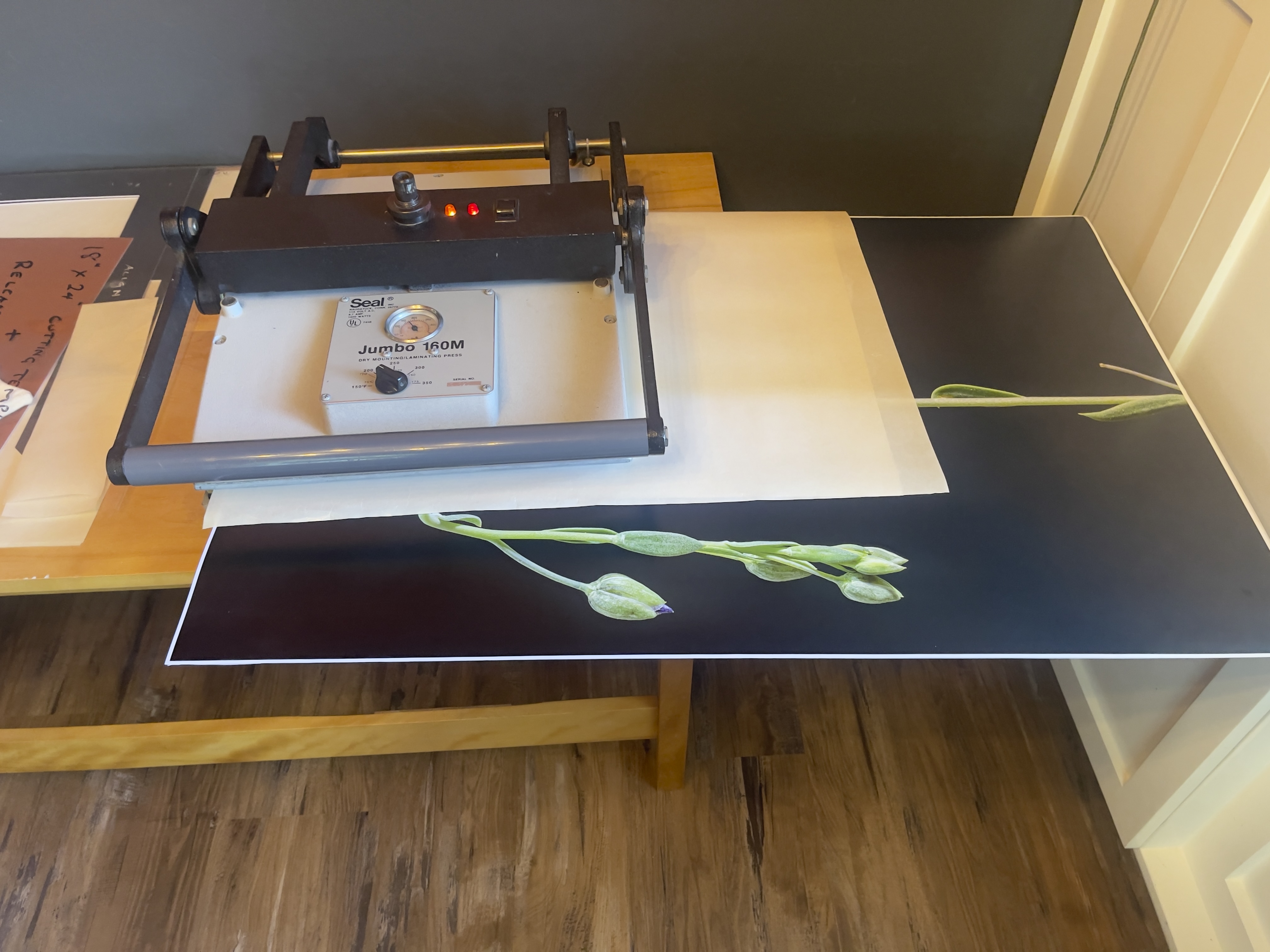
The Seal 160M.

I use a Seal 160M press which I bought ages ago, used, on eBay for some $400 + half my net worth in shipping. It weighs a ton! They are still in business and even shipped me some missing nuts no charge. Today’s price- some $1,400 – reflects the uncompetitive cost of US labor. Will we ever see a flood of cheap ones from China? After all, a press is just a couple of slabs of cast iron and a heater. I doubt it. Few make big prints for mounting any more and I doubt the replacement market in commercial businesses is significant.

Only a fool buys these new. They regularly crop up for $250-500 used and all parts are readily available, not that there’s much to go wrong. The 160M weighs 60 lbs so try to buy locally. The 210M comes in at a whopping 75 lbs. Buy locally and bring a friend.

Typical eBay selling price – this is for the 210M. The 210M has two pressure adjustment knobs in contrast to one for the smaller 160M

The device could not be simpler, so if the heater or thermostat blows, replacement is cheap and the process simple. The whole thing is made up of less than two dozen parts, and B&H carries the essential ones. Framers’ Island also carries spares, including thermostats.

Not exactly complex ….

You can read all about mounting prints here.

I turned the temperature down from my usual 195F (HP Satin) to 185F for the glossy and also first removed the heated platen and gave it a thorough scrubbing with steel wool to remove any surface imperfections. You know how glossy is! Further, I’m careful to keep the release paper (prevents the print sticking to the heated platen) in a dust proof bag to avoid ingress of particulate matter which could mar the surface.

The results are simply spectacular. The surface lost none of its gloss (it will at 195F so temperature seems critical) and there’s not a divot or scratch to be seen. But it is a labor of love! The faster these prints go behind glass, the better.

Mounted glossy prints with helper.

To learn more about the Seal press click the download buttons below. If you track down a used one, look for the S or M designation in the model number, indicating it’s a later model which does not use asbestos in the wiring insulation. Life’s too short as it is.

Download the Seal 160M/210M manual. 160M – up to 2×18.5″,
210M up to 2×23″. Both accommodate any length.

Download the Seal 110S manual – up to 2×12″

The maximum width of a board which these will accept is twice the larger dimension of the platen – you simply flip the board around. Overlapping/reheating a previously sealed area has no deleterious effect. The maximum length is infinite as you simply slide the board sequentially through the press. A 13″ x 19″ print needs two passes in my 160M, whereas an 18″ x 24″ requires four, both when centrally mounted on a 22″ x 28″ mat. It’s the size of the mat, not of the print, which constrains capacity.

Nothing beats a professionally mounted print and, as I have written before, I am still searching for evidence of fading or discoloration in prints I mounted almost 40 years ago using a domestic iron. So when snake oil salesmen come calling, telling you that heat mounted prints fade, ask to see the evidence.

Glossy paper

The touchstone of the photographer’s art.

Its been quite a while since I made glossy prints. In the darkroom days I would squeegee the print, face down, onto a high gloss sheet of chrome-plated steel then heat the thing in a press. If you got things right the resulting print would emerge with an indescribably high gloss (this was before awful RC papers ruined traditional printing) which was also quite incredibly fragile. Any moisture or fingerprints and the surface would be ruined. But the definition afforded the image was beyond compare.

This was not all good, of course. Every imperfection in the image was disclosed, every grain of Kodak’s unbeatable TriX emulsion revealed. Sometimes you wanted that. Sometimes not. And the whole process was a real pain in the nether regions but once you saw an unglazed, normally dried glossy print you never wanted to go there again.

Nearly all the many prints I have made on my HP DesignJet 90 dye ink jet printer have been on HP-branded Premium Plus Satin paper. This paper has a semi-gloss finish, retains detail well and is very easy to use. It has a swellable surface, meaning its pores open when sprayed with ink to absorb the dyes. After a few hours the swelling subsides and the print is less fragile and can be handled easily. Until then the surface is quite fragile. I always handle paper using cotton gloves because any grease from fingers on the surface can result in poor ink absorption, blotchiness and reduced life. Done carefully, HP’s Vivera inks are certified by Wilhelm Research for some 80 years longevity.

Well, take a look what arrived on my doorstep the other day:

Nice things happen to nice people.

The buyer of a hefty chunk of my Canon 5D outfit found several goodies in the shipments I made. A few CF cards, a wired and wireless remote, an LCD protector, a CF-to-SDHC adapter and so on. He had been a pleasure to deal with, none of the usual game playing or nickel and dime nonsense so beloved of buyers of even fairly priced gear, that I felt it was the least I could do. Well, Barry B. dropped me a note saying that he no longer made prints and would I like some HP Glossy? Is the Pope a Catholic? It gets better. The small fortune in printing paper is not only the swellable type specific to my HP DesignJet, it was shipped to me at no charge! There are decent people left in the world …. thank you, Barry.

On receipt the first thing I did was to download the paper profile from HP and make it available to Lightroom. Then I took an image which would really benefit from the ability of glossy paper to render fine detail and ran a test print. In this image I had retouched some overhead wires using Photoshop CS5 and Content Aware Fill and it looked just fine on my Dell 2209WA display. But, oh! boy, the test print clearly displayed my retouching so I had to go back into PS and try harder. That’s glossy paper for you. Every imperfection, every pore, every blemish, is writ large to the world.

A second print – I have no fewer than 125 sheets of 13″ x 19″ to play with so I’m feeling a tad profligate – put all to rights and the quality is simply breathtaking. And this from the Panny G1′s poncy little MFT sensor!

A warning. Before these swellable papers dry, a matter of a few hours, they will show a mottled surface reflecting (!) disparate ink absorption across the surface. Give them a few hours and the surfaces returns to normal, meaning a high gloss almost as good as those monochrome prints from ages ago, but a lot easier to make.

Glossy is not for everyone. It’s hard to display, attracting reflections as it does. It’s fragile and really needs mounting behind glass. It’s unforgiving when it comes to the photographer’s technique. And it needs to be handled with kid gloves …. OK, cotton gloves. But, done right and displayed right, a glossy print remains the touchstone of the photographer’s art.

Why do you think that nice Mr. Jobs insists on those dumb glossy screens on all his computers? Because they plain look better on a casual acquaintance. That’s fine for prints. Not so good for computer screens.

HP Glossy is anything but water resistant, so keep it away from rain drops and the like:

Two minutes under a tap and the emulsion starts to run.

HP DesignJet monochrome printing

Using the right profile.

I’m really not a black and white guy, having last seriously used the medium in 1979. Still, now and then I make a monochrome print from a color original, using the ‘B & W’ option in Lightroom’s Develop module. This is well engineered as you can still vary the mix of the original colors using the sliders for each, and can easily alternate between color and monochrome renditions to gauge the effect.

The dye ink HP DesignJet printers are renowned for the outstanding depth of their black inks with no bronzing on HP Premium Plus Satin Photo paper. Read on to get the best black and white rendition possible, short of paying up for custom profiles.

Using the stock Premium Plus Photo Satin color profile a monochrome print from my DesignJet 90 is too cold. I mostly prefer a slightly warm rendition, so I set about finding dedicated monochrome profiles for this fine paper.

HP still offers free downloads of icc paper profiles from its website for black and white printing and warn that these should not be used for color prints as the results may be unpredictable.

Click below to download these:

Click to download HP monochrome profiles.

There are many to choose from. Basically you experiment until you find the profile that suits your tastes. The download includes instructions for Photoshop but you can readily adapt these to Lightroom.

After downloading, I installed the HP neutral profiles by dragging and dropping the downloaded folder to Username->Library->Colorsync->Profiles. I printed the test print (named Neutral_Profiles,jpg and to be found in the ‘Index_profiles’ folder in the download) using Snow Leopard and Lightroom, and telling LR to use the Neutral 0 profile.

As luck would have it that one gave me the result I wanted, viewed by daylight, warmer than the stock color profile and just right for my taste, so I renamed the Localized Description String as explained here in the ‘Neutral 0′ profile to HP 90 Neutral 0, and checked it off, along with the regular color profile in the Print module of LR (you can also see the other B & W profiles which I did not rename in this screenshot):

Now when I go to the profile selector in LR I see:

It takes less time to do than to explain and is a worthwhile step for best black and white print quality. You can use any one of the many profiles to suit your preference. I like life simple, so I only use the two profiles above with HP Premium Satin photo paper.

About this site

Categories

Archives

Translate