Effective and fast.
Lightroom Classic has added an AI powered object removal capability. It’s superior to Content Aware Fill in Photoshop or Affinity Photo 2. The latter two frequently get confused when an object is closely bounded by others, wrongly duplicating the bounding objects and generally doing a poor job. LRc is superior in this regard.
Here is where to find it in the Develop module:
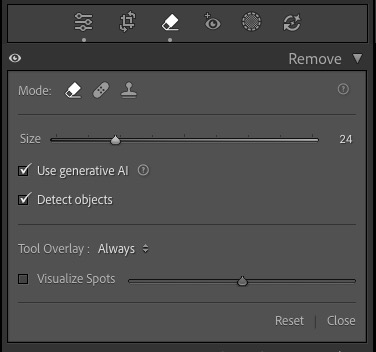
The AI Remove panel in LRc.
I am busy documenting fall in my community but the lovely fall colors in the streets are frequently disrupted by the presence of parked cars. Case in point:

The scene as photographed.

After applying LRc’s AI object removal.
Click the image for a larger version.
In the enlarged version you can clearly see that the car peeking out between the tree trunks has been removed perfectly.
Impressive technology. LRc 15.4.1. You must have an internet connection for this technology to work.
Leica SL2-S, 20-200mm Sigma at f/5.4 and ISO 100.