Category Archives: Photographers

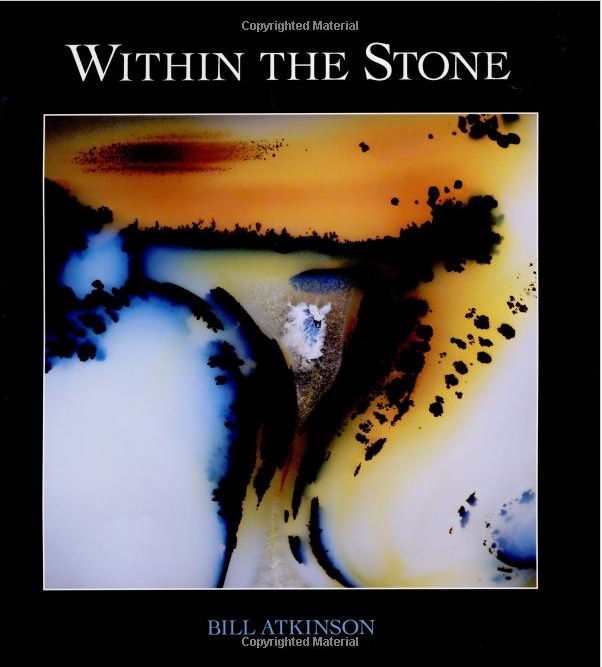
Bill Atkinson

Book review.

Click to order.

As you are reading this on a computer you are a user of Bill Atkinson’s work, whether you know it or not. You see, Bill was the designer of the original Macintosh graphical user interface almost three decades ago, building on the work done by Xerox at PARC (who were clueless as to what they had) and it’s one used by every Mac and PC today.

But chance does not distribute talent evenly, so in addition to being one of the greatest software engineers of our time, Bill can also lay claim to being an immensely talented photographer.

‘Within the Stone’ is a picture book of 72 photographs of naturally occurring stones. That’s the prosaic description. The reality is that this is simply gorgeous abstract photography, conveyed through the best color reproduction in any book I have seen. It’s not enough that Bill researched his subject over many years and migrated from medium format film to a large sensor scanning digital back to make his pictures. In the process he got deeply involved in researching the reproduction of color on paper and to say that the result is a revelation simply fails to do it justice.

Until now the touchstone for me of abstract photography of naturally ocurring colors and shapes has been Roy Hamman‘s superb Boatscapes, pictures of weathered boat hulls, four of which I am proud to say hang on the dining room wall here. Well, Roy finally has some competition!

If you buy the book, please buy it from Bill directly, not from Amazon. This is a labor of love and I would bet it’s a big money loser for the photographer. Support the arts for just a few dollars more than the WalMart of online sales demands. And, as you might expect of the designer of the Mac’s elegant interface, the packaging is perfect too, with the cardboard shipping container’s flaps overlapping just so, preventing a careless knife from damaging the contents. But then you probably would expect no less from Bill Atkinson, a man not given to doing things by halves.

Wireless video routing

Made possible by the A5 CPU.

AirVideo:

A few months ago I wrote about ZumoCast, software which, when installed on a computer and an iPad or iPhone would permit routing of movies on that computer to the iDevice wirelessly. The use was obvious. When you have a lot of movies on your computer or on a file server connected to that computer, it’s nice to be able to view them remotely. The iPad is ideal for this sort of thing when you are in bed!

Sadly, ZumoCast is not available for iOS any more. Motorola bought the company and that business now belongs to Google. Google and Apple are not friends. Goodbye ZumoCast.

But there’s a new alternative named AirVideo, available for your iDevice for all of $2.99 with a free app which has to be installed on the computer in question, as with ZumoCast. AirVideo works well and you can enjoy movies over wifi from your file server or computer on your iPad or, for those with great eyesight, on an iPhone. My iPad 1 or iPhone 4S receives and plays the video and sound fine as long as I am in range of the home wifi.

Rebroadcasting:

But why not take it a step further?

One of the major changes in the iPhone 4S and iOS5 is the ability to rebroadcast whatever the 4S shows on its screen to any display device to which an AppleTV is connected. This is non-trivial and Apple has done a poor job of publicizing this feature, also available on an iPad2. Earlier iDevices which do not have the fast A5 CPU in the iPad2/iPhone 4S cannot do this. They call this AirDisplay and it’s much improved in iOS5.

The Apple TV is an inexpensive, unobtrusive gem, much underappeciated and poorly marketed. I wrote about it extensively, starting here.

Invoking AirDisplay:

First hop into AirVideo on your computer, set up the directories where your movies reside – this only has to be done once – and you can start AirVideo on the iDevice.

To enable rebroadcasting of the iDevice’s display, double click the Home button on the iPhone 4S/iPad2, then swipe the displayed app icons at the base of the screen twice to the right. (Clicking the AirDisplay icon from within an app does not cut it). You will see a volume slider and the AirPlay redirection icon. Touch that icon and available output devices will be displayed. If you have an Apple TV on the same wifi network it will appear as a choice. Choose it. Below the Apple TV choice, if you have upgraded the ATV to OS 4.4 or later, you will see a Mirroring button. Turn it on. (If your ATV is on OS 4.3 or earlier that button will be missing. Update your ATV software).
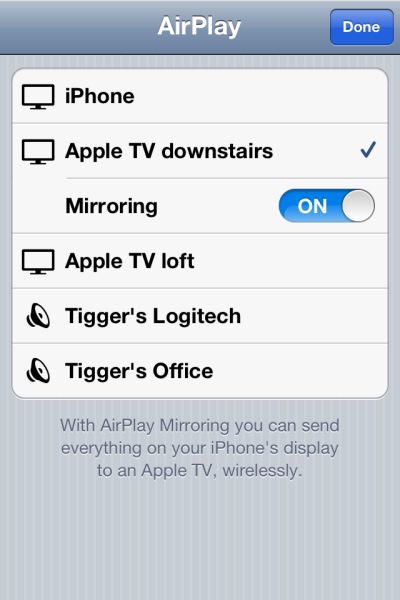
Air Display Mirroring control in iOS5, on an iPhone 4S.

Choose the movie to watch on the iPhone/iPad and you will see:
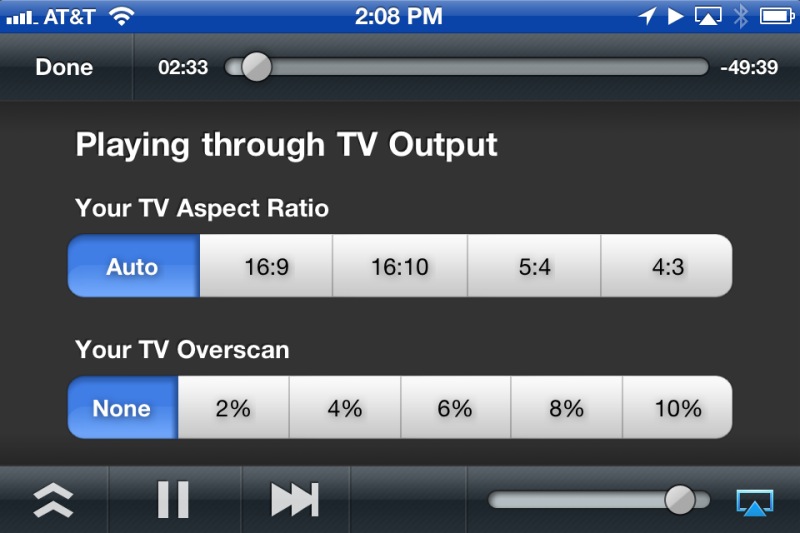
You can now play the movies on the display attached to the AppleTV you chose earlier.

Topolgy:

  • My stored movies reside on the ‘file server’ – a bunch of wired hard disk drives.
  • The file server is connected to the MacMini and can play those directly.
  • I am instead re-routing them to the iPhone 4S and thence to the AppleTV, both wireless.
  • The software on the MacMini and iPhone 4S is AirVideo.
  • The Apple TV routes the wireless video signal to a wired screen of choice – to any screen the AppleTV is attached.

Here’s how things are connected:
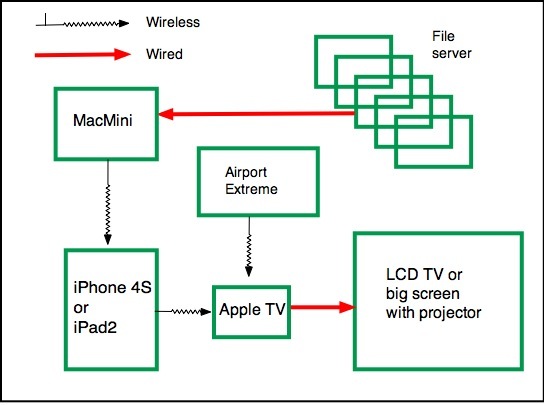
AirServer topology.

Why bother? After all you could simply watch the movie on the MacMini without any of the other hardware or software.

And why not just put all the movies in iTunes on the MacMini?

Well, first iTunes is very restricted as to which file type it will accept. No .avi, no .VOB, etc. And my stored movies are in many different formats.

Second, the display device with its attached ATV can be anywhere there is a wifi signal!

And, finally, the hard wired approach dictates just that – physical wire connections which are not always possible.

So to get a wireless signal to a remote big screen, say, without having to move server boxes or having to run cables, all that’s needed is an iPhone 4S/iPad 2 (the iPad 1’s CPU cannot hack it and stutters), and an ATV connected to the remote display device of choice – big screen TV or overhead projector. The iPhone 4S acts not only as receiver/converter/transmitter but also as a wifi remote, no IR line-of-sight controller required.

When a call comes in, the movie is automatically paused and the phone call is answered. When you hang up, one touch on the iPhone’s screen gets the movie playing again.

Display quality is identical to that when the movie source is hard wired to the display.

Is that serious magic or what?

You can get some sense of how much faster the 4S is at processing tasks, compared with its forerunners, from this Apple Insider chart:
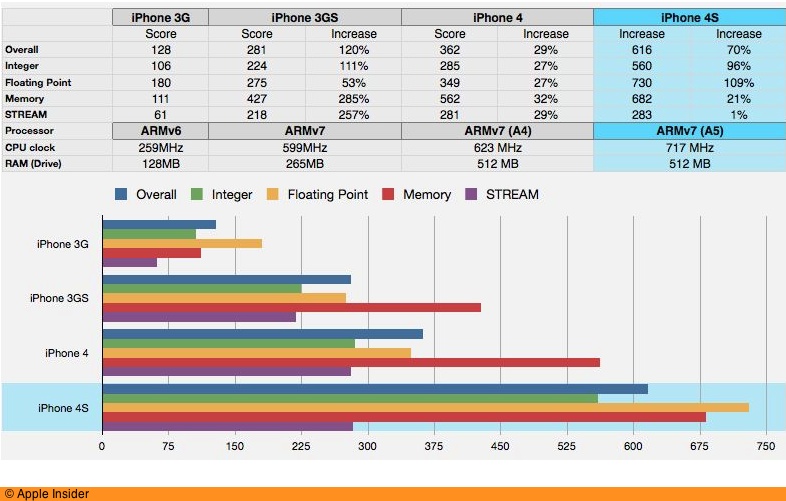
I think I have just solved remote routing of movies from the file server to a large, remote drop down screen!

Performance:

I ran a full length HD movie through this and the iPhone 4S used about 40% of its battery during the two hour test. It is working very hard, converting the received movie from the MacMini on the fly and rebroadcasting it to the Apple TV. Despite that the movie does not stutter. If the battery is low simply connect the iPhone to a USB connection on a local laptop or to the mains. iPad2 users should have no battery capacity issues.
The FSA in color

Magnificent work.

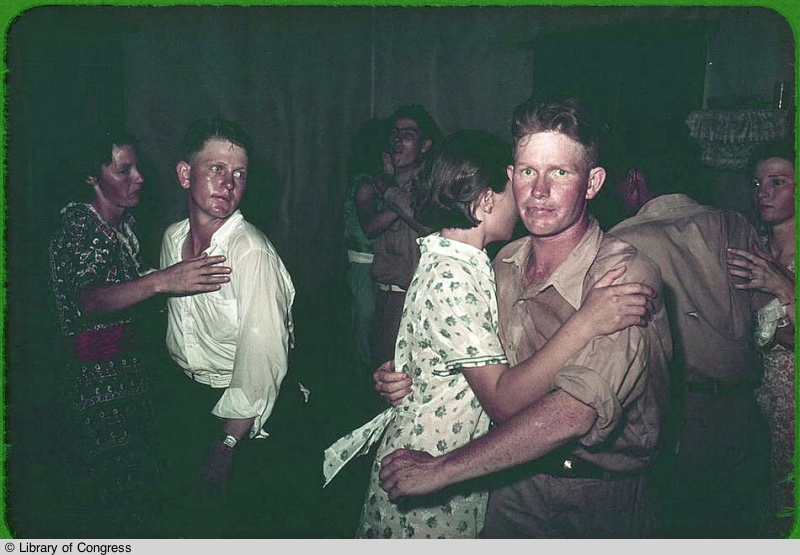
Who is not familiar with the great Farm Security Administration photographers’ work? One of FDR’s best ideas, these great photojournalists recorded the first Great Depression in stunning black and white.

As luck would have it, a friend sent along a link to the Denver Post with no fewer than seventy extraordinary color works. Most have wonderful color with the exception of #19, which has a bad magenta cast, which I have fixed and reproduce below. Click for the article and prepare to be moved.

Click the image for the photographs.

Once. Again.

The second issue is out.

I wrote about the free ‘teaser’ issue of the iPad photography magazine Once here. The second issue is just out and it’s a bargain at $2.99.

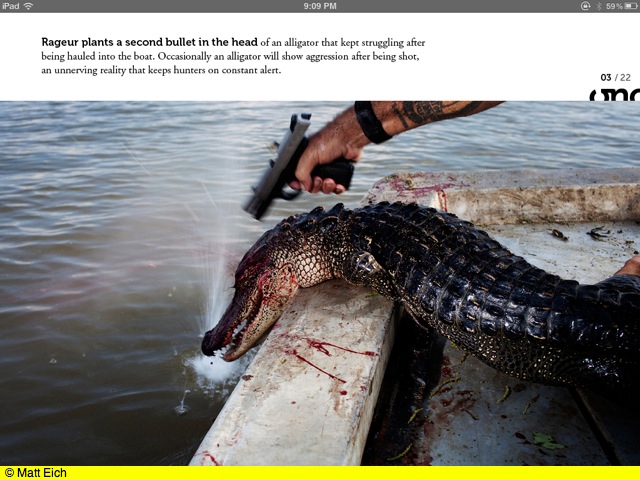
There is a startling documentary photography piece by Matt Eich on alligator farming in Louisiana. I don’t know what these tough men get for doing this job, but you can bet it’s a lot less than Bottega Veneta gets for the handbags which result.

A bayou alligator is shot prior to becoming a handbag.

The other two pieces illustrate the Bay of Bengal’s increasing salt content, a result of global warming, and Chernobyl’s catastrophic aftermath, including an outstanding interactive map showing areas with stil dangerous radiation levels around the blast site.

‘Once’ is recommended to all iPad users who enjoy documentary photograhy with a powerful message. Mine is an iPad 1 running the latest iOS5 and I rout the pictures and videos to a big screen to which an AppleTV is connected. A great way of seeing photographs, though display on the iPad’s screen is almost as good.

At $3 an issue you are not adding to the world’s recycling problem while supporting great artists.

Simple animation

A time lapse movie is easy to make.

Our 9 year old son likes to get traditional games from Mindware, a source which specializes in non-electronic toys and games with the common theme of making a child (or adult assistant!) think.

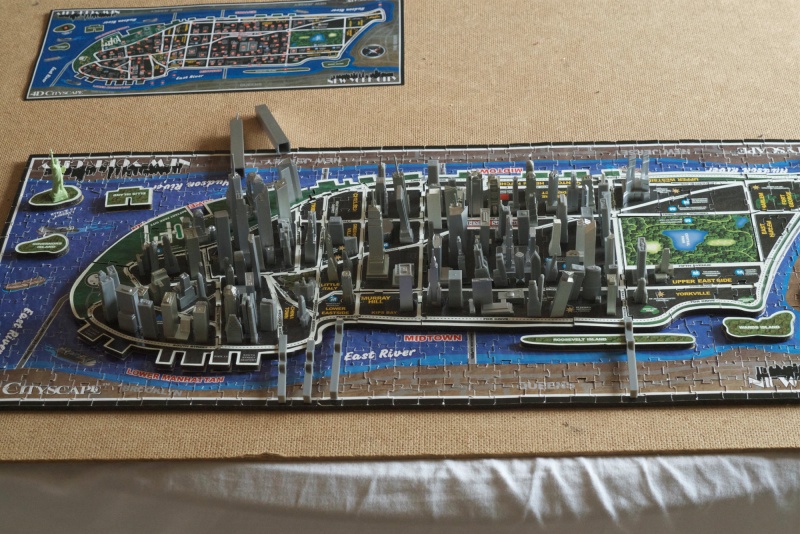
His latest is a study in criminality, also known as the building of Manhattan. First you assemble a jigsaw puzzle of Manhattan, complete with cutouts for all the buildings, then you insert the buildings in chronological order showing how Manhattan, as we know it today, grew. The oldest is the 1812 City Hall, the newest the Millennium Tower, that monument to hubris and stupidity which is an open invitation to terrorists for an action replay of 9/11.

When assembling the puzzle, Winston reminded me that he had taken a movie animation class during his summer holidays, so it was a matter of moments to set up the G3 on a tripod, hand him the wireless remote and instruct him to press the button after each building was inserted. This he proceeded to do with great aplomb, giving the remote a dramatic swing and press each time. David O. Selznick would have been proud.

You can download the result by clicking the picture below. Two things are immediately obvious – the white balance control in the Panasonic G3 sucks (as it did in the G1) and I really should have used a constant light source like an electronic flash. A couple of frames are unsharp, probably the G3 waking from sleep and failing to focus in time. Further the inevitable bumps of the tripod make the result move around a bit. Finally, the Statue of Liberty was not the oldest structure, but as a proud American, Winston insisted of placing it first.

Click the image to download.

I have a pretty good knowledge of Manhattan’s architecure from having lived there many years and because architecture fascinates me, so it was no surprise to find that the easiest buildings to place were those built before 1960 with the hardest dating from the International Style boxes which dominated the subsequent decade. I mean, how do you tell one smooth-sided slab from another? I’ll make honorable exceptions for Seagram for its quality and Lever House for its airiness, both on Park Avenue, but the rest of that period would benefit from a wrecking ball. And if you want something quite unsurpassed for sheer ugliness, try the grandly named 1 New York Plaza on Water Street at the tip of Manhattan, where I worked at Salomon Brothers in the 1980s. The miscreant designing this had some sort of obsession with those early touch type elevator buttons because that’s all it resembles.

While you can get a far higher quality result than in this case, the technique involved is simple. Dump all the pictures into iPhoto, click Command-A to select all, then drop them in a New Project in iMovie. I used iMovie ’09. Hit Command-A in iMovie to select all the images then hit C for Crop. Click on Crop to avoid the Ken Burns effect default, which does not work for time lapse movies. Then export the movie (‘Share’). This one has 127 images/buildings, one second for each. The download is just 11mB in size.