An interesting exchange with a reader.
A friend of the blog left an interesting Comment/question the other day which I was pleased to debate. Absent a digital point-and-shoot, Michel is still largely a film user of all formats from 35mm to 4″ x 5″, with Leica M6 and R hardware as well as a Hasselblad 501. He’s thinking about a G series Panny for the same reason I took the leap – small, decent sensor, good lenses. Our exchange is repeated below, with Michel’s permission.
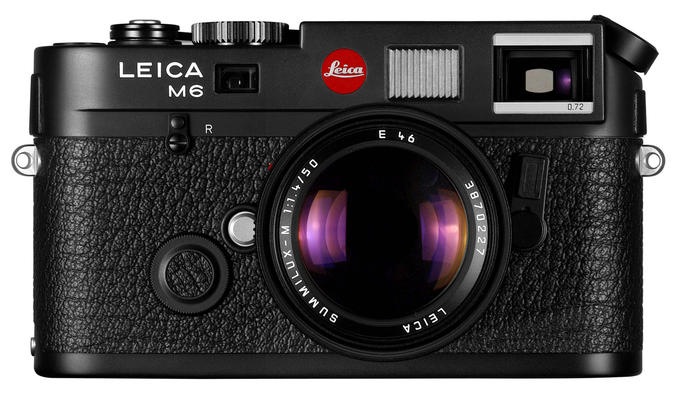
The M6 – an exemplar of the last generation of film cameras.

Michel – interesting question.
Full frame cameras:
First I cannot go back to a heavy full frame camera owing to wrist and back pain. Second, I cannot adopt an M9 owing to absence of autofocus and silly pricing. Lenses have a decent life expectancy, sensors do not, so $7k for an already obsolete sensor fails my basic test of economics and useful life. Case in point, I took a beating on the sale of the 5D whereas all my Canon lenses sold at 80-90% of my cost of 5 years ago.
Until/if FF cameras get much lighter, I have no interest in one. Equally, had you told me five years ago that I would be selling the 5D for an MFT sensor (which did not exist at the time) I would have laughed. So ‘never-say-never’. The design genius residing in Japan is quite capable of crafting a Full Frame body which takes a series of compact, high spec lenses and has a superb EVF which is, even in the G1, superior to anything on any Leica RF in poor light. However, if the Japanese continue to perceive there is too small a market for those, we will never see one. Great design and consumer demand/profits are not the same thing.
Small sensors:
I expect small sensor cameras to only improve over the next few years. Case in point, tests (not mine, as I have yet to try it) suggest that the second ever sensor made for MFT cameras (all Panasonic and Olympus models have used the same sensor until now), the one found in the costly Panasonic GH2, is noticeably better than the original model in the G1, EP-1, etc. I wrote off the MFT format when it was introduced and I was dead wrong. (Well, I did call the iPad right, buying two on the first day!)
The most used camera:
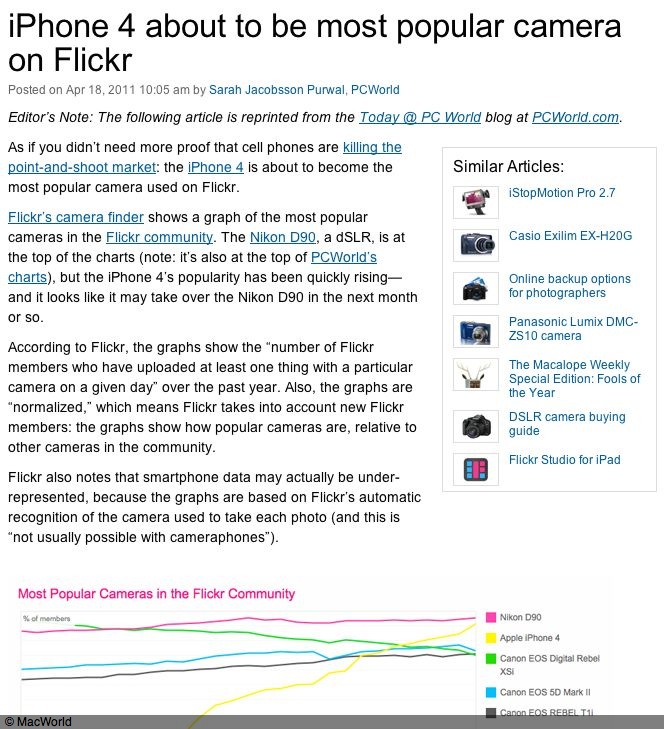
I just read today in MacWorld that the most used camera on Flickr is about to be …. the iPhone4. So I am not alone in wanting small, light and take-it-with-you-without-excuses gear. Interestingly the big body DSLRs seem to be peaking, looking at the chart below.
Cameras and trucks and prints:
A while back Steve Jobs said that the desktop PC (and, by inference, the traditional laptop) will become the ‘truck’ of the computing world. It will be a limited use, special tool for the few power users who need it. I believe the full frame and medium format digital cameras of today are already heading in the same direction. Those who need big enlargements will continue to justify putting up with the bulk, weight, noise and cost of the gear. But given that even the cheapest point-and-shoot more than adequately fills a 50″ LCD screen at home and with a little care will yield 13″ x 19″ enlargement (the maximum the ‘prosumer’ printer can do) and that paying just a little more gets you an excellent APS-C Nikon/Canon or MFT Panny/Oly which can scale to 18″ x 24″ paper prints without too much difficulty, who needs more? How many prints larger than that does the average consumer have at home on the wall? I would bet none. There’s is a growing case to be made for the argument that the traditional photo print is, in fact, dead.
One size fits all:
You make the valid point that Ansel Adams might not be the right candidate for a small sensor digital. Agreed. His descendants will happily continue using trucks. And you don’t need me to tell you that ‘One size fits all’ seldom works. Choose the right tool. However, given my avocation for street snaps and the occasional studio portrait, rather than the other way around, MFT works fine for me and I’m sure if I did the research there are some APS-C bodies every bit as capable. Pentax is a master at miniaturization and has produced some nice small APS-C bodies and lenses. Let’s hope that overpriced baubles like the Fuji X100 (yes, I am on the waiting list!) will spur the big boys into competitive action.