Category Archives: Hardware

Stuff

iPad – which size?

An interesting exchange.

I was sitting on the couch with that insouciant boulevardier Bert the Border Terrier, whiling away a pleasant evening hour catching up on world markets on the iPad and enjoying the Unfair Advantage it confers upon the user when, appropriately enough, in comes an email from quite literally the opposite end of the world – Jakarta, Indonesia.

The iPad, as everyone except maybe the Pope knows by now (he seems to know nothing, or so he would have it), comes in three storage sizes, 16, 32 and 64gB, and I elected the 32gB version for the two I picked up on iPad Day last week.

The email came from American photographer Brandon Hoover, whose fine travel photography in Asia can be seen here. He wrote:

To which I replied (yes, that really is me in the picture – Cary Grant looks just like me):

Brandon followed up with:

And my response:

And finally:

Now at this juncture, Bert the Border came to life and inquired, none too politely, when I was going to put the iPad down so that he could get in some serious tree and lamppost action, so I donned my best English Tweed (OK, Scottish Tweed) jacket and off we went on a gorgeous California evening to commune with nature.

As luck would have it, a friend had recently given me his 3G iPhone (I got him into AAPL at $187 and it’s now at $242, so he owed me! My 2G is off to the recyclers after 3 years of hard work.) and I popped it in my pocket thinking no more of the matter. Then it occurred to me that maybe the above exchange might be of interest to readers, so I whipped it out (the iPhone, that is) and sent Brandon a quick request, using 3G no less, asking whether I might publish our exchange. He kindly approved the idea seconds later. Now you must admit that, no matter how blasé we get about technology, there is something incredible about walking your dog on a California evening at 7:25PM PDT and sending an email to Jakarta, Indonesia (or maybe it was Manila in the Philippines) with the reply coming back at …. 7:25PM PDT.

You can follow Brandon’s writings at his nicely designed blog and you don’t even need an iPad, though it looks just great on mine!

Read all my iPad ruminations by clicking here.

The iPad after one week – software

Good and improving.

Yesterday I looked at hardware issues relating to the iPad.

Today it’s Software.

Software:

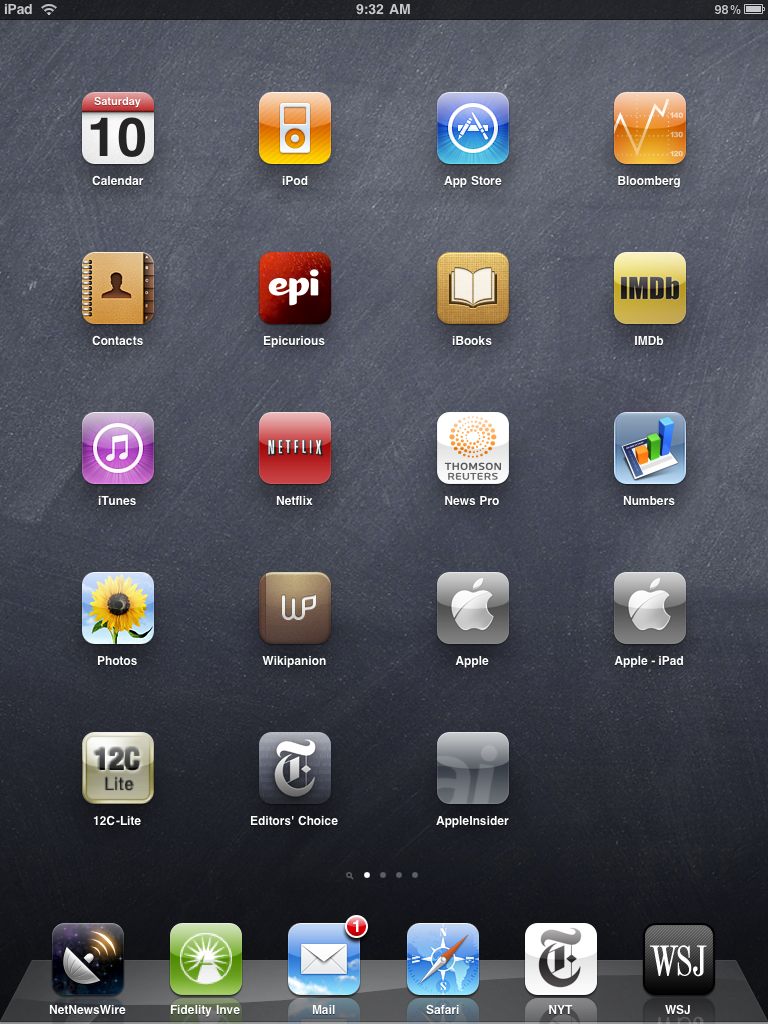
The best way to introduce this piece is to show what’s on my iPad’s Home screen. I’m reproducing this real size so you can get a sense of that gorgeous display.

I always keep one spot open to make it easier to add/move apps. The dock holds the maximum of six apps and these are the ones I use most.

As you can see, for the most part it’s all business, entertainment being limited to iPod (music), iBooks (because it’s so out of sight good), Epicurious (I like to cook), IMDb (I’m a movie buff) and Netflix (just simply superb and something that good deserves a spot on the home screen). The rest has all to do with making money in the markets which is what I do for a living.

But what’s more important is what you do not see here and that is MobileMe. MM allows me to keep my desktop, iPhone and iPad in sync as regards Email, Contacts and Addresses and also provides cloud storage for moving files. While I do have the iDisk app on another page it’s still a work in progress as the iPad cannot open password protected spreadsheets I store there in Numbers. To do that I have to drop the spreadsheet on iTunes on my desktop then sync, whereupon it can be opened on the iPad with full password protection. I am not about to trust Apple (or any corporation, for that matter) with unprotected files wherein reside my crown jewels. I’m confident Apple will fix this oversight which will add a lot of power to Numbers, Pages and Keynote on the iPad.

The main alternative to MM is Google’s suite (mess?) of free applications. Anyone familiar with the user interface of those will realize that it compares unfavorably to Soviet era cameras for finish and polish. If you must use them, have at it, but I prefer cotton shirts to polyester with my Armani suits. And I trust a company which may be bound in a culture of theft even less than I trust one run by P T Barnum’s modern day version. You really think GOOG is Doing No Evil while it analyzes your usage patterns to better target you with advertising?

iPhoto is right now more business than pleasure for me. Getting a screenshot of a news story to a colleague for debate dictates holding the Home key, touching the on/off switch – which places the screenshot in iPhoto – then emailing the story from iPhoto. It’s far faster than it sounds and some time soon we will get screenshot apps which do this without iPhoto. I say ‘more business than pleasure’ as there are no processing controls in iPad’s iPhoto. At the end of the month I will receive the camera connection kit and will say more later. Still, this is version 1.0.

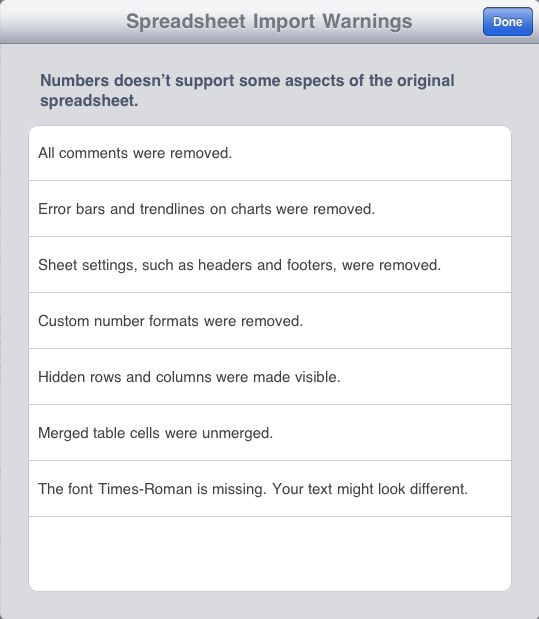
Numbers is a work in progress. I thought I would stress test it by importing a large spreadsheet with many formulae and lookup tables to see how it would cope. Here’s the warning message I received:

Not great. All the formulae worked fine but some of these errors – like the loss of Comments, headers (makes scrolling tough) and trendlines on charts make it of limited use for a money manager right now. Also lots of the row heights were wrong and too small, truncating data, and proved a pig to fix. Then next time you import it’s all wrong again. My major concern is that improvements will be slow (it took Numbers on the desktop two iterations just to get password protection ….) given Apple’s default assumption that most of its users are number blind. They prefer to focus on glamour and glitz in their apps, not hard core reality.

So where is the ROI with the iPad? Simple. Just look in the dock. NetNewsWire is the best RSS feed reader there is and totally explains the meaning of the mantra that has it that Information is Power. It pays for itself many times daily and I hope the authors make tons of money from it. They deserve to, after having given away the iPhone and desktop version for years. It syncs in background mode to all your devices using a Gmail account and works perfectly. Fidelity Investments speaks for itself. My clients and I have been with them for decades, I detest their lack of integrity (but at least I know where I stand) and they have the best execution in the retail business, even if their user interface sucks. Meh, I’m used to it by now and I get the satisfaction of calling them and proffering gratuitous abuse now and then. It’s innocent fun, and a great stress reliever after a visit to, say, an organization staffed solely by morons, like California’s DMV.

It’s hard to see how Mail and Safari can be improved on. If anything, Mobile Mail is even better than the desktop variant, and to all those complainers who say that the iPad/iPhone still lacks a unified mailbox for all your emails (coming to the iPad in the fall), all I can say is you are not thinking. Simply have all your other providers forward email to MobileMe and have the forwarded email automatically deleted from the providers’ servers. Then you only need setup Mobile Me on all your devices. Hey! Presto – a unified mailbox. MM is the single best thing you can buy for your connected devices. Further, once true multitasking and app switching come to the iPad with OS 4.0 in the fall, things will be even sweeter. Right now it’s a bit of a pain to interrupt reading to answer an email.

What’s that you say? MobileMe is just another annuity for Apple and a cost for me? Jeez, get real. Every company wants income annuities and that’s the ones you should be investing in. Suck it in and buy some stock in those. To make money you first have to spend it.

One important thing I have learned is that the three iPad apps for Thomson/Reuters, NYT Editors’ Choice and WSJ all cache content. So fire them up before leaving for a non-wifi location and when you get there you can happily read the news from locally stored content without wifi. The snag here is that NYT has yet to offer an app for all of its paper (what do you expect from the bunch of fools running that paper – they give content away free for heaven’s sake. Way to run a business.) WSJ has small pop up ads at the base of some screens but they are inoffensive and go away after a few seconds. WSJ is slow to load – 30 seconds – but the upside of that is that it caches a lot of content to take with you. If you want to access both WSJ.com and the iPad version, you need two subscriptions. You may accuse Murdoch of cheapening everything he touches (have you checked that parrot cage liner once known as The Times of London recently?), but the guy knows how to make money. Which beats the alternative.

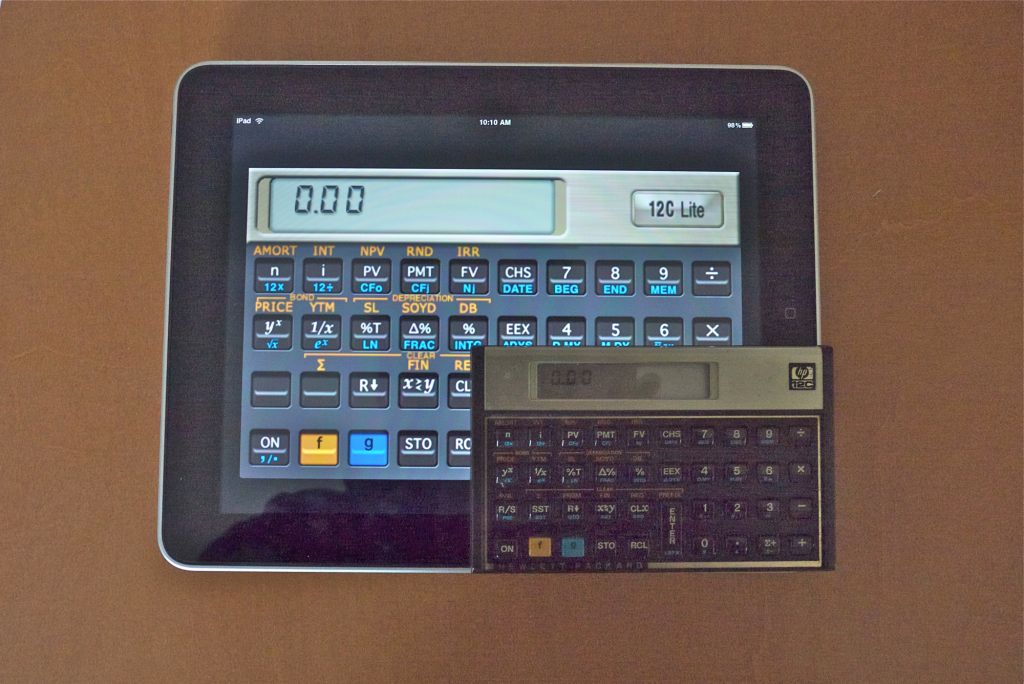
Finally, for those of you into financial math with an engineer’s education (like me!) who love Reverse Polish Notation calculators (figures something so odd would be named after Polacks and as I am one, I should know), here’s the HP12C writ large:

Finally proper sized keys. And no waiting for an answer to a complex calculation. And the iPad is thinner! So there. And be honest. Which would you rather use?

Challenges:

The major hiccup in the iPad’s interface is the challenge of moving data to and from it. There is no Finder like the one you get with desktop OS X. You can bet that when Apple solves that issue it will be done right.

  • Most data can be moved to or from the iPad using iTunes. One more step in the process as you have to sync and over-the-air sync is not yet available. That includes Apps, Music, Movies, TV Shows, Podcasts (useful business and photography information there), iTunesU (very interesting for people with an IQ in three digits), Books and Photos.
  • Email is a direct interface and screenshots are sent through iPhoto for now.
  • There is no native printing function (doubtless coming with OS 4.0 in the fall) and the one app I have tried to work around this, named Print Magic, is indistinguishable from a bilge pump. Both suck.
  • Heavy typing dictates use of a keyboard and my Apple aluminum bluetooth one works fine, or you can get the dockable one, but having to input some commands by touch is a PITA. For now, until a more versatile keyboard comes along, use a desktop or laptop for heavy typing.
  • Apps can be downloaded to iTunes on your desktop and syncd or downloaded directly to the iPad, just as with the iPhone, then syncd back to the desktop for backup. Nice. Too bad the App Store is so awfully organized. How can I search for new apps when I don’t know what they are named?
  • Games? I don’t play games. Our eight year old does and the look on his face, plus the difficulty I have extricating the ipad from his hands, suggests it’s a winner in this genre. Maybe I need to buy a third? His, her’s and the boy’s. Yes, I definitely need a third. Maybe the 3G version.

Stability: I have had to reboot (hold the Home and On/Off switches down for a few seconds) just once during this first week of very heavy use. Use included downloading many apps, much app switching, hundreds of emails in and out, lots of Safari searches, movie, photo, music and book downloads, hundreds of RSS downloads and, of course, a real pounding from our 8 year old playing several different CPU-intensive games. That was necessitated by the WSJ, of all things. They released a bug fix for their app during the week and the new version refused to recognize my account. A reboot cured that. In other words, the device is a model of stability, much as I expected after three years’ experience with the iPhone and comparable with – maybe even more stable than – the desktop version of Snow Leopard.

Free books: There are many sites offering tens of thousands of free books in the ePub format used by the iPad. Two favorites are Project Gutenberg and Feedbooks, the latter even coming over with cover art. Download these to your desktop as there is no direct download to the iPad yet, though Apple has promised one.The ones from Project Gutenberg come with numbers for file names so re-title them before uploading to the iPad. To upload, drag and drop them on iTunes->Books then do a sync.

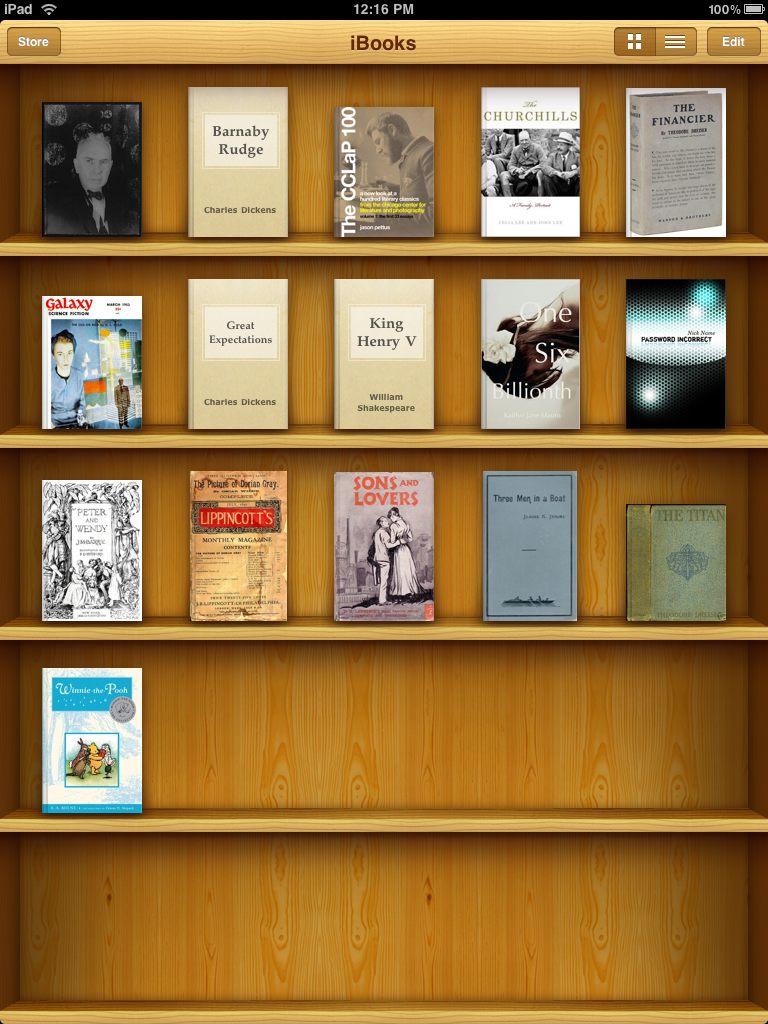
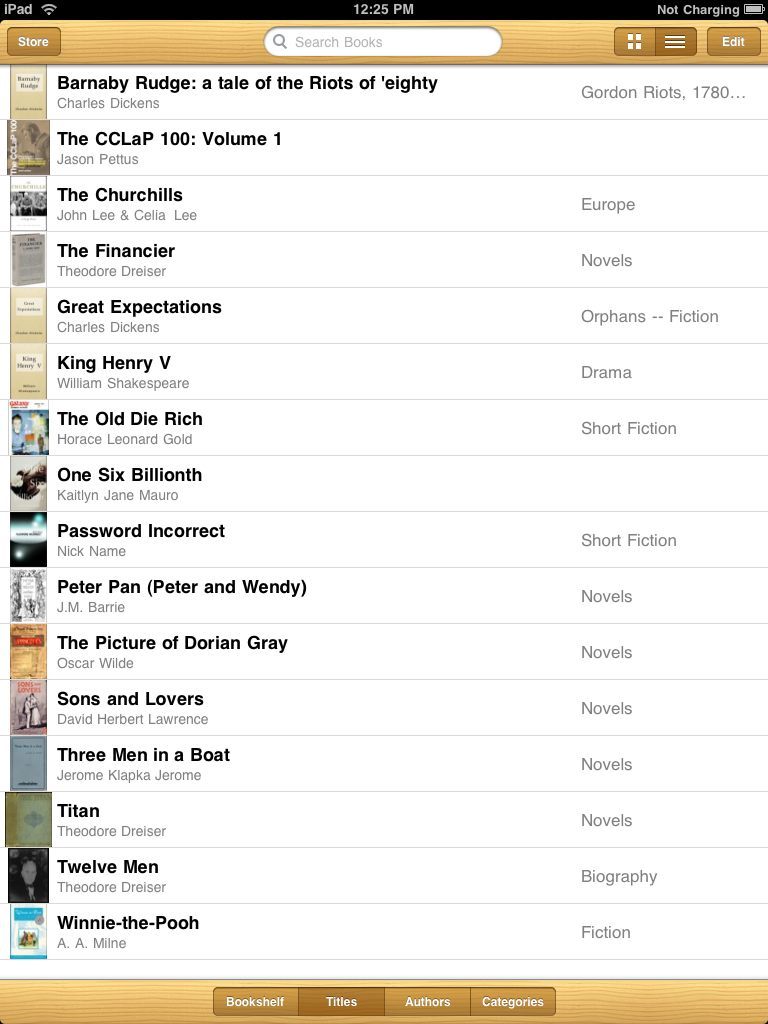
Here’s how my iPad iBooks screen looks:

The Churchill book was purchased, Winnie-the-Pooh comes with every US iPad and the rest are free. Plain covers are from Project Gutenberg.

I have read using the iPad for 2 hours at a time with no fatigue. It’s nice that you can adjust font size and type and screen brightness to get things just so. I find I prefer landscape orientation with the iPad for a traditional two page book layout. You know, like they used to make out of trees in the dark ages.

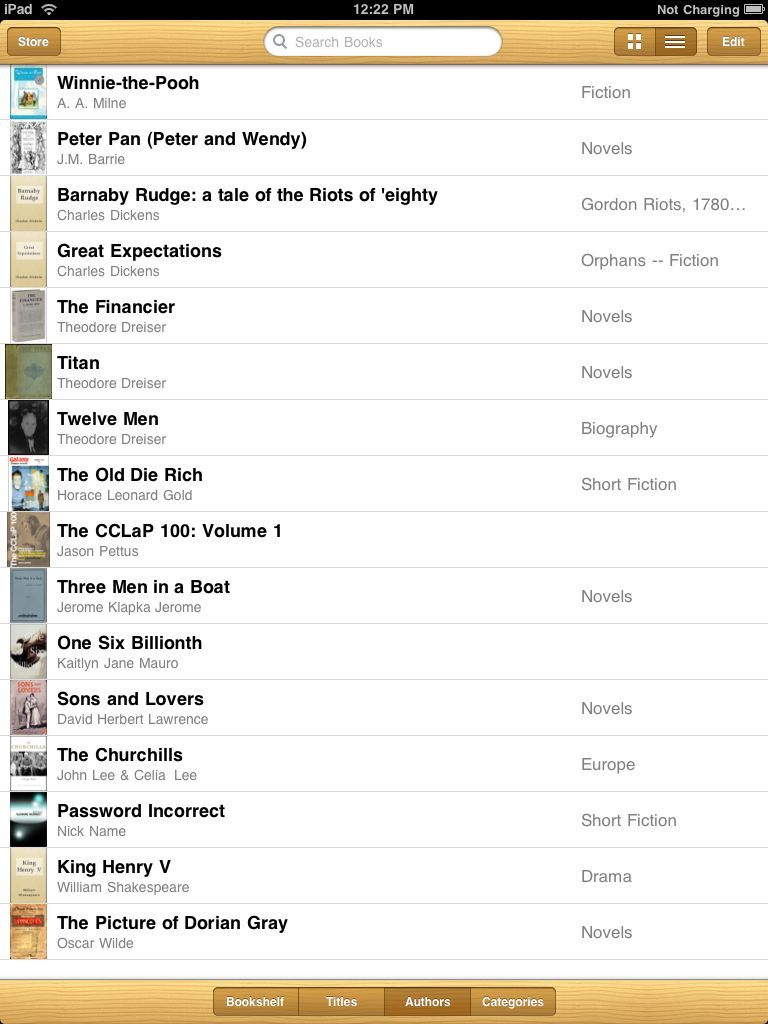
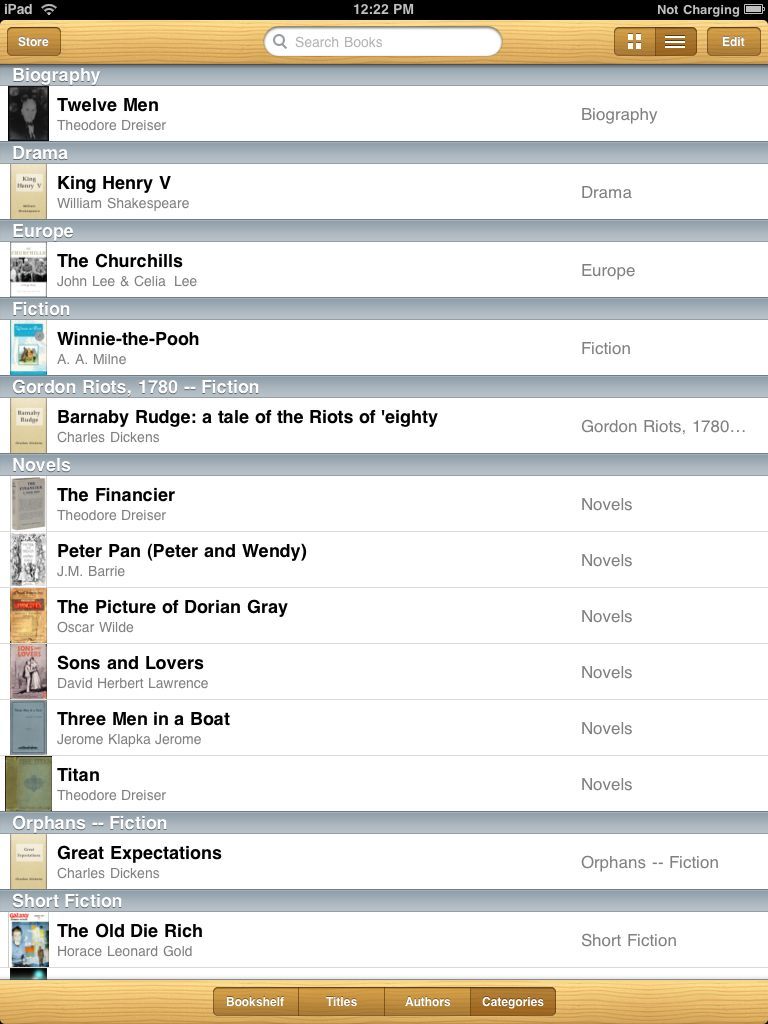
There are three other Library formats:

Titles:

Authors:

Categories:

Bottom line: I would hate to be running a Redmond, WA laundry right now, for they must all be overwhelmed with soiled underwear.

The iPad after one week – hardware

That first time ….

The wait for my first Leica, an M3, was two years, which is how long it took me as a teenager to amass the fortune required to buy a used one with the proceeds of my newspaper round in London. The moment it arrived, I threw out the leather case, stuck a roll of TriX in it and the very first picture I took, Frame 00001, was a winner. That experience continued for many years and the camera seemed as much a part of me from that day as any machine I have ever owned. The enthusiasm of the new never wore off until something better came along 35 years later in the guise of the Canon 5D and, later, the Panasonic G1.

Frame 00001

It was, in other words, just right for the way I roll. A minimum of technology in the way of the image, simple, quiet, fast, beautifully made and supremely elegant. One of the most perfect machines man created.

Later that experience was to repeat – though not at such a level of perfection – with my first Mercedes and Porsche and BMW motorcycle. Machines made for users, not poseurs.

The ultimate in simplicity and representing the very peak of the machine age, is my Patek Philippe wristwatch. Unjustifiably costly, expensive to overhaul (just like my Leicas) but elegant beyond words, reliable and with an absolute minimum of controls. It did one thing very well and continues to do so.

The Leica moved on as I am not a collector and the camera is stuck with 60 year old technology, as did the cars (the Porsche 911 is stuck with 60 year old looks) when more reliable products came from the far east, but the BMW (60 year old technology and looks!) and watch survive to this day.

The iPad is in the same league. Simple, quality execution, marches to its own drummer. Like all of the above machines it will become an anachronism after a few years as yet more capable devices come along but, right now, it is simply the best there is for the way I roll.

Now that the status of the new has passed and the hysteria has wound down and I have had a chance to use the device hard for one week, what is there to say?

The Hardware: The screen is just right – slightly smaller than most books, the iPad’s weight is ideal for reading like a book in your lap. Once the experts have tested them, I will add a matt stick-on film to avoid the insidious reflections resulting from Mr. Jobs’s high gloss fetish, which will further improve matters, especially when you try to read with a light source over your shoulder.

The back is wrong. While the machined aluminum is gorgeous to behold, like Leitz satin chrome of old, the back is gently curved meaning the device will simply not sit still on a flat surface. The lightest nudge and it wants to pirouette. And unless you change the shape no stick on rubber is going to fix that. It’s not that you really mind as it’s a lap-held device, but it’s discomfiting to see the iPad spin as you place it on the coffee table.

The device has four mechanical controls. The Home button just like on the iPhone and they got the resistance to pressure and tactile and audible feedback dead right. The other three mechanical switches – the volume rocker, on/off and screen rotation lock – are wrong, very wrong and dead wrong, respectively. All are wrong in that their edges are too sharp. The crude finish contrasts with the overall excellence of the design. They may wear with age (though I doubt it) but Apple should look to its iPhone for profile and finish of these. The volume rocker is very wrong as that should be a touchscreen control. The rotation lock is dead wrong as this really should be a software function. Every mechanical device is just one more thing to go wrong and a slider is more wear prone than a touch switch. A dedicated touch area on the screen to lock orientation would be faster and less failure prone.

The screen is, of course high gloss – see above for the fix – and has the oleophobic finish shared with the 3G and 3GS iPhones, meaning the grease from your fingers is easily wiped off. Two wrongs making a half right. Like the iPhone’s, the glass is incredibly tough and it would take a concerted effort with a sharp object to scratch it.

The overall form factor and the sheer thinness (another Jobs fetish) of the device makes it a bit slippery to carry around. There’s not a lot to grasp and friction is notable for its absence. There’s not the chunkiness of a netbook nor the rough cover of a book making it easy to hold. It wants to be dropped and I suspect that the force of gravity and the resulting impact will see many remaindered iPads. Care is called for here. Get a shoulder bag of some sort.

Speed is outstanding and shows what happens when you design software to run natively with a new CPU’s architecture, rather than try to compromise with conversion approaches. It puts a netbook to shame on routine surfing and email tasks and poses a decent challenge to a fully featured laptop or desktop machine. I confess when Jobs said “It screams” at the roll out that my BS meter bent its needle. My meter was wrong!

“Subjective clap trap” I hear the Doubting Thomases among you expostulate. Fine.

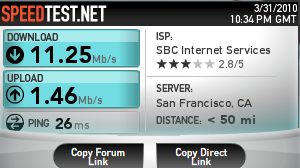
Here’s my nuclear powered C2Q 2.83gHz desktop on wireless 802.11n 2.4gHz, running Snow Leopard 10.6.3:
And here’s the iPad on the same network at the same location::
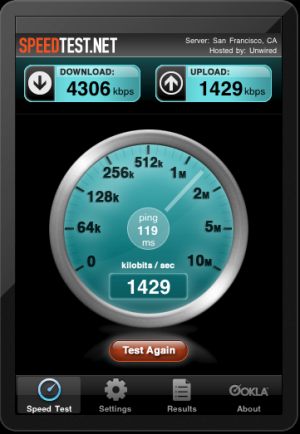
The download speed is 38% of the desktop’s and the upload is virtually identical! And while a 4.3gHz download speed will have Europeans and Asians laughing in ridicule, it’s pretty decent for web surfing.

Heat is notable for its absence and is a standout feature. No matter how long or hard you use it the iPad remains cool. Remarkable and a marked contrast to any of Apple’s tired laptop offerings which can double as toasters in a pinch. There’s no fan and the iPad is silent in operation – another step forward in machine design.

Weight is remarkable, also for its absence. With charger it’s 1.6 lbs, compared to 3.3 lbs for my deceased netbook and 6 lbs for your MacBook Pro. It’s the difference between lugging around a full frame DSLR and a Panasonic G1. A tremendous accomplishment which reduces the resistance to use when you absolutely do not want to have to check your email at the weekend from the ass who is your boss.

The speaker is remarkable after using a netbook or laptop. It simply has no right being that good. For serious listening there’s a standard mini-jack headphone socket and doubtless a plethora of speakers to come from the aftermarket. I’m holding out for a pair of Bowers & Wilkins. “British and Best” as my mother would say of Sheffield Steel.

And if the light weight and low heat output were not enough, the real icing on the hardware cake is the battery. I speculated that Apple would lie about the battery life as they always have in the past with their mobile devices and I am delighted to admit I was dead wrong. 11-12 hours at a charge regardless of what you are doing is the norm, and as the battery is a lithium ion type there’s no need to drain it before recharging to maximize life. Two recharges from half full are the same, in figuring the number of recharge cycles, as one recharge from empty.
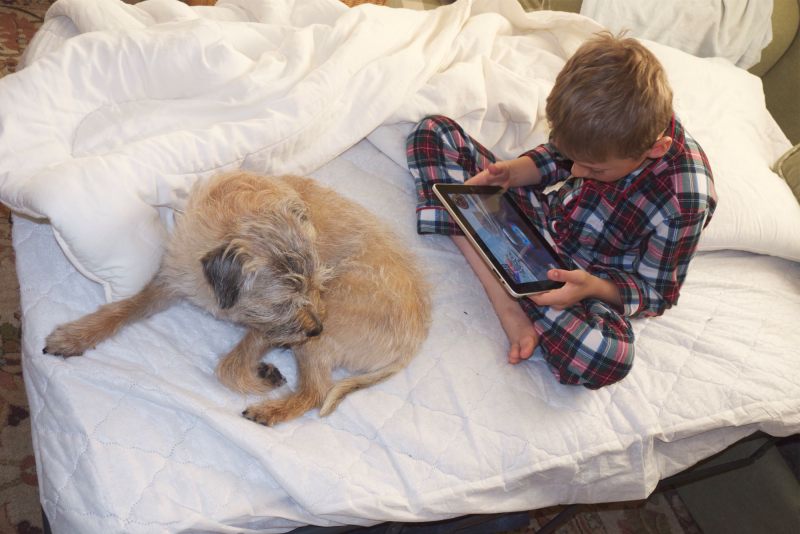
iPad tester and critic at work.

Tomorrow some opinions and thoughts on the software side of the equation and on the user interface.

And my first stock market trade on the iPad? A winner just as with that first Leica. Why yes, a few shares of Apple stock to make sure I didn’t have to actually pay for it. Un-American to contemplate that prospect. I live, after all, in the land of hand-outs. Now do you see what I’m going on about when I write of the Unfair Advantage? I confess to being comfortable in bed sporting my Scottish tartan jammies at the time ….

The HP Slate

Well, it has a better name.

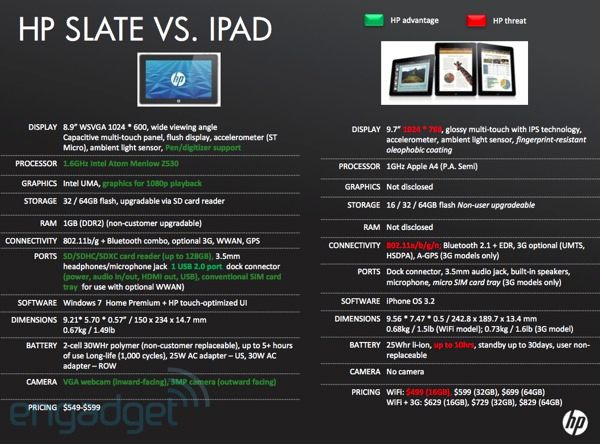
This somewhat forlorn HP marketing piece is meant to buck up the salesmen at HP.

Some issues with the Slate:

  • HP uses the Atom CPU I used in my netbook the past two years (recycled two days after getting the iPad). I overclocked it from 1.6 to 2.0gHz and it was still slow. Not too bad (OS Leopard 10.5.6) but the A4 in the iPad is really special. Fast. (“Wicked fast” as Mossberg of WSJ put it). The iPad surfs almost as fast as my desktop which has thermonuclear power, five big fans and a Core2Quad CPU running Snow Leopard 10.6.3. The iPad’s apparently slow 1 gHz CPU speed does not make for meaningful comparisons – I know, I have used both CPUs.
  • The Atom CPU runs pretty cool but uses much more power than the A4. The result is a much lower battery life. 5 vs 12 hours. Huge difference.
  • The HP’s screen is same as on netbooks – 1024 x 600 vs. 1024 x 768 pixels on the iPad. You will be amazed how much difference those extra 168 pixels make – the iPad screen shows 28% more. Non trivial.
  • No 802.11n wifi on the Slate.
  • No App Store for the Slate.

The HP has a camera, SDXC card reader and USB port. Very nice. The iPad really needs a card reader built in, not as an add on. The HP can likely multitask (my netbook did) – multitasking is coming to the iPad soon with tomorrow’s announcement of iPhone OS 4.0. The Slate’s price seems far too high – aren’t Apple products meant to sell at a premium?

But the real deal killer is the OS. Windows 7, even it is better than Vista and XP, was not designed for touchscreen use. HP has rushed this out in 6m whereas AAPL has been developing the iPad with a ‘ground up’ designed OS for 5 years and has millions of users’ experience from the iPhone/iPod Touch (85.5 million to be exact). HP make nice pro printers. They should stick to that. The Slate looks like a very costly netbook to me.

I would hate to have to compete against the iPad with all that patented technology and wish HP well. They make some great hardware.

Update April 30, 2010: The rumor mill is reporting that HP has decided to cancel the Slate. No surprise there. Windows and 5 hour battery lives just don’t cut it any more.

The iPad’s IPS screen

Not half bad, as we used to say in school.

One of the iPad’s biggest advantages for photographers is it’s IPS (In Plane Switching) display whose singular advantage over TN (Twisted Nematic) LCD displays is that it suffers far less fall off viewed from acute angles.

A picture being worth a lot more than words, I imported a snap from a Panasonic G1 RAW file into iPhoto on the iPad using iTunes (boy, does that ever sound dumb, or what?), the only method available until the iPad’s SDHC card reader debuts later this month.

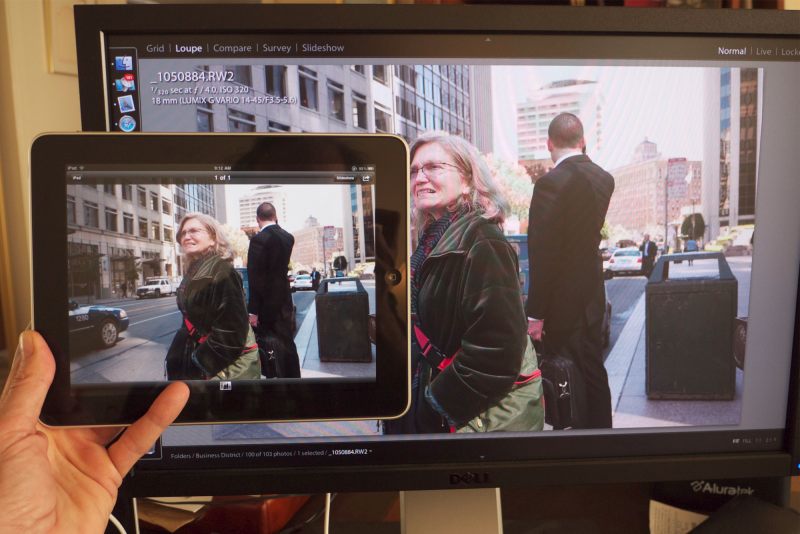
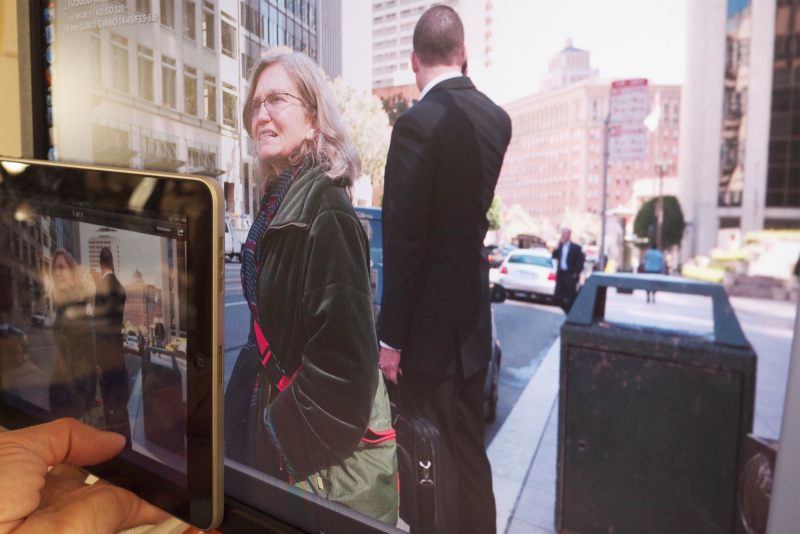
In the comparison pictures below you are looking at JPG renderings of the RAW file on both monitors, the large one being one of the two Dell 2209WA IPS displays on my desk.

Face on, the iPad’s image is a little warmer.

Off axis, reflections make comparisons tricky.

The Dell monitor is profiled using the EyeOne colorimeter. At present there is no way to profile the iPad’s screen but it’s close enough to be useful for preview and culling. Off axis, reflections on the iPad make comparisons difficult, (the Dell is, of course, matte), but the drop off in illumination intensity is far less than the picture suggests.

Some aver that off axis viewing is not something you do with portable devices. That’s largely true for the miniscule screens in devices like the iPhone but the iPad is quite capable of supporting multiple users – some games already provide that functionality – and obviously not everyone can have the screen dead front and central.

So the IPS technology in the iPad’s display is welcome and yet another technological step forward by the design geniuses at 1 Infinite Loop, Cupertino, CA.