Category Archives: Hardware

Stuff

Canon 100mm Macro – Part I

Not your father’s macro lens.

For a preamble on macro lenses, please click here.

Over the past five years anytime I wanted to get really close to something meant using my Olympus C5050Z five megapixel digital. Quality is decent, it focuses postage stamp close and framing using the built-in LCD screen is dead accurate. Rack the lens out to maximum zoom and you also get reasonable subject-to-lens clearance for illumination purposes.

If nothing else, it has been used to list any number of film cameras and lenses on various auction sites, so it has paid for itself many times. Most digital cameras, especially the point-and-shoots, focus easily into what we think of as the macro range, so the Olympus is nothing special in this regard. Handy, though, and easy to use, with auto everything – focus, flash, exposure.

By contrast, here’s my latest Canon lens addition – macro with a vengeance.


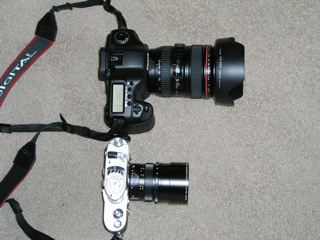
Canon 5D and 100mm f/2.8 USM macro lens, with funding source

With modern multi-coated glasses, charging extra for a lens hood must be as big a scam as ethanol, and I never use one on any of my Canon lenses except on the fish-eye and the 400mm, where they are non-removable. Why? Because they add bulk and make no earthly difference to the picture. And if you have seen the hood for this Canon, you will not want to buy it either. But I do use an UV filter on everything and have recently convinced myself that the German B+W ones are better made than their Japanese counterparts, so I paid up a few dollars more for the real thing. Seems I’m still a sucker for that ‘Made in Germany’ thing. The main reason I use a filter is that I think any decent photographer should throw out all his lens caps.


Not a Japanese filter…. As you can see, that Olympus has no issues with getting in close.

Now no one could accuse the Canon Macro of being pretty to look at – not like in Leica Summicron or Contarex Planar pretty – but its inverted cone design speaks of the Bauhaus, function and funky form. Construction is typical Canon prime – meaning good if not ‘L’ quality and a whole lot better than their crappy kit zooms. Best of all, at under $500, if you drop it you are upset but not destroyed. Try saying that about your Leica lenses….

Everything about the ergonomics of this lens is right. The 100mm focal length means you get a nice long subject distance to simplify lighting. You are twice as far away as with a 50mm macro, at the cost of depth of field. The short (about 135 degree) focus throw from infinity to 1:1 (the lens goes down to life size on a full frame camera) is very smooth and full time manual focusing is included if you use autofocus – very handy for a macro lens where small focus adjustments are the order of the day. The bulk and weight of the lens make for perfect balance on the 5D, meaning hand holding is easy.

Best of all, unlike all those macro lenses I illustrated yesterday, the length of this one does not change as it is racked out – meaning that no new obstacle to proper lighting presents itself. And auto exposure means no more figuring of light loss as 1:1 reproduction is approached – a loss of two stops in brightness owing to the extension of the lens from the sensor. That holds whether the lens is made by Canon or Ballspond Roadski optics.

How accurately does the lens focus on the 5D? I am using the center rectangle here which is the most sensitive focus point in the camera’s design. Placing the camera and lens on a tripod on the high tech Pindelski test bench with the camera at 45 degrees to the tape measure, here is the result with the lens autofocused on the line just above the numeral 3 with the lens at full aperture of f/2.8, set at its closest focus distance:

That looks pretty spot on to me.

Not convinced? Here it is much larger:

Far better than I could do with manual focus.

Now I am an empiricist by nature, not a test bench nerd, but with a lens whose primary use is for the very close-up subject, a few seconds doing this determines whether the lens is a keeper or not. Clearly, this one is a keeper. Thank you, B&H and thank you, Canon!

The Dr. Pindelski optical test bench? High tech at its best:

Because of the internal space needed to allow those elements to be racked out when focusing close, the 100mm Macro is necessarily quite a bit longer than that greatest portrait lens I have ever used, the 85mm:


Comparable in weight, the 100mm Macro is much longer than the 85mm. Lens hoods NOT included!

So ergonomics, autofocus accuracy and sharpness are not going to be an issue with the Canon 100mm USM Macro lens.

Focus speed? Simply startling, with little noise. The only time I could trip it up is by focusing at the closest distance then recomposing on a subject at infinity with poorly defined details. The lens would hunt back and forth before locking in. For non-macro use Canon thoughtfully provides a focus limiter switch to prevent this kind of silliness. In practice, I have found that setting the 5D to servo-focus is ideal when this lens is used in the close-up range. This setting makes the lens focus continuously even after the first pressure is taken up on the shutter release button and you can hear the stepper motor working away to maintain the subject in focus. As I said at the beginning of this article, this is not your father’s macro lens.

As I already own the fast 85mm non-macro, I have little interest in using the 100mm Macro lens for any but macro subjects. To do otherwise would be like using an f/1 lens at f/4 – a waste of money. If, on the other hand, this is your only portrait-length lens, then use in the studio should be just fine.

The challenge now is to see whether I can take any snaps remotely up to the technical standards of this optic. Subsequent articles will determine that.

Click here for Part II.

Latest Canon 5D firmware

Time to update.

Canon has released firmware 1.1.1 for the 5D.

Download is free and installation instructions are included.

Here are the changes:

Here’s the installation in progress:

For me the significant feature is that high capacity 8gB and 16gB cards are now supported. I’m not rushing out to buy these but it’s nice to know I can use them when Vogue calls for that special photo session with Elle McPherson.

The ‘new lenses’ referred to are these:

I somehow doubt any of these exotics will be darkening my gadget bag any time soon. And at the wide end, the Canon Fish-eye beats the pants off their 14mm ‘L’ lens at a fraction of the price and bulk – all you need is ImageAlign and Photoshop.

As for enhanced compatibility with DPP, I don’t use that so it adds no value in my case.

By the way, if you are contemplating purchase of a new camera, most manufacturers now make instruction manuals available on line and it is a good way of learning about features and limitations.

Secular thinking

Some neat editing.


Panasonic LX-1, 28mm, 1/1000, f/3.6, IS 100

Snapped in San Francisco’s Chinatown. The editor of this little comedy had even gone to the trouble of trying to match the paint color, and while I may not agree with the result, it is every bit as tedious to be constantly reminded of the purported existence of a supreme being (it’s even on the currency, for heaven’s sake!) in what is averred to be a secular society. In America, it seems, there’s more religion involved in running for elected office than even the next Pope has to contend with. Bizarre.

Technical note: The widescreen format of the Panasonic LX-1 is a welcome feature here. The small sensor and stretched lens design needs quite a bit of sharpening and chromatic aberration correction – here are my default import setting in Lightroom – bear in mind that I use the camera at its widest lens setting almost all the time. That means 6.3mm, equivalent to 28mm on a full frame. Chromatic aberration falls as the lens is zoomed.


Lightroom import setting for the LX-1

While the LX-1 has been obsoleted by the current LX-2, I would guess things did not change in this regard as the lens on the LX-2 is the same. You can read about automatically applying these corrections in Lightroom here. If anything, I would guess that more sharpening is called for with the LX-2, owing to the overcrowding caused by all those extra pixels on a miniscule sensor, each competing for every photon of light.

There’s a significant amount of barrel distortion at 6.3mm/28mm, too, and when it matters I use the ImageAlign plugin to correct that, round-tripping the file through Photoshop CS2. I believe ImageAlign has been discontinued but similar native functionality exists somewhere deep in the bowels of Photoshop CS3. Unless your subject is one dictating straight lines, it’s generally not an issue.

The Panasonic LX-1 revisited

A fine, unobtrusive street snapper.

I bought the Panasonic LX-1 a couple of years ago with but one purpose in mind. It was to be an unobtrusive street snapper, both smaller and more capable than the Leica M2 it replaced.

You can see my various ramblings on the subject by clicking here.

Since then Panasonic has ‘upgraded’ the camera to the LX-2 adding a bigger LCD screen. Neat idea. The one on my LX-1 is miles ahead when it comes to use in bright sun over the horror in the Canon 5D. They also squeezed in more pixels on that miniscule sensor. Not so neat an idea, as the original is noisy enough and more pixels will not help in that department.

Most importantly, I glued a 28mm Voigtlander optical viewfinder on the top plate, and its field of view matches the widest (default) setting of the zoom lens in the LX-1 nicely. Because depth of field is huge (the lens is but 6.3mm in focal length at its widest) I switch off the auto-focus with the handy slider on the lens barrel and bang away merrily on the street. Response time? Almost as fast as that old M2 with its antiquated film and processing needs. Optical quality? Add a bit of sharpening and chromatic aberration correction and 13″ x 19″ prints are fine. At that size sensor noise starts to intrude, much as film grain did with the M2. You might think that the LX-1 lacks the M2’s low light capability as the lens is not fast but the built in IS is good for two shutter speeds, so the lens’s f/2.8 becomes an effective f/1.4. The whole experiment has been a resounding success. The auto-exposure adds immensely to speed of use. And I console myself that I’m still using a Leica lens when I suspend disbelief and buy in to the engraving on the lens rim.

I’m hoping that the Sigma DP1, with its large sensor and fixed focus lens, will further improve matters, but one thing it will not beat is the tiny size of the LX-1. I was reminded of this when wandering about San Francisco the other day. As usual, I was cradling the LX-1 in the palm of my hand, ready for instant action. Handled thus the camera is invisible until raised to the eye. It was amusing to see a few other snappers either using point-and-shoot digitals and squinting at the ridiculous LCD screens at arm’s length (hard to be more visible, really) or using giant DSLRs and big zoom lenses which simply scream for the subject to disappear.

Me? Happily unobtrusive, courtesy of the fine engineers at Panasonic, greatly enjoying the native widescreen format of the sensor.

The snaps from one day’s fun follow.

* * * * *

Quite what this lady was thinking of with a WASP mannequin selling Chinese clothing I don’t know, but it works for me.


Chinatown vendor. Panasonic LX-1, 28mm, 1/200, f/3.6, ISO 100

This pipe bender was far too busy to worry about photographers:


Pipe bender. Panasonic LX-1, 105mm (LCD finder used), 1/800, f/4.5, ISO 100

The little pop-up flash unit in the LX-1 is not to be sneezed at – it adds that bit of contrast in a shady location, such as that where this beautiful gate was placed:


Beautiful gate. Panasonic LX-1, 28mm, 1/30, f/3.6, built-in flash, ISO 100, ImageAlign used to remove barrel distrotion

These workers were doing what white American labor specializes at, in the shade of the Transamerica pyramid:


American labor. Panasonic LX-1, 28mm, 1/200, f/3.6, ISO 100

There’s nothing wrong with the color rendition of this little gem.


Chinatown silks. Panasonic LX-1, 28mm, 1/100, f/3.6, ISO 100

Throw a great Renaissance name at me and you have my interest. Suspend a pizza pie over a passer-by’s head and you have a picture. By the way, the menu at lower left is perfectly distinguishable in the original, so no excuses need be made for the lens once color fringing is removed in Lightroom.


Flying Pizza. Panasonic LX-1, 28mm, 1/125, f/3.6, ISO 100


Detail of the picture above.

Finally, add one of life’s little incongruities and you have a perfect end to a perfect picture taking day in the gorgeous city of San Francisco.


Precarious perch. Panasonic LX-1, 28mm, 1/30, f/3.6, built-in flash, ISO 100

Because the shutter in the LX-1 is almost dead silent, I have the ‘clack’ sound switched on otherwise it’s hard to know when you have taken the picture on a noisy street. As is typical with modern cameras, there is no progressive resistance in the shutter release button to clue you in. No matter – you get used to what it takes after a few exposures. The wonderful shutter release ‘feel’ of the old rangefinder film Leica is just one more over-hyped piece of nonsense.

Needless to add, the built-in IS adds immeasurably to good definition in the original snaps and 54 RAW snaps on a 1gB SD card is just right for a day’s fun. Sure, you have to adjust for red color fringing and sharpening when processing, but as I can do that with a preset for automatic import into Lightroom, I have no problem with what I call the modern idiom of lens design – meaning poor lenses and great software.


Chinatown medley. Panasonic LX-1, RAW, ISO 100

All pictures taken on March 23, 2008, RAW, processed in Lightroom.