Category Archives: Hardware

Stuff

Ten questions for Mr. Cook

These need to be asked.

I just watched the snow job that was the purported interview of Tim Cook by one Brian Williams on NBC. It confirmed why I never watch US commercial TV. Williams, new to me and hopefully never to be seen again, is one of those saccharine presenters who gets $10m annually for reading a Teleprompter while looking good. As for Cook, he rivals the hammers in my garage for charisma. These are the questions the sycophantic Williams should have asked:

  • Your stock just crashed 28% from $705 to $505, recovered some, then crashed again. There was no news to cause these events and zero communication from you to stockholders. Do you think such lack of communication is appropriate for the CEO of the world’s largest public company?
  • You have $120bn cash in the bank of which $80bn is abroad. It earns negligible sums. You have set aside $20bn in tax liabilities on your balance sheet to pay taxes in the event the $80bn is ever repatriated. By leaving the money abroad you are denying the US government and taxpayer $20bn in revenues which is rightly theirs. You can bring the money back, pay the taxes with no effect on earnings and distribute most of the remainder to shareholders. As you have stated, you have no earthly need for that sum of money when your quarterly free cash flow is $4bn. Why do you not do the right thing for America, its taxpayers and Apple’s shareholders and bring the money back onshore, while simultaneously sending a loud message about what constitutes good US corporate citizenship to your fellow CEOs who are denying the US taxpayer over $0.3 trillion in tax revenues?
  • You fired Scott Forstall, the father of the NeXT, OS X and iOS operating systems. Do you believe that a stress-free, ‘nice’ culture is more conducive to innovation than one where strong internal competitors drive for excellence?
  • Rumors have it that you are going to roll out an Apple TV set. Why would you enter a commoditized low margin business with a decade long replacement cycle and limited sales opportunities for your premium-priced product when none of the content majors wants to play distribution ball?
  • All modern smartphones are now ‘good enough’ and many have better screens than yours for less money, making for a harder than ever sale for Apple’s premium priced, telco-financed iPhone. What are you doing about this to compete for the minds and wallets of young, affluent consumers in huge markets like China where you have failed to execute a contract with China Mobile which accounts for over half of Chinese cell phone users, owing to your insistence on a ‘subsidized’ price model?
  • Do you think your annual product refresh cycle is optimal in a world where your competitors are on a quarterly upgrade frequency?
  • You claim to be innovative and that 80% of current sales are of products which did not exist three months ago. Realistically these ‘new’ products are simply modest refreshes of their predecessors. A smaller iPad, a thinner iMac, a slimmer iPhone, new cases for iPods. When are we going to see some real innovation again from Apple? Apple’s path to future growth is paved with innovative products in new markets commanding high profit margins with high frequency replacement cycles. Do you think you have peaked like Sony, Microsoft, Dell, HP and RIM?
  • Products like the iPad and Apple TV will have very long replacement cycles for most users, and at current prices you are going to be increasingly uncompetitive with solid alternatives being significantly cheaper. Price does matter, regardless of what you believe. Why are you not aggressively pursuing alternative product markets with high demand and replacement frequencies to show off your design chops and allow you to maintain 40+% gross margins? Markets like car controls, home appliances, cameras (a market made for Apple’s business model if ever there was one), ‘green’ products, etc.
  • Apple seems obsessed with making everything thinner and lighter. Few users care that the new iMac is thinner than its predecessor when repair ease is seriously compromised, the machine is never moved, the user cannot easily reach the camera card slot and needs a separate DVD reader for his discs. Few want an even lighter iPhone. Are you not answering questions which no one has asked while complicating the mass production process and compromising your time-to-market?
  • You have placed great prominence on the skills of Jony Ive, your chief designer, as a key man at Apple, rewarding him with a recent promotion. How many people with similar skills are waiting in the wings in the event of the proverbial bus or if Ive concludes that his $125 million fortune is enough and he would rather put his feet up in his new English castle?

Not one of these questions was remotely hinted at in the TV piece. Now do you see why I do not watch US commercial television?
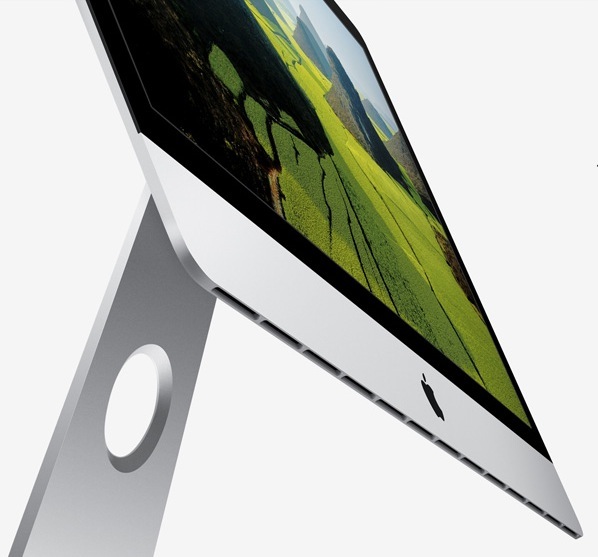

Apple’s idea of innovation. A screen tilted at a ridiculous angle on a near
totally worthless stand at a premium price. Did I mention that it’s thin?

Disclosure: Long AAPL bull LEAP spreads.

Logitech MX Revolution Cordless Laser Mouse

The search continues.


Logitech MX Revolution; MX900 in the back.

Any Mac user brought up on any one of many awful Mac Mice will understand the ongoing search I am making for the perfect mouse. Anything is better than a Mac Mouse, my last the Magic Mouse being a crowning achievement of form over function. The most beautiful mouse on the market it belongs in NY’s MOMA design collection but not on your desk where you will assuredly develop carpal tunnel symptom.

The best mouse I have yet used is the Logitech MX900 which is hard to find in the US. It was mostly sold in Europe and has been discontinued for many years. I hunted down a couple at some $20 each on eBay at the recommendation of a friend who swears by his. After a happy 18 months with mine I chanced on the rave reviews on Amazon of the more recent Logitech MX Revolution (Revo), still listed by Amazon at $155 (silly) and a good deal more than later models. I bought one on eBay for $40 and set about messing with it the other day.

Readon and you will see why it’s worth giving the Revo a try. Not only does it have exceptional ergonomics, the performance and actions of the various controls can be exquisitely tailored to your needs. Not least of the adjustments is the ability to change the behavior of the top scroll wheel from freewheeling to stepped or clutched using the SteerMouse mouse driver. Extraordinary.

As the picture shows, there is an even more extreme level of sculpting for the hand than with the MX900 and both are for right handers only.

The improvements include:

  • A longer battery life. I’ll comment more when I have more data, but the MX900 chews through two rechargeable AA cells in 3-4 days. The Revo has an on-off switch, unlike the MX900, though I really cannot see using it. The rechargeable, non-removable battery has a stated life of one week of steady use.
  • 4 small green diodes – not visible in the picture – which report the state of charge. When the Revo is down to one LED it turns red to warn you. All LEDs only light when the mouse is being used, to save power. The MX900 simply blinks a red LED when it is about to die.
  • A much better scroll wheel. It’s stepped in normal use, with far finer steps than the MX900; flick it fast and a clutch is released and the wheel spins easily for rapid scrolling. Very handy.
  • A tilt wheel. The top scroll wheel tilts either way for sideways scrolling with broad spreadsheets, etc.
  • Better button design and placement. The MX900 has six buttons if you count the depressible scroll wheel. The Revo has seven, with the second, side wheel acting as a for and aft toggle button and as a third button when depressed. Two side buttons, the top button and the scroll wheel make seven.
  • Even better ergonomics than the MX900.
  • An RF wireless design instead of the MX900’s Bluetooth. I really dislike Bluetooth. Pairing is always a challenge with new devices and on restart you have to wait for the mouse to be discovered.
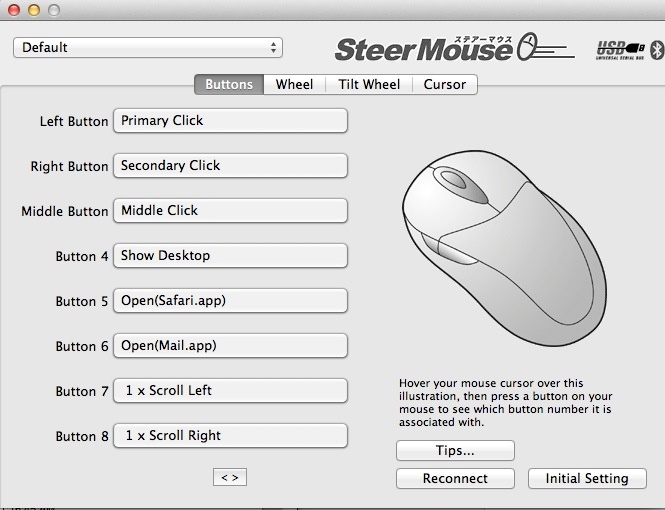
  • I have been able to program all buttons to reflect my preferred working style using SteerMouse – $20. Further, a simple Terminal command tailors the behavior of the scroll wheel – see below.

The drawbacks:

  • Logitech’s downloadable software works fine on my MBA but refuses to work on any of my Hacks. The driver I used with the MX900 – SteerMouse – is optimal with the Revo.
  • You have to use the charger stand provided, unlike with the MX900 where you can simply swap out used AA cells.
  • Once the battery reaches end-of-life, it will be very hard to replace. Replacements are available but the mouse is, to all intents, a sealed design. See Update, below.
  • The Revo is too light for my liking. The heavier removable cells in the MX900 add a pleasant heft.
  • The Revo hates light-colored or variegated mouse pads and is awful with my 3M Mousing Surface. It refuses to work on light colors so a plain black mouse pad is the order of the day.
  • The Revo comes with a (rather oversized and dated by current standards) RF dongle which plugs into any USB socket. That means that you have to remember to transplant the receiver to any other computer you contemplate using with the mouse, and the long stick design makes it vulnerable to damage on a laptop.
  • The Revo – mine at least – needs to be very close to the wireless receiver to function smoothly. Reviews claim a 20 foot range; I have my receiver 6″ from the mouse, on the end of an A-B USB extension cable. Much more than that and it will not provide the smoothest in pointer movement.


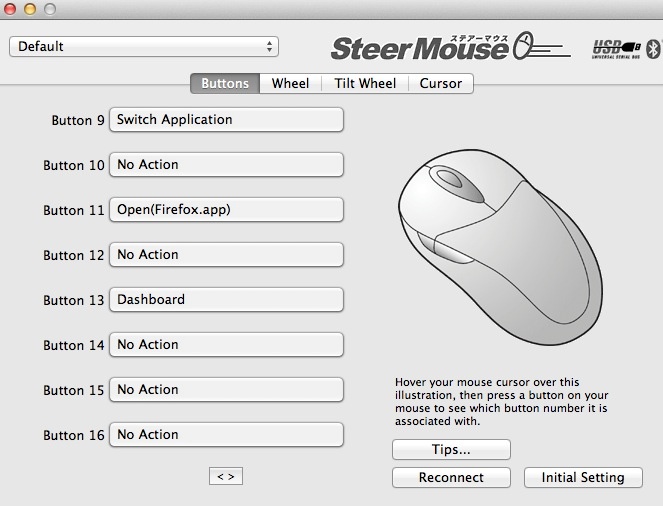
SteerMouse button assignments. Button 6 is the top chrome one.
9 and 11 is the side click wheel toggle fore and aft. 13 is the side wheel depressed.

You will not go wrong with either mouse. Both provide precise pointer movement and both are easily programmed with OS Mountain Lion 10.8.2. The Revo is far easier to find in the US and you really do not want to pay Amazon’s new price. Logitech never made OS X drivers for the MX900 and their Revo OS X driver refuses to install on my Hacks, but seems OK with my MacBook Air, meaning that Hack or MX900 users may have to buy an aftermarket utility to allow programming of their mouse. Proceeds of sale of your ghastly MagicMouse will pay for a good used Logitech replacement.

Tailoring the behavior of the Revo’s scroll wheel:

A simple Terminal (in Applications->Utilities) command allows you to tailor the scroll wheel on the Revo. This works for the wireless version only, not the Bluetooth one. While it’s no longer published on the SteerMouse web site, here it is. You can find it under ‘Tips’ on the SteerMouse preference pane in System Preferences->SteerMouse. Fire up Terminal and copy and paste the following line, then hit enter, then type Exit:

defaults write jp.plentycom.SteerMouse LOGITECH_MX_REVOLUTION_WHEEL -int -3

Replace ‘-3’ at the end as follows:

0-12: Automatic Shift. Smaller values reduce the timing for its shift.
-1 : Click-to-click.
-2 : Free-spin.
-3 : Manual Shift. Changes between the Free-spin and the click-to-click by clicking the scroll wheel button. This is my preferred setting.

I have it set at -3. In that mode, depressing the top scroll wheel alternates between free spin mode and stepped mode. I generally use free spin mode, where the Revo will emulate the ultra-smooth scrolling which is provided by Apple Mice.

Update: Replacing the rechargeable battery: Refer to this piece and you will see that the battery is actually fairly easy to replace. They run under $10 on eBay but be sure to read the complete link as there are two variants, depending on the age of your mouse. If you damage the feet on removal, you can even buy replacement feet here! Isn’t the internet wonderful? I doubt there is any need to destroy the slider pads which the link suggests you should do. Instead, insert a finger nail to pry up one end of a pad then pull through dental floss to remove it without damage.

Double-click issues: If your Logitech Revo is double clicking when you issue a single click, the fault is likely a worn microswitch spring. The fix is here. It is very difficult indeed to do without irrevocably damaging the innards. Don’t ask how I know.

A note on receivers:

There are two models of this mouse and the receivers differ. They are not interchangeable.

2006 model: The mouse is p/n 831869-0000, The receiver is p/n 831735-0001, also coded 993-000007.

2007 model: The mouse is p/n 810-000422. The receiver is p/n 810-000412 or 810-000826, also coded 993-000011.

To pair the mouse to a new receiver, you have to use the Logitech Connection utility, downloadable from Logitech. This only runs on Windows machines but, once paired, you can move the mouse and receiver back to your Mac. Once paired the pairing is not volatile. The pairing instructions are here.

Hitting the wall

Technologically unchallenged.


HP100+

One of the best indicators that the desktop PC has peaked is the falling sales of PC hardware and the poor upgrade rates to Windows 8, the latter as much a function of a mediocre product as it is of ‘free’ competition from the scummy people at Google in terms of their Cloud apps.

And while I have been diligent in seeking out the services of ace Hackintosh builder FU Steve in keeping my Hackintosh at 90% of the state of the art (90%, as Ferrari pricing takes over at anything higher and you get performance you cannot use) the state of play right now suggests that future enhancements will be few and far between.

Sure, while I could add a couple of silly priced EIZO monitors, which I would never do, there is nothing I can currently do to my Hackintosh, the HP100+, to improve it for my purposes, which leaves me without a tech challenge. Disappointing.

Desktops have peaked.

I could add a wild and crazy $$$$ GPU, but I do not game. I can scarcely tell the difference with the latest nVidia GTX 660 card installed on what I do, which is mostly LR and a bit of PS.

I use a SandyBridge i7 CPU and IvyBridge, the latest iteration, adds nothing in a desktop. Nor, I suspect, will Haswell in 2013 where the stated goal is lower power consumption. I’m green, but not so green that I’m about to rip out the guts of HP100+ to save a few watts in power consumption, installing a new motherboard and CPU.

I could have FU install a Xeon CPU and motherboard, at Rolls Royce prices, but the only plus of that is in massively multi-threaded math operations, and I have no need of that. LR and PS use four threads poorly, never mind sixteen.

I could ask El Supremo to add BluRay but the reason I passed on my BluRay player to a friend is that on the 42″ 720p Vizio TV (5 yrs old and it continues to delight daily) I could not tell the difference from regular DVDs, so BluRay is not something I could make use of.

The other thing which is currently useless is Thunderbolt, as so few peripherals support it. Those that do are overpriced, and I already have USB3, which is half as fast, running fine (not a pretty story, but I got there. As Churchill said of American democracy, we will try everything else before settling on the right answer, which is how FU got USB3 to work!). The only thing I use USB3 for where the speed is actually exploited, is to import images from SDHC and CF camera cards into Lightroom.

This sort of reminds me of film camera days. I was happy with my Leicas for 35 years because there was nothing else out there that was better for what I mostly do, meaning street snaps. And technology was only improving for film emulsions, not for hardware. Then digital came along and I have been chopping and changing, but seem to have stabilized on the two big Nikon DSLRs, both obsolete, and the two small Panny MFTs, the latter increasingly my son’s province. Then of course I got into converting old classic-era Nikkors with chips and that effort was super successful, the lenses are to die for and there’s nothing more I need optically. Forget believing that today’s optics are better. They are not.

Yours, technologically unchallenged ….

Easy Hackintosh wi-fi

Never easier.

The ease with which full function wi-fi can be installed in a Hackintosh has never been greater or the cost lower.

What follows assumes you use an Airport Extreme (AEX) or Time Capsule (TC) wi-fi router. My AEX is a Gen 1 (2008), single band only, but Gen 4 AEX/TCs and later are dual band, meaning that they can support both 2.4GHz and 5GHz (802-11n) devices simultaneously. With the advent of iPhone 5 most of my ‘go to’ devices now support 5GHz, including Hacks, iPads and iPhones, so dual-band is not a requirement. We do have two devices in the home which are 2.4GHz capable only, the xBox 360 and the old iMac G4, and these are set to receive their broadband signal directly from the A&T Uverse router which is 2.4GHz, 802-11b. As usual, the Telephone Company is a decade behind. Everything else looks to the Airport Extreme and now uses the 5GHz band.

The Hackintosh wi-fi issue has become much simpler over time. First one used an external USB wi-fi dongle with the associated (awful) Realtek software. Then TP-Link came along with internal PCIe cards which delivered Airport capability and, later, when OS X Lion came along, AirDrop functionality after you messed with Pref files some. You would buy the TP-Link PCIe card then an aftermarket wi-fi card which was an SOB to install in the card owing to the fiddly connectors. After application of cable ties and solder for the joints you destroyed, the card worked fine.

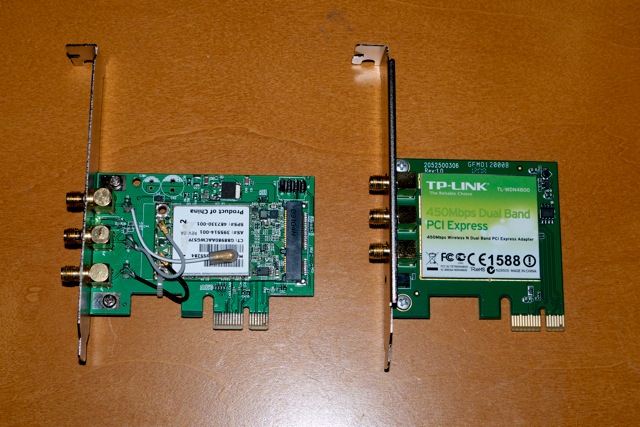
The other day I learned from the excellent Tonymacx86 Hack forum that TP-Link now makes a dual band wi-fi card which integrates the PCIe card and the wi-fi card. The model number is TL-WDN4800 and Amazon has it for $35 – which is less than the previous card + wi-fi card combination cost and is a plug-and-play installation in any Hack. B&H Photo also carries the card for a similar price. (Prices seem to fluctuate daily by a few dollars). The card comes with regular and low-profile brackets, the latter for use in Hacks built in Micro ATX cases.

Here are the old and new cards, antennas removed:

And here are the before and after results on one of my Hacks – the one with the botched old card installed, one antenna missing, replaced with the new card. A two minute job:

Clearly, having three working antennas does no harm. Comparing the speed of the new card with a properly installed old one at a like location, the new card consistently reports download speed 10% higher than the old, possibly attributable to superior antenna design.

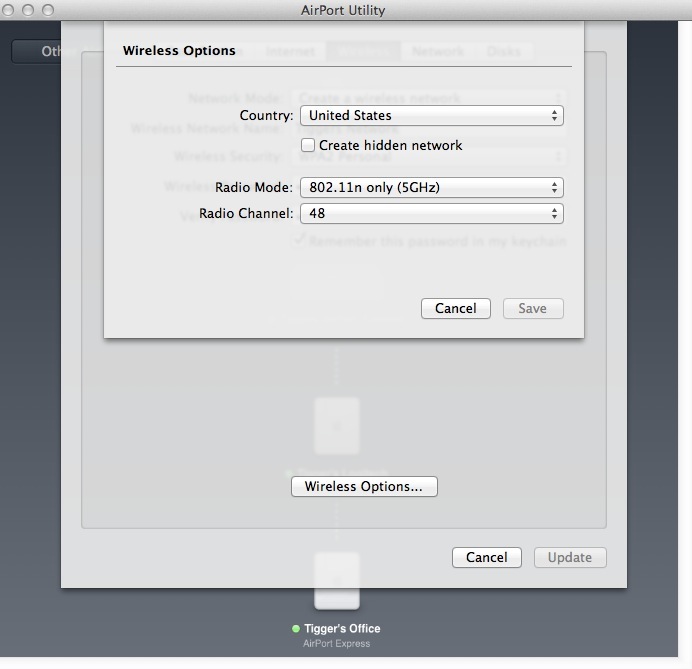
There is but one quirk. The Airport Extreme defaults to channel 149 with 5GHz wi-fi, whereas the new TP-Link card only goes up to 48. So, go into Applications->Utilities->Airport Utility->Airport Extreme->Edit->Wireless->Wireless Options and set Radio Channel to 48, then Save. Your new TP-Link card will now be visible to the Hack in which you installed it.

Setting the Channel to 48 in Airport Utility.

Sony RX1 camera

The (not so) poor man’s Leica at last?

If you told me to select just one lens for all my street snaps it would be the 35mm f/2 Summicron on a Leica M body. Optically unsurpassed, the problem with that combination is that it comes in at some $10,000, and the dated body design comes with a cluttered multi-frame finder. Further, the Leica is manual focus only and 35mm is long enough that focus often matters, especially at larger apertures. So even putting aside price, the Leica no longer cuts it for rapid action street snaps where auto-everything is the order of the day.

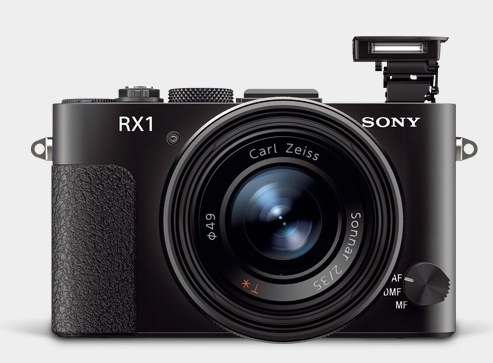
Sony has just released its RX1 camera and it is an intriguing design for street snaps. First, it comes with a full frame sensor in a very compact body – 4.5 x 2.8 x 2.6 inches weighing just 18 ounces. The Leica M9 without lens is 5.5 x 2.9 x 3.2 inches and 30 ounces, with the 35mm Summicron. Second the non-interchangeable lens is a 35mm f/2 design from Zeiss who have recently been distinguishing themselves with outstanding optics for full frame Canon and Nikon DSLRs.

There are some quibbles from reading the specifications. There’s no optical viewfinder which is essential for street work. Squinting at an LCD screen at arm’s length in bright light is not a prescription for stealth. Sony is asking $600 for their clip on finder, which is silly, and you can get the wonderful Voigtländer from CameraQuest for $209. I use the 28mm version and can recommend it without reservation. It’s unclear what battery life is like, but if the LCD screen can be turned off – assuming it’s the greatest power consumer – then over 300 snaps on a charge seems possible. Sony claims 270 shots when using the LCD. It is also unclear how responsive the camera is. The Leica’s shutter release remains the standard against which to judge, being beautifully sprung, predictable and fast – after you have futzed with manual focusing, that is. If the Sony is anywhere close then it’s a winner in my book.

The 24mp sensor looks to be the one from Nikon’s FF D600 which is known to be outstanding, especially at high ISO where it takes over from where the low light sensor in the D700 excelled. Focus is down to 5 inches and there’s a movie mode if that’s your thing. And, best of all, it says ‘Sony’ in large chrome script on the front so no one will ever take you seriously while you get your snaps. Sony makes TVs (OK, loses money on overpriced TVs) and point-and-shoots, right?

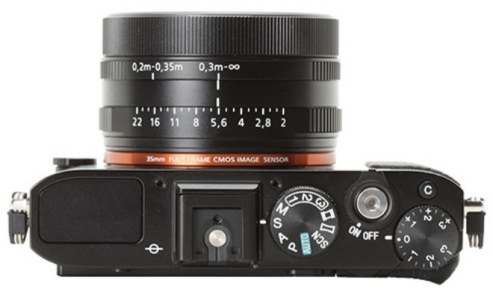
Controls include an Aperture Priority auto exposure mode and the lens has a real aperture ring – excellent! That remains the optimal design in my opinion, not the modern Canon and Nikon DSLR approach which dictates the use of fiddly control wheels while removing the aperture ring from the lens. There’s a built-in pop up flash which is nice to have, if hardly relevant to street snapping. There’s also a nice clickable exposure compensation dial on the top plate for corrections up to +/- 3 stops which is hands-down a better way of doing it than using LCD menus. Very handy.

Chimping the test snaps at DPReview compared to the Nikon D600 (taken with the outstanding 85mm f/1.8G lens) shows little quality difference, though the Sony’s lens displays modest barrel distortion. Once Adobe comes up with a profile the barrel distortion can be easily corrected on import into PS or LR. Noise is barely visible in 16x enlargements even at ISO 6400.

The biggest stumbling point is the price. At $3000 with a good aftermarket viewfinder this is a very costly camera indeed. That sort of money gets you a full frame Nikon D600 with a similar sensor and a fine lens or two. Admittedly, that’s comparing chalk and cheese, but the D600 can do street snaps at a pinch, if less unobtrusively, and can also do lots of things that the single purpose RX1 cannot. However, at $3,000, that’s still less than the Leica 35mm Summicron alone!


Pink Hair. When there’s no time for manual focus, AF is the ticket. Panny G3, kit lens, ISO 1600.