Kinect

An inspired creation.

This column has nothing to do with photography. Rather it addresses a truly impressive creation from a company which is a stranger to innovation and reliability.

Microsoft.

Yes. Microsoft.

I have long ago realized that for my demanding computing needs, whether for business or photography, the optimal combination when performance and reliability are key is PC hardware married with Apple’s OS X operating system and related applications. No surprise that my workhorse is a Hackintosh. No breakdowns, no overheating, no lock-ups, it just runs 7-by-24 and never shows any signs of stress. The design has massive redundancy in case of component failure and all parts are readily available and inexpensive. The displays I use are made by Dell (LG LCDs) because it’s simply impossible to properly profile any Apple display for photography. But after spending 18 of my first 20 years with computers running Microsoft’s OS, I know that nothing will get me there again. Windows 7 is, by all accounts, robust and reliable, but when you have been kicked in the crotch dozens of times by its predecessors your desire for more of the same is zero. So the last ten years have seen this happy user depending on OS X and the recent years finally saw Apple’s pretty but poorly engineered iMacs shown the door, replaced with robust, reliable, well engineered PC hardware.

Thus, when Microsoft released Xbox a few years back I took no notice, and took even less when they debuted the strangely named Kinect add-on accessory in late 2010. “Designed to fail” I recall thinking, after reading the hype. Plus it said ‘Microsoft’ on the box. No thanks.

Then a strange thing happened. Our son, a Nintendo Wii man when it comes to motion games, came home bubbling from a friend’s home, replete with tales of a soccer game he had just played …. in the living room. Turns out the friend has an Xbox360 with Kinect and, as Winston related it, there is no controller. “You just move your body”.

The Microsoft Kinect. Pure genius.

Naturally, I applied the old Socratic process to the boy, grilling him mercilessly on the device and on its performance. He had all the answers. Simple setup, never locked-up, no lag in replicating your movements, doesn’t need special lighting, and so on. “And it’s a lot of fun, dad”.

Well, he’s been doing well at math recently (can’t think where he gets that!) so, holding my nose, I ordered an Xbox360 + Kinect from Amazon.

The word ‘Microsoft’ is nowhere to be found on the box in which the device ships. That’s a good start. We set it up together, Dad suffering from extreme Blue Screen Of Death fear while Winnie merrily looked forward to playing. Not only did nothing go wrong, the device recognized the 802-11n wifi in the home immediately, automatically downloaded a bunch of software updates and maybe 15 minutes later, after a bit of calibration for his 4′ 2″ and my 6′ 0″, we were up and running with the included ‘Adventures’ disc. We mounted the Kinect sensor on the TV using a cheap PS3 mounting clip and some heavy duty Scotch Velcro-like material – the sensor weighs a few ounces.

The Kinect sensor mounted on top of the TV.

The technology is simply jaw-dropping good. The sensor measures you using infra red beams and thereafter replicates your movements on screen. Bright or poor light, it makes no difference. You need an area maybe 6′ x 6′ without obstacles in front of your TV. Then you insert a DVD game of choice in the separate Xbox360 console and follow the instructions. Absent some programming (avatar names and the like) which requires use of the included wireless Xbox controller, all you need is a hand to motion your choices. After many hours of play we have not had a single lock-up, blue screen or related panic.

On completing some of the games on the Adventure disk the Kinect plays back pictures it has snapped of the players, to great amusement of the subjects. Brilliant.

After being roundly thrashed by our nine-year old in the Olympics, using the (extra $) Sports disc, I determined to get my own back and bought the exercise game, one of whose options is a personal trainer. You know, one of those disgustingly fit babes who does 20 miles before breakfast and drinks carrot juice.

So I get into it, mimicking her movements on screen. You get told off if you get out of sync. The whole thing is controller-less. The device scans your body, asks your age and weight, how often you exercise (ahem!) then gets down to it – squats, kicks, you name it. Screen response to your motions is instantaneous.

Well, after a bit of this, following the babe on the screen and trying to keep my concentration up (and my eyes off her tushie), I am breathing heavily, my right knee may just have exploded, and the resident Border Terrier is raising a troubled eyebrow. My scores are falling and my temperature is rising. I tell Bertie to get on with the program as I have to rest, but he says he’s fit and too short anyway, thanks, so we are sit in the garden to recover having burned 20 of my 100 assigned calories ….

Gee, but it’s a real work out. And you don’t have to drive to the gym. Next time I’m telling it I’m 90. Man has to have a chance.

So here’s the $64,000 question. How can a company which is led by a buffoon, which doesn’t ‘get’ computing trends and which has failed at pretty much everything it has tried in the past two decades, a company which is a stranger to innovation, a company which wastes shareholders’ money on foolish acquisitions, do something so brilliant? And when will they close it down? This is simply too good for the likes of Microsoft.

Whatever your age, whatever you think of computer games (not much, in my case), you owe it to yourself to check out Kinect.

Then and now

Times change.

Back in the days when tires were thin and drivers were not, this is what a racing car’s cockpit looked like:

By the time Michael Schumacher was winning just about everything in his Formula One Ferrari, things had become a tad more complex (from the V10 F1 era):

Both snapped on the 5D with the 100mm Macro and a ring flash.

How (not to) do security

Don’t adopt the Cupertino plan.

There are probably some sheepherders in remote areas of Uzbekistan who do not know that Apple’s new mega data center resides in the equally culturally arid desert of North Carolina. It will open to the usual hype and exaggeration next Monday. But, for the rest of us, that message has been broadcast loudly from the rooftops of Cupertino and points west for well over a year now.

First, let’s revisit what a robust, secure, distributed back-up plan looks like.

We start with the Pindelski Plan:

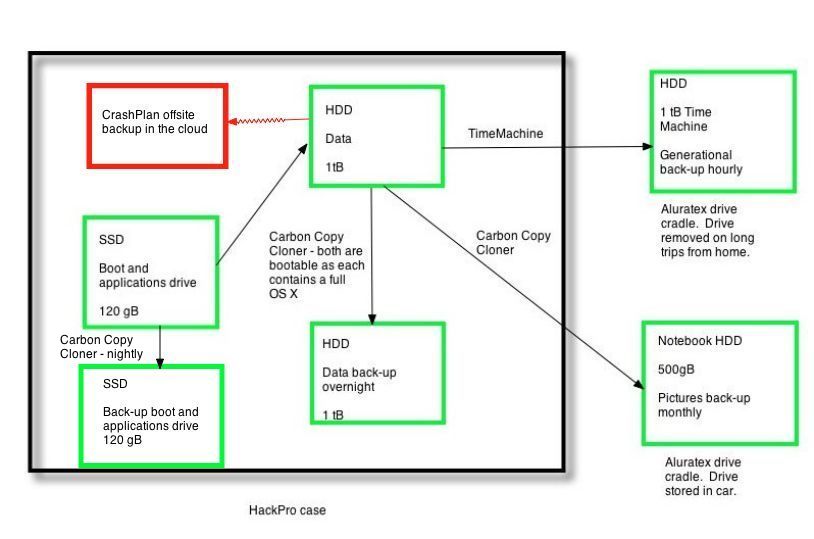
The Pindelski Plan. Two back-ups in the office – full and sequential. One in the car.
One somewhere else at an undisclosed location.

Now the Cupertino Plan:

Apple’s idea of multiple back-up sites.

So when Mobile Me(ss) next goes down, you will know why.

Do you feel lucky?

And in case you want confirmation of this easy target, here it is in Google Earth:

Yes, it will store a list of all your replaceable movies and tunes. But it’s probably the worst possible idea for backing up your precious photographs.

Wait a minute, you say. They will simply use the existing MobileMe (on the Hayward fault?) to back-up data. Uh huh. And you last used MobileMe when, exactly?

Plasma displays

The sweet point.

Plasma and LCD displays continue to compete, with the latter now making the manufacture of plasma screens much below 42″ an uncompetitive proposition. But though plasma displays are heavier and use more energy than LCDs, and though they use a glass front plate with all the attendant issue of reflections, they remain the standard by which contrast range is judged. Nothing beats the blacks of a plasma screen.

What prompts this piece is my use of an inexpensive LCD display for display of art on the wall. I thought it might be interesting to compare prices of plasma displays at different screen sizes.

For some five years now the 104″ Panasonic plasma display has been the largest readily available plasma display, starting out at some $90,000. You see them now and then on TV where they are used for presentation purposes, though it is ordinarily far cheaper to simply use a blue screen behind a news anchor to project charts and the like.

The Panasonic 104″ display.

That Panny whopper has come down in price a lot, and I compare the most common Panny 1080p plasma displays for size, price and weight in the following table. The ‘Area ratio’ refers to the relative surface area of each screen compared to the 42″ one. So the Panny 104″ has more than six times the area of the 42″:

The chart clearly shows that the pricing sweet spot fades rapidly once the screen size exceeds 65″, and you can bet that there’s not that much left to be gained from economies of scale, as it’s unlikely that displays larger than 65″ will ever sell in the quantities needed to really bring prices down. Homes are simply not large enough, for the most part, and the logistical nightmare of installing a 500 lb. display does the rest.

Not that I would complain if you gave me that 104″ display, having lived with a 100″ projection screen in our previous home. The problem with the projection screen was that you needed a darkened room for the overhead projector to cast a contrasty image, but the price of the installation was a small fraction of the Panny plasma whopper.

Cost of a 100″ projection system.

Power consumption – a few watts, compared to 1,500 for the giant Panasonic.

CrashPlan – Part IV

Finally uploaded.

After two weeks of uploading, some 170gB – comprising my user settings and Lightroom catalog – have been uploaded to CrashPlan’s servers. I first wrote about this cloud storage service here.

100%! Two weeks of uploading ….

Hereafter, uploads will be limited to incremental changes as new photos are added to Lightroom.

So how well does recovery work? Click on the ‘Restore’ icon and this is what you see (CrashPlan uses East coast time):

Note that you can recover at any date – just like in Apple’s Time Machine.

The first, unnamed, dropdown is the User’s directory, which CrashPlan uploads by default. The second, ‘HackPro HD’ contains only those directories elected when the upload commenced. In my case, that means my Lightroom catalog:

Drill down and you get to the catalog of Pictures:

One more step and you see the actual RAW, TIF or JPG files:

Check the files to recover and you see this:

I clicked on ‘Click here to download your restored files’ and the 12.5mB RAW file was deposited on the HackPro’s Desktop in 24 seconds, using my 10 mb/s broadband connection. That’s 0.52 mBytes/second compared to the theoretical maximum of 1.25 mB/s (10 megabits equal 1.25 megabytes and the line is 10 megabits/second). Not bad. The Desktop is a good destination as there’s no risk of overwriting your Lightroom catalog.

A couple of clicks and the file is in Photoshop, ready for processing:

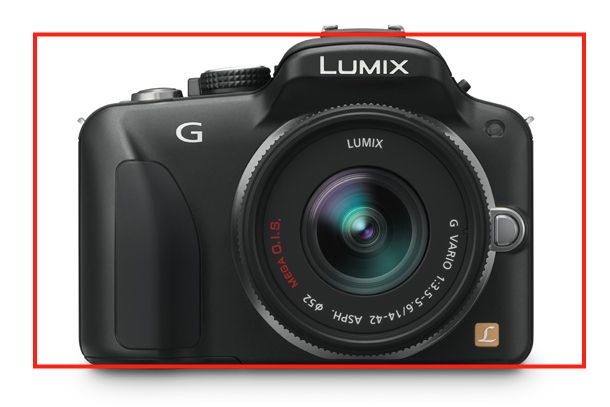
File restored from CrashPlan’s cloud server. G1, kit lens @ 30mm, 1/320, f/5.6, ISO 100.

You can also restore the sidecar file with all the processing data, to avoid having to reprocess the picture.

Restored Zip files remain separately available for 24 hrs – the original RAW (or whatever) file remains untouched:

The only anomaly encountered so far is the wildly erratic reporting of upload status. I asked for daily email updates and got them at inconsistent times. That’s troubling, as inconsistency is the last thing I want from a cloud backup service, but the files appear properly uploaded and easily restored:

Erratic reporting from CrashPlan.

A check of files in my HackPro Lightroom and the CrashPlan directories confirms a like file count.

So, for $50 a year with currently unlimited data volumes, CrashPlan looks to be a useful supplementary backup plan. Just don’t make it your primary one. Are you about to trust all your pictures solely to a fragile ‘cloud’, where you have no independent verification of the adequacy of procedures or the financial solvency of the business?

Finally, recalling my earlier mantra that the only valid backup plan is one which has the qualities of paranoia and mistrust at its core, I made a reminder in iCal to prompt me to do a test restore of a file monthly. That way I get some comfort that the cloud database is not corrupted. It takes seconds to do.

Update June 13, 2011:

With incremental upgrades to my Lightroom catalog on the HackPro work machine being conferred faultlessly, and automatically, in the CrashPlan cloud storage database, I have signed up for 3 years for a total of $119.99:

In Part V I look at backing up additional files and at how best to backup applications.