The MacBook Air – Part II

A two seater sportster, not a truck.

Part I appears here.

My 11.6″, 2gB RAM, 32gB flash disk storage Mac Book Air arrived yesterday and I have spent a few hours wringing it out.

I am writing this on the MacBook Air (MBA).

First impressions:

The MBA is a masterpiece of machine craft. Despite incredible slimness at the thin edge of the wedge (!) it feels robust rather than fragile. The full size keyboard is worth the price differential over a cheap netbook alone. Too bad it’s not backlit like on its much heavier (4.5lbs and up) brother, the MacBook Pro. The machine is unbelievably light – no self respecting student will want to be without one of these.

The battery on mine was 80% charged on receipt and the Magsafe power connector can be connected either way, only one of the two ways possible clearing the left hand of the two USB sockets The finish is, for the most part, Leica satin chrome, like they used to make in Germany. An iSight webcam is included. The Magsafe connector, which disconnects if yanked by an errant foot or child, has a minuscule tell tale light which glows orange when charging and green when charged. The LED appears on either side of the Magsafe plug – another example of Apple using the products it sells. Well done, Mr. Jobs.

The screen has a very high pixel density (1366 x 768) meaning the fonts are pretty small, but that’s more than compensated for by the high definition. After five hours of heavy use I had no headache. Surprisingly, after having tried an MBA in an Apple Store surrounded by monster iMacs, the screen appears far larger than that store test suggests. It’s widescreen (16:9) meaning you tend to scroll vertically more than you are used to, though my two years with a like format netbook made this pretty easy for me. You may have more of an acclimatization period if the widescreen format is new to you.

When using Safari hitting the Command-+ two key combination (actually Command-=, the latter being the key with the +’ sign on it) you can instantly increase the size of fonts on screen if you have difficulty reading the rather small size presented by the MBA.

Likewise, the need to depress the lower left function key to invoke the special features of the function buttons or to delete to the right (Fn-Delete) takes a bit of getting used to. However, the signal value added by the MBA’s keyboard is that it is full sized. Until you have used a $300-400 netbook that sentence is meaningless.

The screen is set to a ridiculous brightness level and, until I have a chance to properly profile it using the Eye One, I simply turned the brightness down a good deal.

Packaging is both effective and environmentally friendly, with very few plastics used. Hooray for that.

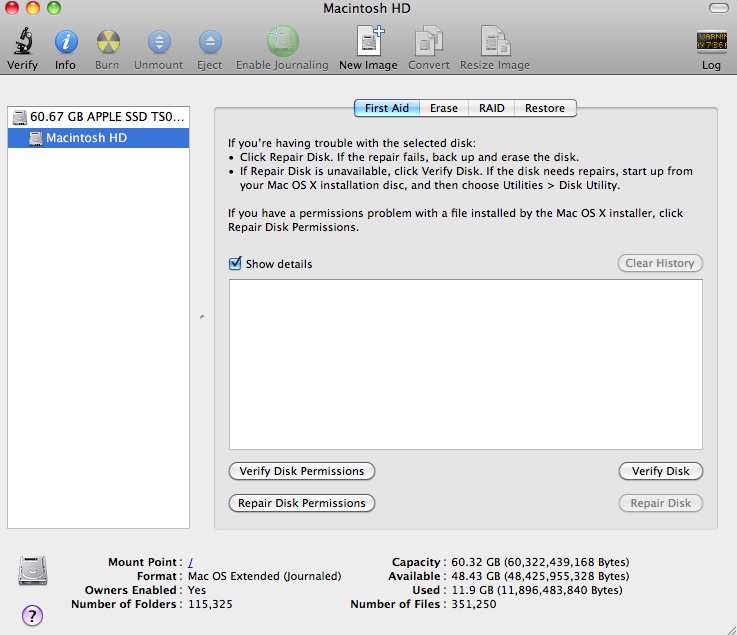
First I updated all the software using Software Update and was left with this capacity:

The advertised 64gB of flash memory is a little less, as this Disk Utility snap shows:
Thanks to my Time Machine backup on the Hackintosh desktop, I simply plugged in my backup drive to the MBA and some thirty minutes later I had imported the 28gB or so of Applications from the desktop, using Migration Assistant. After reinputting a couple of passwords for apps demanding same, I was up and running.
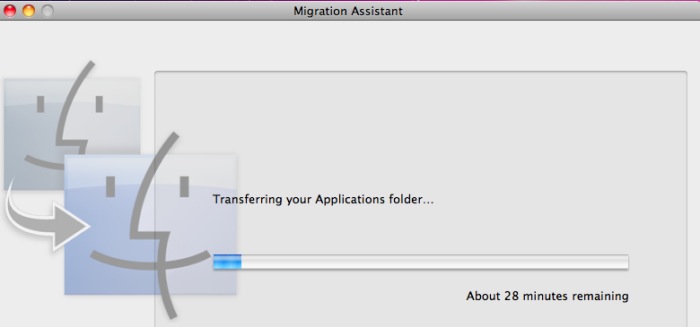
Overkill, sure, but I can always delete the apps I do not need on the MBA later. When all was said and done I had some 16gB of ‘disk’ space left in the MBA. That’s some 1200 RAW pictures from my Panasonic G1. Not bad for my purposes.

Next I ran the geeky tests – Geekbench and Cinebench which test CPU and GPU performance, respectively.

Geekbench, 64-bit comes in at 2205. For reference, the Intel Atom in my MSI Wind netbook, overclocked to 2gHz (1.6gHz is stock) reported a Geekbench (32-bit) score of 920.

And here’s Cinebench 64-bit:
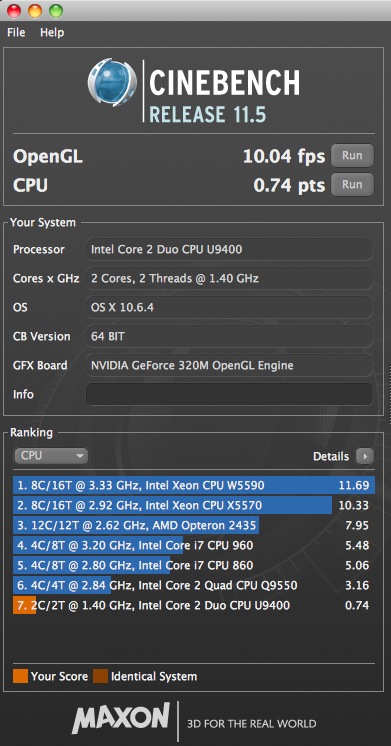
I never ran this test on my old netbook with the poky, integrated Intel GMA950 GPU. Life’s too short. My Hackro with the Intel Core2Quad and Nvidia 9800+ GPU is #6 in the above list. The fastest machines in that list are mostly using the latest Intel i3/i5/i7 and Xeon CPUs.

To compare this to my Core2Quad Hackpro desktop, which with dual displays weighs some 100 lbs more than the 2.3 lb. MBA, look here.

Sure, the Hackintosh blows the MBA away in every respect. Then again, you cannot stuff the Hackster in your shoulder bag. The MBA is no speed demon, but as I captioned this piece above, the MBA is a two seater sportster, not a truck. You want a truck, get a MacPro or build yourself a Hackintosh for one third of the cost.

Right after running these very stressful tests, I fired up Temperature Monitor, noticing that the MBA was getting warm on my lap. Not as uncomfortably warm as a MacBook or an iBook, but noticeably warm, though at no time did I hear the MBA’s single fan at work. Fan tests appear in Part V. I did not want TM running during the geek tests to limit CPU and GPU cycles to the testbench apps, so what you see below is the hottest the machine got after the high stress Cinebench test:
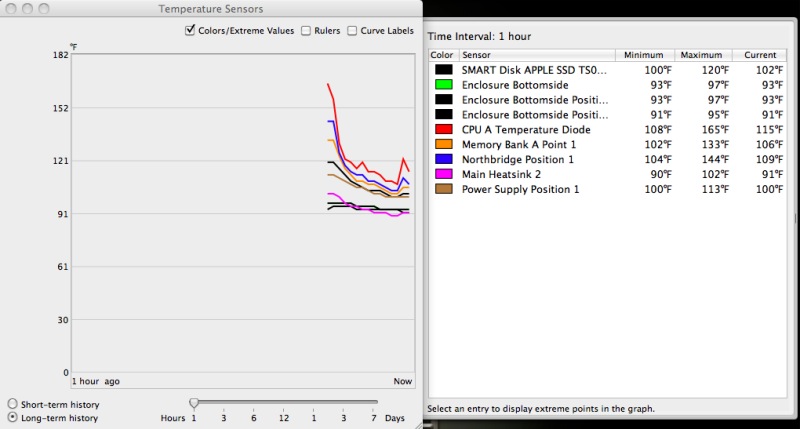
As you can see the CPU hit 165F. I’m unsure of the temperature limit for this low powered Core2Duo 1.4gHz CPU (Intel U9400) but suspect that there’s not much more than 20F headroom left after the Cinebench test. A bit close for comfort, confirming that heavy duty video processing is not the MBA’s forte. So the bottom of the case was noticeably warm on my lap even though there was no smell of burning epoxy in the air! However, the CPU dropped to 115F or so within the hour and has remained below that ever since. CInebench is a brutal CPU and GPU test. The CPU is at 99F as I write, the enclosure base at 86F (75F ambient temperature) and the MBA feels no different on my lap than the iPad. Meaning it’s cool, both calorically and aesthetically.

Maximizing disk space:

After doing a Time Machine restore of Applications from my HackPro I was left with some 16gB of space on the 60gB flash disk drive in the MBA. Many of these applications would never see use on the MBA but before I started erasing them I ran Omni Disk Sweeper to identify large files on the disk. You don’t want to erase any system files but applications typically reside in the Applications directory and often also in the Library->Applications Support directory. Look at the scan from Omni DIsk Sweeper, below, and you will see that Garage Band, which I will never use, takes up no less than 3gB in the latter directory, in addition to some 0.5gB in the Applications directory. So this tool provides a very efficient way of identifying the space hogs before deciding what to delete. After a few minutes work and after an Empty Trash command, my free disk space rose from 16 to 35gB!
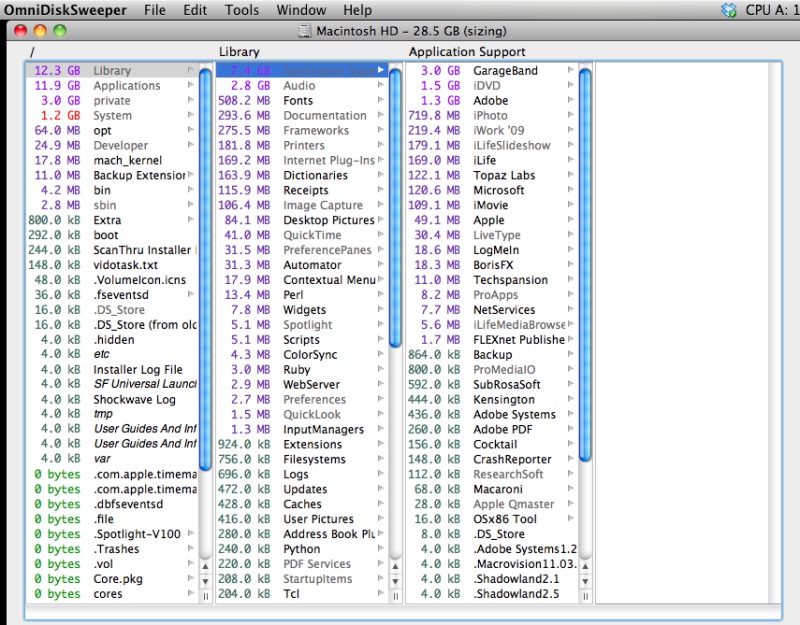
Photo processing tests will be addressed in Part III, but suffice it to say that Lightroom 3 (v 3.2) loads in 6-7 seconds. My clunky old Rosetta-powered PPC Photoshop CS2 loads in 45 seconds, about the same as on the HackPro. I’m rather optimistic about the MBA’s performance with RAW files in Lightroom, as the GPU (Nvidia GeForce 320M) is a decent one and Lightroom is very computer friendly, unlike Aperture which is a resource hog. Hey, it sells hardware!

More when I have profiled the screen properly and processed some pictures.

In the meanwhile, be assured this is a serious piece of hardware and, yes, Jobs is right. One day every laptop will be like this. And you can be assured that pulled punches have no place on this journal. Just read my experiences with Apple’s awful hardware.

Part III appears here.

Disclosure: Long AAPL common stock and AAPL call options.
The new AppleTV – Part I

Some preliminary thoughts.

I wrote of the original AppleTV in these pages a few years back. After my first one blew, I ended up selling the second for this was a deeply flawed device. Its various purposes were to store data, relay data from other devices and allow purchase or rental of movies from the iTunes store. It did none of these well.

Data storage on the internal hard drive was very limited. Absent extensive hacking, external storage could not be added. I hacked mine and would lose the hacks with every OS upgrade.

The relaying of data was not great either. Even with 802.11n wireless, jittering of the movie sourced from your remote Mac was common owing to the pokey Intel CPU used.

And, finally, the iTunes movie library available for purchase or rent was not only very limited in scope, the format for purchased movies was the so-so ‘.mkv’ one, rather than something higher quality.

But the single worst feature, by far, of the original AppleTV was that it ran criminally hot. In his manic pursuit of a clean exterior, Steve Jobs had dispensed with fan cooling for the hot running CPU and hard drive, opting for conduction of heat through the device’s metal skirt. That would get so hot (on both the ones I owned) that you would not want your child close to the gadget. It also dramatically shortened life expectancy and reports of failure in well under two years were a dime a dozen. Design had truly ruled function.

So once I got rid of mine I gave the device no more thought. Movies are routed to our TV from a MacMini to which my file servers are attached, using VLC to play the movie. DVDs from Netflix are played through the MacMini. And pictures residing in iTunes on my Hackintosh are relayed to the TV via the MacMini and simple wireless networking. The movie files are uncompressed VOB format (4-5gB a movie) and there is no stuttering thanks to the competent Core2Duo CPU in the Mini, whose fan is cranked up to avoid the usual Mac overheating problems. I run it at 3,000 rpm minimum, compared to maybe 1,000 stock. A new fan is cheaper than a new MacMini. When I want to watch a streaming Netflix movie the MacMini is pointed to Netflix using Safari and off we go.

It all makes for a very reliable setup yet, when the new AppleTV was announced a few weeks ago, I took notice for one reason. It runs the same A4 CPU used in the iPad and that CPU is cooler than Steve McQueen.

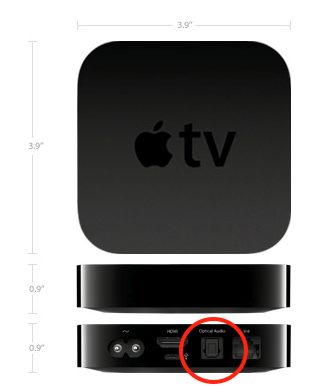
The new AppleTV. TOSlink optical digital sound output socket circled.

The thinking underlying the new AppleTV has changed. There is no more internal storage (hooray for that) and there is still no fan. With the A4 CPU none is needed. The device is now solely a streaming connector for your data, whether stored on other home Macs or in the cloud, be the latter Netflix, iTunes, internet radio stations, etc. And the interface from the original AppleTV is retained and it is outstanding. Just point and click with a simple and elegant remote control.

I wrote about the elegant Apple Remote when reviewing Plex and it is a gorgeous design, even if the buttons could use greater spacing. The new AppleTV includes one and the now much smaller AppleTV (the size of a hockey puck) and Remote sell for just $99. Not much downside if you decide it’s not for you.

Some of the original limitations remain. Your movie files must be in a format AppleTV likes (.m4V, .mp4 and .mov) so you still cannot play your ripped VOB uncompressed DVD files unless you go through the time consuming (if easy) conversion process using an app like Handbrake (free download). Your rental movie choices are still limited to those in the iTunes library and you can no longer buy movies using the AppleTV, as it has no storage. And you cannot access the Internet to rent from Amazon’s Video on Demand service – I use the MacMini for that, with Safari.

But the added functionality makes it worthwhile for me. First, it runs super cool, even when taxed with streaming an HD movie. Setup is easy and you can use the built-in wireless internet connection or an ethernet cable. I prefer the latter as it’s simply more robust. And now you can get dozens of internet radio stations and, most importantly, Netflix, delivered in the usual Apple TV interface. Anyone who has used Netflix streaming through a browser on their TV knows just how poor that UI is, with very small text. I cannot make it out sitting 10 feet away from our 42″ TV. And while you can get the nice AppleTV interface on your MacMini using Frontrow, you cannot get Netflix or Internet radio that way. So just for Netflix alone, the AppleTV makes sense. I can easily read the clear text on the screen of our 720p LCD TV, a somewhat dated bottom-of-the-line Vizio from WalMart.

The Apple Remote:

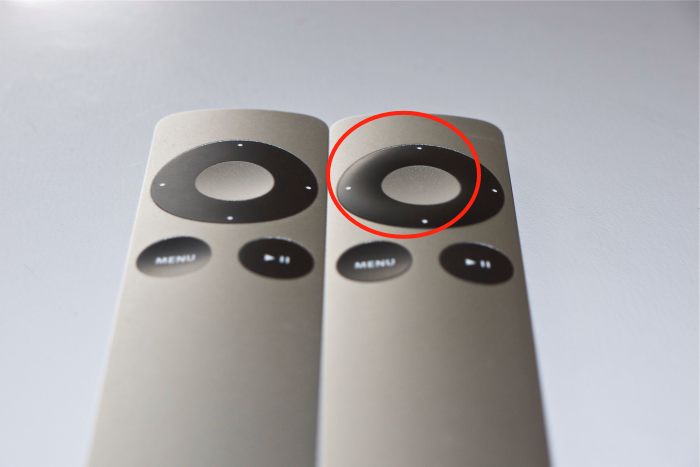
Typifying Apple’s attention to ergonomic design, the Apple Remote supplied with the AppleTV is not the same as the one you can buy separately for $19, though either will work.

Regular and AppleTV Apple Remote – note the raised directional buttons on the latter – circled.

The raised directional buttons on the AppleTV version have a purpose. They permit instant tactile recognition of which is which if you have both, like I do. I use the regular one to control my MacMini. To preclude one remote speaking to both the AppleTV and the MacMini you have to pair each to its respective device. In the AppleTV that’s a simple menu option. For the MacMini you point the other remote at the Mini and hold the Menu and Right arrow buttons for a few seconds until you see the paired logo on the screen. Henceforth each remote will ‘speak’ to the related device only, so when you switch inputs between your AppleTV and the MacMini, you do not enter a chaotic screen resulting from all the instructions you sent to one device being ‘seen’ by the other.

These remotes are infra red, meaning line of sight is needed to your AppleTV if they are to work. You can greatly enhance their range and reduce their directionality by adding an IR blaster or, if you have an iPhone or an iPhone Touch, download the free Remote app which will make your handheld device into a wifi remote, no line of sight being involved.

Connectivity:

The changes here will likely affect how you connect the new AppleTV to your peripherals. Out of the box all you need do is add an HDMI cable, plug it into your modern TV and you have video and sound flawlessly relayed. Anything more than 720p on the TV is wasted as that’s the maximum definition supported by the AppleTV or, indeed, by iTunes or Netflix movies.

However, if like me you prefer better quality sound from your TV, you will want to use a separate amplifier/receiver and external speakers to get the best from the source material. With the old AppleTV you simply switched off the speakers in your TV and used RCA coaxial cables to route sound from the AppleTV to your amplifier to which you connected external speakers. The new AppleTV has no RCA connectors for analog sound, supporting digital sound output only through the single TOSlink optical digital connector – circled in the first picture above. If, as is my case, your external amplifier is older and does not have an optical digital input, you need to convert the optical digital sound output from the new AppleTV to analog, using a Digital to Analog Converter (DAC). It’s cheaper than buying a new amplifier/receiver.

There are two approaches. If you use 2.1 sound (2 speakers and maybe a subwoofer) you need one of these, and a short TOSlink optical cable. The latter goes between the DAC and your AppleTV and the output of the DAC goes to your amplifier using standard analog RCA coaxial cables. If you use 5.1 surround sound, you need one of these. There are cheaper versions than these Gefen DACs but they have been extensively tested with the AppleTV are are known to work. In either case, your total investment is less than one old AppleTV.

At this time I’m using the (poor) internal speakers in our TV to test the new AppleTV while I await delivery of the Gefen DAC.

First impressions: Compared with its predecessor, the new AppleTV runs cool, is far more responsive to the remote, is overall faster, renders iTunes Store movies at a higher quality level and delivers Netflix streaming and a large selection of internet radio stations, neither available on the old version. Why, there’s even classical music for old goats like me. It is very easy to setup as a host for your pictures stored on your remote Mac and does a superb job of rendering slideshows on your TV screen.

More in Part II when I have the DAC installed for higher quality sound, and have stressed the device. Initial impressions, suffice it to say, are positive.

Disclosure: I have been using Apple hardware and software for a decade. All of it has been paid for with a very small fraction of capital gains on my Apple stock holdings. In that sense, I have never actually ‘paid’ for anything from Apple and truly have no axe to grind for the products. Just for the stock! At the time of writing I am long AAPL common stock and call options. This is not investment advice. Take your own advice, not mine.

The MacBook Air – Part I

Finally a quality netbook.

My experience with laptop computers has not been a happy one. All three of my iBooks failed shortly after the warranty period ended and the best I used, an MSI Wind netbook hacked to run OS X, broke its screen hinges after two years of hard use. While the keyboard in the Wind could have been a bit larger that netbook was excellent value for money, especially once Windows was removed. Mercifully, the iPad came to market at just that time so the netbook went off to the recyclers and the iPad became my sole portable computing device, if you exclude the iPhone from that definition.

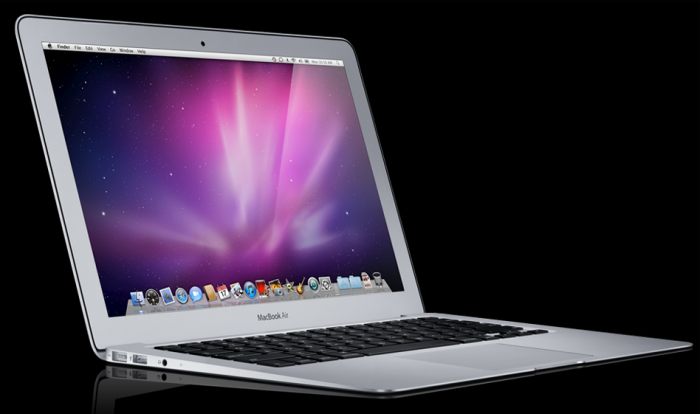
Well, that’s about to change. The rumor mill called the release of the new MacBook Air dead right, predicting both sizes – 11.6″ and 13.3″ – and my price point of $1,000 was right, so I ordered the 11.6″ base specification model for $999 yesterday and expect it here early next week.

The new MacBook Air.

Let’s be clear about one thing. If your Mac laptop serves as your primary computer, maybe connected to a larger display at work or your TV at home, the Air is not the right choice. While the Air supports external displays, it’s slow by comparison, has little internal storage and, until I use it for a while, is probably a good deal more fragile than the MacBook Pro.

On the other hand, if you want a capable road machine which can do light Photoshop and Lightroom work on your photos, the Air may be just the thing. The 11.6″ model I have on order runs a 1.4gHz Intel Core2Duo CPU which should equal the performance of the overclocked 2.0 gHz Intel Atom in the MSI Wind, which was just fine with Lightroom. Now while the smaller Air does not come with an SD card slot – there’s no room for one – a small card reader will do, plugged into one of the two USB sockets. And if the 64gB Flash storage, in lieu of an energy sapping conventional disk drive, proves too small, an external self powered USB HDD will do the trick. Finally, the screen aspect ratio is widescreen which works well with movies.

What is most significant about the Air, however, is what it lacks. Not just weight, where the 11.6″ model comes in at just 2.2 lbs (the iPad is 1.5); Apple has deleted the DVD drive from the machine and followed up by announcing the App Store for the Mac whereby all future software purchases will be optionally made over the air from those vendors who join the Store. And as you already watch movies streamed from any number of sources it’s safe to say that the DVD drive, and the DVD it reads or writes to, are both effectively dead. The machine also lacks the traditional power sapping spinning hard disk drive, replacing it with flash memory and “instant-on” functionality, once you have booted it, that is, with 30 day standby time with the lid closed. That’s a feature in the iPad which I never want to lose.

The iPad? Well, until someone (Adobe – are you awake?) comes along with photo processing software engineered for the touchscreen, there’s only amateur-hour apps out there for the photographer. The iPad is a gorgeous device for viewing pictures but it’s not there yet for processing. How hard can it be to add a touch overlay to a great app like Lightroom. for heaven’s sake?

Part II appears here.

Disclosure: Long AAPL stock and call options.

The end of IT hegemony

No more Mr. Bearded Guy.

For much of my life in business you got what the Information Technology department (rarely was there a greater misnomer) dictated, meaning a PC with Windows, Word, Excel and Powerpoint.

Likely as not the guy in the corner office was computer blind and had (as did many of my bosses) his secretary print out his emails so he could read them and she would type replies. I am not making this up. That generation regarded using a keyboard not only as demeaning, it was a servile function reserved for low paid ‘girls’.

This was great for IT as they got the ultimate in job protection – they chose the hardware and software, got the vendor kickbacks, and there were no decision makers to argue. Their ‘client’ was a secretary ….

But that is all quickly coming to a close. The moment I exited the corporate system, because I hated being told what to do by someone I mostly had little regard for, and started working for myself, I dumped the PC and anything to do with it, and moved to the Mac. I still needed Excel, true, because I crunch a lot of numbers in my day job of managing money, but what drove me to the Mac was my love of photography and a desire to have as little technology intrude between my snaps and the finished print. Plus, I hated having to reboot all the time.

However, Apple has done a lousy job of selling to big enterprises and that only started changing with the iPhone, the most disruptive technology of the past five years. The CEO got one because his existing cell phone was garbage, and told IT to make it work with the company’s systems, over all their self-serving protestations about security. He then went home, buying an iMac on the way, because he was tired of having the smelly, bearded guy from IT come around, pick his nose and reboot his PC. Plus the iMac looked cool in his mansion.

That same CEO just got an iPad because it didn’t cost much and he knew it would work. The most disruptive technology of the next five years. And his kids loved it. And, yes, it too looked cool. Now he has his salesforce using the iPad and IT has reverted to being servant and is no longer master. They have to support what revenue generators demand, not what they think gives them job security. Hurrah for that. And the back end has migrated to Unix servers leaving no room for MSFT’s substandard server software.

That’s why the potential for corporate sales of AAPL’s mobile products is where the greatest revenue growth lies for AAPL, because Apple is just waking up to the demand. Tablet devices will front as the smart client for all those Unix servers and corporate users will increasingly write tailored apps (which do not have to go through the awful App Store and the related approval process staffed by that same bearded guy who lost his job in IT) for in-house use.

The primary users of full blown desktop computers will be the accountants, marketers and engineers. Few others need one. And once we get voice-to-screen perfected, the keyboard will die and a new generation of users will have to learn dictation skills. As for the laptop, it’s already rapidly becoming an anachronism.

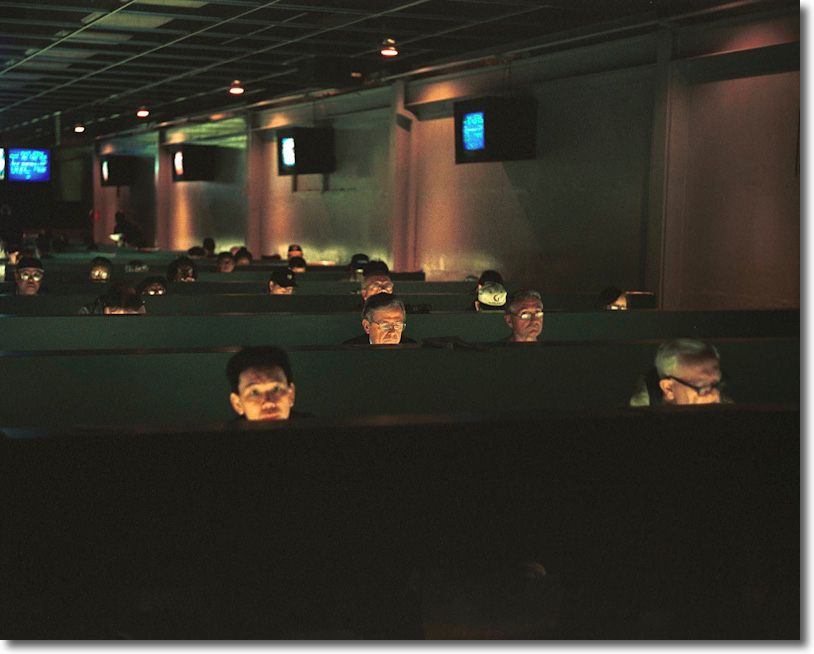
Yesterday’s IT. Leica M2, 50mm Summicron.

Disclosure: Long AAPL and AAPL call options.

Time for an Apple camera?

Needed: A proper UI.

With Apple stock opening over $300 per share for the first time this morning and Apple Computer poised to report its first quarter with sales in excess of $20bn on October 18, 2pm PDT, fans of the stock are asking “What’s next?”

Well, Apple mobile devices (iPhone, Touch, iPod, iPad) now account for a stunning 60% of revenues and growing. They were zero four years ago. The iPad will sell anything between 25 and 50 million units next year, generating $26 billion or more in revenues and some $8.25 in EPS and adding maybe $80 to the stock price. With competitors all over the place with multiple operating systems and few developers writing applications for any but iOS, the iPad has a solid 3-5 year lead on the competition, just like the original iPhone. Cannibalization of traditional computer sales is mainly hurting PCs and netbooks, as MacBook sales continue growing. The newest iPhone is selling like hot cakes, global distribution grows apace and the iPod refuses to die , morphing into the Touch. So it’s not like there isn’t a lot of gas left in the tank for existing products to continue to sell nicely for a while.

Many commentators think Apple should try to get serious about home entertainment with an Apple television but I doubt that will work. The problem with an integrated TV/computer is that you have one part with a ten year life, the LCD display, and another with a 2 year life, the computer hardware. So the consumer will be confronted with the issue of recycling a perfectly fine LCD display just because the computer part is obsolete. That does not solve. Plus dealing with multiple TV and movie studios to get distribution rights to their content is a Sisyphean task.

But how about an Apple camera?


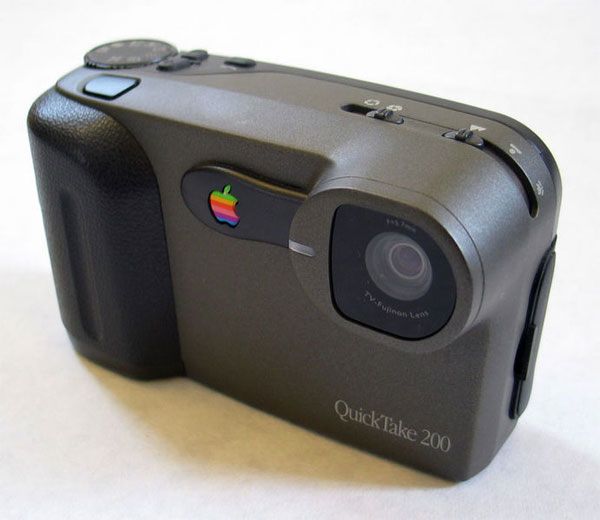
The Apple Quicktake 200 – 1997

Apple marketed three Quicktake models in the 1990s, each 640×480 pixels (0.3 megapixels!) priced at $600-750. They were not successful, the first two being a rebranded Kodak made by Chinon in Japan, serial makers of contract garbage then and now; the last, shown above, was made by Fuji. Steve Jobs rightly discontinued this “me too” product shortly after his return to Apple.

Rebranding is not a formula for success. It’s merely a formula for low sales and even lower margins.

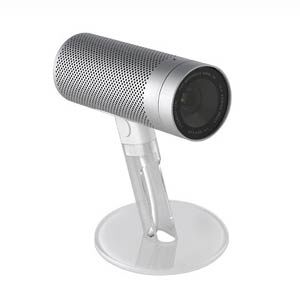
Apple has been using optics in its computers for a long time. There was the excellent 2003 iSight webcam which clipped to your iMac which I happily used for years with my iMac G4 and G5; after that iMacs and MacBooks came with built-in webcams, none quite as sharp as the original clip on which now sells for a small fortune in the used market.


Apple iSight webcam.

The iSight had autofocus and exposure and a fast, sharp lens.

Finally, Apple has made huge strides in cell phone camera design, with the 5mp variant in the latest iPhone4 eschewing pixels for image quality and adding automated HDR in the process. I am still on the iPhone 3G so cannot comment on the quality firsthand, but user reports suggest it’s excellent for that format.

And if anyone knows User Interface design, it’s most certainly not the goons at Microsoft.

So Apple could make a crackerjack separate camera in a sector replete with poor design and near total absence of correct thinking about user interface design. Panasonic and Olympus are among the worst here, with endless menus cluelessly named. What is called for is a simple mechanical analog interface for a few of the most commonly used functions and a voice activated or touchscreen approach for everything else which is rarely used. The Panasonic G2 makes a stab at touch controls, but it does nothing to change the poor menu structure of the G1.

Lenses? Hardly an issue. Any of Schneider, Fuji, Cosina, Sony and many others will be more than pleased to come up with a cool design for what is now the world’s second largest company, just behind ExxonMobil. CPU? The customized ARM A4 used in the iPad will blow anything else out there out of the water.

Disclosure: Long AAPL and AAPL call options.