Finally a proper Finder.
Update October 14, 2015:
The new security features in OS X El Capitan require a hack to keep Total Finder working, a hack which compromises security. This from the developer:

So for all practical purposes this great app is dead. RIP – you will be missed.
Ask any Mac user what the single worst app which comes with every Mac is and the chances are pretty good that the answer will be ‘The Finder’. ‘The Loser’ would be more like it, if you ask me.
Well, the folks at BinaryAge have fixed much of what ails the stock Finder in TotalFinder, adding the ability to use tabs and multi finder windows, allowing the drag and drop of files across directories/volumes/drives. You can also use cut-and-paste rather than Finder’s copy-and-paste, precluding the need to delete the source file if you really want to move it. The multi finder window shown below is toggled with Command-U.
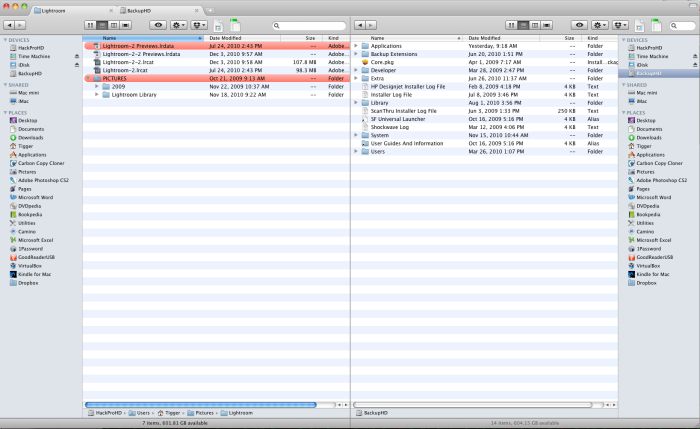
TotalFinder in dual window mode, with tabs shown.
TotalFinder integrates into Finder but is also available as a separate app, meaning it’s visible in HimmelBar which I use to avoid having on screen icons for applications. So now you can jump into finder rather than Command-Tab’bing or mousing to your on screen app display.
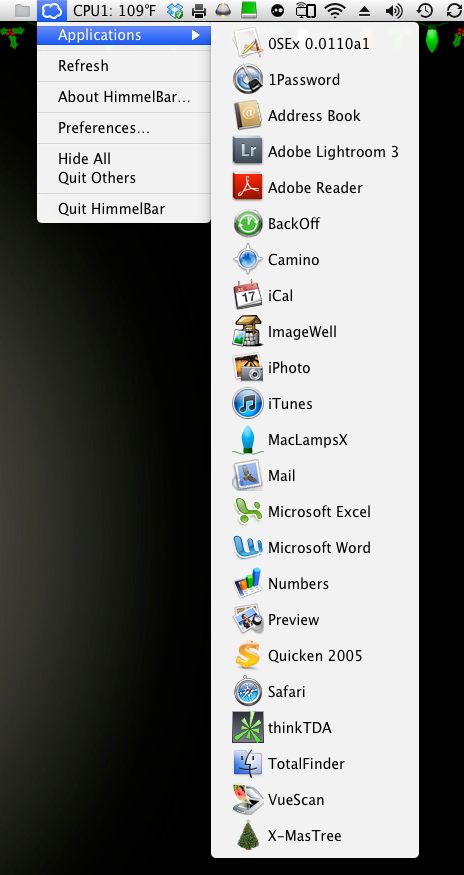
TotalFinder is visible in HimmelBar
MacLampsX you ask? It’s a neat seasonal app which frames your display with Christmas lamps! X-Mas tree? More of the same. 0SEx? No, not what you think. It’s a DVD ripping app. And the little printer icon in the menu bar to the right of the Dropbox icon is Fingerprint which allows my iPad and iPhone to print to any Bonjour printer on the network.
I cannot detect any performance changes on my desktop Mac. Highly recommended for anyone who uses the Finder a lot.