Costly parking.
Panny GX7, 17mm Zuiko.
Costly parking.
Panny GX7, 17mm Zuiko.
Sure.
Panny GX7, 17mm Zuiko.
Excluded.
Panny GX7, 17mm Zuiko.
Late light.
Panny GX7, 17mm Zuiko.
One quirk.
As my correspondence indicates many HP DesignJet 90/130 printer users visit here for help with what ails their HP DJ printers, I thought I would make mention of a quirk which cropped up after I upgraded from Mountain Lion to Mavericks.
Mine is the DJ90 which goes up to 18″ wide. 13″ x 19″ prints were being printed correctly from Lightroom 5.3 but when it came to 18″ x 24″ these started printing 13″ x 24″, with the righthand most 5″ blank. I was unable to find any new drivers from HP on the web (no surprise there – they are probably busy paying management yet more while firing engineers) so decided to sniff around the print menus in LR to see what was what.
The driver I am using is the one downloaded through this pane:
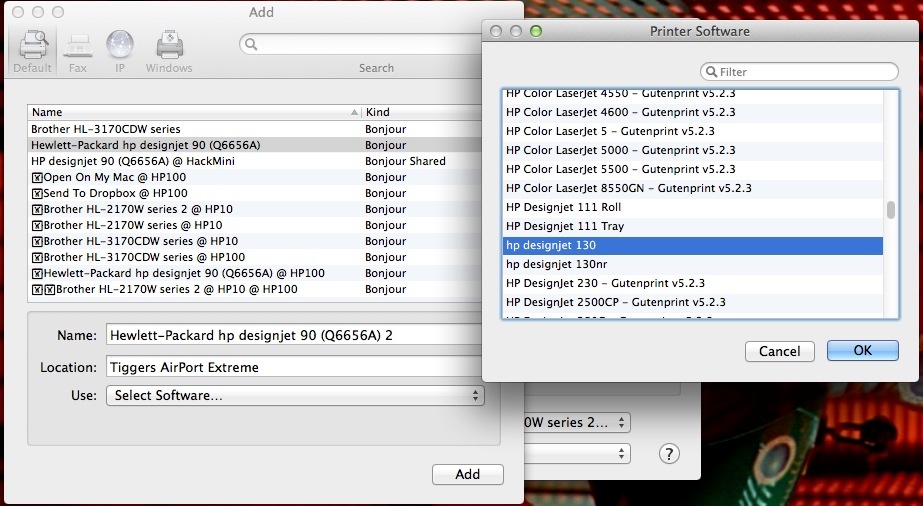
My DJ is connected to an Airport Extreme router and I print to it wirelessly from my Mac Pro in a separate room. Nothing new there.
Go to the Print module and click on ‘Print Settings’ lower left and you get this pane:
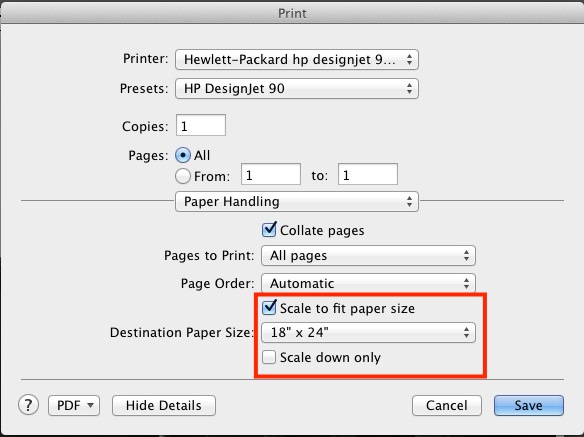
I checked the ‘Scale to fit paper size’ box (the default is unchecked) and unchecked the ‘Scale down only’ one (default is checked).
Now 18″ x 24″ prints are printed perfectly once more.
Update for OS X Yosemite:
No issues. LR5 and Yosemite coexist happily.