All posts by Thomas Pindelski

Whaler’s cabin

At Point Lobos.

My annual trip to enjoy the wonders of Point Lobos was spoiled this year by the fact that the Bird Rock area, where you can see cormorants tending their young on stick nests placed on bare rock, was closed off for repairs. Not that that stopped the State of California charging the full entrance fee which, had I known of the closure, I would have refused to pay.

Still, there is always much to see and revel in here. Take this whalers’ cabin:

Whalers’ Cabin, Point Lobos. G1, kit lens @ 14mm, 1/160, f/5,6, ISO 320.

The cabin overlooks Whalers’ Cove. Like your Mac it was built by slave Chinese laborers, this one in the 1850s. It will outlast your iPad. Slaughtered whales were processed here in the years 1862-79 and many of the tools of the trade – killing weapons, pots for melting blubber, primitive diving suits and so on are well displayed here.

Worth a visit, especially when Bird Rock is closed.

The Alien

The boy can see.

Responding to excited squeals of “Daddy! Daddy! Look, look! It’s an alien” I did the only reasonable thing possible and handed our 9 year old a camera.

G1, kit lens @ 17mm, 1/1000, f/5.6. Picture by Winston Hofler.

There’s no denying the boy has an eye. A large print of this now hangs on his bedroom wall.

Snapped at Bean Hollow beach on the way down to Monterey, where Winnie rejoiced in once again petting the sting rays at the Aquarium.

The future of the desktop computer

The end of the desktop era.

The latest changes to my Hackintosh, which now see it once more delivering performance comparable to the best top-of-the-line Macs at no additional cost, raise the question of what the future holds.

The original design brief for the Hackintosh, which FU Steve built for me, was reliability, with a primary focus on proper cooling of components. Secondary requirements were speed and expandability. At the time of construction, two years ago, I anticipated the HackPro might enjoy a five year useful life. I am now inclined to think that was an underestimate.

If you compare the specs of Intel’s current i3/i5/i7 CPUs, which succeeded the Core2Duo and Core2Quad design (still made and still popular in PCs) the main difference is not in speed but in power consumption. The latest graphics cards barely improve on the Nvidia 9800GTX+. Intel is bowing to the trend which favors mobile computing, meaning laptops, where battery power use is important. Low power consumption CPUs with integrated GPUs add more value than greater speed. And adding more cores is futile. Absent some exotic statistical math applications, plus super speed weather/military computers and the like, multi-core CPUs are wasted on what we photographers use daily. For that matter, four cores are largely wasted, poor application programming failing to make effective use of the available parallel processing potential. Don’t believe me – run Lightroom on a 2 core then a 4 core CPU. Notice any difference?

Since the HackPro was built, iOS and Android, cell and tablet operating systems, have taken the world by storm. While nowhere near as fast as desktop/laptop OSs, they add a whole range of capabilities – fast AppStore downloads, huge app selections, touch interfaces, great UIs – which are quickly migrating the desktop and laptop to the category of mature technologies. The return on incremental investment in these latter technologies falls daily, as Mobile is where the money is. Four years ago Apple introduced the iPhone. Today the iPhone and iPad account for three quarters of the company’s sales! The consequences of this trend are that desktop development will slow to a crawl and prices will cease falling as sales volumes fall. Sure, there will always be demand from artists, scientists, cinematographers and photographers for heavy duty iron but that population is minuscule.

Desptop/laptop OSs have also peaked. Windows 7 (I have not used it so this is apocryphal) is reported to be reliable (a twenty year miracle in the making) and speedy, and OS Lion may well be the last major version of OS X, though after using Lion for a while it’s clear that the changes are very minor ones in UI cosmetics and add little benefit for the working stiff. You aren’t going to make your machine any faster by installing Lion, that much is certain, though users ought to be grateful for an absence of code bloat and forced hardware updates, for the most part.

Desktop applications are likewise mature. Adobe isn’t about to fix the execrable UI of Photoshop when it has a static audience which will dutifully upgrade every 18 months for minor improvements at the margin, using corporate money. And they can’t add too many of PS’s features to the far friendlier Lightroom for fear of cannibalizing their cash cow. But I am happy to wager that they are working like stink on mobile versions of their apps. Sure, some apps like Pixelmator will capture amateur users who (rightly) balk at CS5’s ridiculous price, but the design pro has zero incentive to save his employer money or to risk his career on an unknown quantity, no matter how good.

Dinosaurs. The HackPro and its patrician brother.

The biggest benefits to desktop users in recent years have come from flash storage Solid State Drives and improving broadband, both technologies being pushed to improve by burgeoning demand for mobile devices. Intel’s Light Peak data transfer technology (Apple calls it Thunderbolt) will increase wired data transfer rates ten fold while cutting the number of connecting cables. LCD monitor technology has reached price-quality equilibrium. Who needs higher definition or larger screens than what those already afforded at reasonable cost today? What the world needs is faster broadband and better batteries, not faster CPUs or better displays.

I look at our 9 year old son. I would far rather he learned the iPad, maybe with the eventual addition of a keyboard, than an iMac. If he wants a big screen display it’s there at the touch of an icon, no wires needed. Wikipedia has obsoleted space gobbling encyclopedias and access is instantaneous. His music is accessible anywhere, he can print anywhere (if he even cares what a printer actually is) and even he can lug around the modest weight of a tablet all day. He has access to millions of books and thousands of newspapers at no weight or storage cost and his tools for learning math and spelling are all there at a touch. If he gets serious about taking pictures, all the processing power he will ever need will be on his tablet in a year or two and the camera will likely be a part of that tablet too. And I will be making sure that one of the developed world’s worst educational systems – it’s called US schooling – will not stand in his way.

So why force him to learn yesterday’s technology?

Those magnificent dinosaurs, the desktop computers of our time, will soldier on in dwindling numbers for a generation yet, after which time they will be so much landfill.

The Hackintosh gets a speed boost

35% faster on graphics. Cost – zero.

Background:

This is going to sound like an ad for hair restorer, weight loss or one of Steve Jobs’s rollouts of Apple’s latest piece of hardware, but bear with me and read on.

One of the beauties of the CPU + motherboard in my Hackintosh is the ability to overclock the CPU with great control over dozens of settings – meaning to run it at a faster clock speed than the stock 2.83gHz. I have run mine stock until now, almost two years, and decided it was time to speed things up in light of the improvements in the latest CPUs and to counter the small 2-3% speed loss with the Lion upgrade in case that gets worse with newer versions of Lion.

To do this, I changed some settings in the BIOS on the motherboard after studying overclocker fora (!), and applied a modest overclock of 27% – thus increasing the stock CPU clock speed from 2.83gHz to 3.60gHz, or some 27% faster. This is conservative compared to what the hard core gamers on these fora with liquid cooled (!) CPUs do – they take it as high as 4.50 gHz or + 60% over stock.

The new settings can be saved as a separate set in the BIOS of the Gigabyte EP45-UD3P motherboard, so reverting to stock is a simple matter of recalling your stock settings when restarting. The Gigabyte’s superb dual BIOS (meaning there’s a backup if the main one blows) can store nine different sets of settings if you are that way inclined. On the handful or really warm days here (95F) I would simply restart the HackPro with the stock settings to keep things cool – we have no air conditioning. I simply take note of the Temperature Monitor reading for CPU1 in my menu bar – CPU1 always runs the hottest on the multi-core CPUs I have used.

System Profiler before and after. The CPU is actually a Core2Quad, Q9550 Yorkfield.

Geekbench Before and After:

Geekbench is the objective way of testing CPU speed and is recognized as the standard by many geeks. The pictures below are using 10.7.0 Lion measured in Geekbench 64-bit mode.

Core2Quad CPU at 2.83gHz and 3.60gHz, respectively.

That’s 28% faster compared to the theoretical 27% (3.60/2.83).

Comparison with latest iMacs with i5/i7 CPUs:

The above Geekbench score compares very favorably with the iMacs sold in the past year – HP1 has gone from bottom to top quartile:

Cinebench Before and After – GPU:

Cinebench is a commonly accepted GPU test for graphics rendering.

Cinebench reports a 35% increase in framing rate.

Both Geekbench and Cinebench tests were made using the 64-bit versions of the applications.

Subjective ‘feel’:

I hate subjective data. This is an engineering process, not an exercise in emotions. Subjective clap trap is about as reliable in the computer world as in the stock market. Just because you saw the Apple store full of people doesn’t mean the stock will take off. For all you know they were having a fire sale.

Still, in LR3, the sliders reflect changes even more immediately – almost a ‘real time’ experience. Enough with the subjective stuff.

Trade-offs:

What are the trade offs?

  • Stability. The built in CPU/BIOS failsafes may kick in and switch your machine off. I have run this (modest) overclock hard with no issues.
  • Heat. HP1 was running its CPU1 core at 115F. With this setup it jumps to 138F, still well below the 176F service limit for the Core2Quad. Still, that’s higher than I like so I opened up the case and …. lo and behold …. found that the cable for the CPU fan, attached to the Coolermaster radiator was detached! This must have occurred when I was installing the SSD drives. I reattached it and the ambient CPU1 temperature in overclock mode dropped immediately to 115F. So heat is not an issue if your CPU is properly cooled – my Hackintosh’s CPU has run in the 106-115F range for two years without one problem.

How hot can the Core2Quad be allowed to get?

In my original Hackintosh piece I stated that Intel’s specs dictate a core temperature no higher than 160.5F. That translates to an external case temperature maximum of 185F, as evidenced by Intel’s static storage data:

How hot can the outside get?

Temperature Monitor reports the outside case temperature, so a reported 185F (85C) is the same as the 160F core limit. On heavy Handbrake video conversion I have seen an indicated 169F (CPU cooler fan disconnected!), which is still 16F below the service limit. Limits on Core2Duo CPUs are higher – you can find them on Intel’s web site.

And this is what I mean by properly cooled – not the wimpy, stock Intel fan but something that really works:

Coolermaster 120mm variable speed fan in place. The red circle denotes the proper installation point for the fan clips.
Case exhaust fan on the left, HDD fan on the right.

Given the low cost of these after market fans – $30 for this radiator and fan – there’s no excuse for not installing one. I would not risk overclocking if I was using Intel’s stock CPU fan. In the chart below, you can get a sense of CPU1 temperature when doing a common task – exporting an image from Lightroom3, after converting the 12 mB RAW original to TIFF, to Photoshop CS5, doing heavy manipulation of the image and then re-saving the 80mB TIFF file back to Lightroom3. The temperature rises to 136F and quickly drops back to the steady state 115F.

Temperature changes in LR3 and PS CS5.

Stress test:

To stress test the system I ripped a double layer 7.4gB movie DVD using RipIt!; this took a scant 12 minutes, for a maximum CPU temperature rise of just 2F. I then compressed that ripped movie down to a 1.26gB .m4v file, using Handbrake, another 40 minutes, for a temperature rise of 20F to 133F.

Rip = green box; compress = red box.

Nothing to be worried about here. By the way, the comparable times for this task on my MacMini (Core2Duo, 1.83 mHz, 320M GPU), were 30 and 75 minutes, respectively, albeit with the CPU temperature soaring to 169F.

BIOS settings:

You can see all the revised BIOS settings on the Gigabyte EP45-UD3P motherboard by clicking the picture below. The RAM is Patriot DDR2/800mHz. This board uses the 775 socket common to many Core2Duo and Core2Quad CPUs from Intel. The latest i3/i5/i7 CPUs use a different socket and require a different motherboard and upgraded memory. Changes from stock are marked with green arrows:

Click the image to see revised BIOS setting slides.

To make things easy, as your Hackintosh will be disabled while you are in the BIOS, follow the above pictorial on your iPad while making these changes.

Gigabyte EP45-UD3P motherboard:

When Adam Pash at Lifehacker conceived the design of the HackPro over two years ago, he choose the Gigabyte EP45-UD3P motherboard (775 spec CPU socket). A wise choice as this electronic hardware is a masterpiece of design and flexibility. While it’s no longer available new, there are many used ones on the market available for around $100, and you can download the related manual by clicking below.

Click to download the Gigabyte motherboard manual.

I would guess you could build the HackPro using its previous generation parts with two 1tB HDDs for $500 today with mostly used parts, before adding displays, and have performance as good as the latest iMacs, with far superior engineering design and longevity for heavy users. A good new Dell IPS display 1920 x 1080 widescreen, like the U2211H, will add $250 – it’s probably too great a risk to buy a used one.

Overclocking:

Intel has realized that the overclocking/gaming fraternity is a meaningful business segment to market to, so in their latest i5/i7 CPUs they sell ‘locked’ and ‘unlocked’ versions; the latter can be overclocked and are $10-20 more. Such distinctions were not available for the earlier CPUs like the Core2Quad and Core2Duo used in the HackPro, all of which could be overclocked, so it’s more than likely that the three year warranty on your CPU will be rendered invalid if you overclock. However, if you use a competent motherboard like the Gigabyte, above, your risk of damage should be greatly reduced owing to the many failsafes in the motherboard’s code, or BIOS. Just avoid getting greedy and don’t use voltages which are too high. My selected speed of 3.6gHz is a fine trade off between the last word in speed and long term reliability.

Upgrading to iPhoto ’11

Don’t pay twice!

Until I downloaded OS Lion on my MacMini a week ago, I had never made an online OS X AppStore purchase. So while the experience was painless, and I suppose over-the-air app downloads make sense for all but those cursed with bandwidth limits or poor broadband, I was still fighting an old prejudice whuch has it that you really want DVD versions of all your software in case something blows.

This is really a dated view and when I thought about it I realized that I have been buying and updating key applications from the likes of Adobe for at least a couple of years. My Photoshop CS5 upgrade from CS2, large as it is, was by download and if the installed app ever fails I can simply download it again, the input of my serial number ensuring that the replacement is at no charge.

And it’s time to move to the AppStore way. The iPad works flawlessly with the iOS AppStore and on the occasions the AppStore goes down a restart of a download has never resulted in any additional charges. Still, at almost 5gB, Lion did give me pause.

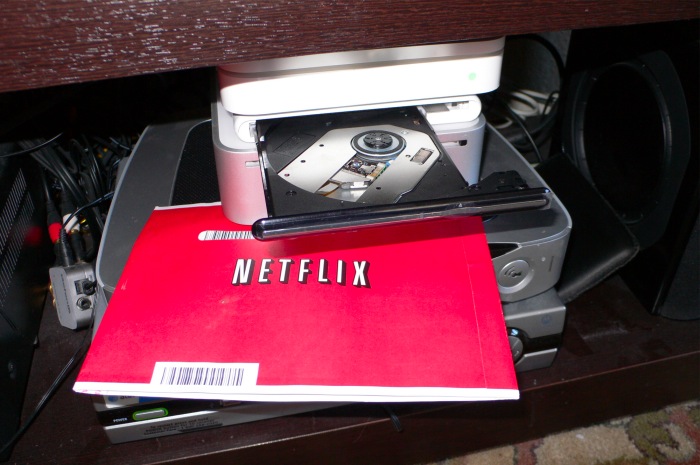
The AppStore approach for OS X devices brings with it Apple’s rapid obsoleting of the DVD drive. Having been among the early adopters of shipping software on DVDs, they have pretty much said the DVD is now dead. The MacBook Air has no DVD drive, the latest MacMini has removed it (causing much angst for Netflix mail renters) and I would expect it will not last long on the iMac either. For those pining after the DVD there’s a $100 plug-in DVD drive available at your local Apple Store and, to be fair, the latest non-DVD Mini is $100 less. Indeed, when Apple releases a ‘hard copy’ of Lion next month it will come on a minuscule USB flash drive, not on a disk. By the way, until streaming movie databases improve, I’m sticking with Netflix mail rentals where the 120,000 movie catalog compares favorably with the 12,000 or so available for streaming. Worse, owing to licensing agreements, the streaming catalog frequently drops movies. So for movie fans, the DVD is far from dead.

Whether you like Apple’s pushing of the limits here or not, there’s everything to like about their new licensing approach for software. Simply stated, any software purchased can be used on any Mac you own at no extra charge. So to test this out I went to the AppStore on my MacBook Air and bought the latest iPhoto ’11 for $15. No problem. I did not have to buy the whole iLife suite, as the AppStore lists the component parts separately.

Then I hopped over to the Hackintosh, and into the AppStore, but when I went to the iPhoto page it was asking me for another $15. What gives?

Call it poor instructions or user error; what you have to do is click on this icon in the AppStore application:

You will then see all your purchased/installed apps and subsequent downloads – click on the word ‘Installed’ – are free.

I suspect iPhoto is looked down on by many serious snappers as so much of an amateur toy. That’s doing it an injustice. The processing (Edit) controls have steadily improved, the integration with book making and card creation is excellent and it’s just the ticket for family snaps where Photoshop or Lightroom are overkill. Exporting to your web site is easy as can be. I have been using the BetterHTMLExport plugin with iPhoto for many years and am pleased to report that iPhoto ’11 is the first version which did not require reinstallation of the plugin.

The processing controls in iPhoto ’11.

Hit the option key on your keyboard and the ‘Exposure’ slider, top right, becomes a highlight recovery slider. Very handy and very fast and easy to use. iPhoto ’11 has no problems handling RAW files – the image above is from my G1 and the original is RAW, as indicated in the histogram.

My iPhoto library contains some 20,000 snaps and the update of the database to iPhoto ’11 from ’09 took some 15 minutes on my HackPro.