Category Archives: Photographs

Just walking the pup

Um, where’s my camera?

One of the toughest things about the iPhone 4S is that you have to keep reminding yourself that there’s a very capable camera with you at all times.

These were snapped on yesterday evening’s walk with Bert, the resident Border Terrier.

American. Truck. iPhone 4S.

Setting sun.

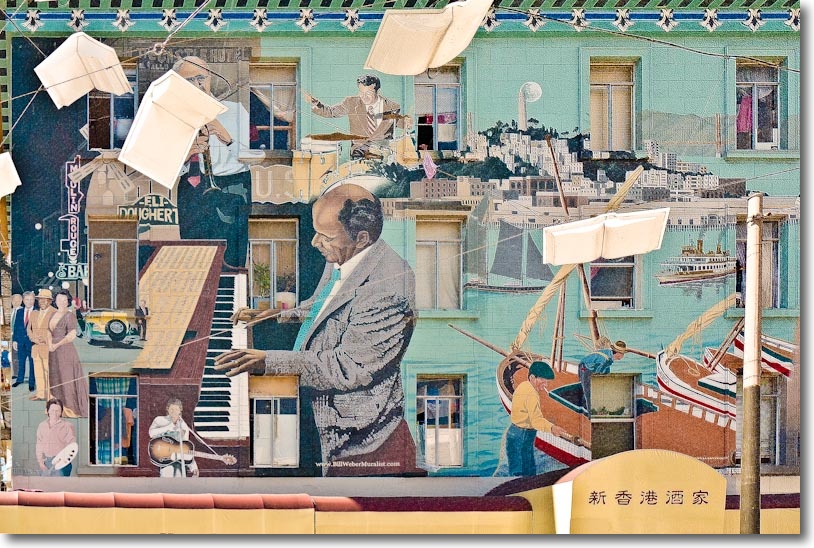
Dinner. Food. Art.

First two processed in Snapseed, the last unprocessed. All snapped on the iPhone 4S.

The iPhone 4S – Part III

Some snaps and observations.

When my second AppleTV refused to update over-the-air to AppleTV OS 4.4.1, and as I did not have a micro USB cable to do it over iTunes, I decided to take it to the Genius Bar at the local Apple Store and let the geniuses have at it. While they milled about, humming and hawing, I got to taking a few snaps in the melée that is the Burlingame store.

Once you learn to keep your finger away from the lens, the 4S is a more than decent snapper. Shutter lag is minimal, I have learned how to switch the flash to On-Off-Auto with the screen touch control and face detection shows a green rectangle to tell you what is being focused on. A touch changes the area of choice if that is wrong. Inter-snap delay is very short and there is no meaningful shutter lag. You can bang away at up to two pictures a second with ease.

Because the focal length of the lens (35mm FFE) is a very short 4.28mm, everything is mostly sharp all the time, though the f/2.4 fixed aperture does make touch focus useful for closer subjects.

On the way to the store we first encountered the parrot man in the street:

Parrot man. 4S, 1/120, f/2.4, flash, ISO 125.

A bit of lens flare is visible here around the red cap, though it may be from thumbprints on the lens as much as anything. Something to look out for – or to exploit for certain subjects. Nothing quite like a good greasy thumb to give you that ethereal look!

Nothing wrong with the definition in the above picture:

Parrot Man – detail.

Down the road my son Winston had to have a snap of the ghoul on the local restaurant’s wall – this is completely unretouched:

Ghoul. Picture by Winston Hofler, aged 9. 4S, 1/120, f/2.4, ISO 125.

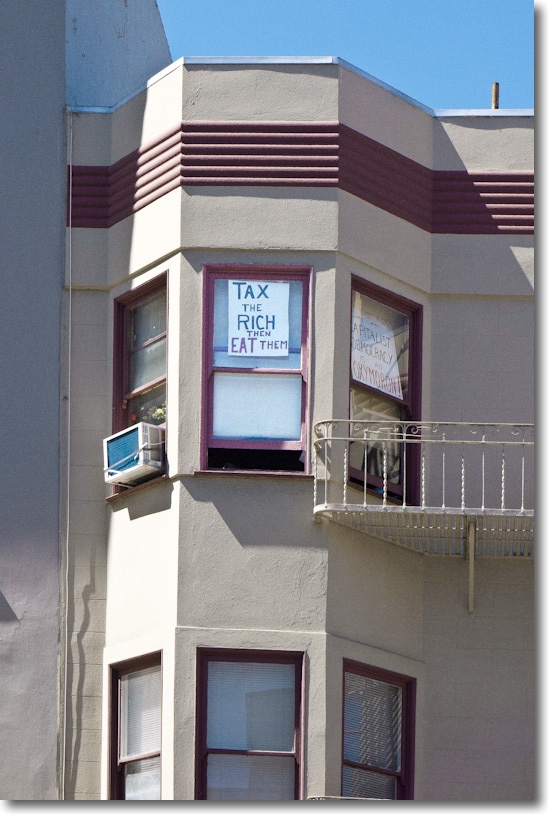
Where Winnie saw a ghoul, I saw a ghoulish business which thinks nothing of stealing from Americans daily:

Bankster ghouls. 4S, 1/120,f/2.4, ISO 80.

Once in the Apple Store, pups were everywhere to be seen while water damaged keyboards and dropped iPhones were being attended to.

Pup at the Genius Bar. 4S, 1/20, f/2.4, ISO 125.

And another:

Another pup. 4S, 1/20, f/2.4, ISO 125.

Apple likes to get ’em young, and there was a plenitude of snap opportunities in the kids’ play area:

Trying the iMac. 4S, 1/20, f/2.4, ISO 100.

In the next snap, I zoomed in using the un-pinch gesture to see what the quality would be like. The answer is that whereas most of the above will print well at 13″ x 19″, this one starts to break up at 8″ x 10″.

Intent. 4S, 1/20, f/2.4, ISO 100.

Don’t be fooled by those blurred backgrounds. These were done in Photoshop CS5 using the Magic Outliner, Refine Edges and Filter->Lens Blur. But then you wouldn’t know that unless I told you! You can see just what a great job Adobe has done in coding this technology in the close-up of the Parrot Man’s whiskers and the young blonde girl’s hair, above. It takes seconds to do and you can bet this code will be in-camera before too long.

The Auto White Balance in the iPhone 4S beats the pants off that in the Panny G1 and G3.

The funky handling of the 4S takes some getting used to, the screen is awful in bright daylight and the camera is better than 99.9% of photographers out there, most of whom seem to contribute to the fora at DP Review. The remaining 0.1% of us actually take pictures.

That AppleTV? Turned out to be a dud so Apple replaced it, no questions asked, doing the software upgrade on the replacement for me in the store. Can’t grumble – time wasted being more than repaid by some great picture opportunities. And because everyone thinks you are futzing with your phone, no one takes any notice. That’s worth a lot. Now I can enjoy wireless Mirroring from the iPhone 4S, when it’s not being used to take snaps or make calls.

iPhone 4S + Snapseed

A combination made in heaven.

One of the signal benefits of the iPhone 4S and iOS5 is the ability to keep everything in sync wirelessly. No computer is needed. The 4S is the computer.

Well, with Snapseed on your iPhone, of which I wrote here, you might argue that Lightroom/Photoshop/Aperture/iPhoto are things of the past. The iPhone is the photo processor.

Snapseed is an extraordinary tailoring of photo processing power to the touch interface. I will not belabor the point, rather preferring to illustrate it with a picture straight from the iPhone 4S, first shown unprocessed here, with one processed on the iPhone 4S in Snapseed. Not only was this a simple process, it actually made ‘darkroom’ work fun.

Here’s the original followed by the Snapseed version:

De Soto. iPhone 4S, 1/120, f/2.4. ISO 80

Who needs a computer?

Snapseed? You got $5?

The iPhone 4S – Part I

It works well.

Given the poor ergonomic design of any cell phone when it comes to taking pictures, the iPhone 4S is not half bad. Sure, you have to hold the wretched thing feet from your face while you ponce about and squint, trying to make sense of what little you can make out on the screen, but iOS5 software makes the ‘+ Volume’ button into a shutter release and there’s a small built in flash (which I have yet to master and which refuses to work when I want it to) to lighten the shadows, or something. Maybe it just enhances the specs?

Coming from an ancient iPhone 3G there is a lot to like here. Sort of like when the torturer moves from ripping out nails to mere thumbscrews.

Nor do I for one moment agree with the tired dictum that has it that “The best camera is the one you have with you”. Pure rot. If you meander around hoping for something to happen, well you might as well wait for the next Hindenburg to blow. Please. Good pictures are made when you have A Sense of Purpose. Sorry, swanning around is not going to cut it.

But after the massive migraine induced by getting iCloud working and OS Lion upgraded and the new iPhone 4S responding to commands, more or less, I was just happy to go out for the groceries.

And I took the 4S with me.

And I saw some things.

Pumpkins. 4S, 1/140, f/2.4, ISO 64

Pumpkins sporting the ‘300’ effect. 4S, 1/150, f/2.4, ISO 64

De Soto. 4S, 1/120, f/2.4. ISO 80

Search me how the iPhone 4S determines the ISO, or anything else for that matter, but I do know you just push the button, bang away (the shutter lag and inter-frame delay are very short) and the picture looks like it may print at a decent size. Or at least one in which this old fart can actually make out details.

The lens has a full frame equivalent focal length of 35mm which is ideal for street snaps.

From the iPhone’s ‘lock screen’ all it takes is two stabs at the Home button and a touch of the camera icon and you are off. Nice UI design given the appalling ergonomics.

So there’s some serious potential here, not least for the fact that no one takes you seriously if you are pirouetting about with a cell phone. That is worth a lot for this street snapper. I was not kidding when suggesting that the point-and-shoot camera makers were in big doo-doo.

More to come.

A few words on Lightroom 3 import settings.

Imported JPG snaps from the 4S are overexposed compared with the usual RAW imports from my G3/G1, so I adopted the following import setting for the best results:

The sharpening settings are identical to those for the Panny G3 and may be a tad too aggressive.

The files size is 3264 x 2448 (4:3 aspect ratio), for 8mB a snap. My iPhone 4S is the cheapest 16gB model, so that means if I leave 1gB free I can still store 125 snaps. If space runs out, get on wifi and upload your pictures to the iCloud, erase from the iPhone and bang away some more. With iTunes Share coming at the end of October, the need for local storage drops greatly so it’s hard to justify the premium asked for the 32gB and 64gB iPhones 4S models. Maybe if you like to carry a lot of games on your iPhone more memory makes sense.

More snaps and field feedback appear in Part III.