Category Archives: iPhone

A smartphone with a decent camera

Leica SL2-S and FOTOS

Problem resolved?

For an index of all Leica-related articles click here.

In Part III I made mention of the poor experience I had with FOTOS. I don’t care to download images from the camera to my iPhone but I do want GPS data for search and retrieval in Lightroom Classic. FOTOS did not work properly, recording incorrect times and constantly disconnecting from the camera.

Overnight Apple applied yet another of its endless iOS ‘upgrades’, meaning yet another fix for one of the most porous operating systems yet devised. I’m now on 26.3.1. And you thought Windows was bad? I think that makes four upgrades this year. It’s time critics ceased praising Apple for its apparent diligence and started damning it for making a lousy OS in the first place.

Anyway, with the new OS in the iPhone and the FOTOS app updated with the latest version in the App Store I restarted the connection with the camera and took phone and camera for a walk. The iPhone is set to 5gHz wi-fi.

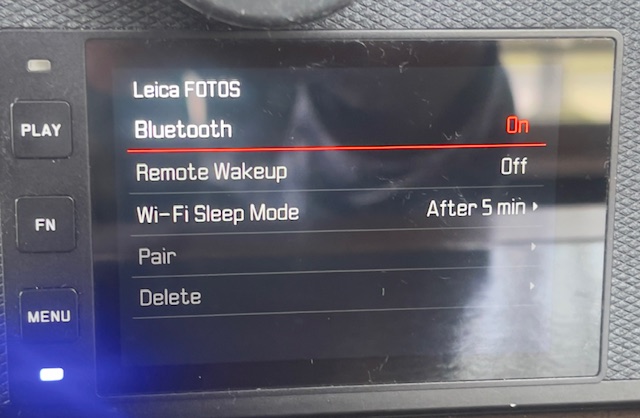
In the setting screen below (Page 5 in the screen system) I had the Wi-Fi Sleep Mode set to ‘Never’ thinking that sleep might mean yet another 30 second wait when the camera was again operated. The result was that the battery was completely depleted in 80 minutes! However, there were no unprompted disconnections, the rectangular LED at the lower left corner of the LCD display blinking a bright blue throughout. (It’s so bright it washes out in the picture below):


FOTOS up and running, switched to ‘After 5 minutes’.

So I switched the Wi-Fi timeout to ‘5 minutes’ to determine the effect on battery life. In the event, after a 5 minute pause, the blue LED continues blinking and placing an eye to the EVF sees the camera wake instantly. So the ‘5 minute’ setting makes sense when the goal is to preserve battery life. After a further 80 minutes with a fresh battery the battery was just 25% depleted. Now this is not quite a fair comparison as I was not taking pictures during that period, but I would estimate that a battery life of 2-3 hours using a 5 minute wi-fi timeout is a reasonable expectation. Nonetheless this cheap and capable backup is recommended, and you will need to re-pair the camera and FOTOS after changing batteries. It’s hard to understand what benefit the ‘Never’ setting confers and the Instruction Manual sheds no light on the issue.

It does not matter whether the iPhone is on or off. FOTOS continues to run in background mode, as long as the camera is left On. I noticed a slight increase in the temperature of the camera body – I measure a maximum increase on the baseplate at 19F after 80 minutes when the ambient temperature was 73F.. No big deal, but clearly something in there – presumably the wi-fi chip – is working hard.

So – for now – it appears that FOTOS is working correctly, until the next iOS change, I suppose. The SL2-S is on the latest OS, version 6.2.0 released in early 2025. Whether the issue was attributable to a dated FOTOS app or to a dated iOS I have no idea as I updated both without interim testing. Not great diagnostic practice, I admit, but I was dreaming of ‘It Just Works’. Remember that Apple slogan?


Correct location mapping in LRC’s Map module.

Update 3/10/26:

After one happy day with a stable connection I cannot reestablish that desirable state of affairs. Simply stated FOTO’s pairing with the iPhone is a disaster. Huge time sink. I’m moving on, forgetting this ‘feature’.

A second update 3/10/26:

I refuse to let this thing beat me, and may have come up with a fix. In an effort to defeat the constant disconnection issue I went to Menu->Page 6->Camera Settings->Power Saving->Auto Power Off and changed the default of ‘2 min’ to ‘5 min’. So far I have been up and running with the blue diode flashing merrily away for 60 minutes, which has to be a record …. The FOTOS app persists in telling me “Camera is not connected” despite what appears to be a good connection. What a mess. More as I experiment with this.

Well, that does not work. While the blue diode continues flashing snd the top display indicates wi-fi is on, all the GPS data are frozen at one location. The time stamp is good, though, as I have told the SL2-S not to use time data from the iPhone. Small progress. The next step will be to revert to Menu->Page 5->Leica FOOS->Wi-Fi Sleep Mode->Never. I still have Menu->Page 6->Camera Settings->Power Saving->Auto Power Off set at the factory default of “2 min”.

Minting it

No more Mr. Nice Guy.

The cell phone is an indispensable part of our lives. Hardly a genius observation. The camera in that cell phone is not only a fine photographic tool, always with you, but it’s also used for scanning QR codes, reading bar codes in the supermarket to detect unhealthy ingredients, and taking pictures of the minuscule print on product labels so you can actually read the text. Why, you can even use the cell phone to, you know, make calls, not to mention receiving spam messages from our Russkie friends inviting you to share your credit card information because of all the toll charges you owe and suggesting you fend off the Dobermans at the IRS with Comrade Ivan’s assistance.

I have been a loyal (read ‘stupid’) Verizon customer for the best part of two decades, when the other day I received this email. It’s hard to conceive of a more crassly worded announcement. Translated, it reads “Thanks for being a loyal customer, chump. Now bend over.”:
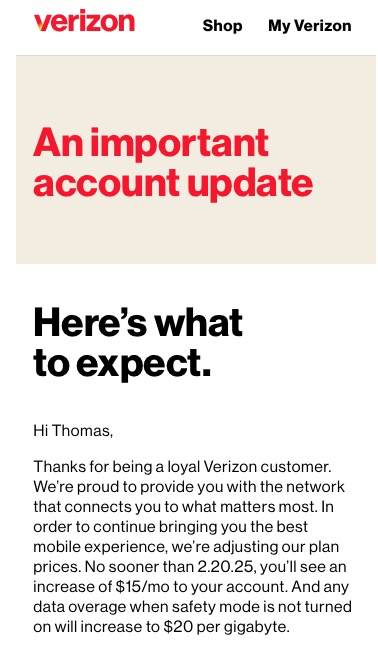

Corporate greed redefined.

That’s a 13.5% increase on my current rate in an economy whose inflation rate is below 3%. That’s not going to happen and triggers Dr. Pindelski’s New Year’s resolution: Any rate increase over 3% results in immediate dismissal of the provider.

A while back, speaking with my sister in West Sussex, it transpired that the UK has many cell service providers and her monthly rate of $19 covers two lines. Hardly a new economic concept – all competition drives down price. My new Verizon rate would be $127 monthly.

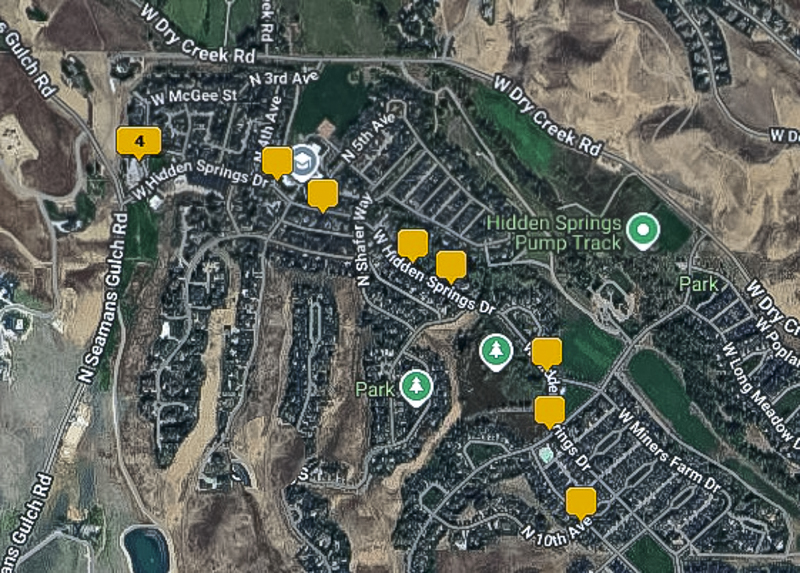
So I searched the web for a lower cost provider with good coverage and found Mint, whose coverage map you can access here.

Here’s the map – use the above link and you can enter your address for a more granular reading:
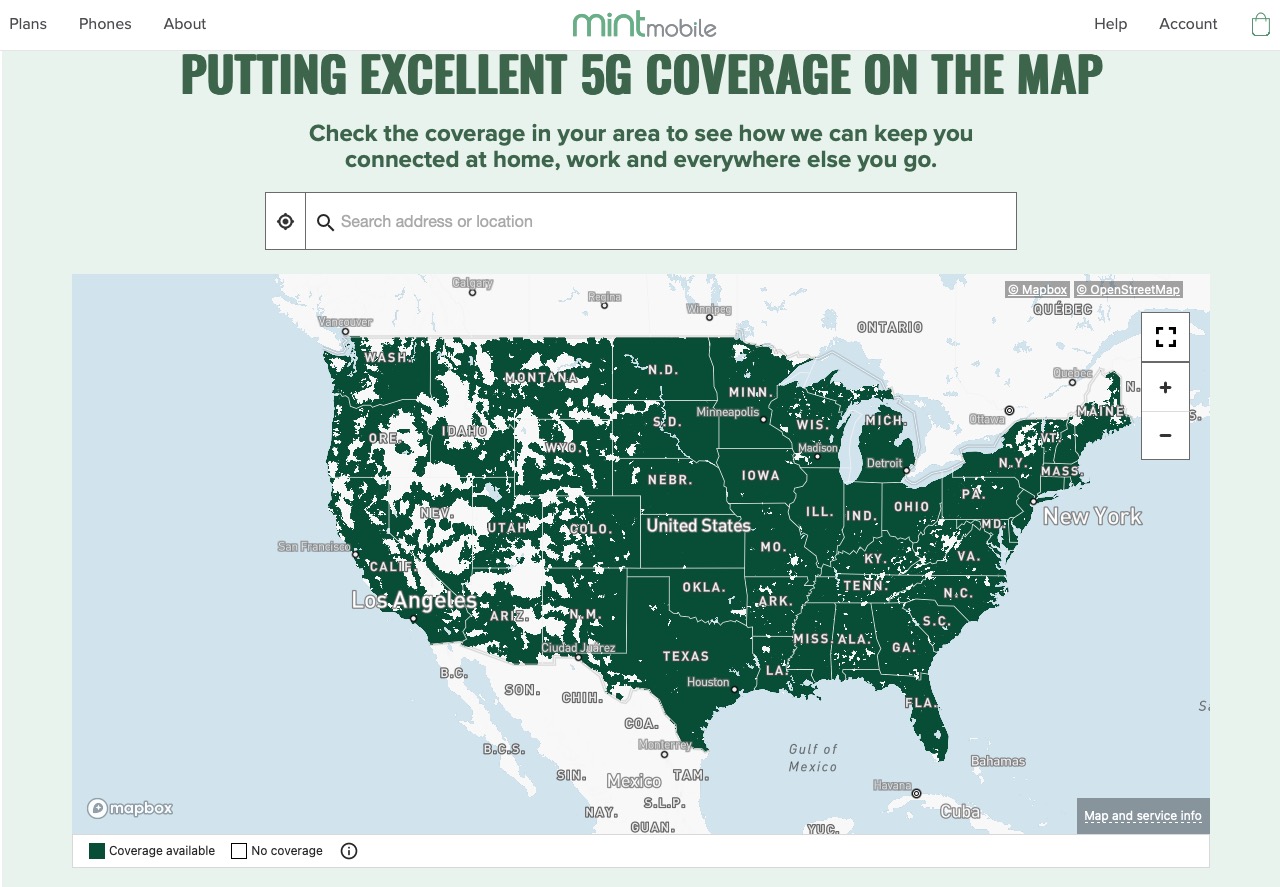

Mint coverage – a few holes in the West.

It’s similar to T Mobile’s, suggesting that Mint is buying excess capacity from T Mobile:
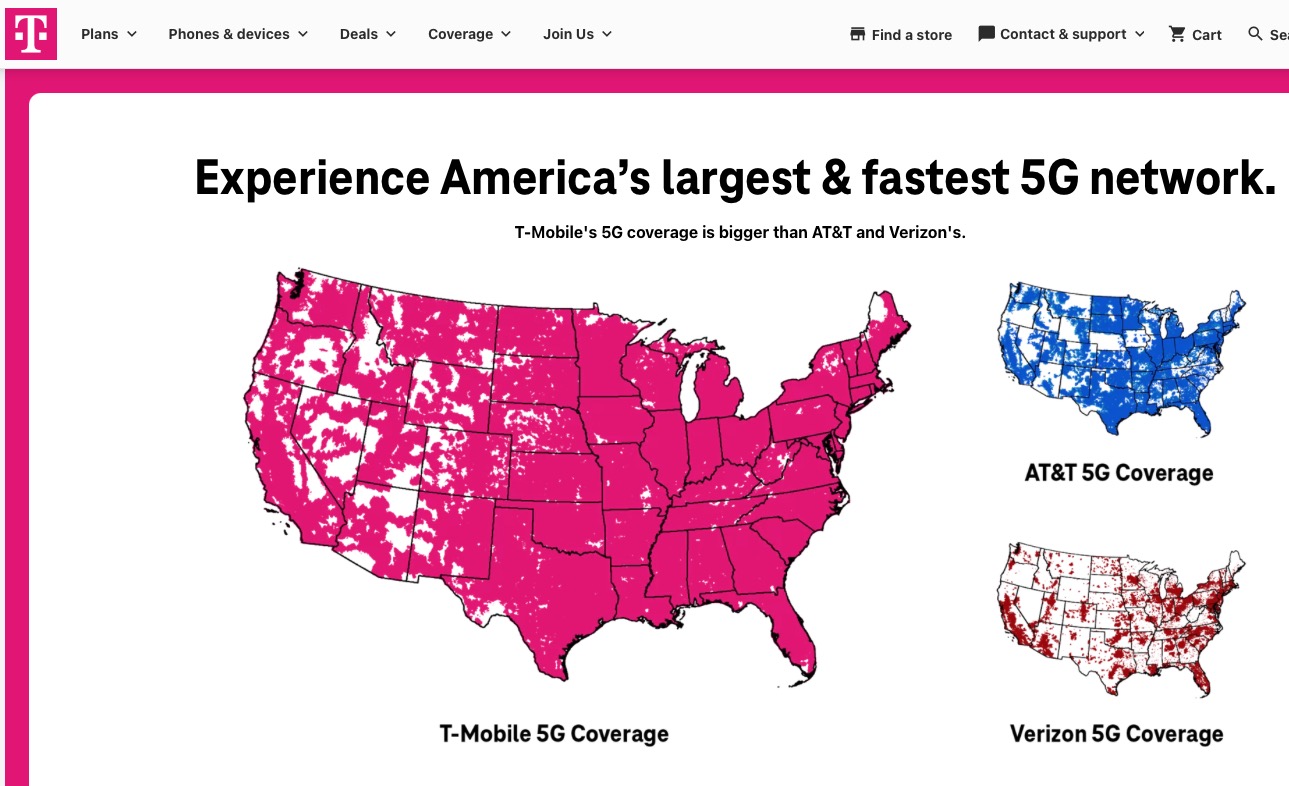

T Mobile coverage.

The Mint service provides for a 3 month $15 monthly teaser rate for two lines, whereupon the rate rises to $45 monthly. That’s a full 65% less than Verizon’s, an annual saving of $984. Heck, two years of this and I get that Leica M for the home theater.

Both my iPhone 12 (physical SIM) and my son’s iPhone 15 (eSIM) are ‘unlocked’ versions, meaning that Greedy Apple got $10 more for each phone. This premium was paid with the distant thought that a carrier change might be made sooner or later. If your phone is tied to a specific carrier you cannot switch, but at a $984 annual saving you can afford a new phone when you do.

There are two aspects to the switch. The easy part is getting an eSIM download from Mint, which arrived in the email 30 minutes after signing up. Secondly, the physical SIM for my iPhone 12 arrived one day later by overnight FedEx, along with the little pin to open the SIM door in the phone’s side. Impressive.

The hard part – you guessed it – is first you have to get the crooks at Verizon to release you from their usurious charges. You are meant to get a ‘Number Transfer PIN’ which you enter in the Mint application but, shock news, the link from Verizon is broken. Fortunately there are several ways of getting this Number Transfer PIN, and one of those worked for me. See below:
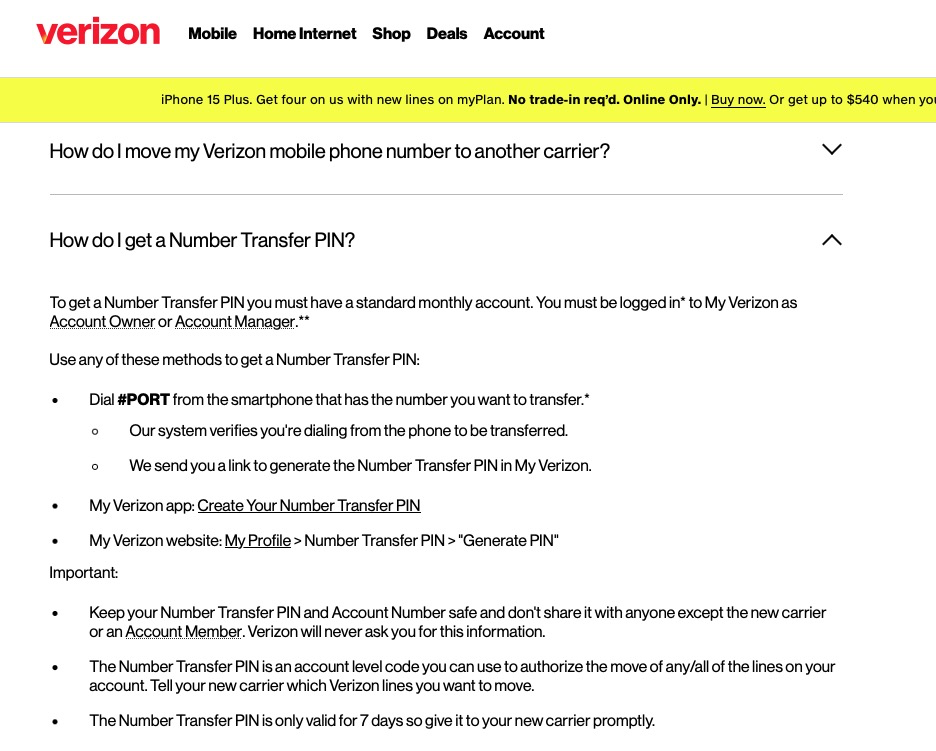

How to get the Transfer PIN.

My son’s iPhone was up and running on Mint within 10 minutes and my service was transferred 24 hours later when the new SIM was installed in the iPhone 12. Here is the happy result:
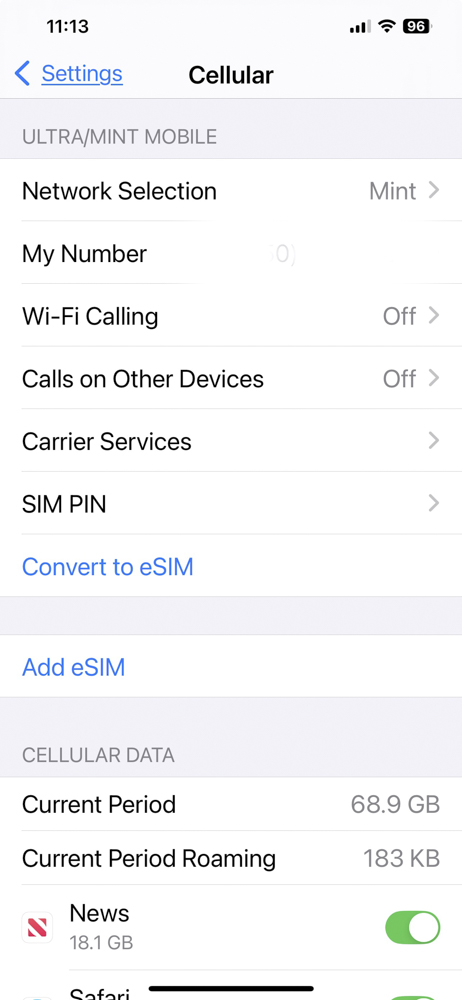

Up and running on Mint.

The only caveat is that the physical SIM is tiny and it took my son’s deft fingers and excellent eyesight to get it installed in my phone.
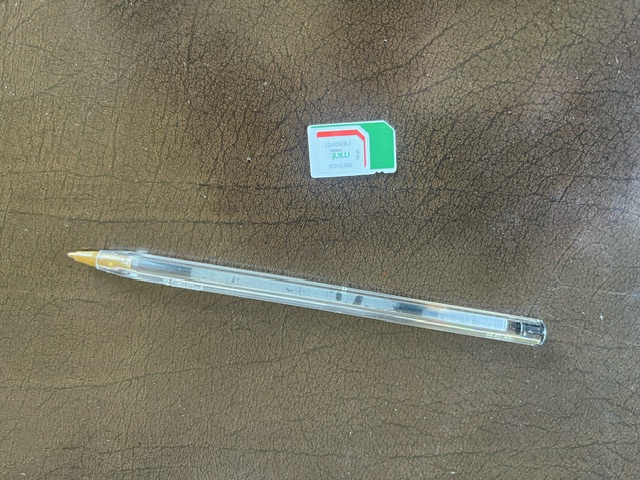

Tiny new SIM.

The service works well and all that’s left to do is to make sure the crooks at Verizon cease charging me while I enjoy the savings.

Because the transfer process is non-trivial and Verizon will make sure it’s as opaque and as difficult as can be, few will bother to make the change to a cheaper carrier. They already know that the integrity of cell carriers is right down there with that of cable TV providers and big banks. So they will bend over, grin and pay up. Thus the 13.5% increase to suckers (like me) will mightily boost the income of a business with a very wide ‘moat’ (meaning prohibitive costs of entry for prospective competitors).

And don’t make the mistake of thinking that Mint is a high integrity outfit. Right after signing up I received an email telling me that my data allocation of 5 MB per month was about to run out and that I should sign up for more at ridiculous cost. A quick check proved that this was a lie. One month later I have only used 2% of the allocation. Don’t fall for this scam.

So I did the only thing logically possible. After firing the bastards I loaded up on Verizon stock. Little competition, oligopolistic pricing and a very safe 7.2% annual dividend. If you can’t beat ’em, join ’em.
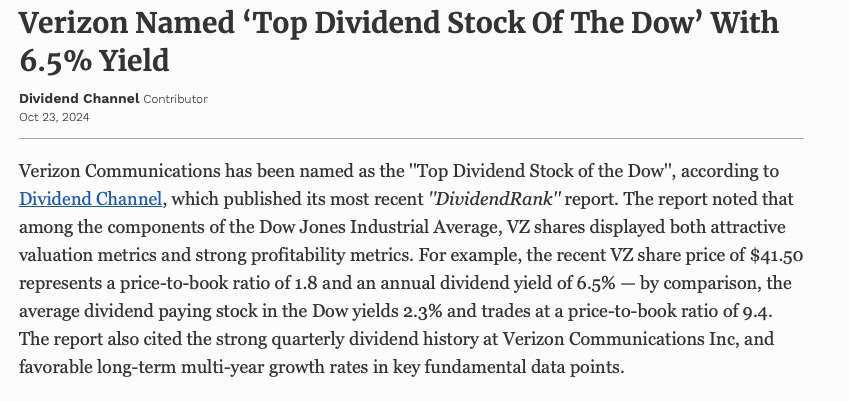

Reaping what I sow.

Other providers? I expect that the insurance company crooks and the gardeners will be the next in the firing line. This is too much fun, replete with schadenfreude.

Update March 19.2025:. Two months into our three month trial period and my son (in NY) and I (in the west) have had zero issues with the Mint Mobile service on our iPhones (iPhone 15 and 12, respectively), so we signed up for a one year plan at a mere $15 per month. Compare with $123/month at Verizon. And yes, VZ stock is up 14% since I bought it plus that high dividend yield. What’s not to like?
Remove ads from Apple News

Too much of a bad thing.

Like any news reader seeking to preserve his sanity, I installed AdBlock on my desktop computer and laptop years ago. At no charge this removes intrusive ads from news feeds, replacing them with a blank space or a grey box.

And it has worked well for years.

But when Apple’s iOS devices added Apple News, there was a handy news consolidator whose content you could curate. Well, whose feeds you could curate as the content, which started with light and bearable advertising a couple of years back, has let greed rear its ugly head. AdBlock did not work on Apple News content. Read a typical Washington Post story on your iPhone or iPad and you will get a blaring ad every two paragraphs of text. I already pay for the subscription and see no reason why it should include unsolicited ads, especially as those increasingly include politician lookalikes to make them doubly irritating. You want to lie to me, steal my money and then pay for the privilege? I don’t think so.

It turns out there’s a simple solution which actually improves on the desktop/AdBlock experience, for the ads are stripped out with no empty spaces testifying to their absence.

It’s called NextDNS and you can download it from the App Store for just a one time charge across any number of iOS devices.

Installation is simple.

After downloading, go to the Smart DNS app and touch Enable on its home page:


Enabling

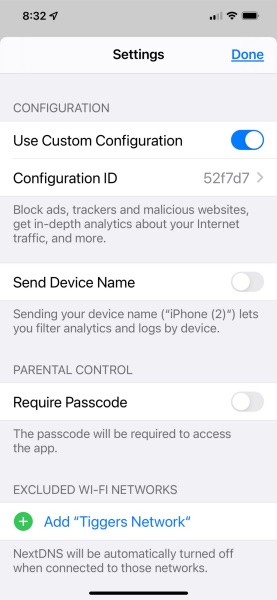
Then touch the dots at the base of that page to get to the configuration screen, touch ‘Custom Configuration’ and enter this code in the ‘Configuration ID’ field:


Enabling

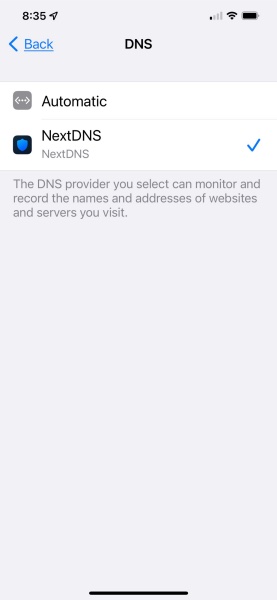
Now jump to the Settings app on your iPhone or iPad and go to Settings->General->VPN, DNS, & Device Management->DNS and touch ‘NextDNS’:


Enabling

You are done. Exit AppleNews, restart it and the ads are gone.

If the custom configuration code does not work generate your own code using the instructions here.

The app is free for the first 300,000 ad removals per month (that’s a lot), and $19.90 annually thereafter.

Who owns the company? Best as I can find out, it’s a Delaware company owned by two Frenchmen. No obvious indication of dirty Russkies trying to infiltrate your system.

Is it perfect? No. The process is somewhat akin to catching a drug addled Russkie athlete cheating in the Olympics. No sooner does detection technology catch up with the latest drugs than the Kremlin finds new and improved ones which defeat detection. The process here is the same. The maker of the app has to maintain a database of offending sites so as to know to block them. So the occasional ad does get through, but it’s still night and day compared to the original with no ad blocking.

The obsoleting of expertise

Denialism rules.

The first time a driver lapped the famed Nürburgring racing circuit in under 7 minutes was in the mid-1970s when Niki Lauda accomplished the task in a Formula One Ferrari. No, you could not buy one at the corner store. Lauda almost died at the ‘ring in 1976 when his car crashed and was consumed, along with Lauda, in flames. Niki survived and added two more championships to his total, but accomplished something far better for the sport. His fiery crash saw to it that henceforth no more Formula One races would be held at the 13 mile circuit, built in the 1920s when tires were slim and drivers were fat. Getting speedy help to an injured driver on a circuit so long was simply not possible.

But the fascination of the circuit refused to go away and, to this day, you can pay up a few Euros and have at it on a nice drive through the beautiful Rhineland mountains.

Niki was driving the old fashioned way, with three pedals and a gearshift. There were maybe two or three other drivers in the world who, given comparable machinery, could match his time. Certainly not you or me.

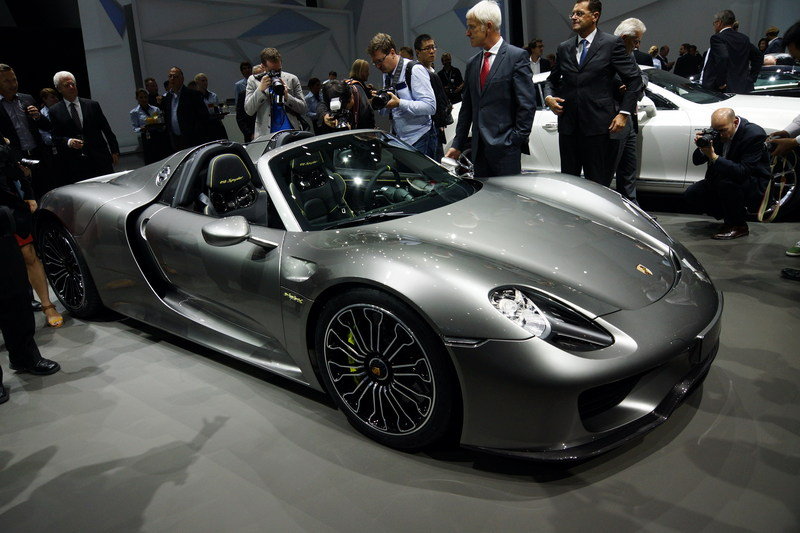
But Porsche well knows the marketing cachet of the ‘ring, so in 2013 they asked their racing driver Marc Lieb to have a go in a 918 Spyder which you absolutely could buy at the local Porsche dealership, albeit after a wait of a few months while they made it back in Zuffenhausen.


Lieb’s 918

That 918 Spyder only had two pedals – go and stop – and Porsche’s magic Doppelkupplung transmission, a device so complex that for once the German love of complex nouns usually reserved for simple descriptions was entirely justified. We know it as the PDK (Pretty Damned Kwik) and it first saw the (retail) light of day on late 1990s 911s. Today you can even get it on some Honda motorcycles! Anyway, the PDK provided two gearboxes in one casing, one waiting for the upshift, the other for the downshift. As there was no longer any need for transmission fluid to confer the force which advised the direction of the change, along with the attendant delays dictated by the laws of hydraulics, the gearbox shifted right now, faster than any human could shift a traditional manual box, like the one Lauda used. And Lieb delivered in spades, returning a time of 6 minutes and 57 seconds and you can see the whole glorious thing here. What that video does not tell you is that when Lieb tried in a regular stick shift version of the 918 he could not break 7 minutes …. Technology had obsoleted the skill of gear shifting for ever. You may still enjoy shifting, but you will never be as fast as a PDK automatic. One thing remains unchanged. Neither you or I could remotely match Lieb’s lap in that off-the-shelf Porsche, but the technology makes a better driver of us all.

This somewhat lengthy preamble brings us to an interview with famous Leica photographer Ralph Gibson, excerpted below. You know, the Ralph Gibson of such great 1960s works like The Somnambulist and Deus Ex Machina, which brought his own special vision of the world to the printed black and white page. Of course it was black and white. And in a book. What did you expect?

All of a sudden the software that makes everybody in the world a photographer also makes everybody’s photographs look exactly the same. My iPhone shots aren’t any better than yours and yours aren’t any better than the person next to you. There’s a homogeneity that comes with this.

I want to know how this technology, which we will consider to be a formal construct, impacts what I’m able to say in my photographs, which is the art that’s discussed in terms of form and content. Let’s say the form is digital imagery. How does this speak differently than analog film, silver gelatin? There is a difference, and it has to do with the fact that the image is somewhat compressed, in terms of its perspective. The laws of perspective were invented in the Renaissance. Prior to that time, painting was entirely two dimensional. That particular illusion of space, from the picture plane back, as we’ve grown accustomed to it in film, is foreshortened on the digital sensor.

What has happened to poor old Ralph, in all this denialism, is that his gear (shifting) skills have been obsoleted and, man, does he rue that loss. The premium his ability confers to manually focus, expose just so and brew the developer as he had learned over decades – all of these have become irrelevant. Stated differently, the iPhone is Gibson’s PDK. Not for one moment can he tell an iPhone picture from his Leica film snaps, although there will be hints. The cell phone version will be sharper, better exposed and come with lots of data missing in his film version. And it can be sent around the world in a matter of seconds, not days or weeks later in some stuffy old book decorating a coffee table.

Film cameras, stick shifts. So much technological detritus. Technology makes a better photographer of us all.

Hide My Email

Another great privacy enhancement from Apple.

Sign up for a new online service and the one thing you can be almost certain of is that next day’s email inbox will be inundated with spam. The reason is that the scummy vendor of the service you just signed up for – and most are scummy – just sold your email address to some other bottom feeder.

The other day I was signing up to a streaming service and I knew that these predators would immediately sell my email address. It’s lost somewhere in the ‘Terms of Service’ fine print which the scummy vendor had his scummy laywers write. Calling this a ‘service’ is like claiming the invasion of Ukraine was a denazification move.

Anyway, as I moved the cursor to the email field, iOS on my iPhone asked whether I wanted to hide my email, and I replied ‘Yes’. It issued me a fake email address which will be the one the scummy vendor sees and the one I signed up with …. immediately to be sold. The snag for Mr. Scummy is that anyone he sells this fake email to who emails me will have that email bounced as only emails from the original vendor will be filtered through to my inbox, using my regular email address which is visible only to Apple. And, indeed, that’s what happened – one confirming email from Mr. Scummy and nothing from his scummy pals.


Beating Mr. Scummy. Click the image for the full explanation from Apple.

Recommended for all your sign-ups. As a default assume that anytime you enter your email online that it will be sold – unless the vendor is Apple.