Category Archives: Hardware

Stuff

The Mirrorless Revolution

Bloomberg nails it.

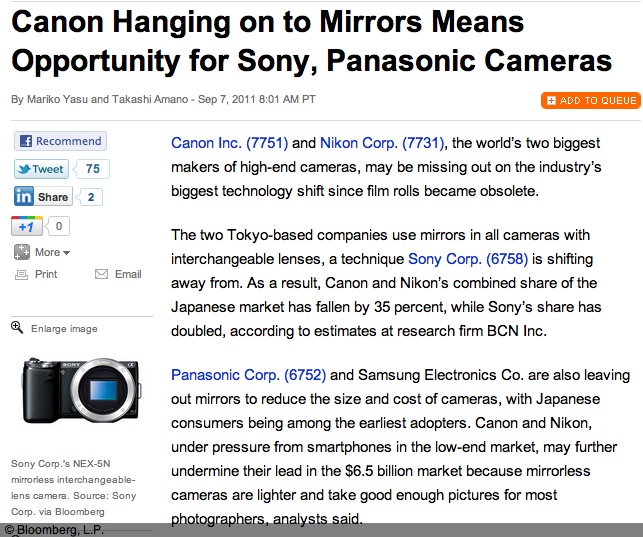
Bloomberg has an interesting piece on how Nikon and Canon are missing the boat by not offering a mirrorless DSLR.


Click the picture to read the article.

As an early adopter and buyer of the first EVF interchangeable lens MFT DSLR, the Panasonic G1, I tend to agree that it’s the future. The EVF will only get better, it’s cheaper to make than the prism/mirror combination used in old tech, and there are no moving parts and no need for complex retrofocus lens designs to clear flapping mirrors.

While I tend to take this quote – “Mirrorless cameras accounted for 40.5 percent of SLR sales in the country in July, surging from 5 percent in early 2009, according to BCN.” – with a bushel of salt, there’s reason to believe that mirrorless DSLRs are gaining market share. Apochryphal data are mostly useless (just because your local bookstore is full does not tell you whether it’s booming or having a going-out-of-business sale), yet I constantly read that big DSLR owners are dumping their heavy gear for something they actually will take along on the next trip. I know, having done likewise with my (quite superb, I hasten to add) Canon 5D outfit with no fewer than eight lenses, in preference for the Panny G1 with but three compact zooms. Yes, it almost always goes along with me, not something that could be said of the 5D.

Still, I keep hoping that someone at these two dominant gear makers is working on an APS-C or full frame EVF design with a silent shutter and fast focus – things now found in several models in the Panasonic range. The disappointing Fuji X10, with its miniscule sensor almost got it right. What’s needed is a fast lens with a 28-90mm zoom range, compactness, silence, no shutter or focus lag and a proper sensor, not some nail clipping. The lens doesn’t even have to be removable. Price it at $750 and you will be rich. Canon and Nikon – are you listening?

Fuji disappoints – again

Good try, no cigar.

Having flipped my Fuji X100 for a quick profit, sight unseen, box unopened a while back, predicated on the realization that its software made even Microsoft Windows ’95 look good, I was excited to read about their latest offering, the X10.

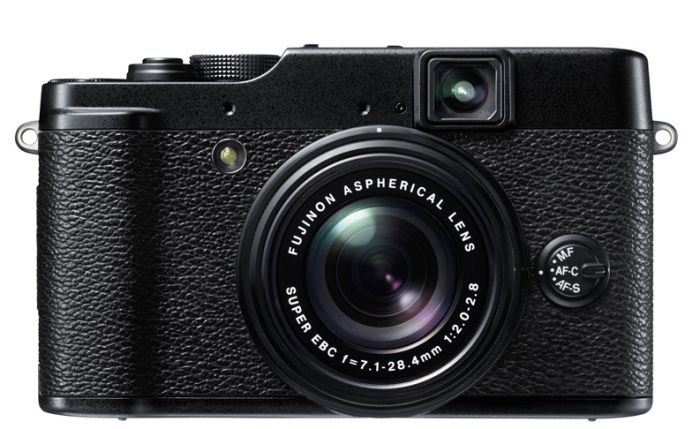
Everything about it at first glance looks right. A fast f/2-2.8, 28-112 zoom lens, a real optical zooming finder (you know, like the Olympus C5050 had a century ago), and an ergonomic design that just screams ‘hold me’. Then you get to the sensor.

The Fuji X10.

APS-C? Nope.

OK then, MFT? Nope.

How about (get the barf bag) a 6.8mm x 8.8mm (euphemistically called a 2/3″ in the trade to fool buyers – last I checked 2/3″ was around 17mm) piece of doo-doo? That’s all of 58 sq. mm., compared with 225 for MFT, 329 for APS-C and 864 for full frame. So the area of the crappy little sensor in this largish body is but one quarter of that in the G1, and the latter struggles with noise above ISO 400 or in poor light. No need to say more.

There is a fortune waiting for the manufacturer who can make a body just like this and implant a proper sensor for, goodness knows, there’s enough room in there. Price it as a premium compact, sell it for $750 (15 of these gets you an obsolete Leica M9), and you clean up. How hard can that be?

Meanwhile, I continue to wait on Amazon to ship my G1 upgrade, the G3, an event I now expect to occur when the US balances its budget.

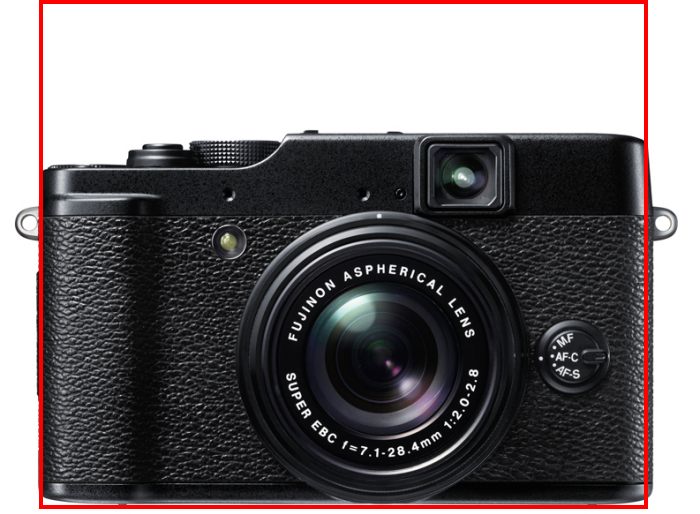
Here’s the X10 superimposed on the outline of the Panasonic G3 – think there’s room for a proper sensor in the X10?

X10 with G3 profile in red.

The extra height of the G3 results from the flash in the ‘prism’ hump, easily moved to the side, as the X10 does.

A smart move from Panasonic

Exploiting movie quality.

It’s no great secret among amateur movie makers that the Panasonic GH2 MFT still camera is also a state-of-the-art movie camera.

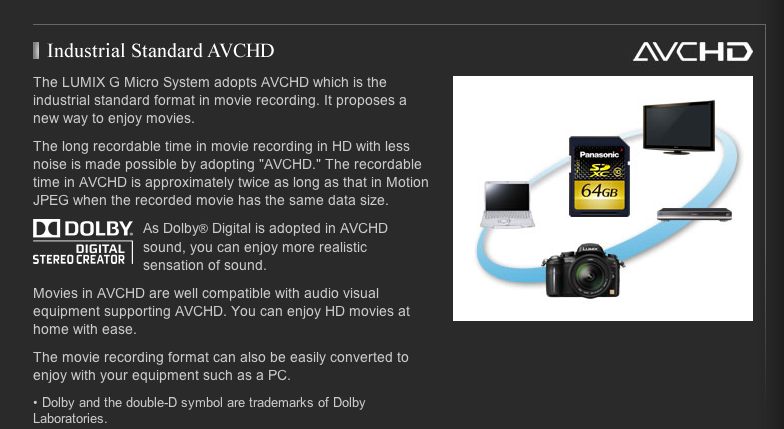
Click the picture for more.

The above link will take you to a full description of the GH2’s movie capabilities and will also allow viewing of movies made using the camera. The appeal of the GH2 over the (still waiting for mine!) G3 is that it accepts professional microphones, as opposed to limiting the user to a poor built-in one.

Now Panny has done something very smart in its recent announcement of two lenses which are clearly aimed at movie makers. With a software update the GH2 will be able to use power zoom with these optics, with variable zoom speeds. This makes for smooth zooming and a professional result. Two lenses have been announced, the ‘X’ in each designating the power zoom option.

These give an aggregate zoom range of 28 to 350mm FFE which will fulfill most movie making needs. Add an ultra wide (where no focussing is needed) and you are set.

With the addition of these optics it seems to me the GH2 (and G3 or GF3 but not earlier models) user has a still camera which will make a ‘no excuses needed’ semi-pro movie camera at very modest cost.

A friend writes:

Video – I share your enthusiasm for the development of high quality video in still cameras – I’ve enjoyed “one camera, two media” for the last ten years or so. On the other hand, I feel that 1080P AVCHD is a triumph of marketing over quality. Others have tested it against 720P MP4 and found the latter sharper; I’ve confirmed this informally and now get 1920×1080 playback using 1440×1080 MP4. Using MP4 you can make routine edits without rendering, which takes minutes instead of hours, and saves a generation. Here is a sample below (converted to Flash on Vimeo. The Algae scooper in our lagoon is kind of interesting too. (Editor’s note: ….and clearly designed by Rube Goldberg!).

Click to view.

Work and play

Good times.

The competence and performance of the desktop Mac – or Hackintosh in my case – has never been better. The price, it seems to me, cannot go much lower, with even Macs being more than price competitive with comparably equipped PCs.

My two year old Hackster, HP1, marches on unperturbed regardless of what I throw at it.

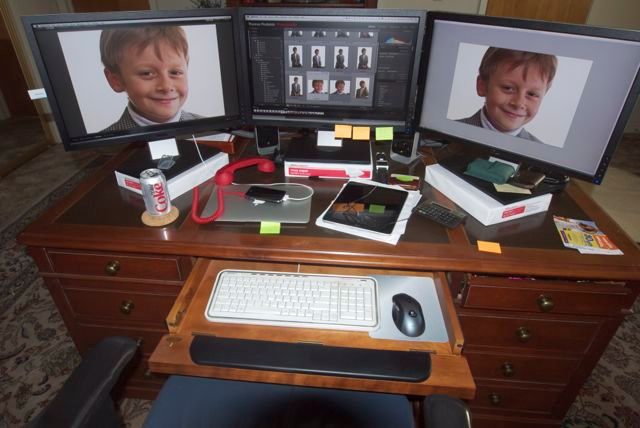
Play. HP1 with three Dell 2209W 1680 x 1050 IPS displays shows our son in LR3 and PS CS5.
The red phone is a hot line to the gutless wonder at 1600 Pennsylvania Avenue, Washington, DC.
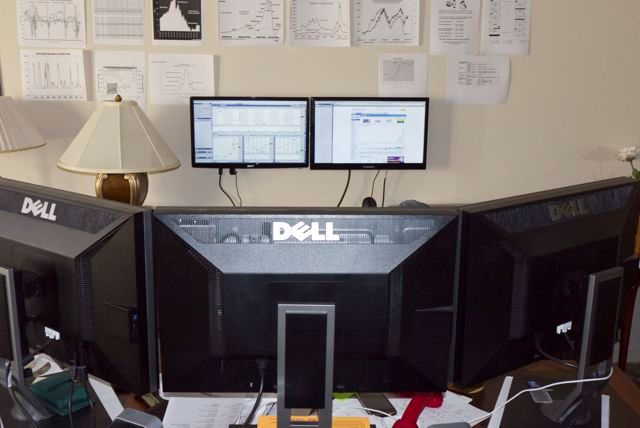
Garish Dell logos on monitor bezels blacked out with a marking pen.

If there’s a grumble it’s that Dell – or anyone else for that matter – is clueless about making display stands tall enough for the preferred operating height, which means the display top should be more or less at eye level. iMacs are quite the worst in this regard. Hence the three reams of paper in the picture. HP1’s technology may be dated – Core2Quad overclocked, Nvidia 9800GTX+ 512mB graphics – but I can asssure you it lacks nothing in performance or reliability.

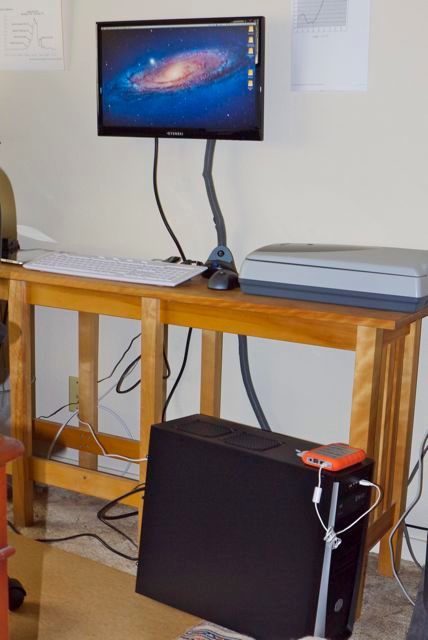
FU Steve’s latest ‘build’ for me is the HP10, using the latest i3 Sandybridge Intel CPU and a tremendous EVGA GT430 dual DVI-D graphics card with 1024mB of memory. No sooner was FU’s back turned than I clandestinely opened the case, dropped in another 4gB of RAM in the one open memory slot and saw Geekbench performance soar 6% past that of HP1! Never one to miss an opportunity to tinker, I invested another $130 in a cheap Acer display and $15 for a wall mount, and before you could say ‘iMacs suck’ the GT430 HP10 was happily driving two displays.

If there’s anything remarkable about HP10, other than the blistering performance, it is the incredibly low cost. Cheap displays are used here as color fidelity is not exactly paramount in the money management business, as long as you can distinguish red from green!

Work. HP10 with cheap Hyundai and Acer 1920 x 1080 displays,
which show the crooked game that is America’s capital markets.

Either rig is a photographer’s dream machine, and you really do not need more performance. Only heavy duty gamers need faster CPUs or more GPU performance.

A note on DVI single ink and dual link display connectors:

A single link DVI connector supports a resolution up to 1920×1200, and a dual link can support up to 2560×1600. The latter is generally found on 27″ and 30″ computer displays.

A reader Comment to FU Steve’s recent piece on the state-of-the-art in today’s Hackintosh suggests a few words are in order regarding connectors for modern LCD computer displays.

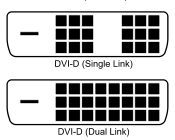
When FU spec’d the machine, he purposefully chose the EVGA GT430 display card which comes with two DVI dual link and one mini-HDMI socket. DVI dual link is the standard used by large 27″ and 30″ monitors to drive their huge pixel counts. It does not mean that you need two connectors on your graphics card. It does mean you need a DVI dual link graphics card and cable, not a DVI single link version of either. Most modern graphics cards support DVI dual link and you can immediately see the difference in the pin pattern on the connectors:

Single and dual link DVI connectors compared.

In practice, you may as well buy dual link DVI cables for all your connector needs as they can be used down the road if you get a 27″ or 30″ display. The premium over single link is negligible. A dual link DVI cable will fit either a single or dual link DVI graphics card or DVI monitor. For example, in the case of HP10 which uses two inexpensive 21.5″ 1920 x 1080 widescreen single link DVI monitors, one is connected to the GT430 card using a DVI dual link cable (which I had to buy) and the other is connected with a DVI single link cable because it came included with the monitor. The first cable will work fine with a 27″ or 30″ display, whereas the second is useless and would have to be replaced.

So, bottom line, the GT430 used in FU’s state-of-the-art Hackintosh (and in HP10) can support two 27″ or 30″ displays so long as a dual link DVI connecting cable is used for each. One cable per monitor, one socket on the GT430 per monitor. Two 30″ displays …. Hmmm!

An economy Hackintosh – Part II

Cheap speed.

Mission style sofaback made by Yours Truly in best Canadian maple.

There are rumors circulating the San Francisco Bay peninsula that FU Steve has been seen wandering the street at night, head on chest, muttering various incantations.

The way I hear it the builder of the economy HP10 Hackintosh, the backup Hackintosh to my nuclear powered HP1, my standby these past two years, had a singular ‘six sigma’ problem in getting HP10 to fire up. Scuttlebut has it that his wild eyed forays on the streets of the Bay area were fueled by his conviction that all was not well with the power supply makers of this world.

You see, FU went through not one, not two, not three but four power supplies before finding one that would engage with the rest of the hardware. And the fourth and final one, the one which actually worked, came from the local computer recycler for $10.

It’s all too sordid to relate and suffice it to say that HP10 with its Intel i3 2100 3.1gHz CPU and Nvidia GT 430 GPU is perking along just fine as I write, delivering ever falling stock quotes to this stock market maven who loves pain for a living.

Well, a disgusted FU left the hardware with me and I duly applied the relevant tests of interest to photographers.

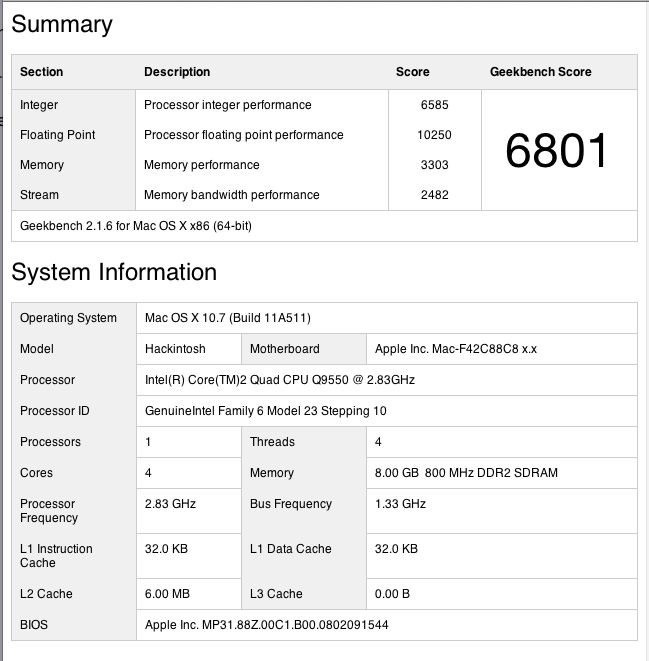
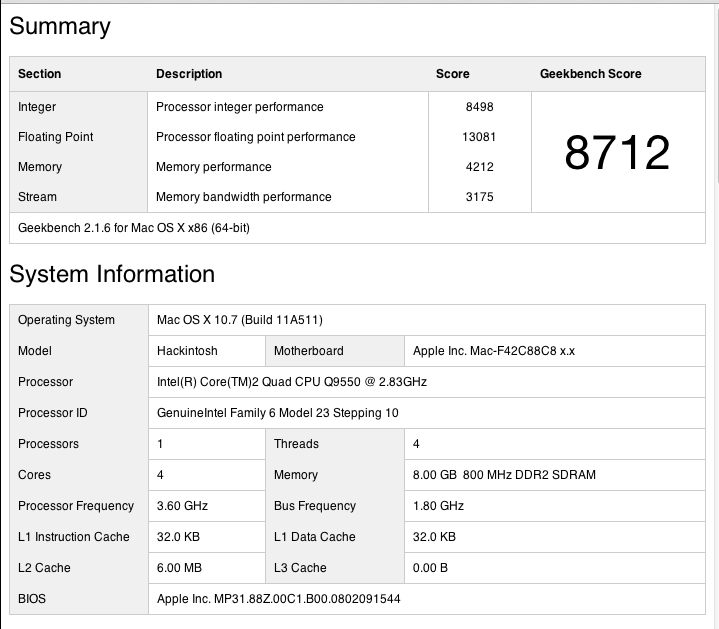
First the old standby, Geekbench (64 bit), a test of CPU performance.

The benchmark here is HP1, my Core2Quad Hackster with an Nvidia 9800GTX+ GPU, in both stock (2.83gHz) and overclocked (3.6gHz) modes, with 8gB of RAM. By comparison the HP10 uses an Nvidia GT430 GPU with just 4 gB of memory, albeit 1333mHz, compared to HP1’s 800 mHz speed.

Here are HP10, HP1 (stock) and HP1 overclocked:
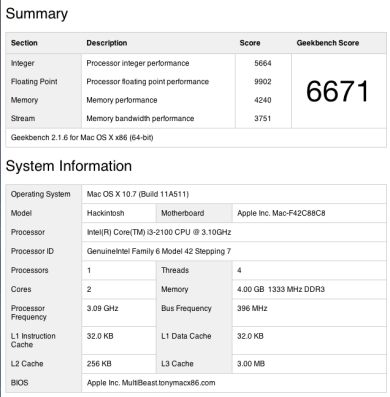
HP10 stock, HP1 stock, HP1 overclocked.

So el cheapo HP10 with its bottom-of-the-line i3 Sandybridge CPU comes in at 98% of HP1’s base speed. What’s not to like?

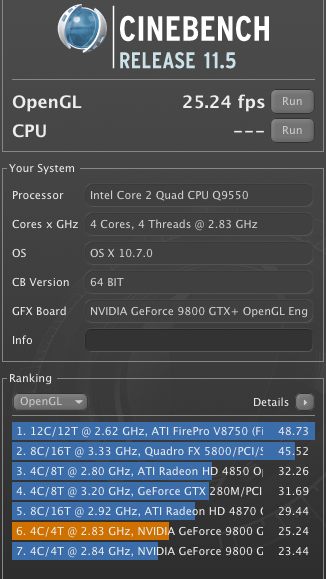
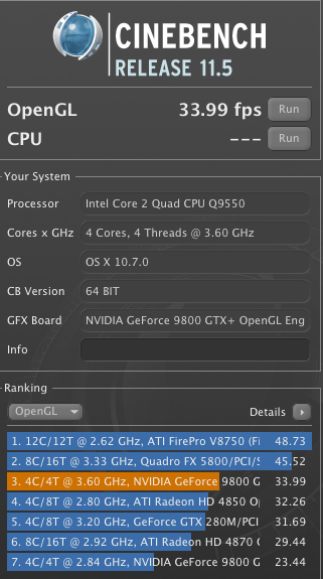
OK, how about GPU performance? Here are the Cinebench benchmarks:
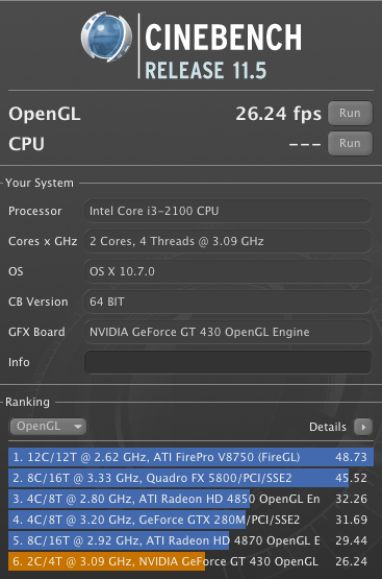
HP10 stock, HP1 stock, HP1 overclocked.

So you are getting stock HP1 performance (Core2Quad – $290) for an i3 price (Core i3 2100 – $128). Your GPU at some $80 is half the price of the fancy one in the older machine. And it’s faster. As is the memory – Memory Performance is 32% faster in stock mode for the i3 machine, even though there’s only 4gB in HP10 compared with 8gB in HP1. The DDR3 memory in HP10 runs at 1333MHz, compared with 800MHz for the DDR2 in HP1. And you don’t need to worry about fancy cooling solutions as the new bits use a lot less power than their predecessors. Similarly equipped to HP1, HP10 will use 30% less power. Less power, contrary to popular belief, is a good thing – whether in computers or bankers.

Tests with LR3 and PS CS5 confirm the above results. HP10 flies in photo processing tasks.

Do you need better cooling? Check out this chart using the poor stock Intel i3 cooler – the rise indicates the use of Handbrake to convert and compress a full size, full length DVD movie to M4v format for viewing on the iPad:
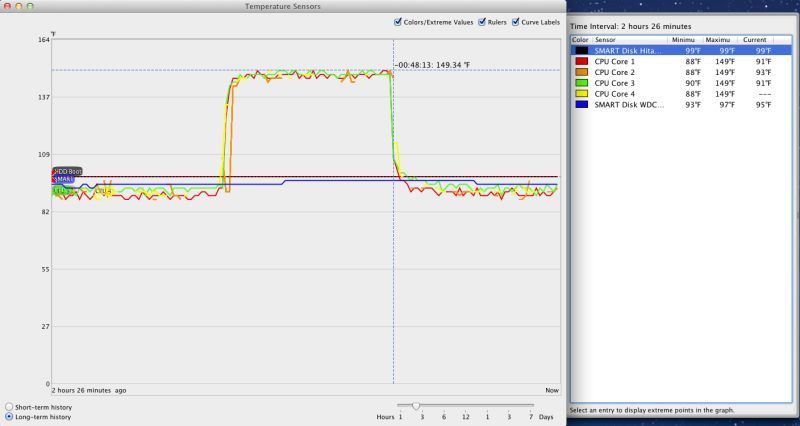
Stress test – stock Intel CPU fan.

The 149F maximum is well below the 176F service limit.

I hate heat in computers – it’s the great killer. So, a few days later, finding myself in Palo Alto, I blew $27 on an open box return Cooler Master 212 Plus at Fry’s Electronics, the same giant radiator and fan used in HP1, with the following result on the stress test:
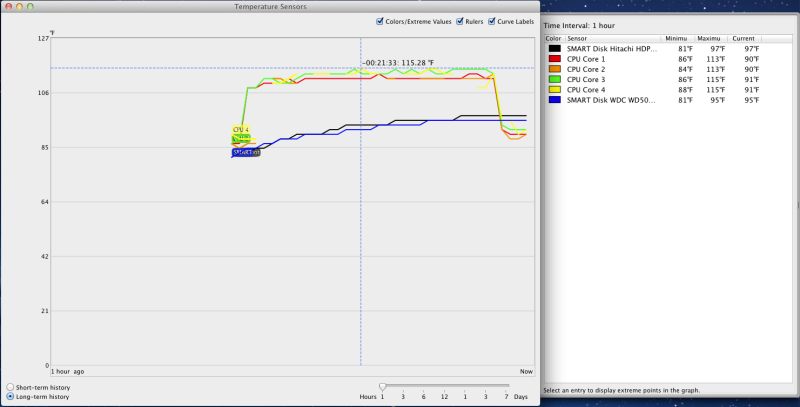
Stress test – Cooler Master 212 Plus radiator and 120mm fan.

Here’s the Cooler Master installed in the case – this is a tall radiator so make sure it will fit your case if buying one.
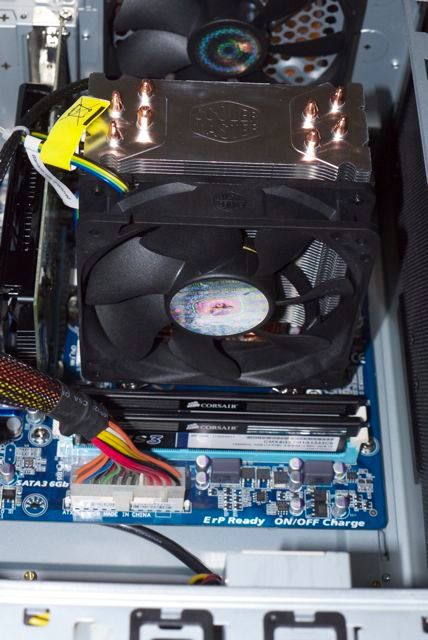
Cooler Master 212 Plus installed.

As with HP1, the motherboard has to be removed when installing the Cooler Master as it requires installation of a retaining plate for the large radiator beneath the motherboard. It’s worth it – the temperature peaks at 115F under load compared with 149F with the stock fan. That is a startling improvement for very modest outlay and confers great peace of mind. As with the stock Intel fan, the Cooler Master uses a four pin connector for the fan (all included in the price) meaning that it’s energy efficient, speeding up only when needed. In practice I could only hear it speed up on restart.

What are you waiting for?

This is a dream photographer’s rig for a price much less than the bottom-of-the-line MacMini with its lower Geekbench score of 5700. And it comes with a DVD drive and proper cooling. The latest Mini (no DVD drive) runs its Core i5 CPU at only 2.3gHz versus 3.3gHz in the version sold by Intel. This is probably to keep heat down in the Mini’s cramped interior. The premium for upgrading the Mini to a Core i7 which runs at a pathetic 2.7gHz is $400, whereas the premium for dropping in a 3.4gHz i7 in HP10 is a mere $190, and you can bet it will blow the Mini away on performance measurements. And overclocking the i7 to 3.8gHz (i7-2600K version) takes about two minutes to do and is approved by Intel within its three year warranty term.

So you want more speed? The premium for an i5 CPU is $90 and for an i7 $190. Drop in plug-and-play replacements. Based on published data I would expect a stock Core i7 CPU to run at almost twice the speed of HP10 for that modest cost premium. Add a further 12% in speed for an overclocked i7. This sort of performance is way in excess of any photographer’s needs and HP10 proves that the modest i3-2100 Sandybridge CPU is a tremendous performer at an unbelievably low price, when properly installed and cooled in a large case.

By the way, there’s no shortage of expansion room in this rig and, yes, it will accommodate the super tall Coolermaster 212 CPU radiator used in HP1 if you want to run an overclocked i5 or i7 CPU. (The overclocking possible with the i3 is so low that’s it’s a waste of time).
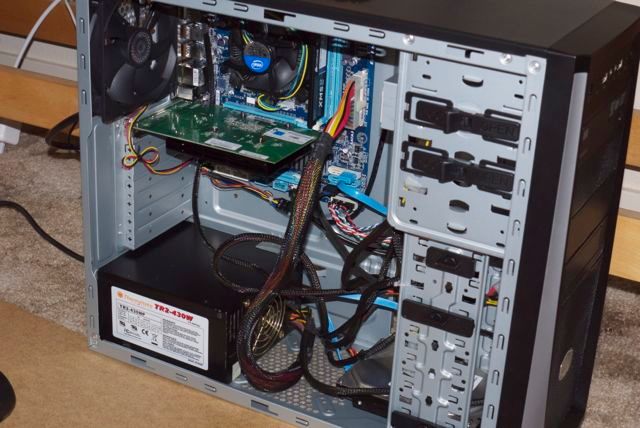
HP10. Lots of room for growth.

Memory update – August 21, 2011:

Because memory is now so cheap, I went wild and ordered another 4gB stick of 1333mHz DDR3 memory ($30) and inserted it in the remaining RAM slot on the motherboard. No tools needed – two thumbscrews to remove the cover and that was it.

The result is that HP10 with its bottom-of-the-line i3 3.1gHz Sandybridge CPU is now 6% faster overall on Geekbench 64 than HP1 with its top-of-the-line Core2Quad CPU running at stock 2.83gHz speed.
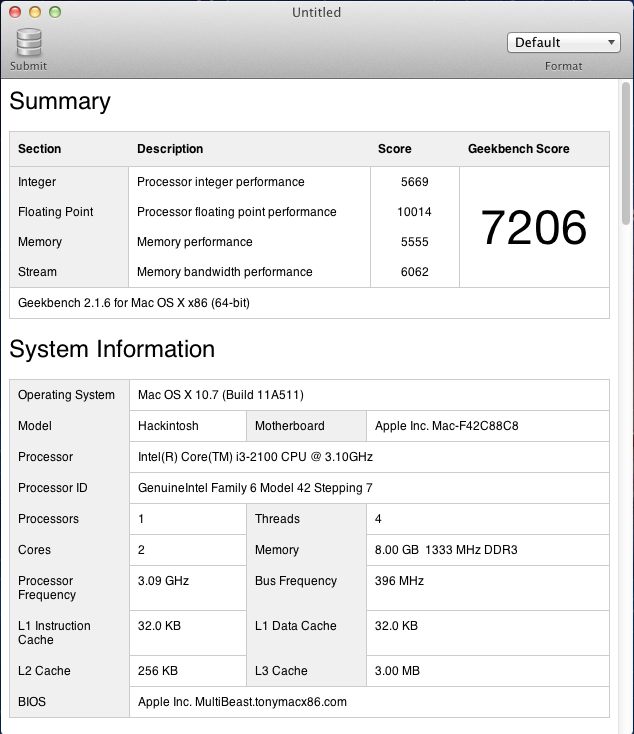
HP10 with 8gB of memory – 6% faster than HP1 stock.

The loss of Processor integer performance is more than made up for by Memory performance which is far more important when moving files to/from LR3 or Photoshop.

Adding memory does not affect OpenGL Cinebench performance which remains unchanged at 26+ fps. That’s a function of the GPU’s RAM, not system RAM.

iCloud update – October, 2011:

OS 10.7.2 adds iCloud functionality. I ran Software Update and it works fine but to access the AppStore, Facetime and iCLoud (in System Preferences) you need a new bootloader named Chimera.

To get iCloud and AppStore working, you must install the latest Chimera boot loader; the old Chameleon one for 10.7.0/1 will not do, if that is what you used. If you used an older Chimera, you will have to update to the latest.

Go to www.tonymacx86.com, choose the downloads area and download MultiBeast. Run it and select Bootloaders->Chimera. Reboot after installing.