Category Archives: Hardware

Stuff

The Nikon D2X – Part II

Some settings.

Part I appears here.

First things first. Now that my pristine Nikon D2X has arrived, courtesy of a fastidious original lady owner, I immediately installed an Upstrap to make sure it felt comfortable when worn. Not surprisingly, the ghastly ‘Nikon’ emblazoned strap which came with the camera was unused – it’s rubberized on one side only and you become an unpaid advertiser when using it. Upstrap is the way to go – the SLR-LT/SLRN non-Kevlar model is what is called for.

Second, a quick check of the firmware confirmed that Version 1.01 was installed. A download of the two BIN files from the Nikon USA site to the root directory of the CF card, a couple of button presses and two minutes and Version 2.0 was up and running. Advantages?

Nikon D2X firmware version 2.0:

  • H 0.3 (equivalent to ISO 1000) and H 0.7 (equivalent to ISO 1250) if using EV steps of 1/3rd steps in the Custom setting b2 or H 0.5 (equivalent to ISO 1100) if using EV steps of ½ steps in the Custom setting b2, have been added between the ISO 800 and H 1 settings in the ISO menu.
  • Autofocus subject acquisition and tracking performance has been improved.
  • A Black-and-white (sRGB) option has been added to the Color mode option in the shooting menu.
  • A new Trim function has been added to the shooting menu.
  • Up to 3 custom tone curves can now be downloaded to the camera for use with the Custom Tone compensation option.
  • Nikon Capture 4 (Ver. 4.4.2) Camera Control or Camera Control Pro with Ver. 1.1.1 and later is required to download 3 custom tone curves to the camera.
  • An Image authentication option has been added to the setup menu.
  • The optional Image Authentication Software is required to authenticate images.
  • A Save/load settings item has been added to the setup menu.
  • The Mirror lock-up option in the setup menu has been modified to function with battery power as well as AC-adapter power.
  • The Lock-On option in the CSM menu now offers 4 options: Long, Normal (default), Short, and Off.
  • Max. sensitivity and Min. shutter speed options have been added to the ISO auto menu.
  • The Maximum shots option in the CSM menu has been updated to support a maximum setting of 60 shots.
  • The FUNC. button item in the CSM menu has been divided into 2 separate items labelled FUNC. button and FUNC. + command.
  • A Recent settings item has been added to the setup menu.
  • The shooting data of an image in the playback photo-information display now includes Focus mode (S/C/M) and Vibration reduction (on/off). Displayed only when the image was captured with a VR lens.
  • Latitude and longitude GPS data now displays up to 3 digits for each segment.
  • A compass bearing is displayed in the GPS data, if used with a GPS device is equipped with digital compass.

Non-trivial enhancements, as you can see. The only surprise here is that the original owner did not do this!

I popped an SDHC 8GB Lexar CF card in and recharged the battery, which the camera states is some half way through its useful life. The D2X was made before SDHC high-speed transfer technology was available, so write times are not reduced with an SDHC card in the camera, but read times in a USB3.0 card reader most certainly are when loading the images into Lightroom or Photoshop. And with the body’s large multiple-shot buffer, write times are not a major concern. In my D700 the 8GB card will store 302 RAW images; in the D2X that rises to 386. Nice.

As expected, the weight of the body, despite its increased bulk, is little different from that of the full frame D700.

As long time readers know I own many old MF Nikkor lenses from what I consider to be the golden age of manufacturing, and have modified all of these by adding a CPU. To confer aperture control on the aperture ring of lenses thus modified (and also for AFD lenses which come with a CPU) the related setting is found in Custom Setting Menu->f – Controls->f6 Command Dials->Aperture setting->Aperture ring->OK. Phew! You can now change the aperture on manual and AFD lenses using the aperture ring on the lens. That’s how cameras used to be and that’s how I like mine. If you elect to use my lens correction profiles, these will automatically adjust to either FF or APS-C images, so no changes need be made when importing images from one or the other sensor.

As usual, I turn Image Review off. If I need to chimp the image on the built-in LCD it’s to check the histogram, and that only in challenging lighting.

The GPS unit and sender set forth here for use on the D700 works better with the D2X, the D700’s 70% hit rate rising to over 90% with the D2x.. Latitude, longitude, altitude and UTC time are all faithfully recorded in the file.

A quick reset (two green buttons at the rear base held for 2 seconds) restarted frame numbering from zero, the body having some 22,500 actuations on it when received. In other words, as these things go, it’s a baby. You really must avoid pros’ beaters when searching out one of these.

Autofocus with AFD lenses is slightly (subjectively) faster than with the D700 – the D2X stops the focus first time whereas the D700 sometimes goes past the optimum focus point then retraces. But practically there’s little to choose. Both are breathtakingly fast, and the older AFD lenses which use the ‘screwdriver’ lenses focus mechanism are nicely suited to the powerful focus motor in the body of the D2X. I only own one Nikon G lens, the 16-35mm VR f/4 which uses the more modern linear in-lens focus motor, and this locks autofocus even faster than the AFD lenses I use. The G lens may be set in awful resin, but the technology delivers. On the AF-C D2X, the 16-35mm focal length range computes to an FFE of 24-52mm, a handy range for street snappers. Couple that with the 35-70mm AFD (FFE of 52-105mm) and you have a powerful ‘around-the-world’ outfit.

A quick tweak on the eyepiece adjuster saw things nice and sharp in the finder. Subjectively the finder in the D2X is one stop brighter than the one in the much newer D700. The D700 projects a larger, warmer image with the 1.2x magnifier I use. Removed, the two are near identical, though the D2X has a smaller sensor. Unmagnified, the D2X’s finder is just right – there’s no need for the eye to scan around for data. Both bodies present a wonderfully uncluttered image area through their respective finders. Best of all, the Nikon Eyepiece Magnifier fits perfectly and makes the viewfinder into a true state of the art focus and composition aid. Highly recommended, especially with fast and/or long lenses.

The focus confirmation light, used with manual focus lenses, is more decisive than in the D700 – there’s less stuttering around the optimum focus point, but I am splitting hairs here. If you use my lens correction profiles (click on Sitemap, above), these will require no changes for the smaller APS-C sensor.

The D2X has one useful feature missing from prosumer bodies like the D700. A button at the lower rear allows recording of a voice memo of up to 60 seconds with an image. Very handy for, say, recording the name and email address of someone in a street snap when you want to send them an image later. It’s a nice thing to do for posed snaps and a handy feature to have.

Despite its increased bulk, the D2X handles better than the D700, owing to the duplicated dual command dials on the handgrip which make vertical operation a breeze – as long as you remember to flip the switch to enable the vertical shutter release! The shutter is noticeably quieter than in the D700, but the latter has a 3″ LCD compared to the 2.5″ on the D2X. If you are a big LCD user, that is not good.

Otherwise things are remarkably similar between the two bodies, despite the disparity in their ages. The EN-EL4 battery has a 1900mAH capacity meaning a whopping 1,500 images per charge (the later EN-EL4a is 2500mAH or 32% more shooting capacity). These batteries are awfully expensive but as there are so many tales of melting aftermarket ones, I bought a lightly OEM Nikon used spare. The EN-EL4a will not fit the D700 but will fit the D700 when equipped with the vertical hand grip. One more recharger to remember. For comparison the D700’s battery is 1500mAH.

In summary, I do not think you will complain about value for money when buying a used D2X. You can decide, based on this and subsequent articles here, if a used one makes sense for you. While I’m not a serial shooter, cranking the body up to maximum continuous shooting is quite something to behold – 8fps in cropped frame mode.

Overall impressions are of a body of quite immense solidity, perhaps subjectively better than even the massive and well made D700. At $650-800 for a lightly used non-pro ‘beater’ the D2X is a bargain if you can live with APS-C. Pay a little more for one with low actuations – the risk-reward is positive. The D2X will accept just about any Nikkor lens ever made, and older ones can be easily retrofitted with CPUs to modernize their data recording abilities.

Pictures in Part III, but of course there has to be the obligatory snap of Bert the Border Terrier to round out this piece!

Bertie. D2X, 85mm f/1.8 AFD, f/5.6, ISO 400.

Detail of the above. The spot autofocus center rectangle was used, locked with a first pressure on the shutter release.

A quick look at the first images from the D2X does prompt the question: Wither sensors? A friend sent me some uncompressed originals from his new Nikon D800 the other day, and encouraged me to pixel peep, meaning I was looking at display images which equalled print originals 10 feet in size. 10 feet! The rendering of detail, the absence of noise/grain/whatever were startling. Even at ISO1600 the results were special. But I cannot help wonder, in the real world, one where prints are dying and large LCDs are the default display medium viewed at a rational distance, who needs these insanely great sensors? For those who do not, and who are looking for value for their money, oldies but goodies like the D2X have an awful lot to offer. And you are not going to beat the framing rate or the vast choice of inexpensive manual focus optics.

And thank you, Christine, for a camera delivered in such fine condition!

Part III appears here.
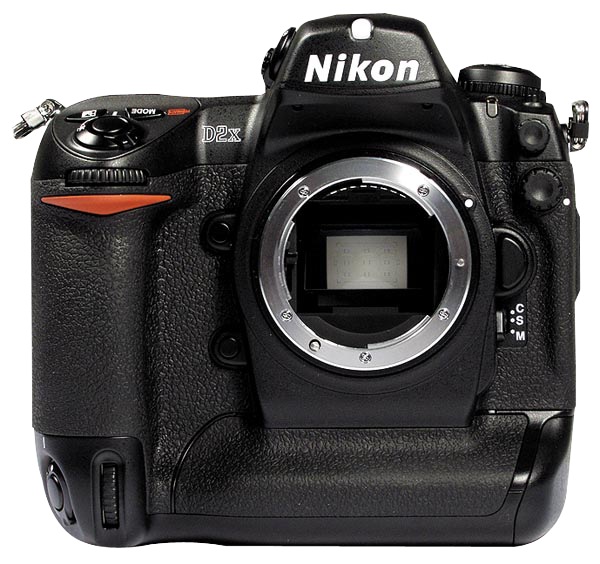
The Nikon D2X – Part I

And oldie but a goodie.

The law of diminishing returns affects all technological goods. The desktop PC has peaked, hampered by its slowest part, poor broadband speeds. All modern cars are good, with even Korean products certain to last 200,000 miles with a minimum of maintenance. The smartphone continues to add bells and whistles but the iPhone 1 pretty much defined the genre five years ago. And the latest offerings from camera makers continue to regale us with more pixels and faster operation, while largely missing the increasingly essential things found on any smartphone – GPS and wifi.

The smart buyer, be it of cars or cameras and maybe even computers, focuses on products a tech generation or two old. The cheapest car is a lightly used five year old one which you can buy at 60% off original list price and drive happily for another 15 years, the first owner having paid you for the depreciation. That car has all the functionality and sophistication of the latest model save maybe its fuel economy, and if you do the math there is no way on earth your hybrid will be cheaper over its life than my ‘dated’ gas guzzler.

With pro-DSLRs the financial math is even more extreme. Case in point. I just bought a near-mint 2005 vintage Nikon D2X body for $760. This body sold for a stunning $5,000 7 years ago. It has 22,000 shutter actuations against a life expectancy of some 250,000 or, as a friend remarked:

If you took 300 snaps per trip, you only have 760 trips left.

So it’s not like I am about to worry about wearing the shutter out in one of the most robust bodies ever made. As a back-up to my full frame D700, the 12mp APS-C sensor in the D2X offers like definition within the confines of a 1.5x cropped frame. That’s not useful for ultra wide lenses, where the 20mm suddenly sees like a 30mm optic, but it’s jolly nice for a 50mm f/1.4 which becomes a handy, small and very fast 75mm portrait lens. And I’m talking the old MF Nikkor from the days when men were men – and women were men.

Read the tech blogs and you will discover that the D2X does not remotely match the high ISO performance of the D700. Indeed, its sweetspot is in the ISO 100-400 range. That’s fine for my purposes. Read on and you will learn that seven year old Sony sensor – the first CMOS sensor used in a pro-grade Nikon – has a stellar reputation for color rendering in that ISO range. Now that gets my attention. And it just happens to have extraordinarly fast autofocus when that is needed.

A related dictate for my purchase was that I did not want to scale the steep learning curve which is part and parcel of the modern DSLR. The controls and operation of the the D2X are identical to those of the D700 in most respects, so setup will be a cloning process of the preferred settings I have learned to love on the D700.

So there’s lots to look forward to here, not least being the fact that many aver that this is the best constructed digital era body Nikon has yet made, and I have a penchant for things that are well made.

Part II is here.

In the Conservatory

A relaxing place.

I make it a point to visit the magnificent National Trust property Filoli frequently, and wander the grounds and do some reading after enjoying an excellent Panini sandwich in the café.

Such a trip washes away the day’s concerns and one comes home recharged. It doesn’t hurt that the journey is all back roads except for a short blast on California’s most beautiful freeway, the 280 on the way down to Woodside.

I generally end my sojourn in the conservatory which has comfortable seating and is a haven of peace and quiet.

The Conservatory at Filoli. iPhone 5.

The iPhone 5 – Part II

An excellent camera.

I wrote about how I believe Apple is managing inventory of the iPhone 5 in Part I.

‘Limited’ as in none. iPhone 4S snap in the Apple Store.

So while there may be a bit of a wait until the floodgates open in Q4/2012, it’s worth it. If you consider your cell phone camera as the one you always have with you, you will want to upgrade.

Let’s retrace. The iPhone 3GS camera was so-so, meaning slow and noisy, as was the one in iPhone 4. Then a quantum leap occurred in iPhone 4S when the sensor jumped to 8 megapixels and the responsiveness of the shutter button was greatly improved. I have already illustrated panoramas using iOS6 in the iPhone 4S and the quality in the iPhone 5 remains excellent. Determined to try out the rumored enhanced low light capability of the iPhone 5’s camera I took it to my country home (aka Filoli – you know, the place my 10 year old son wants to buy) and repaired to the poorly lit interiors.

My first snap startled me. The delay between shutter press and the taking of the picture has been dramatically reduced. I jumped, not expecting this, then proceeded to cycle the shuter as fast as I could. Lightroom 4 reports that I banged off 3 pictures in one second and 4 would have been easily achievable. This compares to maybe 1 per second with the iPhone 4S. It’s quite extraordinary, comparing well with the shutter response in a film rangefinder Leica – where you have to wind the film between snaps – and as good as a better grade DSLR like the Nikon D700, where the cycling rate is comparable in single shot mode. This means the camera is almost directly wired to the photographer’s eye. See an image and snap!, it’s yours.

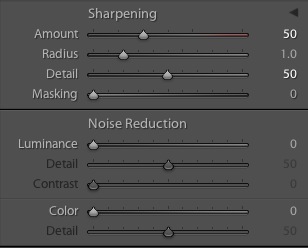
I determined the optimum import settings in LR4 to be as follows, and saved these to an import preset:

iPhone 5 LR4 import settings.

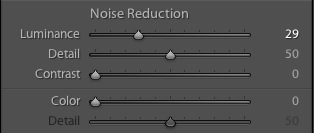
To reduce noise in big prints these are the related settings:

iPhone 5 LR4 noise settings.

The drawing-room at Filoli. 1/20th second.

The camera was focused on the green vases on the mantlepiece by touching the display at the appropriate location. Though the display is now 16:9, up from 4:3 thanks to the taller dimension, still image files remain 4:3, as before. The original JPG file size is 2.7MB.

Here’s a section which would make a 30″ x 24″ print:

Section of above image.

The develop settings in the two panels above have been applied, together with a little boost from the Clarity and Vibrance sliders. Outstanding.

Now you don’t get the dynamic range available in a RAW file and I did not use the HDR function, though for very high contrast subjects that would make sense.

The camera is now so good that no excuse need be made for large print images. I routinely printed 13″ x 19″ from the 4S and feel confident in saying that 18″ x 24″ with the best images would be easily achieved, no excuses needed.

A friend wrote “I bet Apple has four or five camera prototypes in the lab” after I had shared my findings with him. I so hope that is the case. The design clearly incorporates real world usage needs, not something concoted by the dopes at Fuji.

The main drawback in poor light is that a support is needed. There’s nothing worse than having to hold a camera several inches from your face in a poorly lit room than holding it a foot away from your face. The above image was at 1/20th second, and I got lucky, as it’s razor sharp at the focus point. As with the iPhone 4S, the zoom function, accomplished by ‘unpinching’ – you know, the patented technology Android stole from Apple – will simply make a noisier image, so I don’t bother using it; the same result can be accomplished at the processing stage.

In conclusion, if you are happy with a fixed 33mm FFE lens this is an excellent photographic tool, if not blessed with the greatest ergonomics. Can’t be bothered to drag the monster DSLR along? The iPhone 5 does just fine. I would think that a real optical zoom cannot be too far away. Maybe in iPhone 6?

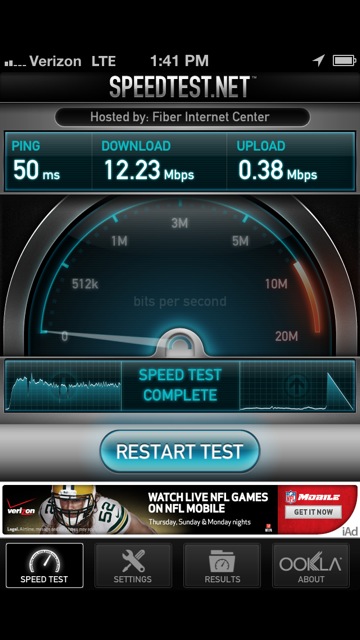
And before I forget, want to see why any sane SF Bay user should be getting a Verizon LTE iPhone 5 rather than an AT&T one with LTE scarcely to be found? Here are the cellular speeds at Filoli, which is pretty much in the middle of nowhere:

Cellular speeds – Verizon LTE, iPhone 5

In town I routinely get 20MBS download.

Getting out of your AT&T contract: Verizon is known to be very rigid on enforcing contract terms, but AT&T is weak. I had one year left on my 2 year iPhone 4S contract with AT&T and was offered two choices. Cancel the contract for $215 or sell the 4S back to AT&T for $227, then pay $449 for the iPhone 5 on a new 2 year contract. Such a deal. A quick check of eBay disclosed an average selling price of $335 for a 16GB 4S. Mine had some rub marks on one side so I listed it for $295 ‘Buy It Now’ with free US Priority shipping. It sold 60 seconds after listing, net cash to me being some $262, less the $215 contract cancellation payment to AT&T, meaning $47 left. I applied that to my new Verizon 16GB iPhone 5 ($199 + $53 CA sales tax), for a net outlay of $205, which I will deduct as business expense on my tax return. Assuming I have taxable income this year the net after-tax cost is lower still.

Disclosure: Long AAPL, BRCM, QCOM.

The iPhone 5 – Part I

First impressions.

Advice for baristas and starving students regarding the purchase of an iPhone 5 appears here. One word version? Don’t.

For those who can afford the latest toy or who need it for their day job (me!) it’s simply a deductible business expense, and as my business involves being current and fast it’s a no brainer. The monthly fees remain unchanged, and the proceeds of sale of the old AT&T iPhone 4S will pay for the early contract cancellation charge.

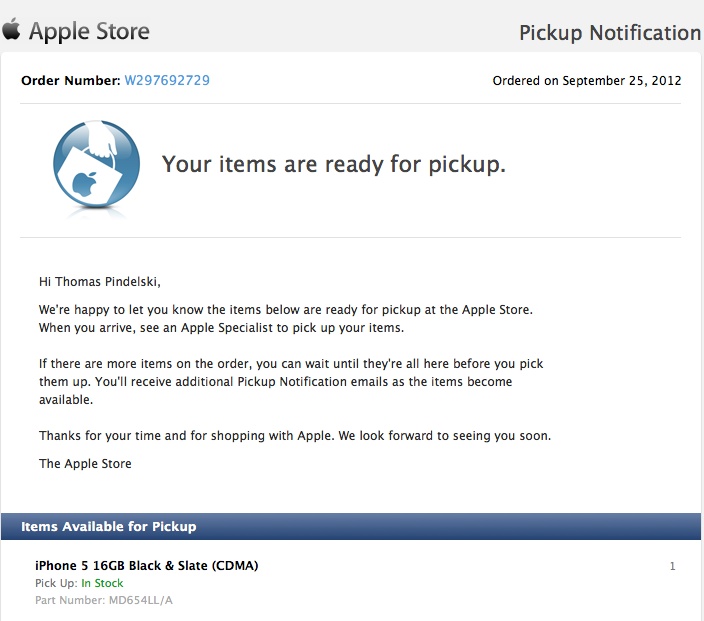
First, the secret of snagging one and not paying someone to wait in line for you is to order it at 10pm local time in the US, go to check out and check “In Store Delivery”. Enter your zip and next morning’s inventory status will be reported for all your local Apple Stores. I tried on Monday and no joy, but hit the jackpot Tuesday. Quickly told a friend but at 10:15 his trigger finger was too slow and they were out. The pleasure of shopping in an uncrowded Apple Store is like Tiffany’s, but cheaper. The girls in Tiffany’s, however, now that’s something else …. 10 minutes in and out and I was off to activate the iPhone at the local proctologist’s, err, make that Verizon. Want to know what it feels like to live in North Korea? Visit a Verizon or AT&T store. After three hours at the Verizon Store I was fried, fit to be tied and activated. This after running across the road to the Apple Store for another NanoSIM as VZ fried the first one. Another hour and my old AT&T iPhone 4S number was ported over.

Allow me to enlighten you on the inventory situation. AAPL’s fiscal year ends 9/30/2012 and they have already sold enough iPhones to exceed earnings expectations. Thus there is absolutely no purpose served by having more sales stuffed into Q4. As they can sell all they make, it makes sense to hoard the inventory then put it out Q1/2013, meaning October 1st. It’s the perfect earnings manipulation tool. Further, despite all the journalists’ reports of display manufacturing backlogs, not one iota of credible evidence has surfaced to support this statement. Still, journalists are people who could not get a real job and are fact agnostic. Their driver is clicks. No clicks, no Big Mac.

How does the iPhone 5 feel? In a word, worse than the iPhone 4S. It’s not that the extra height is not welcomed – it is – but the device is too light, feeling like a cheap toy. The 4S feels, well, like a Leica M2. The iPhone 5 feels like any plastic prosumer horror of a camera – like my Panny G3, for example. (In fairness, the G3 is an order of magnitude superior to the M2 in every respect except how it feels). Sure the much vaunted micron fit and finish is great but I cannot tell the difference between 1 micron and 10 microns and nor can you. The fit and finish of the 4S is identical in practice, the glass back nicer, if more fragile than the alloy one now in use in the latest model.

The other thing I fail to understand is who really needs the thinnest phone? Is not better battery life worthwhile for an ounce/millimeter or two? Keep the 4S battery, Apple, make it feel like the 4S and get with the program.Thin really sells that much?

The new connector? Ever tried inserting an USB plug into the desktop tower while grovelling amongst the black beetles with a flashlight? The new connector rocks. It’s reversible. If you are complaining about paying $29 for a spare, get real. An Android phone is just what you need. Good luck with that mini-USB thing. This connector is the bee’s knees.

iCloud now works well. I backed up the 4S to the Cloud and then restored onto the 5 and the whole thing was seamless, though my son’s games took over an hour to restore over wi-fi. And when you see the realism of a game like Infinity Blade you breathe a sigh of relief that the authors are on our side.

I am not going to publish any objective measurements here. Those are all over the web and can be summarized by saying that all app activities are 2-3x as fast as iPhone 4S and 1.5-2x as fast as iPad3, both on paper and in subjective use. Best of all, AT&T’s lying display of ‘4G’ on the 4S (4MBS download speed on a good day) is forever history as the 4S is consigned to eBay. The iPhone 5 has real 4G and handily delivers 20-25MBS every time. In Burlingame, where I live, on the SF Peninsula, Verizon rules, and has 4G towers everywhere. By contrast, AT&T is still looking for its pickaxe and handle to put up towers.

But the sublimest pleasure in the acquisition of an iPhone 5 for this user has nothing to do with the phone. It’s the simple and immensely enjoyable act of firing AT&T. Sure Verizon is no better, but one devil fired just feels, you know, good. In fact, that was the first call I made on it.

More on the camera in practical use soon.

Note to Apple: Please buy a US telco and fire everyone in customer service. Integrate the operation into the Apple Store/Specialists/Geniuses with proper training and bedside manner.

Disclosure: Long AAPL, BRCM, QCOM.