Category Archives: Hardware

Stuff

A little more speed for the HP100

A little tweak ….

The other day the Hackintosh HP100 got a nice performance boost when the boot+applications SSD was upgraded from SATA2 to SATA3. Fast disk I/O is essential for best Lightroom and Photoshop performance. Now it’s the CPU’s turn.

Geekbench is a test of CPU speed. It’s a simple and quick comparator of great use to photographers as apps like Photoshop and Lightroom are far more dependent on CPU speed than on the latest in GPUs. Little is to be gained, data suggest, from using a high-end gaming GPU.

Cinebench framing rates are a measure of GPU speed. My Hackintosh HP100 (Sandy Bridge Core i5, 16gB RAM) uses a three year old, low power draw, Nvidia 9800GTX+ GPU, yet returns a very high Cinebench framing rate.

One of the beauties of the Sandy Bridge and later Ivy Bridge CPUs is that overclocking is trivially simple, unless you go crazy. Clock speed is a near-linear indicator of effective speed for like CPUs. Double the clock speed and you should see an almost identical change in the Geebench score. In summary, the Sandy Bridge i5-2500K overclocks from 3.3gHz stock to 4.4gHz with one key entry in the BIOS. The i7-2600K goes from 3.4gHz to 4.5gHz for the same effort. As long as you dispense with the inept stock Intel fan and fit a Coolermaster 212 ($27) or similar, you will be thermally protected. Further, the BIOS has many failsafes to turn things off if heat rises too much.

I have been running my Sandy Bridge i5 at 4.0gHz since inception, or 21% over the 3.3gHz stock, but the new Geekbench Ivy Bridge data for the just released MacBook Pros spurred me to action. Here are those data:
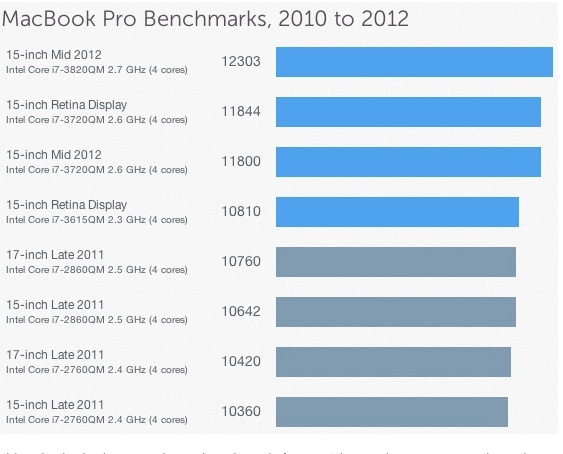
Meanwhile, HP100, perking along at 4.0gHz, records the following in Geekbench 64:
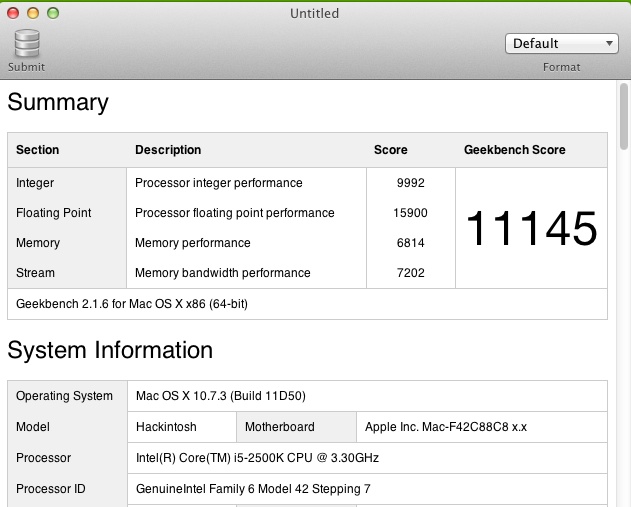
Actual speed with several apps running. 4.0gHz is correct, GB states it incorrectly.

Hmmm. Not good enough, even if my environment measures ‘real world’ results with Mail, Finder, Safari, Firefox, etc. running. You can also bet that the above MacPro data are in an ideal setting with no other apps running. That’s how Apple does data.

So I hopped into the BIOS on the Gigabyte motherboard, changed the ‘Frequency Multiplier’ from 40x to 44x, meaning the clock speed is now 4.4gHz, and restarted. Two minutes later I had the following result:
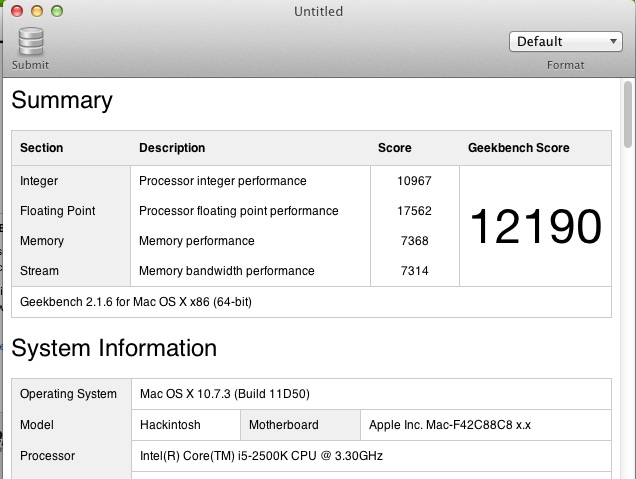
Core i5 Sandy Bridge at 4.4gHz. 42% faster than stock.

That’s more like it. A 10% clock frequency increase realizes a 9.4% CPU speed gain, and equalling the fastest, latest and greatest from Apple, at no incremental cost to me.

Heat, that bugbear of all computers, remains unchanged.
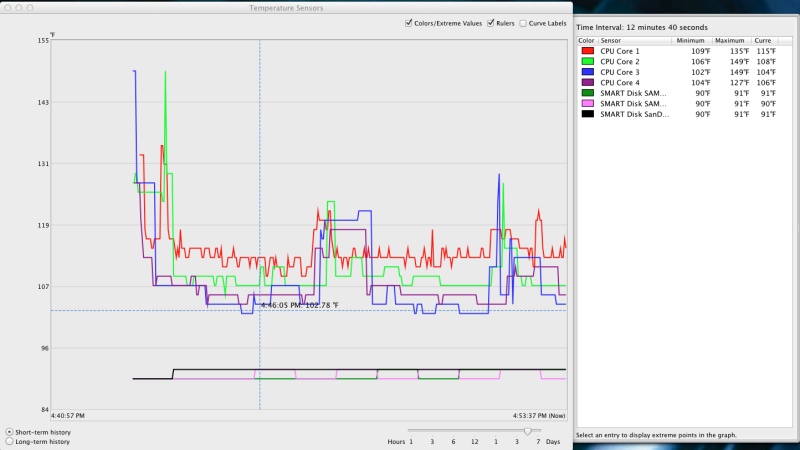
Temperature graph at 4.4gHz.

The above graph reports the temperature of the four CPU cores from restart. The usual start-up spike quickly disappears to settle at 109F, indistinguishable from the reading at 4.0gHz. The CPU cooler is set in BIOS as a variable speed device, meaning it cranks up only when needed. It sounds just a little louder than at 4.0, meaning it’s working harder but just as effectively. On the other hand, when I was running this test, ambient temperature was a high 85F (we have no air conditioning as it rarely gets that warm in the SF Bay Area) so there’s little to worry about. Things can only get cooler on regular days. The spike toward the right results from starting Lightroom 4. Starting Photoshop CS5 does not make any discernible difference. I have had no stability issues so far.

The Cinebench tests for GPU speed are outstanding. Brown (#5) is for HP100 at 4.0gHz, Orange (#4) is at 4.4gHz (not 4.0 as shown) – 13.3% faster. The highest reading here (#1) is for a Xeon equipped machine with a high end gaming GPU – meaning $1,400 more for the CPU and $1,300 more for the GPU – for a 25% speed increase. Goodness, the all in cost of HP100 is less than one of those components! And PS and LR do a very poor job of multi-threading so a 12 thread CPU is money wasted. Those economics do not solve for me nor does any photographer need to spend that sort of money. #3 is for HP100 running at stock GPU speed but with all other apps closed – hardly realistic, but impressive if you are a marketer. Marketing, after all, is lying for a living.
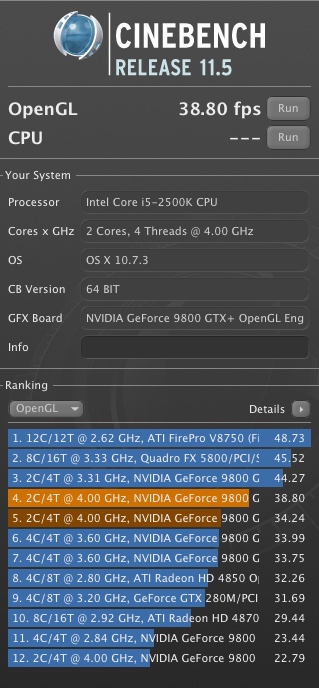
GPU results from Cinebench.

And when Apple gets faster, you can bet on one thing. With a tweak or two, HP100 will be right there at very little or zero cost.

Looking forward:

If you accept that CPU speed increases are leveling off, and that the focus will increasingly be on lowering power consumption, then simply dropping an i7 in place of the i5 will yield a 25-30% speed increase, for a net upgrade cost of maybe $150 after reselling your i5. I doubt Intel will be able to increase its CPUs’ speeds by more than 5% annually henceforth.

GPUs are already so far ahead of anything photographers need that spending lavishly here makes little sense. Any conceivable pixel density is already supported.

In the case of both, Adobe’s software is a long way behind what the hardware can do. Poor use of multi-core, multi-threading technologies means that far greater gains are to be had from software design than from hardware upgrades. Lightroom, in particular, is showing massive code bloat, with no improvement in operating speed. LR4 is some ten times the size of LR3.

The next frontier is peripheral I/O, where Intel’s LightPeak (we keep hearing that Apple’s Thunderbolt is the latest invention from Cupertino, when in reality it is simply LightPeak on which Apple’s 1 year wasted exclusive has now expired). LightPeak promises disk read/writes ten time faster than USB2, maybe three times faster than USB3. Whether it succeeds like USB2 did, or fails like Firewire has, remains to be seen. Very slow adoption is not encouraging, and I suspect it’s simply not a mass-market selling point. External drives are hardly the norm in the average home. If it does succeed, you can bet cheap PCIe cards will become available and that photographers’ Hackintoshes will be adding these for a few dollars.

Update:

As I’m not about to be beaten by Apple’s poor hardware, I set about adding a little more fire to the pot by tweaking the i5’s frequency multiplier from 44x to 45x, for a CPU frequency of 4.5gHz, and increased the VCore voltage to 1.385volts for stability. Nothing else was changed. System ambient temperature remains at 113F (45C) and is stable. At stock VCore it kernel panics. Intel specifies the maximum safe VCore at 1.52 volts so it’s not like I’m really puashing it here. This is the result – faster than the Core i7 in the fastest MacBook Pro:
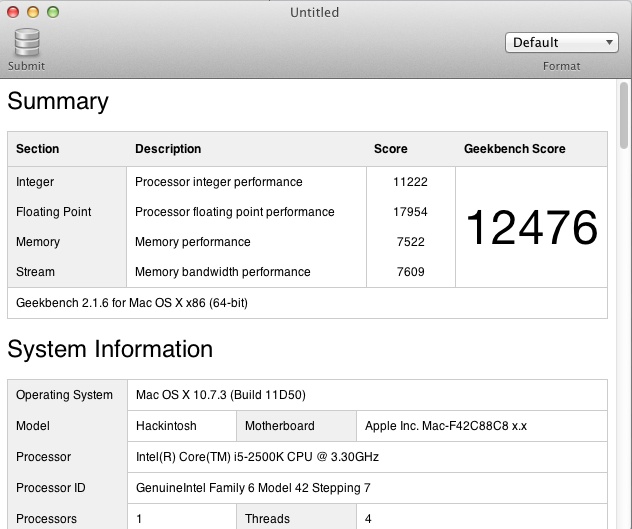
Intel Core i5 – 2500K at 4.5gHz CPU speed.
1.4% faster than the fastest MacBook Pro, with more to come.

Cinebench GPU data remain unchanged.

I have shutdown failsafes in the BIOS set at a CPU temperature of 176F (190F is the danger point for the i5 2500K) so everything remains conservatively specified.
These data suggest that a modestly overclocked i7 – 2600K Sandy Bridge should be good for 16,000 or more. But you do need proper cooling to do this sort of thing, not Intel’s stock cooler.

The Z68 chipset on the motherboard does not work happily with OS 10.7.4, and while there are workarounds, it’s not worth the effort. (It slows to a crawl). H67 and P67 chipsets have no issues with 10.7.4. So on the HP100 I’m sticking with 10.7.3 for now. Only P and Z motherboards support overclocking.

Another 25% in speed?

Sure. Get a Core i7-2600k. Look here.

100mm, f/1.4

Nikkor MF lenses on the Panasonic MFT bodies.

This piece will finally join the heretofore parallel lines for the Nikon D700 and Panasonic G3 systems I use. Absent the one in the iPhone 4S and an old Panasonic Lumix LX-1, I have no other cameras.

Adapters and their limitations:

Adapters, most around $25, are available to use Nikon and Canon and a host of other manufacturers’ lenses on MFT bodies made by Panasonic and Olympus. But just because you can do that, does it make sense?

For the most part the answer is a resounding ‘No’.

You have no autofocus, auto-exposure is aperture-priority only, and Canon EF and Nikon ‘G’ lenses require specialized adapters to control the aperture. Otherwise you are restricted to full aperture only as those lenses lack a manual aperture ring. Except for Olympus MFT bodies which have anti-shake built into the body, a Panny user loses that feature also. Any VR/IS in a Canon or Nikon lens is lost. The sheer bulk of most full frame lenses destroys the compact concept of the MFT body’s design and the whole idea has a rather Rube Goldberg aspect to it. Cool to tinker, useless in practice.

Still, I plonked down $23 for one of these the other day and just received it. It adds some value in specialized applications and works with Nikon pre-Ai, Ai’d, Ai, Ai-S and AF-D (manual focus) lenses. If you want to adapt a G series AF-S lens as well as all older Nikkors, buy the costlier adpater with a mechanical aperture control ring. Read on.

Click the picture to go to Amazon US. I get no click-through payment.

Adapter quality:

I opted for the Rainbow Imaging version as user reviews suggested it has a better release catch for Nikon lenses than other cheap ones. Manufacturing quality is very high, the interior is semi-matte but that’s unlikely to have any effect on image quality as the reflectivity is low. Fit of both the Nikon end and the Panasonic end is excellent. Novoflex makes adapters for $300. Save your money. The cheap ones are fine. You can see the full range of Rainbow Imaging adapters by clicking here. There are 30 adapters for MFT alone, including such odd ducks as Alpa (a superb Swiss 35mm film SLR whose quality of engineering puts Leitz to shame), movie C-mount, Contax/Yashica, Retina Reflex (!), Exacta/Topcon, Zeiss Ikon Contax rangefinder (!!), and many others. Fotodiox makes an inexpensive adapter for Hasselblad lenses to MFT.

Checking the flange-to-flange dimensions with a micrometer I found a maximum-to-minimum variation of 0.0001″ (0.0025mm), right at the limit of accuracy of the measuring tool. That would be tough to beat at any price. The grinding of the front flange, which mates with the Nikon lens of choice, is to a very high standard. The body of the adapter is made of very thick alloy and not about to flex, regardless of the lens fitted. The serrations on the barrel provide a decent grip for installation and removal on the camera. A small set screw on the rear flange provides adjustment of tightness of fit on the camera. Springs permit adjustment of the tightness of the front mount. Both front and rear on mine were set just right on receipt, but it’s nice to know that adjustments can be made in the event of wear.

Best lenses:

So which lenses make sense? The MFT sensor is one quarter the size of a full frame one, meaning that you are using only the center of the image projected by a full frame lens. Thus a 50mm lens becomes a 100mm. However, the depth of field remains that of a 50mm lens. Depth of field is solely a function of focal length. A 50mm lens on a 4″ x 5″ plate camera will have the same DOF at any given aperture as a 50mm lens on medium format, full frame, APS-C, MFT, you name it.

That pretty much means wide angle lenses from full frame bodies are a waste of time. Even a super wide 17mm, with all its associated bulk, becomes a semi-wide 34mm on MFT. You are far better off using the kit zoom with all its automation, than using a gargantuan FF wide. It just gets worse the wider you go. A monster 14mm Nikon or Canon is a not so wide 28mm on MFT. Silly. If you want really wide, use something like Panny’s 7-14mm or Oly’s 9-18mm. I use the latter and it’s an outstanding optic.

Likewise, modest aperture standard or medium long lenses make little sense. The Panny kit zoom – 14-42 or 14-45 – meaning 28-90 equivalent on FF, has you covered. And if you want something really long, using a monster FF telephoto on MFT bodies makes little sense unless you need a very fast aperture. But then why bother with an MFT body when FF will deliver superior results with little aggregate change to weight and bulk? The superb Panny 45-200mm (=90-400mm) has decent apertures fully open and built-in anti-shake, making it perfectly useable at the long end hand-held. And it’s tiny compared to anything from a full frame body.

That leaves fast FF lenses and special purpose ones.

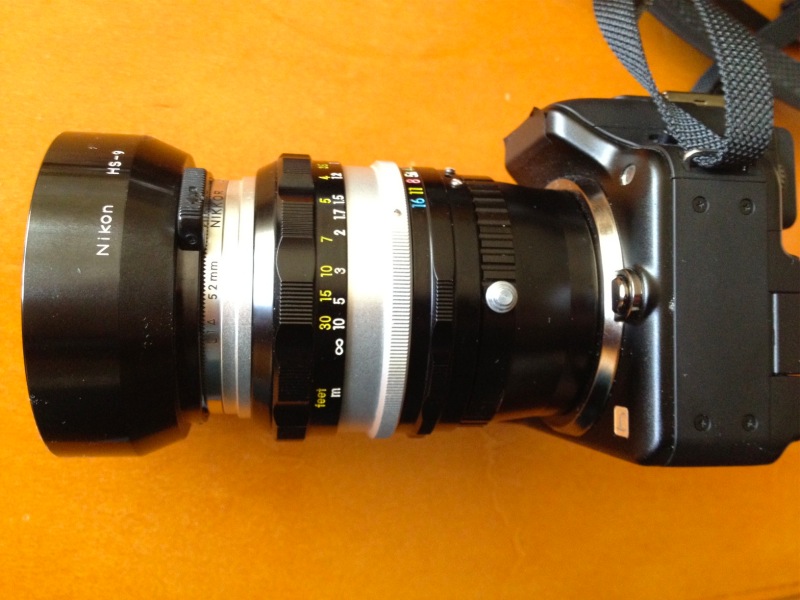
50mm f/1.4 Nikkor-S on my Panasonic G3 body.

The fast 50mm makes for a fine portrait lens and permits limited DOF effects, if you can handle manual focus.

Winston. One 60 watt bulb for lighting. Nikkor-S 50mm f/1.4 at full aperture, Panasonic G3, ISO 1600.

As you can see from the snap, DOF is extremely limited fully open and close-up.

In use on the Panny G3:

You switch the body to Custom->Use Without Lens (go figure; I saved this to C2-2 – the G3’s custom settings allow one on C1 but three on C2, the latter selectable using the LCD rather than the top dial) to enable control of the adapted lens and here’s where one of the great advantages of the electronic viewfinder in selected MFT bodies kicks in. With the camera set to aperture priority automation, as you stop the lens down the finder brightness remains unchanged. It’s as if you were using a standard auto-aperture MFT lens! The EVF adapts as the FF lens’s aperture changes, only the perceived depth of field changes. If only the D700 came with an EVF ….

So aperture automation is not an issue, though the finder will report the aperture as 0.0 regardless of how set. You have to check the lens to see which aperture you are using. With aperture-priority automation, the shutter speed is correctly displayed in the EVF.

As for focus, Panny has another trick up its sleeve. By depressing the control wheel into the body, with the G3 you get a 10x magnified center rectangle (the magnification is variable at will), picture-in-picture, which makes manual focus trivially simple and dead accurate. (Panny’s MFT bodies do not have a focus confirmation LED). Far easier than using MF on the FF D700! Press again or touch the shutter release and the EVF returns to normal display. (In the earlier G1 the whole finder image is magnified, but the functionality is near identical). Thus, with a 50mm lens you are getting the focus accuracy of a 500mm, and even at smaller apertures the magnified image snaps in and out of focus sharply, leaving little room for doubt.

Picture-in-picture 10x focus tool in use on the G3.

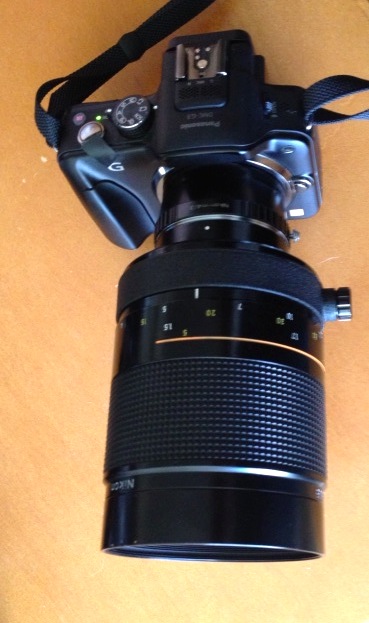
For my purposes there are just a few lenses in my extensive Nikkor MF collection which make sense to use on the G3. They include the 50mm f/1.4 and 85mm f/1.8 for their fast apertures and shallow DOF when fully open (one of the banes of MFT is too much DOF with just about any lens), the 100mm f/4 Micro-Nikkor for its close focusing ability, and the 300mm and 500mm Nikkors for extreme reach. The 300mm is sort of silly as it’s large, heavy and hard to hold at the best of times, but the 500mm (1000mm equivalent) is a real surprise. This mirror lens, with its slow f/8 fixed aperture. is an absolute pig to focus on the D700. The focus LED indicator is at the very limit of its capability (it starts checking out much below f/5.6) and the finder image is dark. With the G3, the finder image is bright as can be and focusing is a joy. No need for the 10x focus feature. The unmagnified image is easy to focus in any light. And the 500mm Reflex Nikkor, once you get the hang of it, is really a special lens – positively a midget for that focal length and sharp as can be when properly handled. Balance on the small G3 body is excellent.

500mm Reflex Nikkor on the G3.

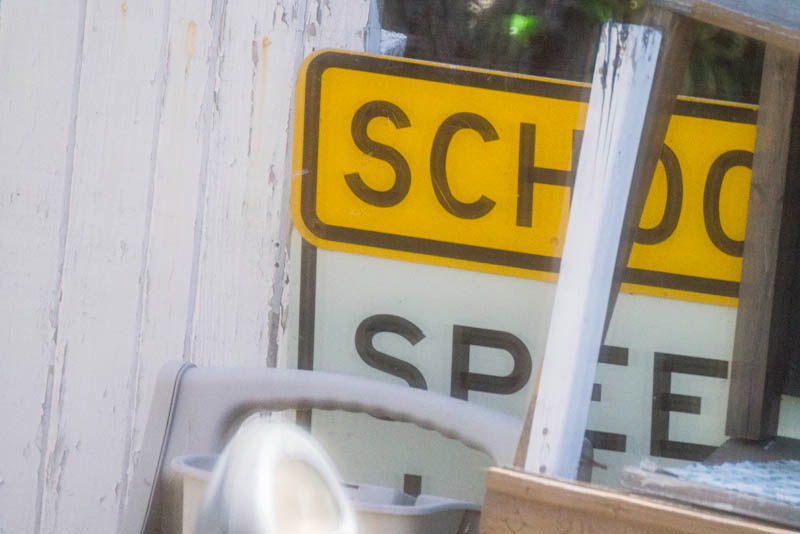
Neighbor’s backyard test target. 500mm Reflex Nikkor, 1600 ISO, G3, 1/1000.

The above was snapped hand held through a dirty window, the ‘target’ is some 100 yards away.

So the FF->MFT adapter has its uses, even if they are somewhat limited. However, a mirror reflex on the G3 is a joy and a pleasant surprise. It’s almost as if the Reflex had to wait all these years for a body capable of doing it justice.

Using the adapter with the Nikon Micro-Nikkor 105mm f/4 makes for a powerful combination. At closest focus you get 1:1 reproduction, compared with 1:2 on an FF body. Despite the small maximum aperture, critical focsuing is very easy thanks to the EVF, and the outfit balances nicely in the hand.

An even better body for use with really long lenses would be the recently released Olympus OM-D MFT SLR, which has in-body image stabilization, though I do not know whether the IS in that camera works with adapted lenses. However, at $1,000, this overpriced body currently costs twice as much as the G3.

A note on CPUs, processing and EXIF data:

If you have installed CPUs in your Nikon MF lenses, as I have, these do not interfere with the adapter. EXIF data in LR or whatever you use for processing will be missing any lens information, as the camera has no way of knowing the focal length used. Thus if you want to apply a lens correction profile, it will have to be selected manually. As only the central part of the image is being used, the need for lens correction profiles is lower than with FF sensors.

The 16mp G3 sensor figures to the equivalent of 4mP on a four times large FF sensor for same-sized prints. That’s perfectly adequate for 18″ x 24″ prints, as the walls around me testify, provided your technique is up to it.

Faster SSDs

Read/write speeds almost doubled.

A while back I explained some of the benefits of using a Solid State Drive in your computer. While SSDs remain very expensive, if restricted to running the operating system and applications, plus acting as a scratch disk for Photoshop and Lightroom, they make a lot of sense. Applications load faster, cached internet pages load faster, operating heat falls. Still, large data storage is best done on traditional Hard Disk Drives as the economics are favorable. A 1tB HDD runs $90. Two 480 gB SSD run ten times that.

And I do not accept that SSDs are ‘more reliable’. We have decades of data on HDDs which allow rational analysis of failure risk. We have no such data volumes on SSDs. The fact that you can drop an SSD on concrete and it will likely survive is irrelevant to the risk discussion in practical use. Meanwhile we are seeing ludicrous manufacturer claims of 2 million hours Mean Time Between Failures. That’s 228.3 years. And you tested that how, exactly? Make me Treasury Secretary and I’ll balance the budget in 6 months, too.

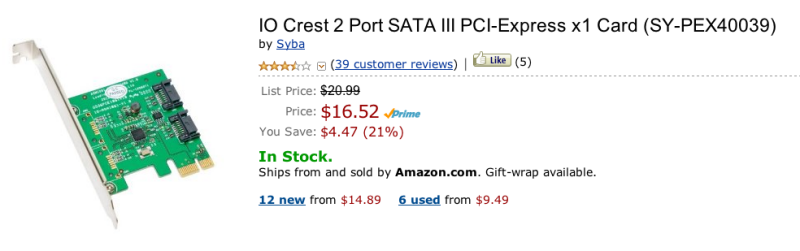
Over the past year or two SATA 3 drives have become increasingly common. Sure you may need to upgrade your motherboard or computer, but they offer twice the data transfer rates on paper of the earlier SATA 2 drives. This applies whether the drive is SSD or HDD. An alternative, if your motherboard has a short slot available, is to add a SATA 3 adapter card and plug the SATA 3 drive, in an external enclosure, into the card:

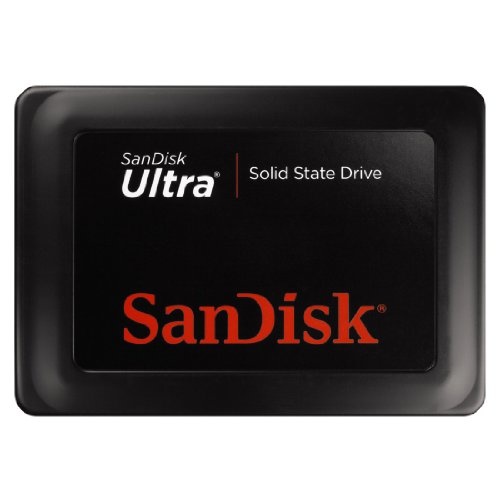
When a friend alerted me to an Amazon special on SanDisk SSDs, the price reduced from $230 to $120 for a 120gB SATA 3 version, I snapped one up. I have since seen them as low as $98.

I popped the drive in my Aluratek external drive cradle, a device which has paid for itself in time saved over and over, and after formatting used Carbon Copy Cloner to clone the new Sandisk SSD from my regular Intel SATA 2 SSD inside the HackPro. This Hackintosh was upgraded a while back with a Sandy Bridge CPU and the related motherboard upgrade came with SATA 3 drive sockets.

A few minutes later the Sandisk was swapped with the Intel SSD inside the Hackster and after restarting I ran some tests.

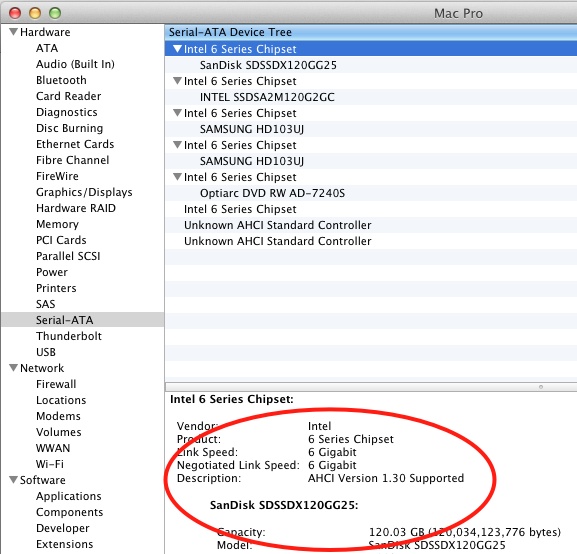
First you want to check it is being recognized as a SATA 3 drive – meaning you are looking for a ‘Negotiated Link Speed’ of 6 gb/s in System Profiler (“About this Mac”):

The new SSD is correctly reported as 6gb/s.

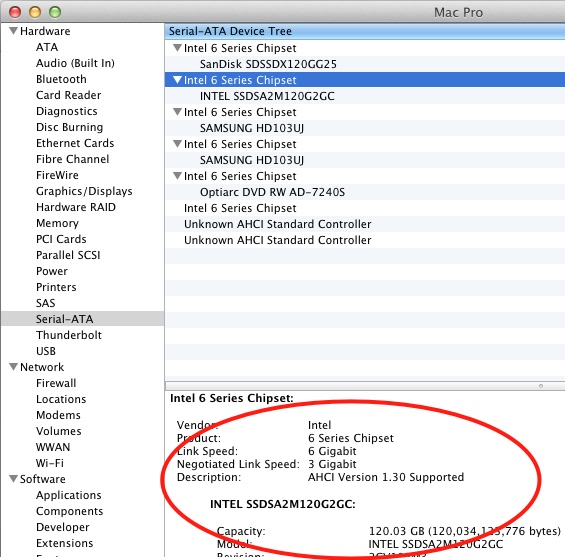
Contrast this with the Intel SATA 2 SSD:

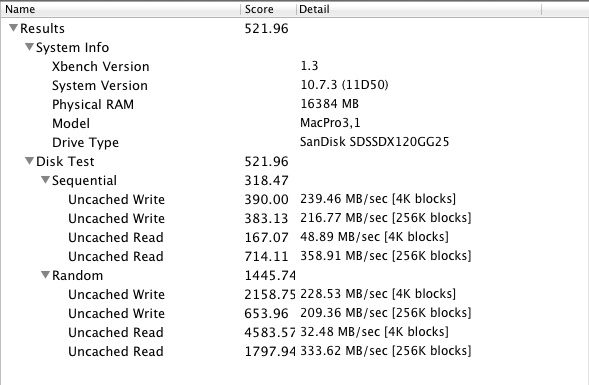
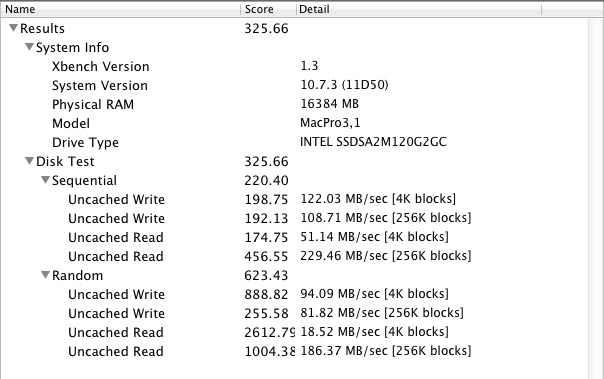
Having confirmed that the drive is connected to the correct socket on the motherboard (there are also SATA 2 sockets, so a check is essential), and making sure the motherboard’s BIOS was set to AHCI, I ran the disk test utility Xbench. As I live in the real world, not a flaky marketing-sponsored ‘test lab’, I kept all my usual apps running when doing this test – Mail, Safari, Firefox, Finder, Temperature Monitor, NetNewsWire and so on. Here are the results:

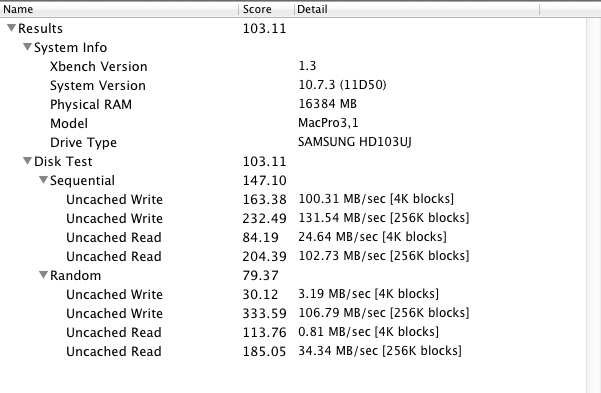
Restarting from the Intel SSD SATA 2 backup drive, with identical content, I ran Xbench again:

That’s a 60% overall speed gain, and a 79% speed gain in Uncached Random Read speeds – which would apply when an application is first loaded, for example.

How about a traditional SATA 2 3gb/s 1tb HDD, like the 7200 rpm Samsungs inside the HackPro?

Night and day, as you might expect.

I tend to distrust subjective tests – the sort which culminate in nonsense like “It feels faster” – as they are mostly polluted with confirmation bias. You just paid for it so it has to be better, right? Still, for pages I visit frequently on the web, I can confirm that the speed with which such cached pages load is noticeably faster. Does LR load faster? Maybe. It’s not easy to tell the difference between 4 seconds and 3. Same for PS CS5.

So what is the optimal drive topology? If you tinker with OS upgrades and hacks as I do, the two SSDs – boot and backup – make sense, especially when you blow it! The boot drive should be SATA 3 for fastest operation, the backup can be SATA 2 if it’s cheaper – no need to have fast backups. Alternatively, use a SATA 2 HDD notebook drive as the backup for the boot disk. Small ones run $70, a modest saving. Then keep your data – picture files, movies, etc. – on inexpensive large HDDs, in redundant pairs and be sure to also maintain an offsite backup.

Anyone contemplating a new computer, or building/upgrading a Hackintoh, should look seriously at SATA 3 drives. Apple, the self-proclaimed great imnovator, just added SATA 3 to its MacBook Air and Pro machines, a year after the competition. 2011 and later iMacs need a firmware upgrade to run SATA 3; you are out of luck on older machines. Meanwhile, SATA 3 remains notable for its absence from the MacPro, despite the $5,000 price tag. Amazing.

SSD technology will eventually obsolete HDDs, but don’t hold your breath. The price is not coming down especially quickly.

What about using that SATA 2 Intel SSD removed from the HackPro? Easy. It found a willing home in the Hack Mini, the machine which replaced one of the worst computers ever made by Apple, the Mac Mini, a machine which doubles as a toaster. The Hack Mini is now faster than ever and happy as can be. As for USB3 or SATA 3 on the Mac Mini, forget about it. Maybe next year? The Hack Mini, of course, has both.

To learn about TRIM (garbage management for SSDs) and how to enable it, click here. Arrogant Apple only enables TRIM by default for favored vendors, and San Disk is not one of those, so you have to go the extra mile.

MacBook Air 2012 update:

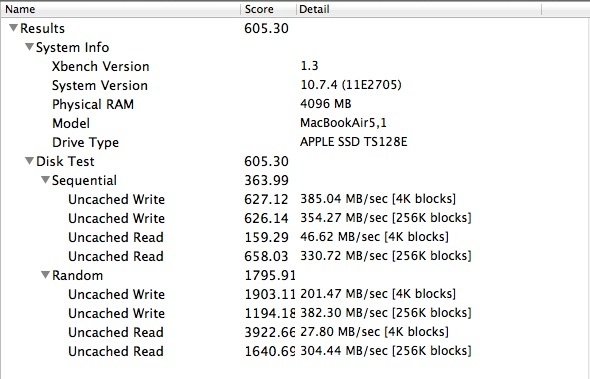
The 2012 MBA with its 128Gb SSD marginally improves on the SanDisk SSD, above. here are the results:

Xbench for the 2012 MacBook Air.

Walter Mandler

The designer’s designer.

For an index of all Leica-related articles click here.

The names of great engineers are known to few. And that is sad. Who knows who designed the Golden Gate? Who cares? What do you mean who cares? What does that say about our educational system? Everyone should know and care.

And it’s the same with photographers. Ask the average fellow with $10k of the best in gear around his neck who Gauss, Bertele or Mandler (1922-2005) was and you will be met with a blank stare. And that saddens me. Because those are three of the lens designers without whose work the 12-400mm f/2.8 autofocus retractable zoom on that magical digital in your vest pocket would not exist.

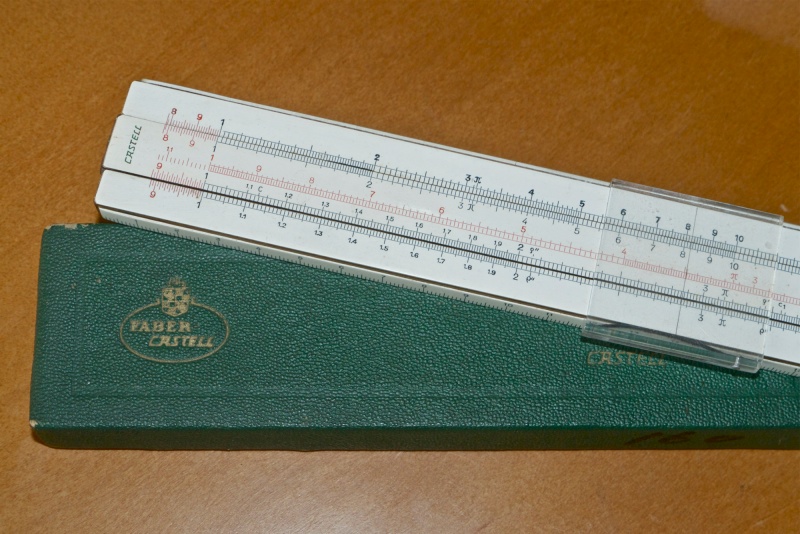
Mandler’s primary design tool.

Back in 1973, I concluded my undergraduate dissertation, which happened to deal with the thrilling subject of the erosion of polymers. Until then, research had lacked understanding of a crucial variable. That was accurate determination of the speed of impact of abrasive particles (sand, grit) on the polymer (plastic) linings used to reduce wear in intake ducts for helicopter jet engines, essential for killing the innocents in Asia. Because the subject fascinated me no end (the erosion, not the killing part), I determined to solve for this missing variable and rooting around in the back of the lab at University College School of Engineering, UC London, I came across two tools of priceless value. A Perkin-Elmer stroboscope whose light duration was specified to great accuracy, and a Minolta SRT101 SLR with a 50mm f/2 Rokkor lens. Yes, you guessed it. Another rip off of Walter Mandler’s timeless Leica Summicron design. (By the way, this was my first serious inkling of America’s genius. Perkin-Elmer made the mirror which NASA placed on the moon, allowing us to determine its distance to, oh, a foot or two, when they bounced a timed light beam off it).

Now my first thought of the Minolta was that I could get to rack it out, no charge, given UC’s famously liberal culture, taking pictures of the many street protests of the time. “Honest, Dr. Jones, they grabbed me and smashed the camera. It wasn’t my fault!” But then I thought about it and the light went off, so to speak. I have a light of known duration, I have a camera which can photograph the intervening flying abrasive particles using Schlieren lighting with the strobe pointed directly into the lens and the rest is just exposure and some simple measurement of blur lengths and schoolboy mathematics. Heck, I even processed the film myself! (PlusX in Microphen if you must know – I was a loyal Kodak man even back then).

The dropped jaws occasioned by my insouciant presentation to the assembled dons, with the requisite anti-American incantations about ‘Nam and the efficiency of killing, said a First, and a First it was. “No, Doctor Jones, I want to go into the real world. Thanks for the offer of post-graduate study, anyway. I want to compete, not teach. And escaping poverty would be nice, too.”

What a First looks like. I had to type this on my mum’s old Remington ….

My tool of choice. RMP? Renata Maria Pindelski.

And thank you, Dr. Mandler.

Surprise fact, something other than Labatt’s and professional complainants was produced in the frozen North that passes for Canada, a nation with the longest contiguous border with the most powerful country on earth and little to show for it. A German company in Midland, Ontario, Canada, a subsidiary of Ernst Leitz, Wetzlar, West Germany, saw to it that Canada’s reputation in the optical pantheon would be secure, even if it was secured by a German mathematician and designer. Walter Mandler was that designer and few would dispute that he is one of the premier optical designers in history.

I am pleased to relate that I owned and used all of the following Walter Mandler designed lenses and not for one moment were they anything but the best. And every time I pressed the button I knew Mandler’s genius was on my side; all I had to do was to try to live up to his standards:

  • 35mm Summicron f/2
  • 50mm Summicron f/2
  • 90mm Elmar f/4
  • 90mm Summicron-R f/2
  • 90mm Elmarit f/2.8
  • 90mm Tele-Elmarit f/2.8
  • 135mm Elmar f/4
  • 135mm Tele Elmar f/4
  • 200mm Telyt f/4
  • 280mm Telyt f/4.8

…. and last, and by no means least, his masterpiece for NASA (and for you and me), the ….

  • 180mm f/3.4 Apo-Telyt-R f/3.4

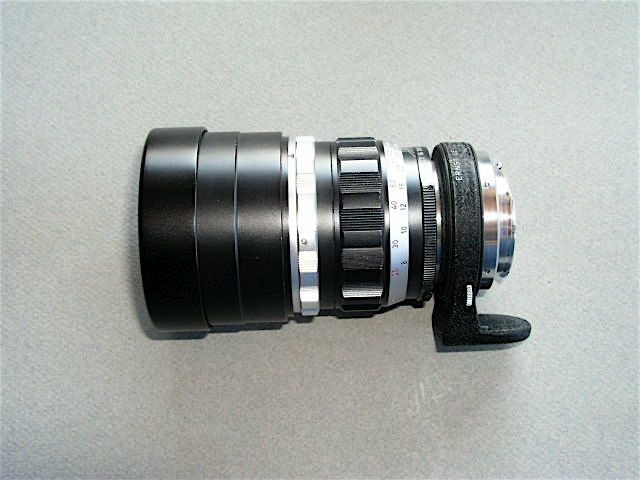
Mandler’s 200mm f/4 Telyt for the Visoflex.

I owned maybe a half dozen other Leitz optics, non-Mandlers I admit, but clearly he dominated the output of the marque. And if you tell me that my 21mm Apo-Elmarit-M f/2.8, the 35mm Apo-Summicron-M f/2, the 90mm Apo-Summicron-M f/2 or the 400mm Telyt f/6.8 didn’t have Mandler’s genes all over them, well, you have no idea.

And each was special in its own way. Anything with that magic sobriquet ‘Summicron’ needs no explanation. It means ‘f/2 and beyond compare’. Maybe bad pictures can be taken with a Summicron, but I never went there. And while I could never afford a Mandler Summilux (f/1.4 and every bit as good, while twice as fast) I now revel in a 1969 Nikkor-S 50mm f/1.4 which was ‘borrowed’ from Mandler’s workbench. That and Nikon’s 50mm Nikkor-H f/2 of that era, a Summicron clone, are every bit as good as Mandler’s Summiluxes and Summicrons, respectively. Though I hate waste, I have no qualms about owning both. And the Nikon optics make no quality concessions. Today those facts would attract some serious patent litigation, but back then the king deigned not to sue his loyal supplicants.

So, unsung master that he may be, next time you snap a picture give a thought to the master lens designer of the past century.

Words are cheap. Here are some Mandlers:

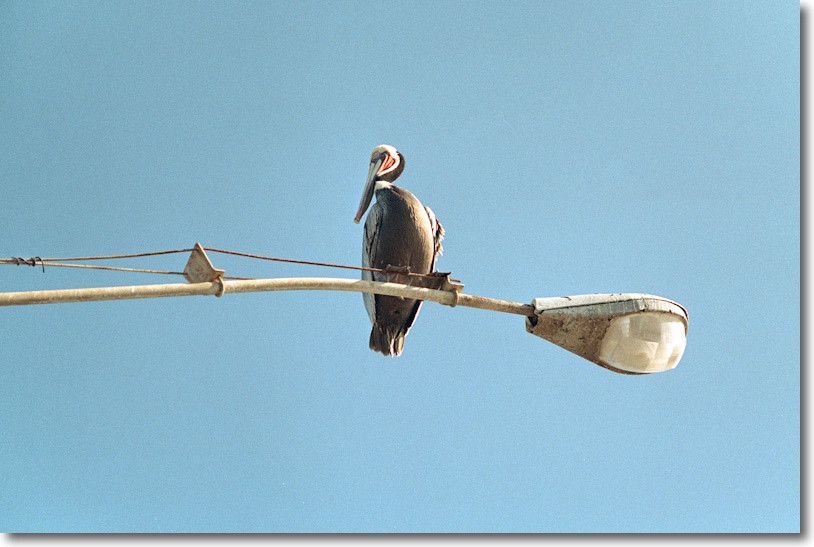
Pelican, Morro Bay. Leica M2, 90mm Elmar, Kodak Gold 100.

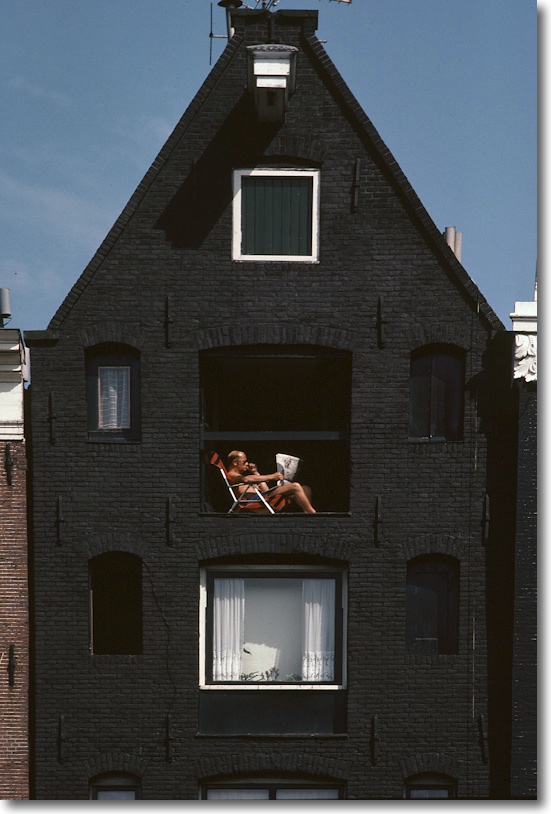
Morning paper, Greenwich Village. Leica M3, 135mm Elmar. Kodachrome 64.

American whales. NY Museum of Natural History. Leica M3, 35mm Summicron, Kodachrome 64.

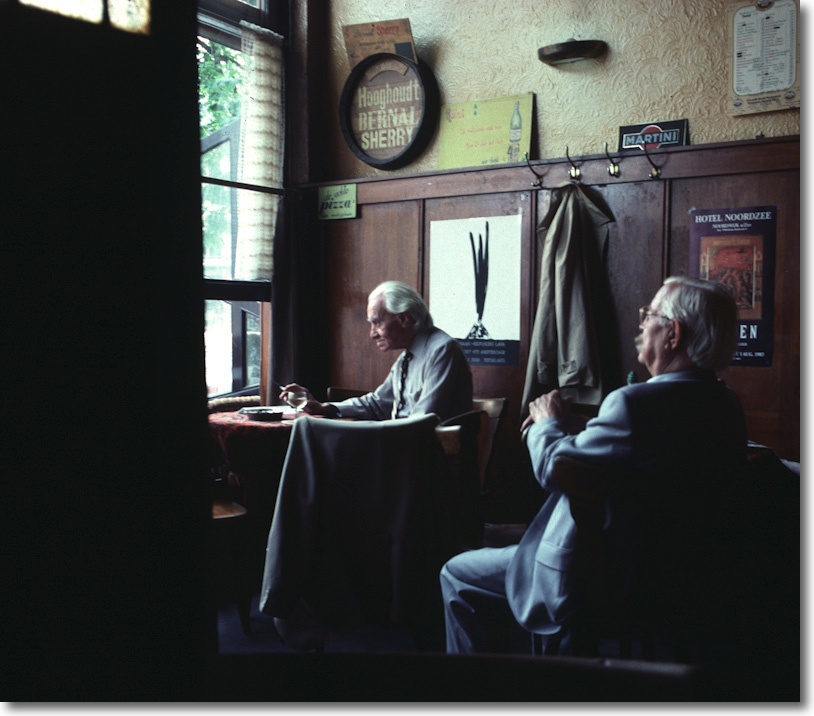
Amsterdam café. Leica M3, 50mm Summicron.

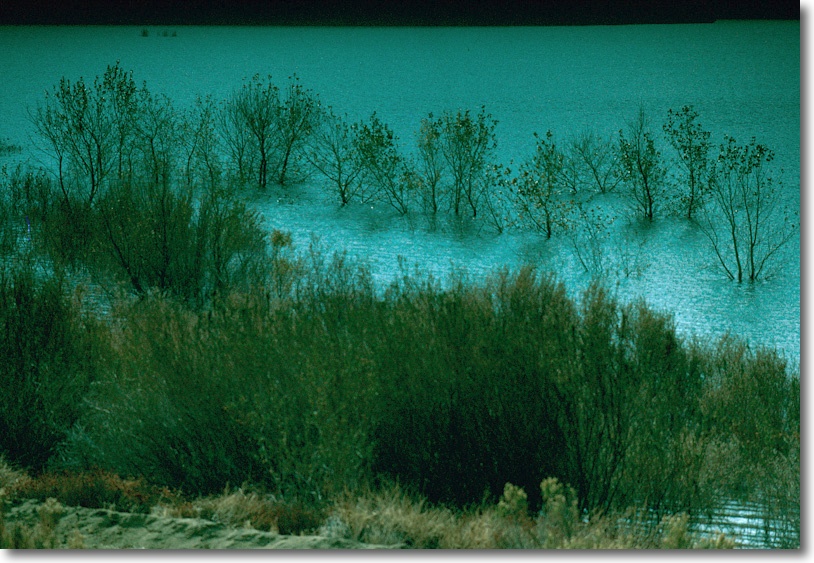
Lake Elizabeth. Leicaflex SL, 180mm Apo-Telyt-R, Kodachrome 64.

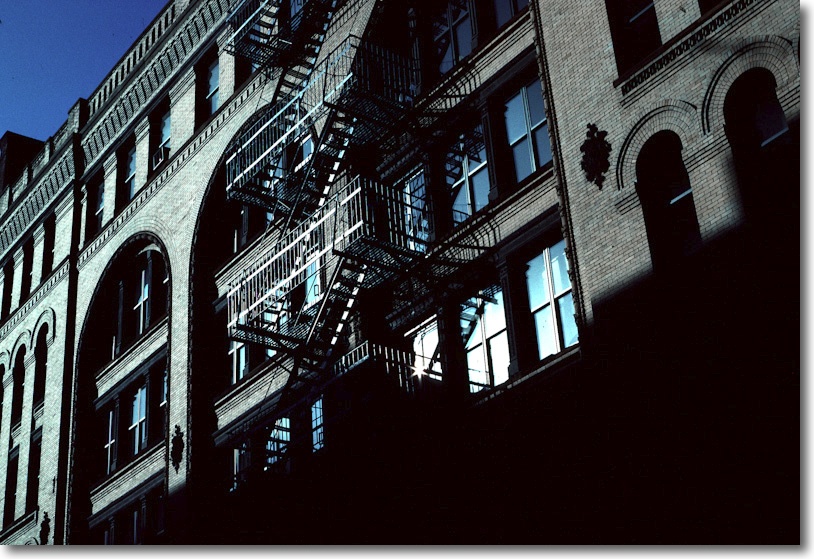
SoHo, NYC. Leicaflex SL, 50mm Summicron-R, Kodachrome 64.

San Diego downtown. Leica M2, 90mm Elmarit, Kodak Gold 100.

San Luis Obispo hard hat. Leicaflex SL, 90mm Summicron-R, Kodak Gold 100.

See what I mean?

The New Macs – 2012

A mixed bag.

Apple rolled out new MacBook Airs, MacBook Pros and Mac Pros the other day. There is good news and bad news.

Overall: Current MBA, MBP or MP users have little reason to upgrade. Apple is making retrograde steps with regard to user upgradeability and has again started price gouging for extra RAM, like they used to a few years back. As there are no aftermarket solutions they presumably think they can get away with this. What I see is falling profit margins with an attempt to offset these with disingenuous design practice, not to mention a fair leavening of arrogance in the assumption that Windows users will continue to switch, regardless of price. Wrong.

For users with just the one computer, the MBP makes sense, but at a very high price. The MBA is far cheaper, lighter, slower and in the 13″ size will do as a photo-processing tool at a pinch, but I would hate to have to use it exclusively for this purpose.

The MP is for those with access to Other People’s Money only. A high end Hackintosh is a far better machine at 67% off the asking price of the MP.

MacBook Air:

The best news is that all but the $999 11″ base model have dropped $100 in price. All support turbo boost of the CPU from 1.7/1.8gHz to 2.6/2.8gHz, best used when connected to the mains owing to the increased power draw. RAM can be doubled to 8gB for $100, a 300% premium to the aftermarket ($25) and not user replaceable; likewise the SSD is 64/128/256 at purchase and cannot be changed. So get it right when you buy your MBA. For the budget conscious photographer, the optimum price point is the 13″ MBA with the 128gB SSD and 8gB of RAM for $1,299. Use an external 2.5″ notebook HDD for external high volume storage, some $75 for 500gB and another $5-10 for an USB enclosure. RAM is speedy 1600mHz.

The integrated Intel HD 4000 GPU is an excellent choice for still photography editing, the glossy screen does you no favors, the machine has a 7 hour battery life and weighs a scant 3lbs. My 11″ MBA (Oct 2010) has had 18 months’ moderate use and is holding up fine, with no signs of failing. The latest MBA is some three times as fast on CPU throughput.

Finally, the SSDs in the MBA are SATA3 6gb/s variants. That is a good thing.

MacBook Pro:

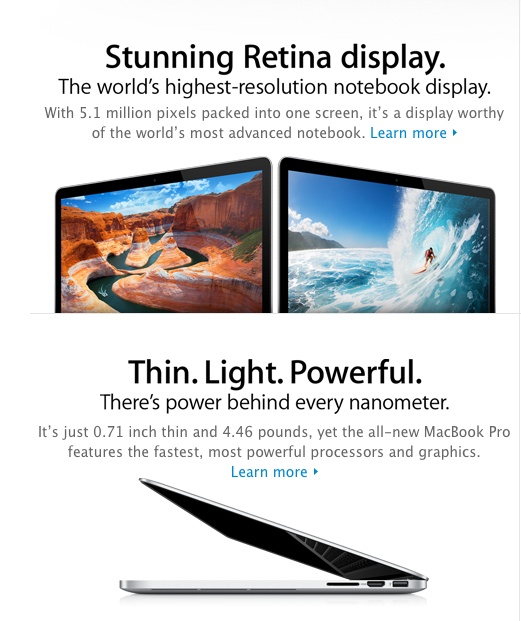
The big hue and cry, replete with all the usual increasingly tiresome Apple hype, is the Retina Display option. Whoever writes this crap most certainly did not read his adjective-free Hemingway.

More hype than most religions.

The Retina Display comes at a substantial premium for its 2880 x 1800 pixels – $300 more compared to the similar regular MBP. The photographer who has no other display handy may find this economically feasible, though 15″ is a small screen for long editing sessions. However, the RD’s maximum definition is only supported by two photo editing apps at present – iPhoto and Aperture. If you are a Photoshop or Lightroom maven, then until Adobe updates their apps you will not get the RD’s best definition. Adobe has said PS will take several months to adapt, with no news on LR yet. RD type displays would have to reach broad acceptance for this to make economic sense for Adobe. As there’s no love lost between the two businesses, it looks like a low priority project. If you use Aperture fine. I have found Aperture to impose extreme demands on hardware and abandoned it long ago for the speedy and far more logically designed Lightroom which pokes along just fine even on my slow, 2010 MacBook Air.

The RD MBP gets very costly if you max it out and it’s the only MBP which permits the use of 16gB of RAM. The regular display version only goes to 8gB. If you frequently round-trip from LR to PS and keep multiple PS files opened, you will notice the difference. Further, as the memory and SSD are soldered in, there is no possibility for the user to upgrade, and Apple will rip you off for $200 to go from 8 to 16gB, when comparably priced RAM sells for $50 in the aftermarket. That’s the same 300% premium as in the 4->8gB MBA upgrade. The good news is that RAM is speedy 1600mHz.

While the previous MacBook Pro permitted installation of a second disk drive – HDD or SSD – if the optical drive was removed, the new one offers no such option. The chassis has been slimmed down with the removal of the DVD player so the space for a second drive is no longer available. You will need to use an external drive.

How much? The 16gB RAM model with 768gB of SSD storage will run you $3,750. That’s a huge sum for an elegant portable which screams ‘steal me’. It comes in one size, 15″.

The regular MBP continues with HDD and SSD options. Same limitation on user replacement of the RAM, though the HDD should be possible, if not especially easy. A 15″ with a 1tB HDD and 8gB of RAM costs $2,550. That still seems awfully expensive to me. It should be easy to hack a comparable Dell laptop to run OS X for much less with identical screen definition and operating speed.

Both MBPs offer integrated or discrete GPUs but, once again, the integrated HD4000 is now so good that the separate GPU is really only required for video editing, so if you are a stills-only photographer you are paying for something you do not need. It is not an option.

All MBPs and MBAs boast Thunderbolt connectivity. Judging by the very slow takeup of this technology by peripeherals manufacturers this technology is a bust and the high price of the peripherals – displays and disk drives – will accelerate its demise. Not a selling feature as there’s very little out there using it. Be prepared to buy an adapter for your external display.

Turbo boost on all the MBPs takes stock speeds of 2.5/2.9gHz up to 3.1/3.6, which can be really worthwhile when connected to the mains. Battery life on regular and RD displays is limited to 7 hours, and Apple appears to be building a smaller battery into the regular display version so as not to cannibalize the RD one. The RD is much more power-hungry.

I tried the MBP with the RD at the local Apple Store and was underwhelmed. (The software was incomplete and I could only try the machine on maximum definition – the definition selector was missing). It’s less of an obvious jump in definition than going from iPad1 to iPad3. Mercifully, Apple doubles font sizes to resemble the size of those on a regular screen or else nothing would be readable. The glossy screen remains sub-optimal (the one I tried in the Apple Store had the sunny street behind me and had to be relocated to be useable) and at this time there’s no indication of a matte option. Another blow for photographers. But it’s the only way of getting 16gB of RAM so if this is to be your only machine, the premium may make sense if you are a heavy LR + PS user.

Mac Pro:

The purported update to this Xeon CPU workhorse is an exercise in cynicism. The machine may have a very capable multi-threading CPU but the rest continues to underwhelm. Maximum memory speed is 1333mHz, or 20% slower than the MBP, and drive connectivity is still SATA2, meaning 3gb/s compared to SATA3 and 6gb/s in the MBP and MBA. For movie makers moving large data files that’s awful. What’s worse is that later Xeon CPUs and disk drive chips supporting these technologies are available, yet Apple chose not to use the newer Xeon. It rather looks like the Mac Pro is finished and at the price asked any half competent geek should be building an Ivy Bridge Hackintosh.

Apple’s CEO has promised an improved MP 18 months hence, by which time every current MP will be a dinosaur. I don’t know that I believe him. Face it, the money for Apple is in iOS.

Conclusion:

The MacBook Airs represent excellent value and performance for the money coupled with light weight. Speeds are now adequate to use the latest MBA at home to drive a large external monitor for heavy photo processing. Memory is limited to 8gB which is a shame.

Apple is getting ahead of itself and building premium priced machines in the MacBook Pro which are answering questions – especially with the Retina Display – with technology no one is asking for and few can afford. Simply stated, it’s more definition than you need or can use. Serious photography users will use a larger external display with a matte screen and one whose gamut is far wider than the MBP’s, further making the Retina Display option pointless. Sadly, this costly display option is the only way to get 16gB of memory.

I would expect the MBA to materially cannibalize sales of the costlier MBP. The cost of upgrade options for both – none are user installable – represents an unwelcome return to Apple’s days of predatory pricing.

The Mac Pro is a waste of money using three-year old CPU, RAM and disk drive technologies. Newer high-end PCs provide a better alternative for those into heavy movie processing. If you are a Final Cut Pro user, a high end Hackintosh is better in every regard. It is, after all, nothing but a PC running OS X, meaning cheap and reliable hardware and software. And the Hack is 67% cheaper than the premium priced and dated MacPro. By comparison, repair costs, if any, are trivial and the user gets bog reliable operation and overnight parts availability at a fraction of the MP’s cost.