Ugh!
[column width=50% padding=3%]
Looking back I suppose there have been two sound decisions I made in my business life – we won’t go into the dozens of poor ones here!
One was leaving socialist England in 1977 for America which, back then, truly was the land of opportunity and, in contrast to my homeland, actually had a work ethic. The other was quitting my day job almost a decade ago and deciding to make my own living.
Working for yourself is truly a breath of fresh air and has probably added a couple of decades to my life expectancy. No more corporate team spirit, working for the greater good and all that gobbledegook which has wasted hundreds of billions of dollars of shareholder wealth over the past few decades in America’s ‘feel good’ society. Whenever forced to attend one of those ghastly team building sessions – whose goal would have made Stalin proud with its emphasis on stamping out all individuality – I would quickly plead a headache and head for the nearest beach with my camera.
But the greatest reduction in stress in my life came from no longer having to use Microsoft’s Windows. This fraud passing for an operating system with its need for large support teams of unwashed techies and constant problems was in my life no more. I became a full time Mac OS X user. And while I have nothing but contempt for Apple’s fragile hardware, OS X has been a model of stability and reliability this past decade and is as good as it gets in the latest Snow Leopard iteration …. especially if you run it on a home made PC box! Good, plentiful, cheap, easy replaced and reliable PC parts installed in a Hackintosh come to life when presented with a sound OS.
However, because I manage money to make ends meet, there are one or two financial applications I use on occasion which only come in Windows versions meaning – oh! horror – that I still have to load that piece of garbage on occasion.
While OS 10.5 Leopard was around I used Parallels as an emulator to run Windows – my copy of Windows started life as Windows 98 and I upgraded it to XP years ago. Parallels was buggy but sort of worked, with a clunky interface and a very long install time. It would lock up every other day on my MacBook and Intel iMac. Well, still better than Windows.
When Snow Leopard OX 10.6 came to market I upgraded but, surprise, surprise, Parallels would no longer work, the maker wanting more money to make its product compatible. Now given that any spend related to Windows is regarded as obscenity in the home, I shopped around and found two competitors.
[/column]
[column width=45% padding=2%]
The competition is comprised of VMWare’s Fusion, also wanting payment, and Sun’s VirtualBox. The latter is free and, now that Oracle has bought Sun, has some serious development effort being put into it. There’s money in virtualization. My earlier experience with VirtualBox 2.0 was awful and I had forgotten about it.
But when VirtualBox 3.0 was released in June, 2009 I paid attention. Larry Ellison, CEO of Oracle, did not become one of the world’s wealthiest by suffering fools (Gates at MSFT didn’t suffer them either, but made sure he sold his product to them) and a download of VirtualBox 3.0 showed the product to be much improved. Super stable on the HackPro, fast and easy to set up if, that is, you can get past the instructions which were written by engineers for engineers in contrast to the Apple approach of writing instructions for regular humans.
Mercifully, I am an engineer and most certainly not a regular human, so installation was a breeze. I then installed Windows XP Sp2, duly inserted my Win 98 disk to prove I was legit (though why anyone would actually want to steal Windows must be one of the great mysteries of our time) and immediately upgraded to Win XP Sp3 which, amazingly, went without a hitch.
I’m currently on VirtualBox 3.2.6 and Windows runs in it in its own little space, making sure no bad stuff migrates over to my OS X work space. If it gets clogged up I’ll simply reinstall it and the one or two apps I use. I give it 4gB of the 8gB of RAM in the HackPro when it’s on and allow it to use all four cores of the Intel Core2Quad CPU in the HackPro, and it runs fast if only in 32-bit mode, but how anyone can stand the UI of Windows XP beats the hell out of me. It was awful in Win ’95 and remains so in XP. No, if anything, it’s worse in XP, trying to interpose a user friendly interface which only makes the bad look awful. VirtualBox + XP Sp3 load in some 40 seconds and XP constantly reminds me that my ‘computer may be at risk’. How about fixing that, Microsoft, without forcing the user to pay for band aids? One of the nicest aspects of VirtualBox is that it allows you to create virtual disk drives in Win XP so that you can seamlessly access files in your OS X space. So, for example, I can install Lightroom 3 on the XP ‘machine’ and access my Lightroom catalog on the OS X side easily. A related benefit is that I can see how this site looks in XP using the truly awful Internet Explorer browser which, needless to say, respects few of the standards adopted by every other browser in the universe.
[/column]
[end_columns]
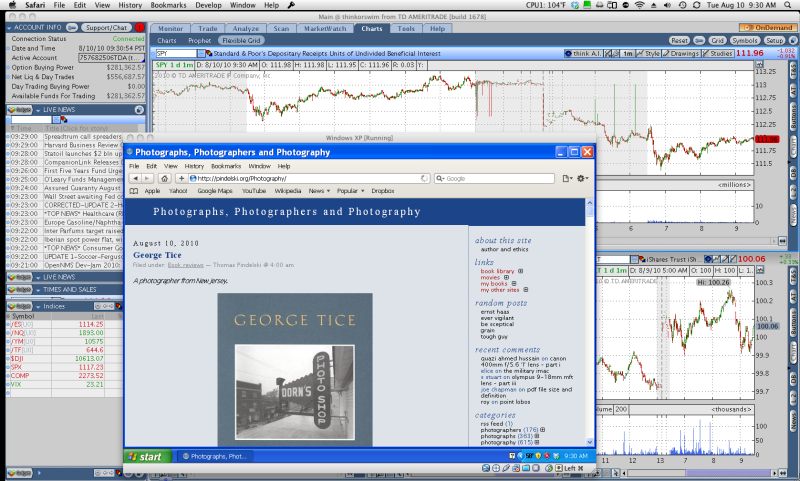
Windows XP Sp3 running this site on the HackPro. OS X in the background.
[column width=50% padding=3%]
All the usual peripherals work with no tuning – wireless internet, USB devices, sound, card readers, optical disk drive and so on. The only thing I have not bothered with is getting wireless printing to work as life is too short. I merely take a screen snap and print from OS X on the few occasions I need hard copy.
Anyway, this is a really long winded way of saying that if you really must run Windows on your Mac, get VirtualBox.
It is free, super stable and if you get a hankering to run Ubuntu, Linux, Solaris, FreeBSD, Windows XP or Vista, Windows Server, Windows 7, Oracle Enterprise, Debian, Redhat, Fedora, Gentoo, SUSE or Mandriva on your Mac, virtualization is a nice safe way of doing that.
[/column]
[column width=45% padding=2%]
And if you are seriously troubled, then consider updating to Windows 7 and making the world’s richest man yet wealthier. After all, there’s a fool born every minute and he has made Microsoft what it is today.
Running Windows in emulation mode under OS X on a PC box hacked to run Snow Leopard may sound like feeding bacon to a pig, but it’s the only safe way of running Windows on anything.
And, if you absolutely must know, this site looks almost acceptable in Internet Explorer 8. Lightroom 3? No problem, if limited to the slower 32-bit mode.
[/column]
[end_columns]

Lightroom 3 running in XP/VirtualBox in 32-bit mode.