At the grocer’s

Amazing what you can find when you try seeing

I really do not like pineapple. Too tart and acidic for my constitution, yet I was struck by the incredible complexity and beauty of the fruit at the local grocery store.


5D, 100mm Macro, ring flash at f/8, 4 images, Helicon Focus Pro

So I picked one up (carefully!) and took four differentially focused snaps, stitching them in Helicon Focus.

The ring flash head was half covered with black tape to add some modeling.

Alec Soth

An interesting artist

When you read that Alec Soth is represented by none other than ace salesman Larry Gagosian, alarm bells tend to go off. Isn’t this the same carpetbagger who persuaded the world that a $100mm diamond encrusted skull was something worth buying?

In Soth’s case the concerns are ill founded, for his work is insightful, sensitive, and original. I especially enjoyed the Fashion magazine section of his web site. It’s a quirky, somewhat sardonic, look at the loons and twits who make up the modern fashion world, a world where publicity and labeling are more important than quality and originality.

Well worth a look.


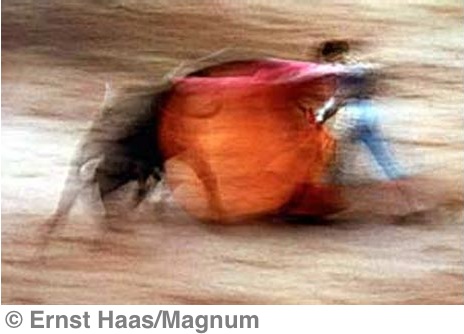
Two prize twits – Karl Lagerfeld and some other dude at Chanel

Soth’s site has several broken links – inexcusable – but you can also find his work at the Magnum site.

MobileMe revisited

It just (mostly) works.

A while back I wrote about Apple’s MobileMe service, at the beginning of my 60 day free trial period.


Amazon pricing on MobileMe

The bottom line is that I am sold and just paid Amazon $68 for a renewal. Apple wants $99 – no thanks. The awful review rating of 2 stars reflects the equally awful early performance of MM which was rushed to the market very much un-debugged. Too bad – it’s a fine piece of software.

Syncing across three Macs and an iPhone is smooth and unremarkable, with emails, Safari bookmarks, iCal events and Address Books being synchronized across all machines with no intervention. Email syncing is especially noteworthy as it’s now event rather than period driven. Get or send an email and the changes are immediately pushed out to all your devices. MM still refuses to sync Bookmark Bar bookmarks but that’s about the only thing I can find wrong with it. The wild emailing of expired iCal reminders has ceased and appears stable.

Finally, a newly added feature allows you to drop large files too big for emails onto the Public section of your iDisk for others to download with one click. A great way to share big photograph files.

Sure you can cobble together other ‘cloud’ syncing approaches for much less, but this one is robust, elegant, invisible and (to use that old car sales trick) less than $1.40 a week.

Recommended for those with multiple devices they wish to keep synchronized. I have no experience (and will be garnering none) of use with Windows computers.

LCD screens

The best review site.

A reader kindly pointed me to a UK site which has the best LCD screen reviews – or more specifically, TFT LCD screen reviews – that I have come across.

It’s called TFT Central (OK, no prizes for a catchy name) but the reviews focus on objective measurements rather than subjective pap – none of that “It looks great to me” rot.

That same reader mentioned that he had added a Hewlett-Packard LP2475w 24″ screen to his white iMac 24″ as a second display and mentioned that, if anything, the HP screen is possibly better than the one in the white 24″ iMac. High praise indeed. The maximum brightness of 400 cd/sq.m. is identical to that of the white 24″ iMac – meaning brighter than you will ever want. It doesn’t hurt that the HP has height adjustment (are you listening Apple?) and a built-in 6 port USB hub. Are these boys thinking or what? Anyway, for those looking for better LCD displays for their photo processing, check out the site.

If this sort of thing turns your crank, check here for an explanation of the different LCD panel technologies used – the iMac 24″ and the HP referenced above use the same state-of-the-art technology, named S-IPS or H-IPS. Which just goes to show how ahead of the market the 24″ iMac was when introduced in late 2006!

Helicon Focus – improved

Even better

When I first wrote about Helicon Focus some five months ago, an improved Mac version was “….2 weeks away” – the developer’s words, not mine.

Helicon Focus (mine is the ‘Pro’ version) allows you to stitch together a collection of differentially focused images, taking the sharp zones from each to make an overall sharp composite with seemingly vast depth of field.

Well, my version (3.79) has just been updated to 4.0.1 and it does a better job on really tough images.

Here’s the rendering of the 10 images of the silk flower I originally used to show what this magic application can do:


A composite of ten images. 5D, 100mm macro at f/2.8. Helicon Focus Pro Version 3.79

The flower was both very close to the image plane in the camera and at an acute angle thereto.

And here is the composite image assembled from the same ten original images using 4.0.1:


The composite image assembled with Helicon Focus Pro 4.0.1

The differences are clear – in fact the developer used my images to test the new version after I had submitted them for review.

Congratulations to Danylo and his team – it was not for nothing that this journal named Helicon Focus the best application of 2008. And it was worth the wait!

Anyone using the best in digital gear – full frame or medium format – involved in industrial or close-up photography should have this application on his Mac or PC. That and a sturdy tripod to make sure the camera does not move between exposures. Your clients will love you.