Things I noticed.
The Fuji X100 brochure is now available from Fuji and as these things have a way of disappearing like all those test shots in early reviews, I have placed it on my file server and you can download it by clicking below:

Click to download the X100 brochure.
I’ll put aside any comments on the sheer vacuity of the puffery, which is at least written by an English speaker not by Google Translate, but there is some gold among the dross, and here’s what I spotted (page references are to pages as numbered using Apple’s Preview PDF viewer and 2-page display – the page numbering in the original is poor and incomplete):
My comments are aimed at the primary target for this camera – street snappers. If you are into landscapes or bugs, I recommend you read elsewhere and buy something else.
[column width=45% padding=5%]
Page 4 – The user is clueless how to hold a camera with an optical finder. The lens should be supported from below with the left hand, not obscuring the finder.
Page 6 – The top plate engraving quality is a whole lot better than on my Leica M2 and M3.
Page 8 – The OVF displays vary between pictures confirming that you can tailor these extensively. The finder magnification is only 0.5x, a bit disappointing. The Leica M2’s 0.72x would have been better. The 1.44 mp definition of the eye-level EVF is identical to that of the Panasonic G1. That’s excellent. Diopter adjustment is -2 to +1 and the finder has a long eye point of 15mm meaning that eyeglass wearers like me will not struggle to see the full frame. One key aspect of the OVF is being able to see outside the frame lines, anticipating objects coming into the field of view.
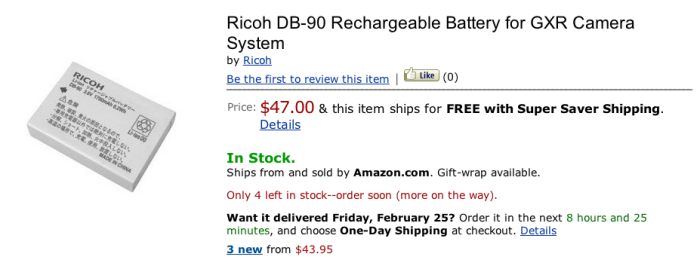
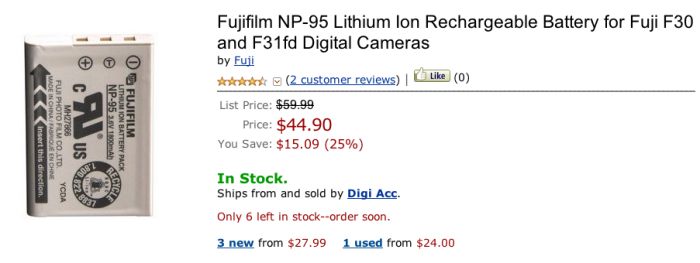
Page 9 – The OVF can show under/exposure compensation, set on the top dial. Nice. It will also show DOF – useless, in my opinion. The AF target mark is a nice size compromise between spot and overall. The brightness of the displayed data varies with scene brightness. Really nice. There’s a proximity sensor, like in the iPhone, which switches off the LCD when the camera is brought to eye level. There’s also reference to a ‘Power Control System’ which suggests that you can switch off the dumb-as-it-gets LCD screen to conserve power. Any street snapper will immediately do this, not to conserve power, but to turn off the single device which has made nearly every point-and-shoot useless until now. An LCD screen is incapable of being a useful viewfinder in daylight. There’s a reference to ‘Page 25’ for more details, but that page is missing, their numbering jumping from 24 to 26 in the original document. Anyway, anything around 300-500 is fine and spare batteries are dirt cheap.
Page 10 – The lens charts show the lens peaks at f/4-5.6, just like Leica’s 35mm Summicron. The built in ND filter reduces sensor sensitivity by 3 stops. Handy when you want to use a slow shutter speed or large aperture but the light is otherwise too bright. For those who think they should be wasting their money on an X100 to take pictures of flowers, the LCD finder will allow framing down to 4″ (10cm).
Page 11 – Like on the Leica M8/9, peripheral photosite lenses on the sensor are inclined inward to minimize edge optical aberrations. There is some sort of dynamic range enhancement built in to reduce highlight burn out.
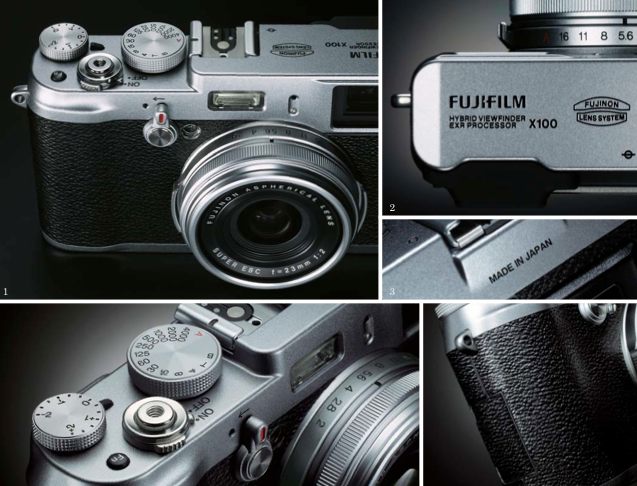
Page 12 – The top and bottom casings are die-cast magnesium. That beats a cheap pressing though I would have preferred plastic, owing to its greater shock resistance and flexibility when struck. They claim the lens engravings are hand-filled with enamel. Whatever. The reference to “Made in Japan” is so duplicitous you can bet the thing is made in China. The body covering is plastic. The smooth rubber from the G1 would have been better, if less sexy. The clear intent here is to mimic early Leica M bodies, though those used vulcanite which cracks and peels with age. There’s a dumb-as-it-gets male thread on the front of the lens with a decorative cover ring. You have to remove this and fit an adapter for a protective 49mm filter. As most 49mm filters have a front thread, it may be possible to simply screw one on reversed, but that would require the thread pitch on the lens to be identical to that used in filters. I don’t know if that is the case. There’s an optional leather case which no sane snapper will come within 100 miles of. There’s also an optional lens hood for those with more money than sense. Also an optional TTL flash for the same set.
[/column]
[column width=45% padding=5%]
Page 13 – The rear thumb wheel allows 1/3rd stop adjustments compared with 1 stop for the shutter dial on the top and aperture ring on the lens. Not sure how this interacts with what the mechanical dials show. The AE/AF button can be set to lock just AE or just AF. I cannot figure out whether a first pressure on the shutter release locks focus (which I like) and if so, that means I’ll be setting the AE/AF button to AE only, like on my G1. I have no comments on manual focus as I cannot see any use for it in street shots where time is of the essence. Those who like manual gearshifts in cars can get off on the options here. There’s a RAW button if you want to shoot in RAW and the camera is set to JPG. Who cares? Set the camera to RAW. There’s a bunch of stuff on white balance but as that’s all in Lightroom I don’t care. You can use sRGB or AdobeRGB gamuts. 5 shots per second bursts are limited to 2 seconds, 10 shots. Lots of bracketing options – AE, ISO setting, and film simulation (footnoted on p.14) – between Provia (natural), Velvia (garish) and Astia (flat). These purportedly emulate Fuji’s film emulsions. Nothing you can’t so in Lightroom or Photoshop.
Metering is selectable between multi metering (meaning you are clueless what is being measured), spot (2%) and average. The latter, used with RAW, is just what the doctor ordered for street snaps.
There’s an AF assist lamp for slow scenes as in “Hey! I’m over here! Can you see me now?”.
ISO top speed can be pushed to 12,800 from 6,400, a choice which can be assigned to the Fn button. Smart. Auto ISO works between 200 and 3200.
The reference to 0.01 second Shutter Time Lag is pure BS. They are trying to mislead by referring to VF display response not shutter lag. Every consumer camera on earth has a shutter lag dozens of times slower and the X100 will be no exception.
Here’s a show stopper. The included (and crappy) Silkypix software works with Winblows only! Wouldn’t do to realize that 99% of all creative people use Macs now, would it? This means that if you shoot RAW, like I do, you will have to use Windows with an emulator (I use the free VirtualBox from Sun and Wincrap XP) to process the images using SilkyPix until Adobe and Apple come up with RAW converters for Photoshop, Elements, Lightroom, iPhoto and Aperture. Ugh!
Page 14 – Built in Yellow, Red and Green filters for those who like to shoot in monochrome and don’t know how to use color or Lightroom. Beyond pretentious. The illustrations are so poor it’s hard to make out any difference. There’s some sort of dynamic range control for high contrast situations. If you like to get hosed down and buy the lens hood, it comes with the filter adapter ring.
No mention of movie mode anywhere which spares me additional vituperation. This is emphatically not a movie camera, having just two uses. One is for street snaps. The other is for the insecure – the types who put stickers in their rear windows saying which university they attended – to show their wealth. Those are the ones who will happily buy the silly leather case.
But, overall, this looks promising.
[/column]
[end_columns]