All posts by Thomas Pindelski

The Nikon D2X – Part II

Some settings.

Part I appears here.

First things first. Now that my pristine Nikon D2X has arrived, courtesy of a fastidious original lady owner, I immediately installed an Upstrap to make sure it felt comfortable when worn. Not surprisingly, the ghastly ‘Nikon’ emblazoned strap which came with the camera was unused – it’s rubberized on one side only and you become an unpaid advertiser when using it. Upstrap is the way to go – the SLR-LT/SLRN non-Kevlar model is what is called for.

Second, a quick check of the firmware confirmed that Version 1.01 was installed. A download of the two BIN files from the Nikon USA site to the root directory of the CF card, a couple of button presses and two minutes and Version 2.0 was up and running. Advantages?

Nikon D2X firmware version 2.0:

  • H 0.3 (equivalent to ISO 1000) and H 0.7 (equivalent to ISO 1250) if using EV steps of 1/3rd steps in the Custom setting b2 or H 0.5 (equivalent to ISO 1100) if using EV steps of ½ steps in the Custom setting b2, have been added between the ISO 800 and H 1 settings in the ISO menu.
  • Autofocus subject acquisition and tracking performance has been improved.
  • A Black-and-white (sRGB) option has been added to the Color mode option in the shooting menu.
  • A new Trim function has been added to the shooting menu.
  • Up to 3 custom tone curves can now be downloaded to the camera for use with the Custom Tone compensation option.
  • Nikon Capture 4 (Ver. 4.4.2) Camera Control or Camera Control Pro with Ver. 1.1.1 and later is required to download 3 custom tone curves to the camera.
  • An Image authentication option has been added to the setup menu.
  • The optional Image Authentication Software is required to authenticate images.
  • A Save/load settings item has been added to the setup menu.
  • The Mirror lock-up option in the setup menu has been modified to function with battery power as well as AC-adapter power.
  • The Lock-On option in the CSM menu now offers 4 options: Long, Normal (default), Short, and Off.
  • Max. sensitivity and Min. shutter speed options have been added to the ISO auto menu.
  • The Maximum shots option in the CSM menu has been updated to support a maximum setting of 60 shots.
  • The FUNC. button item in the CSM menu has been divided into 2 separate items labelled FUNC. button and FUNC. + command.
  • A Recent settings item has been added to the setup menu.
  • The shooting data of an image in the playback photo-information display now includes Focus mode (S/C/M) and Vibration reduction (on/off). Displayed only when the image was captured with a VR lens.
  • Latitude and longitude GPS data now displays up to 3 digits for each segment.
  • A compass bearing is displayed in the GPS data, if used with a GPS device is equipped with digital compass.

Non-trivial enhancements, as you can see. The only surprise here is that the original owner did not do this!

I popped an SDHC 8GB Lexar CF card in and recharged the battery, which the camera states is some half way through its useful life. The D2X was made before SDHC high-speed transfer technology was available, so write times are not reduced with an SDHC card in the camera, but read times in a USB3.0 card reader most certainly are when loading the images into Lightroom or Photoshop. And with the body’s large multiple-shot buffer, write times are not a major concern. In my D700 the 8GB card will store 302 RAW images; in the D2X that rises to 386. Nice.

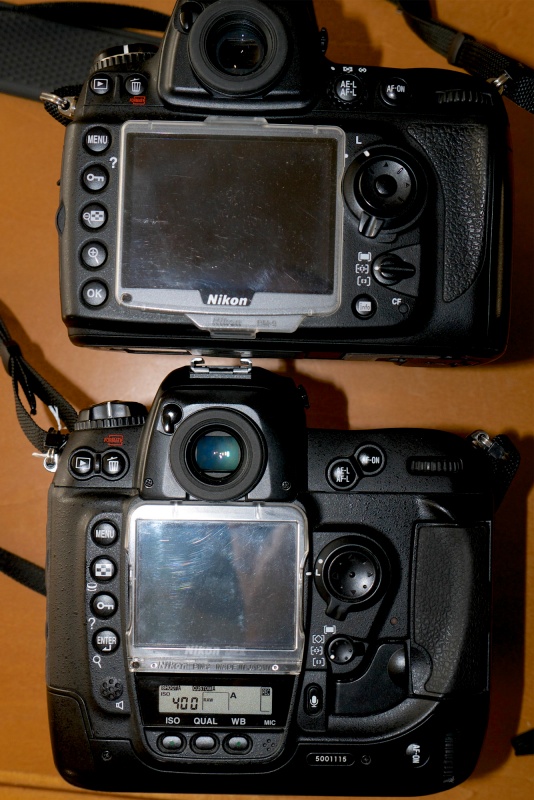
As expected, the weight of the body, despite its increased bulk, is little different from that of the full frame D700.

As long time readers know I own many old MF Nikkor lenses from what I consider to be the golden age of manufacturing, and have modified all of these by adding a CPU. To confer aperture control on the aperture ring of lenses thus modified (and also for AFD lenses which come with a CPU) the related setting is found in Custom Setting Menu->f – Controls->f6 Command Dials->Aperture setting->Aperture ring->OK. Phew! You can now change the aperture on manual and AFD lenses using the aperture ring on the lens. That’s how cameras used to be and that’s how I like mine. If you elect to use my lens correction profiles, these will automatically adjust to either FF or APS-C images, so no changes need be made when importing images from one or the other sensor.

As usual, I turn Image Review off. If I need to chimp the image on the built-in LCD it’s to check the histogram, and that only in challenging lighting.

The GPS unit and sender set forth here for use on the D700 works better with the D2X, the D700’s 70% hit rate rising to over 90% with the D2x.. Latitude, longitude, altitude and UTC time are all faithfully recorded in the file.

A quick reset (two green buttons at the rear base held for 2 seconds) restarted frame numbering from zero, the body having some 22,500 actuations on it when received. In other words, as these things go, it’s a baby. You really must avoid pros’ beaters when searching out one of these.

Autofocus with AFD lenses is slightly (subjectively) faster than with the D700 – the D2X stops the focus first time whereas the D700 sometimes goes past the optimum focus point then retraces. But practically there’s little to choose. Both are breathtakingly fast, and the older AFD lenses which use the ‘screwdriver’ lenses focus mechanism are nicely suited to the powerful focus motor in the body of the D2X. I only own one Nikon G lens, the 16-35mm VR f/4 which uses the more modern linear in-lens focus motor, and this locks autofocus even faster than the AFD lenses I use. The G lens may be set in awful resin, but the technology delivers. On the AF-C D2X, the 16-35mm focal length range computes to an FFE of 24-52mm, a handy range for street snappers. Couple that with the 35-70mm AFD (FFE of 52-105mm) and you have a powerful ‘around-the-world’ outfit.

A quick tweak on the eyepiece adjuster saw things nice and sharp in the finder. Subjectively the finder in the D2X is one stop brighter than the one in the much newer D700. The D700 projects a larger, warmer image with the 1.2x magnifier I use. Removed, the two are near identical, though the D2X has a smaller sensor. Unmagnified, the D2X’s finder is just right – there’s no need for the eye to scan around for data. Both bodies present a wonderfully uncluttered image area through their respective finders. Best of all, the Nikon Eyepiece Magnifier fits perfectly and makes the viewfinder into a true state of the art focus and composition aid. Highly recommended, especially with fast and/or long lenses.

The focus confirmation light, used with manual focus lenses, is more decisive than in the D700 – there’s less stuttering around the optimum focus point, but I am splitting hairs here. If you use my lens correction profiles (click on Sitemap, above), these will require no changes for the smaller APS-C sensor.

The D2X has one useful feature missing from prosumer bodies like the D700. A button at the lower rear allows recording of a voice memo of up to 60 seconds with an image. Very handy for, say, recording the name and email address of someone in a street snap when you want to send them an image later. It’s a nice thing to do for posed snaps and a handy feature to have.

Despite its increased bulk, the D2X handles better than the D700, owing to the duplicated dual command dials on the handgrip which make vertical operation a breeze – as long as you remember to flip the switch to enable the vertical shutter release! The shutter is noticeably quieter than in the D700, but the latter has a 3″ LCD compared to the 2.5″ on the D2X. If you are a big LCD user, that is not good.

Otherwise things are remarkably similar between the two bodies, despite the disparity in their ages. The EN-EL4 battery has a 1900mAH capacity meaning a whopping 1,500 images per charge (the later EN-EL4a is 2500mAH or 32% more shooting capacity). These batteries are awfully expensive but as there are so many tales of melting aftermarket ones, I bought a lightly OEM Nikon used spare. The EN-EL4a will not fit the D700 but will fit the D700 when equipped with the vertical hand grip. One more recharger to remember. For comparison the D700’s battery is 1500mAH.

In summary, I do not think you will complain about value for money when buying a used D2X. You can decide, based on this and subsequent articles here, if a used one makes sense for you. While I’m not a serial shooter, cranking the body up to maximum continuous shooting is quite something to behold – 8fps in cropped frame mode.

Overall impressions are of a body of quite immense solidity, perhaps subjectively better than even the massive and well made D700. At $650-800 for a lightly used non-pro ‘beater’ the D2X is a bargain if you can live with APS-C. Pay a little more for one with low actuations – the risk-reward is positive. The D2X will accept just about any Nikkor lens ever made, and older ones can be easily retrofitted with CPUs to modernize their data recording abilities.

Pictures in Part III, but of course there has to be the obligatory snap of Bert the Border Terrier to round out this piece!

Bertie. D2X, 85mm f/1.8 AFD, f/5.6, ISO 400.

Detail of the above. The spot autofocus center rectangle was used, locked with a first pressure on the shutter release.

A quick look at the first images from the D2X does prompt the question: Wither sensors? A friend sent me some uncompressed originals from his new Nikon D800 the other day, and encouraged me to pixel peep, meaning I was looking at display images which equalled print originals 10 feet in size. 10 feet! The rendering of detail, the absence of noise/grain/whatever were startling. Even at ISO1600 the results were special. But I cannot help wonder, in the real world, one where prints are dying and large LCDs are the default display medium viewed at a rational distance, who needs these insanely great sensors? For those who do not, and who are looking for value for their money, oldies but goodies like the D2X have an awful lot to offer. And you are not going to beat the framing rate or the vast choice of inexpensive manual focus optics.

And thank you, Christine, for a camera delivered in such fine condition!

Part III appears here.

The Supper at Emmaus

It’s all been done before, generally better.

A friend sent me a piece on a London exhibit which documents the history of photo manipulation in pre-Photoshop times. When Content Aware Fill came to Photoshop a while back, allowing the near instant removal of obtruding elements in images, it was merely automating something image makers have been doing for thousands of years. That something is pleasing a client or finding the pantry bare on returning home. In reportage this is inexcusable but in all other fields of endeavor my reaction is ‘Have at It’. If it looks better, it sells the product or keeps a starving artist in bread and water.

Take a peek at any Raphael or Titian or Giorgione. The players are model perfect. The protagonists in Titian’s ‘Noli me Tangere‘ are straight from a latter day Hollywood. Perfect. Christ is out of a Ralph Lauren ad and Mary Magdalene has the classic profile of a Roman goddess, not that of the scrubber she really was.

But there were a couple of bad boys who really didn’t much care what the client thought and hewed to their own vision. Degas (1834 – 1917) is one and he was wealthy enough not to care about sales. The other, the shining example of the breed, was Caravaggio (1571 – 1610) and everything I have seen of his work suggests that he not only knew how good he was, he knew he was so good that it was his way or the highway. “You want pretty” I can hear him saying, “Buy a Raphael” (1483 – 1520). “You want real, here’s my bill”.

Let me step back. As the proverbial starving student in 1970s London, one of the great blessings of a Socialist administration – maybe the only blessing – was its conviction that free museum entry for anyone with a student card was a fundamental right. So thank you, Mr. Wilson, for the many free afternoons I spent in London’s National Gallery, arriving courtesy of a like-priced subway pass. And what was the primary cause of my many visits? What remains unquestionably the greatest image, nay, the greatest photographic image, of the Renaissance. Caravaggio’s ‘Supper at Emmaus’. (There’s another version in Milan. The London one is what you want).

Sure, the lighting is manipulated, the composition beyond perfect. But that’s where Madison Avenue stops.

The torn sleeve

The broken nose

The rotten fruit

And the faces were those of the working people the artist found on the street. No make-up or plastic surgery here. A painting like no other. Well, maybe excepting the few dozen other Caravaggios extant.

So while Joe Stalin though he was onto something years before Content Aware Fill, there really is little new under the sun.

I left the socialist’s English paradise behind in 1977 but feel for those poor students who now may never revel in Caravaggio’s masterpiece as they cannot afford the price of entry. Subsequent administrations put paid to free entry and of course, like all ‘conservatives’ with their Oxbridge degrees safely on the wall, they sought to deny others that which so mightily benefitted them. That seems to be a global belief of the greedy. Whether the Japanese, British or French leaders with their select degrees from the best schools, or their latter-day successors from Harvard and Yale, once they got theirs free they jolly well made sure you paid for yours.

There’s a lot for any photographer to learn from that bad boy Caravaggio.

The Radical Camera

A fine show at the CJM.

Sammy’s, New York, 1941. Photo by Lisette Model.

Once upon a time unobserved street photography, high angles, low angles, crazy angles, was unknown. Until, that is, the New York Photo League (1936-51) came along. From the Depression to the Red Scare, these New York photographers, mostly poor, mostly Jewish mostly left-wing, redefined how we see. So much so that whereas their work was shocking and new back then, today we think nothing of the unposed street snap which they popularised.

San Francisco’s Contemporary Jewish Museum has an outstanding show of some 150 original images taken by this group of photographers who changed how we see. It has just opened, runs through January 21, 2013, and is highly recommended for those of the street snapper persuasion.

The Marin Headlands

Easy.

Drive over the Most Famous Bridge in the World in the Most Beautiful State in America on the Most Perfect Day of the Year and all you have to do is press the button.

I gave the D700 to my 10 year old son again and again and now that he has learned to focus the 80-200mm MF Nikkor I am quite uncertain which of us took these! If you need a superb zoom, have a $130 budget and don’t mind manual focussing, get one. It will knock your socks off.

Looking northwest.

An abundance of ice plant.

Looking Southeast.

Looking North.

The Most Famous Bridge and the Most Beautiful City on the Most Perfect Day.

All snaps on the Nikon D700 with the Nikkor 35-70 AFD and 80-200mm Ai lenses.

Lytro – dead wrong.

A solution looking for a problem.

I wrote about the Lytro camera with considerable enthusiasm over a year ago. It’s now hitting the stores with zoom and manual options added.

Thinking it over and experimenting with their publicity photos taken on the camera I now conclude I was dead wrong.

The Lytro takes an image whose point of focus can be changed when viewed on a computer. The problem with that – putting aside questionable definition and so on – is that no one in their right mind wants to do that. In fact it’s exactly backwards. While the technology frees the user from the need to focus, as the focus point can be determined at the playback stage, in practice what the user wants is a small camera, likely as not in his cell phone, where everything in the picture is sharp. Like the Lytro that obviates the need to focus at the taking stage. But it’s at the viewing stage that the user wants to determine what should be sharp or blurred. But the user only ever wants one thing sharp. He does not want multiple choices. And he wants the image big and sharp where he chooses. Most of all, the last thing the consumer wants is to carry another gadget, especially one with the Lytro’s questionable ergonomics, these largely dictated by the need to use a long lens to confer the required shallow depth of field.

No, users do not want the choice of many sharp points of focus depending one where the image is clicked at playback. Users want one sharp point of focus with all else blurred. One click. So what is called for is processing software that permits that, maybe allied with data capture at the taking point to record relative subject distances when the image was first recorded. Trees were 50 feet away, person was 10 feet away, etc. At playback you click the person and the trees are rendered blurred.

Yes, I do the selective focus thing using the excellent Magic Lasso in Photoshop but no average user is going to want to do that.

Lytro has it exactly wrong. A gimmick which answers a question no one is asking. A solution looking for a problem. I give them one year and hasta la vista to all that venture capital.