Category Archives: Hardware

Stuff

The new art book

Content conversion is the challenge.

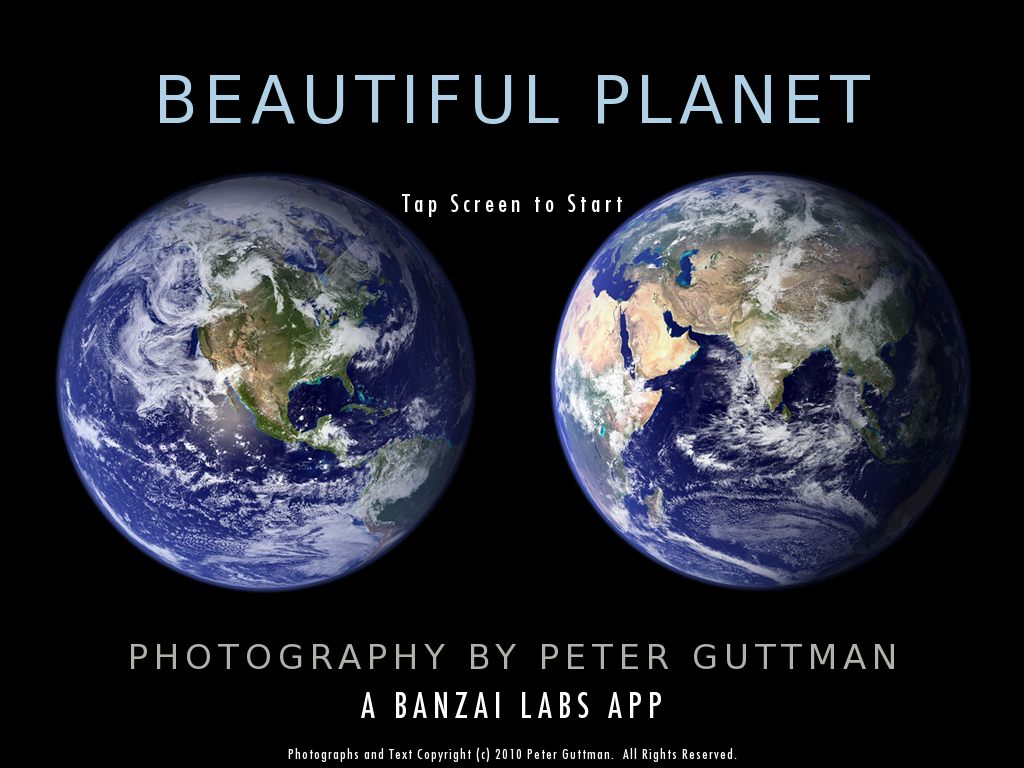
The Beautiful Planet app for the iPad gives you some idea of the future of books. While the navigation is rudimentary, basically being limited to broad geographical locations and seemingly random order of content once you choose a location, it works well as it showcases great photography and the viewer doesn’t much care whether the photograph was taken in Montevideo or Moscow.

But that’s not an approach which will work well for most art books, be they about paintings or photography. Context and background information are required to make the book truly useful.

One of the finest books in my small collection is Raphael by Pierluigi De Vecchi and while the quality of the reproductions and writing are both splendid, it’s never lost on me that the book weighs in at over 8 pounds. It’s simply not comfortable to keep it in your hands or on your lap for any period of time. As a long time fan of the Italian master, I have always kept images of most of his works, sourced from Google Images, in iPhoto and would take these with me on my now defunct netbook when traveling. There’s nothing finer than relaxing with the Italian master’s work before settling in for a night of the dreamless, with iPhoto giving me the option of musical accompaniment of choice.

So it was a moment’s work to synch my Raphael collection with the iPad, and I threw in two other Renaissance masters, Titian and Caravaggio, for luck. This is how the album looks on the iPad:

And here’s a specimen full page view:

What is significant here is that the iPad’s weight remained unchanged at 1.5lbs …. and each album of 70-100 images consumes maybe 75mB of storage. So ten albums, which will get you most of the greatest western art ever painted, run under 1gB. Not a lot.

In addition to the weight (as in lack thereof) advantages, a computer screen is transilluminated, so a well processed original will have tremendous dynamic range – inky blacks and snowy whites. And unlike using a netbook or laptop, as long as the original has enough detail a simple unpinching motion with thumb and forefinger allows me to zoom in on Raphael’s brushwork to enjoy some favorite detail. What is sorely lacking is context. While I have no particular need of the detailed narrative presented in the original book, what I would really like is some sort of index, and the ability to touch a painting on the screen ane be told about its history, location, etc. But given the slow moving art world, the myriad of complications regarding licensing and reproduction rights and so on, I’m not holding my breath. It will be ages, I suspect, before art books take advantage of the magical properties of touchscreen technology.

Further, it is obviously unlikely that the couple of hundred books of photographs I own will ever be converted to digital files. Most are out of print and one of the quickest ways I can think of losing money is to publish photography books.

So it’s time to take the law into your own hands, and remove the book from them at the same time, if you get my drift.

Mercifully Rube Goldberg lives, in the guise of a gadget named the Scan Robot made by some foresightful inventors in Germany and pointed out to me by fellow iPad owner and blog reader, Gregg L. Thank you, Gregg!

You can watch the hypnotic video by clicking below. The maker, Treventus, claims 25 pages per minute can be scanned, though I have yet to find out what the dpi resolution is.

I have no doubt that the device is anything but cheap, but once some smart person at HP or Epson twigs the market potential, we should see high volume production take the price down to the $1-2,000 range. Some other smart person will go into the leasing business and this consumer will be first in line for a lease, after which all my books will be in digital format. Let’s see – 250 books, 50,000 pages, 35 hours, $10 per hour for the student working the thing, $500 to lease it … and a $10,000 tax deduction when I give all the originals to the local library. That solves.

Now let me take this thinking further. My local library, the Burlingame Public Library, occupies a gorgeous building on the prime acre of real estate in the town of Burlingame in Northern California.

I would estimate the value of the lot to be $100 million. It houses 216,579 books with a replacement cost of, say, $5 million. So after sale, the city is left with $95 million and the taxpayer is relieved of the tax cost of probably 50 employees who will now be required to find jobs in the for profit sector. A win-win. What about that $95 million left over? Well, I would guess that the Burlingame Public Library has no more than 5,000 regular visitors and seemingly 20% of those are bums looking for a warm place to hang out during the day. The cost of a tablet computer for each member is $3 million and digitization of the library’s contents is, at say $5 a book, another $5 million. Yes, that’s right. Give every member a tablet computer at the taxpayer’s cost – it saves money net, which is the name of the game. Heck, go crazy and give every one of Burlingame’s 25,000 residents a tablet computer. Cost? A mere $12 million.

The Burlingame Public Library. Prime real estate, awaiting development.

Bottom line?

  • The City has $80 million left over which it can steal for other useless purposes or, God forbid, return to its taxpayers.
  • Apple’s iPad sales go up by 25,000 for this one library alone and you and I make money on the stock
  • All those new iPad users now have real incentive to ‘visit the library’ and, in true American fashion, will have no need to get off their burgeoning behinds
  • $5 million of unproductive payroll and overhead is removed from the tax bill
  • Developers redevelop the site for a for profit business (likely as not a larger Apple Store to handle the increased demand) and the tax base expands accordingly
  • Natural resource use plummets from all those saved 1 mile drives to the library. Air quality improves. Traffic falls. Road repair costs drop. Accidents and police costs fall.
  • Schoolchildren have online access to a vastly expanded library
  • Repeat for all those libraries – starting with the one on Fifth Avenue in New York which would make for some nice high end condominiums – and you begin to eat into that budget deficit. I figure that one would easily raise $3 billion for the city block on which it sits.

And, yes, the chances of any of this happening in my lifetime are zero.

But the art book’s future is clear and when the 21″ iPad comes along I propose to be one of the first to have all my art books on it. Along with the hundreds of DVDs and CDs I converted years ago.

Of course, I hope the Burlingame Public Library is still around then, as I will need the tax deduction from the gift I will be making of my whole collection. It’s not like I’m about to end up out of pocket on this little venture now, is it?

Still, it seems I’m not the only one who gets it:

iPad – one month later

Just get one.

As the ultimate early adopter, having got mine on iPad Day, April 3, 2010, there is always the risk that anything I write about the iPad is tainted by a refusal to admit that it has serious flaws. Egg-on-face is not a particular favorite here any more than it is in your home.

And yes, I have written almost as much about this device as I did about the 5D which rocked my world to the core. That’s because it is every bit as revolutionary as that now classic Canon camera.

But I have no need to lead you up the garden path of denial. Rather, I would prefer to guide you to the road of enlightenment and realization. What the full frame sensor did for DSLRs the iPad will do for photography and the graphic arts. There is no longer any need to excuse the silly little display on your phone or camera when showing someone your pictures or sharing you ideas. You display them, instead, in glorious, high definition color, with your choice of sound track to jolly things along.

Lest you continue to think I’m full of it, let me tell you the single worst thing about the iPad. First, I should explain that I manage money for a living. I cannot think of a more data intensive occupation and in a turbulent world where emotions and markets (the same thing) can turn on a dime, it’s truly a 7 by 24 business. The money manager is always hungry for information. That means that most sunny mornings you will find me walking the resident Border Terrier a couple of blocks down to Broadway where we hang out at one of the many street places happy to serve us a snack and a coffee. It’s natural therapy which does much to improve the workday. Naturally, almost all the snack places have wifi (this is Broadway, Burlingame, Northern California, not Broadway, Pig Heaven, Arkansas) and the first thing I do is start reading on the iPad while waiting for service. Well, it’s getting awfully difficult to do that as before you know it I am surrounded by fellow diners of all ages and have to go into demonstration mode. So my productivity drops while Apple’s sales soar. That is the very worst thing about the iPad experience.

Still, if that’s the very worst you can say about the iPad, you can bet that the shock of the new will pass quickly enough when everyone has one. And judging by this, that should be any day now:

I suspect that over the next year or two, taxpaying US households will have several iPads – one for each bedroom, one for the home theater, one in the workshop, one for the kitchen, one for the au pair, etc. Non-taxpaying ones will have one provided at no cost by working people. Any business dependent on record keeping, diagnosis, analysis, retrieval, sharing will have many. Medicine, law, manufacturing, sales, science, engineering, publishing, teaching, photography, architecture, real estate, the military, design and production – all will become dependent on these keyboard free, inexpensive tools to get things done better and faster than those without. As GPS models proliferate, a whole new range of location sensitive applications will appear as if by magic, leveraging the device’s power and utility. As speech recognition improves, the last vestiges of need for a keyboard will disappear. Have you ever thought how much productivity is destroyed by the simple act of typing? Libraries will disappear (we can develop the real estate for profitable use) and Weyerhaeuser‘s business will halve as the need for dead trees falls. It’s not just that we will not be making paper books anymore. The new frugality will see smaller homes and no bookcases. Both the homes and the bookcases are made from …. yes, you guessed it!

Make no mistake, the first mover advantage enjoyed by Apple with the iPad is non-trivial. Heavily patented, it has already seen two mediocre would be competitors fold – HP’s Slate and Microsoft’s Courier – both before a single one was sold. Of course the one great application MSFT had which would be a natural for the iPad, the Encarta encyclopedia with interactive content, was discontinued a few months back. Such is the Beast of Redmond.

So for those of you holding out because you have to pay the “Apple premium” or whatever silly reason you have come up with, good luck to you. I have no time to look over my shoulder while I do my job, and my clients thank me mightily for the unfair advantage which I enjoy over you.

Comments on this post are open unless, that is, you are in Arkansas, or ArrghCanSore as they pronounce it down there.

Disclosure: No AAPL position.

Beautiful Planet

Gorgeous photography.

A newly released iPad app displays the globetrotting work of photographer Peter Guttman.

It’s called Beautiful Planet, will run you all of $1.99 and showcases Guttman’s work in the best way possible, using the full iPad screen in landscape format. It’s the first photo display app which does the iPad justice, mainly because the quality of photography is as good as it gets.

Tap the opening screen and you see a scrollable map of the world.

Touch a thumbnail and you are transported to a show of pictures from that region of the world. Rather than spoil the fun, I’ll just say that it’s the best $1.99 you can spend on pictures and shows what a transformative display device can do to showcase your work. A coffee table book in your shoulder bag, weighing 1.5 lbs.

Now just imagine how this will look on a future 21″ iPad!

Hullo? Hullo?

Doofus gets his iPad.

The company is huge. It dominates the globe in its sector. It has enormous annuity-like revenue streams from its products. It is massively arrogant, complacent and cocksure. It’s CEO is one of the worst in America. It is doomed to fail.

GM in 1960?

No, Microsoft in 2010.

No credible mobile OS. No cloud presence. No new ideas. Ever. Just a stream of tired re-releases of Office and Windows. That a company with no vision should name its marquee product Windows sort of redefines spin.

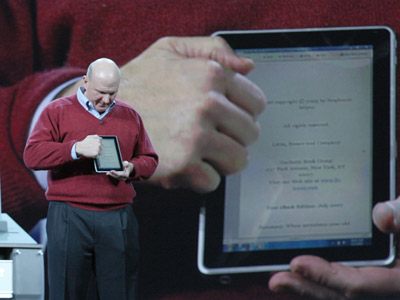
So, ever interested in sharing a scoop with readers, I am pleased to share a snap of MSFT’s CEO, the dunce who famously derided the iPhone as a toy on its launch three years ago, (sales 60 million and counting), enjoying his first encounter with an iPad.

MSFT CEO Steve Ballmer tries the iPad

A well connected friend at MSFT was there and has disclosed what Ballmer was saying as he repeatedly knocked on the iPad’s screen:

“Hullo? Hullo? Is there anyone in there? Can you hear me?”

Update – this just in:

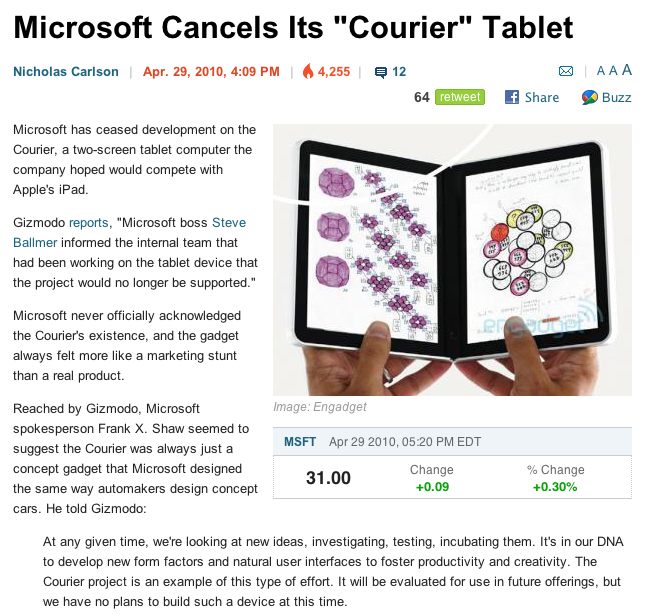
Here’s a perfect example of why MSFT is doomed to failure. Any company which has such contempt for its customers in constantly putting out rumors about non-existent products deserves to fail. And this one actually had people excited, with good reason:

MSFT’s iPad killer …. is dead.

Guess the screen must have been too small for a good knuckling. DNA, my backside. They simply ran out of duct tape which they were using to stick two iPads together ….

Update April 30, 2010: The rumor mill is reporting that HP has decided to cancel the Slate. No surprise there. Windows and 5 hour battery lives just don’t cut it any more. Indeed, the main reason HP just bought the struggling Palm business is for its Web OS – a mobile OS that actually works reliably, unlike Windows Mobile.

iPad Zagg screen protector

Meh!

I got tired of waiting for independent reviews of matte screen films for the iPad, whose glossy screen is an abomination if you are trying to use it near light sources.

I simply fail to understand what the heck Steve Jobs has against matte screens except maybe that they do not display as well for impulse buyers in the showroom. As of now the only Apple screens available with a matte finish (even Apple refers to it as ‘anti glare’!) are on special order versions of the 15″ and 17″ MacBook Pro and on the very costly (and seriously dated) 30″ Cinema Display. Everything else comes in ghastly, glossy glass. It’s the reason I use two Dell IPS monitors with my HackPro.

A friend suggested the Zagg screen protector and while their site has all sorts of torture tests for the plastic film, it’s not scratch avoidance that is the issue here. As a long time user of the iPhone I can testify that the screen is extremely tough. No, the issues are glare and fingerprints.

For a small sheet of plastic, the $30 Zagg is extremely expensive which, I suppose, figures when their site uses the words “military grade”, an expression given to us by the Army with its $750 hammers and $5,000 toilet seats. Hey, it’s patriotic capitalism. Why not gouge the taxpayer?

The Zagg is shipped in a very stout cardboard tube (no indication whether it is military grade but it feels like it), with a small rubber squeegee and a bottle of solution. The packaging probably cost more than the piece of plastic sheet. You clean the iPad’s screen – I used a final swipe of isopropyl alcohol having soaked my hands in it first, and then moisten the adhesive side with the spray on solution. The instructions tell you to moisten both sides but that is wrong.

Now comes the part which is sheer, bloody hell. Zagg has a video which makes it seem simple. Trust me. It is not. I wonder how many times they made that video before they lucked out with perfect placement on the front. Their video also shows the rear protective film (I did not waste money on that) being slid around – possible because of the textured, low surface tension, aluminum surface. You cannot slide the film on the glass, another place where the included instructions err. Gee, considering it took me all of 2 minutes to realize this, Zaggers, why the heck couldn’t you spend 5 minutes typing the instructions correctly? No job in Apple design for you! Read on.

The instructions state that you should slide the film into place on the iPad but that’s impossible. It wants to stick. So after several efforts at rough positioning I got one corner and side just so and somehow managed to work the rest of the film into place without stretching. You really must not stretch it as the size is perfect, right down to a cut out for the iPad’s Home button, and I was careful to keep the moisture down in that area as it looks like moisture might migrate under the Home button. The center of the cut out and the annulus surrounding it have to be removed once in position but, once again, the instructions fail to point that out. If not removed the surrounding film is very reluctant to stick.

Having got the film in place you now moisten the front to allow the provided squeegee (an excellent design) to slide easily over the surface as you smooth out bubbles. The generic instructions go on to say that you can use a hair dryer to help set the film around uneven surfaces. Zagg makes a back cover also for fetishists who care how the rear of their iPad looks. The rear is not plane and may need some local heat to set it. However, all I can say on that inspired piece of advice is “Good luck with the class action suit, boys”.

No matter how hard I tried I was still left with a microscopic bubble or two especially visible in the black frame which surrounds the iPad’s screen. Zagg states “Micro-bubbles and imperfections will work themselves out over 2-3 days” so check back here and I’ll let you know if that is true. The vendor also goes on to say that the iPad should be left for 12-24 hours to allow any remaining solution to dry. This strikes me as pure rot. What is there to ‘dry’ when the plastic sheet is not porous?

So how does it work?

If you are looking for the reflection cutting effect of a good matte TV or computer screen, forget it. It’s a waste of money. The glare is cut a little bit but the film is still far too glossy.

As regards fingerprints – a purely cosmetic issue as they do not affect readability of a ‘naked’ iPad screen – the Zagg film is good. It is more fingerprint resistant than a naked screen but the fingerprints are also harder to clean off. The screen has a very slight texture, which probably explains this.

Finally, as regards the Zagg’s effect on touchscreen sensitivity, I can detect none. It’s just like using a naked iPad.

Unintended consequence: With all that squeegeeing and accidental button pressing, i did relearn an old iPhone trick with the iPad. Press the home button thrice on a sleeping iPhone or iPad and you get the iPod controls (volume, play/pause, fast forward and reverse) without having to unlock the device. Nice.

Conclusion: At $30 it’s hard to recommend the Zagg. It’s a solution for a non-existent problem when it comes to scratch-proofing the glass and does a poor job in cutting glare. It comes with flawed and possibly dangerous instructions, corrected in the video if you bother to find it (the iPad link on their web site is faulty and you have to hunt around). Get my drift? A pretty schlocky job by the fellow who decided that a generic instruction set would do. Not right. In Zagg’s defense they do not tout glare reduction but their published User Comments very much do. Pure BS. Would I recommend it at $30? Give me a couple of days but I’m pretty sure that the answer is “absolutely not” and that ye Zagger is destined for the recycling heap, lifetime replacement warranty notwithstanding.

Basically, I feel I have been …. Zagged.

Hopefully something better comes along that really does what I want, which is to cut glare, and shows a higher standard of care when it comes to written instructions.