A fine QR head system that can only have been designed by a photographer.
A few years ago the very idea of a tripod was anathema to this photographer. Sure, I knew about them and tended to regard them with emotions somewhere between pity and contempt. As a Leica using street photographer there was no way on this God’s earth I was going to use a tripod. Lenses longer than 90mm simply did not compute and TriX, pushed if necessary to 800ASA, and those wonderful, fast Leica lenses, all suggested a tripod was – well, just not done.
Then, as my interests graduated to include landscapes and longer lenses, the tripod once more reared its ugly head, so a few years ago I picked up a nice old Linhof for a few dollars. The good thing about this tripod is that the legs are cantilevered, meaning extra bracing with little increase in weight. The bad was that it came with a pan and tilt head which has to be one of the worst designs of all time. The scale markings are never visible when needed, they are not calibrated, and the locking knobs are so small and inaccessible that they represent nothing so much as an accident waiting to happen. A few dollars later and a nice, if well used, Leitz ball and socket head graced the top of the Linhof’s center column.
I came across that genuinely rotten pan and tilt head the other day when first dipping a toe in the waters of Virtual Reality photography. Since that first encouraging experiment, I have decided to invest in a proper panorama head with a rotating base and nodal point correction, so this time it really is curtains for that pan and tilt head. I have yet to find any use for this wretched design in the field of still photography. A ball and socket head is not only easier to use, when it comes to turning the camera through a right angle there’s simply no contest.
Enough grumbling. When I got sort of serious about tripod use I realized all that screwing the camera on and off the tripod was just so much waste of time, not to mention the risk factor of dropping the camera while messing about with the locking knob. So I searched around only to be astounded at the ridiculously high prices asked for most quick release devices, many tailored to a specific manufacturer’s tripod line. Finally I tracked down an importer of Sima products who did a nice resin QR base with small and light plates which attached to the camera’s base. These worked OK, though truth be told they were somewhat overpowered by larger cameras and lenses. After the effort of selling all my medium format gear and replacing it with the Canon EOS 5D, I decided to rethink the QR issue, especially now that the camera body whose life depended on the QR head ran some $3,000! A good used Leica M2 or M3 body at $1,000 is no joke, but we are talking the price of three of these in that full frame digital wonder that is Canon’s claim to the Greatest Camera on Earth.
What finally forced me to get my act together was the enthusisam I feel for Virtual Reality photography. Given that this requires a tripod to be lugged to the venue of choice and much mounting and unmounting of camera, panorama head, etc., I did some serious research and came up with a very reasonably priced range of quick release tripod adjuncts from Manfrotto (imported by Bogen to the US). So while waiting for the three week backlog on the panorama head of choice to clear (more about this later) I procured a handful of Manfrotto’s best and have to say I am delighted with both the quality, the ergonomics and the price. That’s a combination I have yet to encounter in a woman. Whenever the first two factors are just so, you can bet the third is out of sight.
Here’s the #3299 base ($28) with the included camera plate. The base has an ingenious safety lock which has to be released to permit the large lever to move which, in turn, releases the camera plate. The metal used is a light alloy, more than up to the job. It’s the sort of pot metal used in low stress car components like door handles on German cars or just about anywhere in the case Italian automobiles. Manfrotto is, come to think of it, an Italian company.
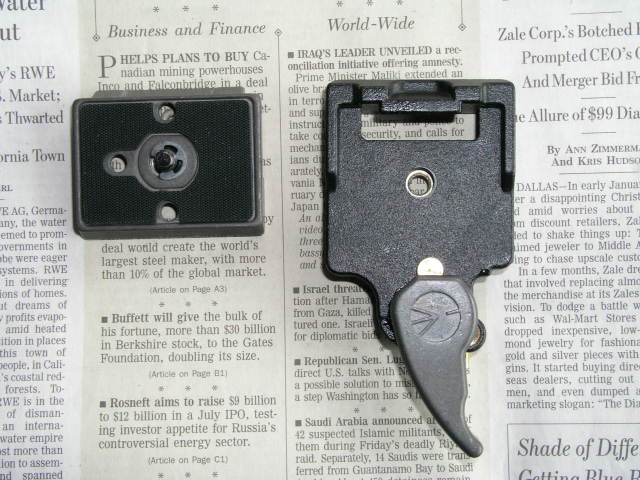
For a fairly heavy camera like the 5D you really want to avoid torquing sheer hell out of the attaching bolt in the interest of the camera’s safety. Even though the camera plate has a substantial rubber platform, a long heavy lens with no tripod socket of its own (like Canon’s 200mm f/2.8 ‘L’ say), with the camera oriented vertically is going to need more fastening torque than I am comfortable with. Manfrotto thought of that when they designed the #3157NR plate ($12) (11/2008 update: the plate is now named the 200PLARCH-14RC2, is identical and now costs $19 from Amazon – it now comes properly assembled for use with the 5D and no messing with the circlip is required) :
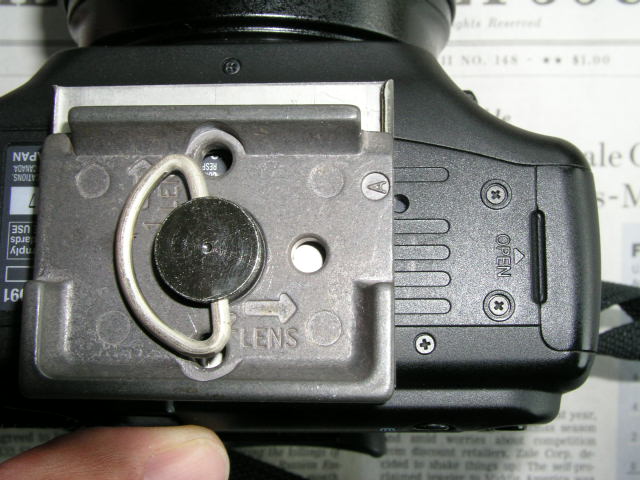
Note the finger hold which precludes the need for a screwdriver when attaching the plate to the base of the camera. The essence of this plate is that it has a small lip which abuts the base of the camera, replacing torque with physical restraint, as shown in the following snap:
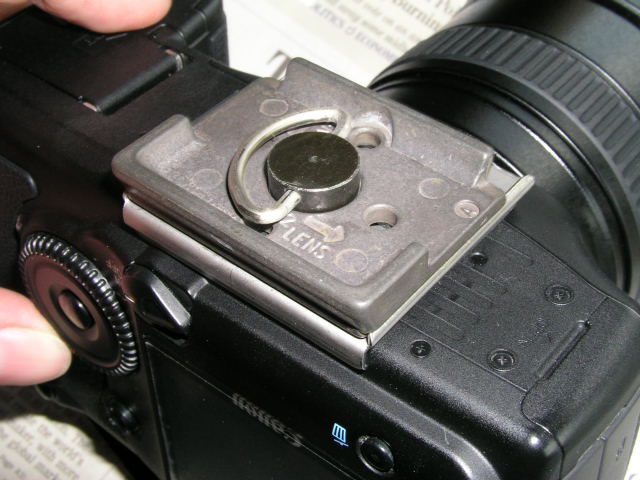
Depending on the design of your camera you may have to remove a small retaining circlip (E clip) for the bolt and flip the head around as I had to do this with the 5D which requires the lip abuts the rear of the camera. On others it may have to go towards the front, which is how it is shipped. No big deal, and clearly explained in the excellent instructions. While the camera plate does block access to the small battery compartment for the camera’s clock, in practice that has only to be accessed every five years or so, so it’s hardly an issue.
Here’s the whole thing mounted on my Linhof with its Leitz ball head:

In this underside view, with the camera oriented for portraits, you can see the small brass quick release lever – note the unrestricted access to the main battery compartment:
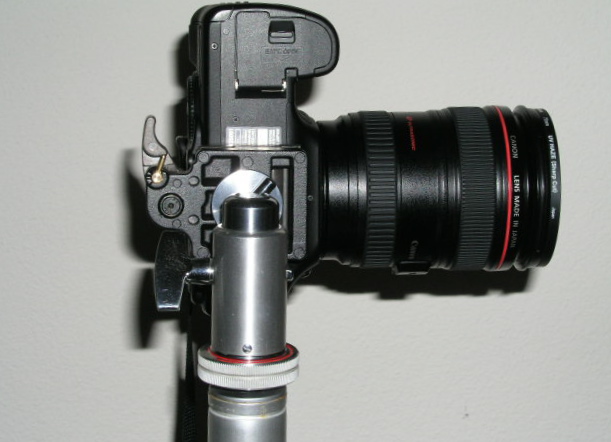
To attach the camera, you simply place the base plate with camera attached, front tilted slightly forward, into the tripod base. As you level the camera into the tripod base the camera plate depresses a small brass button in the tripod base which in turn releases the lever and locks the camera in place. You then rotate the brass safety lever which has the effect of locking the release lever in place. On one of the two tripod bases I bought the big lever would not click all the way home without manual assistance but after a few mount/dismount cycles all was well. Nonetheless, I would suggest you press the big lever home just in case, to ensure all is tight. Then operate the brass safety lock.
To remove the camera, release the safety lock and pull back on the big lever.
How does it compare size wise with the little Sima? See for yourself:
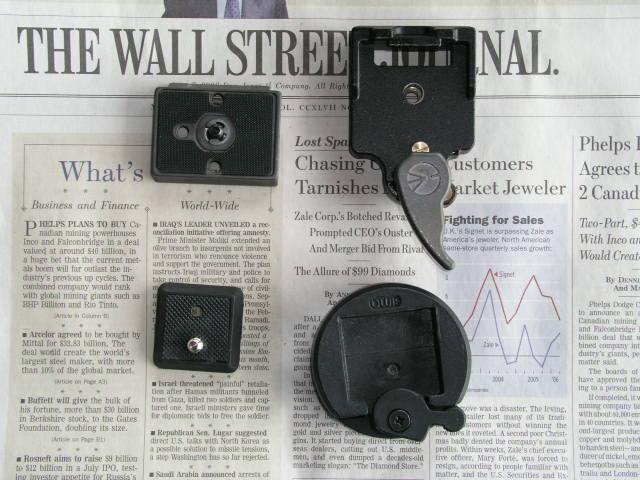
The overall size of the tripod base is much the same but the surface area of the camera plate is maybe twice the size. And no screwdriver is needed unlike with the Sima. The whole assembly is very rigid, even with a really heavy camera like the Crown Graphic with a heavy telephoto lens extended all the way.
If you are buying one of these, do realize that the tripod base comes with one plate (no lip) so buy additional plates as needed for your equipment. I used the two flat plates for my 4″ x 5″ Crown Graphic where the lip would not work owing to the large flat mounting surfaces involved; the Crown takes one plate either side so it can be switched effortlessly from landscape to portrait mode. One of the tripod plates went on the Linhof tripod, the other on the Manfrotto monopod. And lest you think that small Leitz ball head can’t handle it, let me assure you these things were probably used to raise the Golden Gate Bridge during construction. Doesn’t have to be big to be strong, and you can pick these up for some $100 used, which is a lot less than the going rate for all those exotic ball heads on the market. I mean, really. $750 for a ball head? That is God’s way of telling you that you have too much money.