Category Archives: Hardware

Stuff

It’s the software, stupid

Software can yield far greater improvements than optics.

For an index of all Leica-related articles click here.

You might fairly accuse me of worshipping at the altar of the gods in Wetzlar when it comes to optics. For the last 75 years of the twentieth century, Leitz Wetzlar, as it was most of that time, created two great cameras – the screw thread Leica and the M3 and its variants – and dozens of the best lenses known to photographers. And while I may have moved away from Leica rangefinder cameras in the absence of a digital option, I have had the rare pleasure of using many of Wetzlar’s lenses on my rangefinder and reflex Leicas.

My first Leica lens was the 50mm Elmar. It’s sole limitation was the boob behind it pressing the button on the M3. Twist the mount counter-clockwise and the lens neatly collapsed into the camera body, passing for what was compact back in 1971 when I got mine. August 2, 1971 to be exact. The 90mm Elmar and a superb 35mm Summaron followed. In each case these were the ‘beginner’s’ option (meaning cheap, by Leitz standards), and only years of hard work later did a Summicron grace the M3. That was the incomparable 50mm Dual Range, the brass mount having last seen duty as the main engine bearing in a Panzer tank. And I’m afraid that mention of any of the dozen others that came and went would be a tedious exercise in the overuse of superlatives. For the M these included the 21mm Asph Elmarit, the 35mm Asph Summicron, later and mercifully lighter versions of the 50mm Summicron, a 90mm Elmarit, Tele-Elmarit, Elmar-C and Asph Apo-Summicron, a 135mm Hektor, Elmar and Apo-Telyt, 200mm, 280mm and 400mm Telyts, and on and on. Each magical in its own way.
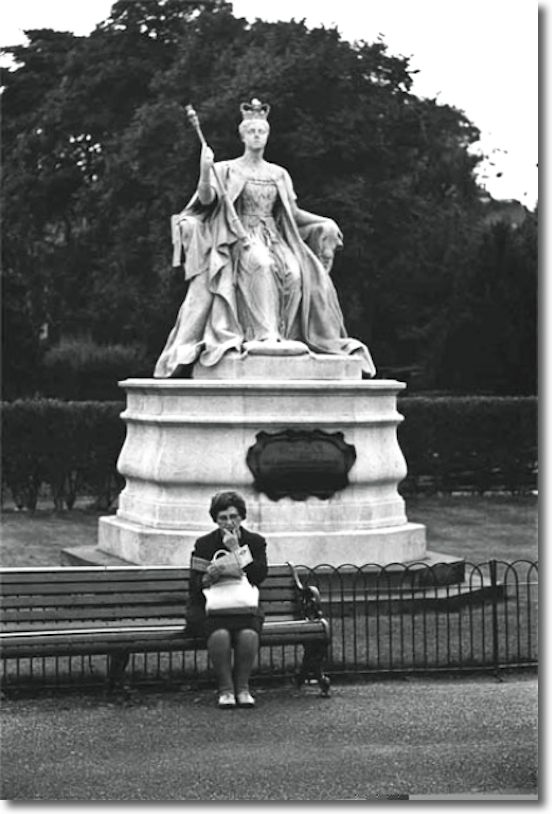
Map reader. 1973. Leica M3, 50mm Elmar, TriX/D76.

For the most part, these lenses were designed the old fashioned way. Hard graft with calculators and logarithmic tables, long hours melting ever more exotic glasses, interspersed with occasional bouts of sheer lunacy. The ‘we made it because we could’ lenses like the original 50mm f/1.2 Noctilux with its aspherical grinds, the NASA commissioned 180mm f/3.4 Apo Telyt R which finally brought the red spectrum in line with the rest of the colors to give an image of startling definition, the fabulous 75mm f/1.4 Summilux (if only you could focus it right – that sort of thing needs an M3 vewfinder!). And while computers played an increasing role in the design of later lenses, the long heritage of optical excellence at Leitz, Wetzlar, West Germany saw to it that they were programmed right. The reality is that if lenses for 35mm cameras can get any better no one will notice as the magicians at Wetzlar had long ago exceeded anything film could resolve.

These thoughts have been coursing thorugh the old brain increasingly as I look at the modern processing workload. Now bear in mind that this is coming from someone who adopted a beginning to end pure digital workflow only earlier this year with a Canon 5D. Until then it was film + scanning, which took over from film + color lab, which in turn had supplanted film + darkroom/bedroom. And what strikes me most is how much software has become a dominant part of picture processing.

Start with the in-camera software that tells the sensor RAW or JPG, maybe with various amounts of contrast, sharpness and other processing included. In to Aperture or Photoshop where chromatic aberration (color fringing) at the edges has to be repaired. Then the barrel distortion has to be removed at the wide end of the zoom. Another tweak and the vignetting is gone. Three aberrations I simply do not recall having to deal with in the days of the Summicron and its brethren. Because if they were present, they were not visible. So on that scale, I suppose, one would rightly argue that Canon lenses simply do not hold a candle to those from Leitz Wetzlar. OK, so you have to laboriously manually focus the Leica lens, and the aperture is manual and the only way to zoom is to walk closer or fall in the water…. But from the sheer standpoint of optics, if I had to bet my life on resolving power and freedom from aberrations, it would have to be Leica every time.

The reality is, it no longer matters. Good software can correct all those problems in seconds. Further, because the digital ‘film’ in the 5D is far superior to the one from Kodak which I used in the M3, the overall result is better in every conceivable way, and it’s mostly due to software. I believe designers are getting the message. Increasingly we are seeing new technologies like image stabilization add more definition than any film based user could hope for, and we are probably very close to the point where very large aperture lenses with vast zoom ranges with minimal bulk are around the corner. The necessary optical compromises will be corrected in the camera with tailored software. For that matter, the lens need no longer be interchangeable as the zoom range will be so large it will accomodate all conceivable needs.

Sceptical? Look at the Kodak P712 digital camera announced earlier this week. The lens is equivalent to 36-432mm (432mm!) with a smallest aperture of f/3.7. F/3.7! The camera costs $499 and weighs probably under one pound. Compare that with the 400mm f/4 DO Canon lens, at $5,200 and 4.3 lbs. And it doesn’t even zoom. Sure, I have no doubt the Canon lens is better, but how long do you expect that to last?

Case in point. My Panasonic LX-1 (click on the entry at right) has a Leica lens that reads ‘DC Vario-Elmarit 1:2.8-4.9/6.3-25.2 ASPH.’ Phew!. Not like saying 50mm Summicron now, is it? To make sure things are not blurred the camera has image stabilization, because some unnamed brilliant engineer at Panasonic thought it up. Auto focus makes sure it’s focused right adding yet more definition to the competitive equation. This lens is like a 28-112mm on a regular camera. At its longest setting it extends 1.5″ from the barrel on the camera’s body.

So, supposing I want a 24-105mm f/2. That would translate to a 5.4mm – 23.6mm lens which, fully corrected, would doubtless be a lot bulkier than the one on the DP. Now throw out the large front element, there to reduce vignetting. Get rid of several of the others there to confer minimal color fringing. And the hell with barrel distortion. Curvature of field and all those insurmountable problems with edge pixels and wide angle lenses? Nonsense. Just bow the edges of the sensor towards the lens as the focal length changes. Flexible sensors? Why not? Zoom? The next generation of sensors will obsolete optical zooming and do it all electronically. About time. Program around all of that with some smart software, fix the image on the fly when saving (or even when viewing if it’s that horrible to look at) and your 24-105mm f/2 zoom is now 1″ in diameter and 1″ long. Wow! So we gradually return to the days of the Box Brownie with its miniscule single meniscus lens, but with an image readily enlarged 12 times or more.

And who will be the genius designing these new ‘lenses’? It won’t be a god the likes of Max Berek or Walter Mandler in Wetzlar. It will be some kid who is really sharp at coding who happens to like a superb picture from the one ounce piece of plastic passing for a lens attached to his camera. The great days of optics are yet to come and their designs will emanate from the keyboard of some unknown master even now getting his lips around the teat on that plastic milk bottle.

Gorilla. 2006. Panasonic Lumix LX1, 6.3mm DC Elmarit Asph, ISO100, image stablizer.
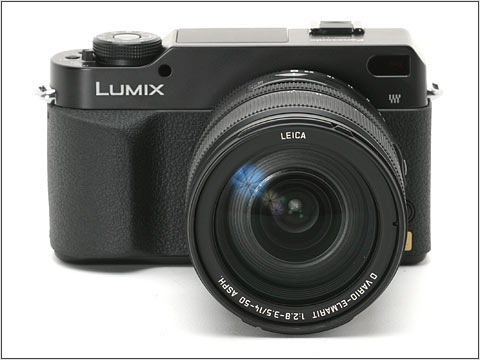

Digital Leica – not!

Panasonic disappoints with the L1.

I should preface this by saying I have not used the newly announced Panasonic L1, so it’s really premature to criticize, but a review of the specificationss underwhelms.

I was really looking forward to this camera, hoping it would be the digital Leica all ex-Leica M users like me are waiting for, at a non-Leica price. They will sell for $2,000 with the Leica zoom lens. Not bad.

The disappointing Panasonic L1.

Now the ergonomics look promising. A real shutter speed dial, a pretty exciting Leica lens (alternatively designed by Leica or Panasonic, depending on where you read on the Panasonic web site) with manual zoom and iris controls, and a nice M-look camera body. Throw in image stabilization, a vibrator to shake off sensor dust and a 16:9 widescreen picture option and what’s not to like?

How about a lousy viewfinder? The L1 shares the prism optics of the Olympus E-330, which uses a side flapping mirror (like their Pen F half-frame film camera did some thrity years earlier) and mirrors in lieu of a pentaprism to turn the image right way round. Result? A very dim image. Don’t believe me. Check out the on line reviews.

How about a lousy sensor? Use it above 400 ISO and all is lost in noise. It’s the same sensor used in the E-330. Don’t believe me. Check out the on line reviews.

How about a very small image in the finder? It’s the same optics used in the E-330. Don’t believe me. Check out the on line reviews. And if you don’t know what I’m talking about, just look through a Canon 5D after trying a Rebel or 20D/30D. I have. Night and day. The L1/E330 is like the Rebel in this regard.

As for all that ‘live preview’ nonsense, why did they waste their time? No one needs this in a professional grade camera. And the E330 does it better, if you must have it, for less.

Too bad. I was kind of excited about that Leica lens. Guess we’ll have to wait for the Digital Leica M but, no, I’m not holding my breath. I’m just holding on to my wallet.

Canon 15mm Fisheye lens – Part II

Not only wider than the 14mm, it more than holds its own

I dropped by Hearst Castle again today to put the Canon Fisheye lens through its paces. The ultra wide angle of view, equivalent to a 12mm full frame lens using ImageAlign – see Part I – is ideal for interiors of the magnificent rooms, aided by the noise free sensor in the EOS 5D which allows ISO to be cranked up to 800 with impugnity. Something that is required as the Castle prohibits the use of flash and tripods.

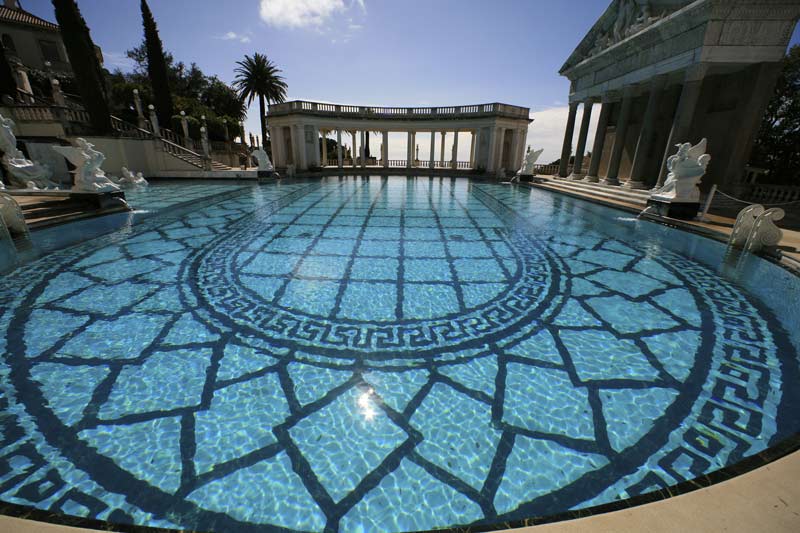
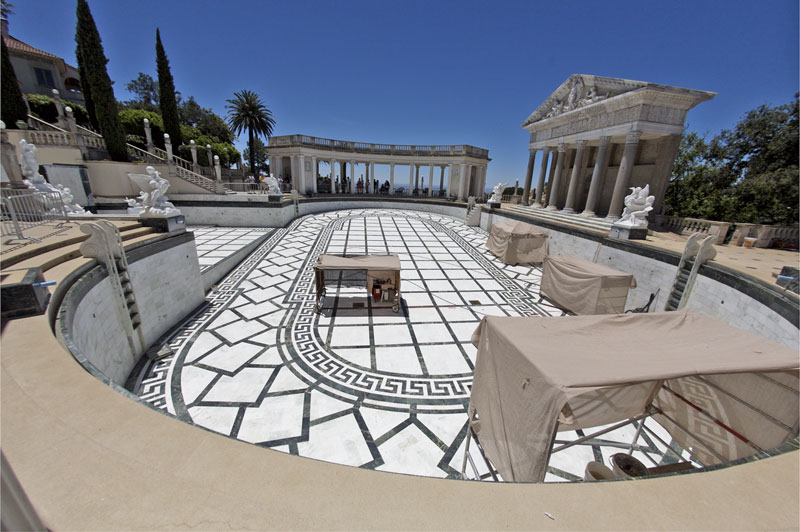
I took Tour 3 this time, which visits the bedrooms used by Hearst and his many guests – the likes of Cary Grant, Clark Gable, Errol Flynn and David Niven. On the way we stopped by the large outdoor pool only to find, to my amazement, that it had been drained! Actually no bad thing as you could see the beautiful Carrara marble floor in broad sunlight. Evidently the pool had sprung a leak and workers were busy patching it up for the Hearst family’s annual summer visit, something they negotiated with the State of California when they donated the property years ago.

Well, it was a moment’s work to take a snap from the exact same vantage point I had used a few weeks ago when a fellow photographer had allowed me to try his very costly 14mm Canon ‘L’ ultra-wide lens. In the pictures below, you can see just how much wider the fisheye is after correcting for barrel distortion with the ImageAlign plug-in in Photoshop.

Canon EOS 5D, 14mm Canon ‘L’

Canon EOS 5D, 15mm Canon fisheye, Image Align

Chromatic aberration had been minimized in both images using the lens correction filter in Photoshop CS2.

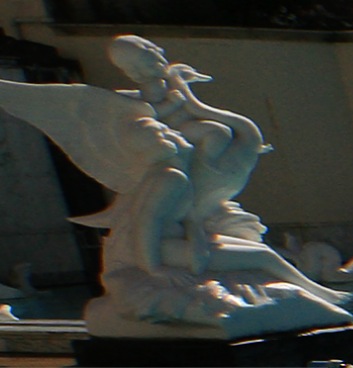
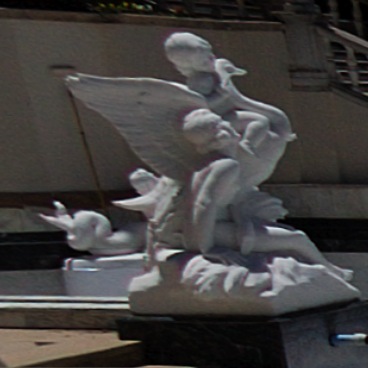
While I was processing these, I thought it might be instructive to compare actual pixel-sized extracts of each image. Granted, the lighting conditions varied slightly, but here are screen shots of the white marble statue at center left – the print size would be over 40″ wide:

Canon EOS 5D, 14mm Canon ‘L’, actual pixels

Canon EOS 5D, 15mm Canon fisheye, Image Align, actual pixels

Fairly compelling evidence that the Fisheye + ImageAlign more than holds its own. The smaller size of the statue in the second picture is accounted for by the wider field of view of the fisheye lens.

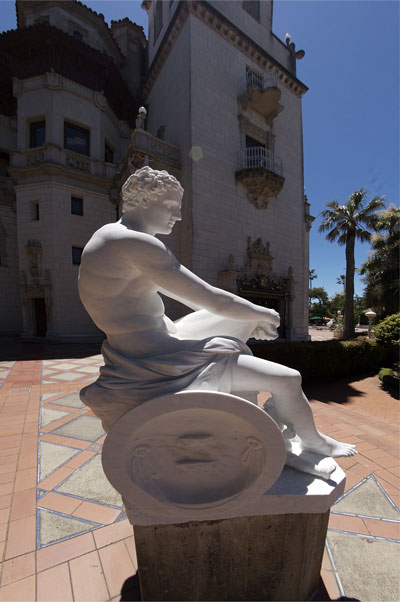
How do the lenses compare directly into the sun? Both are simply outstanding. The original of the 14mm image had one internal reflection at the top, which I removed in processing. In the following fisheye image, the sun is in the frame of the original, disappearing after use of ImageAlign. You can see one internal reflection artifact above and to the right of the statue’s head.

The god Mars. Carrara marble. Canon EOS 5D, 15mm Canon fisheye, Image Align.

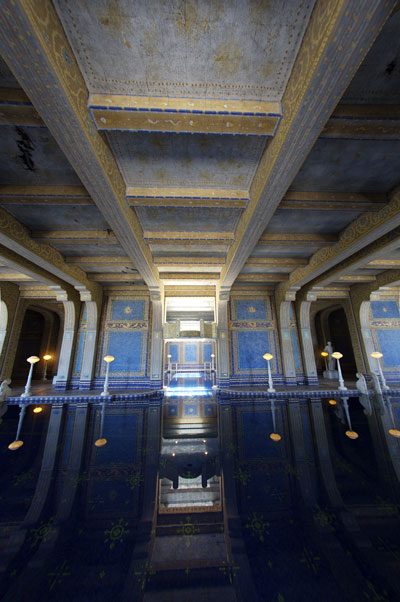
Indoors? No problem. Both lenses are bright at f/2.8, making composition easy.

Hearst Castle. The indoor pool. Canon EOS 5D, 15mm Canon fisheye, Image Align. ISO 1600

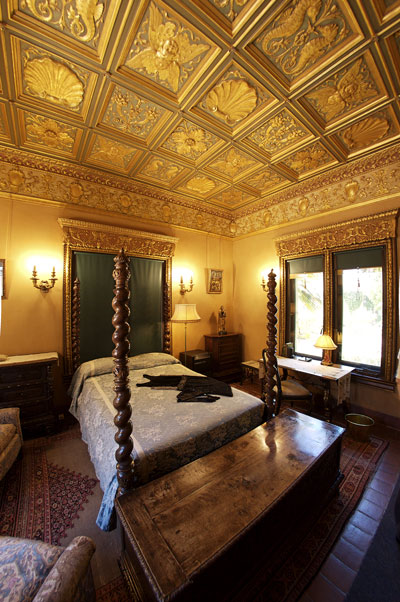
Hearst grew up in a time when the incandescent light bulb was just coming to market and never got over his wonder at the magic of electricity. This fascination translated into a near total absence of lampshades in the Castle’s guest rooms. That is as Hearst wanted it. Opportunity enough to try the fisheye’s handling of light sources in the frame at full aperture.

Guest room at Hearst Castle. Canon EOS 5D, 15mm Canon fisheye, Image Align. f/2.8. ISO 800

The bare bulbs are rendered with a gentle glow – not perfect, but more than acceptable in the circumstances – this room is very dark as are most, by design. There is no air conditioning in Hearst Castle.

For Part III of this review, click here.

Canon 15mm Fisheye lens – Part I

Not just a throwback to the sixties

Update November 2009: ImageAlign is out of business and the plugin described here is no longer available. However, something every bit as good is available. It’s called PTLens and you can read about it here. Lightroom3 also now includes ‘defishing’ controls.

The lengthy list of things best forgotten from the 1960s includes long hair, bad music, revolting students …. and done-to-death fisheye lens images. So you can imagine there was no way on earth I would ever contemplate buying one of these gimmicks.

Yet here was the latest addition to my little outfit yesterday:

Canon EOS 5D, 15mm Canon f/2.8 Fisheye lens

A while back I wrote of the stroke of luck I had when I bumped into a fellow Canon DSLR user at Hearst Castle; he was nice enough to let me take a couple of snaps with his super exotic 14mm f/2.8 ‘L’ lens on my 5D body. This was mightily impressive, the creative opportunities legion, but at some $1,800 for the occasional superwide snap I decided I preferred to keep bread on the table. But that super-duper wide angle view stuck in my mind.

With my standard lens on the 5D being the wonderful 24-105mm zoom, a 20mm, the next widest lens, made little sense. The difference between 20mm and 24mm is not all that great, and I felt pretty happy with the 24mm setting on the zoom. Plus I did not want the bulk of a wide zoom lens. Then I found myself thinking about image correction and how much more of this sort of thing is increasingly being done in processing rather than with the camera’s software. Sharpening, exposure, contrast even lens aberrations can be repaired in Photoshop CS2 and Aperture.

Wait a minute! Lens aberrations? Well, couldn’t you take a cheap fisheye and remove the native barrel distortion, giving you something seriously wide at modest cost? So I typed ‘lens distortion correction’ into Google and one of the first results was for a New Zealand (New Zealand?) company named Grasshopper. Turns out they sell a Photoshop Plug-in named ImageAlign so I did a spot of reading which disclosed that this was a natural match for any number of fisheye lenses out there, making straight that which would otherwise be curved. So I plonked down $650 for the Canon fisheye and took a couple of snaps. No way was Photoshop CS2 able to straighten the curves with its modest range of corrections, so I downloaded the trial version of ImageAlign and, hey presto!, straight lines. So another $79 saw me equipped with what is, in effect, a 12mm wide angle after corrections are applied.

Read that again. A 12mm wide angle full frame lens.

August 2008 update: Grasshopper seems to be out of business but the features of ImageAlign described here are now available in Photoshop CS3.

How does it all work? Well, first you have to overcome the bout of vertigo you get from using a fisheye – a new experience for me. (The fisheye, not the vertigo – I get that every tax day already). Then you have to watch out that you don’t photograph your toes or shadow. Easier said than done. The fisheye fills the frame with its image on the 5D and is very, very wide indeed. Don’t even think of using this lens on a non-full frame sensor camera as your fisheye becomes a 24mm wide, so you might as well buy the equivalent lens (a 15mm non-fish on a 1.6x body) to get straight lines in the first place. But you cannot get this wide with anything except a full frame camera. A 1.6x sensor needs a 7.5mm lens to get this wide and they do not exist.

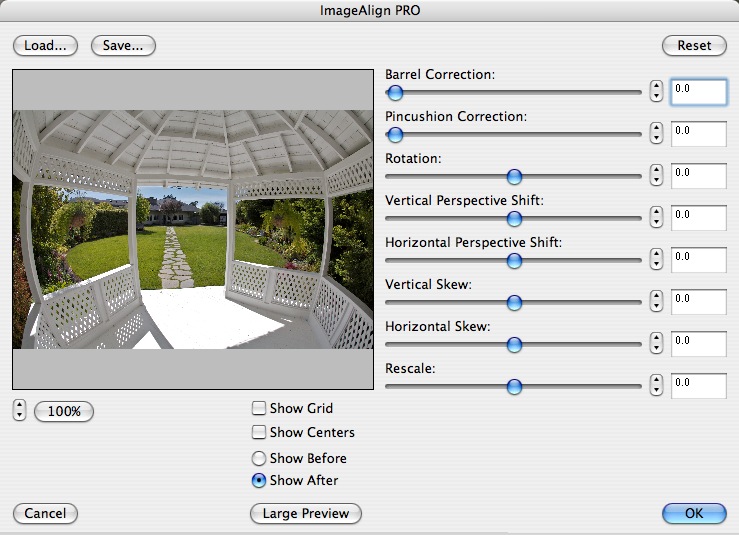
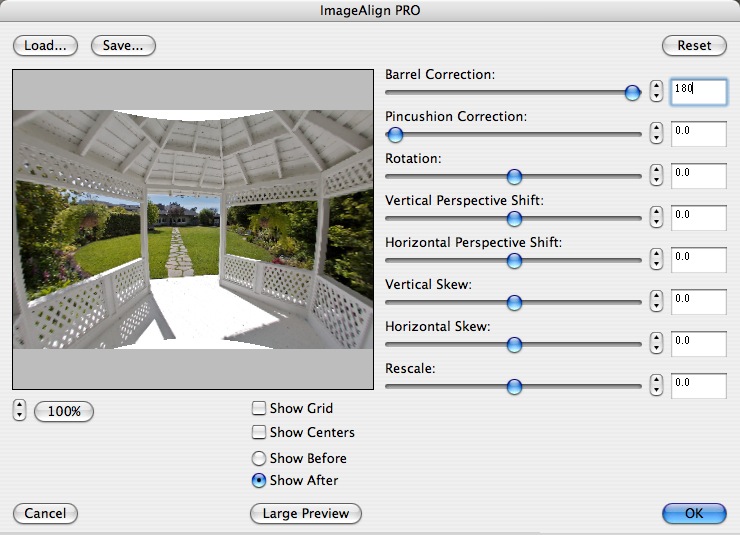
You then load the picture into Photoshop CS2 where the Grasshopper plug-in appears under the ‘Filter’ menu. The interface is everything that Photoshop is not – simple, intuitive and fast. Here is what you see:

Now to get the curves dead straight, you crank in 180 (max) barrel correction:

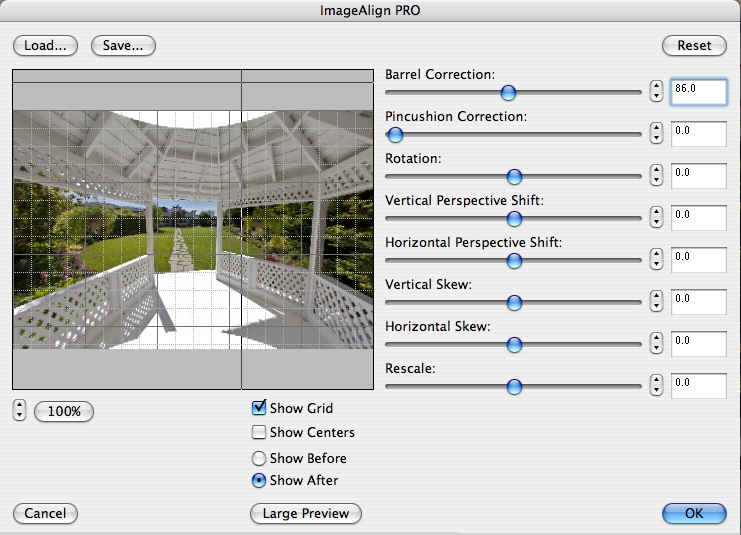
Almost straight, but not quite. Save this and crank in another 86 degrees of barrel correction:

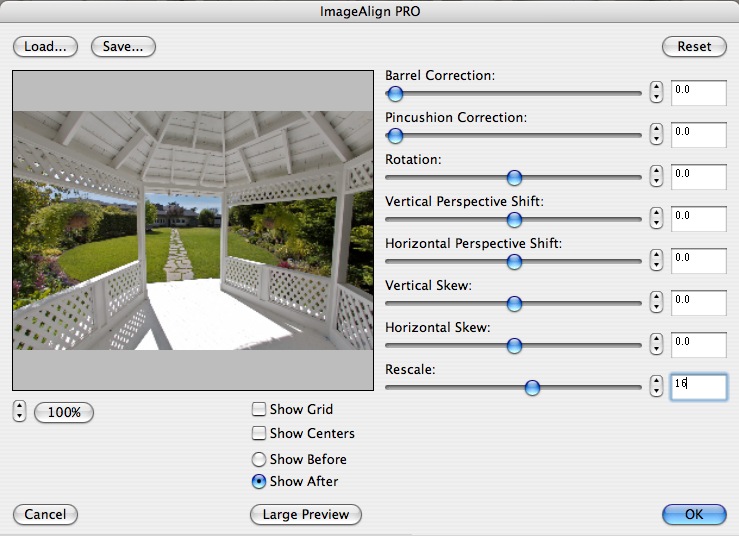
Now things are straight. It only remains to remove the half moons top and bottom by dialing the Rescale slider to 16 and you are done:

Note that in the conversion nothing is lost from the center top and base, but some corner details disappear. That’s distortion correction for you.

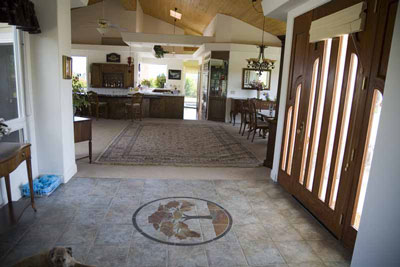
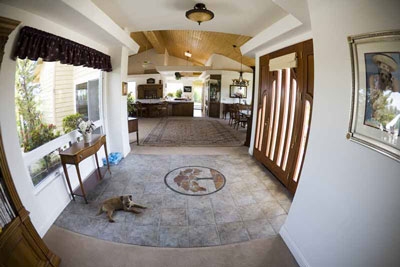
How wide exactly is this combination? Well, suffice it to say that every self-respecting realtor should own one of these. Here’s the main corridor in our home with the 24-105mm at 24mm and with the fisheye:

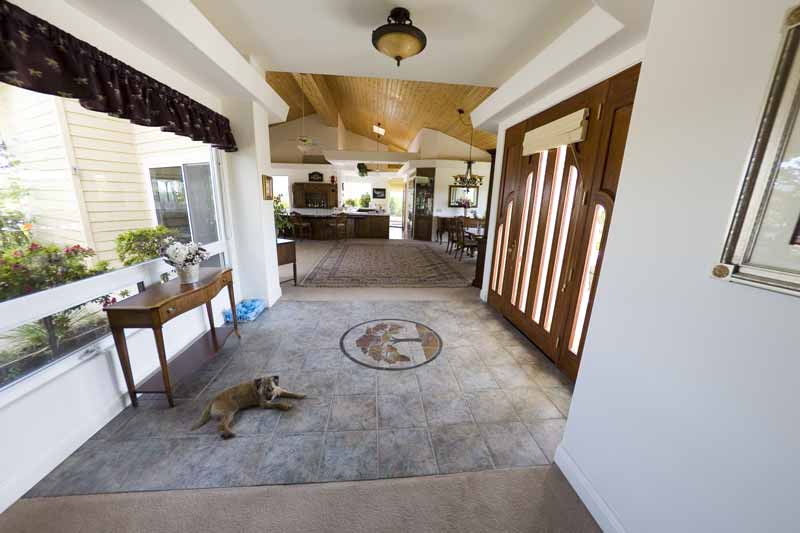
And here is the fisheye version after correction with ImageAlign:

See what I mean? The price of the old estate just doubled.

It should be added that this lens is not easy to use. You don’t have to get close. You have to get intimate with your subject. Not for nothing does this lens focus down to a few inches. Rumor has it that Canon has not changed this lens in twenty years, and I can’t blame them. Edge definition is far superior to the 14mm that I used and while the little focus motor makes a whirring sound, the focus throw is so short that this is simply not an issue. The 14mm ‘L’ lens is silent, by comparison, and weighs twice as much. It also costs three times as much. No one ever said that silence was cheap.

Canon provides a metal lens cap, which is a shame. Plastic, as supplied with the 14mm, resists scratches and knocks far better. And, for once, you have to keep the stupid lens cap with you as there’s no way to protect the front element with a filter.

In practice, I kept feeling that I was looking at Van Gogh’s Yellow Chair or any one of a number of Bonnard paintings, so tilted is the perspective. You can get some sense of this from a few snaps I took down the road at the Cambria Pines Lodge, whose grounds include a beautiful garden, by clicking here. Some of these snaps are corrected with ImageAlign, some are left native where the distortion does not detract.

One other thing to note is that it makes sense to bracket exposure if in doubt. Digital sensors really seem to hate overexposure, reminiscent of slide film, so you want to preserve detail in the highlights and adjust the shadows later when processing. And chances are that you will have a huge contrast range outdoors owing to the enormous field of view of the fisheye. The last picture in the attached slide show, which is the interior of the Lodge’s Lounge, was taken at the fisheye’s full aperture at 1/20th second, with ISO dialled up to 1600, hand held. The glass of wine I had just enjoyed, visible in the foreground, served in lieu of a tripod. Is it sharp? The 13″ x 19″ print lying on my desk would make your eyes pop.

So there you have it – the widest rectilinear DSLR wide angle lens in the world, with absoutely no discernible vignetting, for some $650. Try it. You might like it. Yes, I know there’s a 12mm Voigtlander lens for film cameras, but before you spring for it and its extreme vignetting and poor resolution, let me remind you that Film is Dead.

Cambria Pines Lodge garden. Canon EOS 5D, 15mm Canon Fisheye, sepia toned in Aperture

Part II of this review appears here.