Category Archives: Hardware

Stuff

MacBook Air 2013 – Part II

Better than the 2012.

Part I appears here.

Moving from the 2012 MacBook Air to the 2013 involves no learning curve. Ergonomically the machines are identical.

If you are moving from an earlier model, before wiping it clean for sale do remember to deactivate iTunes (limit is 5 activations) and Photoshop (limit is 2 activations). For iTunes it’s in the Store menu option, for PS it’s under Help.

As usual, I migrated applications and data using Migration Assistant, a speedy and seamless process.

In terms of start-up speed, meaning a working display after opening the lid (there’s no need to ever power the machine off) it’s very noticeable that start-up is considerably faster. The occasional 2-5 second wait (it’s not consistent) with the 2012 is gone, the screen lighting up either instantaneously or 1 second after opening. Apple mentioned this in their roll-out and it appears to be true, not their usual hype. Nice.

Some test data:
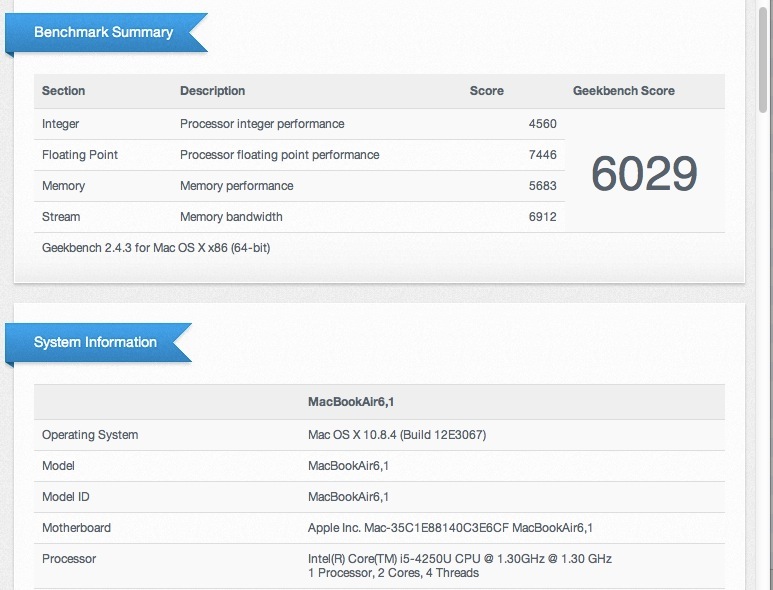
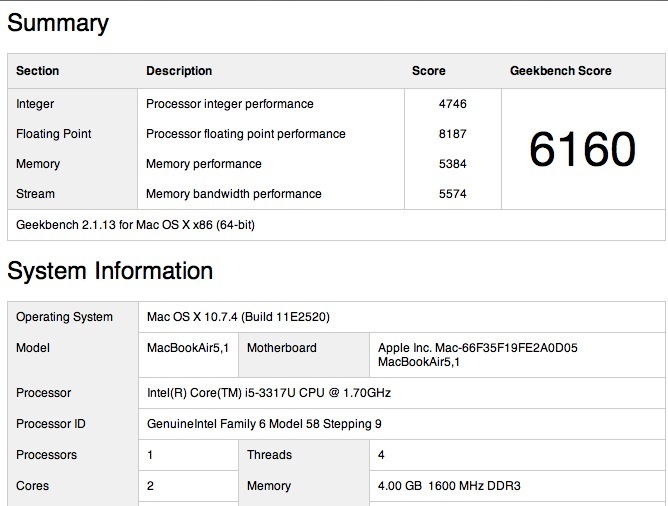
MBA 2013 and 2012, Geekbench 64.

The 2013 CPU is marginally slower but you do not notice this in practice.

Graphics, as measured by Cinebench, are far faster, thanks to the new HD5000 integrated GPU in the 2013 model; the 2012 uses the HD4000 CPU, integrated with the Ivy Bridge CPU:
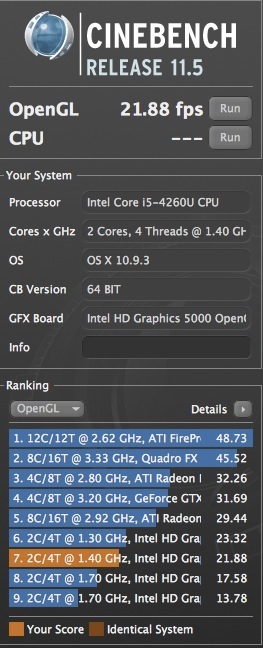
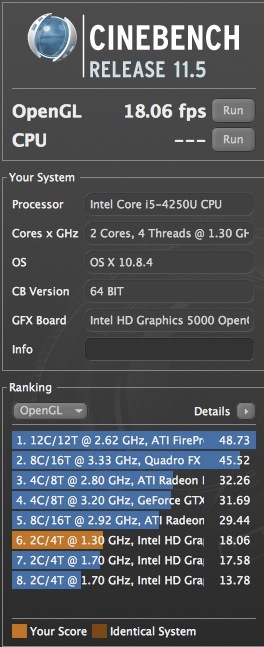
Cinebench 2013 and 2012. The 2013 is 31% faster.

Temperature Monitor (from Bresink) is not yet updated and cannot graphically display the Haswell CPU’s core temperatures, though it does display all the other sensors. SMC Fan control, however, does report the CPU temperature in the status bar. The CPU in the 2013 runs 10-20F cooler than in the 2012, rarely hitting 140F. 158F in the 2012 was common. These machines run hot, owing to poor cooling in the limited space available, the upshot being you can feel the warmth on your lap with stressful processes – like Cinebench. The new machine is noticeably cooler. As usual I’m running SMC Fan Control with a minimum setting for the one poncy fan of 3,500rpm. It’s not audible in practice. The stock speed is just too low for comfort and I rather prefer my vitals unfried.

I don’t have tools to objectively measure the key upgrade in the 2013, meaning battery life, but after a day’s use I can confirm my earlier estimate that the 4 hour life in the 11″ model has approximately doubled, owing to the lower power consumption Haswell CPU. Impressive.

My 2013 MBA has the minimum 4GB of RAM and a 128GB SSD. The Lightroom (Version 5) and Photoshop (CS 5.1) experience remains excellent and no excuses need be made for the MBA 2013 as a photo processing machine. LR starts in 7 seconds, PS in 3-4. Exporting an image from LR to PS takes a scant 2 seconds. Add an external larger display and you have a fine photo processing machine.

The new faster 802-11ac wifi is present, but I have no means of testing this as my router does not support it, so I’m running 802-11n at 5GHz from an ancient single band Airport Extreme router.
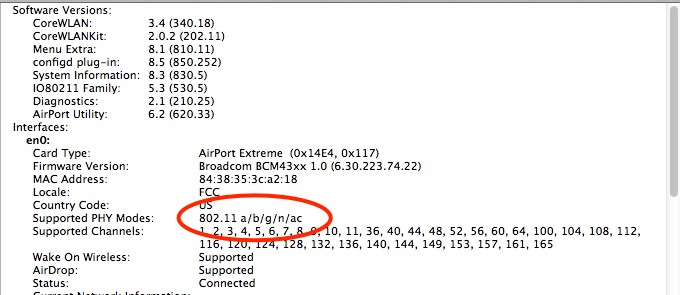

802-11ac installed.

Scrolling in the 2012 model using two fingers on the the touchpad is excellent; in the 2013 it’s not as good, showing slight jerkiness owing to response delay. I’m confident this is something Apple will fix in an OS or firmware upgrade.

Sequential disk access (both machines use a Solid State 128GB drive) is 38% faster, measured with xbench:
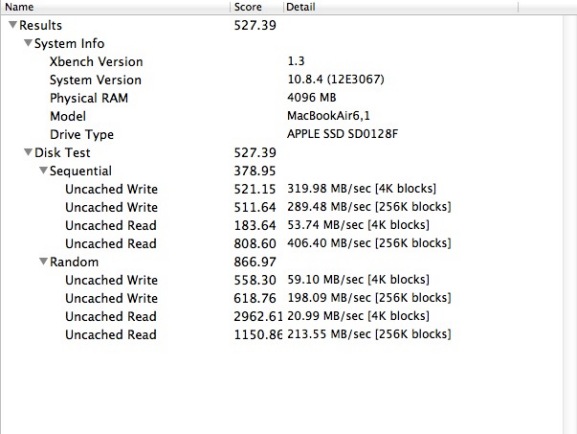
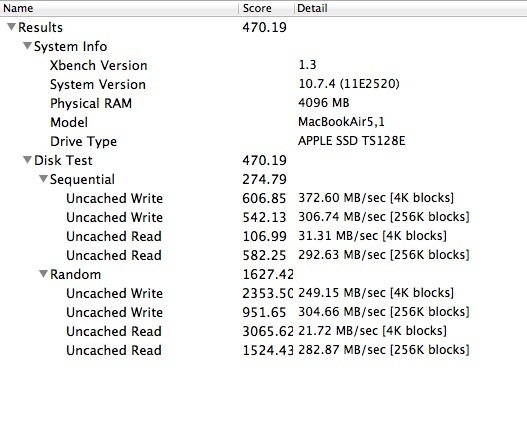
2013 and 2012 disk access data.

I suspect the speed increase results from the use of a PCI connection for the SSD in the 2013 machine, compared to SATA3 in the 2012 version. Strangely random disk access is far slower in the newer machine but I have not seen any subjective slowdown. SSDs are nice for fast starts from cold (irrelevant here) and application loading, but if high volume storage is required with a MacBook Air then an external Thunderbolt (costly and very fast) or USB3 (cheap but slower) traditional hard disk drive is called for. Thuderbolt enclosures seem to start at $500+, a price point which will ensure they do not gain mass market acceptance. USB3 enclosures, like the Mediasonics I use for movie storage, run $100 for a 4-bay box. However, neither of my two Mediasonic boxes is seen by the 2013 MBA, whereas the 2012 was fine, so it looks like Mediasonic will have to issue a firmware upgrade. USB2 works fine with both, and both have the latest circuit boards.

The perpendicular Magsafe2 power connector continues over from the 2012. This is most certainly not an improvement on the right-angled MagSafe1 used in the 2010 model which had a far stronger magnet. The current connector is dislodged far too easily, but Apple has refused to listen to its users, not for the first time.

There is one small error in Mountain Lion on this machine. If you have multiple apps open and quit one, the menu bar disappears until any other app is clicked. Probably an error in the kernel which, I assume, has been modified to work with the new Haswell CPU. Not a big deal.

There’s really not much more to say. For $1,000 with a high resale value, the cost of ownership is low, the machine is as light and robust as can be, and is arguably the best bang for the buck in any laptop currently on the market. Resale value one year hence will be around $700, making the annual cost of ownership just $300.

The Good:

  • Runs cooler and faster than the 2012 model
  • $100 cheaper than the 2012
  • Very well made and robust given how slim it is
  • Doubled battery life compared with the 2012 model
  • Fast 128GB SSD
  • Excellent Intel HD5000 graphics processor
  • Retina Display is not missed in an 11″ screen
  • Wake from sleep is much quicker than in 2012
  • No Windows OS. Masochists can run Windows using Boot Camp or aftermarket software
  • Decent speakers for its small size
  • Full sized, backlit keyboard
  • Fine machine for Lightroom and Photoshop, though plugging in a larger display really helps
  • Familiar mechanical design has shown no major weak points over the past few years
  • Excellent resale value. Compare with any Windows laptop

The Bad:

  • Wretchedly weak magnet on the Magsafe2 power plug
  • Two finger touchpad scrolling is noticeably jerky. 2012 model was perfect in this regard **
  • Status bar at top of screen disappears when an application is exited
  • SDXC card reader available on the 13″ model only
  • You will have to buy two – one for your spouse

** I tracked down the cause of this. On my 3 display desktop I use an app named Mouse Locator which throws up a big green circle where the cursor last was if you ‘lose’ it. That app migrated over to my MBA years ago when I migrated all my apps over from the big machine. Disabling this app (in System Preferences) and restarting made the jerkiness go away. The app is not required on the MBA’s small screen so no loss.
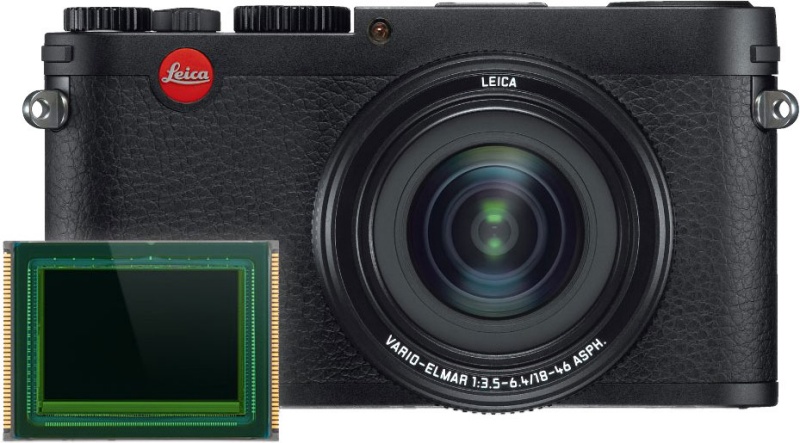
Leica X Vario

A comedic touch.

Proving once again that it’s impossible to underestimate the intelligence of the (camera) consumer, Leica gives us this doorstop:

For your $2,850 you get a modest range 28-70mm (FFE) fixed zoom with the splendid maximum aperture of f/6.4 for your APS-C sensor at the long end. f/6.4!

And no viewfinder!

Add one for $200 (Olympus VF-2) or $500 (Leica rebranded Olympus VF-2) and you have a mediocre EVF which still works poorly in bright sun.

For that sort of money you can get a premium Canon or Nikon APS-C body with a stellar zoom lens with a real aperture, and money left over. A semi-pro quality Nikon D7100 will run you $1,200. Add a no less stellar 24-120mm fixed f/4 zoom for a further $1,300 and you still have $350 left compared to this toy from Leica.

Or, with MFT sensors now competitive with APS-C, an Olympus OMD will cost you $925 and $250 for a 28-84mm compact zoom.

Amazing what people will pay for a red dot.

MacBook Air 2013 – Part I

Kaizen at work.

‘Kaizen’ refers to the Japanese concept of making a good machine then continually improving it. You can see it in Japanese cars where certain brands like Lexus command extraordinarily high repeat purchase rates. When you have owned one you keep coming back for more because you know that what was already very good is now even better.


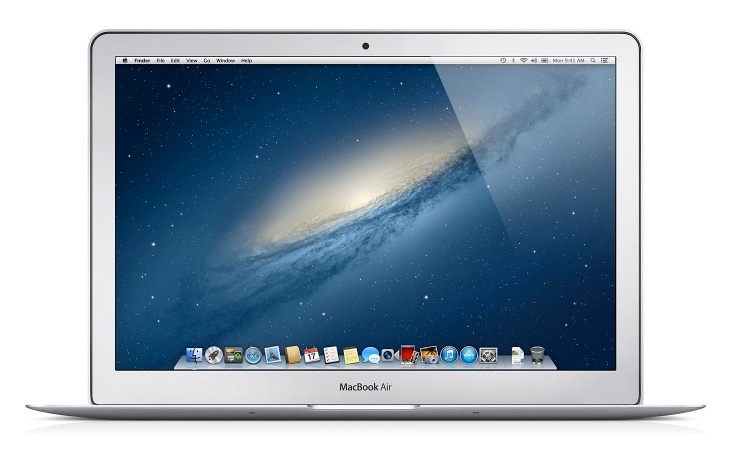
The 2013 MacBook Air – appearance unchanged from 2012.

And so it is with Apple’s MacBook Air, the third version of which I will be receiving next week, the 2013. I reviewed the 2012 here.

That was barely 12 months ago so why upgrade? First, as a job related expense, the upgrade cost to me is pretty much zero. Used MBAs hold value well and I’ll net $700 on the old one. Second, the improvements in the 2013 model – I’ll be getting the 11″ version yet again – are far from trivial, including:

  • Battery life up from 5 to 9 hrs (meaning from 4 to 8 hrs in real world use)
  • Cooler running and lower power consumption Haswell i5 CPU
  • Greatly improved graphics from the new HD5000 Intel integrated GPU
  • Faster SSD now connected using PCIe rather than SATA – an industry first
  • $1,000 for the 128GB SSD version compared with $1,100 a year ago
  • The first computer with 802-11ac wifi

The big one is battery life and while Apple claims the credit for that it results from the use of Intel’s exciting new Haswell CPU which dramatically cuts power consumption. While the new CPU appears slower at 1.3GHz compared with 1.7GHz for the 2012 model, in practice the Turbo mode – automatically invoked when needed – doubles the speed to 2.6GHz and early Geekbench tests suggest the speed is identical to its predecessor.

As usual I’ll test the machine using Lightroom and Photoshop and will report back in Part II. I expect only improvement over the already very capable 2012 version which runs both apps fine if not super fast.

Meanwhile, a word on the new 802-11ac wifi, an industry first. You will need to buy a new router and Apple obliges with the latest Airport Extreme at the same $200 asked for the old version. Both computer and router are backwards compatible with 802-11a, b, g and n so a new router is only required if 802-11ac works in your environment. The new technology claims to seek out your computer’s location, speeding throughput.

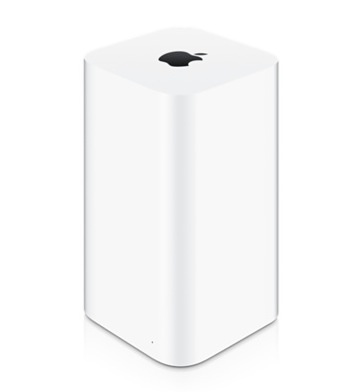
Apple’s new router looks every bit as inept as the new MacPro as regards form factor, and I’ll wait for the likes of AnandTech to test real world speed before deciding whether to upgrade my now ancient single-band Airport Extreme.


2013 Airport Extreme, waiting to tip over.

The tippy looking shape suggests either Velcro is called for or that the device is placed horizontally. Whether the latter orientation affects antenna function remains to be seen.

Apple did not announce a Retina Display version of the MBA and nor do I expect them to. That would simply cannibalize the MacBook Pro RD and there would be little to choose on pricing. Further, current battery technology would not deliver useful life with the MBA’s thin chassis when used with the power hungry Retina Display.

Apple has shown time and again that it can do truly dumb things – the Lisa, the Cube, the Newton and now the new MacPro – but they are skillfully applying kaizen to their fine MBA product.

Part II, with performance measurements, is here.

Mac Pro 2013

Much less than meets the eye.

Announced with much hype at this week’s Apple WWDC, the new MacPro is an exercise in trying to be different for difference’s sake, a solution looking for a problem. I stopped watching the hypefest after the third use of the now meaningless “awesome” and got on with better things.


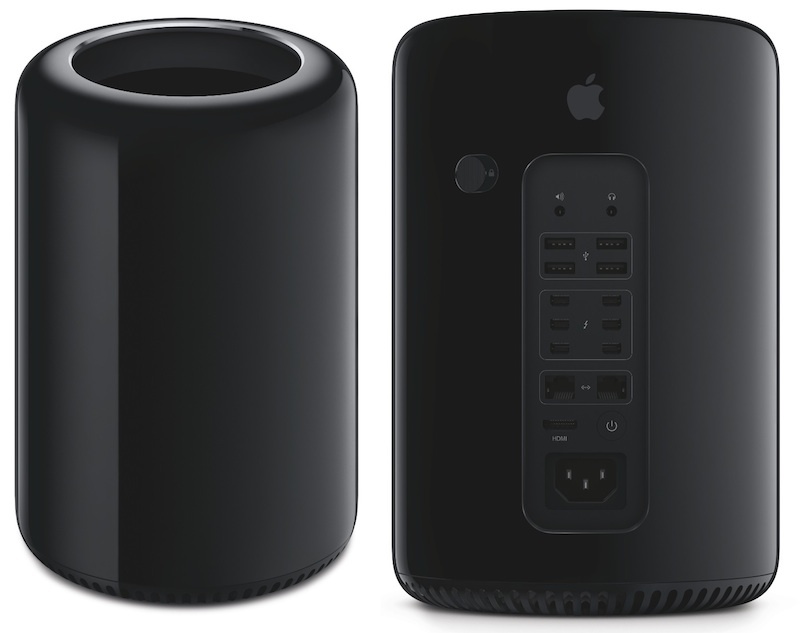
2013 Mac wastepaper basket, errr …. Mac Pro.

Had they really thought about it, maybe the monolith from ‘2001: A Space Odyssey’ would have been a better form factor than a garbage can, but whatever. 1:4:9 form factors are nothing to make a joke of.

The driving thought behind this design – other than trying to look innovative – is the same as behind almost every Apple product. Take away user choice and lock up the box. The last Apple machine to offer user expandability in any meaningful way is the current MacPro. As Apple disregarded that machine as it morphed into a cell phone maker, the 2012 (more like 2007) MacPro is seriously overpriced and seriously dated, easily outperformed by any number of MacBook Pro laptops. Laptops! This has left a lot of graphics pros unhappy, with many migrating to high end HP and Dell workstations, trading the horrors of Windows for the speed of current silicon.

Now nothing Apple does to the MacPro will move the needle on its sales and profits, both a rounding error to the world’s largest technology company. But it’s a flagship product with high exposure to ‘tastemakers’ (ugh!) in Hollywood and much smarter people in Lawrence Livermore Labs, so as a vanity product it makes sense to retain it in the line. Apple has taken the approach of locking up the box, making it very small and doubtless thermally challenged (sound familiar?) and delegated all the storage goodness to external devices. With Intel’s Thunderbolt2 providing high speed connectivity, all your drives will be in very costly external enclosures, connected with TB cables. The Intel Xeon CPU and the twin AMD GPUs in the MacPro’s cylinder will do their thing on externally stored files. Sure you can use USB2 drives, but then much of what is good in the can is lost. However, there is an HDMI socket and the GPU supports 4K video, so this will make a great HTPC for the well heeled!

All of your old drives, heretofore cheaply connected internally running at 3GB/s (6GB/s never having made it to the MacPro) will have to be removed and placed in costly TB boxes or simply junked after the data are migrated. And as for the strange – comical almost – cylindrical shape, blackened in anticipation of huge thermal challenges, who on earth cares when the machine will immediately be stashed under the desk? Sure, the old MacPro is gorgeous to look at, but that’s a phase called ‘unpacking’. After that, it disappears, though unlike the 2013 model (“Awesome! 12% of the volume of the old one. Innovation!”) it will not fall over as soon as you accidentally kick it. Nor will it overheat when taxed. But, heck, with the 2013 MacPro feel free to enjoy the jumble of external boxes and cables which it will demand, and save on home heating bills, too. And as for PCIe expansion cards for all those high end audio and graphics users, fughedaboutit. And your apps use nVidia’s ‘awesome’ CUDA graphics acceleration technology? Ha! You’re out of luck because the ATI graphics in the new MacPro will not support that.

The costly 12core Xeon CPU and two AMD GPU specs, doubtless complemented by overpriced and soldered in SSD storage for the OS and apps, make it hard to think that this machine will sell for under $5,000. Call it $8k with external storage, optical drives, card readers, etc. Not that the desperately in want audience will care as, for the most part, they are spending the boss’s money, not their own.

Well, you can rejoice in the knowledge that the gadget will be assembled in the USA by four displaced Detroit auto workers who should adequately fill the demand.


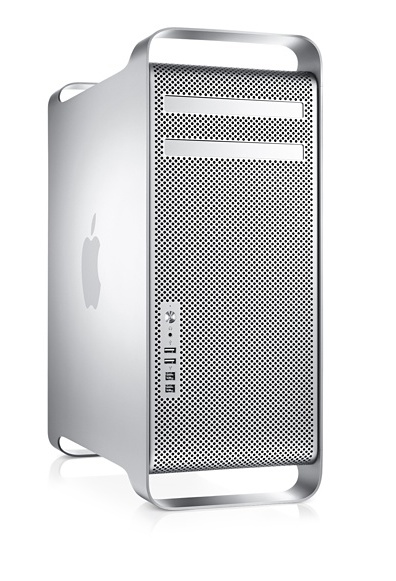
The MacPro. Looking better already.

You will never be able to add the highest speed RAM to that old box, but you can plug in PCIe USB3 and Thunderbolt cards if needed, which makes it almost current while still running cool. As for DVD and Blu-Ray burners, no problemo.

It’s too bad more high end users will not make the time to learn the simple process of creating a Hackintosh. For 20% of the cost of a 2013 MacPro you get an ugly box, state of the art components and exceptional cooling, and no one will laugh at you when you show them just how ugly your box is. It’s the same box you assembled 5 years ago and have updated annually for $200 to maintain performance leadership. A Hummer isn’t pretty either, but its looks are consonant with its goals – brute strength and reliability. Much like a good Hackintosh. The 2013 MacPro is no Hummer. More like one of those low end plastic Mercedes beloved of the polyester set.


Hackintosh – the Hummer of computers.
Everything worth knowing in one picture.

HDMI on the Hackintosh

The last frontier.

As I’m clueless about the tech aspects, I have handed over this latest Hackintosh column to pseudonymous Hackintosh ace and all around good egg FU Steve:

“Thanks, Thomas. Your own recent upgrades to Blu-Ray capability in your HackMini make what follows especially timely.

A brief summary of Hackintosh creation shows that it involves two fields.

Hardware: The Hackintosh is made of cheap stock PC parts, available from many online vendors or from your local Fry’s Electronics. The hardware aspect of the ‘build’ has always been the easy part, and it’s literally no more difficult than making a Lego toy. If there’s a tricky bit it’s inserting those fiddly connectors for the front panel power switches and the LED activity lights, as those are not keyed. No smoke results if you get these wrong – just try again. As for the rest of it, all connectors are keyed and it’s impossible to get them wrong. For brands, the only ones which matter are Intel CPUs and Gigabyte motherboards, because that’s what the Hackintosh community favors. While ATI make some nice Radeon GPUs, if you are using a separate graphics card – increasingly unnecessary in these days of excellent integrated GPUs which come with the CPU – then nVidia is the way to go. It does not pay to be a pioneer here – stick with the GTX6xx series or earlier. Let the GTX7xx lads do the bleeding for you first. Other than those, nothing else is brand sensitive. Have at it when it comes to memory, power supplies, cases, keyboards, displays, speakers, etc. The world is your oyster. The only honorable exception is wi-fi where you simply must use the TP-Link wi-fi card. It’s $42, plug and play, confers full Airport capability and life is too short for the alternatives.

Software: Always the witches brew when it comes to Hackintoshes. Back in the OS Tiger days this was truly a job only for masochists and the terminally insane. Today, with Mountain Lion and superb free tools from Tonymacx86.com (time for a name change, guys?) hacking OS X to run on your PC parts has never been easier. Not as trivial as the hardware part, but follow the excellent instructions on that site and you will succeed, aided by an enthusiastic membership.

But there remains one aspect of software hacking which is still in the Dark Ages, and that is the process of getting the HDMI socket on modern builds to convey audio.

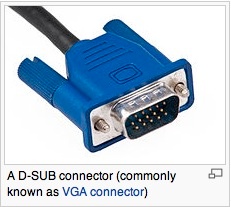
A brief history. A few years ago VGA (Video Graphics Array) was the way to go. IBM’s brilliant invention conveyed video through 15 pin connectors from the Hack to your display of choice. Sound was carried on a separate 3.5mm coaxial cable (or cables, for multichannel sound). VGA is robust, very easy to implement – nothing needs be done most of the time – and delivers excellent analog video.

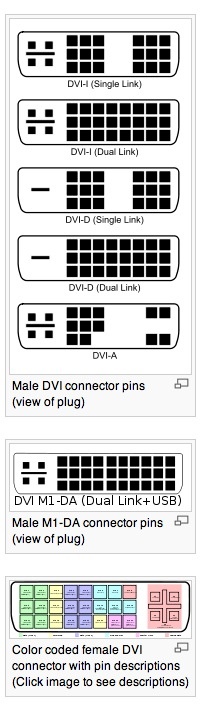
Then along came DVI (Digital Video Interface) in a bewildering set of variations:

And one or more of these is what every Hack and most PCs use to convey video to a display with, once again, a separate cable for audio. DVI video can be analog or digital, depending on the connector, whereas the audio remains analog over the separate cable.

With the advent of large flat panel TVs the need to simplify things saw the creation of HDMI, the High-Definition Multimedia Interface, which conveys video and audio, both in purest digital, from Hackintosh to TV set. Getting video working requires only that an HDMI cable be connected between TV set and the Hackintosh. It’s audio which is an SOB. The problem is that getting HDMI working on a Hack is sheer bloody hell. There is no standardization, many software apps are needed, the hacking involves the most arcane changes to code in various files and the results are anything but guaranteed. Just look at the length of the discussion on this topic on the above referenced board and you will see they frequently stretch to dozens of pages and hundreds of postings, many issues remaining unresolved. So the Hackintosh community definitely needs to go where no man has gone before and come up with an app to do this for all but the code monkeys of the world.

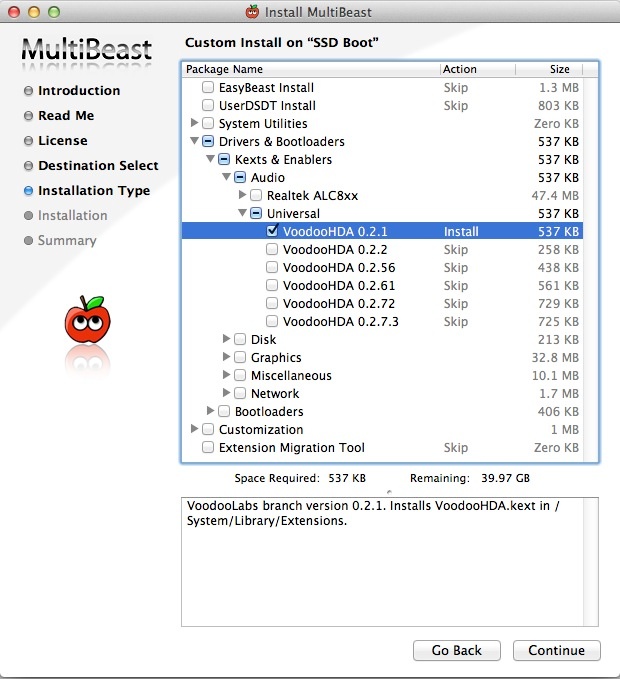
But there is a simpler solution. Having tried – and failed – to make Thomas’s HackMini enable its HDMI socket audio (via his nVidia GT430 graphics card), I resorted to the easy fix. Using TonyMac’s Multibeast I added the Voodoo kext to his System->Library->Extensions directory and then moved the existing AppleHDA.kext to an applications directory for storage. The two do not coexist. Then I rebuilt permissions, just to be safe. Here’s what I’m talking about:

There are several versions of Voodoo – just keep trying until one works. The first did the trick for me.

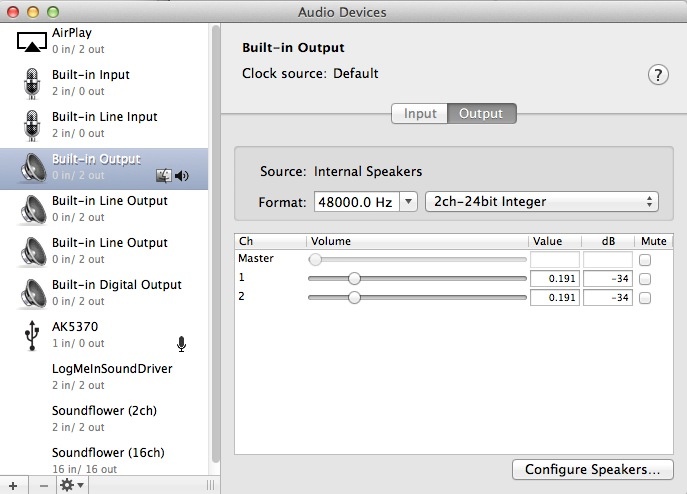
Then you need to go into Applications->Utilities->AudioMidi Setup and dial in 48000 Hz as the Format, thus:

Restart and you will have working HDMI video and audio, the latter after going into SystemPreferences->Sound->Output and choosing one of the four ‘Digital’ options – try one after the other until it works. No need to restart for this step.

The upside of the Voodoo approach is that it’s fast and easy. The downside is that if you restart the Hack you may need to redo the AudioMidi Setup step, which takes all of five seconds. Further, you will be limited to 2+1 channel sound, not the 5+1 or 7+1 offered by the proper hack. Until the Hackintosh community develops a systematic hack to get HDMI audio working, this is the easiest way.”

* * * * *

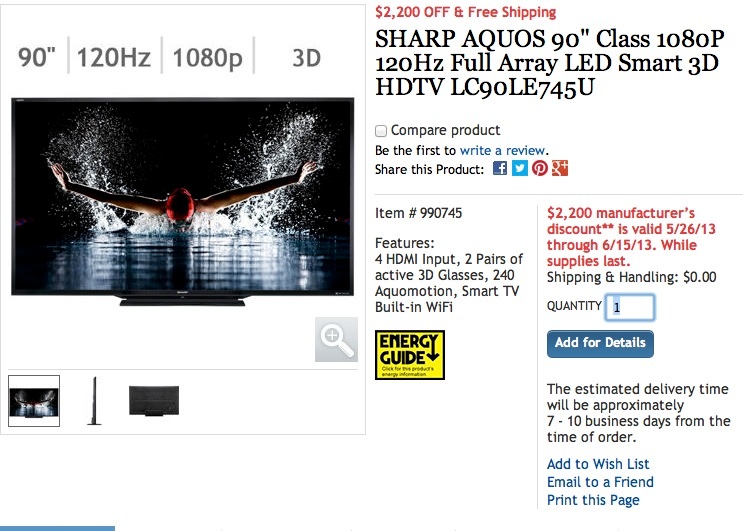
Thank you, FU. Now my Blu-Ray experience is complete …. until I add a 90″ Sharp LED display and 7+1 surround sound, that is!


The Sharp 90″ newly listed by Costco – for all of $7,500.
Remember when the Pioneer 104″ was $100,000 not so long ago?

The other night I was watching the opening of Once Upon a Time in the West where the steam train idles while Charles Bronson gets off to meet the assassins. The breathing of the train’s massive piston is like nothing I have ever heard, and HDMI digital audio is to thank for that. I then changed to Steve McQueen’s Le Mans also in Blu-Ray and reveled in the sound of two of the greatest endurance racers ever – the brute Porsche 917 and the beautiful Ferrari 512. Though calling any Ferrari ‘beautiful’ is an exercise in the tautological. Just ‘Ferrari’ suffices.

If you have not yet done so, I encourage you to look into adding HDMI connections for video and audio to your TV. Beware that the colors are all over the place after using VGA so be prepared to re-tune things.

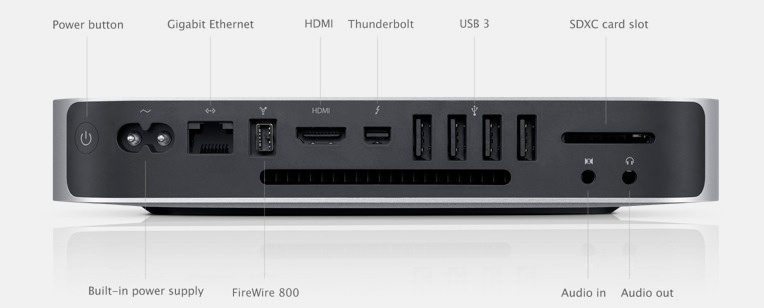
For those disinclined to build a Hackintosh, the only Apple solution is in the current MacMini which is the only Mac which an HDMI output:

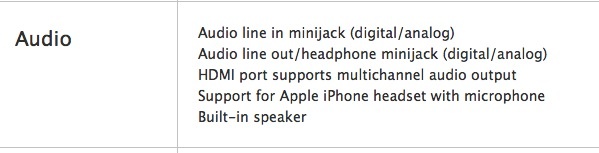
Of course, you will have to add external storage and an external BluRay drive if you want to watch Blu-Ray movies and rip them for storage. Also hope the gadget doesn’t overheat. Apple claims the HDMI output delivers audio and video; I have not tested it, nor will I be. New MacMinis start at $600. The cheapest version with an SSD runs some $1,099 with 4GB RAM and no DVD drive, which is outrageous. Used mid-2010 (the one with HDMI added) can be found on eBay for $400.