Category Archives: Hardware

Stuff

HP100 adds USB3

Not without a struggle.

Intel’s LightPeak is currently the fastest way of moving data to or from external storage, claiming 10 gigabits/sec, or 1.25Gbytes/s in regular English. This compares with a theoretical limit of 0.06Gbytes/s for USB2, so twenty times as fast on paper. LightPeak was rolled out in several Macs where it continues to enjoy near-zero market share, owing to a dearth of peripherals using the connector and insanely expensive connecting cables.

Meanwhile we have USB3 which claims 0.63Gbytes/s, is backward compatible with USB2 and USB1.1, and is available on most current Macs. The 2012 MacBook Air supports both USB3 and LightPeak (‘Thunderbolt’ in Apple Hypespeak).

For Hackintosh owners there are two ways of adding USB3. For those with older motherboards (LGA775, LGA 1156 typically) a PCIe internal card has to be added at a cost of $20-40. For more recent builds (LGA1155 and LGA1366 sockets) most come with USB3 connectors built into the motherboard. For Sandy Bridge and Ivy Bridge machines (LGA1155) current Gigabyte boards include USB3, so when ace computer builder FU Steve upgraded HP1 (LGA775 Core2Quad) to LGA1155 (Sandy Bridge i7-2600K) by fitting a Z68 Gigabyte motherboard, it came with two blue USB3 sockets on the back and a 19 pin USB3 connector inside.

And my HP100 has done nothing to use those USB3 sockets since the upgrade, as I have no USB3 peripherals. Until now. As we are getting into hardware, definitely not my forte, I’ll hand it over to ace Hackintosh builder FU Steve for what follows.

* * * * *

Thanks, Thomas.

When I upgraded Thomas’s HP1 to HP100 I intentionally chose the Z68X-UD3H-B3 motherboard from Gigabyte because it’s easily hacked, comes with two USB3 sockets (and many USB2), and has the 19 pin USB3 connector on the board itself. I envisaged upgrading the USB2 internal, front panel USB2 card reader to USB3 and had Thomas plonk down $33 for a Silverstone FP37B 3.5″ internal card reader. This was easily swapped with the older Sony 3.5″ reader, plugging into the 19 pin mobo socket.

And here the story gets complicated. After installing the appropriate USB3 driver (kext file) using TonyMac’s MultiBeast app, the two rear panel blue USB3 sockets were recognized:
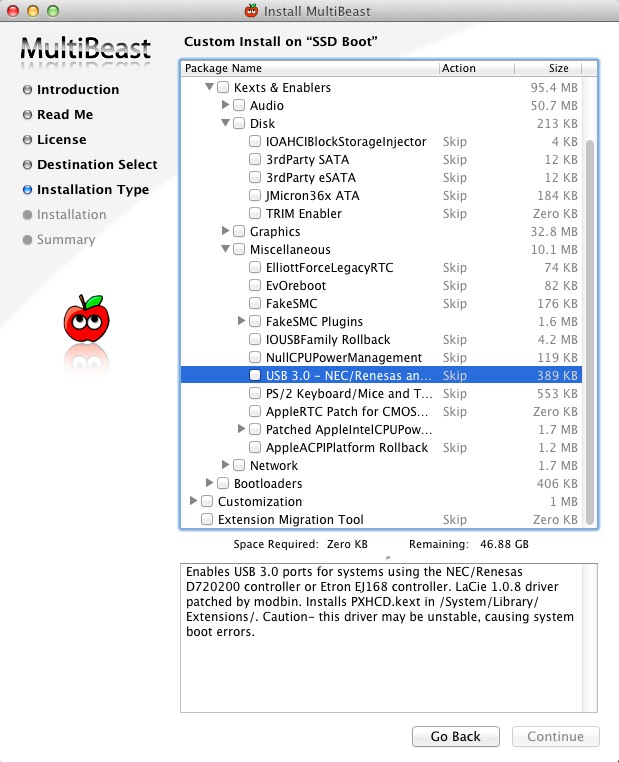
Installing the USB3 driver – check the box and restart after running this.
The Gigayte Z68X mobo uses an Etron EJ168 controller. No instability issues noted.

However, no matter how many different drivers I tried the card reader was MIA. Nada. Zilch. Back she goes to Amazon.
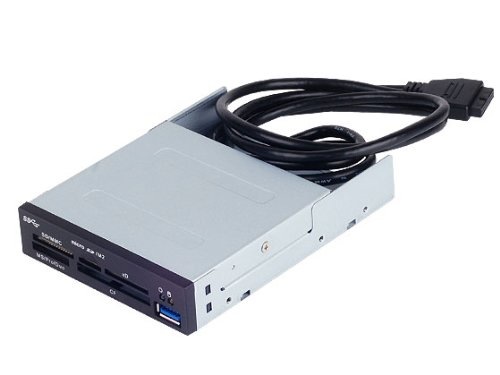
Failure. Not recognized by the Hackintosh.

Plan 2. I had Thomas buy an external USB3 card reader, confident it would be recognized once plugged into one of the rear sockets. $35 and nowhere near as elegant a solution, but having the advantage that it could also be used with Thomas’s 2012 MacBook Air, which has no built-in card reader.
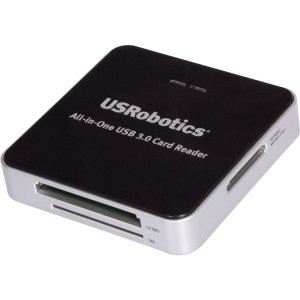
US Robotics USB3 card reader.

This comes with a ridiculous 6″ (yes, inch) USB3->micro-USB3 cable, so another $7 saw a 6′ extension cable arrive which is actually usable on the HP100. Having Thomas cuss me out because he cannot get at the card reader is more than life is worth. The stock, short cable is fine for use with the MBA. The reader is USB-powered, so no power brick is required.
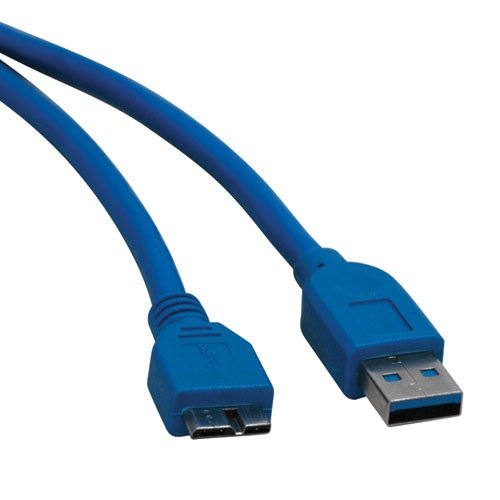
Micro-USB3 extension cable.

Don’t bother with that old male-female USB2 extension cable in the brown cardboard box under the stairs. It will fit but you will only get USB2 speed. A USB3 cable has more wires and contacts. There is no free lunch here.

The card reader was immediately recognized, and though System Profiler reports the maximum speed is the 480Mbits/s of USB2, rather than the 5000Mbits/s of USB3, the full USB speed is available. Here’s how it’s seen in System Profiler:
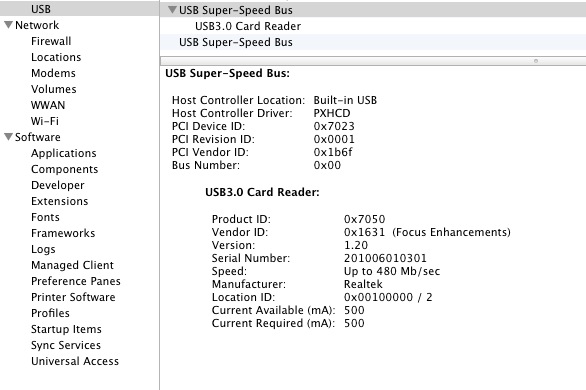
USB3 card reader with a Class 10 SDHC card inserted.

USB3 is reported as ‘USB Super-Speed Bus’, and you can see both sockets are recognized.

Confirmation of the transfer speed was easily done by running the Xbench disk test. Here’s USB2, which takes 10 minutes (!) to run:
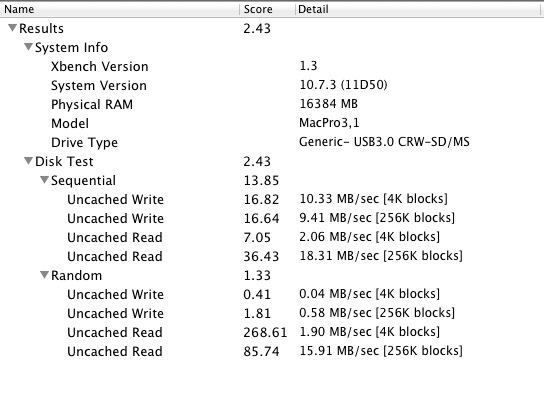
Xbench – USB2 (extension cable) with SDHC Class 10 card.

And here’s USB3 which takes a 75 seconds:
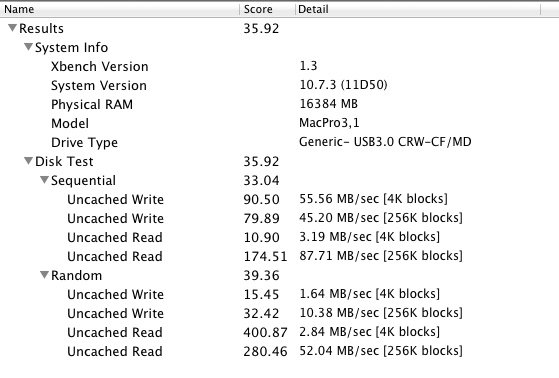
Xbench – USB3 cable with UDMA CF 400x card.

Like, whoa!

So USB3 is working properly on the HP100. I ran the same tests with the card reader connected to the 2012 MacBook Air, with identical results, except that the MBA reports the card reader’s speed correctly:
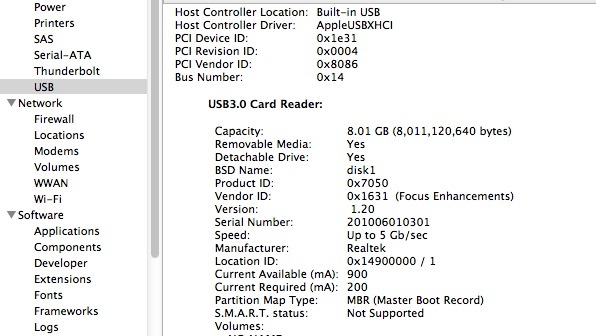
USB3 card reader as reported by the 2012 MacBook Air.

How about some real world tests?

Import and processing of 20 Panny G3 RAW files from the SDHC Class 10 card (not especially speedy as cards go) using USB3 compares with USB2 as follows, using Lightroom 4.1:

  • Import 20 files: 20/20 seconds. No difference.
  • Generate 20 1:1 previews and apply lens correction profiles: 43/48

Hmmm. Not very impressive. Why is USB3 no faster?

The limiting factor here is the slow SDHC Class 10 card. Here are the speed specs for the various SDHC card classes:
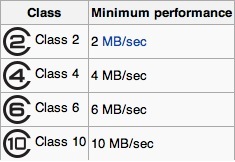
As you can see both USB2 and USB3 are working at maximum efficiency in HP100 – meaning one second per file, with files being around 10Mbytes in size. SDHC simply cannot go any faster, and is not helped by USB3 at all. More recent high-speed CF and SDXC cards however should benefit, as they support data transfer rates of 32Mbytes/s or more and here USB3 should realize the benefits. Thomas’s Panny G3 does support SDXC cards, his earlier G1 does not. He needs a faster card to realize the benefits of USB3 with the Panny G3.

Now repeating the same test using the Lexar 400x CF UDMA card from the Nikon D700:

  • Import 20 files: 3/20 seconds. Seven times as fast
  • Generate 20 1:1 previews and apply lens correction profiles: 46/48. No material difference.

* * * * *

Thanks, FU. So USB3 in the HP100 will work great with external USB3 drives, and with SD and CF cards. If the card is fast, USB3 is 7x as fast importing files with a 400x UDMA CF cards (and probably similar with recent SDXC cards), and all at a fraction of the cost of LightPeak/Thunderbolt. Processing time remains unchanged as that’s a function of the CPU and GPU, having nothing to do with the card. For users of the latest DSLRs like the Nikon D800 which generate 75Mb files USB3 is a cheap – and highly recommended – fix for fast import – the time will fall from 6 seconds a file to under 1 second.

And, of course, any USB3 external disk drives will be much faster, especially if SATA3 drives are used in preference to the older SATA2 designs.

As for the processing speed when importing to LR, that’s hardly a limitation. Once the files are imported, you can let LR grind through processing while you simultaneously start developing your picture. Processing occurs in background mode and only a faster CPU and GPU can speed that up.

So if you want the best transfer speed per dollar, USB3 is the way to go at very modest increased cost – $35 for the card reader plus $7 for an extension cable.

Update January 27, 2013:

I managed to bend two of the pins in the US Robotics USB3 card reader when inserting a CF card from my Nikon D3x. The pictures on the card were corrupted, but were easily recovered with the wonderful DiskDrill application. Mercifully, I have retained the original internal USB2 Sony card reader in my Hackintosh, so download could proceed. I dismantled the US Robotics device (you have to pull off the four rubber feet hiding the screws) and managed to straighten the bent pins and all is well again.

Moral: Be very careful to insert the card straight into this device. The guide channel is short – misalign your card and the suspect engineering design of the CF card which requires perfect alignment will trip you up, much as it did me. SD/SDHC/SDXC cards are a far more robust design, using broad contacts on the card, addressed by wipers – not pins – in the reader. Yes, you hear of CF cameras with bent pins too, but Nikons are fairly well made in this regard as they use a very long channel to ensure proper alignment of the card in the slot.
MacBook Air 2012 – Part II

A meaningful improvement over 2010.

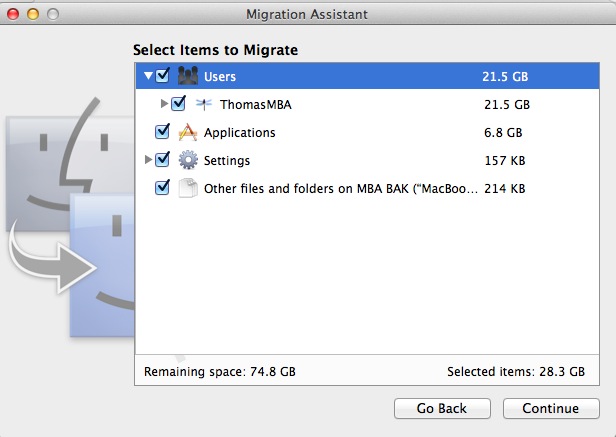
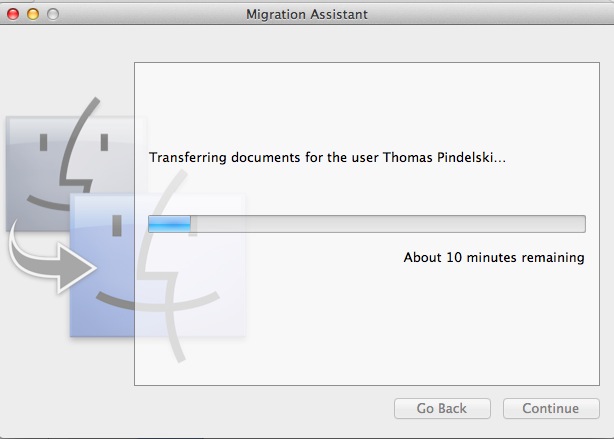
My 2012 MBA arrived yesterday and here are test results. It’s the i5/4Gb/128Gb version, for $1,100. Last year’s model ran $1,200 with the 128Gb SSD and only 2Gb of RAM. The battery was 86% charged on receipt. From unboxing to ‘ready to import’ status took 5 minutes. Migration Assistant allowed recovery of all my user settings and applications from the backup for the predecessor 2010 MBA in 12 minutes more while I got on with something else. iCloud now makes setup of mail, calendars and contacts trivial and it’s this robust ecosystem which makes the premium paid, if any, for an OS X or iOS machine worth every penny and more. ‘Ecosystem’ remains a word none in Windows land know to spell and it’s what drives OS X sales to constant quarterly increases, small as they are.

Migration Assistant at work.

The focus of this piece is on performance with Lightroom 4.1.

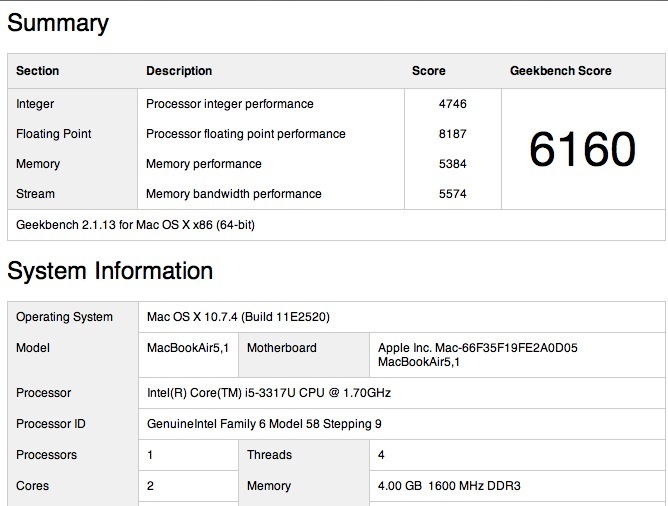
Here’s Geekbench, 64-bit:

MBA 2012.

The 2010 model was 2205, making the 2012 almost three times as fast. If you get the 8gB model then you can expect a score of 7,000, meaning 16% faster for another $100.

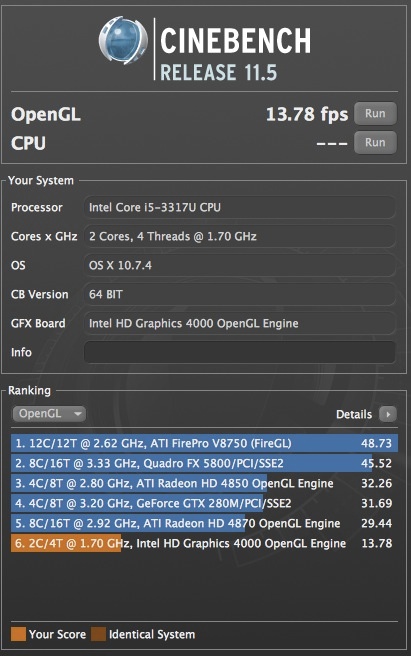
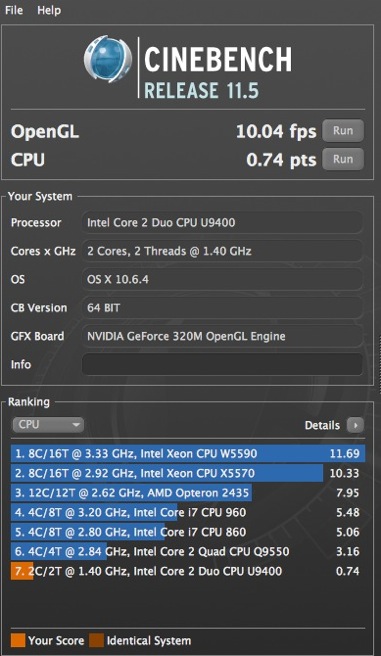
And here’s Cinebench 64-bit:

MBA 2012 and 2010.

The performance is where it’s needed for a Lightroom or Photoshop user, as those applications are far more demanding on CPU (Geekbench) than GPU (Cinebench) performance. And while the Cinebench frame rate is nothing to write home about, the integrated HD4000 GPU in the IvyBridge i5 CPU does not disgrace itself, pausing just once briefly at the start of the movie stress test.

It bears pausing a moment to reflect on that Geekbench score. When my builder FU Steve built the original HP1 Hackintosh three years ago it used a Core2Quad CPU in a large case and delivered a Geekbench score of 6,200, barely faster than the 2.3lb. 2012 MBA. Startling. Add the fact that this is the first MBA with USB3 and Thunderbolt connectors and you are looking at a very capable machine indeed.

Unlike with the 2010 model, no USB thumb drive is included with the 2012. That drive included OS Snow Leopard and allowed recovery if the internal SSD became corrupted. Now you can simply download a new version of the OS (now OS Lion) over wifi. You start the MBA with the corrupted SSD, are asked for your wifi and Apple Store credentials, and can download the OS over the air. I tried it when prepping my 2010 for sale and it took 100 minutes, and worked perfectly. Elegant.

On importing to Lightroom 4.1, this is how the MBA 2012 compares to my nuclear powered HP100 Hackintosh desktop, both using a USB2 SDHC card reader in a USB socket; timings are in seconds for import of 20 Nikon D700 files to the MBA and HP100, respectively:

  • Import 20 files: 20/22 (yes, the MBA is a bit faster!)
  • Generate 20 1:1 previews and apply lens correction profiles: 135/48

In the 1:1 preview generation – very useful for effective fast processing – the superior RAM of the HP100, all 16gB, blows away the 4gB in the MBA. But still these are, overall, very impressive statistics, with the CPU speed increase a standout.

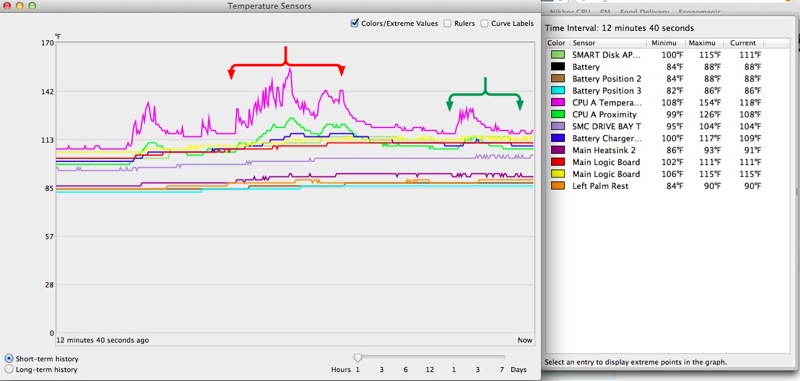
How about real use? It’s an absolute pleasure using Lightroom 4.1. With the exception of the Noise Reduction Luminance slider, all other sliders respond in real-time. The NR one has a 1-2 second lag. The selective editing brush is immediate. No excuses are needed for the integrated GPU and while the machine can run up the CPU to 160F with stock settings, as always I use the SMC Fan Control utility and set the fan (the one, pathetic, poncy, pusillanimous, microscopic, homunculus of a fan) to a minimum of 4,000rpm, as it’s more than this engineer’s mind can stand to see CPU temperatures that high. Set at 4,000rpm, where it is just audible, the machine gets slightly warm on the lap, nothing more. Left at stock it gets noticeably warm.

Here are the temperatures. Why so many sensors? Because Apple is rightfully terrified that if something fails then a meltdown will result if the problem is not sensed immediately.

Fan minimum set to 4,000rpm.

I turn down SMC Fan Control to 3,500 when not photo-processing, at which speed the 2012 MBA CPU core idles at 120F in a 75F room.

On the MBA, LR4.1 loads in 5 seconds compared to 3 seconds on the HP100. The red brace denotes the area where LR 4.1 was being imported from Adobe. The green brace indicates the import of the 20 RAW files tested above, and their subsequent processing. As you can see, processing causes little heat rise. The mauve uppermost temperature trace is for the i5 CPU core, whose service limit is 192F according to Intel.

What’s not to like? Well, Apple has made a silly retrograde step in reverting to an inline MagSafe power adapter plug, the original design which was the subject of a recall. The 2010 and 2011 MBAs used the superior, sleek right-angled plug which, when oriented with the cable to the rear, allowed easy insertion of any SDHC card in the left USB socket. The new (old) version does not allow that, so you either have to pull the plug or use the right hand USB socket. Doubtless they have reinforced the cable junction which used to fray, but it’s not an improvement.

The other caution would be for users of DSLRs which create very large files, like the Nikon D800. If you are using LR4, generating 1:1 previews is not a good idea. It takes 7 seconds per 12Mb D700 RAW file. The D800 generates 75Mb RAW files. You can do the math. Smaller previews are no big problem on the 11.6″ display but if you are driving a large, external display you will need 1:1 previews, and will have to wait as each is prepared. That will make for a slower workflow.

Tests with Photoshop CS5 appear here.

So the 2012 MBA is a credible and fully usable Lightroom/Photoshop machine where the 2010 was sluggish. If you try the 2012 and are using the 2010, you will want to upgrade. The improvement over the 2011 will be less noticeable. For those just seeking a speedy web and email laptop, the 2010 MBA at $650 used is a great deal.

For other comments, refer to my five-part review of the 2010 MBA which starts here. The ergonomics of the 2010/2011/2012 machines are identical, with one strange exception. The lid/display on the 2010 swivels back some 5 degrees more. The 2012 is not an improvement in that regard. However, by way of atonement, here’s a bit of magic the 2010 does not offer:

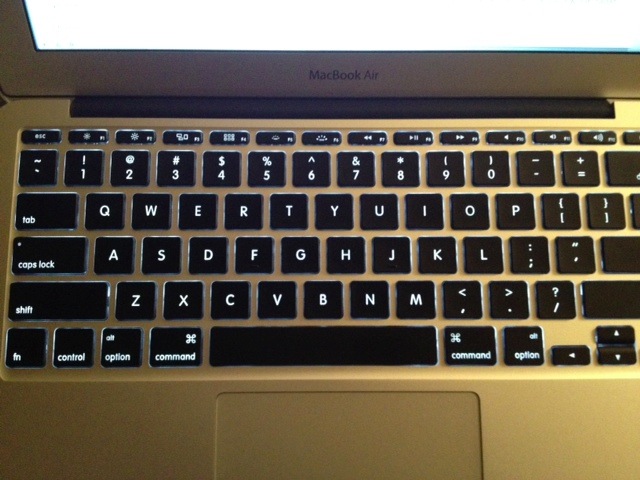
Backlit keyboard.

A friend writes: “Dimly lit venues are now fair game for inspiration.” Indeed. Thank you, Gregg.

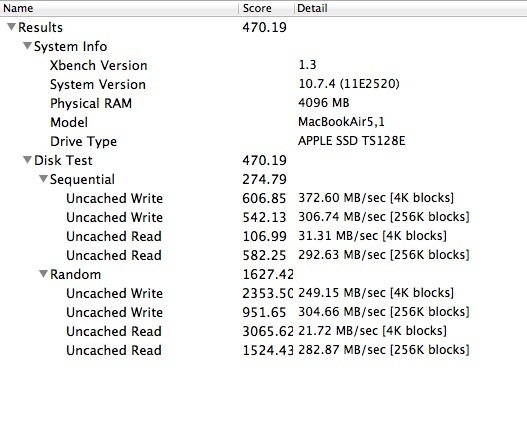
Finally, disk speed. Here’s Xbench:

That compares to a score of 522 for the SATA3 SSD in the HP100, both representing a 60% speed increase over SATA2 drives like those used in the 2010 and 2011 MBAs. My 2012 MBA uses a Toshiba SSD (denoted by the ‘TS’ in the Xbench screen above), which some have said is slower than the Samsung used in others of the same model.

In conclusion the 2012 MacBook Air is an outstanding laptop, reasonably priced, and one which increasingly asks the question as to why you should pay more for a MacBook Pro. A free upgrade to Mountain Lion will be available in a few days when the latest version of OS X is released.

MBA as your only computer?

For those on a budget, the 2012 MBA can be used as your only computer for photography and all other general tasks. As all MBAs now come with at least 4Gb of memory, the cheapest point of entry is the base 11″ model with a 64Gb SSD ($1,000), a SATA3 500gB external notebook drive ($65), a USB3 enclosure for the drive ($25) and a cheap external 21″ monitor for home processing of snaps ($140) with the required cable ($14). The total of $1,244 gets you a capable Lightroom and Photoshop powerhouse with a large external display for home use. The OS and apps will start very fast owing to the MBA’s SSD. Not at all bad, and with lots of storage not affordable in SSDs at present.

* * * * *

Now I have to go for a hamburger and apple pie, seeing as it’s the anniversary of the greatest day in modern history!

Photoshop CS5 use is addressed here.

Disclosure: Long AAPL January 2013 call options.

MacBook Air 2012 – Part I

Much enhanced.

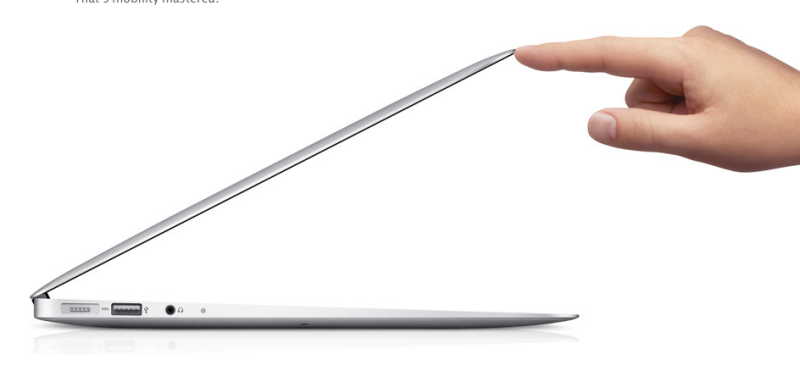
The 2012 MacBook Air.

My two year old MacBook Air has moved to a happy new home and its replacement arrives tomorrow in the guise of the 2012 model. It has proved trouble free, reliable and a joy to use and rarely gets so hot on your lap that you notice.

I wrote about the 2010 model here concluding that it was a decent, ultra light portable with a fine keyboard and decent Lightroom and Photoshop capabilities.

Once again I have opted for the 11″ model owing to its low weight and handy size, but a little more than related statistics for an iPad. However, this time I opted for 128Gb of SSD rather than the minimum of 64Gb, for an outrageous premium of $100 (market price for 64Gb of RAM is $25) and a total cost of $1,100 delivered from Amazon.

The jump in specifications is non-trivial and confirms again that a two year upgrade cycle on MacBooks and iPads is appropriate. For desktops only a Hackintosh makes sense for my heavy use purposes, and you can read all about the one I use by clicking the Sitemap link at the top of this page. Here are the more obvious changes comparing the 2012 model to the 2010:

  • Model MD224LL/A; 2010 is MC505LL/A.
  • 4Gb RAM vs. 2Gb
  • Low power consumption IvyBridge i5 CPU vs. slower and hungrier Core2Duo
  • 1.7GHz CPUclock speed with 2.6GHz boost, compared with 1.4Ghz, no boost
  • Backlit keyboard
  • Intel HD4000 integrated GPU vs. Nvidia GeForce 320M with 256Mb memory
  • HDMI output via adapter vs. none
  • 720p HD Facetime camera vs. SD Facetime camera
  • Sata3 SSD vs. Sata2 SSD

As before only the 13″ model comes with an SD card slot, so an external USB reader will be needed. Either model requires an external reader if you use CF cards.

Options are very costly and include an i7 CPU for a little more speed (2.0/3.2GHz), 8Gb RAM and a 512Gb SSD. None solve economically for this user.

With an anticipated Geekbench CPU speed score of 6,000 (4Gb RAM) the 2012 model should be some three times as fast on CPU intensive tasks like Lightroom and Photoshop as the 2010 model. That’s a huge increase. Cinebench GPU frame rates should be almost doubled at 18 vs. 10. Another large jump. Disk read/write access should be almost 60% faster, as I noted when upgrading my HackPro’s SSD from SATA2 to SATA3.

In the two years since the 11″ MBA was introduced, it has become the entry level for students everywhere, (at least for those who prefer studying to rebooting their Windows machine) with the white plastic MacBook being discontinued. This is a significant market for Apple both on volume and for first time sales, as many users’ first serious introduction to the Mac ecosystem. Thus it’s no wonder that Apple has not rested on its laurels when improving the model. Last year’s Sandy Bridge model offered a big speed increase and this year’s Ivy Bridge builds on that.

Resale value of the 2010 after two years use is some 65 cents on the dollar, not at all bad for a used computer.

Some first impressions and test data soon when I have unpacked mine.

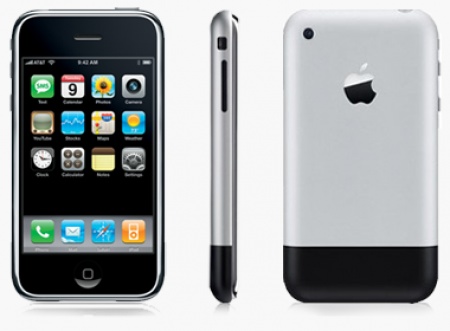
Five years of the iPhone

Sea change.

I bought mine on day 2, June 30, 2007, in the San Luis Obispo Apple Store for some $500. Ouch! But I consoled myself that, as a money manager it was both deductible, constituting research, and might actually be useful.

Today I use an iPhone 4S for all calls and have no landline at home.

That first iPhone was obvious; you know, like shorting builders’ stocks in 2007 or going long corporate debt when IBM’s was yielding 7% in 2008. There were lots of things it could not do. No camera, 2G only, no App Store, web apps only plus the few it came with. But look at the businesses it obsoleted over these past five years and others which will not be around five years hence:

  • RIMM
  • Nokia
  • Palm
  • Nintendo
  • Landline telephony
  • Hewlett Packard
  • Dell
  • DVDs and CDs
  • Garmin and TomTom GPS
  • Printed books and bookstores
  • Print manuals, flight maps, etc.
  • Point and shoot camera makers
  • Print news media
  • Print magazines
  • Apple’s own OS X, now very much in its last innings

Another in huge trouble is Microsoft, cursed with no credible offering, no attention span and no leadership.

At the same time, iOS created a huge raft of new businesses which did not exist before:

  • Independent software designers
  • Mobile games
  • Interactive advertising
  • Facebook – OK, not all change is good
  • Specialty medical and forensic tools
  • Hand held intelligent industrial inventory tools
  • Interactive video telephony
  • Broadband expansion
  • Mobile investing
  • GPS/war/traffic/weather systems
  • New CPU designs from the likes of ARM
  • 2 billion+ prospective new computer users who will go from abacus to iPhone overnight
  • 10 million making a poor living in China where before they made none

Sure, many of these were around earlier, but they scarcely moved the needle of any metric.

Because the iPhone not only changed how we communicate, while creating a new mobile computer, it gave Apple a five-year lead in touchscreen design with the iPad 1 three years ago. This is what poorly run businesses like HP and Microsoft fail to understand. Nothing about that iPad was rushed to market. By the time you could buy one in April 2009, the user interface had thousands of man years labour invested in it. It did not just happen, and iPad 1 must rank right up there with the Leica M3 (1954) as one of the most perfectly developed ‘Version 1’ models of any machine man has yet made. That iOS has worthy competition from a company which had never made a computer – Google – in the Android OS, is no surprise. By definition, GOOG’s thinking was out of the box. They had no blinkers to discard.

It’s common to see the iPhone and its OS referred to as ‘disruptive’. Wrong. A disruption is when you put down your tea to answer the door for the UPS man. The iPhone was both intensely destructive and creative at the same time. It is a tsunami device, not a storm in a teacup, and it created the world’s largest corporation, Apple, Inc.

The Leica M3, 1954. The previous occasion on which Version 1 was perfect.

The new Kindle – Part II

Second try.

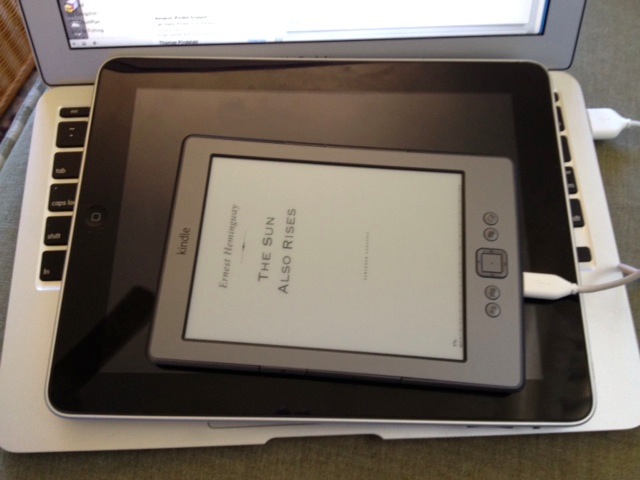
Kindle, iPad 1, MacBook Air.

I last wrote about the predecessor to this device a couple of years ago, having returned mine because the UI was about as bad as it gets. The keyboard was indistinguishable from a bilge pump. Both suck, and the page turn buttons on the long sides were way undersprung, so I was always turning pages unintentionally. It’s the only thing I recall returning – OK there was that awful 20mm Canon EF lens – in ages.

Well, the new one – mine is the bottom of the line $79 model – dispenses with 3G, being wi-fi only, and deletes the physical keyboard in exchange for a button-activated virtual on-screen version. An improvement from the execrable to the awful. This makes the device smaller and lighter, as it’s now down to 6 ounces, and the only time you really have to use the clunky keyboard is when first signing in to wi-fi. UK residents pay $138, 75% more, which will serve to remind them not to try and tax our tea ever again. Call it war reparations.

In the US, Amazon Prime members ($80 annually for 2 day UPS on almost everything, plus free movie rentals – recommended) can also get free access to all the Harry Potter books which is enough to make you want to cancel your Prime membership. Still, you don’t have to read this tripe and J K Rowling has no need of your filthy American money. They have enough worthless paper there already, not least in her interminable, glutinous prose-laden novels.

Such a deal.

This is actually a lending library, so I thought I would get off to a good start and borrowed Michael Lewis’s ‘The Big Short‘ because though I am tall I am also short, if you get my drift. Woo hoo, $9.99 saved already. (Lewis attended my alma mater Salomon Brothers. No, it’s not a Catholic school).

Why am I subjecting myself to this torture again? I want to spend some quality time with our son on the beach and as my earlier piece illustrates, the iPad is useless in direct sun, whereas the Kindle is useless everywhere else. Bright sun is a reasonable bet on California’s beaches, and the prospect of sitting there on me bum like a dope doing nothing would mean early insanity. Swimming? Excuse me, I would rather like to return home with at least two legs attached, rather than with one stashed in the belly of the local Jaws. We are talking Pacific Ocean, here, and those boys gotta eat. Now all I have to do is avoid the discarded hypodermic needles on the beach. So Kindle it is.

The device remains useless for viewing pictures. It automatically downloads software updates unprompted, and did so in my first 30 minutes of use. Nice, if accompanied by more flashing than your local member of Congress in the men’s room at the airport. Unlike your MacBook Pro, there is no telltale odor announcing the fact that you have just fricasséed your gonads, as the Kindle remains perfectly cool.

The weight is so low that it goes unnoticed, one hand operation is a non-event (page turn buttons are on both uprights) and the buttons need a far firmer push on this model, preventing accidental page turning. As before, it comes pre-registered to your customer name and account at Amazon – very nice. Best of all the gadget fits in the back pocket of your Levi 501 button-front jeans, the type Real Men wear, allowing you to do it justice when you next sit down in a forgetful moment.

Finally, not having email etc. means there is no distraction from the old guilt feeling when using an iPad that you have not checked email in the last five minutes or the markets in the last two seconds. That’s not all good, though. Germany loses at soccer, their Chancellor goes berserk and next thing you know the market is up 20% because she was seen making off to the Führer Bunker in the Chancellery with a loaded pistol and a cyanide capsule clenched in her teeth. Well, you will miss that joyous event in real-time if the Kindle is the only gadget you have with you at the time. I suppose there’s always the iPhone and a towel over your head for a quick trade or two while the waves roll in as you twiddle your toes in the sand and broken bourbon bottles.

The regular model is $109 and comes without home page ads; you can pay the extra $30 to remove these from the $79 version I bought, at any time. Smart pricing. These ads are referred to as ‘Special Offers’ which is rather like saying the IRS invites you to file an annual tax return. Your freedom of choice is identical. In practice the ads appear on the home page only and are unobtrusive. The first one I got was for diapers …. maybe condoms will be next? Battery life is claimed to be one month which is Kindlespeak for a week, I suppose. You recharge from any USB socket using the provided micro USB cable. Too bad it’s not mini USB – yet another thing to pack. Mine came 40% charged and was up to 100% in an hour using the MacBook Air as a power source, meaning it should recharge in about 3.5 seconds on a desktop machine. Switching wi-fi off is the best bet for battery life and trust me, only true masochists will keep it on for web surfing.

The Kindle continues to suffer from inept synchronization design. Amazon makes much of how a book read on one device, say an iPad, will be synced to the same location on any other, say a Kindle. They call it ‘Whispersync’ and I call it ‘Bollocks’. In practice if you choose to re-read a finished book, no matter which page you leave it at, all devices will think you are at the last page, and there is no ‘Reset’ button. Gee, how hard is that to do? The simplest fix I have found is described here and it works well. I reset my finished book on the MacBook Air, and then all other devices thought I was at the beginning, or whatever location I set it to on the MBA. No biggie, but really, Amazon!

And don’t ever dare hit a footnote reference because it’s back to Bollocksync and all your devices will once again be at the back of the book. Reminds me of my 10 years dealing with US Immigration. (OK Immigration and Naturalization, though there was nothing Natural about the methadone cases behind the counter). Any time you made an insignificant error on one of their interminable forms, it was back to the end of the line. About that time I recall entertaining serious thoughts about joining the Communist Party and lying on my application. I imagine they were running a pool to see who could accomplish this sadistic ‘back of the line’ trick most often. “Yo, Phil, I did sixteen today!” Once such victim in the line in front of me had a fully fledged nervous breakdown when this treatment was visited on her. Needless to add, she was French. I suspect the software designers at Kindle must be the same ones who work on Fuji cameras or INS forms. Neither ever uses what they create and sure as hell none of them are Americans.

There’s also a ‘Shop in Kindle Store’ option which is rather like asking an amputee to use chopsticks. Yup, that keyboard again. Buy your books using a Mac or iPad, then sync the device. Life is too short for the alternative. I challenge you to find the fiction work you want from the catalog of 504,779 titles and counting. This year’s US Budget will make it 504,780.

One special feature is the ability to rotate the screen orientation whereupon, in landscape mode, the device’s buttons take on all the utility value of a eunuch looking for a spot of fun in a harem. Don’t go there. (The landscape mode; the harem’s fine). However, in flipped portrait mode it works well, moving the button pad to the top. It’s not used when reading and the long, side-mounted page turn buttons fall more easily under the fingers. However owing to another bit of coding genius from the chaps at Amazon, the home page advertisements do not invert which is either wrong or inspired. Probably inspired, as the first ad I saw upside down was for AT&T proclaiming the might of its 4G cellular telephony. Upside down it looks more like 1/4G, which is about right.

Finally, there’s a web browser under the mysterious menu choice of ‘Experimental’. After personal discussions with Jeff Bezos, I can disclose here for the first time that Bezos took my comments to heart and that the choice is being renamed to “I just crapped my pants”. I know this as I just looked up this site using the Kindle after a few hours of virtual keyboard input, and it looked like s**t.

Use with cellular wi-fi? No problemo. My iPad has Verizon cellular (the working alternative to AT&T in the US; AT&T is like government – you pay and nothing happens); fire it up, switch on the personal hotspot on the iPad and login the Kindle after seventeen attempts using the virtual keyboard. Works perfectly. You even get that little symbol on the Kindle telling you that magic is happening and this is not your grandfather’s wifi. You know, the kind in every Dell computer.

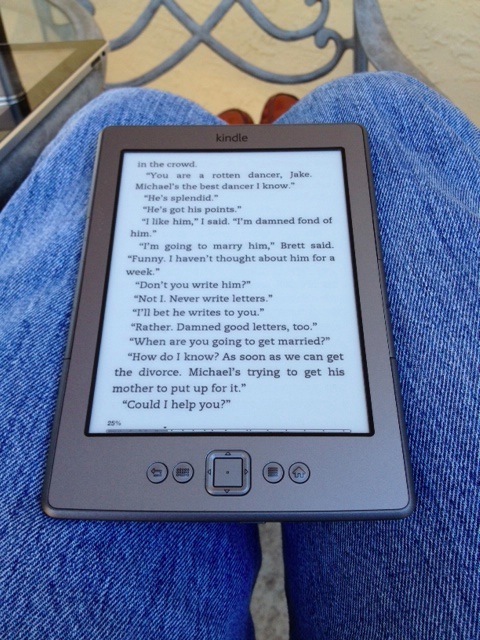
Hemingway on the Kindle in the sun.
The ability to change font sizes is welcome.

More when I have got through some more Hemingway. But take it from me, this is very much a single purpose device, designed for reading in bright light only. No idea if it does Chinese. Fair bet it does. Anything else, fughedaboutit.

First field test results:

On the beach at Half Moon Bay

Battery life – update July 23, 2012:

I kept wifi off except for downloads, read seven full length books since I bought mine on June 28, and the battery was showing dead with wifi on and maybe 10% left with wifi off. So Amazon’s ‘four week battery life’ is more like three weeks as long as you leave wifi off, which is not so easy, as after switching it on for a download, you have to dig into the Settings menu to place the device in ‘Airplane Mode’ which is Amazonspeak for ‘wifi off’. A full recharge using the USB cable took 2 hours.