Category Archives: Hardware

Stuff

Nikon buyers beware

The grey market is a mess.

I recently bought a Nikon full frame DSLR and some lenses. Last time it was Canon (the 5D, sold long ago, and excellent in every way) so this time I thought I would give Nikon a shot. I am brand agnostic. I elected the D700, shortly to be replaced by the D800, because it is affordable used, well built, dust sealed, there’s lots of lightly used inventory out there and because the pixel density and low light performance are ideal for my needs. Most importantly, it’s full frame which is what’s needed for true wide angle snaps with the best optics out there.

The Grey market racket:

But, being cautious by nature, it was not lost on me that Nikon products in the US are frequently sold as both “USA import” and “Grey market”, the latter a few dollars less. The greys circumvent Nikon USA as the importer, thus denying the business the profit it might otherwise earn. So what does Nikon USA do in its infinite stupidity? Why, try and cartelize the import racket by refusing either warranty or post warranty service to any grey market camera in the USA. And while there are instances of a lucky few managing to get service on their ‘greys’ it’s not like you want to take the risk of your megabuck D700 or D3/4 ending up as a brick because you have to send it to south central Mongolia for service, which will take a year if you ever get it back at all, covered in yak goo.
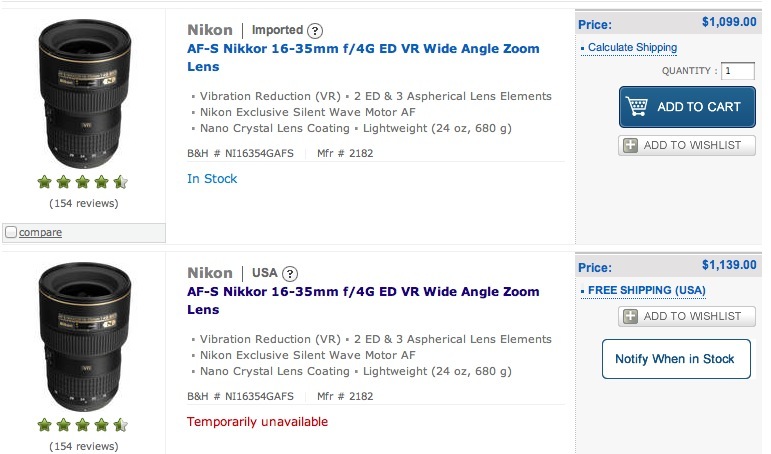
An example of split pricing – Grey and USA. No, the economics do not add up after shipping.

Further, the accountants at NUSA, really getting the pencil between their teeth now, have started refusing to sell parts to non-authorized dealers, arguing that special gear is needed to fix their fancy hardware. Mercedes tried that racket 25 years ago and lost a massive class action suit, which not only required them to sell parts but also dictated that the related diagnostic equipment be made available. It was nothing more than a crude land grab aimed at putting tens of thousands of independent repair places out of business.

Let’s hope Nikon is next to be sued. In one fell swoop NUSA has:

  • Upset any grey market buyer who cannot get his camera serviced. It’s not like he checked this out when saving his $50.
  • Made absolutely sure that the buyer will never return to Nikon products, destroying brand loyalty and repeat sales.
  • Generated abysmal word of mouth from every abused owner.
  • By refusing non-warranty service to grey owners, decided to pass on the income stream that results.
  • Remained completely clueless whether their childish attempts at price controls have any effect.

A basic principle of economics is that “All control drives up price” or, in NUSA’s case, destroys profits. This is what happens when you let accountants run a business.

Now given that I had decided to buy my D700 body used, it was clear that I would have to establish that it was a legitimate USA import. So I tried eight sellers on eFraud, each claiming his camera was bought at B&H NYC. Can I see the invoice please? No, I have lost it. Well, given that the camera is <4 years old and B&H keeps 5 years of invoices on line, could you please download yours and copy me? Silence. Eight out of eight. You wanna get cheated? Hasten over to the 'Bay.

The shutter activation lie:

The other bit of cheating the fraudsters there indulge in is the ‘shutter activation’ count lie. They reset the camera’s counter and claim that the number of the file indicates the count. Nonsense. So of each seller I asked for a current NEF (Nikon RAW) file. I would then upload this to MyShutterCount.com and get the true number. In all cases but one, the true count was far higher than the advertised one. No surprises there.

The one I bought had a count which exactly matched what the seller stated and it came with an original B&H NYC invoice. Easy. It’s not like I need the remaining count to be huge. I do not. But the last thing I want is a pro’s beater on its last legs.
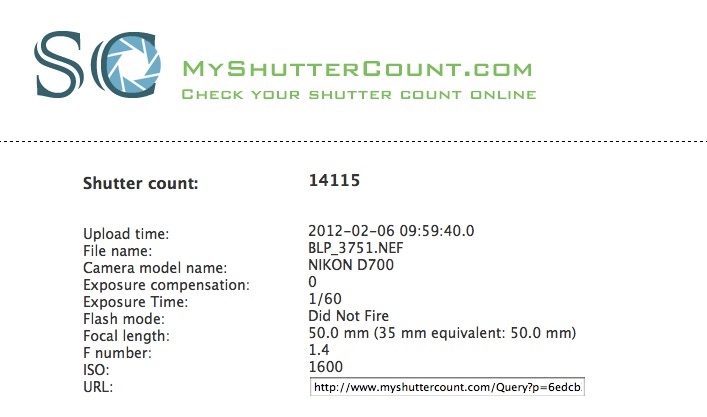
The true shutter count on the used D700 I bought.

The quoted life of the D700’s shutter is 150,000 activations, so I’m not exactly going to trouble that ceiling.

An alternative to determine true shutter count:

You snap a JPG image and drop it onto Preview, dialing in the application as below:
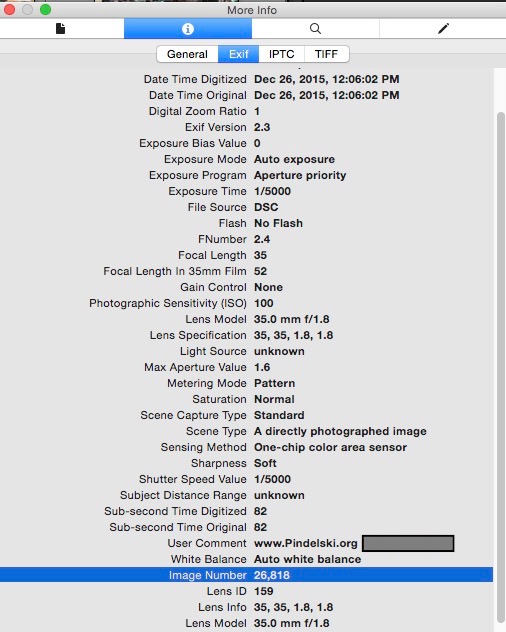

Shutter count on the author’s 2005 Nikon D2x body.

The shutter count is disclosed in the highlighted row.

Stay safe:

If you are going to buy costly Nikon gear in the US, do yourself a favor. Forget saving $50 on grey imports. And when you get that purportedly USA import in your hands, check the serial number with Nikon to make sure your vendor has not tried to cheat you. Yes, it happens.

Finally, don’t buy on eBay. The odds against finding an honest seller are long and the gear will be marked up 7%, 3% for PayPal and 4% for eBay fees. I bought my used body at Fred Miranda which also happens to be where I sold all my Canon 5D gear. It’s largely the province of Nikon and Canon users, and I have only had good experiences as both seller and buyer.

Other brands:

I haven’t checked for other brands but if you are contemplating costly aquisitions of Canon, Sony, Pentax, Fuji, etc. gear, you should do your due diligence before buying grey. The Japanese are not exactly known for original thinking, so it’s a fair bet to assume that other Japanese manufacturers are adopting similar policies.

* * * * *

For the many micro-four-thirds aficionados who visit here and enjoy the intimate style of street snapping that compact gear encourages, fear not. I have not gone to the dark side. Indeed, there could scarcely be a less appropriate camera to that sort of work than a full frame DSLR with a honker lens attached.

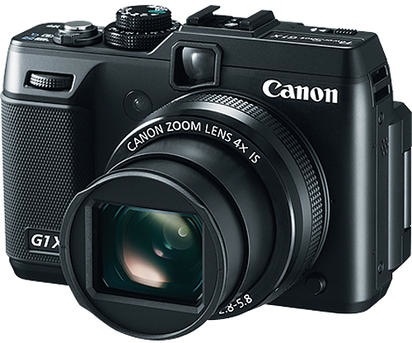
Fuji X-Pro1 and Canon G1X

Overpriced.

The recent announcement by Fuji of its interchangeable lens APS-C X-Pro1 leaves me in two minds, but let’s get one thing out of the way. This camera is not a ‘Leica killer’. At a costly $2,400 with one lens it’s one quarter of the price of the Leica M9 and simply does not compete with it, any more than a Mercedes competes with a Rolls Royce. Sure, the features may be similar, the fit and finish identical and the looks attractive but one caters to the buyer thinking he’s getting some exclusivity for his money, the other caters to the buyer with more money than sense.

The clumsily named X-Pro1 with 28, 50 and 90mm FFE lenses.

What your $2,400 gets you here is a camera with one interchangeable lens and no zoom. That certainly harkens back to the Leica rangefinder idiom in the days when zooms were awful and Leica’s viewfinder didn’t know a zoom from a hole in the ground. And while the Fuji adds autofocus (still missing from the Leica M9 with its 60 year old manual range/viewfinder) and a zoom hybrid optical/electronic finder, the optical finder’s magnification of just 0.37x is simply ghastly. Even Leica managed 0.72x in most of its M bodies and around 0.9x in the M3 and certain later variants. 0.37x, if it is to be believed, is a joke.

For this camera to be a useful street snapper – and like the Leica M it’s ill suited to other genres – then responsiveness will be key. The APS-C fixed lens X100 has poor focus speed and high shutter lag by all accounts, whereas the much cheaper X10 cures those ills but blows it with a silly, fingernail-sized sensor, good for small prints only. Though a zoom lens is currently unavailable and may be coming, the clunky use of fixed focal length lenses for a street snapper, and the delay occasioned by the occasional need to change these, is simply an anachronism in a modern, fast paced world. Significantly absent from the design is any anti-shake technology. A big omission for the price asked and for the primary use intended.

The X-Pro1 retains the well executed automation settings from the X100 (and the much earlier Rollei 6000 series medium format film SLRs, one of which I happily used for years). For shutter priority set the aperture ring to ‘A’, for aperture priority set the shutter dial to ‘A’ and for program automation set both to ‘A’. And it’s nice to have simple rings and dials for these functions, in addition to the over/under exposure dial on the top plate.

Finally, the price of all this retro-think is ridiculous. If the M9’s $10,000 price tag is simply silly, the $2,400 asked for the X-Pro1 is exorbitant. The difference between silly and exorbitant is that a select few can afford silly and not care about it, but all others have to think twice about exorbitant, meaning three times the price of the competition. If you want to pay a $1,500 premium for the admittedly gorgeous looks, then have at it. For $700 you can have your choice of MFT bodies from Oly and Panny with a capable zoom kit lens and any number of decent offerings from Canon/Nikon/Sony in APS-C.

What is wanted by the street snapper is a camera with a modest zoom range – say 28-70mm – a decent aperture, maybe f/2.8, anti-shake, a fixed lens is fine, a hand operated zoom and a decent finder, optical or EVF, married to an MFT or APS-C sensor. Responsiveness is paramount. Canon sort of gets it with its new $800 G1X, but the zoom range is too long at 28-112mm, sacrificing speed in the process for a disappointing f/5.8 at the long end. Responsiveness is also currently unknown, the optical finder appears to be the same crappy one from the G9/10/11/12 series, though the body at least includes anti-shake and the sensor is almost APS-C sized. So that’s a lot closer to the street snapper’s demand for functionality than the dated approach of fixed focal length lenses, fast as they may be, adopted by Fuji on the X-Pro1.

The ‘almost right’ Canon G1X.

However, these are encouraging developments. If the Fuji enjoys robust sales, one of the mass manufacturers will likely get it right and produce a sub-$1000 fixed lens, big sensor, responsive snapper with a modest range fast zoom, the latter manually operated. Electric zooms simply don’t cut it in real life street situations. Goodness knows, we have been waiting long enough. Right now the street snapper chooses from:

  • Panasonic G3 or GH2. $630/900 with kit zoom. Traditional DSLR looks but with EVFs, MFT sensor, marginal ergonomics on the G3, decent lenses for the most part, attractively priced, very responsive, needless prism ‘hump’. Ugly as sin to look at.
  • The Olympus MFT range, all damned by the absence of a viewfinder other than the frightful clip-on EVF designs. Attractive looks.
  • Fuji X100. $1,200. No zoom, APS-C sensor, sluggish, overpriced. Gorgeous looks.
  • Fuji X10. $600. Nice fast zoom, responsive, attractively priced, very small sensor. Forget about cropping and large prints. Gorgeous looks.
  • Fuji X-Pro1. $2,400 with one lens. Zooms may become available later, APS-C sensor, unknown responsiveness, exorbitantly priced. Fixed focal length lenses only for now. Gorgeous looks.
  • Canon G1X. $800. Almost APS-C sized sensor. Unknown responsiveness, crappy optical finder, attractively priced, slowish zoom, no manual zoom ring. ‘Wouldn’t-kick-it-out-of-bed-for-eating-crackers’ looks.

So none of these gets it quite right, but it is very encouraging to see that makers are slowly ‘getting it’. Once manufacturers start realizing that fewer features on a better executed body are what the user wants, then the right camera will follow. And if it looks half as nice as the three Fuji models, it will be an object of desire in itself.

But while the new Fuji may make those who value looks over function happy as can be, it doesn’t seem to be the answer to the street snapper’s ideal. Close, but no cigar.

Lumin

Ingenious.

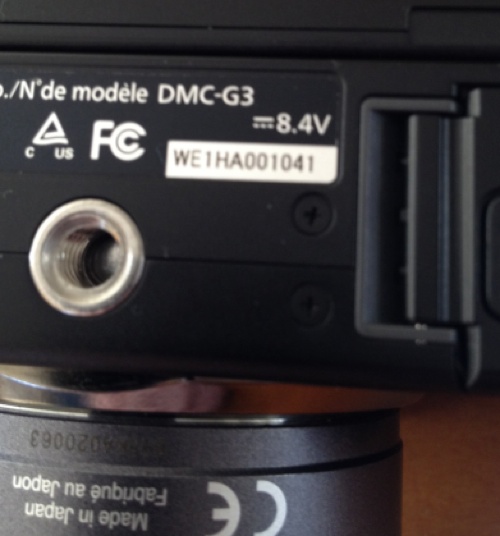
The Lumin app for the iPhone allows the use of the phone’s camera as a magnifier, with or without illumination from the built-in LED. That’s incredibly clever, and I have found it ideal for determining serial numbers on hardware for insurance purposes. Such numbers are increasingly screen printed in very small fonts on equipment and the their falling size and my aging eyesight conspire doubly against me.

You can take a snap of the area imaged and email it to yourself with ease – here’s an example of the serial number on my Panny G3:

Other uses include looking at restaurant menus in poorly lit diners, spotting that wood splinter in your finger, examining your Border Terrier’s nose to try and determine just how it manages to stay frigid, and …. well, you get the idea.

There are many flashlight apps in the iPhone AppStore, but none that can compare to this. Try and buy an illuminated magnifier for $1.99 that fits in your vest pocket and doubles as a flashlight.

Inside the Box

No new thinking.

If you look at the hand-held SLR, it really has had no radically new thinking since Pentacon had the idea of installing a pentaprism and Pentax added an instant return mirror and auto diaphragm for largely uninterrupted viewing. That was 60 years ago. A few decades ago Honeywell invented autofocusing and now everyone (except Leica, of course, who helped invent it) has it. While those early variants were exclusively mechanical designs, the later ones have added batteries and motors to replace the thumb and fingers and a digital sensor replaces film. But the basic design, that of a flapping, noisy mirror in a bulky box, remains the same.

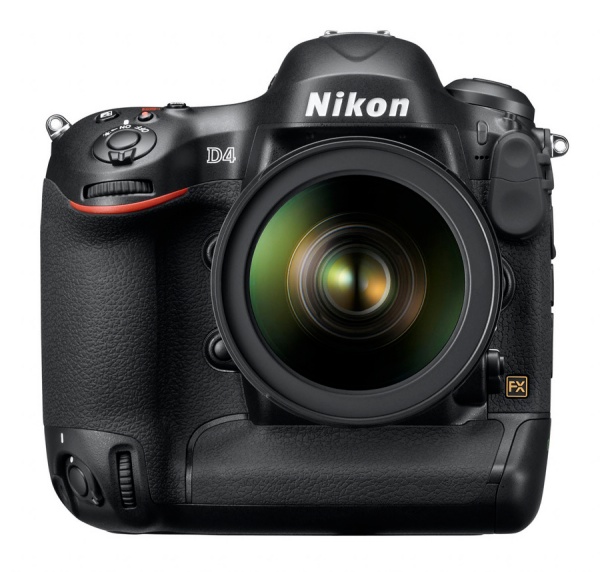
But as electronics have added a host of new capabilities, DSLR bodies have grown buttons, sockets and dials on seemingly every surface. Take a look at the new Nikon D4:

Nikon D4. Not a smooth surface in sight.

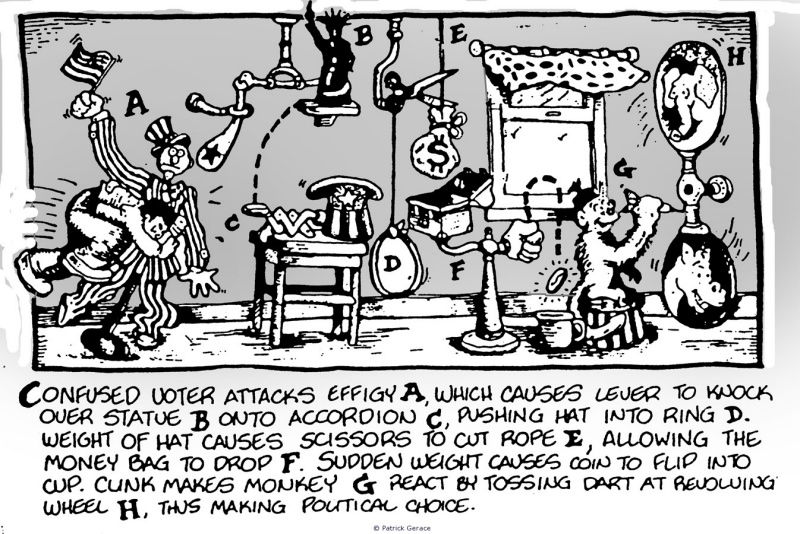
In fact, my first reaction on seeing this was to laugh. It is so exactly wrong in every design respect that the only thing that comes to mind is the inventions of Rube Goldberg:

Rube’s voting machine.

Sure, the Nikon can take a bazillion pictures a second, removing the last vestiges of skill from the sports picture taking process, and can be tuned to any number of picture taking situations, but the thinking is all wrong. If you watch a sports photographer at work, he never adjusts anything. He has his rig set for shutter priority automation and autofocus, carrying a spare battery and a few cards for image storage. Then he bangs away. Better still, watch his UK counterpart on the sidelines at a pro soccer game. Likely as not his camera, with one lens attached at all times, is shrouded with a plastic bag to keep out the rain and the only thing he does is point and shoot. Likewise the fashion photographer. The strobes are set just so, the camera’s settings are frozen and all he does is encourage the model to wet her lips or lean this way and that.

Both these professionals have no need of the myriad settings on their pro-DSLR body. They default to a menu of standards and care not one whit for all the options. And this is where high-end DSLR makers get it so wrong. Rather than recognize the working method of just about every snapper out there, they prefer to give you all the options, forcing you to decide, thus belaboring their designs with all those buttons and dials.

No question that these pros need the flexibility the body provides, but they need only one specific subset of all those options. So here’s how modern cameras should be designed:

  • No flapping mirror. Cuts bulk, noise, vibration and wear.
  • One dial, one button. Yup. That dial simply exists to alternate between a handful of custom settings. The button is for taking the snap.
  • One fixed lens. You want wide, use the wide body. You want long, get the long one. Just like the guy on the sidelines for the soccer game. This greatly simplifies design and dramatically cuts bulk and weight.
  • A smartphone wireless interface through which those customized settings are conferred to the body, obviating the need for any body controls.
  • One large LCD display to show the settings dialed in under any custom choice.

None of the flexibility or ‘tuneability’ of the original concept is lost. Ergonomic form and function are restored. And weight is cut as all those mechanical adjusters, mirrors, prisms and interchangeable lenses disappear. Nothing really new here – it’s just a sophisticated version of what point-and-shoot cameras have been trying to achieve for ages with their mode dials – one setting for ‘landscapes’, another for ‘portraits’, a third for ‘sports’, and so on, but done at a far more accomplished level.

And realization of that concept is getting closer daily. The market is filling up with capable mirrorless designs, EVFs are improving by leaps and bounds, custom settings are here, but the smartphone interface is still largely lacking. You see it in some of the iPhone apps (like Camera+) which integrate the software with the hardware at an amateur level (allowing both pre-taking adjustments and post processing in one app), but there is no reason why this approach should not be extended to professional gear.

And unless the likes of Nikon, Canon and Sony start thinking Outside the Box, the will soon find themselves Inside the Box which is called Bankruptcy. Hey, it happened to Kodak. It can happen to you.

Zite

A news consolidator for the iPad.

For the past year my default RSS feed reader on both the iPhone and iPad has been Reeder, a product well attuned to the touch interface and continually improved. I use it for RSS feeds I elect, thus making an efficient process of reading just those sites which interest me and making it unnecessary to visit to see whether updates exist. Reeder looks at your RSS feeds in Google Reader (yes, the company which :”Does no evil” and derives content based on those.

A new class of feed reader is coming along as an adjunct to Reeder, and one example is named Zite. If you wonder about the name it’s derived from German under the mistaken impression that Americans actually speak more than one language. (Had this been a News Corp app it would have been named ‘Scheiss’).

Zite also goes out to your Google Reader account (and Twitter and others) to look at what you are reading then returns stories based on the most popular sites within your interest areas:

So, for the most part, there’s relatively little overlap between what you choose in Reeder and what Zite chooses for you based on your Reeder feeds. The layout is magazine style and on my iPad1 everything loads quickly. Setup is a breeze, with the user choosing major categories of interest, which you can see down the right hand column:

Touch ‘Photography’ and you get:

Touch the story for the full text. Swipe left for the next page under the same Section heading.

There are links on the right of the iPad’s display (not shown above) which permit emailing or saving to Instapaper, etc. Nicely done.

The app uses the touch interface really well and I’m enjoying it greatly, not least for some of the unexpected source materials it presents. The one shortcoming I have asked the developers to address is that once read a story should be ‘greyed out’ to make the whole thing more efficient. With so many stories, I find that I was choosing ones I had already read before they were relegated to the dustbin of history.

Zite is free and I have not been troubled by any intrusive advertising.

Bad news – 11/2015:

Too good to last, Zite is closing down 12/7/2015, asking that you join some foul social network instead. Hasta la vista, Zite.