Some settings.
Part I appears here.
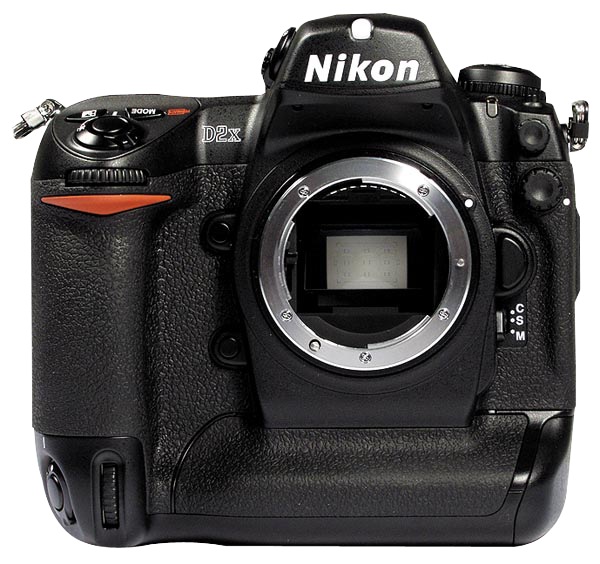
First things first. Now that my pristine Nikon D2X has arrived, courtesy of a fastidious original lady owner, I immediately installed an Upstrap to make sure it felt comfortable when worn. Not surprisingly, the ghastly ‘Nikon’ emblazoned strap which came with the camera was unused – it’s rubberized on one side only and you become an unpaid advertiser when using it. Upstrap is the way to go – the SLR-LT/SLRN non-Kevlar model is what is called for.
Second, a quick check of the firmware confirmed that Version 1.01 was installed. A download of the two BIN files from the Nikon USA site to the root directory of the CF card, a couple of button presses and two minutes and Version 2.0 was up and running. Advantages?
Nikon D2X firmware version 2.0:
- H 0.3 (equivalent to ISO 1000) and H 0.7 (equivalent to ISO 1250) if using EV steps of 1/3rd steps in the Custom setting b2 or H 0.5 (equivalent to ISO 1100) if using EV steps of ½ steps in the Custom setting b2, have been added between the ISO 800 and H 1 settings in the ISO menu.
- Autofocus subject acquisition and tracking performance has been improved.
- A Black-and-white (sRGB) option has been added to the Color mode option in the shooting menu.
- A new Trim function has been added to the shooting menu.
- Up to 3 custom tone curves can now be downloaded to the camera for use with the Custom Tone compensation option.
- Nikon Capture 4 (Ver. 4.4.2) Camera Control or Camera Control Pro with Ver. 1.1.1 and later is required to download 3 custom tone curves to the camera.
- An Image authentication option has been added to the setup menu.
- The optional Image Authentication Software is required to authenticate images.
- A Save/load settings item has been added to the setup menu.
- The Mirror lock-up option in the setup menu has been modified to function with battery power as well as AC-adapter power.
- The Lock-On option in the CSM menu now offers 4 options: Long, Normal (default), Short, and Off.
- Max. sensitivity and Min. shutter speed options have been added to the ISO auto menu.
- The Maximum shots option in the CSM menu has been updated to support a maximum setting of 60 shots.
- The FUNC. button item in the CSM menu has been divided into 2 separate items labelled FUNC. button and FUNC. + command.
- A Recent settings item has been added to the setup menu.
- The shooting data of an image in the playback photo-information display now includes Focus mode (S/C/M) and Vibration reduction (on/off). Displayed only when the image was captured with a VR lens.
- Latitude and longitude GPS data now displays up to 3 digits for each segment.
- A compass bearing is displayed in the GPS data, if used with a GPS device is equipped with digital compass.
Non-trivial enhancements, as you can see. The only surprise here is that the original owner did not do this!
I popped an SDHC 8GB Lexar CF card in and recharged the battery, which the camera states is some half way through its useful life. The D2X was made before SDHC high-speed transfer technology was available, so write times are not reduced with an SDHC card in the camera, but read times in a USB3.0 card reader most certainly are when loading the images into Lightroom or Photoshop. And with the body’s large multiple-shot buffer, write times are not a major concern. In my D700 the 8GB card will store 302 RAW images; in the D2X that rises to 386. Nice.
As expected, the weight of the body, despite its increased bulk, is little different from that of the full frame D700.
As long time readers know I own many old MF Nikkor lenses from what I consider to be the golden age of manufacturing, and have modified all of these by adding a CPU. To confer aperture control on the aperture ring of lenses thus modified (and also for AFD lenses which come with a CPU) the related setting is found in Custom Setting Menu->f – Controls->f6 Command Dials->Aperture setting->Aperture ring->OK. Phew! You can now change the aperture on manual and AFD lenses using the aperture ring on the lens. That’s how cameras used to be and that’s how I like mine. If you elect to use my
As usual, I turn Image Review off. If I need to chimp the image on the built-in LCD it’s to check the histogram, and that only in challenging lighting.
The GPS unit and sender set forth here for use on the D700 works better with the D2X, the D700’s 70% hit rate rising to over 90% with the D2x.. Latitude, longitude, altitude and UTC time are all faithfully recorded in the file.
A quick reset (two green buttons at the rear base held for 2 seconds) restarted frame numbering from zero, the body having some 22,500 actuations on it when received. In other words, as these things go, it’s a baby. You really must avoid pros’ beaters when searching out one of these.
Autofocus with AFD lenses is slightly (subjectively) faster than with the D700 – the D2X stops the focus first time whereas the D700 sometimes goes past the optimum focus point then retraces. But practically there’s little to choose. Both are breathtakingly fast, and the older AFD lenses which use the ‘screwdriver’ lenses focus mechanism are nicely suited to the powerful focus motor in the body of the D2X. I only own one Nikon G lens, the 16-35mm VR f/4 which uses the more modern linear in-lens focus motor, and this locks autofocus even faster than the AFD lenses I use. The G lens may be set in awful resin, but the technology delivers. On the AF-C D2X, the 16-35mm focal length range computes to an FFE of 24-52mm, a handy range for street snappers. Couple that with the 35-70mm AFD (FFE of 52-105mm) and you have a powerful ‘around-the-world’ outfit.
A quick tweak on the eyepiece adjuster saw things nice and sharp in the finder. Subjectively the finder in the D2X is one stop brighter than the one in the much newer D700. The D700 projects a larger, warmer image with the 1.2x magnifier I use. Removed, the two are near identical, though the D2X has a smaller sensor. Unmagnified, the D2X’s finder is just right – there’s no need for the eye to scan around for data. Both bodies present a wonderfully uncluttered image area through their respective finders. Best of all, the Nikon Eyepiece Magnifier fits perfectly and makes the viewfinder into a true state of the art focus and composition aid. Highly recommended, especially with fast and/or long lenses.
The focus confirmation light, used with manual focus lenses, is more decisive than in the D700 – there’s less stuttering around the optimum focus point, but I am splitting hairs here. If you use my lens correction profiles (click on Sitemap, above), these will require no changes for the smaller APS-C sensor.
The D2X has one useful feature missing from prosumer bodies like the D700. A button at the lower rear allows recording of a voice memo of up to 60 seconds with an image. Very handy for, say, recording the name and email address of someone in a street snap when you want to send them an image later. It’s a nice thing to do for posed snaps and a handy feature to have.
Despite its increased bulk, the D2X handles better than the D700, owing to the duplicated dual command dials on the handgrip which make vertical operation a breeze – as long as you remember to flip the switch to enable the vertical shutter release! The shutter is noticeably quieter than in the D700, but the latter has a 3″ LCD compared to the 2.5″ on the D2X. If you are a big LCD user, that is not good.
Otherwise things are remarkably similar between the two bodies, despite the disparity in their ages. The EN-EL4 battery has a 1900mAH capacity meaning a whopping 1,500 images per charge (the later EN-EL4a is 2500mAH or 32% more shooting capacity). These batteries are awfully expensive but as there are so many tales of melting aftermarket ones, I bought a lightly OEM Nikon used spare. The EN-EL4a will not fit the D700 but will fit the D700 when equipped with the vertical hand grip. One more recharger to remember. For comparison the D700’s battery is 1500mAH.
In summary, I do not think you will complain about value for money when buying a used D2X. You can decide, based on this and subsequent articles here, if a used one makes sense for you. While I’m not a serial shooter, cranking the body up to maximum continuous shooting is quite something to behold – 8fps in cropped frame mode.
Overall impressions are of a body of quite immense solidity, perhaps subjectively better than even the massive and well made D700. At $650-800 for a lightly used non-pro ‘beater’ the D2X is a bargain if you can live with APS-C. Pay a little more for one with low actuations – the risk-reward is positive. The D2X will accept just about any Nikkor lens ever made, and older ones can be easily retrofitted with CPUs to modernize their data recording abilities.
Pictures in Part III, but of course there has to be the obligatory snap of Bert the Border Terrier to round out this piece!

Bertie. D2X, 85mm f/1.8 AFD, f/5.6, ISO 400.
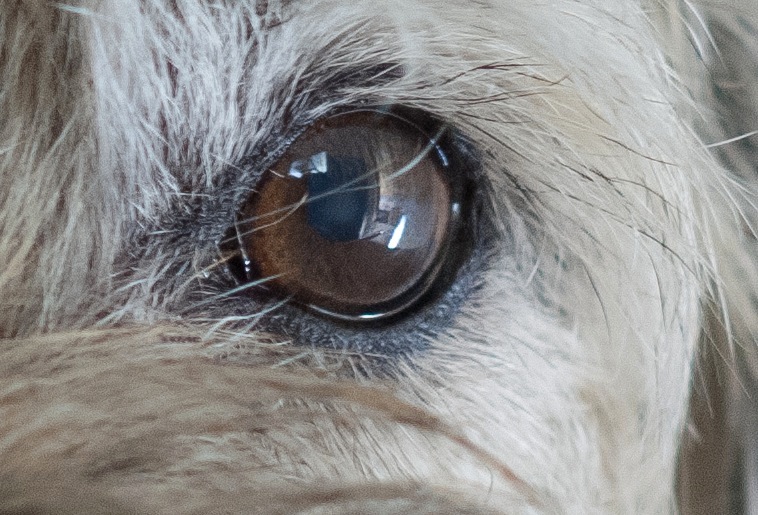
Detail of the above. The spot autofocus center rectangle was used, locked with a first pressure on the shutter release.
A quick look at the first images from the D2X does prompt the question: Wither sensors? A friend sent me some uncompressed originals from his new Nikon D800 the other day, and encouraged me to pixel peep, meaning I was looking at display images which equalled print originals 10 feet in size. 10 feet! The rendering of detail, the absence of noise/grain/whatever were startling. Even at ISO1600 the results were special. But I cannot help wonder, in the real world, one where prints are dying and large LCDs are the default display medium viewed at a rational distance, who needs these insanely great sensors? For those who do not, and who are looking for value for their money, oldies but goodies like the D2X have an awful lot to offer. And you are not going to beat the framing rate or the vast choice of inexpensive manual focus optics.
And thank you, Christine, for a camera delivered in such fine condition!
Part III appears here.