Category Archives: Photography

Goodbye Kodachrome, hullo freedom.

Bitter sweet feelings.

Kodachrome was the first and last color slide film I used, before migrating to color negative when emulsions equalled and exceeded Kodachrome for quality and contrast range. Then along came digital and film was no more.

Kodak gave its last roll of Kodachrome to National Geographic snapper Steve McCurry and his last picture on the last roll was of the Parsons, Kansas cemetery, the town with the last Kodachrome processing lab. So even if you can find some Kodachrome, you can no longer get it processed.

The last snap on the last roll. Parsons, Kansas.

Click the picture for the NPR article.

It is not this journal’s goal to indulge in political discussion. However, when the hydra of politics begins to threaten our most basic freedoms, it is important to draw attention to the reality. In England, for example, a nation increasingly resembling a police state, just try pointing your camera at something when a cop is present. In France, woe betide you if you wear a rag on your head. As goes Europe, so goes America. How long before our first photographer is incarcerated as a ‘threat’ to national security?

But not all was bad with the year just ending. Most significantly, we have seen the stirrings of global free speech through the courageous acts of an Australian journalist whose WikiLeaks publication has started exposing all governments for the frauds and cheats they are. Those seeking proof need look no further than the outpourings of vituperation and threat from those very governments so clearly exposed. If you were an unelected apparatchik of a government which afforded you easy money for no work, you too would consider your job mightily threatened by this sort of thing and that is what we are seeing in the press today.

So for all of you believing that the First Amendment to the US Constitution is a Good Thing in need of daily defense and support, all of you tired of perpetual war, all of you disgusted with a world ruled by banksters and corrupt oil men and purchased politicians and morally bankrupt diplomats and warmongers and despots and torturers, wrapping themselves in the flag, caring nothing about the next generation, let me take a moment to remind you of the words of that great piece of US constitutional prose:

Congress shall make no law respecting an establishment of religion, or prohibiting the free exercise thereof; or abridging the freedom of speech, or of the press; or the right of the people peaceably to assemble, and to petition the Government for a redress of grievances.

I fondly hope that all global hegemonies are mightily exposed by what is happening in the world of disclosure and look forward, perhaps naïvely, to a better future.

So Kodachrome, thanks for a great past and Mr. WikiLeaks, thank you for a promising future. We can but hope that US gaols remain free of photographers.

For an earlier version of this brave journalist, one who worked before the invention of cameras, click here.

And you can read all about Kodachrome here
Fuji FX100 web site

Looks promising.

If it really is responsive, quiet and has a decent viewfinder, you will find me at the front of the line for the Fuji FX100. This is much more than the ‘Leica M9 for the rest of us’. It’s not just the price, it’s the automation. The Fuji has autofocus and shutter or aperture priority auto-exposure. The M9 has only the latter.

Sure, the lens cannot be changed, but as a single purpose street snapper, you don’t need that anyway. What you want is fast – no fiddling with exposure or focus or this or that. Just press the button. C’mon, gimme the snap.

So Fuji’s new site (mostly English, though some page turns get you to pure Japanese) is welcome.

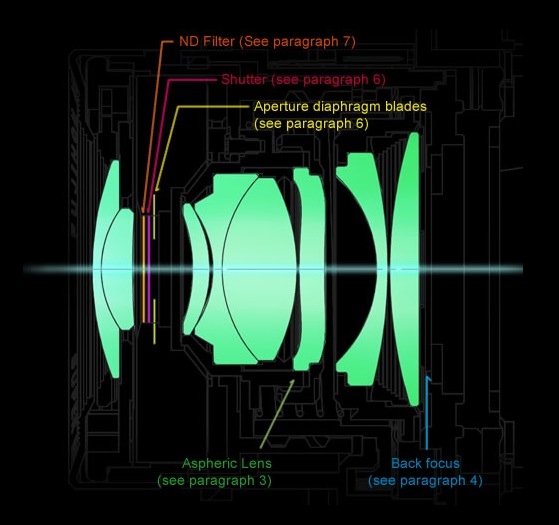
Just look at the complexity of the design of that aspherical lens element!

35mm equivalent f/2 lens in the Fuji FX100

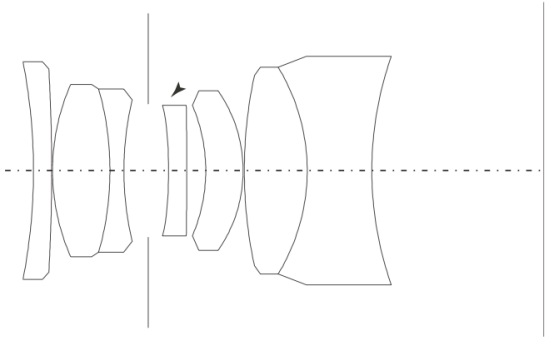
Emphatically not your father’s 35mm Summicron!

Yesterday’s news. The superb 35mm Asph Summicron which I used for years on my M2.

So it doesn’t look like Fuji is skimping on the optics, but the key variables remain to be assessed – speed, viewfinding and noise.

Still, I find lots to be excited about here.

To enter the FX100 site, click the picture below.

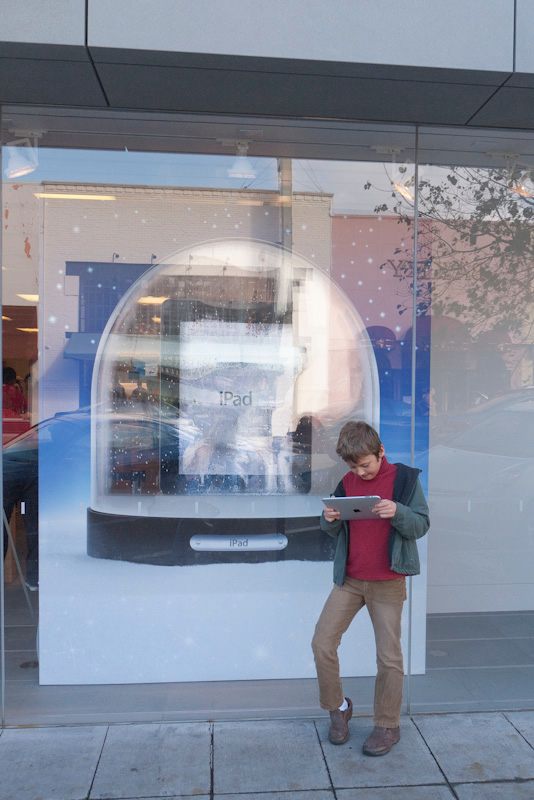
Click to enter the Fuji FX100 web site. Needs Flash, so no iPad! Thanks, Mr. Jobs, for being such a jerk.

Virgin Mobile MiFi 2200

Bring your own wifi.

Want to bring your own wifi hotspot with you rather than suffer the agonies of lousy hotel systems or ill equipped restaurants? Want to upload your snaps to friends or write and upload your blog from the road? Want to do whatever it is you do seamlessly on your travels?

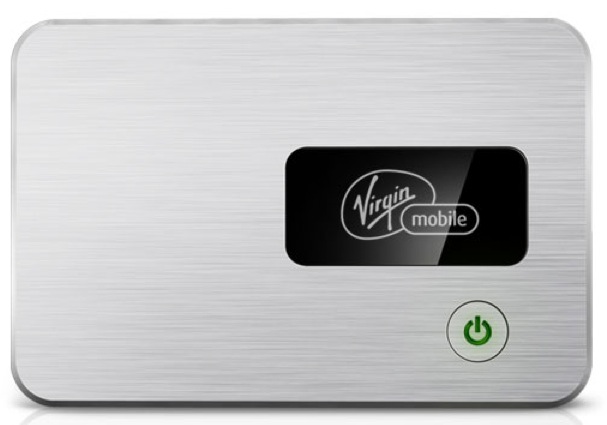
Well, now it’s easy and cheap. It’s called the MiFi 2200 from Virgin Mobile, it’s the size of a credit card, although a bit thicker, runs four hours on a charge and it costs $150.

The Virgin Mobile MiFi 2200 – 140% of life size

It also works fine off the mains. $40 monthly for unlimited use on the Sprint cellular network and it fools your computer into thinking it’s a wifi source, not cellular 3G, so things you cannot download using 3G (like large files) work fine.

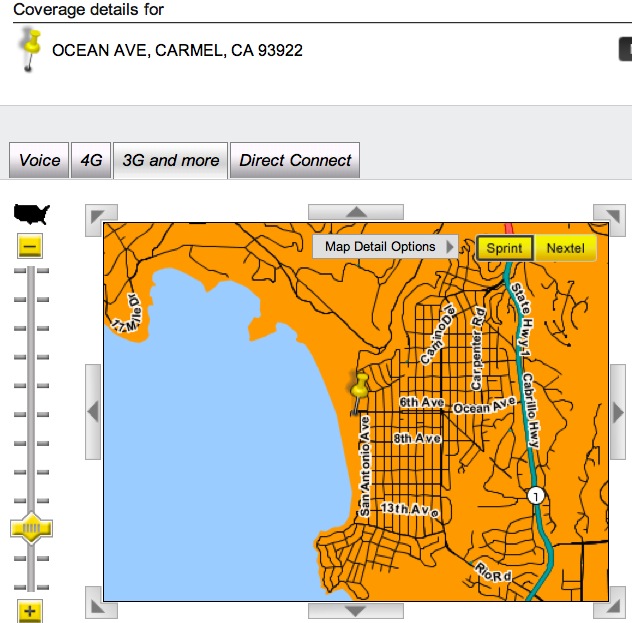
Before I bought one and signed up I checked coverage for 3G Sprint at Sprint’s coverage map for my favorite places in California – I refuse to fly, so that means driving distance. These include Monterey Bay and Carmel, both a two hour ramble from home in the old roadster.

Well, it turns out that Sprint is excellent (=orange) in both locations; here’s Carmel for example:

After signing up (more passwords and codes than a retriever’s litter – a disgrace) I tried it with my iPhone, iPad and MacBook Air. All work perfectly. While my iPhone has 3G built in (my iPad version does not) this reduces battery drain on the iPhone significantly. On Airport Extreme/AT&T 10mB/s broadband, my iPad usually gets about 4mB/s download; I got 1.1 mB/s using the diminutive MiFi. I also tested it using this slower speed with an HD Netflix movie and it works fine. Wow!

I like to drive to Carmel and Monterey Bay now and then for some R&R and have been staying at the Pine Inn on Ocean Avenue in Carmel since before wifi was invented. The Pine Inn has the worst – the absolutely WORST – wifi on the planet and I have been complaining about it mightily for years and years. They smile and do nothing. Another favorite, the Spindrift Inn in Monterey, just down from the Monterey Aquarium, always tries to charge me for their wifi (a truly dumb business practice) and I always have to fight to get the charge reversed as the service is awful.

No more!

The additional advantages of the gadget are that you can have up to five computers/devices accessing it at the same time and it uses WPA encryption for high security. I’m going to see about getting a second battery for travel, just in case. Battery life is claimed to be 4 hrs, 40 hours standby. Plus, when iPad2 comes along, I’ll buy the cheaper non-3G version as the MiFi is device independent – meaning it’s not built in.

But here’s the real killer feature for someone like me who simply cannot be without the Internet. The MiFi works perfectly with my desktop HackPro which of course has no cellular receiver! It may not be a speed demon, but it works fine, so if AT&T’s wifi goes down at home, the desktop HackPro thinks the MiFi is just another Wifi source and can lock on to it. So the MiFi is also a wifi backup system in the home.

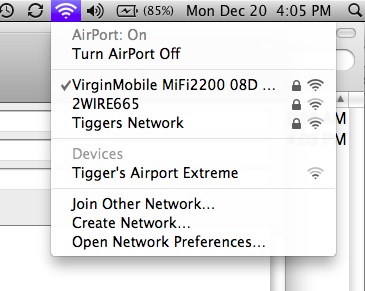
Here it is running on the MacBookAir (2WIRE665 is the native AT&T feed; Tigger’s Network is the Airport Extreme wifi in the home; the seemingly unsecured Tigger’s Airport Extreme is actually a secure Airport Express range extender which the Mac seems incapable of naming or displaying properly):

For some reason Virgin Mobile has decided that when the MiFi 2200 is connected to your MacBook using the provided USB cable as an alternate charging source, its wifi/3G is disconnected. Duh! Well, needless to say there’s a hack out there to fix that – a simple change in the config file, so I’ll be doing that tomorrow. That means one less charger to carry on the road.

Just for fun this was written using the MiFi to proof, upload and finalize the whole piece on the MacBook Air from the road. While obviously slower than native wifi, after a while I was so into the process that I no longer noticed. The MiFi sat in my shirt pocket, got noticeably warm to the touch – not old Apple TV fry-your-eggs-and-bacon hot nor new Apple TV too-cool-for-school cool – and worked like a charm.

What are you waiting for?

Warning! Update January 13, 2011:

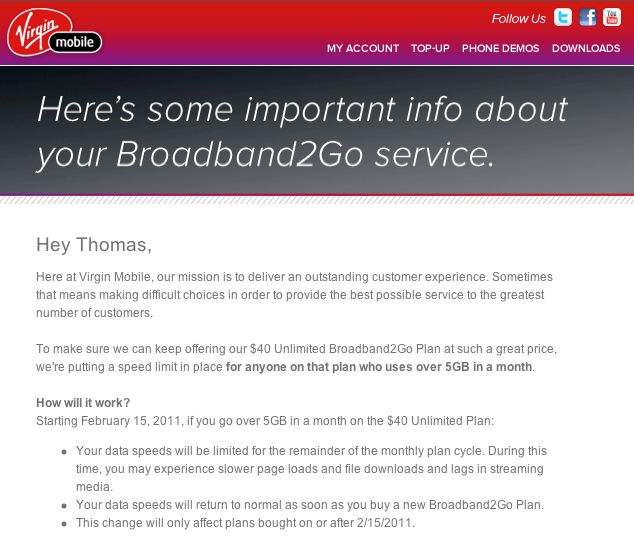
Just received this from the crooks at Virgin Mobile – they are limiting monthly downloads to 5gB for new MiFi plans bought January 15, 2011 or later:

Hey, Virgin? Up yours!

ZumoCast

Your own iPad cloud.

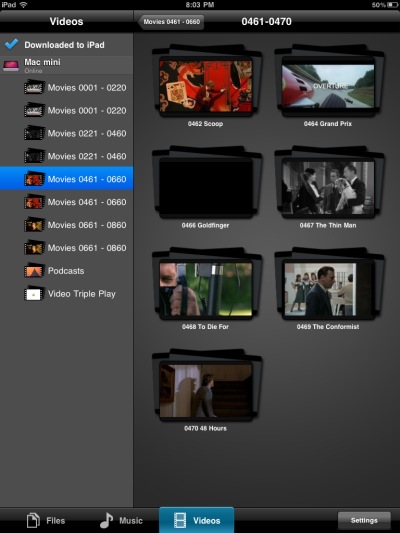
I have some 800 uncompressed movies stored on a 4+4 terabyte ganged series of hard drives, attached to a MacMini which is connected to our TV. Uncompressed because one day I believe 100″ LCD screens will be affordable and compression drops quality. That 100″ screen will need a high quality original DVD file. These movie files, in VOB format, average 4-6gB each and while you can copy these to your iPad there are two snags.

First, you will run out of space on the iPad very quickly, and you are wasting resources as an uncompressed file is unnecessary for the iPad’s small screen. Second, you are wasting your time as the iPad cannot play VOB files; it’s limited to m4v/H264 video files which average 1.2-1.3gB. So I have a few favorite movies on the iPad which I have converted to m4v using Handbrake and RipIt (where needed) but the process is very inefficient. Conversion averages 30 minutes, and I have to rotate the files on and off the iPad owing to its very limited storage.

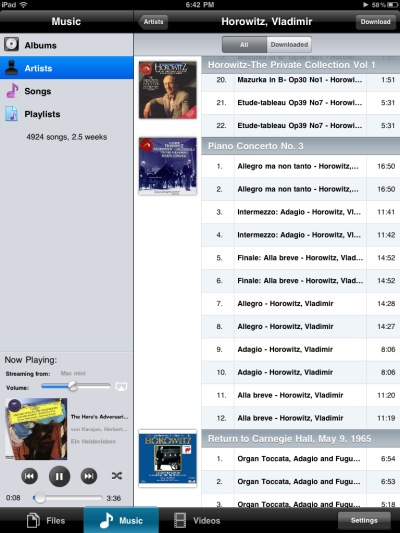
Well, there is a miracle app for the Mac and your iPad which does everything you could possibly wish. It’s called ZumoCast and it makes your Mac or PC into your own cloud storage. It will access your movie, picture or music files over the air and can access these whether they are on the Mac or on HDDs attached to the Mac. And here’s the magic part. ZumoCast converts those monster VOB files to m4v on the fly and displays them perfectly on the iPad after a few seconds of buffering using our home wifi. To set Zumo up you download the Mac app, tell it which folders you would like your iPad to see, install the iPad app and click away. The movie quality on the iPad’s screen is superb.

So now my iPad has access to the 4tB of storage attached to the Mini, access to the Mini itself and access to any other Intel Mac on the network where I have installed the Zumo Mac app. Unless I have the Mini doing some processor intensive task like a backup there is no stuttering, multitasking works fine and for music files I can route the sound to any network device in the home. The Macs in the home have suddenly become my own cloud storage, accessible from the iPad.

Two other items of lunacy – Zumo says the iPad app works over 3G as well as wifi (I have not tried that as my iPad does not have 3G), and ZumoCast is free. Quite how their business model works I have no idea as there are no ads, but free is good.

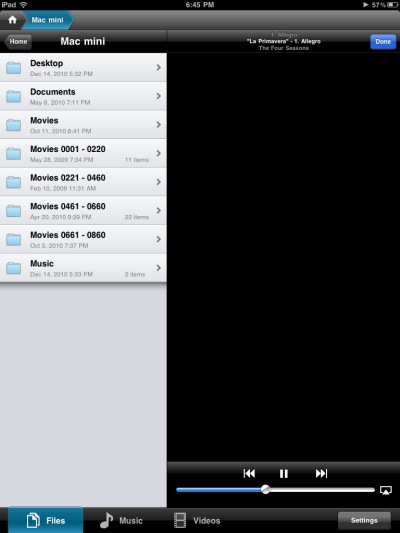
Showing the folders on the MacMini made available to ZumoCast on ther iPad – including four remote ‘Movies’ HDDs.

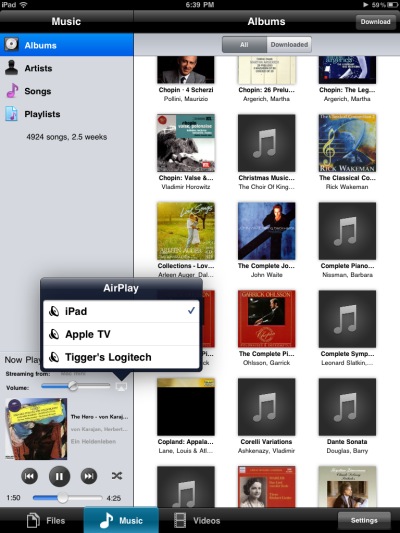
AirPlay works fine for sound but not for video.

The iTunes library on the remote Mac works beautifully with AirPlay.

A movie directory from one of the remote HDDs seen in ZumoCast on the iPad.

Stanley Kubrick’s ‘Eyes Wide Shut’ – the original VOB file plays on the iPad over the air.

If you want to store the converted file on your iPad, ZumoCast allows you to do that though it’s hard to see why you would need to do this – maybe for viewing/listening where you have no wifi or 3G access? The stored file will be in the appropriate iPad format.

Limitations: ZumoCast cannot play copy protected DRM files – like older iTunes music purchases or any iTunes movie purchases. However, if your content has all been ripped from DVDs and CDs, like mine, this is not a problem.

ZumoCast compared to Apple’s Remote iPad app: ZumoCast doesn’t care what format your remote file – music or video – is stored in, as long as there’s no DRM. Further, you do not have to have iTunes running on the remote Mac for the iPad app to work as ZumoCast addresses the remote files directly, not through iTunes. Remote will play DRM files on the remote Mac but that Mac must have iTunes running. So it seems the only time you would prefer Remote is when the remote file has DRM.

So with ZumoCast you can use the iPad as a remote controller for your file servers where your music and video files, regardless of format, reside, and watch them on the iPad; further, for sound tracks you can route the sound to your AirPlay device of choice. There is no need to perform format conversion to suit the limited range supported by iTunes or the iPad and storage is not an issue as your files never make it to the iPad, the latter being used solely as a routing and display device. Inspired.