A new addition to my G1 kit.
I confess that when I first bought the Panasonic G1 a year ago it was with the sole intention of dedicating it to occasional street snapping forays. Small, inexpensive, light, fast and quiet with a killer kit lens, it offers everything a street maven requires. For ‘serious’ photography there was no question in my mind that my Canon 5D with its battery of lenses and accessories would continue to be the ‘go to’ hardware.
That scenario is increasingly being disproved, as I find that the 5D molders in its gargantuan kit bag while the petite G1 accompanies me everywhere. And the only good camera is the one you have with you.
A trio of discoveries has brought about this turn of events.
First, I added the compact Panasonic 45-200mm zoom. This immediately showed itself to be a superb performer at all focal lengths and apertures but, startlingly, offered the possibility of a pocketable 400mm (Full Frame Equivalent) monster lens without the weight and bulk of anything similar for a full frame body. Add built-in anti-shake technology and you have a compelling argument for the Micro Four-Thirds concept.
Second, I’m out of wall space for huge prints and I have done my big-print-one-man-show thing, so the need for pin sharp definition at big enlargement ratios is no more.
Third, the increasing affordability of big display canvases, also known as flat screen TVs, obsoletes the big, static print in much the same way that the iPod obsoleted the CD, and Netflix On Demand movie streaming is obsoleting space- and capital-wasting DVD collections. And given that the quality delivered by even a modest $150 point-and-shoot digital is more than adequate for display on a 40″ TV screen, the desire for the level of resolution that has made pixel peeping a favorite pastime – for those equipment fetishists incapable of taking a good photograph – makes no sense. And if you want an even better display medium than your TV, try the iPad’s 10″ screen. It’s the perfect venue for photo eBooks as my several recent examples here illustrate and is a whole lot nicer to ‘read’ than a computer screen.
This is a long winded way of saying that the 5D’s days are likely numbered chez Pindelski. Click on categories->photography->technique->ebooks in the right hand column above to see what I’m going on about, and do make sure to upload these files to your iPad. Most of these snaps were taken on the Panasonic G1. A few dozen snaps well displayed on a small screen beat one huge static print on the wall. And the latter not only takes huge amounts of time, cash and equipment to create, it also gets boring really fast. There are simply too many images I want to show to remain content with a static wall print.
So while I have been a huge fan of the big print for as long as I can remember, I do think its days are numbered. Times change. Change or die.
All of which brings me round to the topic of today’s column, the newest addition to my G1 kit.
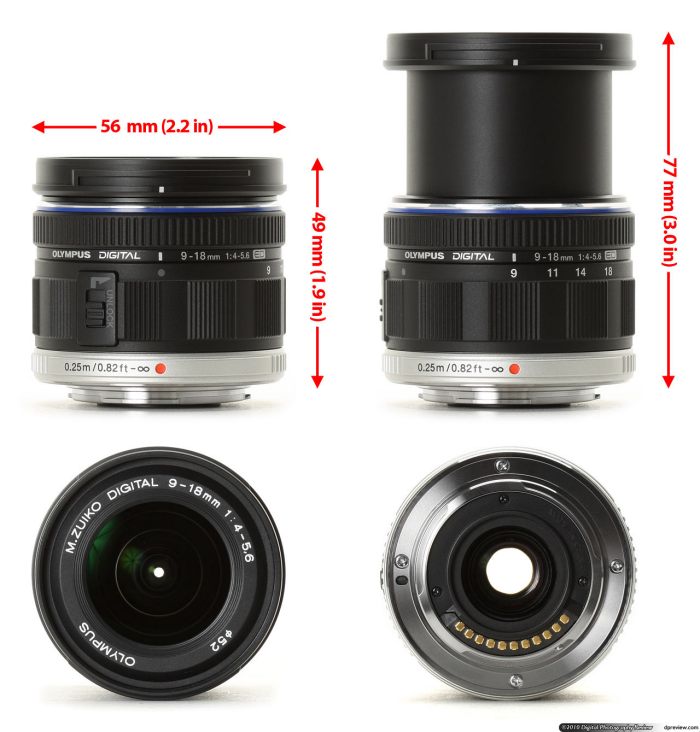
Olympus 9-18mm MFT lens for the G1. Image from DPReview.
My hot little hands await in glee.
I expect to have this little wonder in my hands today, but if you want to read the geeky stuff about how it performs there’s no better place to do so than at DP Review which has done an excellent job of reducing the myriad tables and measurements which technical reviews generally present into a single, sophisticated, interactive chart. (You cannot see the chart on an iPad as it uses Flash, so use a laptop or whatever). Interestingly their charts show that in almost all respects, regardless of focal length, the lens performs better at large apertures. I suspect that, with the small physical size of the diaphragm, diffraction effects are hurting definition at smaller apertures.
I’m no great fan of lens test charts, goodness knows, but DPR’s work does at least offer the comforting assurance that my money hasn’t been blown on a dog.
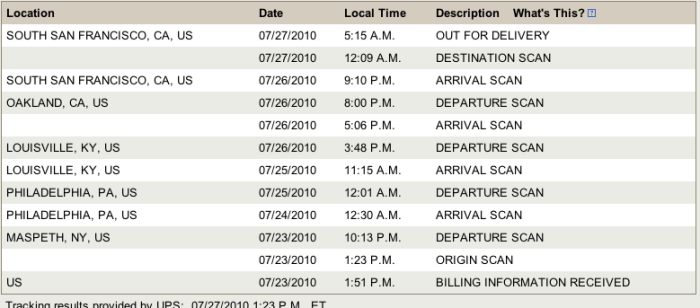
Here’s what this little charmer ran me at B&H PhotoVideo – I splurged on a costly B+W filter because the same one works well on my two G1 lenses and on two day shipping as it was dirt cheap:
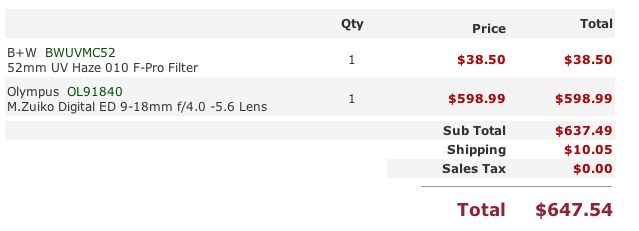
The only competition in the super-wide zoom category is Panny’s 7-14mm which, while optically outstanding by all accounts, costs almost twice as much, cannot accept a protective filter owing to its bulbous front element and is a tad bulkier. The filter thing is important to me as I refuse to use lens caps which are just one more impediment to getting a lens into action and because our eight year old is increasingly getting into photography but still has the uncanny ability of sticking his grubby fingers into a front lens element at a moment’s notice!
Of course, let’s not forget the collapsible part of the Oly’s design, and I do not mean that is a good thing. To make the lens usable you have to press a button and extend the barrel. This increases the bulk of the lens, though that’s not so bad a thing.
It can still be made much smaller for storage when collapsed as there is no rear protrusion, but it does mean one more thing to do to make the lens usable and suggests another thing to wear and go wrong in the long run. I have had more experience with collapsible lenses than most, having grown up with two Leica 50mm Elmars and one 50mm Leica Summicron in collapsible mounts for my Leica M bodies, but the collapsible feature of these was simply poor design. You see, when the lens was ‘collapsed’ what formerly stuck out in front now stuck out in back. The overall size of the lens barely changed! Leica’s design dicate was that, as long as you kept the lens on the body of the camera, things did in fact get smaller as the absence of a reflex mirror permitted retraction of the lens barrel into the camera’s innards. True. But, once you took the lens off, the design made no sense. And, by the way, if you forgot to extend the lens it was perfectly easy to take a bunch of out of focus blobs in lieu of pictures as there was no shutter interlock. A solution looking for a problem.
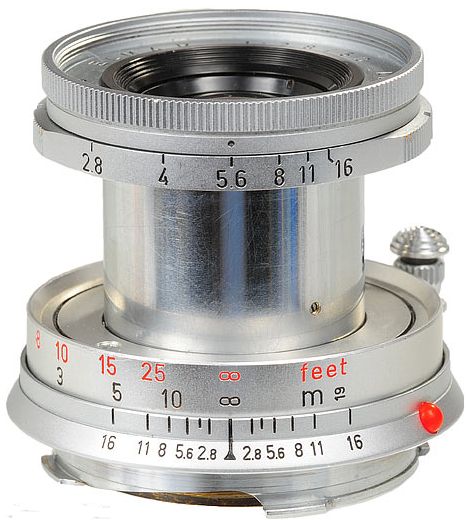
The poorly designed Elmar – as big collapsed as open.
The Oly avoids this issue as the above picture shows, the whole of the extensible optics portion being housed in the existing space of the focus unit.
The Oly lacks one other thing compared with the Panny 7-14 (neither has anti-shake). Width. Meaning the Olympus at its widest has a focal length of 18mm (FFE) whereas the Panny is considerably wider at 14mm. Flashing back to my Leica days again, I remember when all we impoverished Leica M users lusted after the seemingly impossibly wide 21mm Super Angulon, later the 21mm Elmarit. Lust was the emotion of the day as it comes into play any time you want something that’s more than you can afford. (Women, Ferraris, Leicas, you get the idea). When you did eventually get the coin together for the 21mm SA you also had to blow an additional egregious amount on a simply lousy clip on viewfinder as the Leica M’s built-in finder could at best go to 35mm or, later, 28mm at a stretch, and that was solely for those who did not wear glasses.
But 21mm was really wide and remains so for me to this day.
A simple test of how wide is wide is to question how often you find yourself cropping those ultra-wide snaps when processing. If it’s more often than not, then you do not need something that wide. However, I’m consoling myself here. 14mm is nicer to have than 18mm but the trade-offs in expense, bulk and weight allow me to rationalize in favor of the Olympus lens.
One final point. With three lenses in my G1 kit I have an FFE range of 18-400mm. And just look at the weight of these optics:
- 9-18mm – 5.5 ounces
- 14-45mm – 6.9 ounces
- 45-200mm – 13.4 ounces
So a total of 1.6lbs. – the same as an iPad – for a focal length range one would have dreamt of a few years back. That’s what MFT is all about and you can bet on one thing. Sensor technology will continue to improve so that, before we know it, the MFT body of tomorrow will be equal in resolving power to the 5D of today. And the need (as opposed to desire) for anything greater is limited to 0.01% of the world’s working professionals.
In Part II I look at the ergonomic aspects of this interesting optic.