Category Archives: Technique

Large prints on canvas

Up to 86″ a side!

I came across this site while looking for a large print service.

They certainly use the right printers and fade free inks as this excerpt from their FAQ states:

“What kind of equipment are you using to print on canvas?

Photogonia uses state of the art printers like HP DESIGNJET 5500 series and EPSON STYLUS PRO 9800. These large format printers deliver high quality print jobs that fit the high standards that Photogonia sets for our products.

What kind of Ink are you using?

PhotoGonia uses ONLY original factory Inks like HP 83 UV Ink Cartridges for our HP printers and 8-color Epson Ultra Chrome K3â„¢ Ink For our Epson printers. PhotoGonia doesn’t use refills, third party Ink or generic Ink. ”

A 40″ x 30″ ‘gallery wrap’ canvas (the printed edges are stretched over the frame) is $322.50, shipped. Not cheap, but the alternative of buying an ultra-wide carriage printer for one or two prints a year is hardly a viable choice. For that matter, unless you regularly make large prints, this sort of service makes sense for any photographer limited by the 13″ carriage width common on home ink jet printers.

Ring flash

An awful lot to like.

The ring flash I have been using on the 5D with the 100mm Canon macro lens is proving to be a real joy. It’s pretty much set and forget. All I do is adjust ISO to procure an f/11 aperture with the camera on shutter priority and 1/200th (the fastest sync speed) and the circuitry in the flash takes care of balancing natural and artificial light. In use I simply leave the flash switched on all day – battery drain is only significant when recharging as opposed to maintaing a charged state. My current set of four alkaline AA batteries has lasted for some 16 hours and two hundred or so snaps, and shows no sign of dying.

F/11? That, I find, gives the best balance of definition and depth of field. Smaller apertures introduce diffraction and definition begins to fall – that’s physics, not Canon. Wider apertures at close distances result in very shallow depth of field – appropriate for plane, perpendicular surfaces only. ISO seems to end up in the range 100 to 400, which is the sweet spot for the 5D’s sensor. Nice!

Reflections of the tube in the ring flash can be an issue – though the sort seen here just enhances the sense of curves.

Occasionally, with reflective subjects, you get a nasty image of the flash tube reflected in the subject, like so:


Note reflections from the sun and the ring flash

I do not know whether the enhanced localised processing controls in Lightroom 2.0 could fix this – I”m still on 1.4.x and await 2.1, presumably suitably debugged. In the meanwhile, it’s back to that old dog Photoshop (Lightroom has a direct export and save function) and a few seconds with the Magic Eraser:


After using the Magic Eraser in PS CS2

That’s more like it. French Racing Blue never looked better. The wide brimmed individual on the left is none other than famed racing driver and backdrop man, Franklin Rudolph.

Ink and paper supplies

For heavy users.

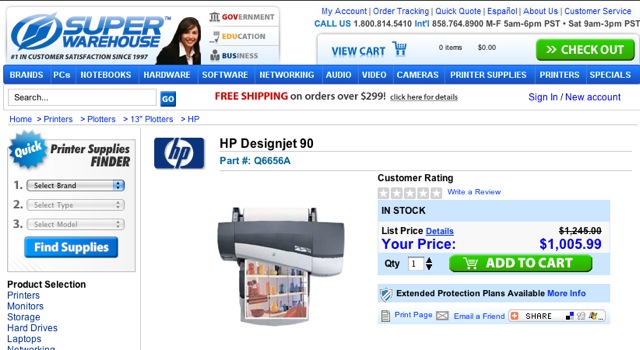
I have made, and continue to make, many large prints on the Hewlett Packard HP90 Designjet printer. While it’s being phased out it remains broadly available if you do a Google search, typically selling for under $900. If you have priced other fade-free ink jet wide carriage printers, then you will know this is a superb bargain. Add a small desktop footprint and print quality to die for – and it works perfectly with Mac’s Tiger and Leopard OS – and you have a tremendous bargain. After some thirty months of use I would buy another at the drop of a hat if needs dictated.

Printers, however, are increasingly marketed using the Gillette razor model – give away the printer and clean up on the supplies. While HP has no need to give away a non-mass market device like the DJ90, ink and paper still take their toll on the budget if you make a lot of prints.

When it comes to consumables I have long been a believer in using the manufacturer’s recommended products. There’s little point in saving a dollar or two on refilled ink cartridges if the risk is that your printer heads clog up or the inks fade with age. With paper, I have found that HP’s Premium Plus photo satin is superb and maintains its surface sheen when the print is dry mounted at ~190F (88C) in a press. Much warmer than that and the surface looks less pleasant. While rumor has it that HP’s paper is made by Hahnemuhle in Germany, there’s little incentive to use aftermarket papers when each involves a tedious profiling and test session. So I stick with what works for me and now that I have digital’s dynamic range limitations under control, why bother with anything else? One more example where consistency takes out a complex set of variables from the equation. A good thing.

Given the need to have a spare cartridge of each of the six colors used in the HP (the printer uses ink frugally but you can bet you will run out when you least expect it), I found myself about to place an order at my photo retailer of choice, B&H in NYC, the other day. Then, what with the newly found need for frugality dictated by America’s total absence of an energy policy, I recalled that someone had mentioned a Florida vendor named Atlex. A quick click and comparison (3 ink cartridges and 40 sheets of 18″ x 24″ paper – $252 delivered to CA) disclosed that Atlex’s price was some 18% less than B&H’s. Now I like B&H and they have never let me down but 18% is non trivial. Loyalty to my pocket book wins every time. Atlex – their site claims they have been at it for over 25 years – also stocks Epson and Canon printer supplies, all original maker labelled, so what’s not to like? And, unless you live in Florida, you will be doing your bit by starving the beast that is government as you no longer pay sales taxes to the organized crime bosses masquerading as state government.

This is an opportune time to remind users not to mess with roll paper. Even if you have a proper roll paper holder and built-in cutting knife like in the HP DesignJet, life is simply too short to mess with severely rolled up paper supplies – just try to dry mount a print which prefers to roll up. I have tried. It was hell. Use cut sheets.

Shutterfly

You can’t beat a print.

My first computer, bought in 1981, came with a 3 inch monochrome cathode ray tube screen which was nearly impossible to read. Not that it mattered as you couldn’t display pictures on it in any case. After many unhappy years with PCs, with screens growing to 15 inch (and still huge CRT boxes) 2000 saw the first of many Macs join the household. The screen was 17 inch, crystal clear and made for a photographer. Currently, my MacBook uses a Samsung 21.6 inch screen when at home and it’s the best photo processing hardware I have used so far.

One day I would love to make that screen into a 30 inch Apple Cinema Display (there are only so many trendy movies to watch and each just raises desire with all those huge screens on show) but the ridiculous cost lets “I should” wait upon “Don’t be silly”. It also amuses me no end how the happening set always use Apples on the big screen while the losers in government stick with PCs. That’s a good thing. A cheap government computer beats a costly one and any government that locks up daily is doing its job in this voter’s eyes, regardless of party. Ironman anyone?

Yet now that my screen is larger than any of the many photography books in my library, I still prefer to luxuriate in the pages of a book to looking at the screen, no matter its size. Maybe having grown up without computers, and with lots of books, has prevented me from fully accepting a screen as the display medium of choice; what’s more, I like the look and feel of a book when it comes to looking at pictures. Plus you can read when you shave – try that with a computer!

All of which reminds me why I so much like Shutterfly and what it does for my snaps. Every now and then I put out a calendar showing our son’s growth and interests. It goes to relatives and invariably ends up on a wall somewhere.


The bald one’s the surgeon, if you must know

Having used the service since it started a few years ago, I can only sing its praises. An intuitive user interface, easy upload and arrangement of your snaps and a beautifully printed calendar in your hands in a few days, all at reasonable cost. What’s not to like?

And a printed picture beats a screen anyday.

Full Time Manual Focus

A handy tool.

One of the less well publicized aspects of many Canon lenses (and probably equally applicable to those from the competition – I have no axe to grind for Canon) is the Full Time Manual Focus function.

Canon describes it well:

Because the center focus point in the 5D (the most sensitive one) I use is more accurate and faster than anything I have used before – yes, including a well adjusted Leica M rangefinder – I tend to use the focus-recompose technique when critical focus is needed. For example, in a studio portrait, I will focus on the eyes, take a first shutter release pressure to lock the focus and recompose. Click. This is an essential technique when the object of focus is off center and I am not about to trust area/matrix/whatchyoumacallit focusing to guess the primary focus point. Equally, I am not going to use the 5D’s ability to select the focus point on the screen, as the central autofocus sensor is more sensitive than the peripheral ones. Why compromise?

However, there is an alternative and I don’t mean switching the lens to Manual. Many Canon lenses offer something named Full Time Manual Focus, meaning that you leave the lens on Autofocus but make final focus adjustments with the focusing collar on the lens. As long as you hold on to the collar and maintain first shutter release pressure, autofocus is overridden by your manual setting. The technique works especially well with the 400mm f/5.6, where ‘focus and recompose’ is often tricky owing to the small field of view and substantial bulk of the lens.

By the way, Canon makes a selection of interchangeable focusing screens for many of their DSLRs, including the 5D. Some of these allegedly make manual focusing easier, though I prefer to stick with the stock screen. Changing screens is not something you want to do every day.