Category Archives: Technique

QTVR on the big screen

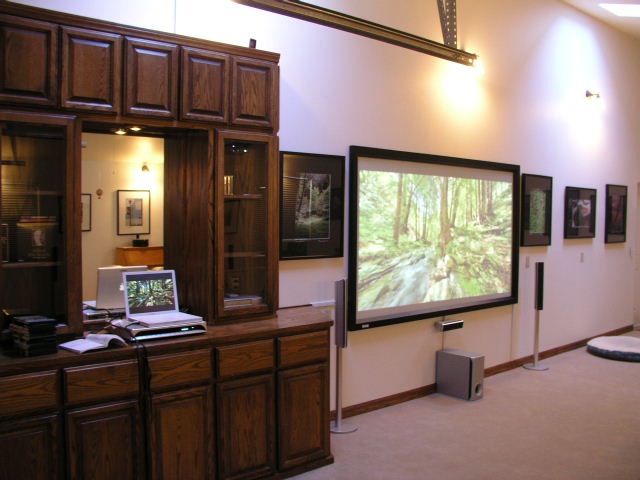
100″ of forest glory!

I wrote the other day about displaying QTVR pictures on the TV screen.

Today, using the same connecting cables with my iBook I plugged the computer into the ‘Video 1’ input on the AV unit in our home theater and what do you think I got?

Surround sound quality from the MP3 soundtrack – which you can listen to here – was excellent, even if only in two channel stereo. Visual quality was marginal, probably accounted for by the fact that I used a fairly modest quality setting on the Canon 5D when snapping the images. Further, I constrained the quality of the Quicktime movie to keep file size small for speedy loading from my web site. On the other hand, we are talking a 100″ diagonal screen here – now that’s an enlargement!

The screen is 16:9 format (1.78:1) which suits most movies. The QTVR is 2.55:1 which is standard widescreen, and the difference in aspect ratios accounts for the black bars at the top and base of the screen area. I could save the QTVR image in CubicConverter to match this format if desired, thus filling the screen.

For my upcoming one man show at a local winery in April 2007, I hope to get in a couple of big screen TVs as an advertising promotion with a local TV vendor and will thus have QTVRs running throughout the show in addition to the display of framed, static photographs.

QTVR on the TV screen

A couple of cables, a smart friend and the iBook do the trick.

My eventual goal for the QTVRs + sound that I am making is to show them on the big screen, meaning the 100″ screen in the home theater on which I project movies.

Well, my iBook, a nice portable source for all of this, is a rather dated G4 model so the first port of call was my trusty nerdy friend, a man of great erudition and wisdom when it comes to things computer. As usual, he did not disappoint.

As advised, I bought an adapter from Apple for some $25 for the video signal – its output end looks like this:

Apple calls it the ‘iBook Video Adapter’ and it connects to the mini-VGA socket on the side of the keyboard. If you want to do this make sure you get the right adapter for your iBook – they vary from model to model.

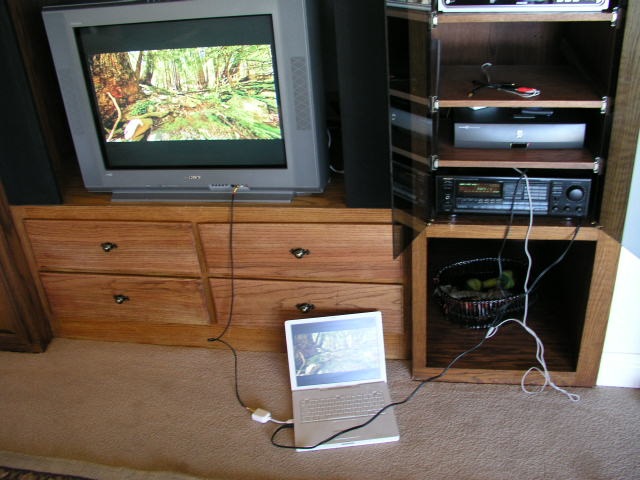
Those outputs are, respectively, S video and Composite video. As I have a few composite video cables lying around terminated with standard RCA phono plugs, I connected the adapter to the iBook and thence to one of the yellow video inputs on the front of my TV and, hey presto!, the image appeared on the screen, easily controllable with the track pad on the iBook.

For sound, my nerdy friend advised that the only way to do things with this older iBook (meaning it’s completely obsolete, being 3 years old….) was to rout a stereo minijack cable from the low level headphone output using an RCA phono plug-terminated cable to attach the sound feed to the ‘Tape’ input on my receiver. The latter is an ancient Onkyo bought used for very little and produces great sound. Sure enough, the oracle did not let me down, as sounds of birds twittering proceeded to emanate from the speakers. Once inserted the poor quality internal speakers in the iBook were silenced.

It may not look pretty but it works:

I also tried connecting the red and white phono plugs from the iBook to the sound terminals on the TV and there was more than enough signal to drive the TV’s speakers at adequate volume, even if the fidelity was lower than through the speakers attached to the stereo system.

The next step, then, is to try this same setup with the home theater system. This panorama used HDR photography to prevent the bright outdoors from burning out.

Adding sound to QTVR panoramas – Part III

Alternatives and first field experience.

The weekend finds me in the Bay Area and whatever you may say of the frenetic pace, the overcrowding and the relentless drive for this year’s BMW, the environment does come with lots of great sound locations, so naturally the Edirol R-09 sound recorder came with me.

First, a few words about alternatives. In this price range, meaning $400 or less, I could only find two. One is the add on option for an iPod which is reputed to have very poor sound quality. Plus my 60gB iPod is full, so that’s a non-starter.

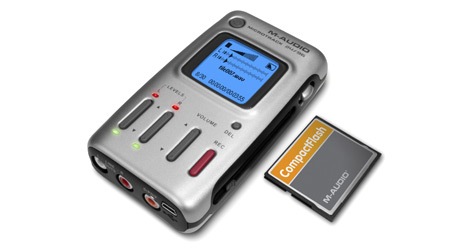
The other is the M-Audio MicroTrack 24/96 which, like the Edirol, retails at $400, looks less chintzy, is similarly sized and also records on a small camera card. In this case on a CF card.

I turned this one down for a couple of reasons. First, it uses an internal, sealed battery (in contrast to the removeable AAs used by the Edirol) so that when you are out of power you either have to use the mains adapter (impossible in the field, obviously) or put the device out of commission while you recharge. That means the bulky recharger travels with you and when the internal battery eventually fails the whole unit is toast until repaired. Not good. Second, the supplied stereo microphone has to be plugged in and the thing looks pretty fragile sticking out of the end of the gadget. One more thing to lose or go wrong. So I decided in favor of the Edirol. All other better quality portable digital recorders seem to be much more expensive and/or bulky.

The morning found me at the excellent Hiller Aviation Museum which just happened to be hosting a model train show with lots of great crowd sounds waiting to be recorded. I set input gain on ‘AGC’, meaning Automatic Gain Control, and followed the model trains around with the recorder. Recording quality was set to best MP3 (WAV can be used for the very best uncompressed quality which I thought would be overkill in this case) as I reasoned I could always compress the file to something smaller using Audacity. To keep things discreet I dispensed with monitoring headphones and just let the AGC do its thing.

On the upper level of the museum there is a loudspeaker broadcasting the airport control tower traffic controllers’ voices (all that ‘One-Niner’ stuff you hear in movies) so I recorded a one minute burst of that, aided by the sound of a low flying plane coming in to land at the immediiately adjacent San Carlos Airport.

Popping the card in the reader attached to my iBook a few minutes later disclosed that all was well. The sounds were atmospherically rendered, the background noise below the threshold of hearing and the stereo effect surprisingly good for so small a device with such limited microphone separation. The AGC works well, sacrificing dynamic range for an absence of clipping on loud sounds – ideal for my intended use with QTVR panoramas.

Later that afternoon, a quick check of the Caltrain schedule disclosed that the downtown train would pass through the station in Burlingame at 2:28 pm so I trotted over, Edirol in hand, and caught the train crossing Broadway to the accompaniment of ringing bells and diesel sounds. Dashing down to the front of the train as it sat in the station I reccorded the air blast as the brakes were released and the diesel started up on its journey south, accompanied by much squealing of steel wheels on rails. Very atmospheric. AGC struggled here as the dynamic range between the loud whistle of the train and the ambient sound level must have been over 90dB and in a couple of spots the mics shut down, so I had to edit those out using Audacity.

One thing I quickly learned about the little iPod earphones (the Edirol comes without headphones of any kind) is that they may be great for listening to playback but that they are useless for monitoring while you record, as they do very little to attenuate ambient sound, thus making it difficult to distinguish recording from original. What is called for here is a true set of over-the-ear sound isolating headphones which, let’s face it, would be a pretty ridiculous load to carry with the diminutive Edirol.

The Edirol did a great job in almost all cases and is so easily tucked in a trouser or vest pocket as to become an indispensible companion. Despite the generally prosaic looks of the device, the display is truly wonderful, as the twin sound level meters are back lit and stark white against a black background. They are clearly visible in even the brightest light. Crank them up to maximum brightness and they really shine. Canon could use this sort of thing to replace the truly lousy LCD screens in their 5D and 350D cameras which wash out in all but the poorest light. One ergonomic boo-boo is that the microphones face the same way as the display, meaning that if you point them towards a sound source in front of you you cannot see the sound level meters! Mercifully, AGC seems to do such a great job of automatic input level control that you quickly forget to worry about input sound levels. Rotatable mics would be a nice touch, Roland.

Had you told me three months ago that I would be recording a collection of sounds for my photo library I would have politely excused myself with a hint that a visit to a shrink might be in order. It’s expensive at $400 but a great and unobtrusive device for recording high quality sound tracks in WAV or MP3 format which can be attached to QTVR panoramas with very little effort. A related use for true still pictures would be to attach the sound track to a slide show created in, say, iTunes, and show the whole thing to your audience with sound included. A whole new realm of possibilities opens up with this fascinating tool.

Adding sound to QTVR panoramas – Part II

Batteries not included! Heck, lotsa things not included.

I looked at incorporating public domain sound into QTVR panoramas in Part I. How about recording your own sound track?

Meet the latest addition to the digital household:
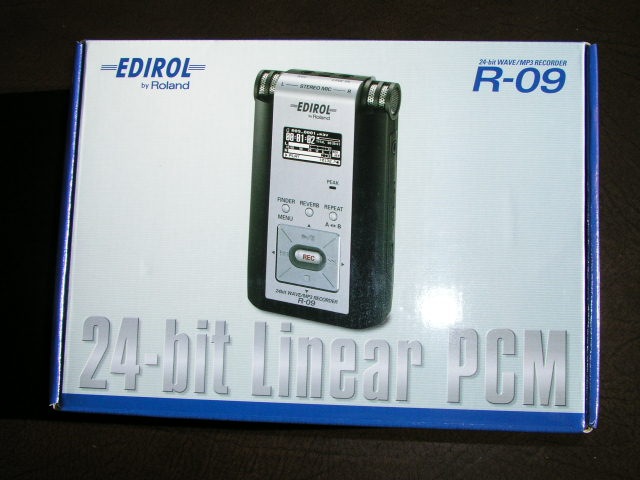
Made by the fellas who gave us all those rock-‘n-roll consoles, Roland, it is mightily costly at $400 (whadya expect? It’s made in Japan, not China), comes with no batteries, an insanely chintzy 64 mB SD card for storing recordings (a leaf out of the digital camera makers’ book – at least Canon has the good sense to include no card with the 5D) and no headphones.

Appropriately enough, Marty Paris, ace acoustical guitarist and local UPS driver, just delivered it so we got to chatting about sound recording. “Wait a minute”, he intoned, “I thought you were a photographer?”. “My dear Marty”, quoth I, with that bemused look of pity and understanding we sound panographers reserve for the unenlightened, “Photography is sound!”. “What?”. “Hey, you know, QTVR and all that. Imagine your band with 360 panoamas and sound, man”. Note the ‘man’ bit. A little bit of hip. Big thing in the musical world, I’m told.

So I open the box and find that this little MP3/WAV sound recorder, which will serve to add sound to my QTVR panoramas – no more public domain stuff for this operator – comes without batteries. Gee, is that cheap or what? No problem. Two AA sized NiMh batteries, which have yet to explode or catch fire, are resurrected from one of the chargers in the ancestral manse, and hey presto!, she fires up.

OK, so the R09 records on an SD card. The 64 mB card included with the R09 can record just about all the true statements from all of the USA’s senators and congressmen made over the past decade, which means 5 minutes’ worth, at best quality. Well, the spare 1 gB card for the Leica DP comes out and truth, justice and the American Way (or, at best, the prospect thereof) are restored.

How large is the Edirol R09? Judge for yourself – that’s the 1 gB SD card on top of the iPod and the picture is about life size on my iMac:
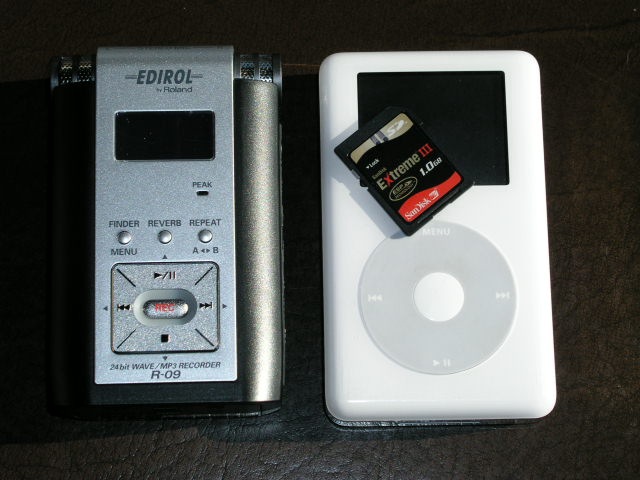
Feel? Positively chintzy compared to the iPod, and the flimsy combined door for the two AA batteries and the SD card is a problem waiting to happen unless it loosens up with use. Indeed, one of the first things you see on opening the box is a warning to the effect that the battery/card door is easily damaged. Not good. How about redsigning it, Roland, rather than hiding behind lawyers and disclaimers? Add the fact that the supplied (useless) charger cannot recharge NiMh batteries in the R09 means the door will get a lot of action as batteries are removed for recharging and replacement. I suppose you could argue the charger can be used for running the R09 off mains power, but given that it’s twice the size and six times the weight of the R09 you know what you can do with it.

Another useless accessory is the provided USB II cable to connect the R09 to your Mac. In practice, you simply remove the SD card and pop it in your card reader which displays all the MP3 or WAV files on the card. Nor do you even need to format the card in the R09, despite dire warnings in Roland’s instruction book. The 1 gB Sandisk Extreme III card formatted in my Lumix worked fine in the R09. Nice. At a pinch you could mix MP3 and JPG/TIFF/RAW files on the one card.

In fairness, one reason for the light weight of the R09 is that there is no hard disk inside, unlike in my 60 gB iPod. Recorded sounds are stored on the miniscule SD card, meaning the device should be fairly shock resistant as there is a near total absence of moving parts.

Roland claims a battery life of 4 hours continuous recording (at least small stereo microphones are built in – you can see them in the snap above) so figuring in the ‘Washington factor’ (when you hear your taxes will go up by 5%, multiply by four) that works out at one hour, which is still a lot, given that the average loop for a QTVR panorama is some 60 seconds long. Even my boy reciting his ABCs takes less time than that!

Monitor your recording or listen to the playback using the R09? No such luck. No earphones are included. Fortunately, I saved mine from the iPod (a device I use connected to the home AV system, not to my long suffering ear drums) and the R09 can be monitored just fine:

Note the sad and unsuccessful attempt to emulate the superb iPod ‘click-wheel’. Aren’t patents wonderful?

So we have here a very expensive, crappy looking device, with a miniscule SD card, no batteries, no earphones, a useless charger, unnecessary cables, no case and the usual 102 page booklet (hell, you press ‘Rec’ and have at it – you need a 100+ pages of legalese to tell me how to work this thing?) So how does it work? Stay tuned for Part III.
More on single image tone mapping

A useful technique for managing dynamic range.

I made mention of the single image capabilities of the tone mapping Photoshop plug-in from Photomatix here.

This technique may not be as effective as using three images – under exposed, normal and overexposed – but is ideal when the subject is moving or when older pictures have to be restored. For film user I would think it is invaluable.

When I first got my Canon 5D one of the early excursions made with it was to Limekiln State Park to test the image stabilization in the 24-105mm ‘L’ lens. It proved remarkably effective and I took a bunch of pictures at 1/4 – 1/15 second or so using just a monopod for support.

That experience is recounted here.

Originally published here the pictures may have been blur free but suffered from the most horrible loss of detail in the highlghts and shadows. So I went back and applied single image tone mapping to the twelve best with the results you can see here.

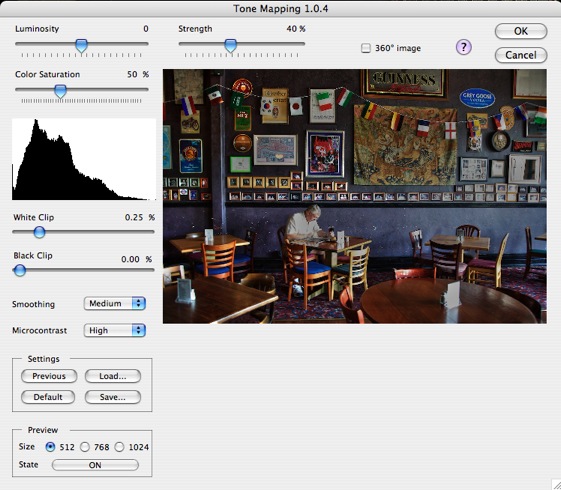
I have found it’s very easy to overdo things and step over the line to the garish, so I tend to leave the ‘Strength’ slider at the default of 40% (this one has a high ‘garish risk’) and generally crank up the ‘Luminosity’ and ‘Color Saturation’ sliders a tad. If the overall image is too dark a tweak of the ‘White Clip’ slider to the right usually suffices. After saving, a final adjustment of Levels (Apple-L) in Photoshop is all that is needed. You can see the plug-in sliders here:

A very useful tool to have in the photographer’s tool chest.