SOMA

One of SF’s most photogenic areas.

During the dot-com boom, the area South of Market Street (SOMA) in San Francisco saw rents skyrocket as legions of code monkeys sought to become the next Google. Most crashed and burned spectacularly in April, 2000 and the tech stock market has not remotely recovered in the decade since. Such are speculative bubbles.

Not that this was bad. The San Mateo bridge to Oakland is once more drivable thanks to the lane added too late for the boom and rents in SOMA have come back down from the nosebleed levels seen during the bubble, allowing artists and sculptors and generally creative people to once more return and make the place what it is. There are lots of great print and machine shops here, serving all needs from large posters, custom furniture, metalworking and photographic printing.

And what most typifies SOMA is a vital mix of old buildings made to look new again, vibrant colors, murals, local eateries and all of those great things that constitute a neighborhood.

You can get some sense of what I’m going on about by clicking the picture below, which will download a 3.2mB PDF to your computer. Suffice it to say that all the 22 snaps included were made on one dreary morning between rain showers earlier this week.

Best viewed on an iPad or in Preview on a Mac.

HP DesignJet monochrome printing

Using the right profile.

I’m really not a black and white guy, having last seriously used the medium in 1979. Still, now and then I make a monochrome print from a color original, using the ‘B & W’ option in Lightroom’s Develop module. This is well engineered as you can still vary the mix of the original colors using the sliders for each, and can easily alternate between color and monochrome renditions to gauge the effect.

The dye ink HP DesignJet printers are renowned for the outstanding depth of their black inks with no bronzing on HP Premium Plus Satin Photo paper. Read on to get the best black and white rendition possible, short of paying up for custom profiles.

Using the stock Premium Plus Photo Satin color profile a monochrome print from my DesignJet 90 is too cold. I mostly prefer a slightly warm rendition, so I set about finding dedicated monochrome profiles for this fine paper.

HP still offers free downloads of icc paper profiles from its website for black and white printing and warn that these should not be used for color prints as the results may be unpredictable.

Click below to download these:

Click to download HP monochrome profiles.

There are many to choose from. Basically you experiment until you find the profile that suits your tastes. The download includes instructions for Photoshop but you can readily adapt these to Lightroom.

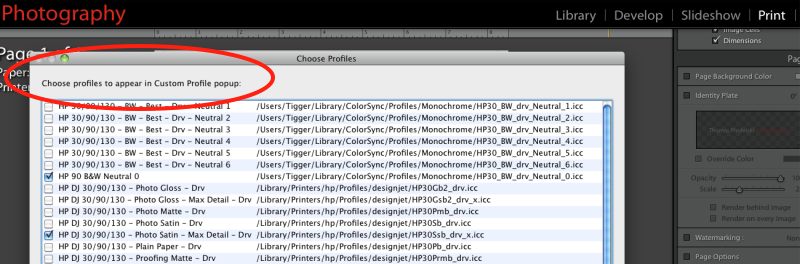
After downloading, I installed the HP neutral profiles by dragging and dropping the downloaded folder to Username->Library->Colorsync->Profiles. I printed the test print (named Neutral_Profiles,jpg and to be found in the ‘Index_profiles’ folder in the download) using Snow Leopard and Lightroom, and telling LR to use the Neutral 0 profile.

As luck would have it that one gave me the result I wanted, viewed by daylight, warmer than the stock color profile and just right for my taste, so I renamed the Localized Description String as explained here in the ‘Neutral 0’ profile to HP 90 Neutral 0, and checked it off, along with the regular color profile in the Print module of LR (you can also see the other B & W profiles which I did not rename in this screenshot):

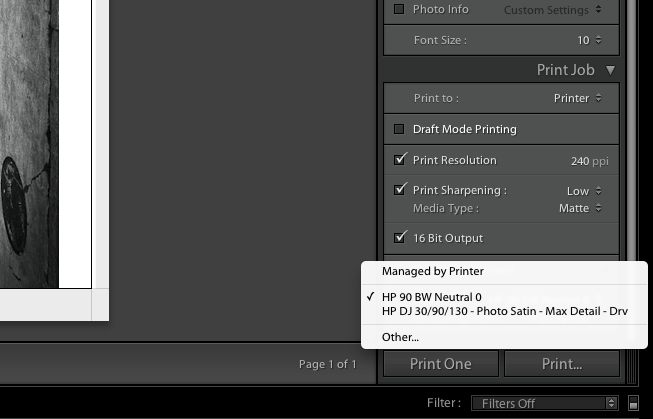
Now when I go to the profile selector in LR I see:

It takes less time to do than to explain and is a worthwhile step for best black and white print quality. You can use any one of the many profiles to suit your preference. I like life simple, so I only use the two profiles above with HP Premium Satin photo paper.

Snow Leopard 10.6.7

The latest release.

Snow Leopard 10.6.7 came out yesterday, with bug fixes and security enhancements, and before you could say ‘Hackintosh’ I had it installed on the HackPro.

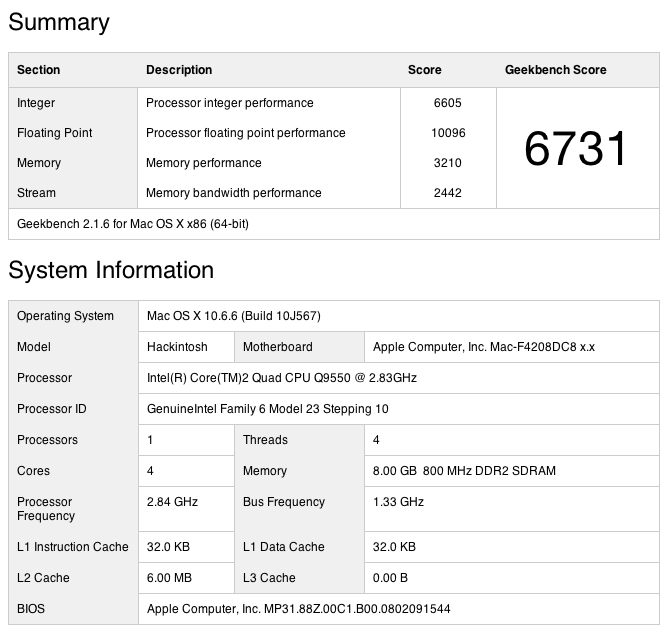
It’s worth the upgrade. Running in 64-bit mode here is the Geekbench (OS performance as reflected in CPU and RAM throughput – no disk factors, so the SSD I have recently installed is irrelevant to comparisons) report:

Snow Leopard 10.6.7

Here is 10.6.6 with the same configuration:

Snow Leopard 10.6.6

That’s 2.4% faster. Not enough to notice, but nice to know that the newer version is not the victim of performance drag from code bloat. The biggest component of the overall change is in the memory performance result which is 8.0% faster. Nice code optimization, Apple!

On the 2010 MacBook Air (mine is the 11″ with the base spec and minimum RAM) the change in speed is +5%. Once again, not noticeable but nice to know.

Goodbye, Canon and Thank You.

The end of a beautiful friendship.

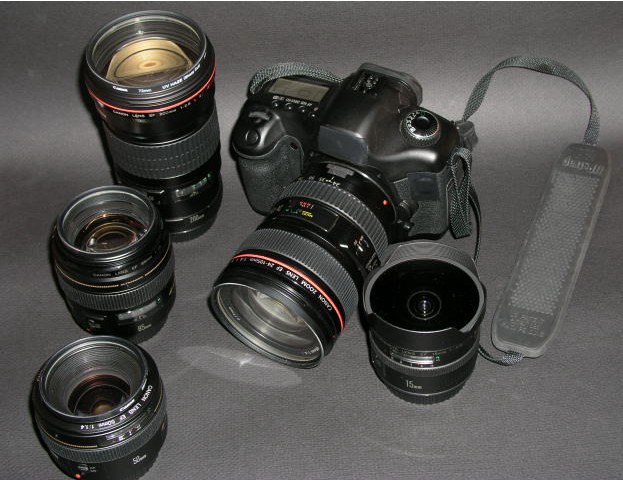
My Canon 5D and its collection of Canon lenses are for sale.

5D and friends.

You can see all the journal pieces I wrote on this transformational camera by clicking here.

The decision to sell was not an easy one, but I am a user, not a gear collector. In my book, it’s a crime to have equipment of this quality sitting around unused. Simply stated, when the 5D, with its full frame sensor, came out it instantly obsoleted all the 35mm and medium format film gear I owned. A short time thereafter my Leica M bodies, used by me for 35 years, my Mamiya 6, Rollei 3.5F and Rollei 6003 Pro were all gone, along with their lenses. Such was the quantum leap in image quality and versatility offered by this magnificent camera. My Canon 5D journey commenced over five years ago and as my first serious digital camera I thank Canon for its 5D, which revitalized my interest in taking pictures, while simultaneously obsoleting the sheer drudgery of film processing. I have always preferred pressing the button to time in a darkened room with smelly chemicals.

But a couple of significant changes have occurred in my life since the 5D was purchased. First, we sold our vineyard in the country and moved back to the San Francisco Bay Area. It was a fun experiment, my zinfandel grapes won a lot of prizes but the whole farming thing started to get old. Plus, we wanted our son to grow up with all the diversity and distractions offered by one of the world’s great cities. And, from a snapper’s perspective, being close to the City by the Bay meant a return to my first love, street snaps. So while landscape work was fun and my one man show of landscape snaps was a success, my heart remains on the streets, a genetic code inculcated during a youth in London. And a street snapper the 5D is not. It’s not that it’s a big camera, it’s that it’s simply not the best instrument for my way of working on the street. I tend to get really, really close to my human subjects and the 5D just is not right in that context. Yet whether it’s outdoors for infinite vistas, QTVRs with a fisheye, bugs and birds, or in the studio, I have yet to use a finer instrument.

Other things changed in my life. Testifying to the abuse of my hands over many years of tinkering with cars and engines and woodworking, I started to develop tendonitis in my wrists. Make me lift a heavy weight and it’s not a lot of fun. Further, with age, my back has started to give out and carrying heavy gear compounds my problems. Canon 5D gear is built like a tank; it is not featherweight.

I still believe that in a world where very few prints are made, there’s simply nothing like a large print to do justice to a great photograph. For those, the 5D is unbeatable. Photo exhibitions still favor mounted, framed prints, not LCD screens. The 5D is crazy sharp and grain free, at any rational enlargement size. Want prints over 36″ on the short side? The 5D Mark II is for you.

Update 4/23/2011: All my 5D gear has been sold. I hope the new owners will enjoy this superb equipment as much as I did.

Thank you, Canon, and Goodbye.

HP DesignJet printhead diagnosis

Finding faulty heads.

For the HP DesignJet six head dye ink 30/90/130 printers and their four head predecessors (10, 70, 120, etc.) HP recommends running its Image Quality Diagnostics Page using the System Management Utility when you experience print quality issue; the Utility can only be run for Mac users using OS Leopard or earlier. That’s a shame as HP has committed to stocking repair parts, heads, inks etc. for 10 years after the printer is discontinued, and as they still sell the DJ130 on their site that means through 2021 at least. Too bad their Mac software is obsolete, requiring an earlier Mac OS or a Windows PC.

When the DesignJet has a faulty printhead the front panel indicator for the head is meant to flash. The problem is that it does not always do so.

Here’s a print I was making the other day; all was proceeding swimmingly until the last few inches on the right of the 13″ x 19″ original, where the color suddenly goes awry. The image below is a low quality photograph of the 13″ x 19″ print as my scanner does not go beyond 8 1/2″ x 11″!
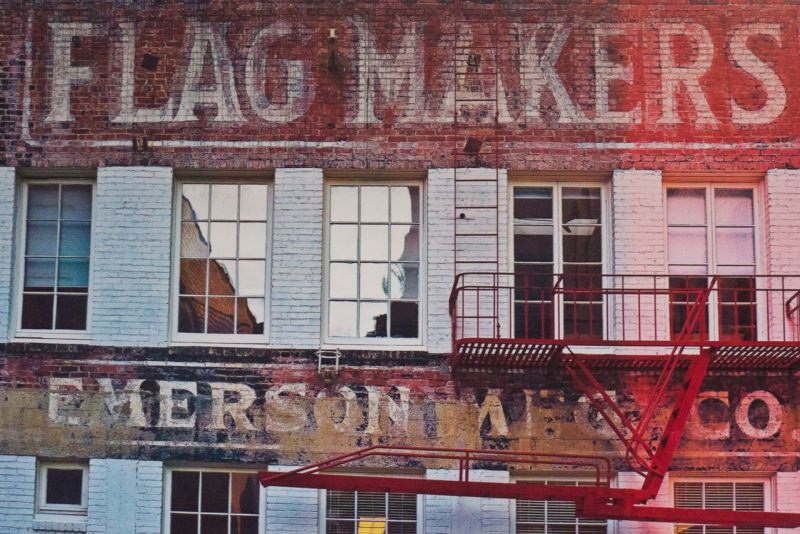
Prining problem with the DesignJet.

This problem is not unknown to DesignJet users and generally indicates a clogged or faulty head. However, there was no indication on the printer’s front panel of any problem and the first Image Quality Diagnostics Page report I ran showed all the color squares at the top to be solid and full.

However, because sometimes a head can temporarily recover from a clog, I simply ran the report again and the problem was now disclosed clearly, as follows:


Faulty head disclosed.

Consulting this chart from HP ….

…. I immediately concluded that the Cyan head was at fault. Rather than try and clean it, I simply ordered a replacement as the original was over 1,100 days old. Further I have found cleaning to be a quixotic exercise which rarely fixes a printhead problem for long. While HP states that the smaller color squares are merely for warm-up before printing the head alignment grids to their right, the total absence of Cyan in the related small square confirmed my conclusion, suggesting that the little color squares have some value after all.

Also, note that HP’s statement that “All patches associated with a given color must have banding, for the corresponding printhead do be determined at fault” is incorrect in my experience. As you can see, Cyan affects squares A2, A3 and B3, yet only A3 and B3 disclose banding, above. After many print head replacements, I have never seen three banded patches and five of the six cartridges – all except Black (K) – affect three patches each. I have had all five of Y, C, LC, M and LM fail and in each case the report only disclosed two banded patches.

The LC, LM and Y ink cartridges are much larger than the K, C and M ones, meaning that on average HP expects prints to use more LC, LM and Y ink. Yet with all my non-black heads failing it seems that volume of ink use is not the driving factor. Mine were all over 1,100 days old so age may be the deciding issue for light users. Whether age of the ink is relevant I have yet to determine. Some of my ink cartridges are past their expiration date.

After changing the Cyan printhead I placed three sheets of plain letter sized paper in the DJ; the DJ automatically runs a head alignment when a head is replaced and will do so up to three times. A check mark on my first and only page confirmed all was well, and printing was restarted.

The Ink Consumable Usage report section:

But wait a moment, you say. I just checked the Ink Consumable Report on the two page Information Report I ran from my DesignJet. It says that all is well as my head has only used up a fraction of its life.

Oh yeah?
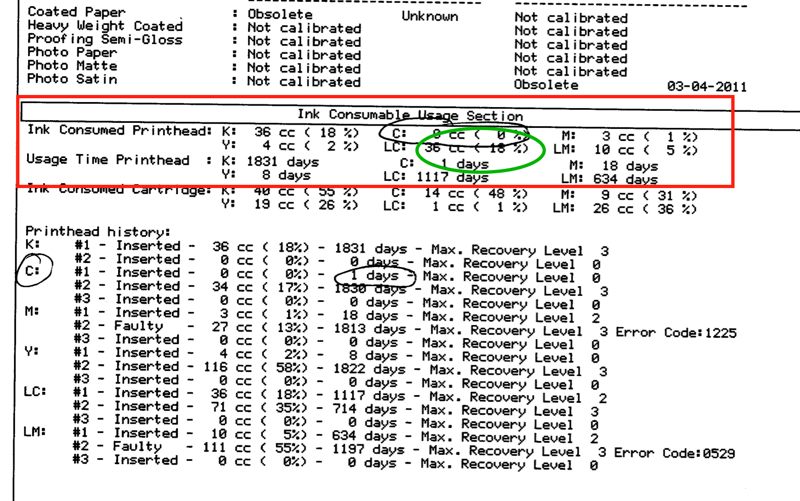
The unhelpful Ink Consumed Printhead data for the old LC head.

Well, right after I replaced the Cyan head, above, and made one print, the Light Cyan head blew! Yet the report, above, says the LC head was only 18% through its life (green oval). That statistic is useless, it seems, for old heads. Read further down and you will see that the LC head is no less than 1,117 days old! Now I have only the ancient K (Black) head left to blow. The K head is a model 84, all the others are 85, so I’m running it until it drops, hoping that any design difference will help. As a minimum it will be an interesting discovery process. And it’s still cheaper to waste a sheet of paper than buy a new head. Moral of this story? Old heads are likely to fail even if modestly used. Keep spares.

Am I complaining? Not really. After four years of sitting there, mostly inactive, I can hardly grumble about a $35 head failure.

All is once again well. Now I have to make a lot more prints to bring down my average cost per print – logic akin to that of the US Government spending more money on its war machine to keep down the cost of oil.
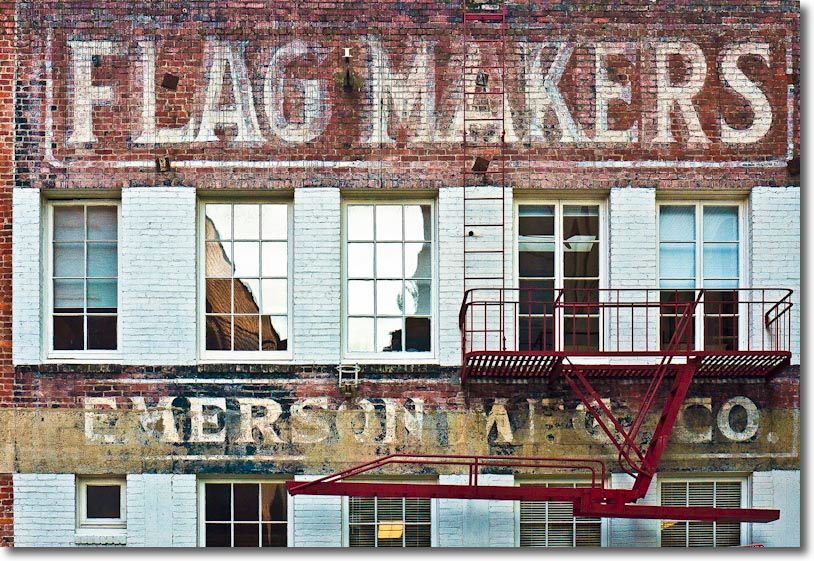
Flagmakers, San Francisco. G1, kit lens @ 29mm, 1/500, f/5,2, ISO320.

Note on the picture: The original was taken in a dark alley with insufficient room for square composition and is surpassingly bland. A few seconds in Lightroom and a round trip to Photoshop to fix leaning verticals, and the power of RAW is writ large in allowing me to restore some color to the original.
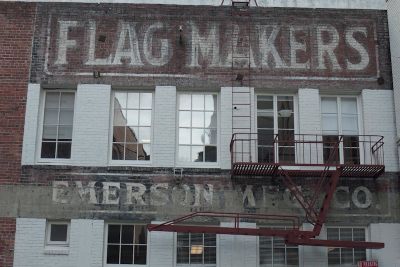
The original of Flagmakers.