About the Snap: Bermuda

Bermuda


Date: July, 1999
Place: Bermuda, near St. Catharine’s Fort
Modus operandi: From the seat of a scooter
Weather: Gorgeous
Time: 1 pm
Gear: Leica M6
Medium: Kodak Gold 100
Me: Stop! Stop! Stop!
My age: 47

There’s not a lot of good things I recall about 1999. I spent much of that year working for a bunch of hillbillies at a big bank in Charlotte, a city whose cuisine may be worse than even England’s in the 1960s. Not to mention the foul humid summers and freezing cold winters. And people who would say one thing to your face, another behind your back. Fughedaboutit! Before you could say “Where’s ma grits?” we were back on a one way flight to San Francisco.

Not, however, before we took a one week side trip to the lovely island of Bermuda. That, and the return to civilization later, were the high points of the year. Good British food (strange, I know, but true), French wines and Cuban cigars. There’s a lot to be said for those. Add a spectacularly beautiful place which limits tourists to 25 mph scooters, and you have a fine venue for any photographer.

One of the best was the annual cricket match between North and South, one of the oldest fixtures in sports. Another day found us at St. Catharine’s Fort, one of many built by the British to keep out marauding Americans. The Fort never fired its enormous guns in anger, the Yankees doubtless having concluded that discretion was the better part of valor.

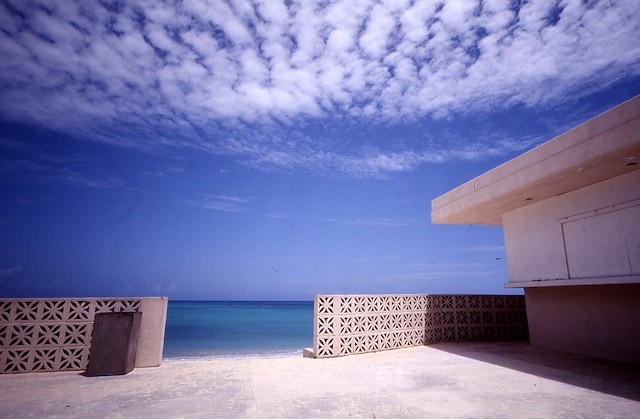
Leaving the Fort we were tooling along when I caught the above out of the corner of my left eye. I ran back and just one click recorded the magical combination of clouds and color. This one hangs over our mantlepiece and works well in an otherwise simple room.

The lens and camera used bear comment. The body was the much unloved Leica M6, which had a rangefinder that would flare out in just about any light and a built-in meter that could only be read at eye level. Not so smart for candids. I sold it a while later with no regrets, reverting to my M2.

The lens was far more interesting.

No thanks to the jerks running my employer (my stock options, if I had them today would still be worthless – 8 years later ….) all I could afford in the ultra-wide area for my Leica was a Russian Orion 20mm, which ran me some $200 from a reseller in England! This came with a massive and very good finder and recessed all the way into the M’s body, after fitting the obligatory screw-to-bayonet adapter. Maximum aperture was a modest f/5.6. You had to reach into the lens to adjust the aperture, so forget about a protective filter. The aperture ring was hard to grasp, the settings were not click stopped and were most certainly not linearly spaced. Further, the lens did not couple to the M’s viewfinder and the finish of the whole thing would make even a Chinese tool maker blush. In other words, an ergonomic disaster, quite the worst piece of equipment from that perspective I have ever used. But it took nice sharp pictures and we got on fine for many years until more money than sense saw it replaced by the ultimate 21mm exotic, Leica’s fabulous f/2.8 Aspherical Elmarit. That’s a story for another time.
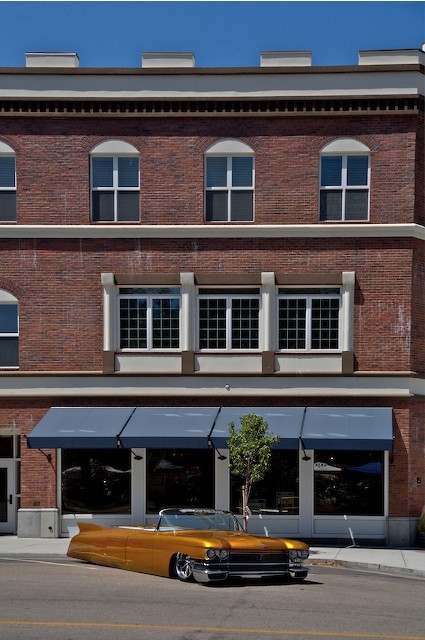
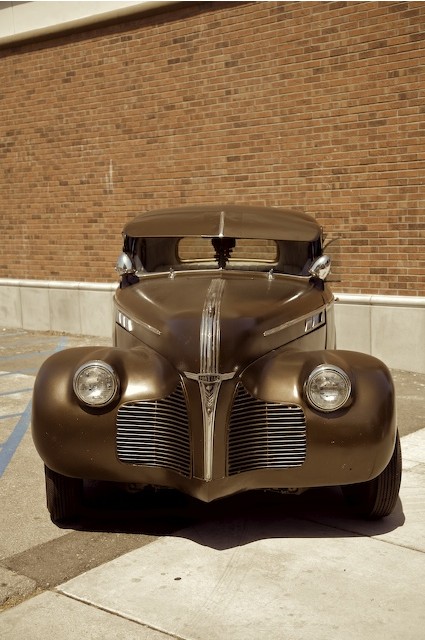
Street rods

A masterpiece of metalworking


Golden Rod. 5D, 24-105mm at 47mm, ISO 250 1/1000, f/5.6

One of the challenges of these car ‘meets’ is to get rid of the clutter. I have found that going back on the second day in the evening, when only the hard core owners remain, is usually the best strategy. Even so, I had to come back several times to this scene before there was the chance of a ‘clean’ snap of this beautifully fabricated street rod. Air suspension makes it rise once the motor is running, in case you wondered!


Sepia Symphony. 5D, 24-105mm at 47mm, ISO 250 1/500, f/4.5

Another example of a bit of patience to clean up the sorroundings. Gawkers are all very well, but I have never known them to improve the snap.

For people watching and candid photography, the first day is usually best.


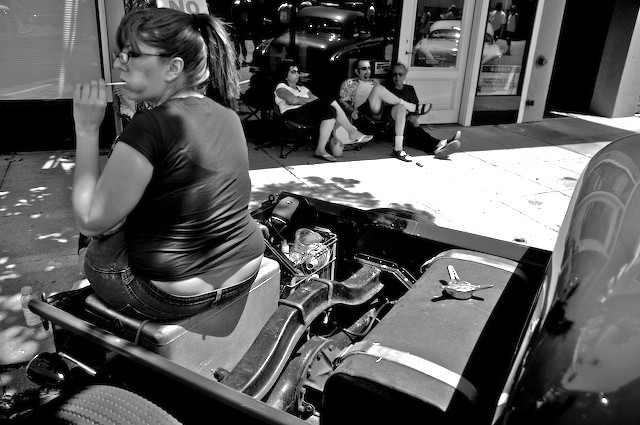
Cheeks. 5D, 24-105mm at 28mm, ISO 125 1/500, f/4.5

How to clear a cocktail party

In 10 easy steps

1.   I run the UAW
2.   I’m with the government and I’m here to help
3.   The IRS is a great place to work
4.   The tort bar has been good to me
5.   I just got a new Dell
6.   Check out my Zune
7.   Steve Jobs is speaking next door
8.   I only make black & white prints
9.   Look at these snaps of my kids
10.  I use film

#1-4? Get a real job. Some morals wouldn’t hurt, either.

#5 and 6 need to get a life.

#7 Run, don’t walk.

#8, 9 and 10 – You are a Bore.


Click the logo for details of my
2009 Mac Pro CPU upgrade service.

Google goes QTVR

Now you can see your home – and so can everyone else

It may be invasive and doubtless the scum class (aka tort lawyers) will have a field day, but it sure is fun.

Check this link to see NY’s Metropolitan Museum in scrollable panoramic format with the newly enhanced Google Maps. It may not be QTVR quality but it certainly is clever.

The company doing all the pictures, or snooping if you are a tort lawyer, is Immersive Media.

Publishing with Blurb – Part I

A service with the requisite Gen Y silly name – is it any good?

That exemplar of street photographers, Juan Buhler mentioned in an email that his latest book of snaps was published using a web publisher named Blurb. He finds the quality superior to Lulu, which I used for my first book which was all monochrome. With the first book I uploaded a PDF file, created in MS Word (the bad old days before Apple’s Pages came along), to Lulu, and sure enough, what you see is what you get with this approach.

Blurb, by contrast, delivers an application named BookSmart to you by download and you use it to compose your book. There’s a broad selection of handy templates and while the whole thing is not especially fast, it more than suffices for composing a picture book. As my second book will be all color, I was intrigued to see what Blurb had to offer. Best of all, Blurb offers the option of a hardcover – the only way to go if you value longevity.

First, the software requires that files uploaded be 3000 x 2400 pixels, or thereabouts, to preserve quality. Make them smaller and your picture will show a large exclamation mark indicating the quality is insufficient for reproduction on paper. Given that all my high quality original pictures reside in the Aperture database, I wasn’t about to export them one by one (I’m aiming for 50 or so in the new book), as Aperture is as slow exporting pictures as it is in preparing them for printing – meaning dead slow. So instead I created a custom export profile for my pictures of choice which I highlighted in Aperture using Command-Click, thus allowing selection of non-contiguous originals. Here’s how the export preset screen looks in Aperture:

Note that I have set the Image Quality slider to maximum – twelve on the scale. DPI is set to 300 (not the more common 72 which is fine for screen display, inadequate for printing), as this is the density at which Blurb prints. Hence the large file sizes.

Here’s the export about to commence – the destination folder shows ‘Desktop’ but in practice I make a new folder and export there, to keep clutter down.

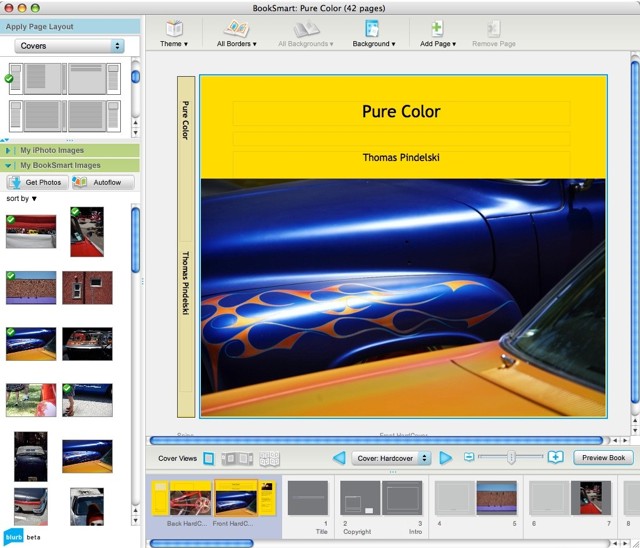
Thirty minutes later and there are 50 pictures in my book folder on the iMac (I cannot advise on PC use as I refuse to have a Microsoft paperweight in our home), with sizes ranging from 3-11 mB; some are from film, some from RAW files, so the file sizes are all over the place. These picture files are then imported into Blurb – another ten minutes or so, and after a bit of experimentation with the cover design, here’s what you see:

Pictures marked with a green check mark in the inventory tray at left are those which have been dragged and dropped into the book itself. Rearranging the pictures is a drag-and-drop affair and you can print one or two sided. I’m going to try both and will report back on how things look – I found with my first book that a draft print makes a lot of sense as it’s really the only way to determine if the book feels right from a layout and content point of view. I’m settling on an 11″ x 8.5″ landscape format with hard covers.

Narrative is easily added, but I keep it to a minimum. After all, this is a picture book, not a novel.

Time to do all this from start of export from Aperture to completion of upload to Blurb followed by the related formatting? 5 hours. This would be less on a second attempt, as there should be no learning curve. Blurb saves your uploaded pictures on the fly so if you lock up (I did, once) nothing is lost. Nice.

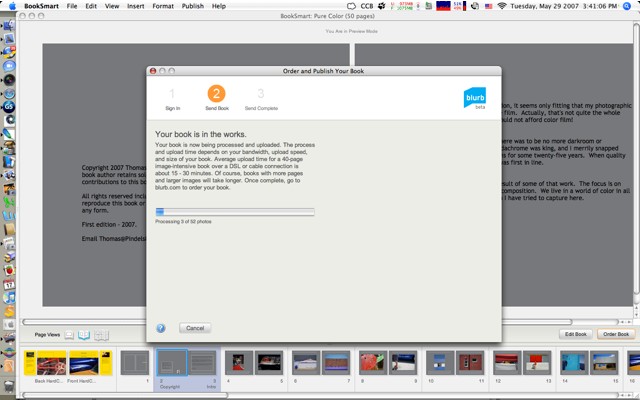
When composition is complete, the product must be uploaded using a broadband connection to Blurb. Here’s the Blurb upload in progress – it took 18 minutes on my so-so cable broadband connection. Not bad.

Overall I have found the BookSmart application provided by Blurb to be easy to use and reasonably flexible, providing many useful templates (techies can upload their own designs). The program slows down from time to time but simply exiting and restarting the application seems to solve the problem on my G5 iMac.

More when I get the first draft back. Meanwhile you can see the book at Blurb, together with a Book Preview, by clicking here. Don’t order it, please, as this is a draft proof to permit review and editing. Blurb automatically creates a Book Preview – click to see the first fifteen pages.

Update: You can read my comments on the first draft here.