Boxers

Book review

I confess that I approached ‘Boxers’ by Carol Huebner Venezia (an American photographer, the exotic name notwithstanding) with great anticipation. The publicity talked of how the photographer had got inside the psyche of the professionals in Gleason’s Gym in Brooklyn where many famous fighters had trained. Further, the publicists intoned, she counterbalances the tough end of the sport with pictures of fighters in Italy. I quote:

“Boxing offers those working class men who learn the sport a slim chance of realizing the American dream. But the price for social standing and above-average income is often broken bones and chronic health problems. In contrast, in Assisi, in the center of the Italian boxing world, boxing is about athletic competition and the art of the sport.”

Well, based on what I see here, she never made the remotest emotional contact with her subjects in either location. Indeed, some of the best pictures have no boxers in them – one of a young child in the ring and another of swinging sacks, or whatever you call those things, that boxers pummel. Nary a boxer in sight. Great pictures though.

Despite the high fallutin’ text, based largely in academic drivel, the woman’s inability to get inside the brains (or what’s left of them) of her subjects is mystifying. It’s not as if she didn’t try, as the pictures span over a decade.

Let me quote from the introduction just to reassure you I am not making this up:

“If we look at the group of pictures as a whole, there appears to be a clear impulse to movement both in the single photographs and as a sequence”. What? Nearly every picture in the book is stiffly posed in a pale imitation of August Sander. Sander is much lauded in the introduction let it be said, and the comparison only goes to show the photographer in a negative light.

One of the few snaps with movement is of the swinging medicine (yes, now I recall what they call them) balls in a deserted gym. Why these should be moving when there is no one in sight beats me, but it’s a neat idea, I suppose.

Here’s another Doozie from the intro:

“The objective approach of this photography avoids pathos or any explicit critique of society”.

Please.

So that’s where our higher education monies are going? To pay boobs to write claptrap like that? What a travesty. Time they got a real job and learned to write English.

Lots more of the above garbage is to be found in the introduction. No need to dwell there.

On to the pictures.

There are a scant thirty all told, one of which, the one so badly exposed that no facial details can be discerned, also appears on the cover. Not exactly what you would call value in a $30 paperback. Fully half of these are static portraits, some in what could be a studio setting, of half naked guys who, absent their gloves, could as well be construction workers. Or fit investment bankers, come to think of it. The remaining pictures are generally so irrelevant to the genre that I really wonder why the woman bothered? Maybe she liked to go to Gleason’s for the vicarious pleasure of seeing all those muscles, the camera as an excuse, but the guys in the ring clearly did not accept her as one of their own. Heck, she’s probably the wrong gender and color anyway.

I would like to say something positive about this book. I cannot. I just feel I have been ripped off.

Update May 18, 2009: This book is so unquestionably bad, the photography so regurgitably awful, that I finally consigned my copy to where it belongs. The garbage bin. Good riddance.
Stamp out sensor dust

Apple’s Aperture has a unique tool for the job

It’s no secret that image sensors in digital cameras with removeable lenses are prone to atrract dust. The Canon EOS 5D I use seems to be especially bad in this regard from what I have read on the various chat boards. While I give my sensor a swipe with the anti-static brush now and then, the reality is that sensor dust does crop up and can be a real problem if many snaps are exposed with the dust mote in place on the sensor.

The one positive about all of this is that Apple’s Aperture has a tool to remove such dust spots, as the designers recognized that any particular speck of sensor dust will have the exact same position on the resulting photographs from image to image. The dust mote does not move even if the camera does.

Apple’s Aperture provides a tool, unique as far as I can tell, which permits rapid removal of sensor dust from mutiple images. So if you have just taken two hundred pictures only to find an offending dust spot in each, at the same location, the Aperture Lift and Stamp tool is for you.

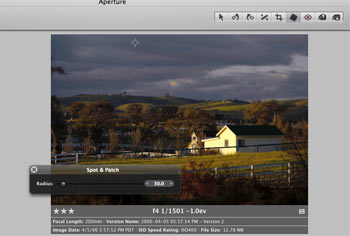
Here’s how it works. In this picture you can see the Spot and Patch tools cross-haired locator at the top of the image, where the offending dust spot makes its home:

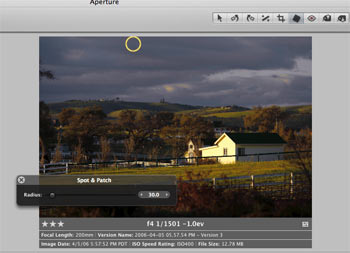
Hit enter and the circle becomes yellow, effecting removal of the spot on the selected image:

Unlike with Photoshop, there is no need to select a source for the patch – Aperture does it automatically based on the area sorrounding the defect.

Now click on the Lift part of the Lift and Stamp tool icons visible at the top of the screen – it’s the one with the arrow pointing up.

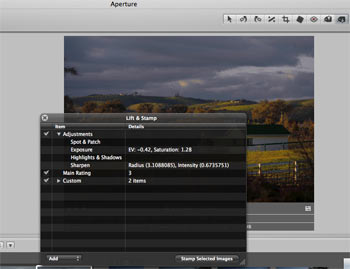
The type is small here, but the original discloses that I have made four adjustments – Spot & Patch, Exposure, Highlights & Shadows and Sharpening.

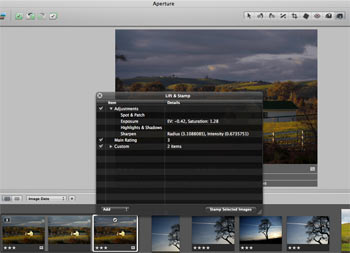
Now highlight all the images with a like dust defect (Shift-Click for contiguous ones or Control-Click for non-adjacent ones), click the Stamp icon of the Lift and Stamp tool (the one with the arrow pointing down) and click on any one of the selected images.

The dust mote is removed in all of them. In my case, as I have also made Exposure, Highlight & Shadow and Sharpening adjustments, these would also be conferred on all these images. So if the images are different, do the Spot & Patch and Lift & Stamp work first, then selectively change other parameters in images as you please. The images selected for dust removal can be versions of one image, disparate images, or both.

Don’t forget to clean the camera’s sensor after doing this!

See what I mean about good design? Care to find this feature in Photoshop? I think not.

A simple precaution

Protection for that exposed LCD screen on the Canon EOS 5D

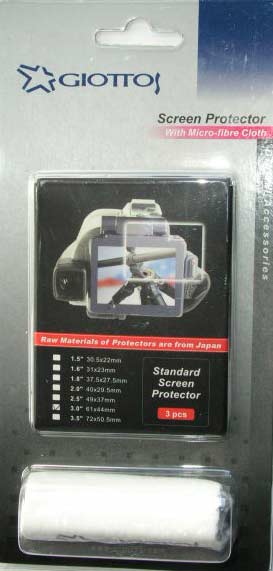
For a few dollars from the good people at B&H I picked up a packet of three sheets of matte surfaced stick-on plastic screen protectors for the exposed rear LCD screen of the Canon EOS 5D – click on the topical index to learn more about this camera.

I couldn’t get quite the right size so I purchased the 3″ one and shaved 9/64″ off the long side and it fits fine. The packet comes with a nice cloth to make sure you have removed all grease from the screen before applying the plastic sheet and also includes a small hard plastic blade to smooth the film once in place. This spreads even pressure better than your finger can.

A side benefit, apart from the protection against scratches, is that the matte surface does a far better job of supressing reflections than the smooth surface of the original.

New EOS 5D firmware

It pays to stay current

Canon has released Firmware update 1.0.5 for the EOS 5D.

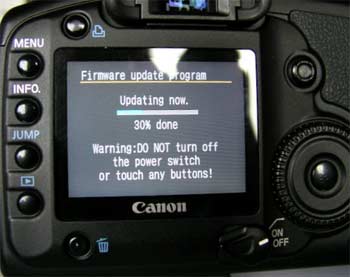
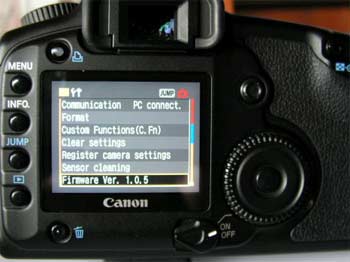
Here’s mine loading and the result:


This fixes a problem with color pictures taken with the Standard Picture Style with +4 Color Density setting (the pictures would lose saturation on the sRGB setting and appear monochrome) and with the 85mm f/1.2L lens when used with the Canon 580EX flash where the shutter button would not work.

It’s nice to stay current.