But your old Brother laser printer does not have to.
Extensive reports from beta testers of Apple’s latest desktop operating system – Mac OS 27, or Golden Gate – suggested that the software was robust and reliable, so I updated from Mac OS 26 (Tahoe) to OS 27 the other day …. and promptly lost the use of my USB wired Brother HL-2300D laser printer.
Reading the Apple Community discussion board disclosed that Apple was no longer including Rosetta with Mac OS 27, and that old but reliable Brother printer used Intel era code to do its thing. Meaning it needs access to Rosetta.
Rosetta – some background:
Two CPU generations ago Apple’s hardware was running on IBM G-series CPUs – the G1 through G5. Apple’s notebook, the Powerbook, was widely regarded as the best laptop on the market and was running the G3 CPU. Steve Jobs wanted to up performance by installing the latest G5 but the CPU ran so hot that it was unusable, unless you liked a scorched lap. I recall owning a G5 iMac desktop and, indeed, it put my kitchen toaster to shame when it came to heat output. The fans would race to maximum under the most modest tasks. Not Apple’s proudest moment.
Anyway, Steve concluded that the IBM CPUs were …. err, toast, and migrated the hardware to Intel CPUs. Cooler, faster, cheaper. To aid in the migration Apple developed a brilliant piece of software named Rosetta, after the Rosetta Stone, whose multi-language engravings acted as a Greek-to-Egyptian hieroglyph dictionary. Hieroglyphs could now be understood. Apple’s smartly named Rosetta performed a like task in translating IBM G generation applications to Intel code, meaning that all those old G apps would run seamlessly on Intel machines. The performance penalty was minor and Rosetta ran completely invisibly. A nod in the direction of that old Apple marketing slogan, “It Just Works”. Eventually developers rewrote all their application to run natively on Intel CPUs and the need for Rosetta disappeared, meaning you forever lost the use of old apps which were never rewritten, though those were few and far between.
History repeats:
When Apple started developing its own desktop and laptop CPUs, Apple Silicon, meaning the M1 through M6 range, they crafted a new version of Rosetta which did for the Intel-to-Apple Silicon change what the original Rosetta did for IBM-to-Intel. Old Intel applications would run perfectly well on M CPU hardware, performing the translation task invisibly in the background. The seamless implementation testifies to some serious programming chops in Cupertino. As before, with most applications now rewritten to run on Apple Silicon, the need for Rosetta went away, so much so that Apple warned that Rosetta would no longer be shipped with Mac OS 27. And as that old Brother printer needs Rosetta to work, it ceased doing so.
The fix is simple, as this extract of the Apple Community discussion discloses. Install Rosetta.
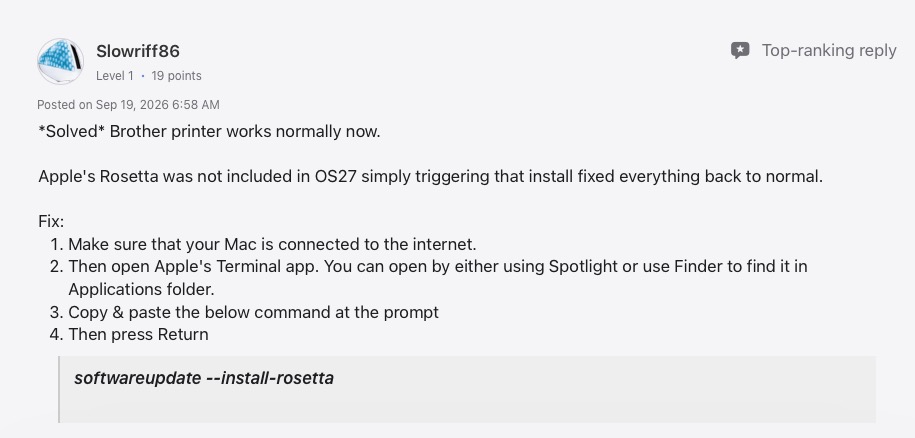
From the Apple Community discussion board
The Terminal app can be found in the Utilities folder, and the whole process takes under a minute. And, Bingo!, my old Brother HL-2300D is as good as new. That printer is hard wired to my Mac Mini M4 and is no longer supported by Brother, so the chance that Brother will update the driver for Mac OS 27/Apple Silicon is exactly zero. But there’s no need to throw it away. Further it works perfectly well with dirt cheap aftermarket toner cartridges and I expect to get many more years from mine. Will Mac OS 28 include Rosetta as a downloadable option? Unlikely, but I’m confident some smart programmer will come up with a new fix.
Running old Intel-era applications:
If you have old Intel apps you like and if these were never rewritten for Apple Silicon, installing Rosetta in Mac OS 27 should allow them to continue functioning.
Lightroom use:
The current desktop version of Lightroom is Lightroom Classic. It requires an Apple Silicon CPU to work and I print using a wirelessly connected Epson ET8550 color ink jet printer. There are no issues using LRc with the ET8550 running Mac OS 27.