Category Archives: Mac Mini M4

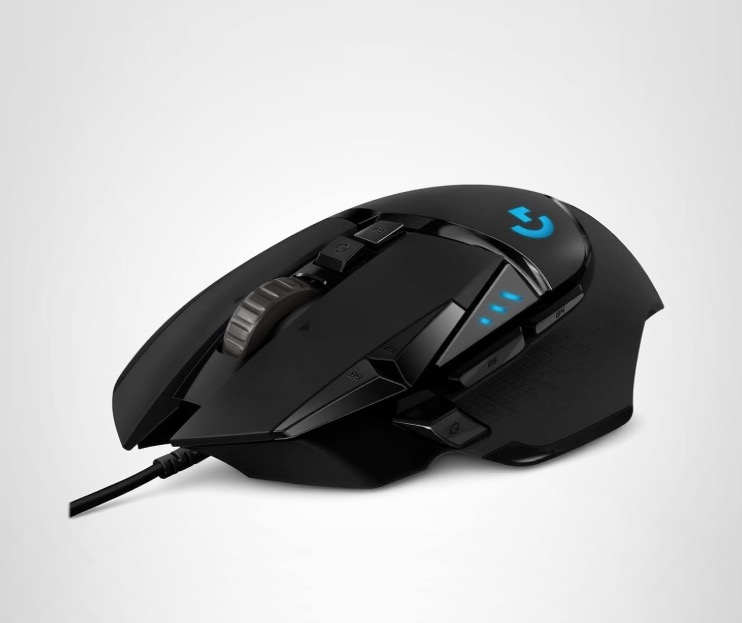
Logitech G502 wired mouse

Time for a new one.


The Logitech G502 wired gaming mouse.

My Mac Mini suddenly lost the ability to drag and drop files. Given the frequent use of this function and its general indispensability, this fault rendered the computer near useless.

I set about reinstalling the Tahoe operating system – no change – then restored files from my Time Machine sequential back-up. Still no joy.

That left the mouse and trying a basic old Microsoft two button mouse had drag and drop working once more, so the old Logitech G500 had to be replaced. As it had served me well I went with its replacement, the Logitech G502, and stuck with a wired design as that’s one less thing to go wrong and one fewer battery to recharge. At $38 it’s some 50% less than the G500 was 13 years ago, in inflation adjusted dollars, so no complaints here.

Like the G500 the G502 has installable weights to add heft and I loaded up the G502 with all six. There’s also one spare provided. Each weighs 36 grams/1.27 oz, so fully loaded you are adding 216 grams/7.6 oz, which confers just the right heft for my use. Also, like with the G500, the scroll wheel’s click-stops can be disengaged for smooth scrolling, much my preferred setting.

There’s a downloadable app which claims to do all sort of magic things, including changing the color of the LED logo (how dumb is that?). Well, it is a gaming mouse, which explains a lot about the typical user, I suppose. Rather than mess with that I stuck with the well supported SteerMouse which recognized the G502 immediately and programming the several buttons – there are seven – took a couple of minutes. After some use I had to turn down the pointer sensitivity and speed to get the settings I was used to. Simple to do. The G502’s buttons are located in a manner similar to that on the G500 which makes transition easy.

If the G502 lasts as long as the G500 I will be a happy camper.

6 months with the Mac Mini M4

A solid machine.


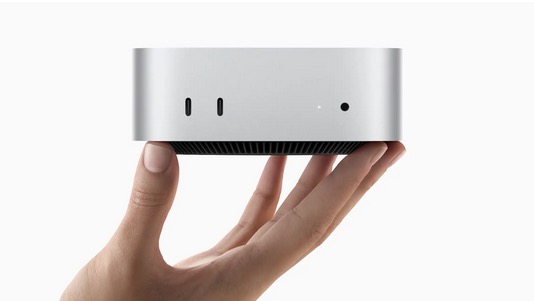
Still tiny.

I paid $799 for my 16gB/512gB Mac Mini M4 six months ago. B&H currently lists it for $744, at which price it’s a great bargain.

I have had no issues, except that I had to upgrade some applications, most importantly Lightroom Classic with its execrable subscription pricing. Still, at $10 monthly with many enhancements since my ancient version 6 running on the Mac Pro it’s not that bad a deal, but I do not like paying ransom money to a huge corporation. I also had to purchase an external enclosure for the four large hard disk drives and for the BluRay reader/burner which were formerly housed in the chassis of the magnificent Mac Pro. Sadly the latter had to be taken to the recyclers, despite being in perfect condition. A sad event.

Complaints? Screenshots take a few seconds to hit the desktop and sometimes they do not arrive at all. Not that big a deal. And rendering of 20-30mB DNG/RAW image files in LRc (from the Leica M10 and Nikon D800, respectively) can take some three seconds whereas the huge 80gB of RAM in the Mac Pro saw this happen immediately. Again, not a deal killer. And despite having only 16gB of RAM I cannot complain about performance which, in most respects, is of similar speed to that of the 2010 Mac Pro predecessor. And LRc loads in 4 seconds compared with 25 seconds in the old Mac Pro which is excellent, especially given my daily use of the application. Given three daily uses that’s a saving of over 6 hours a year.

Though there are 5 USB-C connectors (three of those also support Thunderbolt) I had to buy adapters for all my hard wired USB-A devices – keyboard, mouse, BluRay drive, laser printer, ink jet printer and a spare for a removable SDHC/CF camera card reader or an off site back-up hard drive. That’s six connections so in addition to buying USB-C to USB-A adapters, I also had to buy a splitter cord. All inexpensive.

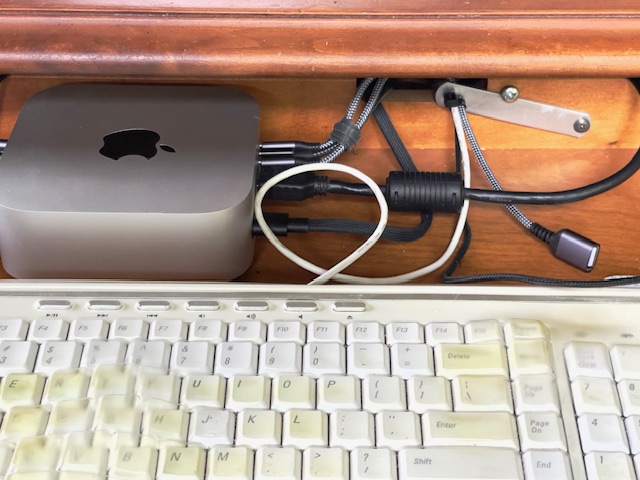
The Mini continues to reside behind the keyboard on a pull out tray where it is not particularly well ventilated, but rarely gets even warm to the touch. I never hear the fan despite the Mini being some 14″ from my ears.


Nestled at the back of the keyboard tray. Open USB-A
connector is mostly used for reading camera cards.

If the Mini fails there’s nothing that can be easily fixed unlike in the Mac Pro which was an assemblage of replaceable hardware components. But there are no reports of poor reliability so far. And I console myself that the frequent software security updates from Apple keep the bad guys at bay. Yeah, right.

Recommended, as long as you avoid Apple’s gouging for higher RAM/SSD versions where the cost quickly goes ballistic.

Mac Mini M4 after one month – Part VI

It will do, and is fine with LRc.

In Part III I set forth some technical measurements which indicated that the performance of the 2024 Mac Mini M4 was pretty much on a par with that of the 2010 Mac Pro fitted with dual 3.46gHz 6-core Intel CPUs, 80gb of memory and a speedy Nvidia GTX980 GPU. By contrast the M4 Mini has a single 10 core CPU and just 16gb of very fast memory. This testifies not only to the great performance gains realized by Apple with its in house Apple Silicon M4 CPU with its integrated GPU, but also shows just how awfully good that old behemoth, the Mac Pro tower was almost 15 years ago. Sadly, Apple’s planned obsolescence strategy, which saw to it that the Mac Pro was now six generations of MacOS behind, forced the upgrade. Well, that and the aggressive pricing of the new Mini, and my electricity bills will fall!

I now have a month of heavy daily use with the M4 Mini under my belt, much of that with the Apple Silicon optimized Lightroom Classic (LRc – v14.1.1), an upgrade from the prior Lightroom v6.4), so the following observations are mostly subjective.

Start up is much faster at 4-6 seconds compared with 20 for the older version, if I get a beachball it’s maybe once or twice a week, and with previews enabled image-to-image flipping is instantaneous. There’s the very occasional delay of 3-4 seconds for the image to render in full definition but that was also much the case with the Mac Pro.

More significantly, the latest version of LRc adds significant functionality in terms of localized image adjustments with both the Remove and Masking tools well implemented and easy to use, largely obsoleting the more complex variants in Photoshop. Indeed as I hate paying rent I dropped PS all together and made a one-off purchase of Affinity Photo 2 which does all I need on those rare occasions where LRc cannot do the trick.

A good example of the use of these new to me tools is in this night snap of a retailer’s window in Carmel, CA. The host of images I took in that setting all have a common factor which is that the dynamic range is very high, necessitating exposure for the highlights, to avoid burn out, with a post processing need to bring up the shadows. In the case of these ‘before’ and ‘after’ images not only was the shadows slider used to bring up the shadows across the whole image, I then selectively masked the fountain at the lower left to bring the sparkle in the water to life. The difference is, err…., night and day:


Before.


After.

In learning some of these new features I invested in Scott Kelby’s book. It does not cover the recently added Remove/Generative Fill functions but is an excellent learning resource, greatly superior to any video I have seen.

Returning to the Mac Mini M4, it never gets more than a tad warm to the touch, is small enough to nestle at the back of the keyboard tray and performs equally to the old Mac Pro at a fraction of the cost. While there were many frustrations regarding application incompatibility when switching from Intel to Apple Silicon CPUs these are now behind me, though I still hate paying Adobe $10 monthly in rent for LRc. Otherwise, what’s not to like?

Mac Mini M4 – Part V

Matching storage.

In Part IV I wrote about the French company named Polysoft which is providing upgraded storage for the Mac Studio computer, adding that I expect they will expand their offerings to include the Mac mini M4.

That may take a while as they will have to reverse engineer around Apple’s greed, but meanwhile another entrepreneurial outfit has produced an external SSD in a box with the same footprint as the Mini. TechRadar has the story and storage capacities from 512gb to a whopping 8tb will cost from $140 to $1000. That is extremely competitive when you look at Apple’s upgrade pricing – Greedy Timmy wants an additional $800 for just 2tb.


The Orico external SSD for the Mac mini M4.

Orico claims a throughput of 40Gbps which seems unlikely to me, but we should soon be seeing test data.

Mac Mini M4 – Part IV

Expect storage upgrades soon.

In Part III I wrote:

Internal SSD upgrades: Early teardowns of the Mac Mini M4 disclose that the NAND storage resides on a removable card. However, components on that card make it impossible to simply plug in a larger storage one as the Apple design ties the card to your particular machine. However, hackers with micro-soldering skills have unsoldered the two existing NAND modules from the card, replacing them with much larger ones for very low cost, and things work well. So you can bet that an aftermarket business will shortly arise offering this service. When you realize that Apple charges $200 for the jump from 256gb to 512gb, and $600 more to go from 256gb to 1tb, there’s money to be made from competing with Apple’s greed. So if you want a 1TB drive or greater it might make sense to buy the base 256gb $600 Mac Mini and wait for the market to offer upgrades.

Well, here we are not a month after the release of the Mac Mini M4 than French company Polysoft has reverse engineered the NAND storage in the Mac Studio and will soon be offering 8tb upgrades for $1,160. Here’s Apple’s pricing – greed personified while Mr. Cook walks around the stage, hands prayerfully clasped in supplication to the god of money:


Mac Studio SSD upgrades.

And here’s the excellent article and related video from Cult of Mac explaining what Polysoft accomplished and it’s really magical:


Click the image for the article.

In contrast to much of the appalling dreck found on YouTube, Luke Miani’s presentation is articulate and involving.

The real volume for Polysoft’s business will be selling upgrade SSDs for the Mac Mini M4 because that’s where the money is. I would expect they should have a competitive offering in a quarter or two. And yes, Apple’s greed for upgrades to that machine is equally abundantly on display. Well done Polysoft. Vive La France!