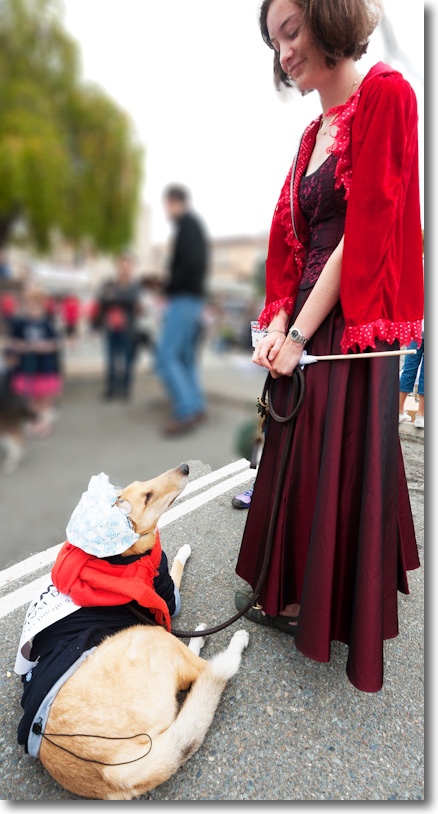
What a gas station should be.
In Carmel, CA. iPhone 5, 1/15. ISO 400.
Click the picture for the map.
The search continues.

Any Mac user brought up on any one of many awful Mac Mice will understand the ongoing search I am making for the perfect mouse. Anything is better than a Mac Mouse, my last the Magic Mouse being a crowning achievement of form over function. The most beautiful mouse on the market it belongs in NY’s MOMA design collection but not on your desk where you will assuredly develop carpal tunnel symptom.
The best mouse I have yet used is the Logitech MX900 which is hard to find in the US. It was mostly sold in Europe and has been discontinued for many years. I hunted down a couple at some $20 each on eBay at the recommendation of a friend who swears by his. After a happy 18 months with mine I chanced on the rave reviews on Amazon of the more recent Logitech MX Revolution (Revo), still listed by Amazon at $155 (silly) and a good deal more than later models. I bought one on eBay for $40 and set about messing with it the other day.
Readon and you will see why it’s worth giving the Revo a try. Not only does it have exceptional ergonomics, the performance and actions of the various controls can be exquisitely tailored to your needs. Not least of the adjustments is the ability to change the behavior of the top scroll wheel from freewheeling to stepped or clutched using the SteerMouse mouse driver. Extraordinary.
As the picture shows, there is an even more extreme level of sculpting for the hand than with the MX900 and both are for right handers only.
The improvements include:
The drawbacks:


You will not go wrong with either mouse. Both provide precise pointer movement and both are easily programmed with OS Mountain Lion 10.8.2. The Revo is far easier to find in the US and you really do not want to pay Amazon’s new price. Logitech never made OS X drivers for the MX900 and their Revo OS X driver refuses to install on my Hacks, but seems OK with my MacBook Air, meaning that Hack or MX900 users may have to buy an aftermarket utility to allow programming of their mouse. Proceeds of sale of your ghastly MagicMouse will pay for a good used Logitech replacement.
Tailoring the behavior of the Revo’s scroll wheel:
A simple Terminal (in Applications->Utilities) command allows you to tailor the scroll wheel on the Revo. This works for the wireless version only, not the Bluetooth one. While it’s no longer published on the SteerMouse web site, here it is. You can find it under ‘Tips’ on the SteerMouse preference pane in System Preferences->SteerMouse. Fire up Terminal and copy and paste the following line, then hit enter, then type Exit:
Replace ‘-3’ at the end as follows:
0-12: Automatic Shift. Smaller values reduce the timing for its shift.
-1 : Click-to-click.
-2 : Free-spin.
-3 : Manual Shift. Changes between the Free-spin and the click-to-click by clicking the scroll wheel button. This is my preferred setting.
I have it set at -3. In that mode, depressing the top scroll wheel alternates between free spin mode and stepped mode. I generally use free spin mode, where the Revo will emulate the ultra-smooth scrolling which is provided by Apple Mice.
Update: Replacing the rechargeable battery: Refer to this piece and you will see that the battery is actually fairly easy to replace. They run under $10 on eBay but be sure to read the complete link as there are two variants, depending on the age of your mouse. If you damage the feet on removal, you can even buy replacement feet here! Isn’t the internet wonderful? I doubt there is any need to destroy the slider pads which the link suggests you should do. Instead, insert a finger nail to pry up one end of a pad then pull through dental floss to remove it without damage.
Double-click issues: If your Logitech Revo is double clicking when you issue a single click, the fault is likely a worn microswitch spring. The fix is here. It is very difficult indeed to do without irrevocably damaging the innards. Don’t ask how I know.
A note on receivers:
There are two models of this mouse and the receivers differ. They are not interchangeable.
2006 model: The mouse is p/n 831869-0000, The receiver is p/n 831735-0001, also coded 993-000007.
2007 model: The mouse is p/n 810-000422. The receiver is p/n 810-000412 or 810-000826, also coded 993-000011.
To pair the mouse to a new receiver, you have to use the Logitech Connection utility, downloadable from Logitech. This only runs on Windows machines but, once paired, you can move the mouse and receiver back to your Mac. Once paired the pairing is not volatile. The pairing instructions are here.
Technologically unchallenged.

One of the best indicators that the desktop PC has peaked is the falling sales of PC hardware and the poor upgrade rates to Windows 8, the latter as much a function of a mediocre product as it is of ‘free’ competition from the scummy people at Google in terms of their Cloud apps.
And while I have been diligent in seeking out the services of ace Hackintosh builder FU Steve in keeping my Hackintosh at 90% of the state of the art (90%, as Ferrari pricing takes over at anything higher and you get performance you cannot use) the state of play right now suggests that future enhancements will be few and far between.
Sure, while I could add a couple of silly priced EIZO monitors, which I would never do, there is nothing I can currently do to my Hackintosh, the HP100+, to improve it for my purposes, which leaves me without a tech challenge. Disappointing.
Desktops have peaked.
I could add a wild and crazy $$$$ GPU, but I do not game. I can scarcely tell the difference with the latest nVidia GTX 660 card installed on what I do, which is mostly LR and a bit of PS.
I use a SandyBridge i7 CPU and IvyBridge, the latest iteration, adds nothing in a desktop. Nor, I suspect, will Haswell in 2013 where the stated goal is lower power consumption. I’m green, but not so green that I’m about to rip out the guts of HP100+ to save a few watts in power consumption, installing a new motherboard and CPU.
I could have FU install a Xeon CPU and motherboard, at Rolls Royce prices, but the only plus of that is in massively multi-threaded math operations, and I have no need of that. LR and PS use four threads poorly, never mind sixteen.
I could ask El Supremo to add BluRay but the reason I passed on my BluRay player to a friend is that on the 42″ 720p Vizio TV (5 yrs old and it continues to delight daily) I could not tell the difference from regular DVDs, so BluRay is not something I could make use of.
The other thing which is currently useless is Thunderbolt, as so few peripherals support it. Those that do are overpriced, and I already have USB3, which is half as fast, running fine (not a pretty story, but I got there. As Churchill said of American democracy, we will try everything else before settling on the right answer, which is how FU got USB3 to work!). The only thing I use USB3 for where the speed is actually exploited, is to import images from SDHC and CF camera cards into Lightroom.
This sort of reminds me of film camera days. I was happy with my Leicas for 35 years because there was nothing else out there that was better for what I mostly do, meaning street snaps. And technology was only improving for film emulsions, not for hardware. Then digital came along and I have been chopping and changing, but seem to have stabilized on the two big Nikon DSLRs, both obsolete, and the two small Panny MFTs, the latter increasingly my son’s province. Then of course I got into converting old classic-era Nikkors with chips and that effort was super successful, the lenses are to die for and there’s nothing more I need optically. Forget believing that today’s optics are better. They are not.
Yours, technologically unchallenged ….
Splendid.

This book of O Winston Link’s extraordinary night steam railroad photographs improves on Steam, Steel and Stars of which I wrote over 5 years ago. The earlier tome remains available but is far costlier, for some reason, and is missing two things which makes the newer book better. The new one includes a handful of moving color pictures and a CD with recordings of steam trains made by Link himself.
This is the first I have read of his involvement in sound recording, an endeavor to which Link applied himself with the same intensity exhibited in his picture making. There’s an index to the recordings on Page 236 but zero information on the tracks once the CD is imported into iTunes. Try Track 4 to experience the immense power of a heavy steam locomotive working hard – a Class Y train moving coal trucks. Ideal background sound for any train enthusiast’s den. You can hear Link on Track 06 – he sounds remarkably like Groucho Marx! Recorded in June 1958, in the very last days of steam. The haunting, plaintive whistle of the big Y6-b can be heard on Track 07. Link’s recording technique is outstanding – for example try Track 08 where you can hear water dripping off the tunnel walls until the sound of the locomotive drowns everything out. The recordings make reference to photographs showing the trains in the locations where they were recorded.

Nothing about Link’s efforts was easy. From the large view cameras, huge tripods, hundreds of flash bulbs, miles of cable, large power supplies and gargantuan tape recorders, this was a very focused effort indeed. Next time you make a color movie, sound track and all, with your iPhone think about what Link had to go through.

The above image is not only immensely moving, the work that went into it is well described and worth the price of the book alone.
Highly recommended. It bears repeating that you do not have to be a steam train nut to enjoy this book. All you have to like is great photography.
A photographer of great breadth.

I have written before of my distaste for the term ‘Woman photographer’. How gender has anything to do with the quality of the work beats me and, were I a woman, I would feel mightily offended to be included in a show of ‘Women photographers’, for that would suggest I needed gender bias as an excuse for avoiding honest competition with my male peers.
Germaine Krull needs no such gender-specific excuse for her work, much of it in the 1920-1939 period, is as good as it gets. Looking at her images you can see that Cartier-Bresson studied them as a child because he takes over where she left off, many of his early snaps from the 1930s bearing a striking resemblance to Krull’s work. Reportage is a dominant theme, but reportage with a strong eye for composition and drama.
If you click through to the Amazon link, above, be sure to look through the ‘Look Inside’ section where a truly amazing selection of images is reproduced. If you like what you see, buy the book which comes along with a scholarly biography, as you might expect of MIT, the publisher. What MIT is doing publishing a monograph on a great photographer beats me, but we should all be grateful that their massive endowment is being put to good use. It beats export of intellectual property to China, through all those ‘guest’ students from Beijing busy scurrying off with our technologies.

Place de l’Etoile, 1926.

Eiffel Tower, 1926.

Cocteau, 1930.

Woman in a slip, ND
Krull’s natural sensibility was that of a liberal and it shows in her work. Quite how anyone claiming to be ‘conservative’ can ever take good pictures of people mystifies me. In fact I challenge you to name one good conservative worker in the genre. What would they do – go to the mansions of plutocrats to picture them with all their possession in the manner of suck-ups like Slim Aarons?
The Krull book is expensive but Amazon lists any number of used ones for much less, which is how I bought mine.