Category Archives: Photography

Mac OS 10.8.3

One nice enhancement.

The best thing about Apple’s troubles – a CEO with the charisma of a sponge, a stock down over 30% from its peak, more cash than it knows what to do with, a tired cell phone offering, a lack of innovation and failure in the TV market – is that these many distractions mean fewer updates of OS X, the OS powering Macs and Hackintoshes. Because, let’s face it, every ‘enhancement’ since OS Snow Leopard (10.6) has been so much fluff and noise. SL (Intel machines only) can still be bought from Amazon for some $40 but will almost certainly not run on the latest Macs. It’s fine with Hacks and offers one huge feature missing from Lion and Mountain Lion – Rosetta, the PPC G3/4/5 emulator which allows it to run any old apps from your PPC days on an Intel Mac or Hack. You know, apps like HP’s DJ30/90/130 color management utility which will not run on anything later and is essential for debugging whatever ails your HP DesignJet dye ink printer.

As I still have a ten year old PPC iMac G4 for DesignJet maintenance, the loss of Rosetta is not such a big deal, so it was with trepidation that I approached the latest minor upgrade of Mountain Lion 10.8.3. What else would now be broken by Cupertino’s policy of planned obsolescence?

When performing the upgrade I did so by downloading the complete (Combo) update from Apple here rather than the incremental upgrade which is what is applied if you upgrade through the App Store. Hackintosh community chat has it that a Combo upgrade is more reliable than an incremental one. I have no idea if that is true, but this approach avoids being forced to upgrade to the latest version of iTunes, an app which Apple has never got right.

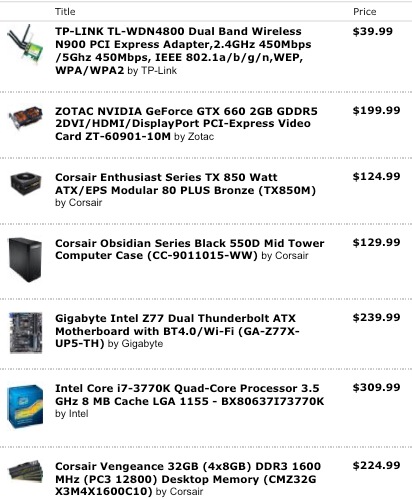
After a week of running I can say it seems fine and there is one significant enhancement. Because one of the new 2012 iMacs uses the nVidia 660M GPU, Apple has had to provide native support in OS X for the nVidia 660 GPU family to run OS X on that machine. The GTX 660 is one of nVidia’s finest bang-for-the-buck mid-range GPUs, with the 660M in the iMac being – yup, you guessed it – a crippled version. The iMac 660M version has but 0.5GB of memory, compared with 2GB (3GB on some EVGA cards in the US for $30 more) for the aftermarket cards. I would bet the clock speed is lower too, heat being any iMac’s bugbear, but cannot confirm this. The Zotac GTX 660 I am using (not the 660 TI) retails for $215, which includes two powerful variable speed integrated fans which are exceptionally quiet. These aftermarket cards all support up to two 2560 x 1600 pixel displays and include HDMI and DisplayPort in addition to DVI sockets. The Zotac board is recommended over the competitors’ if you have limited space in your box. It is considerably shorter, making a major difference to the accessibility of the motherboard’s SATA sockets in my Antec Sonata III enclosure. Non-trivial.

To put the sophistication of these latest GPUs into context, the Intel i7 Ivy Bridge CPU has some 800,000 transistors. The nVidia GTX660 CPU has 2.54bn – three times as many! Little wonder nVidia is making serious progress in the world of supercomputers, where its graphics chips are delivering cost effective performance at state-of-the-art throughputs.

My three monitors remain the estimable Dell 1650 x 1080 21.5″ 2209WA IPS ones, now some 4 years old, because they are easily calibrated and the dot pitch is fine for my purposes. Plus I like the bigger default fonts these deliver. If you use newer 1920 x 1200, 1920 x 1080, 2560 x 1600 or 2560 x 1440 displays, a card like the GTX 660 will easily crunch through graphics which might leave earlier nVidia GT2xx, GT4xx, 98xx or 88xx cards running out of steam.

I wrote about updating my HP100 Hack to nVidia’s latest card here and that hardware and OS needed nVidia’s separate drivers to make the card work. Now, with 10.8.3, the drivers come with the OS, so no external drivers are necessary. The benefits are twofold. My Hack is now more stable – looking to be as good as in the Snow Leopard days of yore – and the CPU’s idle temperature has fallen from 104F to 94F. Nice. The start-up problem where 10.8.2 frequently refused to recognize my third display, driven through a DisplayLink USB dongle, is gone. And the i1 DisplayOne Lion colorimeter display profiling software continues to work fine.

The Zotac GTX 660 in the HP100. Lots of room.

The native GTX660 support works for all nVidia cards, whether Asus, EVGA, MSI, Gigabyte (all per chat boards), Zotac (mine), PNY (tested and owned by reader PB) or any other brand. The chips are the same. Once you upgrade your Hack to 10.8.3 you can delete these two lines from your Boot Drive/Extra/org.chameleon.Boot.plist file on your Hackintosh as the presence of native drivers no longer requires the Hack to be informed that a 660 Kepler card is installed (thanks to reader PB for the tip):


The above lines can be deleted.

nVidia also released an update to its CUDA driver, which you can download through the related System Preferences pane, after which you will see this:


Latest CUDA driver.

The System Information->Displays data is also updated to reflect the use of native nVidia 660 drivers:

Let us all hope that Apple remains seriously distracted with its other woes and leaves OS X alone for good and all, instead of adding dumb gesture support, hidden Library directories and poorly implemented voice recognition. They might like to start by fixing the joke that is Siri on the iPhone. I use Google search on my iPhone – it’s everything Siri is not. Fast, accurate, a joy to use for voice search with excellent speech recognition. Even if you speak English, like me, not American!

Rolleiflex 6003

The ultimate medium format film SLR.

Franke & Heidecke had been making twin lens reflex medium format film cameras since 1920 until they decided to compete with Hasselblad with an SLR medium format design named the SLX in 1976. This quickly got a reputation as one awfully unreliable piece of hardware with common failures including the film drive motor and the lens aperture motor. Hasselblad was not about to be replaced as the fashionistas’ camera of choice, a reputation earned over several decades by the Swedish camera maker using Zeiss lenses.

But Rollei kept banging away and by the time the Rolleiflex 6003 Professional was introduced in 1996, the product was close to perfection. One later iteration saw the addition of AF, hardly an essential in this type of body and dictating replacement of all those expensive optics, but the 6003 Pro improved on the dated Hasselblad’s design in every way possible.

The design was Bauhaus modern, the oversized controls on the body and lenses perfectly conceived and the detachable handgrip, which could lock at various angles, was a piece of design genius. It made a clunky studio camera into a fully fledged street operator, albeit at the price of a lot of dollars and avoirdupois. This camera was heavy!

The images below are of (and by) the one I owned.


Large, clear controls. Note the Multiple Exposure dial, lower right.


Bauhaus design influences everywhere.
Beautifully designed and integrated handgrip with adjacent green shutter release.


The collapsible waist-level hood could be replaced with a 45 degree pentaprism.


Rear view. I was always a Kodak man.


Compact, inexpensive film holders could be preloaded for rapid reloading.
Unlike the tortuous film path in the Hasselblad, Rollei did it right.
Fully interchangeable backs were also available.


Easy to use exposure compensation dial. The mirror could be locked-up.
Spot/average metering control on the periphery. Modern flash shoe.


Built-in QR tripod base.


Easily changed focusing screen. I used
an aftermarket Beattie Intenscreen, far brighter than stock.


High capacity NiCd battery could be swapped in seconds and powered the
film motor, the exposure meter and the lens’s diaphragm.
The fuse protects the battery from overcharging.


The controls and markings on the lens were outstanding.
Operation with gloves was very easy.


150mm Zeiss Sonnar portrait lens.


Tack sharp – and massive – 40mm Zeiss Distagon wide-angle optic.


The 45 degree prism finder could be rotated.


Massive – and massively imposing – 350mm Zeiss Tele-Tessar telephoto.


Extension tube showing electronic contacts for the lens.


The outfit in a LowePro backpack.

Where the Hasselblad was created in a mechanical age, the Rollei was clearly a child of the electronic era. Unlike with the Hasselblad, the Rollei had motorized film advance (available for extra on special Hasselblad models, and still as clunky as it gets), an instant return mirror where the Hasselblad had none, and far superior ergonomics. It was an integrated whole, needing no add-on gadgets. The accurate TTL meter was built-in, you could opt for aperture-priority, shutter-priority or fully automatic program modes, single or continuous shooting, spot or average metering and even TTL flash metering on the 6008 variant. There was a full bright red LED status readout of all the vital signs at the base of the finder window and once you attached the 45 degree prism the outfit would really sing at a comfortable chest/eye level. There were two shutter releases – green in the above images – the one perfectly placed for use with the handgrip. Hand held use for close-ups was easy with a couple of extension tubes which conveyed all the information needed to the camera and lens using electrical contacts. Even the aperture was electronically controlled by a linear motor – advanced in its day, now stock in most DSLR lenses.

Hasselblad’s claimed advantage was that all the lenses for the 500C and later bodies had in-lens leaf shutters, the long-lived Synchro-Compur. This purportedly added to the cost of lenses, not that shutterless Rollei/Zeiss lenses seemed any cheaper. Rollei countered by adding selected lenses with leaf shutters, which have the advantage that they can be sync’d with flash at any speed, unlike focal plane shutters, allowing for easier balancing of ambient light and motion blur. Eventually Schneider also offered lenses for the Rollei, just as it did for the Hasselblad, making for a very large lens selection indeed for both marques. If you could afford them, that is. These optics were insanely expensive, not helped by a perenially strong Deutschemark and an overfed and overpaid German worker. Nothing changes.

I used mine with a Nikon Coolscan 8000 film scanner which would take a few minutes to render a 4000 dpi scan for a theoretical definition of 81mp, but in practice with all the variables, the vagaries of film and scanner and so on, it looks more like 10mp on my display using Lightroom.

And that was the Rollei’s undoing. When the 12mp Canon 5D was released as the first full frame affordable DSLR, a first look at the results doomed the Rollei to eBay. The Canon had superior resolution and color rendering, the lenses were outstanding and much faster, the body was a fraction of the bulk and cost of the Rollei and if you wanted 3+ fps, no problemo. But, best of all, there was no need to waste precious time scanning and then retouching the spots and scratches conferred by the film lab. And that was after first waiting to get the film back.

But my, my, what a well designed and fun to use machine this Rollei was. It always reminded me of what Lord Chesterfield said of sex. “The pleasure momentary, one’s position ridiculous and the cost damnable”. I sold my outfit before the penny dropped in the mass market that MF film was dead. A year or two after sale the price of used Rollei MF SLR gear had dropped 70% and Rollei had gone bust. Such is technological obsolescence.

It mystifies me why anyone would buy one today when a like-priced Nikon D600, with lenses a fraction of the cost, will leave the Rollei in the dust in every regard. Further, spares are unavailable and qualified technicians who can fix the electronics are even rarer. Finally, be prepared to procure replacement cells and soldering skills when the dated NiCd battery gives up the ghost. But as a design and display exercise, it’s as good as medium format film cameras ever got.

If you really must get into MF film gear SLRs, I highly recommend a Hasselblad. The bodies are mechanical, aesthetically beautiful to hold and behold, easily fixed and abundantly available. Their dated features are more than compensated by the ease of repair and the ready availability of spares and technicians, even if Lord Chesterfield’s pricing mechanism comes to mind.

As for all you hear about the plasticity and rendering and blah, blah, blah of medium format film, forget it. Pure claptrap engaged in by those with too large an investment in dead tech, now worthless.


Morro Rock from Highway 46. 350mm Tele-Tessar.


Sunrise, Templeton, CA. 40mm Distagon.


Highway 46 at Highway One. 150mm Sonnar.


Starfish, Moonstone Beach. 80mm Planar.


Moss and molluscs, Moonstone Beach. 80mm Planar.


Clams and rock, Moonstone Beach. 150mm Sonnar.


Driftwood. My son calls this one ‘The Snake’ and he was the one who spotted it.
“Daddy, daddy! Look, look! A snake!”
150mm Sonnar – 9+ 17mm Extension tubes.

No more Google Reader

And that’s a good thing.

I get all my news through RSS feeds, whether that means newspapers or favorite blogs. American TV is not a source of news any more than is The Wall Street Journal. I suspect many readers here do likewise, especially as I refuse to provide links to Twitter (for those with negligible attention spans) or Facebook (for those yet to hit puberty). As I prefer quality readers to click volumes, that policy will not change. The Twitter and Facebook mindsets are simply not consonant with my goals and I really prefer not to have fans of those noise and theft machines visiting here or publicizing my work.

Now the thieving Google, that adept reseller of your privacy, has announced that Google Reader will be closed June 30, 2013. Their goal is simple. They wish to force you over to Google+, their version Facebook larceny where your private data can be sold without your approval or knowledge. Google’s abandonment of Reader is a good thing as it forces those using Reader as a back-end to their favorite RSS apps to find something else. Excellent apps like NetNewsWire use Google Reader for data sources and the reason they exist is that the Google Reader interface, like every interface for Google products, is atrocious.

So knowing that Reader’s demise is imminent, I searched around among the bevy of alternatives and settled on Feedly. Feedly is a web browser-based RSS reader, meaning that you activate it through a browser on your computer (I use Safari on my Hacks and Macs) or through a downloadable app on an iPad, iPhone or Android phone. All free. If you download Feedly before July 1, 2013 you will be able to also download your existing RSS feeds from Google Reader, a painless and speedy process. Thereafter you will never be accessing Google Reader again.

The apps for the iPhone and iPad work equally well and the whole user experience is a pleasure, not least for the knowledge that one other Google theft conduit has been sidestepped.

So if you are using Google Reader on any one of a number of apps which front for Reader to read this or any other blog, now is the time to start planning for a change. Feedly is one elegant alternative.

Printing paper for the HP DesignJet 30/90/130 – Part III

Testing Hahnemühle glossy papers.


Hahnemühle glossy paper sample pack.

Tests for the Matte paper sample pack appear here. I concluded that not one of these papers was adequate for high resolution photographic prints, the color and/or texture taking out too much resolution. The heavily textured papers were downright awful.

The Glossy sample pack mysteriously includes two types of canvas paper which I consider totally unsuitable for photographic prints and did not test. Photographs are not faux paintings. They are photographs.

My first reaction on opening the glossy sample pack was one of disappointment. After discarding the two canvas horrors, only one (Baryta FB) of the remaining six papers was a true white, in fact slightly whiter than the HP-banded Premium Glossy paper, with Fine Art Pearl being almost as white. None was anywhere near as glossy as the HP brand, the Photo Rag Satin was anything but Satin (here the HP Premium Satin truly excels) being surpassingly flat and bland. How this can be included in a ‘Glossy Sample Pack’ beats me.

Paper profiles:

Hahnemühle does not provide any paper profiles for these papers when used with the HP DesignJet 30/90/130 dye printers. Accordingly, I used the stock HP Premium Glossy Maximum Detail profile, with colors controlled by Lightroom, not by the printer.

Glossy paper characteristics:


Hahnemühle paper characteristics – glossy sample pack.

Printer settings:


In Lightroom. Note that a matte profile was used for Photo Rag Satin in preference to a glossy one.


In the printer dialog. Note that the Photo Matte setting was used for Photo Rag Satin in preference to a glossy one.

As is always the case when using an HP Glossy profile, the DesignJet will hold onto the printed sheet for a few minutes before ejection, thus allowing the print to dry. It can always be manually ejected, but be aware that the surface is very fragile at this juncture.

One sheet of the whitest glossy paper, Baryta FB, had a small black blemish, maybe 0.5mm long, but enough to destroy a print if it appeared in a light area. Inexcusable.

Results:

My gradings are based on three simple criteria for a glossy print. The paper must be a stark white and the gloss has to be a high gloss or a true satin for papers named ‘Satin’. The third is that colors have to be accurate.

Color fidelity:

This was the best:

  • Baryta FB

This paper is extremely heavy at 350gsm, like the matte Museum Etching paper in the earlier matte paper test. Like that paper some color tracks were left in the bottom white margin from the printer’s roller, though strangely none on the printed area. The color rendering is outstanding, identical to HP Premium Glossy, but the finish s more satin than glossy.

I cannot recommend any of the other papers – too yellow, nasty surface finish or just plain yecch! (Canvas).

Fade tests in strong sun:

I will report results for both glossy and matte papers after three months of sun exposure, compared to a control sample stored in a cardboard box.

Conclusions and alternatives:

If my tests of 16 Hahnemühle printing surfaces proves anything it’s that the HP-branded papers are very good indeed. But my remaining supply of some 120 sheets of 18″ x 24″ is dwindling, so a replacement has to be found. HP’s paper avoids ridiculous excess weight, which serves no purpose and can cause roller marks.

There is no true glossy Hahnemühle paper here. The best is the Baryta FB, and it bears more resemblance to HP Premium Satin than to HP Premium Gloss, and Baryta FB’s high weight may result in ink smudges from the feed rollers.

Hahnemühle Fine Art Pearl leaves nasty blotches viewed at an angle, and only two paper base colors equal or exceed the whites of HP Premium Glossy – that same Fine Art Pearl (forget it, because of the blotchiness) and Baryta FB whose thickness causes dirt tracks from over-pressured rollers.

All the other papers in this sample pack are too yellow to pass muster for proper color rendering. Some of the finishes belong in a morgue, not on a photographic print.

Bottom line is that there is only one paper in the Hahnemühle mis-named ‘Glossy Sample Pack’ which I can recommend, the Baryta FB with the roller pressure caution mentioned above. And it’s not even glossy.

These tests of Hahnemühle papers have been very dispiriting. Not one of their Matte papers has anything to recommend it compared to HP’s Premium Glossy and Satin offerings and the Glossy ones are anything but.

Accordingly, I did some more research and will soon be testing Moab’s glossy papers. While I originally wrote these off as not suitable for dye inks, a revisit and more careful reading of Moab’s site, spurred by the poor experience with Hahnemühle’s offerings, suggests that their papers are suitable for dye inks, come in the large cut sheet sizes (13″ x 19″, 17″ x 22″ and A2 which is 16.5″ x 23.4″ – click here for paper sizes) which I prefer, and there are even profiles available for the glossy offerings specific to the HP DesignJet 30/90/130 dye printers. That is encouraging. As glossy print appearance and permanence are the very touchstones of the photographer’s craft, it’s worth the effort to find a long-term replacement for HP’s superb but discontinued Premium offerings. And I promise that is the last time I will use the words ‘superb’ and ‘HP’ in the same sentence.

For those photographers who revel in big prints and are trying to get the best print quality using the latest high megapixel sensors, high gloss surfaces are the answer. The quickest way to turn a 36mp sensor into a 6mp one is to use something ghastly like canvas paper.

Fade tests:

As with the matte papers, I will report back in three months on the extent of fading noted after daily all day exposure to bright sun:


Three matte and three glossy test strips in the sun.

Fuji X100s

Second time lucky?

Though I bought the Fuji X100 shortly after it became available, by the time it arrived reports confirmed that the software was deeply flawed and the camera was cursed by slow AF. So when it arrived I flipped it for a quick ‘unopened box’ sale and kept the profit.

In the meanwhile Fuji tinkered mightily with the software bugs, things like preferred settings disappearing after a battery change, but the poor AF performance was never really fixed.

Now they are having another go and I am more than willing to give this innovative camera maker a second chance.

The replacement, named the X100s, has the benefit of all the testers – they are known as customers here – reporting software bugs, so that side should be robust. The new version has the same body and fixed 23mm f/2 (35mm FFE) lens and hybrid viewfinder, a 16mp CMOS sensor replacing the earlier 12mp, and adds three focusing features which should transform the user experience. The more important of these is that a phase detection sensor array has been added for fast focusing in decent light – just like the system used by the stellar Panasonic G1 and G3 bodies I own whose AF is fast if not Nikon/Canon DSLR fast. The other two new focus features include an innovative manual focus aid which Fuji calls ‘Digital Split Image’ and focus-peaking. The Digital Split Image works in the EVF finder mode only and splits an unsharp image into horizontal strips. Get it right and the strips disappear. Sort of like a Leica M rangefinder patch on steroids. I’m not that sure that MF makes much sense in a fast street snapper like this but it’s clever and I look forward to trying it. The other MF assist is focus-peaking which highlights the sharp areas in the EVF.

This is the sort of innovation Leica can only dream about and I would be prepared to bet that Fuji will release a full frame version of the APS-C X100s before long. Given that a 35mm lens was what I used on my Leicas 90% of the time it’s not inappropriate to think of this as a Leica killer. The new Leica M and a 35mm Asph Summicron will run you $10,000. I would guess an FF Fuji with a fixed 35mm f/2 lens would come in under $2,000. Fuji will sell all they can make. Hopefully they will make a further follow up with a second body with a 75-90mm fast fixed lens which will make for the ideal outfit. Two small cameras, one wide, one medium-telephoto.

Other good news is that Adobe has enhanced its RAW processor in LR and PS to take advantage of the unusual pixel arrangement in Fuji’s sensor so enhanced image quality should come with the upgrade.