High contrast scenes

Underexpose then adjust.

After working with a few digital sensors – from cheap and nasty ones in point-and-shoots through the best on the market, the one in the Canon 5D, the thing they have in common is that highlights burn out very easily and are mostly impossible to fully recover in the displayed or printed image.

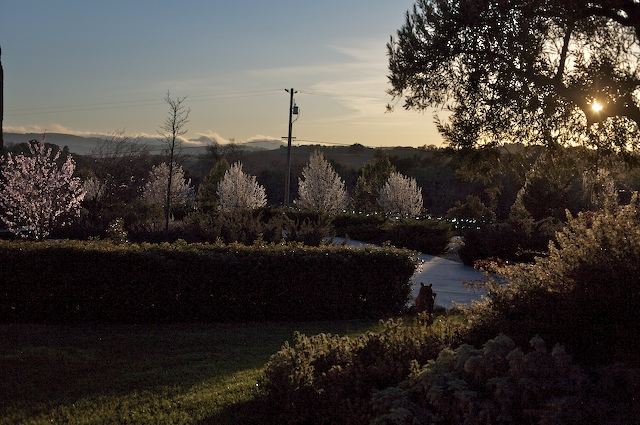
Case in point. This snap of the first sign of spring here in central California was originally exposed for the shadows, meaning about 1/400th @ f/4, ISO 250. That’s because I automatically tend to meter for the shadows, and that approach with a subject like this is all wrong. Recalling this, I metered on the sky instead and retook the snap, which resulted in some three stops less exposure – 1/3000 @ f/4.


First signs of spring. Canon 5D, 50mm lens

The original is dark and muddy, so much so that one’s first inclination on importing it into Aperture is to delete the image. But wait. As this was exposed in RAW format, we can do a lot of image manipulation without hurting quality, aided by that awesome, grain free sensor in the 5D. A simple (and substantial) tweak of the Shadows slider in the image HUD in Aperture brings up the shadows and cherry trees nicely, while preserving the tone of the sky. By contrast, the version exposed for the shadows has highlights so blown out that it’s past saving.

Music box photography is back

With the latest iTunes you can see cover art again.

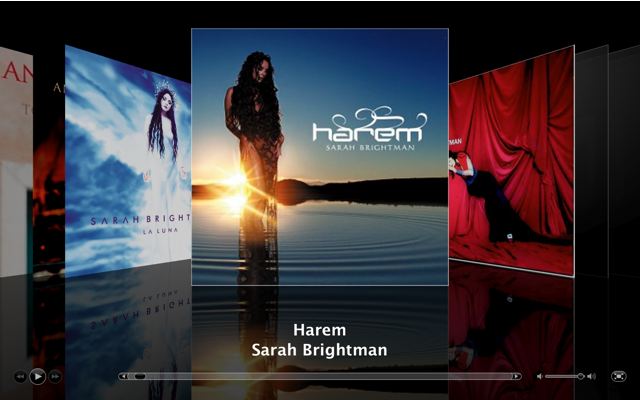
No sooner do I grumble about the demise of the LP record and the resulting loss to the world of photography, than Apple revises iTunes so that you can now look at your album art in Coverflow on a full screen:

On my 17″ iMac screen that center image is 6″ square – not the 12″ of an LP, but it’s a start. Now on a 30″ Apple Cinema Display, that would really be something, though definition would be marginal – at 6″ the image is just beginning to break up.

Still, it’s a start. Download the latest 7.1 version of iTunes free from Apple.com.

Cover art for your ripped CD missing from the iTunes store? Very common for classical music fans, given Appple’s predispositiion to catering to the south central LA crowd’s musical tastes. Go to Widget Foundry and download their Amazon Album Art widget, which will allow you, once you have highlighted the item(s) in your iTunes library, to search any number of Amazon international sites, in addition to the US one, for cover art.

The latter is for Macs only, but then again, what sane person uses a PC for aesthetic pursuits anyway?

The biggest loss in the demise of the LP ….

…. was not sound quality. Modern media and machines equal and regularly surpass vinyl as regards sound quality, and of course convenience is not up for debate.

Yes, yes, I know, nothing sounds like an LP. Keep using film and drinking the Kool Aid.

No, the saddest loss from the demise of vinyl was the loss of a large outlet for great photography, reproduced in a size that could be properly appreciated.

Compare the cover of an LP to the small CD box or the even (ridiculously) smaller iPod screen.

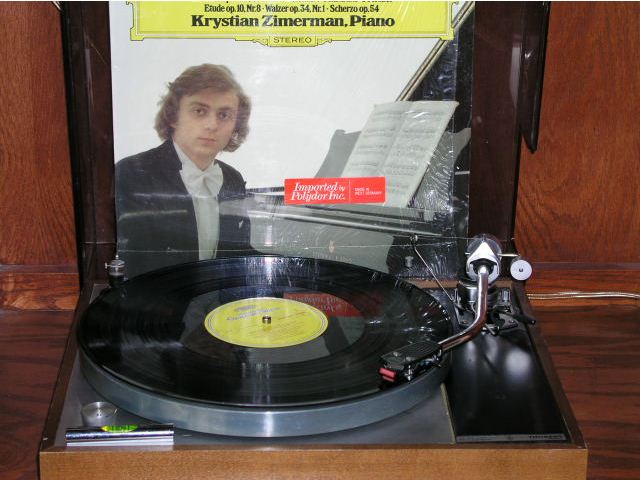
For those interested in these things, I use classic 1970s gear to listen to my two hundred or so LPs – Shure V15/III in an SME 3009 S2 Imp. arm on a Thorens TD150 turntable, thence to a Quad 33/303 pre/power amplifier and Bowers & Wilkins DM3 speakers in my small office. Truly international and look how times have changed: American/British/Swiss-German/British/British. Hmmm, lots of British. Now it bears adding that I have only owned one machine which surpases an early M Leica for build quality and for stunning aesthetic appeal. That British SME tone arm you see pictured above is that machine – a unique merging of sublime form and superb function. A very beautiful machine.

That’s the great Polish pianist (why not the best?) Krystian Zimerman tickling the ivories in an all Chopin disc (I ask again, why not the best?) and, by golly, I must say his magnificent instrument, a giant Steinway Grand, sounds …. well, as I know it to.

It is a fine photo of a young God on that cover, pensive, apprehensive even. Not the lionine gaze of Richter or the charm and confidence of Horowitz. All of this is clearly visible from the large picture that is the LP’s cover.

So shed a tear with me for the demise of that pain-in-the-rear-click-sizzle-pop-twenty-minute-a-side LP which was such a fine gallery for the photography of the world’s greatest talents.

HP DesignJet 90 ink use

Frugality is thy name.

I did some arithmetic to show just how inexpensive ink and paper are when it comes to a large exhibition print using the DJ90 here.

Well, it’s coming up on my first anniversary of ownership of the HP DesignJet 90 printer and it finally came time to replace one of the ink cartridges as the Light Magenta indicator started blinking, showing the ink was about to run out. Replacement is literally a 10 second afffair – pull the old, plug in the new.

An appropriate time to point out that the DesignJet should never be unplugged from the mains; even when switched off with the front panel push-button, the DJ keeps the ink cartridges warm to prevent clogging. The front panel light attests to the fact the printer is getting power and the warmth of the ink cartridge area confirms the clever warming feature, something sorely needed on my older Epson 1270 which would clog up if not used for a month or so. I just came back to the DJ after six weeks of not using it and the first print was as perfect as any other. Why HP doesn’t shout about this feature from the rooftops beats me, but then it’s always been a company more about engineering than marketing.

Here are the ink meters right after replacing that Light Magenta cartridge:
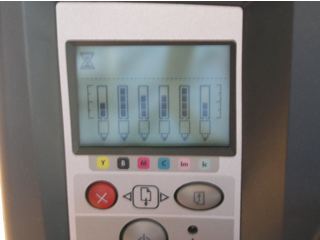
My best estimate is that over the past year I have made twenty 18″ x 24″ prints and fifty 13″ x 19″ ones, before that first cartridge gave up the ghost. As the picture shows, the other cartridges are between 1/2 and completely full. Do the math and that works out at less per square inch than those great instant 6″ x 4″ prints from the local drug store at 19 cents each. And you get fade resistant inks into the bargain – suffice it to say that Wilhelm’s test say 82 years or something silly, meaning I won’t care when these start fading! Wilhelm Research is the leader in testing ink longevity.

HP seems to be continuing with the dye ink based DJ series, even though the new pigment ink based DesignJet Z series with built-in colorimeters would appear to be their latest thing. The Z series uses pigment inks. Pigments rest on the surface of the paper like paint on a wall, whereas dyes need a porous medium as they are absorbed, like stain on wood, meaning that the paper you use with the DJ90 has to be suitable for dye based inks – not all papers are absorbent.

I have read tests on the Z series which suggest that there is nothing to choose between dyes and pigments (heretofore dyes were generally regarded as superior for color fidelity) though I have not seen Z prints for myself. Given the target user market for the new Z printers – professionals – I doubt that HP would supercede the DJ dye printers with something inferior. These are very costly printers and not something you would really want to use for small prints.

Anyway, after almost a year the honeymoon with the Hewlett Packard DesignJet 90 printer continues untroubled – no breakdowns, no lockups, no cryptic messages. Should these ever get remaindered and you like big prints, do consider one if you can make the space for it at home. That’s with a Mac, of course. I can’t see how any Windows user could write objectively about up time given that he or she is busy rebooting most of the time….
Apple’s Pages revisited

Posters are easy with this great application.

I had decided to get some posters printed to better publicize my photo show in April which will be at a local wine gallery here in central California’s wine country.

Before trudging off to the printer and getting once more cross-examined on the arcana of RGB versus CMYK (printers speak in an exclusionary language all their own – can you wonder the profession is in terminal decline?) when it comes to printing the wretched thing, I thought I might give my home printer a try instead.

Now page composition is about the last thing I want to do. I admit it – I have little interest in learning some complex page composition application for once a year use, when my time is better spent taking pictures. But then I remembered that one of the fine Apple applications I have enjoyed a lot for book assembly is Pages, so I fired it up and looked for poster templates.

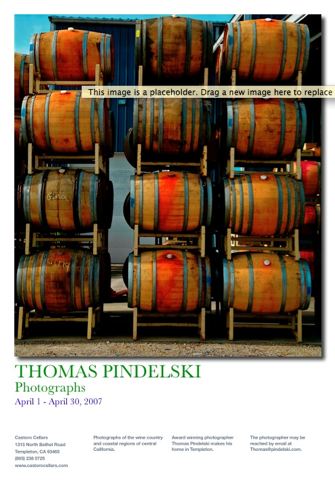
I clicked on ‘Gallery Poster’, clicked on the ‘Media’ icon which popped up my library of Aperture pictures (a feature which arrive with version 2.0.1 of Pages) and simply dragged and dropped a picture of choice onto the template. Pages resizes it automatically as long as you respect orientation – meaning a vertical snap for this template. Ten more minutes were spent on the narrative and the results is this – note the sexy drop shadow I added for effect:

OK, so I’m twelve minutes into this project and so I start getting ambitious. I make half a dozen posters, dragging alternative pictures into each, Export them to a medium quality (to keep file size down) PDF file which I then move to my web site server. A couple of dozen emails later to friends, asking their opinion, and it’s off to bed. The originals are in Canon 5D RAW format but Pages seems to know all about that – smart!

Next morning a bunch of replies shows two clear winners and I print each on 13″ x 19″ satin paper on the Hewlett Packard HP90 ink jet printer. And it’s off to the gallery and local merchants to see how many I can get interested in hanging the poster in their windows.

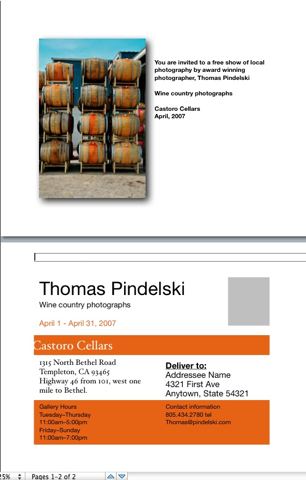
Postcards announcing the show? No problemo. Into the Pages postcard template and we are done:

I’ll get some two-sided photo paper for these and rip off a few dozen on the HP.

Now is that interactive design or what?

Now back to taking pictures.