Not your father’s Nikon
Some neat pictures of the asesemly line for the Nikon D3 full frame DSLR appear here.
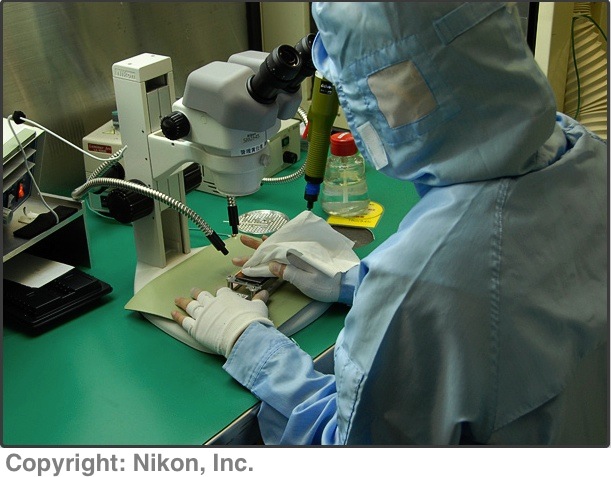
I was surprised how seemingly un-sterile the general environment appears.
Not your father’s Nikon
Some neat pictures of the asesemly line for the Nikon D3 full frame DSLR appear here.
I was surprised how seemingly un-sterile the general environment appears.
A trip to the dentist gives a pause for reflection
What have my teeth to do with photography?
Let me start with a recent couple of incidents which caused the needle to spike on the Pindelski BS meter.
I have my teeth cleaned every six months. I don’t know why it’s every six months. Maybe it should be a year? Two years? I floss twice daily, adhere to high standards of dental hygiene and try to preserve that most important of tools for success in America, a beautiful, toothy smile. I live with the six month frequency as it seems to me the related check-up will disclose any problems in a timely manner. The cleaning, on the other hand, seems like a waste of time and money, even if it makes me feel holier than thou.
On a related topic, I take my dog to the vet annually for his shots and they assure me he is in great shape. Like a cold nose in the leg every morning didn’t already tell me that.
Now both these ‘professionals’ tried to rip me off last week. The dentist decided I needed to come in every four months. The vet said the dog needed biannual check-ups. When asked why, neither could provide a reasoned, objective, statistical argument supporting their views. Rather, I got the usual BS about “We feel that….” and “In our opinion….”. Notice how fraudsters and monarchs (same thing, really) default to the first person plural when they mean ‘I’. A simple, if naive, attempt at the power of agency. If it’s ‘we’ then more than one person must be in on the decision, right? And who are you, Mr. Layman, to question us professionals? Further, whenever I hear the words ‘believe’, or ‘think’, or ‘in my opinion’ my default conclusion, absent evidence to the contrary, is that the speaker is either lying or ignorant.
This technique is most commonly used, of course, by car mechanics, the medical profession and every scumbag salesman in insurance. Fear sells. It’s why some believe in God absent no credible scientific evidence to support their delusion. It’s the ultimate fear sell. “Buy insurance (make a donation) now at the Temple/Church/Mosque because one day you will need it”. Each is levering the consumer’s ignorance to tack on gratuitous bills. “Trust me, your engine will last longer on synthetic oil” (even if it means I can charge you four times as much). Zero objective statistical evidence on that one, by the way, unless you believe the stuff the oil companies put out. “You need an annual check up” (even if I disclaim all liability for missing the golf ball sized cancer on your head). Statisticians are wise to these games, of course, and the smarter ones are publishing refutations of these frauds by the medical profession (whom you thought you could trust) and the car mechanic (whom you know you cannot trust).
The bottom line when it comes to any sort of insurance is, in the words of a great US President, “Trust but verify”.
So if the current weakening US economy is the true source of these fraudulent attempts at revenue enhancement (dentists, vets, doctors and car mechanics have sub-prime loans too), some consideration of failure curves is in order. Which is where the photographic bit comes in.
Those who are in the machine sales racket will tell you that preventive maintenance is de rigeur. But think a moment about failure curves and you will see that machines fail most often when very new and very old. One of the greatest frauds in American retail sales practice is the ‘Extended Warranty’. It’s offered on every car, computer, camera, gadget, you name it, on sale in the retail world. Doctors, of course, offer no such warranty on their work and neither do dentists. There’s too much money to be lost. But the retail vendor knows the consumer is, for the most part, a blithering idiot. He knows if that new camera is to fail it will do so right away or thousands and thousands of pictures later. Any failure in the first year (the highest risk one) is covered, free, by the manufacturer’s warranty. The late one is irrelevant as the extended warranty will have expired. Meanwhile the sucker who has just paid the extended warranty premium has contributed a like amount of pre-tax net income to the seller. Sweet!
Think it’s trivial? Let’s check the B&H website. These estimable, honest folks are not above capitalizing on victims of American public schooling (mathematics is not on the curriculum). Can’t really say I blame them – it’s a for-profit business, after all. Too bad I cannot buy their stock.
Here’s the warranty they offer on the $2,200 Canon 5D body:

Here it is on the $1,059 Canon 24-105mm L zoom, a natural partner for this body:

Now given that these are statistically computed premiums which assure the seller maximum profit, we can glean two things from the amount. The 5D is more likely to fail (the premium is 5.9% of the selling price) than the lens (3.8%). OK, so how likely is that failure?
If I was in this protection racket, I would expect to clear a 75% margin. For every $100 dollars of revenue a net profit of no less than $75. Now when that 5D blows, it’s going to be something big – the mirror fails, the motor burns out, the meter goes kaput. A $1,000 repair, but $750 to you, Mr. Retailer. So every 5D failing because of manufacturing error (use, of course, is not covered) costs the writer of the insurance policy $750. So if I want a 75% margin, the failure rate of Canon’s 5D can be seen from this Excel spreadsheet – I have used the Goal Seek function and show the input box for the variables:
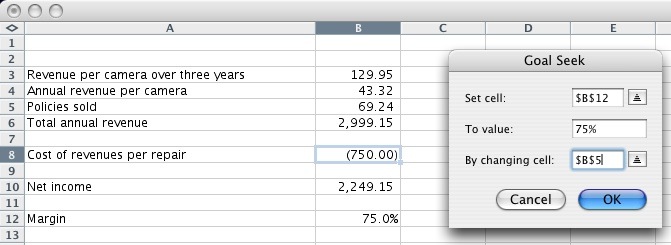
Stated differently, for the policy writer to make his 75% annual margin, he can sustain no more than one claim for every 69 cameras sold.
Or, looked at from the perspective of the user, there is a 1 in 69 chance of the camera failing in the three year extended warranty period. And you are going to pay $129.95 to protect a 1 in 69 chance of a $1,000 cost?. Let me put this politely. If you answered ‘Yes’ I am going into the warranty writing racket.
You want the numbers for that fabulous Canon 24-105mm L zoom? Assuming a $375 repair cost to the insurer, the result is 1 in 112. I repeat. 1 in 112.
When did you last bet on a 1 in 69 or 1 in 112 long shot? Because that’s what you are doing if you buy an extended warranty on your photographic gear.
So next time you are encouraged to have preventive maintenance on your car, body, teeth or camera, or someone tries to sell you an extended warranty, do the math. The rational amongst you will keep the money every time. The others need to beat a path to Pindelski Warranties Inc., cash in hand. And the smart ones will, of course, run the camera until it drops because that’s the lowest cost statistical probability.
Is there ever a set of circumstances under which a warranty makes statistical sense for your 5D? Check this database of shutter lives and you will see that the average life to failure of the Canon 5D’s shutter is some 217,000 actuations. Over 4 years (the extended and basic warranty periods in aggregate) that translates to 1,043 snaps a week. So, if you are a pro banging away at a higher rate than that, consider the warranty. But check the fine print. Chances are that professional use is not covered ….
America’s strong suit.
As an American resident for some 55% of my life now, I’m permitted to make value judgments about what we do well and not so well. Note the “we”. I may still affect an English accent but 20 years of American citizenship and a disproportionate tax burden grudgingly paid over those years very much entitles me to say ‘we’.
So America does lots of things very poorly. Since 1955 our foreign policy has varied from criminally incompetent to disgraceful. It is nothing less than a history of failure. Our secret services probably couldn’t find bin Laden if he had a permanent suite in the Holiday Inn behind the White House, and we continue to think that waging hostile, aggressive foreign wars is the solution to what ails us. We guzzle oil like there’s no tomorrow – not surprising in the absence of an energy policy – and continue our migration to adoption of the worst of the nanny state policies of a dying Europe. Our fiscal and taxation policies make some sub-Saharan dictatorships look the model of common sense and our insane greed translates into bubbles of excess more or less twice each decade. We have a public schooling system that is a criminal conspiracy against our children and one of our main political parties derives its funding from shake down artists – trades unions and class action lawyers.
That’s some pretty bad stuff. But the other side of the coin continues to surprise and delight, for we do so many things right.
Whether by accident or design we are exceptionally welcoming to immigrants, despite all the hatred we engender abroad. We are, beyond any shadow of a doubt, the most generous and open-hearted nation the world has seen. We are, for the most part, supremely powerful and exceptionally benign in wielding that power. We are brilliant scientists and technologists and, most of all, we are the world’s business leaders. We grow more food than an we can consume. We are the leaders in all aspects of art and entertainment. Anyone can get an education for very little and anyone can get a job. We have the finest private schools the world has ever seen.
But, above all, we are a nation of hustlers, nowhere more evidently so than in our infinite skill at marketing. We can sell anyone anything. Whether it’s a fighter jet for the despot of the day in the Middle East or a newer, better car, boy, do we have a deal for you.
I am always reminded of our marketing prowess when I think about my mother, who passed away a few years ago. No way, she would tell you, was any marketer ever going to direct her thinking away from its independent path. But what did my sister and I find in her closet once she had passed away? Some dozen Coach bags and sufficient numbers of pairs of Evan Picone shoes to give even Imelda Marcos a little frisson. So, like the rest of us, the US marketing machine had got to the old girl.
In my fifty or so year life as a photographer I have always been fascinated by the externalities that affected my choice of equipment. Was I choosing based on need, economics or because the Coach-bag guys had got to me? I would like to tell you it was need, that money did not matter and that, like with my mum, no marketer was going to change my mind. Wrong on all three.
Let’s get specific. Of all the gear I have owned over the years which items mean the most to me? Worked best, took the best snaps, gave me that warm glow that comes with seamless execution?
As I don’t want this journal entry to stretch to book length any more than you do, I narrowed it down to just five. Five pieces of photographic equipment that changed my direction and interests.
In chronological order, with my ownership period shown:
Actually a very easy list to make, for each of these machines made a big change in how I work.
What made these special, and how did American marketing affect my choice?
The Leica M3 was the result of viral marketing as we would call it today. A relative had an M2 and once I handled it as a teenager, I had to have one. First there was the world’s best viewfinder. Second was the relative silence. But above all, it just felt right. And it so totally meshed with my interest in street photography that Leica’s marketing can rightfully be said to have been undertaken without pay by Cartier-Bresson, Brassai and Kertesz, because it was through their work I knew the rangefinder Leica. Leica’s marketing is, of course, some of the worst on earth. First, they made a device so good and so expensive that most of their market came from resales of used gear. When my last Leica finally saw the insides of the local UPS store last year I couldn’t help reflecting that after all those years of cameras and lenses from Wetzlar only once had I ever bought a new Leica product – the 90mm Apo-Summicron Asph, bought from England when the mighty dollar was well, mighty. Leica has got over its attention to detail and quality since those days so now everyone can own one. Which did nothing to improve Leica’s bottom line. Anyway, with that M3 the marketing feed was like that of a fellow painter recommending a brush. Word of mouth or eye, in this case.
By the time the Epson 1270 came around in the mid-90s, not only was I well and truly an American, but computer processing had sounded the death knell of traditional processing methods. And the dyes in Epson’s inks were so well made that great prints were limited solely by your ability to tune your hardware just so. The only reason this machine moved on was that I wanted to make larger prints, something the HP DJ90 readily offered in its 18″ x 24″ capacity, compared to the more limiting 13″ x 19″ of the Epson. Unusually for modern technology, the Espon truly is a Ten year digital device. Suddenly my default print size was no longer 8″ x 10″. The marketing input here was simple. I used to subscribe to an advertising magazine for photo gear named Shutterbug. It had started as a classified ad rag and then tried to migrate up market with the inclusion of content. The fact that said content reflected some of the worst writing ever put out by flacks dependent on free gear (“Sure you can keep it, if you like itâ€) was lost on me. They said the Espon was great, I bought it and, well, I bought it. I was lucky. Their lies were my truth. I lucked out as it really was that good.
In a roundabout way, the Epson reacquainted me with medium format photography. I had long owned a little used Rollei 3.5F TLR but never got on with the reversed waist level image. My brain had become lazy after all those years with Leica’s ne plus ultra viewfinders. But the Epson had opened my eyes to larger prints and, frankly, only rarely was the resolution/grain/whatever of my Leica snaps equal to the occasion. Epson had done Rollei’s marketing and the wonderfully ergonomically correct Rollei 6003 SLR, with a prism viewfinder, made for one very happy camper. Pretty much fully automated, the lenses beyond reproach, it made medium format as easy and as approachable as banging away with that Leica. Too bad it weighed about as much as a Mack truck. Not only was Rollei’s marketing nowhere to be seen – they don’t even bother advertising their medium format gear here and had they done so I would likely have avoided the product. Have you ever studied the sheer ineptitude of German marketing in the US? They just don’t get it. We don’t want things that last forever and get handed down to the next generation (only Patek Philippe gets that one right, and they are Swiss). We want the here and now.
Apple’s Mac was a no brainer and viral marketing was again at work. For the last five years of my life which saw me as other than my own boss, I ran an investment firm. We ran all our technology on Windows NT and had no fewer than six people (out of 50) running IT to make sure the daily failures by Windows would not show their ugly head in the front office. I was shooting the breeze with the head of IT one day and he mentioned he had just bought a roll sheet feeder to go with his Epson 1270. I chance to ask which computer he used at home and the surprise answer was “I use a Mac”. Now this is a fairly limp-wristed admission in the machismo world of Wall Street which regards Mac users to this day as a bunch of artsy-fartsy Nancy boys. Now because my CTO was a very capable person, I paid attention. Add the fact that my home PC ran Windows 98 (want to know how to cure world air traffic problems? Run the Civil Aeronautics Board on Windows and, after the first two mid-air crashes, traffic will disappear) and crashed daily, you can imagine I was more than a bit receptive to some good marketing. Even if it was for a fag product. OS X had just arrived and the machines looked like nothing I had ever seen. I own my original G4 iMac with the screen on a stick to this day, even if it is relegated to back-up duty. The machine worked, it did not lock up, the awful Photoshop ran nicely on it (Apple’s Aperture was not to become available until years later) and it looked great. As has every Mac since. And while I only work for one asshole now (me) I can still run Gates’s version of organized theft in Parallels, where Windows’s virusphilia is neatly contained in its own little incubated tent. I still need that for stock market applications – hardly Apple’s forte.
By the time I found out about the Canon 5D the Shutterbug subscription had been cancelled. Any number of web sites now published equipment tests and whenever you doubted the independence of the writers you could always jump over to comment boards. Even the smart marketers in camera-land couldn’t pollute all of those with purportedly independent emails extolling their products. Like any rigorous stock analyst I was approaching every piece of gear with the question “Where’s the money?” uppermost in my mind. So the decision to try a 5D was the result of word of mouth, too. People who used it loved it, I was getting increasingly irate with the amount of time wasted on the back-office functions related to film (all that non-creative processing and error correction) and people who splash out $3k on a camera body should, you would like to think, be pretty critical. After all, you could get a couple nice used film Leicas and a few of Wetzlar’s magical lenses for that kind of cash. The 5D made a huge difference to what I did photographically. The street stuff of Leica days-yore no longer interested me, the bulk and weight of medium format displeased me and I had grown to love the outdoors and the landscapes it offered. Plus I now hated, just hated, processing pictures. Just show me which button to press for a huge print, please. The 5D made all that possible – my migration to the front office of photography was complete.
And many thanks to all those anonymous, unpaid marketers who made it possible.
The Nikon D3 is pushing the limits of complexity
I have never been a fan of some of the needless menu complexity of Canon’s 5D, my mainstay camera. So now that the estimable DP Review has started poking about the design of the full frame Nikon D3 I was eager to take a look how the designs compared.
First indications are not encouraging. The vast number of menu options is an order more complex than anything on the 5D and I have to wonder where all this is going. Worse, just like with the Canon, most choices have to be made after scrolling through options using the LCD screen on the back, rather than with knobs and dials on the body. Knobs and dials with fixed functions (shutter speed, say, or ISO sensitivity) are the preferred way to go. No hunt and peck. No squinting. It’s the sole superior feature remaining in film cameras. Any time a display provides for more than one variable, the user interface suffers.
So while I greatly appreciate that Nikon’s lens mount is backwards compatible with just about every Nikon F mount lens made, albeit with some compromise in automation with older lenses, I have to wonder just who needs all those hundreds of choices. Wouldn’t it be easier to relegate all of those to an application on your computer which would permit storage of the user’s selections when the camera is connected? Let’s face it, adjustment of variables is an 80/20 game – you want some almost all the time – focus, aperture, shutter speed, ISO – whereas most are accessed once in a blue moon.
Not perfect – you get what you pay for, I suppose.
I wrote in somewhat lukewarm terms of the underwhelming definition of the Canon 20mm lens here.
I took a more objective view of the vignetting issue by banging out four snaps on the old estate, camera and lens dutifully mounted on a tripod, at the four largest apertures:
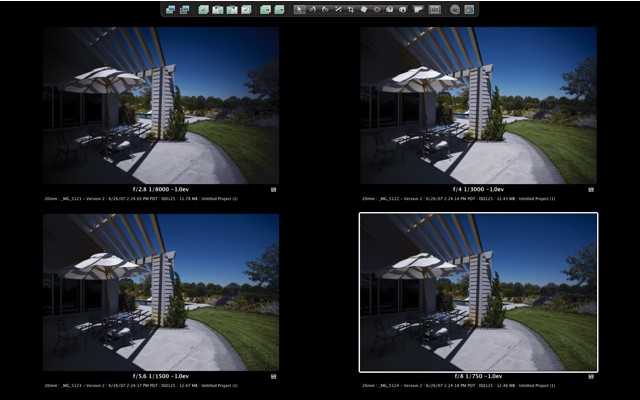
To best assess vignetting, look at the bottom right corner. The sky is misleading as the changing azimuth angle will provide some natural vignetting with any lens this wide. You can see that at full aperture, f/2.8, the vigneting is pretty awful, but rapidly falls by f/4 with full coverage at f/5.6 and below.
So unless you want to use the Photoshop CS2 Filter->Distort->LensCorrection->Vignette->Amount, (does anyone at Adobe have the remotest iota of common sense when it comes to designing menus – who would guess it’s under ‘Distort’?) f/2.8 is simply not useable. Realistically, if it’s a low light situation, vignetting is no big deal and tends to enhance the drama of a picture. But if you want full coverage to the corners, forget it. Regard the maximum aperture as useful for focusing only.
How about definition? Well, I concluded that my first sample was just not good enough, especially after nothing but great experiences with the 15mm fisheye, the 85mm f/1.8, the 200mm f/2.8 and the 24-105mm zoom. If I can get way better definition from the fisheye after doing all that pixel stretching with ImageAlign (making the lens like a 12mm rectilinear hyper-wide) then all cannot be right with my 20mm sample which clearly has poorer definition than the fisheye. So I bit the bullet and returned the lens to B&H. Moses, of that estimable store, didn’t understand when I explained the lens sucked, but when I pulled Schlecht on him he cottoned on and was very good about it. I had a replacement (with an older serial number, strangely) in my hands in seven business days. Thank you, B&H. Was the result a quantum leap in definition? No. However, overall the ‘bite’ of the image is improved, if still not up to any of the other lenses which, frankly, easily surpass it in this regard. Vignetting in both samples at full aperture is just awful.
The right answer, I suppose, is to get a used Leica 21mm Super Angulon R and adapt it to the 5D. That lens may only be f/4 but it’s fabulous, like all Leica glass. I used one on my Leicaflex SL for years. Unfortunately, the sheer bulk of the lens, compounded by a heavy brass mount and a huge front element, not to mention a complete lack of focus or aperture and exposure automation on the 5D, rules it out. The M Elmarit will not, of course, achieve infinity focus owing to the need for a short flange-to-sensor distance mandated by the rangefinder design. Plus, it’s way overpriced.
So mediocre definition would seem to be the Achilles Heel of this optic – that or I have been an unlucky victim of poor quality control. Canon has little incentive for improving the lens, with everyone being sold on bulky, slow zooms. Shame. Still, at f/8 it’s decent and it’s dirt cheap, too, at $400. If it was much more I would return it.
You can get an idea of the relative size of the 20mm in this picture where it is side by side with the 50mm f/1.4 – it’s not too bulky.
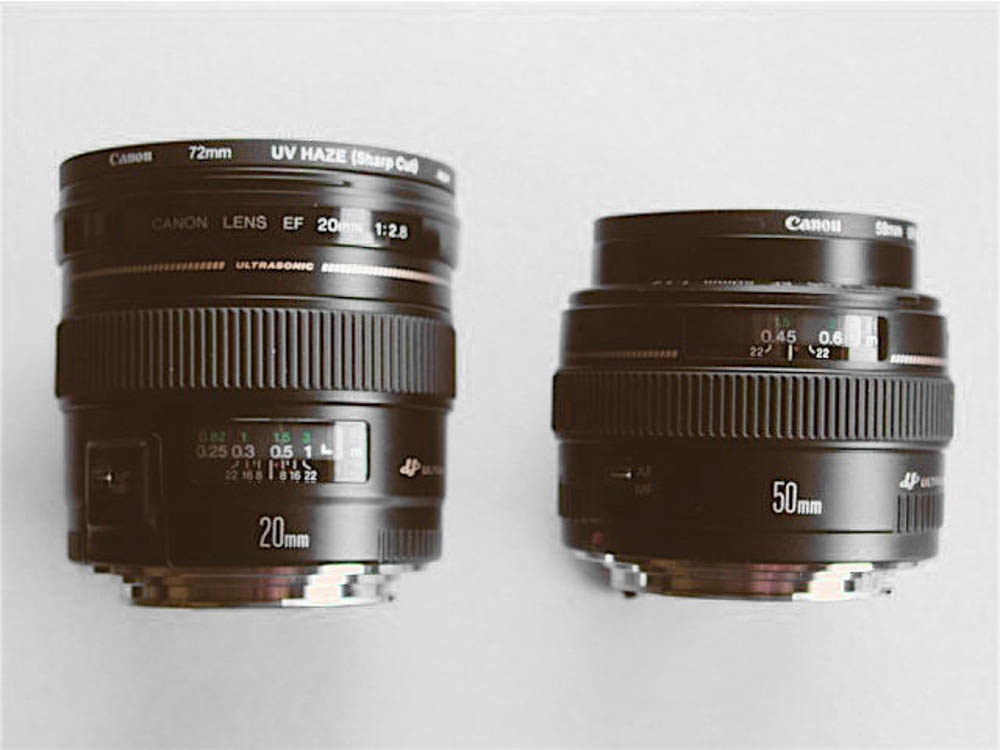
Notice that the 72mm Canon UV filter on the 20mm lens says ‘Sharp Cut’, implying a sharp cut off prior to the infra red range of the spectrum. By contrast the 58mm filter on the 50mm lens bears no such designation. This is rather mystifying (the 77mm filter for the 24-105mm is also ‘Sharp Cut’) as the sensor in the 5D (and probably in their other DSLR offferings) has a built in IR filter – something Leica should have learned before mistakenly releasing the M8 with no IR sensor filter, only to have to issue free lens filters to all buyers as IR rays wreaked havoc with color accuracy. No biggie – Canon’s filters are inexpensive and do the job of protecting my lens’ front elements.
Update: I ended up selling the lens – too much bulk for too little performance. Read all about it here.