Category Archives: Photography

The Mac Mini – 2009

The last Mac we are buying for now.

The base spec Mini (1 year warranty) with an HP L1750 17″ monitor (3 year warranty) ran $800 delivered, including a Firewire 400 to 800 cable to allow restoration of all data and applications from the Firewire backup drive always connected to the machine. The latest Mini only has an FW 800 port, in addition to 5 USB sockets.


The Mac Fry

We have named this machine the Mac Fry as the previous one fried, I own McDonald’s stock (they make great fries) and we fully expect this one to fry in due course.

The Mini removes one significant heat source from the box – the LCD display – but then appears to compound heat management issues by cramming what’s left into an impossibly small cuboid. Still, you get the choice of a reasonably priced matte LCD of your choice, something unavailable from Apple whose LCDs are either overpriced (both 24″ and 30″ models) or come in glossy only (24″).

Because our FW back-up is fully bootable, you simply connect it to the Mini with the FW cable and it thinks it’s seeing another Mac, meaning you can use Migration Assistant to move data, applications and settings over fairly seamlessly. MA will promptly tell you that there is just one minute remaining for your migration to finish, which it will continue to do for the next hour. This error has been there as long as I can remember. I mean, how difficult is it to program the fifth grade arithmetic that has it that you divide bytes/minute by bytes of data to get time remaining and reflect the result in the progress bar? Bottom line is that this computer is barely out of its box and I’m already wondering what other basic errors have been made in its engineering. Well, there are plenty, if you read on. 

The base spec of the Mini is positively cheap. Only 1mB of RAM and a small 120gB HDD. I have a 160 gB notebook 2.5″ SATA HDD lying around (yes, from a dumpster MacBook we recycled a while back) and will swap for that as, at 90+ gB, the Mini is a little too full for comfort. First I have to order another 1 gB of RAM (all of $10 though Apple will charge you many times that) and the Mini will hold up to 4 gB (2 x 2). A total of 2 gB is fine for just about anything, including Lightroom. The other specs are fine – the machine has Firewire and a Core2Duo 2 gHz CPU and the allegedly better nVidia 9400M GPU.

The Mini sports that awful mini-DVI video port with a non captive plug, and comes with a Mini-DVI to DVI adapter, which is just what the HP display requires. Just don’t move the Mini about too much because this adapter is just waiting to fall off. There’s Mr. Jobs’s ‘form over function’ obsession again – in a rear panel connector, for heaven’s sake. Did someone beat this guy for untidiness when he was a kid or something?

So let’s get to the big issue – heat.

Heat killed the 20″ late-2006 iMac and took my late-2006 24″ iMac to death’s door, whence I just saved it.

Bottom line is that the GPUs in these, once cooked, start to deteriorate slowly thereafter, with growth of screen artifacts and more frequent beachballs, until the whole thing gives up the ghost.

Well, at least the Mini is separate from the screen but everything is crammed into the tightest imaginable space and, as the saying goes, “Trust, once lost, is seldom regained”. And Apple hardware, simply stated, has lost my trust.

So after Migration Assistant had done its thing, and after I refused to upgrade Leopard to 10.5.8 (better the devil you know – 10.5.6), I immediately checked iStat, Temperature Monitor and Fan Control to see what the heat story was.

Well, as Pete Townshend once put it, “Meet the New Boss, Same as the Old Boss”.

It runs too hot.

Here are the readings after the Migration Assistant process – one which is mostly CPU- and HDD-intensive. Meaning no GPU labor was involved.

Now while this Mini has yet to fry, these readings are higher than those at which the 20″ iMac would show artifacts – although it had probably fried by then. As you can see, Apple continues to insist on running the (single) cooling fan in the box at ~1,000rpm, despite these elevated temperatures. Now I’m beginning to think like a conspiracy theorist ….

A second with Fan Control and the minimum fan speed was increased to 2,200 rpm (it remains inaudible) and a few minutes later here were the readings:

By running the fan up before frying I’m hoping to nip the issue in the bud this time. Most devotees of Fan Control, like me, come to it after the patient has already passed the point of no return. Anyway, for an additional 15-20F cooling, I would rather buy a new fan in a year at $50 than a new Mac for $600 and, I can assure you, the latter is not an option.

Here’s a heat trend graph for the three hottest sensors (there are several others) – the immediate drop at the start reflecting the increase in fan speed from 1,000 to 2,200 rpm:

The blip after the early drop reflects the use of iPhoto to download and process holiday snaps, so you can see that GPU use immediately raises CPU (Northbridge) and Airport card (Wireless) temperatures; the Airport card must be close to the CPU in the box as, obviously, no wireless effort was required to process pictures downloaded using a wired card reader. Another piece of down right execrable engineering by Apple. Having a fragile wireless card act as a de facto heat sink will not put the designer in the pantheon of great engineers.

I am reminded of the multiple Airport card failures my ante-pre-penultimate (for you lawyer schmucks reading this who despise clear English – ‘third from last’ for those of you with a spine and morals) MacBook suffered. Now I’m beginning to understand why, thanks to Temperature Monitor.

Temperature Monitor does not report a separate GPU heat sensor so, if that is right, I assume that the GPU and CPU are integrated (much in the same way as the older Intel GMA950/3100 was integrated with the Core2Duo in earlier MacBooks). So GPU heat is a proxy for CPU heat and vice versa. To cut to the chase, you can treat the ‘Northbridge’ temperature as being identical to the GPU temperature.

Any comments that I am running components at sub-optimal temperatures will be treated with the respect accorded all trash. Save your time and forget it. Cooler is always better.

Now I have the exciting prospect of cracking the Mini’s case to look forward to, so that I can install the additional RAM and bigger HDD. Oh! joy. You can read all about that here where, in addition to adding RAM and installing a larger hard drive, I also present the results of real world import and export timings and temperatures using RAW files from my Panasonic G1 and Lightroom 2.

And I have a jumble of cables to hide while I’m at it.

A nerdy note on video RAM:

The nVidia 9400M GPU used in the Mini does not have video RAM of its own. Rather, it ‘borrows’ RAM from the CPU’s RAM, probably explaining the occasional slowness I have noted with just 1 gB of CPU RAM installed. By the time OS X and the 9400m have taken their chunks, not a lot is left for applications.

The default ‘borrow’ is limited to 128mB. I have read that the 9400m can ‘borrow’ up to to 256mB of video RAM which it can do if the Mini is maxed out to 4gB of CPU RAM. Wikipedia says that once you have 2gB or more of system RAM, the GPU RAM increases from the base 128mB to 256mB. Nice! The relevance of this is that more video RAM generally means faster image rendering in applications like Lightroom. Either way, increasing minimum system RAM from the stock 1gB makes sense. The 1gB in our Mini is reported as occupying one of the two RAM slots by System Profiler, so adding another 1gB ($12) or 2gB ($45!) is sensible. You need a putty knife to crack the case and thereafter adding the RAM is trivial. The whole thing can be done in 20 minutes.

Adding a bigger HDD is harder. I address that and provide some performance and temperature measurements here.

There are fine videos on the web illustrating both tasks.

An excellent Lightroom book

Evening writes good English.

It’s now coming on for two years since I made the painful switch from Aperture to Lightroom and scarcely a day passes when I do not rejoice in that decision.

From the resource intensive Aperture (sells more ‘newer, faster’ Macs, I suppose), illogical and buggy application to one that is logical, has yet to lock-up on me and is blisteringly fast on my middle-of-the road iMac, Lightroom (I’m on version 2.4) is a joy to use. I visit some of the Lightroom blogs now and then and find I am always picking up new tips, no thanks to the lack of a proper instruction book from Adobe, as none is bundled with the software.

Indeed, to my own surprise, I actually find that after 50 years of processing pictures, I’m beginning to enjoy what is ordinarily a drudge. Anyway, a while back I decided to get a good book on the product as it was increasingly irritating to find out more or or less by accident about features that really helped the processing step along.

In selecting my book of choice, the first dictate was that it had to be written by a photographer who can actually take good pictures. Why on earth would you want to learn any skill from an academic, clueless in real life application of his expertise? That dictate promptly excluded most of the many books out there – some of these people really have no right to be preaching about Lightroom when they cannot take a well composed, decent photograph.

The second driver was that the author has outstanding communication skills.

Having watched some of his instructional videos on the web the book to choose was easy – Martin Evening’s The Adobe Photoshop Lightroom 2 Book: The Complete Guide for Photographers. (Disclosure: The link is to Amazon – I get no ‘click through’ payment if you click on it. I have no position in AMZN at the time of writing.)

My main reason for buying a good reference manual, dictated by the poor quality of the materials included with the software and the generally poor Help files within LR – was that I wanted to be absolutely sure how best to integrate two catalogs of pictures. I wanted to add the one from my laptop to the master on my desktop computer. While I have daily back-ups of everything, I would rather get this right first thing than scramble to recover from mistakes by resorting to the back-up.

Evening’s book not only walked me through this in accurate detail, I found that it added value in many other areas where the apparently simple user interface of LR hides many special functions, often invoked through the use of the Alt key on the keyboard. Areas where I find real value was added include:

  • Importing and creation of import profiles specific to a camera or lens
  • Using filters to find images
  • White balance corrections
  • Sharpening – a whole chapter, much of it addressing magic simply invisible to the normal user
  • Custom profile printing

The book, at 600 pages, seems long, until you realize that much of that is the result of copious illustrations which make it much easier to follow along. I still think of it more as a dictionary – something you look up to learn from – than a tutorial, but I find I keep it at hand when processing and frequently dip in to learn a new trick or two.

It’s published by Adobe Press (I only learned this after buying it – it was most certainly not a reason for purchase) which simply begs the question why it isn’t included with the software in the first place.

Quibbles? On p. 582 Evening states “The graphics card does not play such a vital role in Lightroom’s overall performance.” This contrasts with my experience which shows that screen rendering of previously generated previews when flicking between images is considerably faster with the new nVidia 7600 GPU (256 mB RAM) in my iMac 24″, compared with that using the nVidia 7300 GPU (128 mB) it replaced. But I have no objective measurements to bear this out and it may just be the placebo effect at work as I try to justify all the time I have had to waste in repairing my faulty Apple computer.

Overall, it’s a fine manual by a real, working photographer who has had the benefit of a proper education in the use of the English language. Highly recommended.

WSJ puffery

Don’t expect objective reporting here.

Under its new ownership, the Wall Street Journal is redefining yellow journalism, seemingly perfected by W R Hearst in the ’30s.

Meaning, write what suits you politically and economically, and the heck with objective reporting of the facts. It makes the New York Times look like an arbiter of truth, which is saying something.

Today’s edition has a puff piece on the new Apple Tablet and how El Jobso is back and driving everyone to distraction with his attention to slim perfection at the expense of all else.

Well, I simply could not resist adding to the Comments section (link is probably available to subscribers only), with my own 2 cents worth – OK, $7,500 worth looking at the volume of Apple junk we have bricked. My opening sentence references Jobs’s oft quoted remark when asked why Apple will not make a cheap netbook:

I may have added a few months, maybe even a year, to the life of my 24″ iMac with all the work I have been forced to do to it, as described earlier, but when it fails you will see me going the Hackintosh route. And I don’t need any sanctimonious shill for the legal profession lecturing me on the legality of this – how can it be any less legal than selling devices under false pretenses (“It Just Works” as Apple advertises)? Thus my computer odyssey will have come full circle – a big well ventilated reliable PC box full of hardware running the best OS for the home and small business user out there.

Here’s an index to my recent spate of articles here on Apple’s awful hardware and let that be an end to it:

I am still committed to sharing temperature readings on my repaired/ventilated 24″ iMac with readers, and these can now be seen here.

Snow Leopard – Just Say No

Serious compatibility issues.

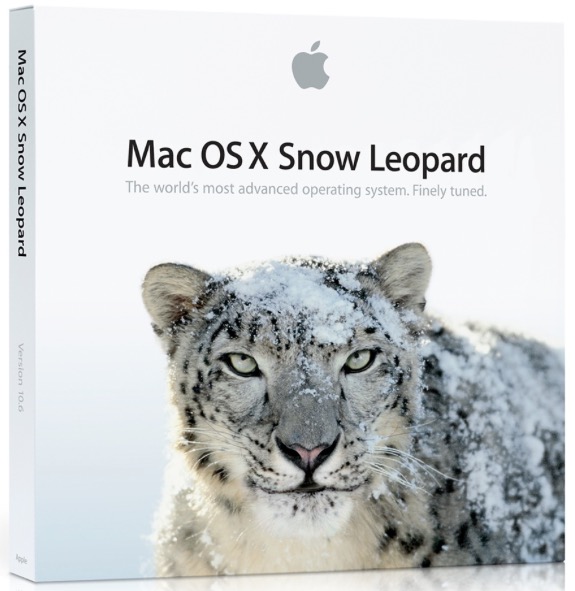
Apple has said that its 64-bit OS, Snow Leopard, will be on sale August 28. You know – all the usual twaddle – better, faster, smaller, etc. Just pay up, please. The cash register is right over there. We gotta keep those analysts on Wall Street happy. Goodness alone knows what additional stress the 64-bit OS places on already overtaxed graphics circuitry in overheated, poorly ventilated boxes. And excuse me, but just how many 64-bit third party applications are out there and don’t these need 32gB or more of RAM to show any benefit? Once again, it seems, we are being offered a Ferrari to do the grocery shopping, because the racetrack is closed.

Come to think of it, I’m still trying to figure out what, if anything, the ‘upgrade’ from Tiger to Leopard did for me, other than a butt ugly purple login screen. At least our machines did not fry under Tiger.


Snow Leopard (in)compatibility list – extract

Unless you are positively insane or unless you have checked this compatibility list and are willing to believe what you read, you really should hold off upgrading, no matter how cheap it is.

Older PPC applications like Adobe Photoshop CS2 (will not run) and Intuit’s Quicken (Intuit says it will run but they are a business which shares business morals with eBay and PayPal – no earthly way you can trust a company that disables its software every other year to force you to upgrade) are problem areas. I don’t know about you but I am not about to shell out hundreds of dollars on the latest version of Photoshop which does nothing for me, or trust Intuit, only to do my photo processing or mess up my on-line banking.

But there are bigger shockers in this list. SpamSieve, the ne plus ultra of email spam apps, superb in every way and leaving Apple’s Mail Spam function in the dust, will not run. Photoshop Elements will not run. Really! Disk Warrior (serious $) will not run. MenuMeters will not run. NeoOffice may not run (the thinking man’s free alternative to the garbage called Office from Microsoft). SafariBlock – a key ad blocker for me which stops all ads, including those irritating flash ads – will not run. SmartScroll will not run. Dozens of others are in ‘Unknown’ status.

And no news of all those fan (Fan Control, SMC Fan Control) and temperature measurement (Temperature Monitor) utilities which are essential to stop your Mac from frying. What if they don’t run? And what if your new OS fries the GPU twice as fast as the old one, seeing as Snow Leopard is meant to be so much faster?

Well you get the idea. Updating now is simply crazy. Let the guinea pigs who see no wrong in anything Apple do the bleeding for you.


Snow Leopard – run away fast or it will bite you in the rear.

Macs and nuts

Theories abound.

One thing I learned early on in my years in America is that the country has a marked taste for conspiracy theories.

While the average Briton, Frenchman or German will write off government bungling as so much incompetence by the least able in society who could not get a real job, the American will, likely as not, take you aside and whisper in your ear “It’s a conspiracy, you know”. I have learned that the best course of action in these cases is to nod wisely, claim other commitments and exit stage left.

As it is, I have yet to meet one conspiracy theorist who is remotely successful. Many of these fellows, and they are almost always men for some reason, seem to be suffering from PTSD and probably spend their spare time making crank calls to right wing radio talk shows. They are, after all, the only ones who can get past the censor who screens the calls.

You know the types. “Castro killed JFK”, “We never landed on the Moon”, “Exxon controls the world”, etc., etc. Nuts. In a world where everyone lusts for their moment of fame, loves to talk and craves publicity, not one of these conspiracy loons has managed to explain how the secret of each conspiracy has been kept by so many for so long, undiscovered. It does not solve.

My point is that my email box filled with conspiracy theories based on my recent awful experience of having not one but two 30 month old iMacs die. “Designed to fail”, “Forced replacement policy”, “Jobs needs coin for a new liver/heart/spleen” – you get the idea. And Elvis lives. Right.

The realities are, I’m afraid, far less likely to sell newspapers. Lee Harvey Oswald was a sharpshooter with awesome scores, Neil Armstrong brought back some moon rocks and there’s a reflecting mirror on the moon from which we bounce laser beams testifying to his arrival, and Exxon controls under 2% of the world’s crude. As for Jobs, he owns 7% of Disney so I doubt he will have to wait too long for that new organ or have any difficulty scraping up the cash.

Elvis, however, is almost certainly alive.

So why do Macs, at least the ones I have owned, fail early and often? It’s not like I’m a careless teenager burning them up with moronic computer games. The common thread has been heat. After the cool running G4 iMac and our equally cool running G4 iBook, both 7 years old, and both still in daily service with nary a problem between them, everything since has failed. My first MacBook had graphics issues. The second one got so warm that toasted nuts (like the guys making those crank calls) were the order of the day, then after two Airport cards made no difference to the intermittent wifi, was finally replaced at no charge by Apple (after I had wasted countless hours on getting it fixed). The G5 iMac was sold after nascent heat issues showed up and the story of the 20″ and 24″ late-2006 iMacs is documented all too well here. The second Airport Extreme router I owned doubled as a frying pan for which honor it competed with the AppleTV. All gone.

The reality, I suspect, is as mundane as the simple fact that the modern Mac is poorly designed to manage heat. The emphasis is all about looks and so long as it works in the warranty period, who cares? Like modern cars.

Take a peek inside an Apple store – beautiful design, rows of glossy screens screaming ‘buy me’, chic iPhones waiting to convince you that you are not just another overfed American who hasn’t seen his privates in years – if there is a conspiracy here it’s an obvious one. It’s called short term profit.

The slim and trim Apple Geniuses waiting to favor you with reverse condescension while they make $10 an hour. The soft sell of implied superiority. It’s the very best of American marketing. When did you ever read one of those sycophantic, advertiser supported ‘independent Mac magazines’ survey users of 2-3 year old machines for their experiences? In their advertiser supported hell of ‘free hardware and write nice about us or we will can you’ nothing ever breaks. Be nice or El Jobso will fix you good.

An even worse problem for a growth company with public stock like Apple is what I call the ‘hamster treadmill’ problem. Keep running faster or you fall off. Every quarter’s results have to beat understated expectations and promise yet greater numbers a quarter hence. Once day the whole thing will come crashing down like a pile of cards but, until then, we make hay.

No? Well there were 20 companies in the Dow in 1896 when the index was started. Only one survives today – GE. And it was kicked out not once but twice early in the twentieth century when it soiled the sheets. Nothing is forever.

And if you don’t believe that, I’m from GM and I have just the car for you. Why, it does 230 mpg!

So I’m not all that mad at Apple for making crappy hardware. But I would like to get even! As that bumper sticker I saw on a Fiat in NYC years ago reminds me “You breaka ma car, I smasha ya face”.


The first iMac we bought, and the last reliable one*

* Hint: It’s the one in the middle.

At least let’s be grateful for OS X. This photographer most certainly is. Apple got the Unix code free from Ma Bell and stole the graphics interface and mouse from Xerox who were too dumb to know what they had. How’s that for a conspiracy theory? And it remains the one part of the Mac ecosystem which just works to this day.