HP DesignJet 90 – Part II

First serious prints and some myths debunked

Let’s get the myths out of the way first. I had read somewhere on the World Wide (disinformation) Web that so much as a sneeze or a hint of moisture would make the inks on prints made with the HP DesignetJet printer run. I had the 8 1/2 ” x 11″ print from yesterday’s evening trial run handy (it was made without any attempt to color balance nor did I use the right paper profile) so I let it dry for one hour and then took it to the Pindelski High Tech Test Lab, also known as the kitchen sink:

My dry elephant seals were now well and truly in their habitat as I soaked the lower half of the print with tap water for thirty seconds. That’s a little more moisture than from a sneeze, I would think. Placing the half wet seals on the Pindelski High Tech Moisture Removal Center, aka the dish drying rack, I let the print air dry overnight and came back in the morning.
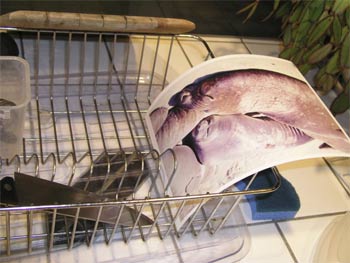
Guess what. No color changes or running ink to be seen. Just ’cause it’s written don’t mean it’s so.

As it’s raining today I decided to calibrate the printer and see what she could do on large prints. HP includes 3 sheets each of their Photo and Proofing Gloss, Photo Satin and Photo Matte with the printer in 13″ x 19″ size. Such generosity. I had also taken the precaution of buying 40 sheets of the HP Photo Satin in 18″ x 24″ to try the largest width the DesignJet 90 can handle. That’s a lot larger than 13″ x 19″ – 75% larger.

It has been quite a while since I set up Photoshop to match the Epson 1270 and their Premium Luster paper to make things automatic, so I had quite forgotten how to get through all the arcane menus in Photoshop. Mercifully, HP provides a tutorial CD with the printer (what is happening at Hewlett Packard?), and this one actually loaded first time on the iMac G5, unlike the recalcitrant driver disk. The on-screen tutorial is really outstanding, narrated in clear, non-technical English. The thrust is simply one of “Select these options for the best print” without a lot of gobbledegook about gamuts, color spaces and all that garbage which has little interest to real life photographers who just want their print to come out like it looks on the screen.
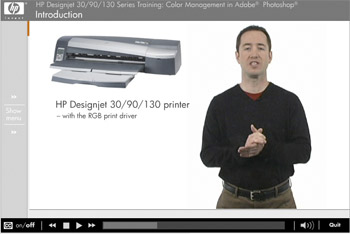
I had earlier created a profile for the screen using the Monaco EZColor colorimeter thingy, so I left that alone as the monitor has not been on that long that color drift from age would be an issue.

Unlike the Epson 1270 which is silent when switched on and dormant, the DesignJet has a fan whirring away. Not really obtrusive but a wear part nonetheless, so I switched it off overnight. Warm up took just over a minute and I gave her a try with one of the free 13″ x 19″ sheets of HP Photo Satin whose sheen is identical, to my eye, to Epson Premium Luster though the weight of the paper seems quite a bit more. The back of the HP paper is rough rather than smooth, but I can’t see that mattering either way.

I set up Photoshop as instructed on the CD video and saved the setting as ‘HP Photo Satin’. I haven’t tried the other papers but the HP Photo Matte looks interesting. It is dead matte, lighter in weight than either the Gloss or Satin and very much whiter viewed in daylight. HP recommends it for black and white printing which seems to make sense and indeed their web site has a ton of paper profiles together with very detailed instructions on how to get the best monochrome prints from the DesignJet. Nice to know but right now the focus is color, so that will have to wait.

Clearly, HP has done a great deal of work on color matching and paper profiles as you would expect from a company that has long had a leading position in large format printing in the graphics design and architectural work places.

The Epson 1270 is a very quiet printer. I always had to use it in non-bidirectional printing mode to avoid tracks on large prints, so that doubled printing time and, as I recall, a 13″ x 19″ would take some 28 minutes to make. The DesignJet is a different kettle of fish. It clanks, whirrs and grinds a lot when starting up and then gives a distinctive ‘clack’ with every pass of the print head on 13″ and wider prints, although once running on smaller prints it’s near silent. The table on which it sits has a space frame base construction – light but extremely strong – yet I could clearly see the table vibrate gently with each pass of the print head. To cut a long story short, the print emerged in 9 1/2 minutes and I let it dry an hour before comparing it to the screen in natural daylight. It was immediately clear that print quality was exceptional, indistinguishable from the Epson, and there was no sign of any ink tracks on the surface. The printed area had a 1/4″ margin on the top, bottom and left side and a 7/16″ margin on the right, making for a print size of 12 1/2″ x 18 5/16″, a tad larger than that from the Epson 1270.

One thing I do not like is that you have to adjust the input and output trays in disparate ways depending on the size of the paper, so I’m going to make a little guide for the commonly used sizes and paste it to the top of the printer. HP provides a good guide in their book, but it’s more detailed than I need and involves too much hunting for the right settings.

After the print had dried for an hour I compared it with the image on the iMac’s screen, which is some 14″ wide and I must say it was very, very close. Greens in this landscape subject were a tad darker in the print but everything else was in order. The next test will be with a portrait, whose flesh tones should really provide for critical evaluation. That one will be 18″ x 24″.
HP DesignJet 90 – Part I

The monster printer arrives

I dropped off the Epson 1270 printer at the UPS Store early in the afternoon not, it should be added, without a sigh. This great machine had served me well and many fine prints testify to its reliability and quality. I think the recipient will do great things with it. If nothing else, it will be a huge test of his technical skill – a 13″ x 19″ is not like making an 8″ x 10″. No sooner had I arrived home than Marty Paris, great acoustical guitarist that he is, arrived at the gate. “I have a big box for you” he intoned dramatically. Gulp! I had been without a printer for all of 45 minutes. Marty is our UPS man in his spare time and you could not meet a finer person.

Well, after Bert the Border Terrier had jumped in the UPS van for his cookie (Marty comes prepared) we struggled to get the 75 pound box on the dolly and lowered it gently to the ground. “Six years I got from the old printer, Marty”. “Wow! Nothing lasts more than three years today. That’s fantastic!” Nice to know the Epson has gone to a good home.

Bertie supervised while I struggled to unpack this bear. The fine people at B&H in New York had not chintzed on the packing, double boxing with more polystyrene peanuts than you really want to know about. By the time I got through the layers of tape, cardboard, polystyrene and plastic, the thing was almost manageable. The weight had halved. I had taken the precaution of clearing a space for it in the office – the old niche was too small – as well as running a long USB cable to feed it pictures. Enough time in the dark recesses of the wiring cabinet, replete with black beetles and cobwebs. There is a fortune waiting for the person who works out how to unwire home computers.

Now I must admit to some dismay on first extricating this monster from its cocoon. When I was an engineering student in London everyone knew that the finest laboratory instruments were made by Hewlett Packard. Later, on Wall Street, a like recognition played into the adoption of the HP12C as the calculator of choice. In neither case were clear instructions expected or available. You see, these devices were made by engineers for engineers, and no real engineer is going to read the instruction book. Heck, when Apollo was landing on the moon, did Buzz Aldrin check the book to determine why the panel was on the blink? Not a bit of it. A solid thump with a fist resolved the issue. It may have been “One small step for man” but a good bang ensured it was “A giant leap for humanity”. Or something.

So the cause of my dismay was none other than some of the clearest instructions known to man, on huge paper that even I could read. I’m not sure whether this means you should buy HP stock or sell it….

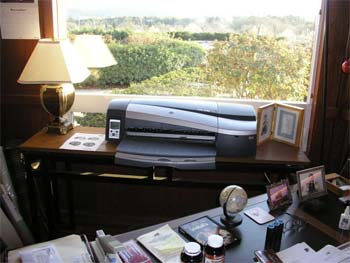
Anyway, with psychological support from Bertram, I manhandled the thing onto that nice little oak toppped sofaback I had made many moons ago from some alder, which I ebonized, and some gorgeous stairing oak for the top. It wasn’t conceived as a printer stand, but it does the job nicely.

HP does not supply a USB cable (how cheap is that?) but I was prepared, and my long cable was in place. The mechanical part of the installation was a breeze. You pop in six ink cartridges, followed by six print heads. Not for the colorblind, as several are like-sized, but easy to do.

Then came the software part. Now after my dismay at the clarity of the instructions, not to mention growing concern over the ease of the mechanical setup, I finally ran into a snag. And it was a big one. Try as it might, the drive mechanism in the iMac G5 refused to read the provided software CD. OK, I’m up to it, I can handle this, I’m not panicking. Dial up the HP web site, of course. Just download the driver. Not so easy, pal. The driver’s there, but you cannot download it. Mail order only. Can you believe this? Is Carly Fiorina still in charge, dammit? I though they fired her with a $40mm handshake. OK, OK. I’ll try HP Canada. No Designjet 90 in sight. Fine, how about England then. That bastion of civilization and decency must have the driver, no? No.

What to do? Well, maybe it’s just a quirk of the G5’s drive, or of the HP drive that made the CD. So I pop the CD in the iBook and Hey Presto!, she fires right up. Advised by Bert, that fount of wisdom, I plugged in one of the Firewire external drives to the iBook and before you could say ‘Woof!’ the software was on the G5’s hard drive. Minutes later the printer was installed. No lockups. The only Windows you will find in the old estate are in the walls.

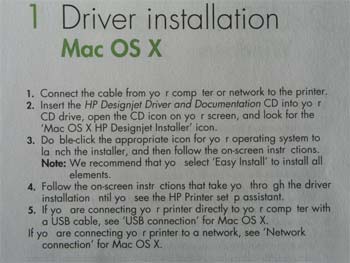
That’s not to say that HP doen’t have some humorists at Software Central. Take a look at their wonderful proofreading of their software installation intructions:

The letter ‘u’ somehow dropped off the HP typewriter.

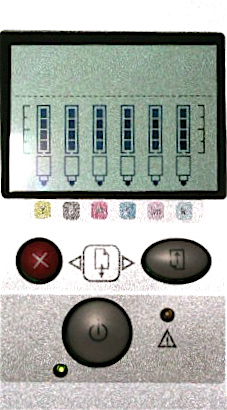
By this time the sun is setting, the evening libation beckons and I only have time for one quick print from the wretched Photoshop to see if the printer is speaking to the G5. So I load up a RAW image of the elephant seals just north of Hearst Castle on the magnificent Pacific coast and …. a jam. A piercing noise emanates from the beast and the yellow light blinks. Now in case you think HP is no longer dominated by engineers, just take a look at the control panel on this machine:

Now do you see why Aldrin resorted to brute force? Same guy designed the bloody buttons in the Lunar Module, for God’s sake. To be honest I had loaded one sheet of Epson Premium Luster in the HP to try things out, so maybe this was some sort of corporate rivalry at work and HP had the thing jam by design anytime non-HP paper was inserted. So I pressed every button in sight, threatened Bert with physical violence, and slammed ten more sheet of Epson’s finest on top of the one I had loaded.

And she printed just fine. 105 seconds for an 8″ x 10″ which is about four times faster than that great Epson 1270. Colors were right, density a tad pale, but this may well be the start of a beautiful friendship. Even if the birth was a Caesarean.

Gary Winogrand

Book review

The old dictum has it that “If you having nothing good to say, say nothing, so I will earnestly struggle to say something good about Garry Winogrand’s street photography. I purchased my copy of this book in June, 1992 and, amazingly it remains in print. I return to it earnestly every year or two trying to see what the famed critics who all gush over Winogrand’s work are going on about.

True, some of the early work here is not bad, capturing the feel of 1950s and ‘60s America. Where a set piece is involved, such as a night club or an event or a zoo, in other words somewhere where Winogrand could actually be bothered to make the slightest effort at framing the picture, then indeed there is some good photography. The many pictures from the night club El Morocco are exemplars of their kind and the zoo pictures are poignant and thoughtful.

But the overall feeling I always come away with from my repeated occasional marathons through this book, is that, well, the photographs are, for the most part, surpassingly ugly. In his gushing essay on the photographer’s work John Szarkowski nonetheless pulls no punches between the lines. Take a look at the contact sheet of Winogrand’s street shots in 1961 (vital, involved, he actually bothered to raise his camera to eye level in a few) with the one from 1982. Sorry, the latter is pure garbage. The other way in which Szarkowski takes a side swipe at Winogrand’s work is in reciting some mind numbing statistics about Winogrand’s prodigious use of film during his Los Angeles period, 1979-1981. In that time, Winogrand processed 8,522 rolls of 35mm film with another 5,000 or so rolls taken but not proofed. Half a million pictures in 2 years. That’s 20 rolls a day. Can you wonder his contact sheet from this period is rubbish? Judging from the 1982 contacts he just walked the streets frantically pressing the button all the time without looking for or at a subject. Well, I suppose Kodak loved him.

By all means get the book to see the work of an American icon. Just don’t expect too much.

Update May, 2019: Sad to report but Winogrand also wasted money on color film stock.

Long thoughts

200mm and 400mm are great focal lengths for landscapes

I have always enjoyed using a lens around 200mm for landscape photography. On the one hand, it’s relatively easy to hold steady hand held or with the aid of a monopod. On the other, it affords the easy opportunity of focusing on the essentials, cutting clutter.

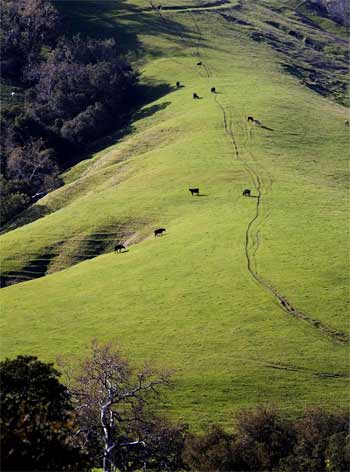
I often find that selecting an elevated viewpoint and then composing to cut out the sky works well. This approach heightens the sense of drama and ‘stacking’ inherent in a lens of this length, such as in this picture taken the other day of some local vines just before spring pruning:

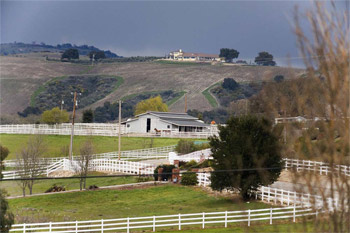
Another example of an elevated viewpoint, looking down into the valley in afternoon light is this one:

And finally, a strongly receding subject like this is only made bolder by the long lens:

Go longer, meaning 400mm in my case, and things get shakier. Literally. There’s more bulk to manhandle and more lens length for the wind to bear upon. It’s not that my 400mm lens is bad – it is not – but I have very rarely managed sharp large prints from it using film as they were nearly always plagued by definition-robbing camera shake. 400mm is long! The new ‘film speed’ opportunities offered by the full frame sensor in the Canon EOS 5D, even at 1600 ISO it’s near noise free, have literally brought my old Leitz 400mm f/6.8 Telyt back to life, once it was suitably adapted for use on the Canon body. This was taken at 1600 ISO and I think the shutter speed the camera selected was 1/1000th. Hand held with no support, the original is wonderfully detailed:

Now while there may be an ‘auto everything’ Canon 200mm L lens in my future, it’s really a pleasure to see these old Leitz 200mm and 400mm warhorses getting a new lease of life.

Canon’s EOS Capture

Instant digital gratification?

I messed about some more with the software Canon provides with its 5D camera, Digital Photo Professional (DPP). You know the application with all those comedic spelling errors.

Well, I found more spelling errors, true, but I got to wondering about the little USB cable Canon provides with the camera that plugs into a receptacle under that silly flap on the side.

After installing DPP on my iBook, I plugged the camera in and switched the ‘Communications’ option on the Tools menu on the LCD from ‘Print/PTP’ (the default) to ‘PC Connect’. That really should read ‘iMac Connect’ but I’ll let it go. With the camera switched on, go to DPP->Tools->Start EOS Capture on the iBook and you are ready.

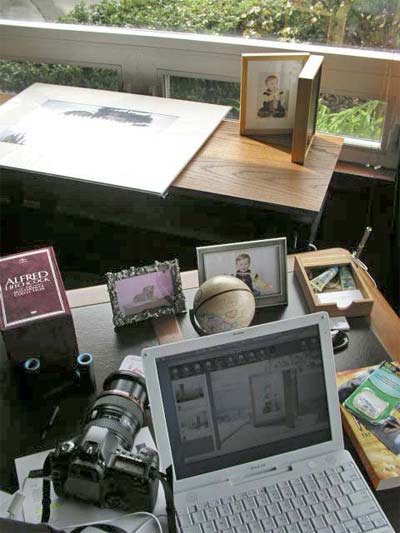
Take a snap in RAW format and, hey presto!, the picture appears on the iBook’s screen. It works as well in Jpg mode. You see the snap on a full screen where you can actually gauge sharpness, focus, exposure and so on, as opposed to the small LCD screen on the back of the camera where you mostly see your nose in the reflection.

For a studio photographer, whether taking product pictures or using live models, this strikes me as the bee’s knees in functionality. The pictures are automatically transferred from the camera’s card to the computer while all this is going on. Thus a smart pro could have his studio assistant view the screen shots and provide instant feedback allowing corrections to be made. After all, said assistant no longer has anything else to do as he’s not loading film any more. And you thought Polaroid invented instant gratification?

With the camera set to the lowest quality Jpg setting, a sharp picture pops on the screen in 3 seconds; with RAW it pops up blurred in 5 seconds and takes another 10 seconds to sharpen. There’s quite a bit of processinbg going on in this case and, let’s face it, my iBook’s 1.42 gHz processor isn’t the fastest on the planet. The timing with RAW + low quality Jpg is similar.

A separate panel on the iBook’s screen also appears allowing you to set many of the cameras settings using the keyboard, such as aperture, shutter, ISO, image quality. Most intriguingly, you can also enable a timer automating shots with stated intervals. Maybe astronomers will like this sort of thing?

The cable provided is ridiculously short – some eighteen inches – as to be unusable, but that’s nothing an extension cable cannot fix.

Postscript: I tried this set-up with a 15 foot long USB extension cable using my iMac G5 which has a 2 gHz Power PC processor, 2 gB of memory and very fast video processing. A sharp RAW image is displayed in 5 seconds, highest quality Jpg takes 3 seconds and lowest quality Jpg is around 1.5 seconds. These times suggest this would be an extremely capable studio installation as, by the time you have set the camera down to look at the monitor, the image will be there.